ABS CHEVROLET SILVERADO 2012 2.G Owners Manual
[x] Cancel search | Manufacturer: CHEVROLET, Model Year: 2012, Model line: SILVERADO, Model: CHEVROLET SILVERADO 2012 2.GPages: 584, PDF Size: 8.03 MB
Page 5 of 584

Black plate (5,1)Chevrolet Silverado Owner Manual - 2012
Introduction v
Vehicle Symbol Chart
Here are some additional symbols
that may be found on the vehicle
and what they mean. For more
information on the symbol, refer to
the Index.
0:Adjustable Pedals
9:Airbag Readiness Light
#:Air Conditioning
!:Antilock Brake System (ABS)
%:Audio Steering Wheel Controls
or OnStar®
$: Brake System Warning Light
":Charging System
I:Cruise Control
B: Engine Coolant Temperature
O:Exterior Lamps
#:Fog Lamps
.: Fuel Gauge
+:Fuses
3: Headlamp High/Low-Beam
Changer
j: LATCH System Child
Restraints
*: Malfunction Indicator Lamp
::Oil Pressure
g:Outside Power Foldaway
Mirrors
}: Power
/:Remote Vehicle Start
>:Safety Belt Reminders
7:Tire Pressure Monitor
_: Tow/Haul Mode
d:Traction Control/StabiliTrak®
M:Windshield Washer Fluid
Page 32 of 584
Black plate (26,1)Chevrolet Silverado Owner Manual - 2012
1-26 In Brief
Storing Radio Stations
A maximum of 36 stations can be
stored as favorites using the six
softkeys located below the radio
station frequency tabs and by using
the radio FAV button. Press FAV to
go through up to six pages of
favorites, each having six favorite
stations available per page. Each
page of favorites can contain any
combination of AM, FM, or XM
stations.
For more information, see“Storing
Radio Stations” inAM-FM Radio on
page 7‑8.
Setting the Clock
To set the time and date:
1. Turn the ignition key to ACC/ACCESSORY or
ON/RUN, then press
O,
to turn the radio on.
2. Press
Hto display HR, MIN,
MM, DD, and YYYY (hour,
minute, month, day, and year).
3. Press the softkey located under any one of the labels to be
changed.
4. To increase or decrease the time or date, turn
fclockwise or
counter‐clockwise.
For detailed instructions on setting
the clock for the vehicle's specific
audio system, see Clock on
page 5‑8.
Satellite Radio
XM is a satellite radio service based
in the 48 contiguous United States
and 10 Canadian provinces.
XM satellite radio has a wide
variety of programming and
commercial-free music, coast to
coast, and in digital-quality sound.
A fee is required to receive the
XM service.
For more information, refer to:
.www.xmradio.com or call
1-800-929-2100 (U.S.)
.www.xmradio.ca or call
1-877-438-9677 (Canada)
See Satellite Radio on page 7‑10.
Portable Audio Devices
This vehicle may have an auxiliary
input located on the radio faceplate
and a USB port located in the center
console or on the instrument panel.
Page 81 of 584
Black plate (17,1)Chevrolet Silverado Owner Manual - 2012
Seats and Restraints 3-17
Shoulder Belt Height Adjuster
The vehicle has a shoulder belt
height adjuster for the driver and
right front passenger.
Adjust the height so the shoulder
portion of the belt is on the shoulder
and not falling off of it. The belt
should be close to, but not
contacting, the neck. Improper
shoulder belt height adjustment
could reduce the effectiveness of
the safety belt in a crash. SeeHow
to Wear Safety Belts Properly on
page 3‑14.
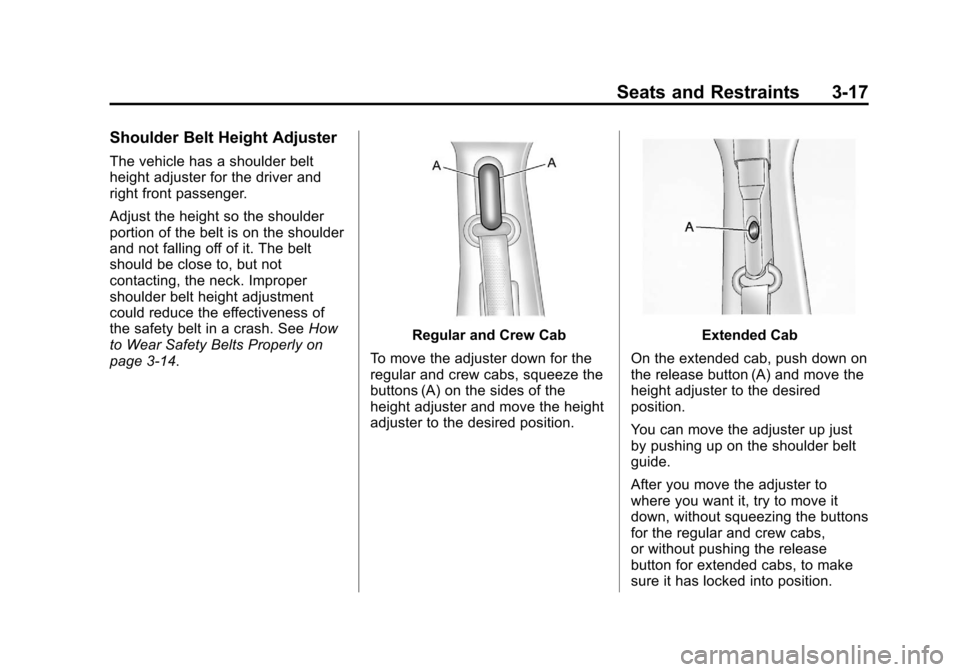
Regular and Crew Cab
To move the adjuster down for the
regular and crew cabs, squeeze the
buttons (A) on the sides of the
height adjuster and move the height
adjuster to the desired position.Extended Cab
On the extended cab, push down on
the release button (A) and move the
height adjuster to the desired
position.
You can move the adjuster up just
by pushing up on the shoulder belt
guide.
After you move the adjuster to
where you want it, try to move it
down, without squeezing the buttons
for the regular and crew cabs,
or without pushing the release
button for extended cabs, to make
sure it has locked into position.
Page 119 of 584
Black plate (55,1)Chevrolet Silverado Owner Manual - 2012
Seats and Restraints 3-55
Be sure to use an anchor (loop)
located on the same side of the
vehicle as the seating position
where the child restraint will be
placed.
Be sure to read the instructions
following to properly install a child
restraint using these loops.
Do not secure a child restraint in a
position without a top tether anchor
if a national or local law requires
that the top tether be attached, or if
the instructions that come with the
child restraint say that the top tether
must be attached.
According to accident statistics,
children and infants are safer when
properly restrained in a child
restraint system or infant restraint
system secured in a rear seating
position. SeeWhere to Put the
Restraint on page 3‑49 for
additional information.Securing a Child Restraint
Designed for the LATCH
System
{WARNING
If a LATCH-type child restraint is
not attached to anchors, the child
restraint will not be able to protect
the child correctly. In a crash, the
child could be seriously injured or
killed. Install a LATCH-type child
restraint properly using the
anchors, or use the vehicle safety
belts to secure the restraint,
following the instructions that
came with the child restraint and
the instructions in this manual.
{WARNING
Do not attach more than one child
restraint to a single anchor,
except for the center top tether
anchors in the crew and extended
cabs. Attaching more than one
child restraint to a single anchor
could cause the anchor or
attachment to come loose or even
break during a crash. A child or
others could be injured. To reduce
the risk of serious or fatal injuries
during a crash, attach only one
child restraint per anchor.
Page 139 of 584
Black plate (1,1)Chevrolet Silverado Owner Manual - 2012
Instruments and Controls 5-1
Instruments and
Controls
Controls
Steering Wheel Adjustment . . . 5-2
Steering Wheel Controls . . . . . . 5-3
Horn . . . . . . . . . . . . . . . . . . . . . . . . . . 5-5
Windshield Wiper/Washer . . . . . 5-5
Compass . . . . . . . . . . . . . . . . . . . . . 5-6
Clock . . . . . . . . . . . . . . . . . . . . . . . . . 5-8
Power Outlets . . . . . . . . . . . . . . . 5-10
Cigarette Lighter . . . . . . . . . . . . . 5-11
Ashtrays . . . . . . . . . . . . . . . . . . . . . 5-12
Warning Lights, Gauges, and
Indicators
Warning Lights, Gauges, andIndicators . . . . . . . . . . . . . . . . . . 5-12
Instrument Cluster . . . . . . . . . . . 5-13
Speedometer . . . . . . . . . . . . . . . . 5-14
Odometer . . . . . . . . . . . . . . . . . . . . 5-14
Trip Odometer . . . . . . . . . . . . . . . 5-14
Tachometer . . . . . . . . . . . . . . . . . . 5-14
Fuel Gauge . . . . . . . . . . . . . . . . . . 5-14
Engine Oil Pressure Gauge . . . . . . . . . . . . . . . . . . . . . . 5-16 Engine Coolant
Temperature Gauge . . . . . . . . 5-17
Voltmeter Gauge . . . . . . . . . . . . . 5-18
Safety Belt Reminders . . . . . . . 5-19
Airbag Readiness Light . . . . . . 5-20
Airbag On-Off Light . . . . . . . . . . 5-20
Passenger Airbag Status Indicator . . . . . . . . . . . . . . . . . . . . 5-22
Charging System Light . . . . . . 5-23
Malfunction Indicator Lamp . . . . . . . . . . . . . 5-24
Brake System Warning Light . . . . . . . . . . . . . . . . . . . . . . . 5-26
Antilock Brake System (ABS) Warning Light . . . . . . . . . . . . . . 5-27
Four-Wheel-Drive Light . . . . . . 5-28
Tow/Haul Mode Light . . . . . . . . 5-28
StabiliTrak
®OFF Light . . . . . . . 5-28
Traction Control System (TCS)/StabiliTrak
®Light . . . . 5-29
Tire Pressure Light . . . . . . . . . . 5-29
Engine Oil Pressure Light . . . . 5-30
Low Fuel Warning Light . . . . . . 5-30
Security Light . . . . . . . . . . . . . . . . 5-30
High-Beam On Light . . . . . . . . . 5-31
Front Fog Lamp Light . . . . . . . . 5-31
Cruise Control Light . . . . . . . . . 5-31
Information Displays
Driver Information Center (DIC) . . . . . . . . . . . . . . . 5-32
Vehicle Messages
Vehicle Messages . . . . . . . . . . . 5-42
Battery Voltage andCharging Messages . . . . . . . . 5-42
Brake System Messages . . . . 5-42
Door Ajar Messages . . . . . . . . . 5-43
Engine Cooling System Messages . . . . . . . . . . . . . . . . . . 5-44
Engine Oil Messages . . . . . . . . 5-45
Engine Power Messages . . . . 5-46
Fuel System Messages . . . . . . 5-46
Key and Lock Messages . . . . . 5-46
Lamp Messages . . . . . . . . . . . . . 5-46
Object Detection System Messages . . . . . . . . . . . . . . . . . . 5-47
Ride Control System Messages . . . . . . . . . . . . . . . . . . 5-47
Airbag System Messages . . . . 5-48
Anti-theft Alarm System Messages . . . . . . . . . . . . . . . . . . 5-48
Page 146 of 584
Black plate (8,1)Chevrolet Silverado Owner Manual - 2012
5-8 Instruments and Controls
3. Press the set/reset button tostart the compass calibration.
Or, if the vehicle does not have
DIC buttons, press and hold
the trip odometer reset stem
for two seconds to start the
compass calibration.
4. The DIC will display CALIBRATING: DRIVE IN
CIRCLES. Drive the vehicle
in tight circles at less than
8 km/h (5 mph) to complete the
calibration. The DIC will display
CALIBRATION COMPLETE
for a few seconds when the
calibration is complete. The DIC
display will then return to the
previous menu.Clock
AM-FM Radio and AM‐FM
Radio with CD Player
To set the clock:
1. Turn the ignition key to ACC/
ACCESSORY or ON/RUN, then
press the
Obutton to turn the
radio on.
2. Press the
Hbutton until the hour
numbers begin to flash, then
turn the
fknob to increase or
decrease the hour.
3. Press the
Hbutton until the
minute numbers begin to flash,
then turn the
fknob to increase
or decrease the minutes.
4. Press the
Hbutton until the
12HR or 24HR time format
begins to flash, then turn
the
fknob to change the time
format. 5. Press the
Hbutton again until
the clock display stops flashing
to set the currently displayed
time, or wait until the flashing
stops after five seconds and
the current time displayed
automatically sets.
MP3 Radios with a Single CD
or a Single CD and DVD Player
To adjust the time and date:
1. Turn the ignition key to ACC/ACCESSORY or ON/RUN,
then press the
Obutton to turn
the radio on.
2. Press the
Hbutton to display
HR, MIN, MM, DD, YYYY (hour,
minute, month, day, and year).
3. Press the softkey located under any one of the tabs to change
that setting.
Page 147 of 584
Black plate (9,1)Chevrolet Silverado Owner Manual - 2012
Instruments and Controls 5-9
4. To increase the time or date,do one of the following:
.Press the softkey below the
selected tab.
.Press the¨SEEK button.
.Press the\FWD button.
.Turn thefknob clockwise.
5. To decrease the time or date, do one of the following:
.Press the©SEEK button.
.Press thesREV button.
.Turn thefknob
counterclockwise. To change the time default setting
from 12 hour to 24 hour or to change
the date default setting from month/
day/year to day/month/year:
1. Press the
Hbutton and then
the softkey located below the
forward arrow tab. 12H, 24H, the
date MM/DD (month and day),
and DD/MM (day and month)
displays.
2. Press the softkey located below the desired option.
3. Press the
Hbutton again to
apply the desired option, or let
the screen time out.
MP3 Radio with a Six-Disc
CD Player
To set the time and date:
1. Turn the ignition key to ACC/ACCESSORY or ON/RUN,
then press the
Obutton to turn
the radio on.
2. Press the MENU button and then the softkey under the
Htab
to display HR, MIN, MM, DD,
YYYY (hour, minute, month, day,
and year).
3. Press the softkey located under any one of the tabs to change
that setting.
Page 165 of 584
Black plate (27,1)Chevrolet Silverado Owner Manual - 2012
Instruments and Controls 5-27
The vehicle brake system consists
of two hydraulic circuits. If one
circuit is not working, the remaining
circuit can still work to stop the
vehicle. For normal braking
performance, both circuits need to
be working.
If the warning light comes on and a
chime sounds there could be a
brake problem. Have the brake
system inspected right away.
This light can also come on due to
low brake fluid. SeeBrake Fluid on
page 10‑30 for more information.
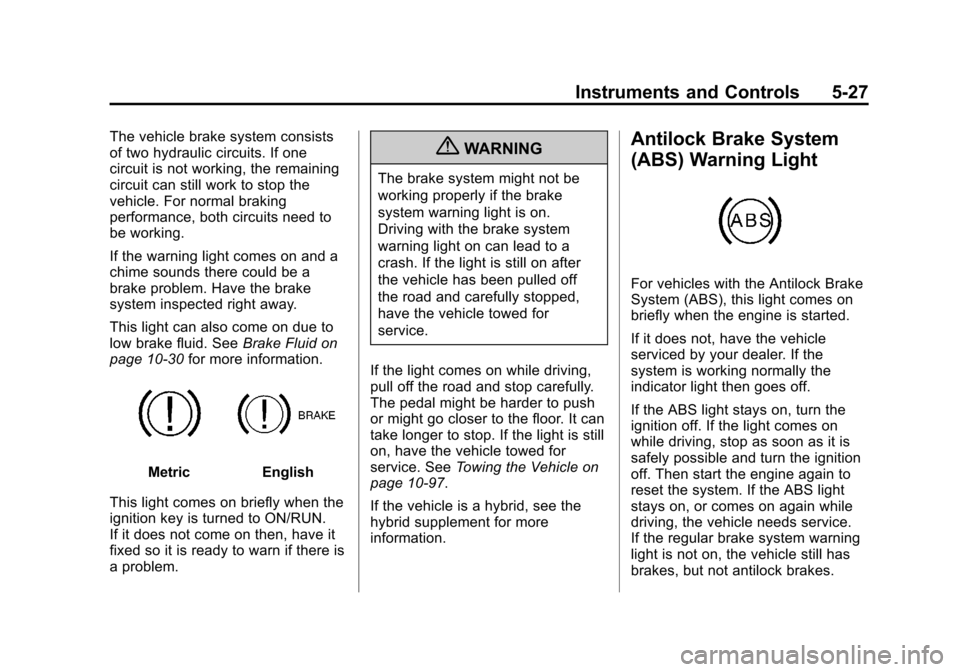
MetricEnglish
This light comes on briefly when the
ignition key is turned to ON/RUN.
If it does not come on then, have it
fixed so it is ready to warn if there is
a problem.
{WARNING
The brake system might not be
working properly if the brake
system warning light is on.
Driving with the brake system
warning light on can lead to a
crash. If the light is still on after
the vehicle has been pulled off
the road and carefully stopped,
have the vehicle towed for
service.
If the light comes on while driving,
pull off the road and stop carefully.
The pedal might be harder to push
or might go closer to the floor. It can
take longer to stop. If the light is still
on, have the vehicle towed for
service. See Towing the Vehicle on
page 10‑97.
If the vehicle is a hybrid, see the
hybrid supplement for more
information.
Antilock Brake System
(ABS) Warning Light
For vehicles with the Antilock Brake
System (ABS), this light comes on
briefly when the engine is started.
If it does not, have the vehicle
serviced by your dealer. If the
system is working normally the
indicator light then goes off.
If the ABS light stays on, turn the
ignition off. If the light comes on
while driving, stop as soon as it is
safely possible and turn the ignition
off. Then start the engine again to
reset the system. If the ABS light
stays on, or comes on again while
driving, the vehicle needs service.
If the regular brake system warning
light is not on, the vehicle still has
brakes, but not antilock brakes.
Page 221 of 584
Black plate (7,1)Chevrolet Silverado Owner Manual - 2012
Infotainment System 7-7
Setting the Tone
(Bass/Midrange/Treble)
(All Except AM-FM Radio
and Radio with CD)
BASS/MID/TREB (Bass, Midrange,
or Treble):To adjust the bass,
midrange, or treble:
1. Press the
fknob until the tone
control tabs display.
2. Highlight the desired tone control tab by doing one of the
following:
.Press thefknob.
.Press the softkey under the
desired tab.
3. Adjust the setting by doing one of the following:
.Turn thefknob clockwise
or counterclockwise.
.Press the¨SEEK,
or
©SEEK.
.Press the\FWD,
or
sREV. If a station's frequency is weak or if
there is static, decrease the treble.
To quickly adjust bass, midrange,
or treble to the middle position,
press the softkey positioned under
the BASS, MID, or TREB tab for
more than two seconds. A beep
sounds and the level adjusts to the
middle position.
To quickly adjust all tone and
speaker controls to the middle
position, press the
fknob for more
than two seconds until a beep
sounds.
EQ (Equalization): Press this
button to choose bass and treble
equalization settings designed for
different types of music. Selecting
MANUAL, or changing bass or
treble, returns the EQ to the manual
bass and treble settings.
Unique EQ settings can be saved
for each source.
If the radio has a Bose
®audio
system, the EQ settings are either
MANUAL or TALK.
Adjusting the Speakers
(Balance/Fade) (AM-FM Radio
and AM-FM Radio with CD)
To adjust the balance or fade:
1. Press
`or press thefknob
until the speaker control label
displays.
2. To adjust the setting, do one of the following:
.Turn thefknob.
.Press either¨SEEK,
or
©SEEK.
.Press either\FWD,
or
sREV.
Page 222 of 584
Black plate (8,1)Chevrolet Silverado Owner Manual - 2012
7-8 Infotainment System
Adjusting the Speakers
(Balance/Fade) (All Except
AM-FM Radio and Radio
with CD)
BAL/FADE (Balance/Fade):
To adjust the balance or fade:
1. Press the
fknob until the
speaker control tabs display.
2. Highlight the desired speaker control tab by doing one of the
following:
.Press thefknob..Press the softkey under the
desired tab.
3. Adjust the setting by doing one of the following:
.Turn thefknob clockwise
or counterclockwise.
.Press the¨SEEK,
or
©SEEK.
.Press the\FWD,
or
sREV. To quickly adjust all speaker and
tone controls to the middle position,
press the
fknob for more than
two seconds.
If the Rear Seat Audio (RSA) is
turned on, the radio disables FADE
and mutes the rear speakers.
Radio Messages
Calibration Error: The audio
system has been calibrated for
the vehicle from the factory.
If Calibration Error displays, it
means that the radio has not been
configured properly for the vehicle
and it must be returned to your
dealer for service.
Locked or Loc: One of these
messages will display when the
THEFTLOCK
®system has locked
up the radio. Take the vehicle to
your dealer for service.
If any error occurs repeatedly or
if an error cannot be corrected,
contact your dealer.
Radio
AM-FM Radio
Radio Data System (RDS)
For radios with the Radio Data
System (RDS) feature, it only works
with FM stations that broadcast
RDS information. This system relies
upon receiving specific information
from these stations and only works
when the information is available.
While the radio is tuned to an
FM-RDS station, the station name
or call letters will display. In rare
cases, a radio station could
broadcast incorrect information that
causes the radio features to work
improperly. If this happens, contact
the radio station.
4(Information) (RDS Features):
For vehicles with RDS features,
press
4to display additional text
information related to the current
FM-RDS station. If information is
available, the song title information
displays on the top line of the