charging CHEVROLET SILVERADO 2012 2.G Owners Manual
[x] Cancel search | Manufacturer: CHEVROLET, Model Year: 2012, Model line: SILVERADO, Model: CHEVROLET SILVERADO 2012 2.GPages: 584, PDF Size: 8.03 MB
Page 5 of 584

Black plate (5,1)Chevrolet Silverado Owner Manual - 2012
Introduction v
Vehicle Symbol Chart
Here are some additional symbols
that may be found on the vehicle
and what they mean. For more
information on the symbol, refer to
the Index.
0:Adjustable Pedals
9:Airbag Readiness Light
#:Air Conditioning
!:Antilock Brake System (ABS)
%:Audio Steering Wheel Controls
or OnStar®
$: Brake System Warning Light
":Charging System
I:Cruise Control
B: Engine Coolant Temperature
O:Exterior Lamps
#:Fog Lamps
.: Fuel Gauge
+:Fuses
3: Headlamp High/Low-Beam
Changer
j: LATCH System Child
Restraints
*: Malfunction Indicator Lamp
::Oil Pressure
g:Outside Power Foldaway
Mirrors
}: Power
/:Remote Vehicle Start
>:Safety Belt Reminders
7:Tire Pressure Monitor
_: Tow/Haul Mode
d:Traction Control/StabiliTrak®
M:Windshield Washer Fluid
Page 139 of 584
Black plate (1,1)Chevrolet Silverado Owner Manual - 2012
Instruments and Controls 5-1
Instruments and
Controls
Controls
Steering Wheel Adjustment . . . 5-2
Steering Wheel Controls . . . . . . 5-3
Horn . . . . . . . . . . . . . . . . . . . . . . . . . . 5-5
Windshield Wiper/Washer . . . . . 5-5
Compass . . . . . . . . . . . . . . . . . . . . . 5-6
Clock . . . . . . . . . . . . . . . . . . . . . . . . . 5-8
Power Outlets . . . . . . . . . . . . . . . 5-10
Cigarette Lighter . . . . . . . . . . . . . 5-11
Ashtrays . . . . . . . . . . . . . . . . . . . . . 5-12
Warning Lights, Gauges, and
Indicators
Warning Lights, Gauges, andIndicators . . . . . . . . . . . . . . . . . . 5-12
Instrument Cluster . . . . . . . . . . . 5-13
Speedometer . . . . . . . . . . . . . . . . 5-14
Odometer . . . . . . . . . . . . . . . . . . . . 5-14
Trip Odometer . . . . . . . . . . . . . . . 5-14
Tachometer . . . . . . . . . . . . . . . . . . 5-14
Fuel Gauge . . . . . . . . . . . . . . . . . . 5-14
Engine Oil Pressure Gauge . . . . . . . . . . . . . . . . . . . . . . 5-16 Engine Coolant
Temperature Gauge . . . . . . . . 5-17
Voltmeter Gauge . . . . . . . . . . . . . 5-18
Safety Belt Reminders . . . . . . . 5-19
Airbag Readiness Light . . . . . . 5-20
Airbag On-Off Light . . . . . . . . . . 5-20
Passenger Airbag Status Indicator . . . . . . . . . . . . . . . . . . . . 5-22
Charging System Light . . . . . . 5-23
Malfunction Indicator Lamp . . . . . . . . . . . . . 5-24
Brake System Warning Light . . . . . . . . . . . . . . . . . . . . . . . 5-26
Antilock Brake System (ABS) Warning Light . . . . . . . . . . . . . . 5-27
Four-Wheel-Drive Light . . . . . . 5-28
Tow/Haul Mode Light . . . . . . . . 5-28
StabiliTrak
®OFF Light . . . . . . . 5-28
Traction Control System (TCS)/StabiliTrak
®Light . . . . 5-29
Tire Pressure Light . . . . . . . . . . 5-29
Engine Oil Pressure Light . . . . 5-30
Low Fuel Warning Light . . . . . . 5-30
Security Light . . . . . . . . . . . . . . . . 5-30
High-Beam On Light . . . . . . . . . 5-31
Front Fog Lamp Light . . . . . . . . 5-31
Cruise Control Light . . . . . . . . . 5-31
Information Displays
Driver Information Center (DIC) . . . . . . . . . . . . . . . 5-32
Vehicle Messages
Vehicle Messages . . . . . . . . . . . 5-42
Battery Voltage andCharging Messages . . . . . . . . 5-42
Brake System Messages . . . . 5-42
Door Ajar Messages . . . . . . . . . 5-43
Engine Cooling System Messages . . . . . . . . . . . . . . . . . . 5-44
Engine Oil Messages . . . . . . . . 5-45
Engine Power Messages . . . . 5-46
Fuel System Messages . . . . . . 5-46
Key and Lock Messages . . . . . 5-46
Lamp Messages . . . . . . . . . . . . . 5-46
Object Detection System Messages . . . . . . . . . . . . . . . . . . 5-47
Ride Control System Messages . . . . . . . . . . . . . . . . . . 5-47
Airbag System Messages . . . . 5-48
Anti-theft Alarm System Messages . . . . . . . . . . . . . . . . . . 5-48
Page 156 of 584
Black plate (18,1)Chevrolet Silverado Owner Manual - 2012
5-18 Instruments and Controls
Voltmeter Gauge
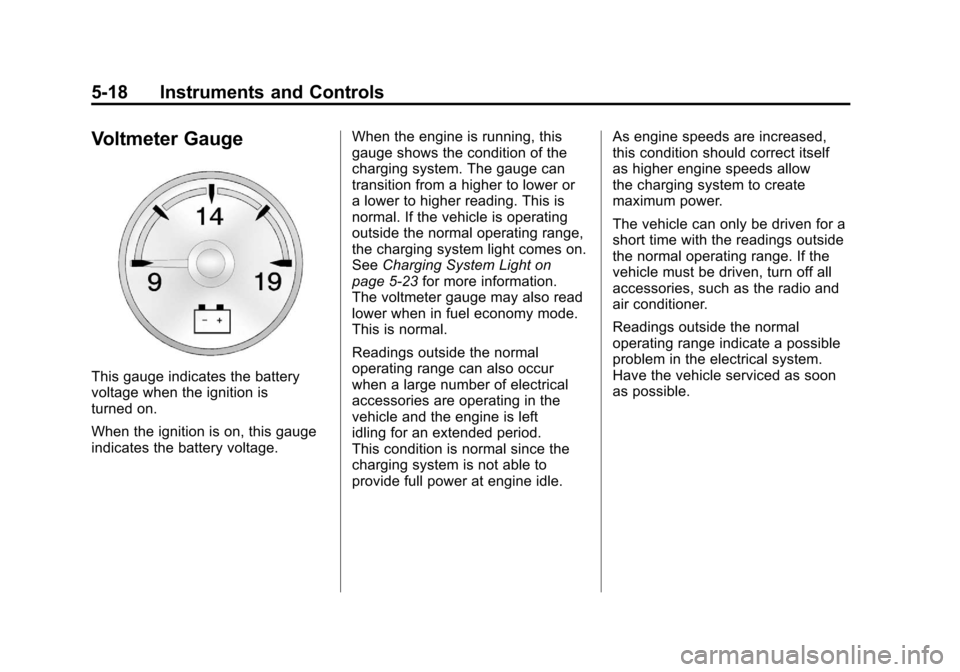
This gauge indicates the battery
voltage when the ignition is
turned on.
When the ignition is on, this gauge
indicates the battery voltage.When the engine is running, this
gauge shows the condition of the
charging system. The gauge can
transition from a higher to lower or
a lower to higher reading. This is
normal. If the vehicle is operating
outside the normal operating range,
the charging system light comes on.
See
Charging System Light on
page 5‑23 for more information.
The voltmeter gauge may also read
lower when in fuel economy mode.
This is normal.
Readings outside the normal
operating range can also occur
when a large number of electrical
accessories are operating in the
vehicle and the engine is left
idling for an extended period.
This condition is normal since the
charging system is not able to
provide full power at engine idle. As engine speeds are increased,
this condition should correct itself
as higher engine speeds allow
the charging system to create
maximum power.
The vehicle can only be driven for a
short time with the readings outside
the normal operating range. If the
vehicle must be driven, turn off all
accessories, such as the radio and
air conditioner.
Readings outside the normal
operating range indicate a possible
problem in the electrical system.
Have the vehicle serviced as soon
as possible.
Page 161 of 584
Black plate (23,1)Chevrolet Silverado Owner Manual - 2012
Instruments and Controls 5-23
as a system check. Then, after
several more seconds, the status
indicator will light either ON or OFF,
or either the on or off symbol to let
you know the status of the right front
passenger frontal airbag.
If the word ON or the on symbol is
lit on the passenger airbag status
indicator, it means that the right
front passenger frontal airbag is
enabled (may inflate).
If the word OFF or the off symbol is
lit on the airbag status indicator, it
means that the passenger sensing
system has turned off the right front
passenger frontal airbag.
If, after several seconds, both status
indicator lights remain on, or if there
are no lights at all, there may be a
problem with the lights or the
passenger sensing system.
See your dealer for service.{WARNING
If the airbag readiness light ever
comes on and stays on, it means
that something may be wrong
with the airbag system. To help
avoid injury to yourself or others,
have the vehicle serviced right
away. SeeAirbag Readiness
Light on page 5‑20 for more
information, including important
safety information.
Charging System Light
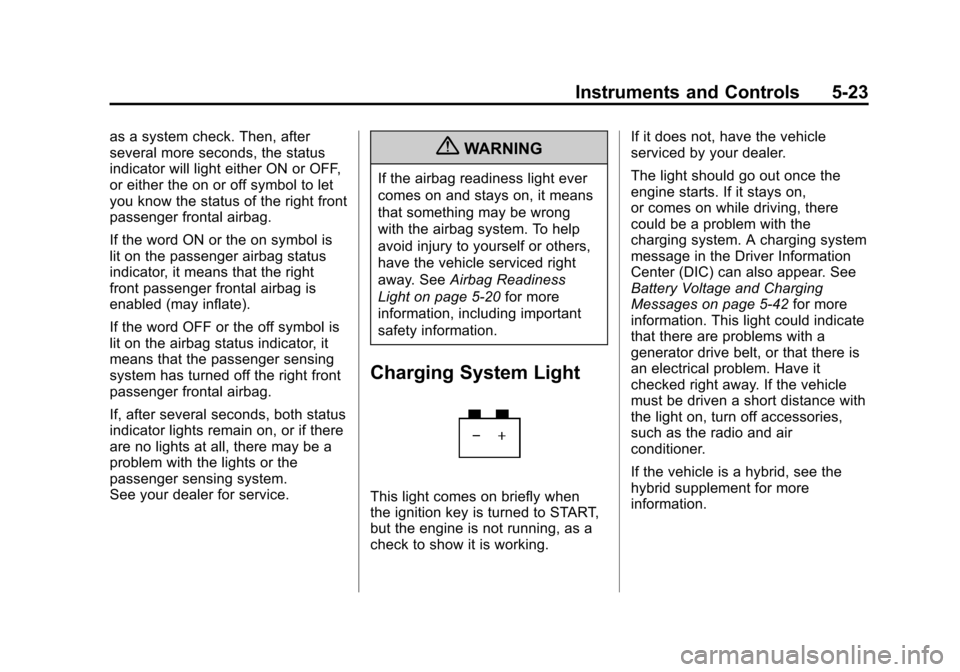
This light comes on briefly when
the ignition key is turned to START,
but the engine is not running, as a
check to show it is working. If it does not, have the vehicle
serviced by your dealer.
The light should go out once the
engine starts. If it stays on,
or comes on while driving, there
could be a problem with the
charging system. A charging system
message in the Driver Information
Center (DIC) can also appear. See
Battery Voltage and Charging
Messages on page 5‑42
for more
information. This light could indicate
that there are problems with a
generator drive belt, or that there is
an electrical problem. Have it
checked right away. If the vehicle
must be driven a short distance with
the light on, turn off accessories,
such as the radio and air
conditioner.
If the vehicle is a hybrid, see the
hybrid supplement for more
information.
Page 175 of 584
Black plate (37,1)Chevrolet Silverado Owner Manual - 2012
Instruments and Controls 5-37
If a low tire pressure condition is
detected by the system while
driving, a message advising you to
add pressure in a specific tire will
appear in the display. SeeTire
Pressure on page 10‑62 andTire
Messages on page 5‑49 for more
information.
If the tire pressure display shows
dashes instead of a value, there
may be a problem with the vehicle.
If this consistently occurs, see your
dealer for service.
Trailer Gain and Output
On vehicles with the Integrated
Trailer Brake Control (ITBC) system,
the trailer brake display appears
in the DIC. Press the vehicle
information button until TRAILER
GAIN and OUTPUT display.
TRAILER GAIN shows the trailer
gain setting. This setting can be
adjusted from 0.0 to 10.0 with either
a trailer connected or disconnected. OUTPUT shows the power output to
the trailer any time a trailer with
electric brakes is connected. Output
is displayed in 0 to 10 bars. Dashes
may appear in the OUTPUT display.
To adjust trailer gain see
“Integrated
Trailer Brake Control System” under
Towing Equipment on page 9‑102
for more information.
Battery
This display shows the current
battery voltage. If the voltage is in
the normal range, the value will
display. For example, the display
may read BATTERY 13 VOLTS.
Your vehicle's charging system
regulates voltage based on the state
of the battery. The battery voltage
may fluctuate when viewing this
information on the DIC. This is
normal. Oil Pressure
This display shows the oil pressure
in either kilopascals (kPa) or pounds
per square inch (psi).
Engine Hours
Press the vehicle information button
until ENGINE HOURS displays.
This display shows the total number
of hours the engine has run.
Compass Zone Setting
This display allows for setting the
compass zone. See
Compass on
page 5‑6 for more information.
Compass Recalibration
This display allows for calibrating
the compass. See Compass on
page 5‑6 for more information.
Blank Display
This display shows no information.
Page 178 of 584

Black plate (40,1)Chevrolet Silverado Owner Manual - 2012
5-40 Instruments and Controls
The trip odometer has a feature
called the retro-active reset.
This can be used to set the trip
odometer to the number of miles
(kilometers) driven since the ignition
was last turned on. This can be
used if the trip odometer is not reset
at the beginning of the trip.
To use the retro-active reset feature,
press and hold the trip odometer
reset stem for at least four seconds.
The trip odometer will display the
number of kilometers (km) or
miles (mi) driven since the ignition
was last turned on and the vehicle
was moving. Once the vehicle
begins moving, the trip odometer
will accumulate mileage. For
example, if the vehicle was driven
8 km (5 miles) before it is started
again, and then the retro-active
reset feature is activated, the
display will show 8 km (5 miles).
As the vehicle begins moving, the
display will then increase to 8.2 km
(5.1 miles), 8.4 km (5.2 miles), etc.Transmission Temperature
Press the trip odometer reset
stem until TRANS TEMP displays.
This display shows the temperature
of the automatic transmission fluid
in either degrees Celsius (°C) or
degrees Fahrenheit (°F) .
Trailer Gain and Output
On vehicles with the Integrated
Trailer Brake Control (ITBC) system,
the trailer brake display appears in
the DIC. Press the trip odometer
reset stem until TRAILER GAIN and
OUTPUT display.
TRAILER GAIN shows the trailer
gain setting. This setting can be
adjusted from 0.0 to 10.0 with either
a trailer connected or disconnected.
OUTPUT shows the power output to
the trailer any time a trailer with
electric brakes is connected. Output
is displayed in 0 to 10 bars. Dashes
may appear in the OUTPUT display.
To adjust trailer gain see
“Integrated
Trailer Brake Control System” under
Towing Equipment on page 9‑102
for more information.
Speedometer
The speedometer shows how fast
the vehicle is moving in either
kilometers per hour (km/h) or miles
per hour (mph). The speedometer
cannot be reset.
Battery
This display shows the current
battery voltage. If the voltage is in
the normal range, the value will
display. For example, the display
may read BATTERY 13 VOLTS.
Your vehicle's charging system
regulates voltage based on the state
of the battery. The battery voltage
may fluctuate when viewing this
information on the DIC. This is
normal.
Page 180 of 584
Black plate (42,1)Chevrolet Silverado Owner Manual - 2012
5-42 Instruments and Controls
Vehicle Messages
Messages displayed on the DIC
indicate the status of the vehicle or
some action may be needed to
correct a condition. Multiple
messages may appear one after
another.
The messages that do not
require immediate action can be
acknowledged and cleared by
pressing
V(Set/Reset) or the trip
odometer reset stem.
The messages that require
immediate action cannot be cleared
until that action is performed.
All messages should be taken
seriously and clearing the message
does not correct the problem.
The following are the possible
messages and some information
about them.
If the vehicle has a diesel engine,
see the Duramax
®diesel
supplement for more information.
Battery Voltage and
Charging Messages
BATTERY LOW START
VEHICLE
When the vehicle’ s battery is
severely discharged, this message
will display and four chimes
will sound. Start the vehicle
immediately. If the vehicle is not
started and the battery continues to
discharge, the climate controls,
heated seats, and audio systems
will shut off and the vehicle may
require a jump start. These systems
will function again after the vehicle
is started.
SERVICE BATTERY
CHARGING SYSTEM
On some vehicles, this message
displays if there is a problem with
the battery charging system.
Under certain conditions, the
charging system light may also turn
on in the instrument panel cluster. See
Charging System Light on
page 5‑23. Driving with this problem
could drain the battery. Turn off all
unnecessary accessories. Have the
electrical system checked as soon
as possible. See your dealer.
Brake System Messages
SERVICE BRAKE SYSTEM
This message displays along with
the brake system warning light if
there is a problem with the brake
system. See Brake System Warning
Light on page 5‑26. If this message
appears, stop as soon as possible
and turn off the vehicle. Restart the
vehicle and check for the message
on the DIC display. If the message
is still displayed or appears again
when you begin driving, the brake
system needs service as soon as
possible. See your dealer.
Page 213 of 584
Black plate (9,1)Chevrolet Silverado Owner Manual - 2012
Lighting 6-9
Reading Lamps
For vehicles with reading lamps,
they are located on the overhead
console.
To turn on the reading lamps, press
the button located next to each
lamp. To turn them off, press the
button again.
The vehicle may also have reading
lamps in other locations. To turn the
lamps on or off, press the button
located next to the lamp.
If the vehicle has a DVD Rear Seat
Entertainment (RSE) system, press
the lamp lenses to turn the lamps
on or off.
The lamps are fixed and cannot be
adjusted.
Lighting Features
Entry Lighting
The vehicle has an illuminated
entry feature.
When the doors are opened, the
dome lamps will come on if the
dome override button is in the
extended position. If the dome
override button is pressed in, the
lamps will not come on.
Exit Lighting
The interior lamps come on when
the key is removed from the ignition.
They turn off automatically in
20 seconds. The lights do not come
on if the dome override button is
pressed in.
Battery Load
Management
The vehicle has Electric Power
Management (EPM) that estimates
the battery's temperature and state
of charge. It then adjusts the voltage
for best performance and extended
life of the battery.
When the battery's state of charge
is low, the voltage is raised slightly
to quickly bring the charge back up.
When the state of charge is high,
the voltage is lowered slightly to
prevent overcharging. If the vehicle
has a voltmeter gauge or a voltage
display on the Driver Information
Center (DIC), you may see the
voltage move up or down. This is
normal. If there is a problem,
an alert will be displayed.
Page 229 of 584
Black plate (15,1)Chevrolet Silverado Owner Manual - 2012
Infotainment System 7-15
XM™Satellite Radio Service
XM Satellite Radio Service gives
digital radio reception from coast to
coast in the 48 contiguous United
States, and in Canada. Just as
with FM, tall buildings or hills can
interfere with satellite radio signals,
causing the sound to fade in and
out. In addition, traveling or standing
under heavy foliage, bridges,
garages, or tunnels may cause loss
of the XM signal for a period of time.
Cellular Phone Usage
Cellular phone usage may cause
interference with the vehicle's radio.
This interference may occur when
making or receiving phone calls,
charging the phone's battery,
or simply having the phone on. This interference causes an
increased level of static while
listening to the radio. If static is
received while listening to the radio,
unplug the cellular phone and
turn it off.
Fixed Mast Antenna
The fixed mast antenna can
withstand most car washes without
being damaged as long as it is
securely attached to the base.
If the mast becomes slightly bent,
straighten it out by hand. If the mast
is badly bent, replace it.
Occasionally check to make sure
the antenna is tightened to its base.
If tightening is required, tighten
by hand until fully seated plus
one quarter turn.
Satellite Radio Antenna
The XM Satellite Radio antenna is
located on the roof of the vehicle.
Keep the antenna clear of
obstructions for clear radio
reception.
If the vehicle has a sunroof, the
performance of the XM system
(if equipped) may be affected if the
sunroof is open.
Page 321 of 584
Black plate (35,1)Chevrolet Silverado Owner Manual - 2012
Driving and Operating 9-35
Shifting out of Park
This vehicle is equipped with
an electronic shift lock release
system. The shift lock release is
designed to:
.Prevent ignition key removal
unless the shift lever is in
P (Park) with the shift lever
button fully released.
.Prevent movement of the shift
lever out of P (Park), unless
the ignition is in ON/RUN or
ACC/ACCESSORY and the
regular brake pedal is applied.
The shift lock release is always
functional except in the case of an
uncharged or low voltage (less than
9 volt) battery.
If the vehicle has an uncharged
battery or a battery with low voltage,
try charging or jump starting the
battery. See Jump Starting on
page 10‑92 for more information. To shift out of P (Park) use the
following:
1. Apply the brake pedal.
2. Move the shift lever to the
desired position.
If you still are unable to shift out of
P (Park):
1. Ease the pressure on the shift lever.
2. While holding down the brake pedal, press the shift lever all
the way into P (Park).
3. Move the shift lever to the desired position.
If you are still having a problem
shifting, then have the vehicle
serviced soon.
Parking (Manual
Transmission)
If the vehicle has a manual
transmission, before you get out of
the vehicle, move the shift lever into
R (Reverse), and firmly apply the
parking brake. Once the shift lever
has been placed into R (Reverse)
with the clutch pedal pressed in,
turn the ignition key to LOCK/OFF,
remove the key and release the
clutch.
If you are parking on a hill, or if the
vehicle is pulling a trailer, see
Driving Characteristics and Towing
Tips on page 9‑82.
Parking over Things
That Burn
{WARNING
Things that can burn could touch
hot exhaust parts under the
vehicle and ignite. Do not park
over papers, leaves, dry grass,
or other things that can burn.