window CHEVROLET SILVERADO 2016 3.G Owners Manual
[x] Cancel search | Manufacturer: CHEVROLET, Model Year: 2016, Model line: SILVERADO, Model: CHEVROLET SILVERADO 2016 3.GPages: 533, PDF Size: 8.17 MB
Page 2 of 533
Chevrolet Silverado Owner Manual (GMNA-Localizing-U.S./Canada/Mexico-
9159338) - 2016 - crc - 10/21/15
ContentsIntroduction . . . . . . . . . . . . . . . . . . . . . . 2
In Brief . . . . . . . . . . . . . . . . . . . . . . . . . . . 5
Keys, Doors, and Windows . . . . . 33
Seats and Restraints . . . . . . . . . . . 57
Storage . . . . . . . . . . . . . . . . . . . . . . . 119
Instruments and Controls . . . . . . 123
Lighting . . . . . . . . . . . . . . . . . . . . . . . 178
Infotainment System . . . . . . . . . . 188
Climate Controls . . . . . . . . . . . . . . 250
Driving and Operating . . . . . . . . . 259
Vehicle Care . . . . . . . . . . . . . . . . . . 360
Service and Maintenance . . . . . 461
Technical Data . . . . . . . . . . . . . . . . 477
Customer Information . . . . . . . . . 482
Reporting Safety Defects . . . . . . 497
OnStar . . . . . . . . . . . . . . . . . . . . . . . . 500
Index . . . . . . . . . . . . . . . . . . . . 520
Page 6 of 533
Chevrolet Silverado Owner Manual (GMNA-Localizing-U.S./Canada/Mexico-
9159338) - 2016 - crc - 10/21/15
In Brief 5
In Brief
Instrument Panel
Instrument Panel . . . . . . . . . . . . . . . . 6
Initial Drive Information
Initial Drive Information . . . . . . . . . . 8
Remote Keyless Entry (RKE)System . . . . . . . . . . . . . . . . . . . . . . . . 8
Remote Vehicle Start . . . . . . . . . . . 9
Door Locks . . . . . . . . . . . . . . . . . . . . . 9
Windows . . . . . . . . . . . . . . . . . . . . . . . 10
Seat Adjustment . . . . . . . . . . . . . . . 11
Memory Features . . . . . . . . . . . . . . 13
Heated and Ventilated Seats . . . 13
Head Restraint Adjustment . . . . 14
Safety Belts . . . . . . . . . . . . . . . . . . . . 14
Passenger Sensing System . . . 14
Mirror Adjustment . . . . . . . . . . . . . . 15
Steering Wheel Adjustment . . . . 16
Throttle and Brake Pedal Adjustment . . . . . . . . . . . . . . . . . . . 17
Interior Lighting . . . . . . . . . . . . . . . . 17
Exterior Lighting . . . . . . . . . . . . . . . 18
Windshield Wiper/Washer . . . . . . 19
Climate Controls . . . . . . . . . . . . . . . 19
Transmission . . . . . . . . . . . . . . . . . . 22
Four-Wheel Drive . . . . . . . . . . . . . . 23
Vehicle Features
Infotainment System . . . . . . . . . . . 24
Radio(s) . . . . . . . . . . . . . . . . . . . . . . . 24
Satellite Radio . . . . . . . . . . . . . . . . . 25
Portable Audio Devices . . . . . . . . 25
Bluetooth
®. . . . . . . . . . . . . . . . . . . . . 25
Steering Wheel Controls . . . . . . . 26
Cruise Control . . . . . . . . . . . . . . . . . 27
Driver Information Center (DIC) . . . . . . . . . . . . . . . . . 27
Forward Collision Alert (FCA) System . . . . . . . . . . . . . . . . . . . . . . . 28
Lane Departure Warning (LDW) . . . . . . . . . . . . . . . 28
Lane Keep Assist (LKA) . . . . . . . 28
Rear Vision Camera (RVC) . . . . 28
Parking Assist . . . . . . . . . . . . . . . . . 28
Power Outlets . . . . . . . . . . . . . . . . . 29
Universal Remote System . . . . . 29
Sunroof . . . . . . . . . . . . . . . . . . . . . . . . 29
eAssist Features
eAssist®Overview . . . . . . . . . . . . . 30
Performance and Maintenance
Traction Control/Electronic Stability Control . . . . . . . . . . . . . . 30
Tire Pressure Monitor . . . . . . . . . . 31
Engine Oil Life System . . . . . . . . 31
E85 or FlexFuel . . . . . . . . . . . . . . . . 32 Driving for Better Fuel
Economy . . . . . . . . . . . . . . . . . . . . . 32
Roadside Assistance Program . . . . . . . . . . . . . . . . . . . . . . 32
Roadside Assistance
Program . . . . . . . . . . . . . . . . . . . . . . 32
Page 11 of 533
Chevrolet Silverado Owner Manual (GMNA-Localizing-U.S./Canada/Mexico-
9159338) - 2016 - crc - 10/21/15
10 In Brief
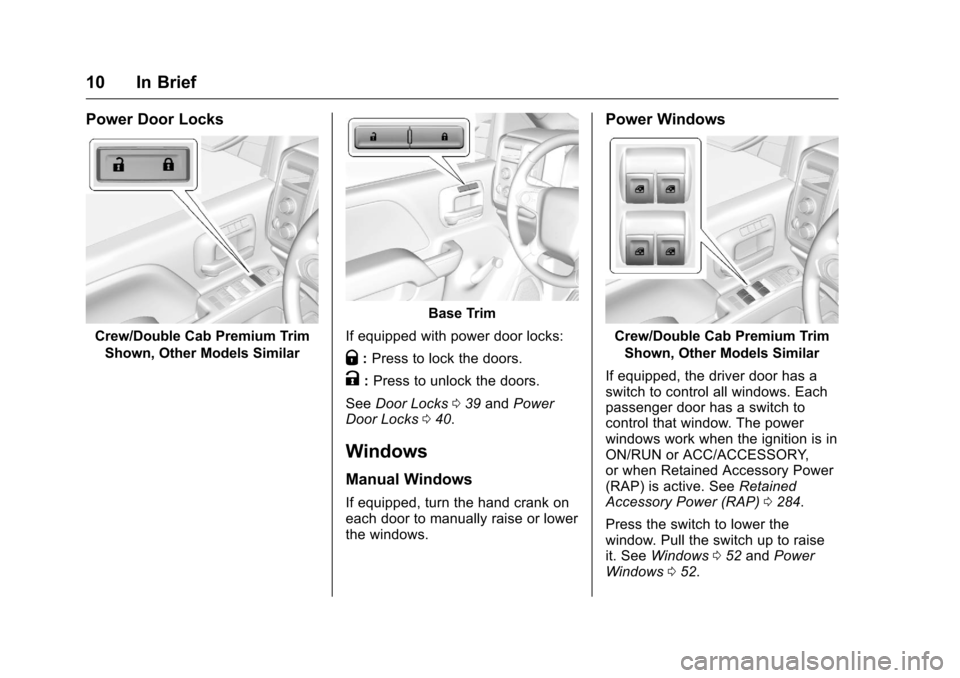
Power Door Locks
Crew/Double Cab Premium TrimShown, Other Models Similar
Base Trim
If equipped with power door locks:
Q: Press to lock the doors.
K:Press to unlock the doors.
See Door Locks 039 and Power
Door Locks 040.
Windows
Manual Windows
If equipped, turn the hand crank on
each door to manually raise or lower
the windows.
Power Windows
Crew/Double Cab Premium Trim
Shown, Other Models Similar
If equipped, the driver door has a
switch to control all windows. Each
passenger door has a switch to
control that window. The power
windows work when the ignition is in
ON/RUN or ACC/ACCESSORY,
or when Retained Accessory Power
(RAP) is active. See Retained
Accessory Power (RAP) 0284.
Press the switch to lower the
window. Pull the switch up to raise
it. See Windows 052 and Power
Windows 052.
Page 12 of 533
Chevrolet Silverado Owner Manual (GMNA-Localizing-U.S./Canada/Mexico-
9159338) - 2016 - crc - 10/21/15
In Brief 11
Express Windows
If equipped, the express window
feature allows the windows to be
raised or lowered without holding
the switch.
To use express-down, press the
switch down fully and release.
The driver window may have the
express-up feature. Pull the switch
up fully and release to activate.
Power Sliding Rear Window
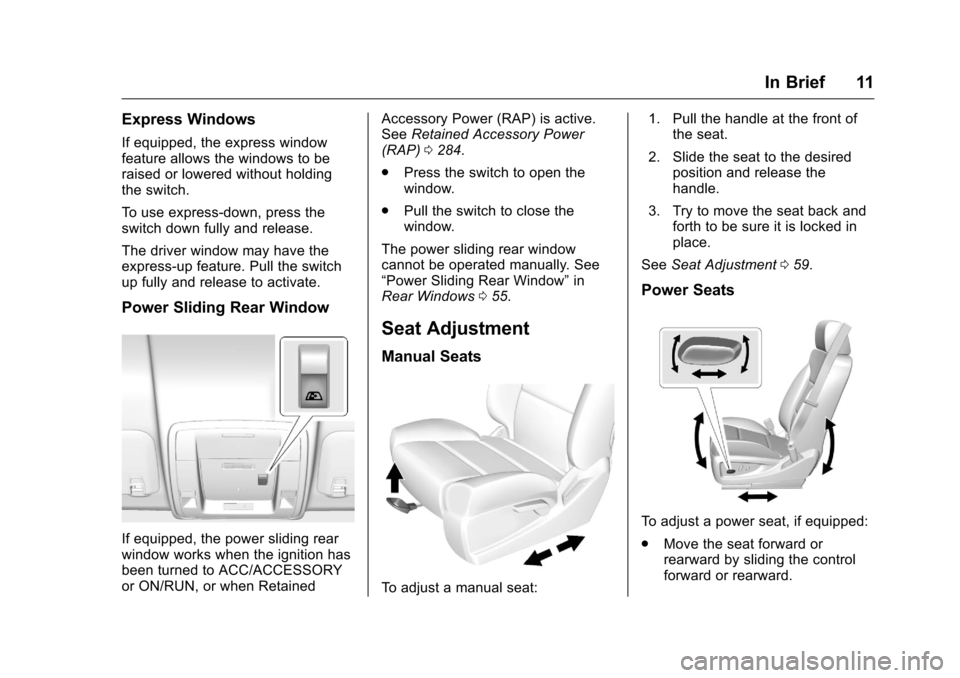
If equipped, the power sliding rear
window works when the ignition has
been turned to ACC/ACCESSORY
or ON/RUN, or when RetainedAccessory Power (RAP) is active.
See
Retained Accessory Power
(RAP) 0284.
. Press the switch to open the
window.
. Pull the switch to close the
window.
The power sliding rear window
cannot be operated manually. See
“Power Sliding Rear Window” in
Rear Windows 055.
Seat Adjustment
Manual Seats
To adjust a manual seat: 1. Pull the handle at the front of
the seat.
2. Slide the seat to the desired position and release the
handle.
3. Try to move the seat back and forth to be sure it is locked in
place.
See Seat Adjustment 059.
Power Seats
To adjust a power seat, if equipped:
.
Move the seat forward or
rearward by sliding the control
forward or rearward.
Page 22 of 533
Chevrolet Silverado Owner Manual (GMNA-Localizing-U.S./Canada/Mexico-
9159338) - 2016 - crc - 10/21/15
In Brief 21
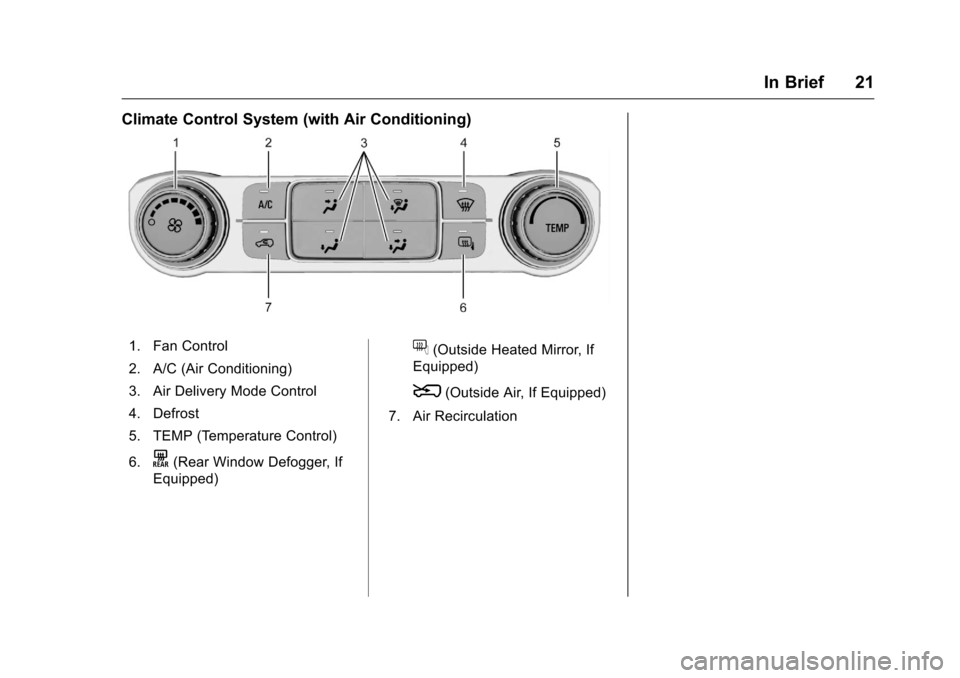
Climate Control System (with Air Conditioning)
1. Fan Control
2. A/C (Air Conditioning)
3. Air Delivery Mode Control
4. Defrost
5. TEMP (Temperature Control)
6.
K(Rear Window Defogger, If
Equipped)
f(Outside Heated Mirror, If
Equipped)
8(Outside Air, If Equipped)
7. Air Recirculation
Page 23 of 533
Chevrolet Silverado Owner Manual (GMNA-Localizing-U.S./Canada/Mexico-
9159338) - 2016 - crc - 10/21/15
22 In Brief
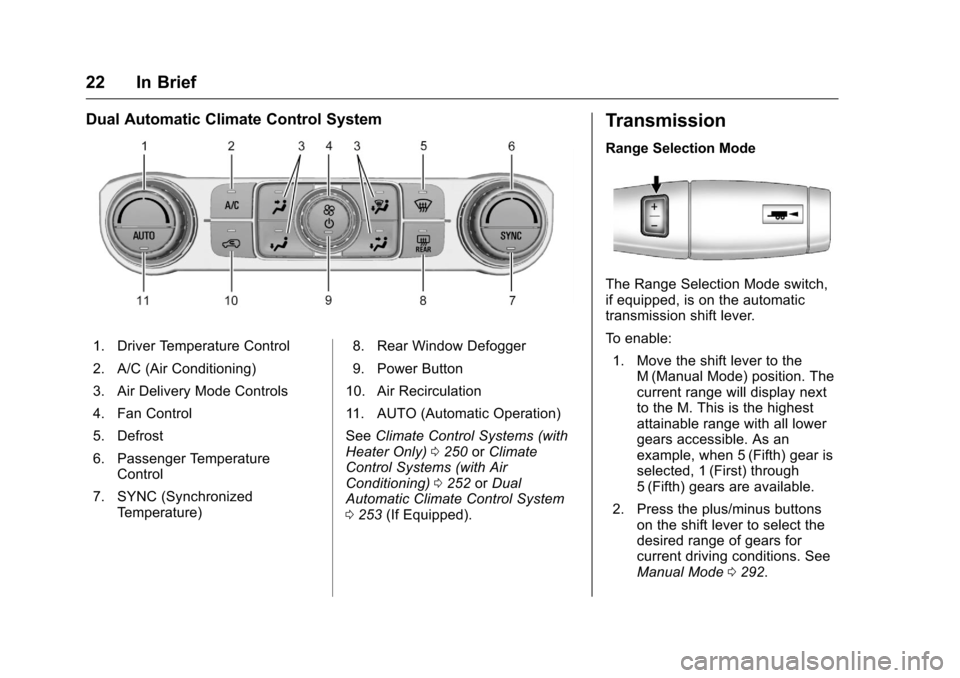
Dual Automatic Climate Control System
1. Driver Temperature Control
2. A/C (Air Conditioning)
3. Air Delivery Mode Controls
4. Fan Control
5. Defrost
6. Passenger TemperatureControl
7. SYNC (Synchronized Temperature) 8. Rear Window Defogger
9. Power Button
10. Air Recirculation
11. AUTO (Automatic Operation)
See Climate Control Systems (with
Heater Only) 0250 orClimate
Control Systems (with Air
Conditioning) 0252 orDual
Automatic Climate Control System
0 253 (If Equipped).
Transmission
Range Selection Mode
The Range Selection Mode switch,
if equipped, is on the automatic
transmission shift lever.
To enable:
1. Move the shift lever to the M (Manual Mode) position. The
current range will display next
to the M. This is the highest
attainable range with all lower
gears accessible. As an
example, when 5 (Fifth) gear is
selected, 1 (First) through
5 (Fifth) gears are available.
2. Press the plus/minus buttons on the shift lever to select the
desired range of gears for
current driving conditions. See
Manual Mode 0292.
Page 34 of 533
Chevrolet Silverado Owner Manual (GMNA-Localizing-U.S./Canada/Mexico-
9159338) - 2016 - crc - 10/21/15
Keys, Doors, and Windows 33
Keys, Doors, and
Windows
Keys and Locks
Keys . . . . . . . . . . . . . . . . . . . . . . . . . . . 33
Remote Keyless Entry (RKE)System . . . . . . . . . . . . . . . . . . . . . . . 36
Remote Keyless Entry (RKE) System Operation . . . . . . . . . . . . 36
Remote Vehicle Start . . . . . . . . . . 38
Door Locks . . . . . . . . . . . . . . . . . . . . 39
Power Door Locks . . . . . . . . . . . . . 40
Delayed Locking . . . . . . . . . . . . . . . 41
Automatic Door Locks . . . . . . . . . 41
Lockout Protection . . . . . . . . . . . . . 41
Safety Locks . . . . . . . . . . . . . . . . . . . 42
Doors
Tailgate . . . . . . . . . . . . . . . . . . . . . . . . 42
Power Assist Steps . . . . . . . . . . . . 43
Vehicle Security
Vehicle Security . . . . . . . . . . . . . . . . 44
Vehicle Alarm System . . . . . . . . . 44
Immobilizer . . . . . . . . . . . . . . . . . . . . 46
Immobilizer Operation . . . . . . . . . 46
Exterior Mirrors
Convex Mirrors . . . . . . . . . . . . . . . . 47 Manual Mirrors . . . . . . . . . . . . . . . . . 47
Trailer-Tow Mirrors . . . . . . . . . . . . . 48
Power Mirrors . . . . . . . . . . . . . . . . . . 48
Folding Mirrors . . . . . . . . . . . . . . . . . 49
Heated Mirrors . . . . . . . . . . . . . . . . . 50
Automatic Dimming Mirror . . . . . 50
Blind Spot Mirrors . . . . . . . . . . . . . . 50
Reverse Tilt Mirrors . . . . . . . . . . . . 51
Interior Mirrors
Interior Rearview Mirrors . . . . . . . 51
Manual Rearview Mirror . . . . . . . . 51
Automatic Dimming Rearview
Mirror . . . . . . . . . . . . . . . . . . . . . . . . . 52
Windows
Windows . . . . . . . . . . . . . . . . . . . . . . . 52
Manual Windows . . . . . . . . . . . . . . 52
Power Windows . . . . . . . . . . . . . . . 52
Rear Windows . . . . . . . . . . . . . . . . . 55
Sun Visors . . . . . . . . . . . . . . . . . . . . . 55
Roof
Sunroof . . . . . . . . . . . . . . . . . . . . . . . . 55
Keys and Locks
Keys
{Warning
Leaving children in a vehicle with
the ignition key is dangerous and
children or others could be
seriously injured or killed. They
could operate the power windows
or other controls or make the
vehicle move. The windows will
function with the keys in the
ignition, and children or others
could be caught in the path of a
closing window. Do not leave
children in a vehicle with the
ignition key.
Page 35 of 533
Chevrolet Silverado Owner Manual (GMNA-Localizing-U.S./Canada/Mexico-
9159338) - 2016 - crc - 10/21/15
34 Keys, Doors, and Windows
{Warning
If the key is unintentionally
rotated while the vehicle is
running, the ignition could be
moved out of the RUN position.
This could be caused by heavy
items hanging from the key ring,
or by large or long items attached
to the key ring that could be
contacted by the driver or
steering wheel. If the ignition
moves out of the RUN position,
the engine will shut off, braking
and steering power assist may be(Continued)
Warning (Continued)
impacted, and airbags may not
deploy. To reduce the risk of
unintentional rotation of the
ignition key, do not change the
way the ignition key and Remote
Keyless Entry (RKE) transmitter,
if equipped, are connected to the
provided key rings.
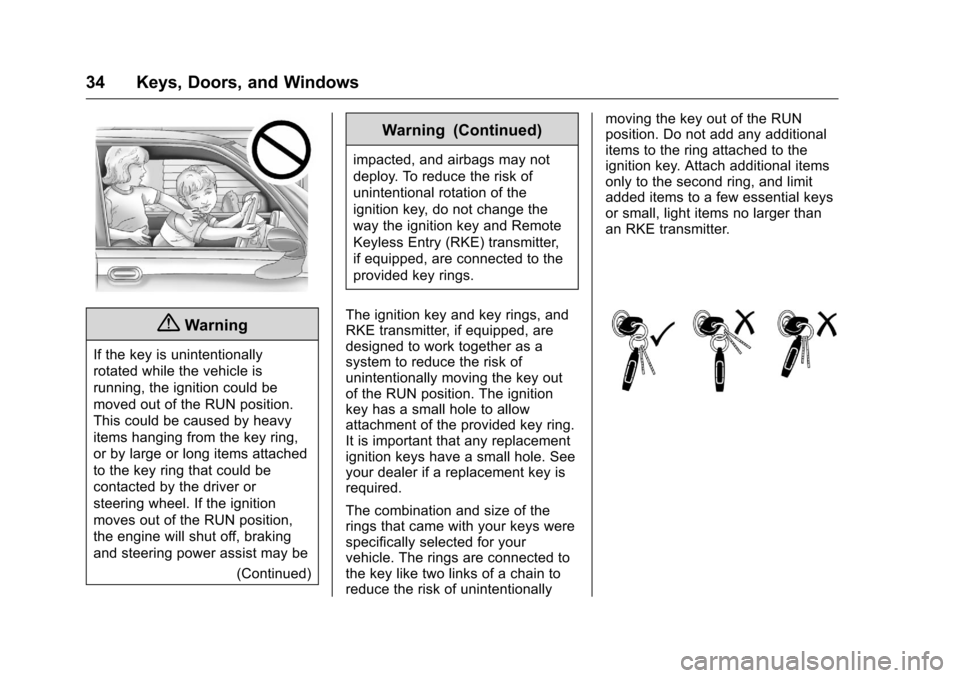
The ignition key and key rings, and
RKE transmitter, if equipped, are
designed to work together as a
system to reduce the risk of
unintentionally moving the key out
of the RUN position. The ignition
key has a small hole to allow
attachment of the provided key ring.
It is important that any replacement
ignition keys have a small hole. See
your dealer if a replacement key is
required.
The combination and size of the
rings that came with your keys were
specifically selected for your
vehicle. The rings are connected to
the key like two links of a chain to
reduce the risk of unintentionally moving the key out of the RUN
position. Do not add any additional
items to the ring attached to the
ignition key. Attach additional items
only to the second ring, and limit
added items to a few essential keys
or small, light items no larger than
an RKE transmitter.
Page 36 of 533
Chevrolet Silverado Owner Manual (GMNA-Localizing-U.S./Canada/Mexico-
9159338) - 2016 - crc - 10/21/15
Keys, Doors, and Windows 35
Interference from radio-frequency
identification (RFID) tags may
prevent the key from starting the
vehicle. Keep RFID tags away from
the key when starting the vehicle.
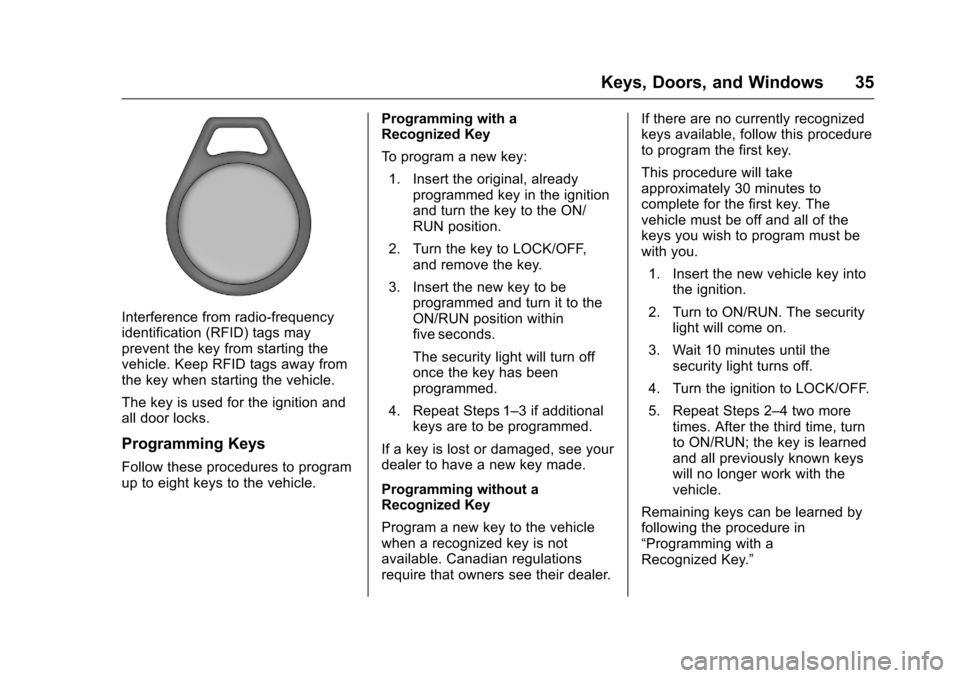
The key is used for the ignition and
all door locks.
Programming Keys
Follow these procedures to program
up to eight keys to the vehicle.Programming with a
Recognized Key
To program a new key:
1. Insert the original, already programmed key in the ignition
and turn the key to the ON/
RUN position.
2. Turn the key to LOCK/OFF, and remove the key.
3. Insert the new key to be programmed and turn it to the
ON/RUN position within
five seconds.
The security light will turn off
once the key has been
programmed.
4. Repeat Steps 1–3 if additional keys are to be programmed.
If a key is lost or damaged, see your
dealer to have a new key made.
Programming without a
Recognized Key
Program a new key to the vehicle
when a recognized key is not
available. Canadian regulations
require that owners see their dealer. If there are no currently recognized
keys available, follow this procedure
to program the first key.
This procedure will take
approximately 30 minutes to
complete for the first key. The
vehicle must be off and all of the
keys you wish to program must be
with you.
1. Insert the new vehicle key into the ignition.
2. Turn to ON/RUN. The security light will come on.
3. Wait 10 minutes until the security light turns off.
4. Turn the ignition to LOCK/OFF.
5. Repeat Steps 2–4 two more times. After the third time, turn
to ON/RUN; the key is learned
and all previously known keys
will no longer work with the
vehicle.
Remaining keys can be learned by
following the procedure in
“Programming with a
Recognized Key.”
Page 37 of 533
Chevrolet Silverado Owner Manual (GMNA-Localizing-U.S./Canada/Mexico-
9159338) - 2016 - crc - 10/21/15
36 Keys, Doors, and Windows
The key has a bar-coded key tag
that the dealer or qualified locksmith
can use to make new keys. Store
this information in a safe place, not
in the vehicle.
See your dealer if a replacement
key or additional key is needed.
If it becomes difficult to turn a key,
inspect the key blade for debris.
Periodically clean with a brush
or pick.
With an active OnStar subscription,
an OnStar Advisor may remotely
unlock the vehicle. SeeOnStar
Overview 0501 orOnStar
Overview 0501.
Remote Keyless Entry
(RKE) System
See Radio Frequency Statement
0 496 orRadio Frequency
Statement 0496.
If there is a decrease in the RKE
operating range:
. Check the distance. The
transmitter may be too far from
the vehicle. .
Check the location. Other
vehicles or objects may be
blocking the signal.
. Check the transmitter's battery.
See “Battery Replacement” later
in this section.
. If the transmitter is still not
working correctly, see your
dealer or a qualified technician
for service.
Remote Keyless Entry
(RKE) System Operation
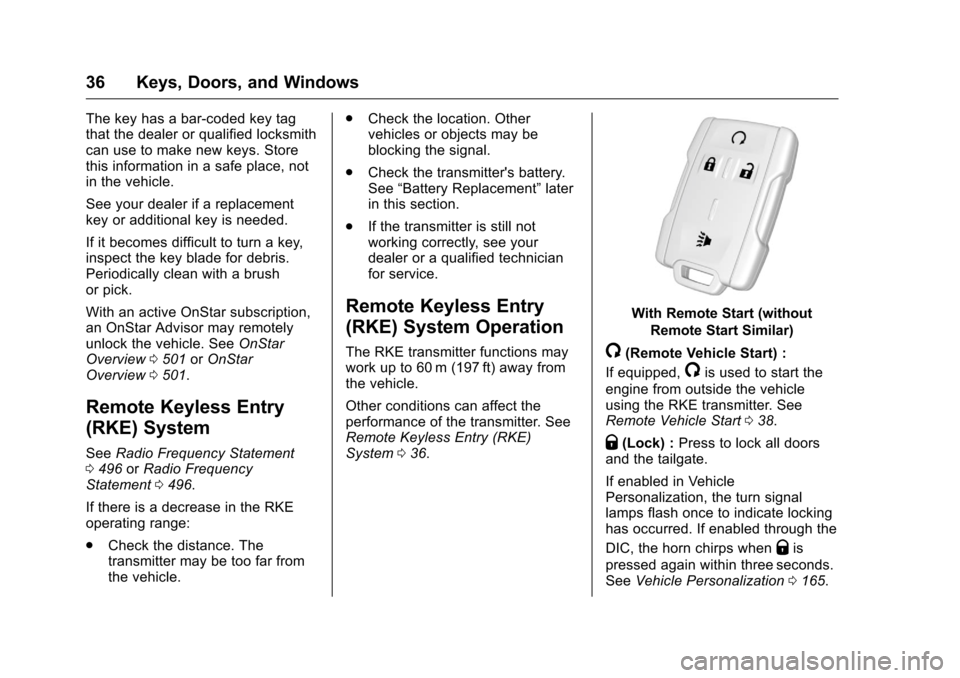
The RKE transmitter functions may
work up to 60 m (197 ft) away from
the vehicle.
Other conditions can affect the
performance of the transmitter. See
Remote Keyless Entry (RKE)
System 036.
With Remote Start (without
Remote Start Similar)
/(Remote Vehicle Start) :
If equipped,
/is used to start the
engine from outside the vehicle
using the RKE transmitter. See
Remote Vehicle Start 038.
Q(Lock) : Press to lock all doors
and the tailgate.
If enabled in Vehicle
Personalization, the turn signal
lamps flash once to indicate locking
has occurred. If enabled through the
DIC, the horn chirps when
Qis
pressed again within three seconds.
See Vehicle Personalization 0165.