change wheel CHEVROLET SILVERADO 2017 3.G User Guide
[x] Cancel search | Manufacturer: CHEVROLET, Model Year: 2017, Model line: SILVERADO, Model: CHEVROLET SILVERADO 2017 3.GPages: 509, PDF Size: 8.87 MB
Page 172 of 509
Chevrolet Silverado Owner Manual (GMNA-Localizing-U.S./Canada/Mexico-9956065) - 2017 - CRC - 4/29/16
Lighting 171
Lighting
Exterior Lighting
Exterior Lamp Controls . . . . . . . 171Exterior Lamps OffReminder . . . . . . . . . . . . . . . . . . . 173Headlamp High/Low-BeamChanger . . . . . . . . . . . . . . . . . . . . 173Flash-to-Pass . . . . . . . . . . . . . . . . 174Daytime RunningLamps (DRL) . . . . . . . . . . . . . . . 174Automatic HeadlampSystem . . . . . . . . . . . . . . . . . . . . . . 174Hazard Warning Flashers . . . . . 175Turn and Lane-ChangeSignals . . . . . . . . . . . . . . . . . . . . . . 175Fog Lamps . . . . . . . . . . . . . . . . . . . 176AuxiliaryRoof-Mounted Lamp . . . . . . . . 176
Interior Lighting
Instrument Panel IlluminationControl . . . . . . . . . . . . . . . . . . . . . . 177Cargo Lamp . . . . . . . . . . . . . . . . . . 177Dome Lamps . . . . . . . . . . . . . . . . . 178Reading Lamps . . . . . . . . . . . . . . 178
Lighting Features
Entry Lighting . . . . . . . . . . . . . . . . 179Exit Lighting . . . . . . . . . . . . . . . . . . 179Battery Load Management . . . 179Battery Power Protection . . . . . 180
Exterior Lighting
Exterior Lamp Controls
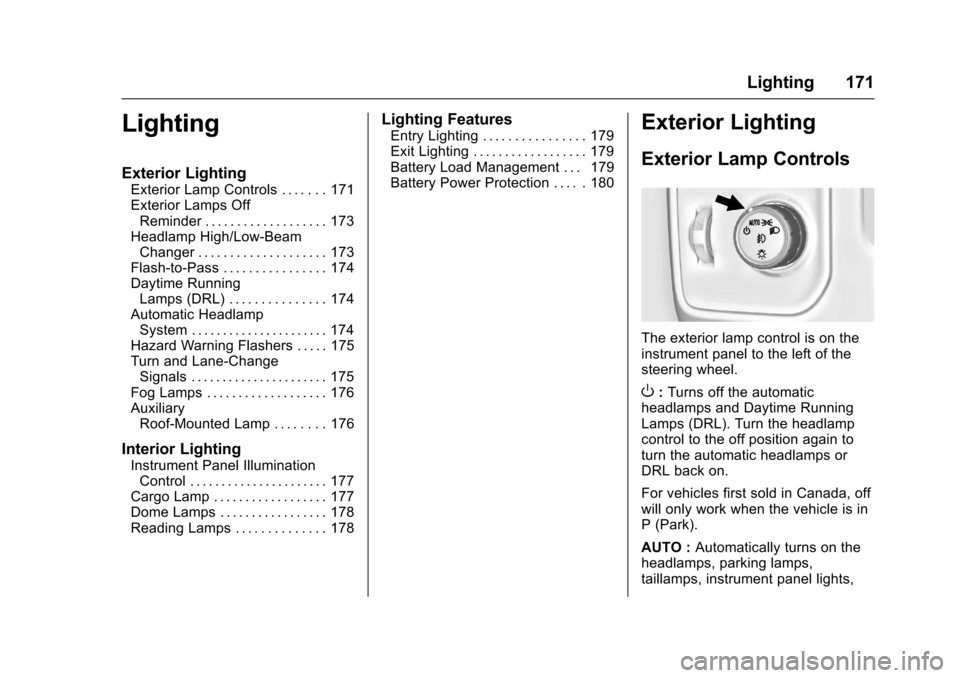
The exterior lamp control is on theinstrument panel to the left of thesteering wheel.
O:Turns off the automaticheadlamps and Daytime RunningLamps (DRL). Turn the headlampcontrol to the off position again toturn the automatic headlamps orDRL back on.
For vehicles first sold in Canada, offwill only work when the vehicle is inP(Park).
AUTO :Automatically turns on theheadlamps, parking lamps,taillamps, instrument panel lights,
Page 252 of 509
Chevrolet Silverado Owner Manual (GMNA-Localizing-U.S./Canada/Mexico-9956065) - 2017 - CRC - 4/29/16
Driving and Operating 251
The vehicle may straighten out.Be ready for a second skid if itoccurs.
.Slow down and adjust yourdriving according to weatherconditions. Stopping distancecan be longer and vehiclecontrol can be affected whentraction is reduced by water,snow, ice, gravel, or othermaterial on the road. Learn torecognize warning clues—suchas enough water, ice, or packedsnow on the road to make amirrored surface—and slowdown when you have any doubt.
.Try to avoid sudden steering,acceleration, or braking,including reducing vehicle speedby shifting to a lower gear. Anysudden changes could causethe tires to slide.
Remember: Antilock brakes helpavoid only the braking skid.
Off-Road Driving
Four-wheel-drive vehicles can beused for off-road driving. Vehicleswithout four-wheel drive and
vehicles not equipped with AllTe r r a i n ( AT ) o r O n - O f f R o a d ( O O R )tires must not be driven off-roadexcept on a level, solid surface. Forcontact information about theoriginal equipment tires, see thewarranty manual.
One of the best ways for successfuloff-road driving is to control thespeed.
{Warning
When driving off-road, bouncing
and quick changes in direction
can easily throw you out of
position. This could cause you to
lose control and crash. You and
your passengers should always
wear safety belts.
Before Driving Off-Road
.Have all necessary maintenanceand service work completed.
.Fuel the vehicle, fill fluid levels,and check inflation pressure inall tires, including the spare,if equipped.
.Read all the information aboutfour-wheel-drive vehicles in thismanual.
.Remove any underbody airdeflector, if equipped. Re-attachthe air deflector after off-roaddriving.
.SeeHill Descent Control(HDC)0297
.Know the local laws that apply tooff-road driving.
To g a i n m o r e g r o u n d c l e a r a n c e i fneeded, it may be necessary toremove the front fascia lower airdam. However, driving without theair dam reduces fuel economy.
Caution
Operating the vehicle for
extended periods without the front
fascia lower air dam installed can
cause improper airflow to the
engine. Reattach the front fascia
air dam after off-road driving.
Page 255 of 509
Chevrolet Silverado Owner Manual (GMNA-Localizing-U.S./Canada/Mexico-9956065) - 2017 - CRC - 4/29/16
254 Driving and Operating
.Never back down a hill inN(Neutral)usingonlythebrake. The vehicle can rollbackward quickly and youcould lose control.
.If driving downhill when thevehicle stalls, shift to alower gear, release theparking brake, and drivestraight down the hill.
3. If the vehicle cannot berestarted after stalling, set theparking brake, shift intoP(Park),andturnthevehicle off.
3.1. Leave the vehicle andseek help.
3.2. Stay clear of the path thevehicle would take if itrolled downhill.
.Avoid turns that take the vehicleacross the incline of the hill.Ahillthatcanbedrivenstraightup or down might be too steep todrive across. Driving across anincline puts more weight on the
downhill wheels, which couldcause a downhill slide or arollover.
.Surface conditions can be aproblem. Loose gravel, muddyspots, or even wet grass cancause the tires to slip sideways,downhill. If the vehicle slipssideways, it can hit somethingthat will trip it—arock,arut,etc.—and roll over.
.Hidden obstacles can make thesteepness of the incline moresevere. If a rock is driven acrosswith the uphill wheels, or if thedownhill wheels drop into a rutor depression, the vehicle can tilteven more.
.If an incline must be drivenacross, and the vehicle starts toslide, turn downhill. This shouldhelp straighten out the vehicleand prevent the side slipping.
{Warning
Getting out of the vehicle on the
downhill side when stopped
across an incline is dangerous.
If the vehicle rolls over, you could
be crushed or killed. Always get
out on the uphill side of the
vehicle and stay well clear of the
rollover path.
Driving in Mud, Sand, Snow,
or Ice
Use a low gear when driving inmud—the deeper the mud, thelower the gear. Keep the vehiclemoving to avoid getting stuck.
Traction changes when driving onsand. On loose sand, such as onbeaches or sand dunes, the tirestend to sink into the sand. Thisaffects steering, accelerating, andbraking. Drive at a reduced speedand avoid sharp turns or abruptmaneuvers.
Page 271 of 509
Chevrolet Silverado Owner Manual (GMNA-Localizing-U.S./Canada/Mexico-9956065) - 2017 - CRC - 4/29/16
270 Driving and Operating
Caution
If you add electrical parts or
accessories, you could change
the way the engine operates. Any
resulting damage would not be
covered by the vehicle warranty.
SeeAdd-On Electrical
Equipment0345.
Caution
If the steering wheel is turned
until it reaches the end of its
travel, and is held in that position
while starting the vehicle, damage
may occur to the power steering
system and there may be loss of
power steering assist.
Place the transmission in theproper gear.
Automatic Transmission
Move the shift lever to P (Park) orN(Neutral). To restart the enginewhen the vehicle is already moving,use N (Neutral) only.
Caution
Do not try to shift to P (Park) if the
vehicle is moving. If you do, you
could damage the transmission.
Shift to P (Park) only when the
vehicle is stopped.
Manual Transmission
The shift lever should be in Neutraland the parking brake engaged.Hold the clutch pedal down to thefloor and start the engine.
Starting Procedure
1. With your foot off theaccelerator pedal, turn theignition key to START. Whenthe engine starts, let go of thekey. The idle speed will godown as the engine gets warm.Do not race the engineimmediately after starting it.
Operate the engine andtransmission gently to allow theoil to warm up and lubricate allmoving parts.
When the low fuel warning lightis on and the FUEL LEVELLOW message is displayed inthe Driver Information Center(DIC), hold the ignition switchin the START position tocontinue engine cranking.
Caution
Cranking the engine for long
periods of time, by returning the
ignition to the START position
immediately after cranking has
ended, can overheat and damage
the cranking motor, and drain the
battery. Wait at least 15 seconds
between each try, to let the
cranking motor cool down.
2. If the engine does not startafter five to 10 seconds,especially in very cold weather(below✓18 °C or 0 °F), it couldbe flooded with too much
Page 293 of 509
Chevrolet Silverado Owner Manual (GMNA-Localizing-U.S./Canada/Mexico-9956065) - 2017 - CRC - 4/29/16
292 Driving and Operating
10. Turn the ignition to LOCK/OFF.
Shifting Out of N (Neutral)
To s h i f t o u t o f N ( N e u t r a l ) :
1. Set the parking brake andapply the brake pedal.
2. Turn the ignition to ON/RUNwith the engine off.
3. Shift the transmission toN(Neutral).
4. Turn the transfer case knob tothe desired setting.
After the transfer case hasshifted out of N (Neutral), theN(Neutral) light will goout.
5. Release the parking brake.
6. Start the engine and shift thetransmission to thedesired gear.
Brakes
Antilock Brake
System (ABS)
This vehicle has an Antilock BrakeSystem (ABS), an advancedelectronic braking system that helpsprevent a braking skid.
When the vehicle begins to driveaway, ABS checks itself.Amomentarymotororclickingnoisemay be heard while this test is goingon, and it may even be noticed thatthe brake pedal moves a little. Thisis normal.
If there is a problem with ABS, thiswarning light stays on. SeeAntilockBrake System (ABS) WarningLight0141.
If driving safely on a wet road and itbecomes necessary to slam on thebrakes and continue braking toavoid a sudden obstacle, acomputer senses the wheels areslowing down. If one of the wheelsis about to stop rolling, the computerwill separately work the brakes ateach wheel.
ABS can change the brake pressureto each wheel, as required, fasterthan any driver could. This can helpyou steer around the obstacle whilebraking hard.
As the brakes are applied, thecomputer keeps receiving updateson wheel speed and controlsbraking pressure accordingly.
Remember: ABS does not changethe time needed to get a foot up tothe brake pedal or always decreasestopping distance. If you get tooclose to the vehicle in front of you,there will not be enough time toapply the brakes if that vehiclesuddenly slows or stops. Alwaysleave enough room up ahead tostop, even with ABS.
Page 299 of 509
Chevrolet Silverado Owner Manual (GMNA-Localizing-U.S./Canada/Mexico-9956065) - 2017 - CRC - 4/29/16
298 Driving and Operating
When enabled, if the vehicle is at aspeed above 22 km/h (14 mph) andless than 60 km/h (37 mph), a DICmessage will display. SeeVehicleSpeed Messages0160.
Locking Rear Axle
Vehicles with a locking rear axle cangive more traction on snow, mud,ice, sand, or gravel. It works like astandard axle most of the time, butwhen traction is low, this feature willallow the rear wheel with the mosttraction to move the vehicle.
Cruise Control
{Warning
Cruise control can be dangerous
where you cannot drive safely at
asteadyspeed.Donotuse
cruise control on winding roads or
in heavy traffic.
Cruise control can be dangerous
on slippery roads. On such roads,
fast changes in tire traction can
cause excessive wheel slip, and
you could lose control. Do not use
cruise control on slippery roads.
With cruise control a speed of about40 km/h (25 mph) or more can bemaintained without keeping yourfoot on the accelerator. Cruisecontrol does not work at speedsbelow about 40 km/h (25 mph).
If equipped with an Allison orHydra-Matic 6-speed automatictransmission, see“To w / H a u l M o d eGrade Braking”underTo w / H a u lMode0282for an explanation of
how cruise control interacts with theRange Selection Mode, Tow/HaulMode, and Grade Braking systems.
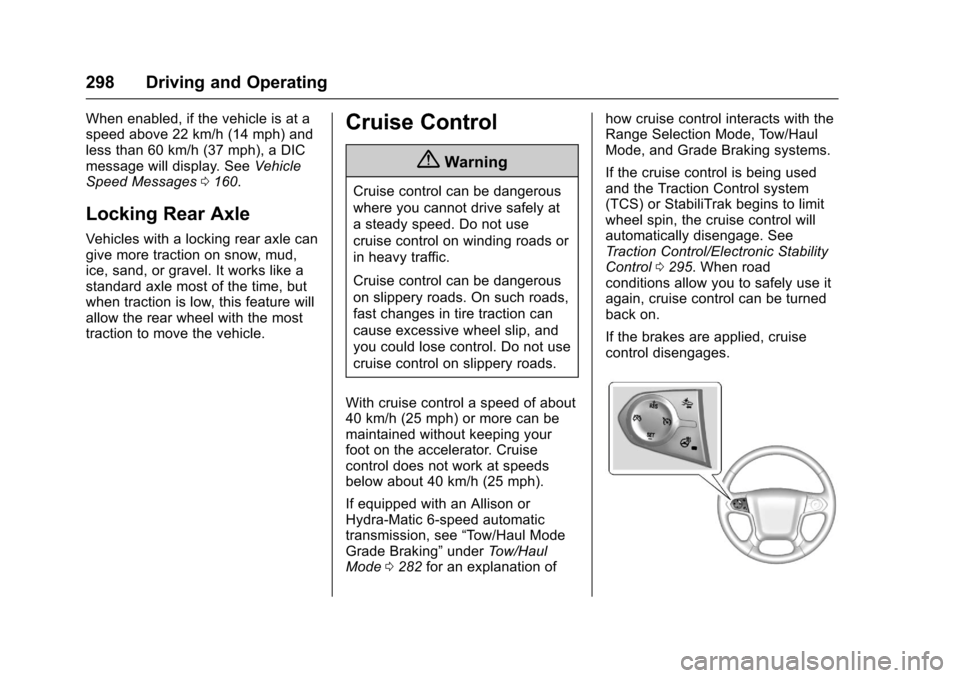
If the cruise control is being usedand the Traction Control system(TCS) or StabiliTrak begins to limitwheel spin, the cruise control willautomatically disengage. SeeTr a c t i o n C o n t r o l / E l e c t r o n i c S t a b i l i t yControl0295.Whenroadconditions allow you to safely use itagain, cruise control can be turnedback on.
If the brakes are applied, cruisecontrol disengages.
Page 311 of 509
Chevrolet Silverado Owner Manual (GMNA-Localizing-U.S./Canada/Mexico-9956065) - 2017 - CRC - 4/29/16
310 Driving and Operating
{Warning
Using LKA while towing a trailer
or on slippery roads could cause
loss of control of the vehicle and
acrash.Turnthesystemoff.
How the System Works
The LKA camera sensor is on thewindshield ahead of the rearviewmirror.
To t u r n L K A o n a n d o f f , p r e s sA
on the center stack.
When on,Ais green if LKA is
available to assist and provide LDWalerts. It may assist by gentlyturning the steering wheel and
displayAas amber if the vehicle
approaches a detected lane markingwithout using a turn signal in thatdirection. It may also provide an
LDW alert by flashingAamber
as the lane marking is crossed.Additionally, there will be threebeeps, or the driver seat will pulse
three times, on the right or left,depending on the lane departuredirection.
The LKA system does notcontinuously steer the vehicle.If LKA does not detect active driversteering, an alert and chime may beprovided. Move the steering wheelto dismiss.
When the System Does Not
Seem to Work Properly
The system performance may beaffected by:
.Close vehicles ahead.
.Sudden lighting changes, suchas when driving through tunnels.
.Banked roads.
.Roads with poor lane markings,such as two-lane roads.
If the LKA system is not functioningproperly when lane markings areclearly visible, cleaning thewindshield may help.
LKA assistance and/or LDW alertsmay occur due to tar marks,shadows, cracks in the road,temporary or construction lanemarkings, or other roadimperfections. This is normal systemoperation; the vehicle does not needservice. Turn LKA off if theseconditions continue.
Page 320 of 509
Chevrolet Silverado Owner Manual (GMNA-Localizing-U.S./Canada/Mexico-9956065) - 2017 - CRC - 4/29/16
Driving and Operating 319
Caution (Continued)
vehicle warranty. To pull a trailer
correctly, follow the advice in this
section and see your dealer for
important information about
towing a trailer with the vehicle.
SeeVehicle Load Limits0259formore information about the vehicle'smaximum load capacity.
To i d e n t i f y t h e t r a i l e r i n g c a p a c i t y o fthe vehicle, read the information in“Weight of the Trailer”later in thissection.
Trailering is different than justdriving the vehicle by itself.Trailering means changes inhandling, acceleration, braking,durability, and fuel economy.Successful, safe trailering takescorrect equipment, and it has to beused properly.
The following information has manytime-tested, important trailering tipsand safety rules. Many of these are
important for your safety and that ofyour passengers. Read this sectioncarefully before pulling a trailer.
Weight of the Trailer
Safe trailering requires monitoringthe weight, speed, altitude, roadgrades, outside temperature, andhow frequently the vehicle is used topull a trailer. Take into considerationany special equipment on thevehicle, and the amount of tongueweight the vehicle can carry. See“Weight of the Trailer Tongue”laterin this section for more information.
Trailer weight rating (TWR) forpickup models is calculatedassuming the tow vehicle has thedriver, a front seat passenger, andall required trailering equipment.Weight of additional optionalequipment, passengers, and cargoin the tow vehicle must besubtracted from the trailer weightrating.
Ask your dealer for traileringinformation or advice.
For kingpin weight and trailertongue weight information, see“Weight of the Trailer Tongue”laterin this section.
Use the following chart to determinehow much the vehicle can weigh,based upon the vehicle model andoptions.
Weights listed apply forconventional trailers andgooseneck/fifth-wheel trailers unlessotherwise noted.
Page 343 of 509
Chevrolet Silverado Owner Manual (GMNA-Localizing-U.S./Canada/Mexico-9956065) - 2017 - CRC - 4/29/16
342 Driving and Operating
.There is a fault present in thewiring to the trailer brakes (aCHECK TRAILER WIRINGmessage will also display onthe DIC).
.The ITBC system is not workingdue to a fault (a SERVICETRAILER BRAKE SYSTEMmessage will also display inthe DIC).
Manual Trailer Brake Apply
The Manual Trailer Brake ApplyLever is used to apply the trailer’selectric brakes independent of thevehicle’sbrakes.Slidingthelevertothe left will apply only the trailerbrakes. Use this lever to adjustTrailer Gain to properly adjust thepower output to the trailer brakes.
The trailer's and the vehicle's brakelamps will come on when eithervehicle brakes or manual trailerbrakes are applied.
Trailer Gain Adjustment Procedure
Trailer Gain should be set for aspecific trailering condition and mustbe adjusted anytime vehicle loading,trailer loading, or road surfaceconditions change.
{Warning
Trailer brakes that are
over-gained or under-gained may
not stop the vehicle and the trailer
as intended and can result in a
crash. Always follow the
instructions to set the Trailer Gain
for the proper trailer stopping
performance.
Use the following to adjust TrailerGain for each towing condition:
1. Drive the vehicle with the trailerattached on a level roadsurface representative of thetowing condition and free oftraffic at about 32 to 40 km/h(20 to 25 mph) and fully applythe Manual Trailer Brake ApplyLever.
Adjusting Trailer Gain atspeeds lower than 32 to40 km/h (20 to 25 mph) mayresult in an incorrect gainsetting.
2. Adjust the Trailer Gain, usingthe Trailer Gain AdjustmentButtons, to just below the pointof trailer wheel lock-up,indicated by trailer wheelsqueal or tire smoke when atrailer wheel locks.
Trailer wheel lock-up may notoccur if towing a heavily loadedtrailer. In this case, adjust theTrailer Gain to the highestallowable setting for the towingcondition.
3. Readjust Trailer Gain anytimevehicle loading, trailer loading,or road surface conditionschange or if trailer wheellock-up is noticed at any timewhile towing.
Page 378 of 509
Chevrolet Silverado Owner Manual (GMNA-Localizing-U.S./Canada/Mexico-9956065) - 2017 - CRC - 4/29/16
Vehicle Care 377
Caution
Continuing to drive with worn-out
brake pads could result in costly
brake repair.
Some driving conditions or climatescan cause a brake squeal when thebrakes are first applied or lightlyapplied. This does not meansomething is wrong with the brakes.
Properly torqued wheel nuts arenecessary to help prevent brakepulsation. When tires are rotated,inspect brake pads for wear andevenly tighten wheel nuts in theproper sequence to torquespecifications inCapacities andSpecifications0468.
Brake linings should always bereplaced as complete axle sets.
Brake Pedal Travel
See your dealer if the brake pedaldoes not return to normal height,or if there is a rapid increase inpedal travel. This could be a signthat brake service may be required.
Replacing Brake System Parts
Always replace brake system partswith new, approved replacementparts. If this is not done, the brakesmay not work properly. The brakingperformance expected can changein many other ways if the wrongreplacement brake parts areinstalled or parts are improperlyinstalled.
Brake Fluid
The brake master cylinder reservoiris filled with DOT 3 brake fluid. SeeEngine Compartment Overview0354for the location of thereservoir.
There are only two reasons why thebrake fluid level in the reservoir maygo down:
.Normal brake lining wear. Whennew linings are installed, thefluid level goes back up.
.Afluidleakinthebrakehydraulic system. Have thebrake hydraulic system fixed.With a leak, the brakes will notwork well.
Always clean the brake fluidreservoir cap and the area aroundthe cap before removing it.
Do not top off the brake fluid.Adding fluid does not correct a leak.If fluid is added when the linings areworn, there will be too much fluidwhen new brake linings areinstalled. Add or remove fluid, asnecessary, only when work is doneon the brake hydraulic system.
{Warning
If too much brake fluid is added, it
can spill on the engine and burn,
if the engine is hot enough. You
or others could be burned, and
the vehicle could be damaged.
(Continued)