climate control CHEVROLET SILVERADO 2017 3.G User Guide
[x] Cancel search | Manufacturer: CHEVROLET, Model Year: 2017, Model line: SILVERADO, Model: CHEVROLET SILVERADO 2017 3.GPages: 509, PDF Size: 8.87 MB
Page 116 of 509
Chevrolet Silverado Owner Manual (GMNA-Localizing-U.S./Canada/Mexico-9956065) - 2017 - CRC - 4/29/16
Storage 115
Storage
Storage Compartments
Storage Compartments . . . . . . . 115Instrument Panel Storage . . . . . 115Glove Box . . . . . . . . . . . . . . . . . . . . 115Cupholders . . . . . . . . . . . . . . . . . . . 116Sunglasses Storage . . . . . . . . . . 116Center Console Storage . . . . . . 116Floor Console Storage . . . . . . . . 117
Additional Storage Features
Cargo Tie-Downs . . . . . . . . . . . . . 117
Storage
Compartments
{Warning
Do not store heavy or sharp
objects in storage compartments.
In a crash, these objects may
cause the cover to open and
could result in injury.
Instrument Panel Storage
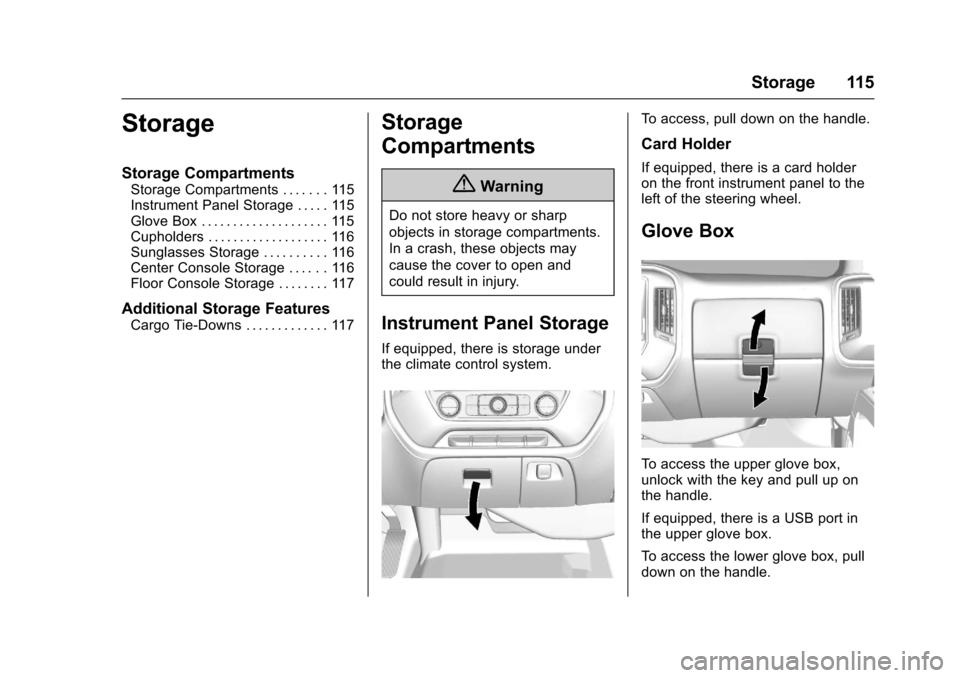
If equipped, there is storage underthe climate control system.
To a c c e s s , p u l l d o w n o n t h e h a n d l e .
Card Holder
If equipped, there is a card holderon the front instrument panel to theleft of the steering wheel.
Glove Box
To a c c e s s t h e u p p e r g l o v e b o x ,unlock with the key and pull up onthe handle.
If equipped, there is a USB port inthe upper glove box.
To a c c e s s t h e l o w e r g l o v e b o x , p u l ldown on the handle.
Page 125 of 509
Chevrolet Silverado Owner Manual (GMNA-Localizing-U.S./Canada/Mexico-9956065) - 2017 - CRC - 4/29/16
124 Instruments and Controls
1. Touch the SETTINGS screenbutton from the Home Page,then touch Time and Date.
2. Touch Set Date and touch«
orªto increase or decrease
month, day, or year.
3. Touch the}or0screen
button to go back to theprevious menu.
To s e t t h e c l o c k d i s p l a y :
1. Touch the SETTINGS screenbutton and touch Timeand Date.
2. Touch Clock Display and touchOFF or ON to turn the clockdisplay off or on.
3. Touch the}or0screen
button to go back to theprevious menu.
Power Outlets
Power Outlets 12 Volt DirectCurrent
Accessory power outlets can beused to plug in electrical equipment,such as a cell phone, MP3player, etc.
The vehicle may have up to fouraccessory power outlets.
Vehicles with a Center Console
.One or two in front of thecupholders on the centerconsole.
.One inside the center console.
.One on the rear of the centerconsole.
Vehicles with Bench Seats
.One on the center stack belowthe climate control system.
.One or two in the storage areaon the bench seat.
Lift the cover to access and replacewhen not in use.
The power outlets on the centerstack and in front of the cupholdersare powered at all times. The poweroutlets inside the storage area andon the rear of the console arepowered when the ignition is in ON/RUN or ACC/ACCESSORY,or when RAP is active.
{Warning
Power is always supplied to the
outlets. Do not leave electrical
equipment plugged in when the
vehicle is not in use because the
vehicle could catch fire and cause
injury or death.
Caution
Leaving electrical equipment
plugged in for an extended period
of time while the vehicle is off will
drain the battery. Always unplug
electrical equipment when not in
use and do not plug in equipment
that exceeds the maximum
15 amp rating.
Page 151 of 509
Chevrolet Silverado Owner Manual (GMNA-Localizing-U.S./Canada/Mexico-9956065) - 2017 - CRC - 4/29/16
150 Instruments and Controls
OUTPUT shows the power output tothe trailer anytime a trailer withelectric brakes is connected. Outputis displayed as a bar graph. Dashesmay appear in the OUTPUT displayif a trailer is not connected.
Off Road :Displays vehicle pitchand roll information, road wheelangle, and four-wheel drive (4WD)status.
Blank Page :Shows noinformation.
Vehicle Messages
Messages displayed on the DICindicate the status of the vehicle orsome action that may be needed tocorrect a condition. Multiplemessages may appear one afteranother.
The messages that do not requireimmediate action can beacknowledged and cleared by
pressingVor the trip odometer
reset stem on the base cluster.
The messages that requireimmediate action cannot be cleareduntil that action is performed.
All messages should be takenseriously and clearing the messagedoes not correct the problem.
The following are the possiblemessages and some informationabout them.
If the vehicle has a diesel engine,see the Duramax dieselsupplement.
Battery Voltage and
Charging Messages
BATTERY LOW START
VEHICLE
When the vehicle’sbatteryisseverely discharged, this messagewill display and four chimes willsound. Start the vehicleimmediately. If the vehicle is notstarted and the battery continues todischarge, the climate controls,heated seats, and audio systemswill shut off and the vehicle mayrequire a jump start. These systemswill function again after the vehicleis started.
BATTERY SAVER ACTIVE
This message displays when thebattery voltage drops belowexpected levels and features aredisabled. Turn off all unnecessaryaccessory features.
Page 163 of 509
Chevrolet Silverado Owner Manual (GMNA-Localizing-U.S./Canada/Mexico-9956065) - 2017 - CRC - 4/29/16
162 Instruments and Controls
Radio
Select and the following maydisplay:
.Manage Favorites
.Number of Favorites Shown
.Audible Touch Feedback
.Te x t S c r o l l
.To n e S e t t i n g s
.Auto Volume
.Maximum Startup Volume
.Audio Cue Volume
Manage Favorites
This allows favorites to be edited.See“Manage Favorites”in“RadioSetup”underHome Page (BaseRadio)0186orHome Page (BaseRadio with Touchscreen)0188or“Manage Favorites”in“Settings”under“Radio”in the infotainmentmanual.
Number of Favorites Shown
Select to set the number of favoritesto display.
Select the desired number or selectAuto and the infotainment systemwill automatically adjust the numberof favorites shown.
Audible Touch Feedback
This allows Audible TouchFeedback to be turned on or off.
Select Off or On.
Text Scroll
Select to see text scroll on thescreen.
Select Off or On.
Tone Settings
Select to adjust the radio tone. See“To n e S e t t i n g s”inAM-FM Radio(Base Radio with Touchscreen)0191orAM-FM Radio (BaseRadio)0189.
Auto Volume
This feature adjusts the volumebased on vehicle speed andambient noise.
Select Off, Low, Medium-Low,Medium, Medium-High, or High.
Maximum Startup Volume
This feature sets the maximumstartup volume. If the vehicle isstarted and the volume is greaterthan this level, the volume isadjusted to this level. To set themaximum startup volume, turn theMENU knob or press + or✓toincrease or decrease.
Audio Cue Volume
This feature sets the volume ofaudio files played at system startupand shutdown.
Select On, then press + or✓toincrease or decrease the volume.
Vehicle
Select and the following maydisplay:
.Climate and Air Quality
.Collision/Detection Systems
.Comfort and Convenience
.Lighting
.Power Door Locks
.Remote Lock, Unlock, Start
Page 164 of 509
Chevrolet Silverado Owner Manual (GMNA-Localizing-U.S./Canada/Mexico-9956065) - 2017 - CRC - 4/29/16
Instruments and Controls 163
Climate and Air Quality
Select and the following maydisplay:
.Auto Fan Max Speed
.Auto Rear Defog
Auto Fan Max Speed
This feature will set the maximumauto fan speed.
Select Low, Medium, or High.
Auto Rear Defog
This feature will automatically turnon the rear defogger when it is coldoutside.
Select Off or On.
Collision/Detection Systems
Select and the following maydisplay:
.Alert Type
.Park Assist
Alert Type
This feature will set crash alerts tobeeps or seat vibrations. Thissetting affects all crash alerts
including Forward Collision, LaneDeparture Warning, and Park Assistalerts.
Select Beeps or Safety Alert Seat.
Park Assist
If equipped, this feature can assistin backing up and parking thevehicle. SeeAssistance Systems forParking or Backing0302.
Select Off, On, or On with Towbar.
Comfort and Convenience
Select and the following maydisplay:
.Auto Memory Recall
.Easy Exit Options
.Chime Volume
.Reverse Tilt Mirror
.Auto Mirror Folding
Auto Memory Recall
This feature automatically recallsthe current driver’spreviouslystored1or2buttonpositionswhenentering the vehicle. SeeMemorySeats061.
Select On or Off.
Easy Exit Options
This feature moves the seatrearward automatically allowing thedriver more room to exit the vehicle.SeeMemory Seats061.
Select On or Off.
Chime Volume
This allows the selection of thechime volume level.
Turn the MENU knob, touch + or✓to adjust the volume, or selectNormal or High.
Reverse Tilt Mirror
When on, the driver and/orpassenger mirrors will tilt downwardwhen the vehicle is shifted toR(Reverse)toimprovevisibilityofthe ground near the rear wheels.
Select Off, On - Driver andPassenger, On - Driver, or On -Passenger.
Page 180 of 509
Chevrolet Silverado Owner Manual (GMNA-Localizing-U.S./Canada/Mexico-9956065) - 2017 - CRC - 4/29/16
Lighting 179
Lighting Features
Entry Lighting
Some exterior lamps and the interiorlamps turn on briefly at night, or in
areas with limited lighting, whenK
is pressed on the Remote KeylessEntry (RKE) transmitter. When adoor is opened, the interior lampscome on if the dome lamp control isin the DOOR position. After about30 seconds the exterior lamps turnoff. Entry lighting can be disabledmanually by changing the ignitionout of the OFF position, or by
pressing the RKE transmitterQ
button.
This feature can be changed. See“Ve h i c l e L o c a t o r L i g h t s”underVehicle Personalization0160.
Exit Lighting
Some exterior lamps and the interiorlamps come on at night, or in areaswith limited lighting when the key isremoved from the ignition. Theexterior and interior lamps remainon for a set amount of time and then
automatically turn off. The interiorlamps do not come on if the domelamp control is in the Off position.
The exterior lamps turn offimmediately by turning the exteriorlamps control off.
This feature can be changed. SeeVehicle Personalization0160.
Battery Load
Management
The vehicle has Electric PowerManagement (EPM), whichestimates the battery's temperatureand state of charge. It then adjuststhe voltage for best performanceand extended life of the battery.
When the battery's state of chargeis low, the voltage is raised slightlyto quickly bring the charge back up.When the state of charge is high,the voltage is lowered slightly toprevent overcharging. The voltmetergauge or the voltage display on theDriver Information Center (DIC),if equipped, may show the voltage
moving up or down. This is normal.If there is a problem, an alert will bedisplayed.
The battery can be discharged atidle if the electrical loads are veryhigh. This is true for all vehicles.This is because the generator(alternator) may not be spinning fastenough at idle to produce all thepower that is needed for very highelectrical loads.
Ahighelectricalloadoccurswhenseveral of the following are on, suchas: headlamps, high beams, foglamps, rear window defogger,climate control fan at high speed,heated seats, engine cooling fans,trailer loads, and loads plugged intoaccessory power outlets.
EPM works to prevent excessivedischarge of the battery. It does thisby balancing the generator's outputand the vehicle's electrical needs.It can increase engine idle speed togenerate more power, wheneverneeded. It can temporarily reducethe power demands of someaccessories.
Page 190 of 509
Chevrolet Silverado Owner Manual (GMNA-Localizing-U.S./Canada/Mexico-9956065) - 2017 - CRC - 4/29/16
Infotainment System 189
Phone :To u c h t o a c t i v a t e t h ephone features (if equipped). SeeBluetooth (Voice Recognition - BaseRadio)0221orBluetooth(Infotainment Controls - BaseRadio)0217orBluetooth(Overview)0216orBluetooth(Infotainment Controls - Base Radiowith Touchscreen)0226.
Projection :To u c h t o a c c e s ssupported devices when connected.SeeUSB Port (Base Radio)0199orUSB Port (Base Radio withTo u c h s c r e e n )0201.
Settings :To u c h t o a c c e s s t h ePersonalization menu. SeeVehiclePersonalization0160.
Climate :To u c h t o a c c e s s t h eClimate menu. SeeDual AutomaticClimate Control System0240.
OnStar :If equipped, touch toaccess the OnStar menu. SeeOnStar Overview0486.
Software Updates
See the website for moreinformation.
Website Information
In the U.S., see www.chevrolet.com
In Canada, seewww.chevrolet.gm.ca
In Mexico, seewww.chevrolet.com.mx
Radio
AM-FM Radio (Base
Radio)
Playing the Radio
While on the audio main page,press the RADIO button repeatedlyto cycle through the availablesources AM, FM, and SiriusXM®(ifequipped) or press the MEDIAbutton repeatedly to cycle throughthe available sources Bluetooth®
Audio (if equipped), USB, and AUX.
The steering wheel controls canalso be used to adjust the volume.SeeSteering Wheel Controls0121.
AM, FM, or SiriusXM (If Equipped)
To s e l e c t A M , F M , o r S i r i u s X M ( i fequipped), press the RADIO buttonto toggle to the desired broadcastsource.
Page 202 of 509
Chevrolet Silverado Owner Manual (GMNA-Localizing-U.S./Canada/Mexico-9956065) - 2017 - CRC - 4/29/16
Infotainment System 201
Artists:
1. Turn MENU to highlight andpress to view the artists storedon the device.
2. Turn MENU to highlight andpress to select an artist nameto view a list of all albums bythe artist.
3. Turn MENU to highlight andpress to select an album nameto view a list of all songs on thealbum.
4. Turn MENU to highlight andpress to select the song fromthe list to begin playback.
Albums:
1. Turn MENU to highlight andpress to view the albumsstored on the device.
2. Turn MENU to highlight andpress to select an album nameto view a list of all songs on thealbum.
3. Turn MENU to highlight andpress to select the song fromthe list to begin playback.
Genres:
1. Turn MENU to highlight andpress to view the genres storedon the device.
2. Turn MENU to highlight andpress to select a genre nameto view a list of artists of thatgenre.
3. Turn MENU to highlight andpress to select to view albumsby that artist.
4. Turn MENU to highlight andpress to select an album toview songs.
5. Turn MENU to highlight andpress to select the song fromthe list to begin playback.
Songs:
1. Turn MENU to highlight andpress to view a list of all songsstored on the device.
2. Turn MENU to highlight andpress to select the song fromthe list to begin playback.
USB Port (Base Radio
with Touchscreen)
Using the USB Port
The infotainment system can playmusic by connecting an auxiliarydevice to the USB port.
USB Support
If equipped, the USB connector is inthe center stack below the climatecontrols, and uses the USB 2.0standard.
USB Supported Devices
.USB Flash Drives
.Portable USB Hard Drives
Not all iPods and USB drives arecompatible with the USB port.
Make sure the iPod has the latestfirmware from Apple®for properoperation. iPod firmware can beupdated using the latest iTunes®
application. See www.apple.com/itunes.
For help with identifying your iPod,go to www.apple.com/support.
Page 238 of 509
Chevrolet Silverado Owner Manual (GMNA-Localizing-U.S./Canada/Mexico-9956065) - 2017 - CRC - 4/29/16
Climate Controls 237
Climate Controls
Climate Control Systems
Climate Control Systems (withHeater Only) . . . . . . . . . . . . . . . . 237Climate Control Systems (withAir Conditioning) . . . . . . . . . . . . 238Dual Automatic ClimateControl System . . . . . . . . . . . . . 240
Air Vents
Air Vents . . . . . . . . . . . . . . . . . . . . . 243
Maintenance
Passenger Compartment AirFilter . . . . . . . . . . . . . . . . . . . . . . . . 244Service . . . . . . . . . . . . . . . . . . . . . . . 245
Climate Control Systems
Climate Control Systems (with Heater Only)
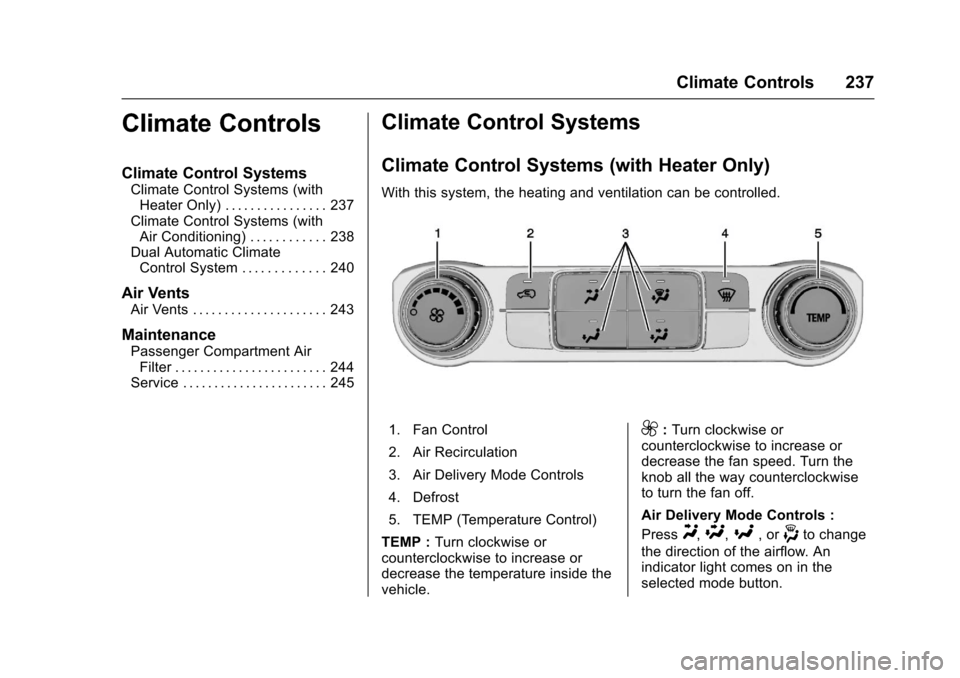
With this system, the heating and ventilation can be controlled.
1. Fan Control
2. Air Recirculation
3. Air Delivery Mode Controls
4. Defrost
5. TEMP (Temperature Control)
TEMP :Turn clockwise orcounterclockwise to increase ordecrease the temperature inside thevehicle.
9:Turn clockwise orcounterclockwise to increase ordecrease the fan speed. Turn theknob all the way counterclockwiseto turn the fan off.
Air Delivery Mode Controls :
PressY,\,[,or-to change
the direction of the airflow. Anindicator light comes on in theselected mode button.
Page 239 of 509
Chevrolet Silverado Owner Manual (GMNA-Localizing-U.S./Canada/Mexico-9956065) - 2017 - CRC - 4/29/16
238 Climate Controls
Y:Air is directed to the instrumentpanel outlets.
\:Air is divided between theinstrument panel and floor outlets.
[:Air is directed to the flooroutlets, with some air directed to thewindshield, side window, andsecond row floor outlets.
-:This mode clears the windowsof fog or moisture. Air is directed tothe windshield, floor outlets, andside window vents.
0:Press to clear the windshieldof fog or frost more quickly. Air isdirected to the windshield and theside window vents. The systemautomatically forces outside air intothe vehicle.
Do not drive the vehicle until all thewindows are clear.
SeeAir Vents0243.
@:Press to turn on recirculation.An indicator light comes on. Air isrecirculated to quickly cool theinside of the vehicle. It can also beused to help reduce outside air andodors that enter the vehicle.
Climate Control Systems (with Air Conditioning)
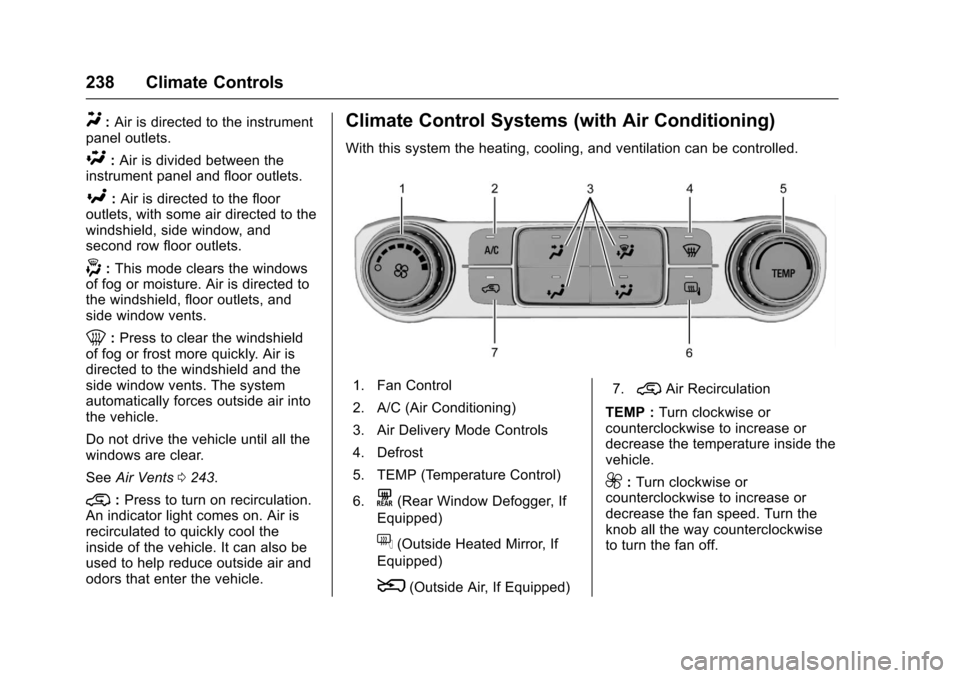
With this system the heating, cooling, and ventilation can be controlled.
1. Fan Control
2. A/C (Air Conditioning)
3. Air Delivery Mode Controls
4. Defrost
5. TEMP (Temperature Control)
6.K(Rear Window Defogger, If
Equipped)
f(Outside Heated Mirror, If
Equipped)
8(Outside Air, If Equipped)
7.@Air Recirculation
TEMP :Turn clockwise orcounterclockwise to increase ordecrease the temperature inside thevehicle.
9:Turn clockwise orcounterclockwise to increase ordecrease the fan speed. Turn theknob all the way counterclockwiseto turn the fan off.