lock CHEVROLET SILVERADO 2017 3.G User Guide
[x] Cancel search | Manufacturer: CHEVROLET, Model Year: 2017, Model line: SILVERADO, Model: CHEVROLET SILVERADO 2017 3.GPages: 509, PDF Size: 8.87 MB
Page 30 of 509
Chevrolet Silverado Owner Manual (GMNA-Localizing-U.S./Canada/Mexico-9956065) - 2017 - CRC - 4/29/16
In Brief 29
Sunroof
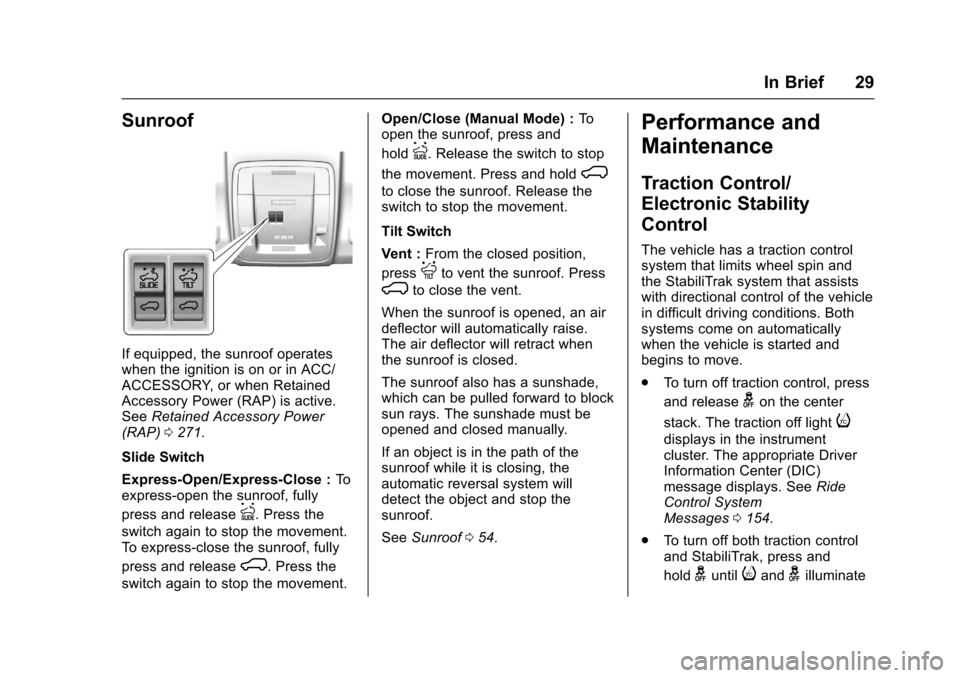
If equipped, the sunroof operateswhen the ignition is on or in ACC/ACCESSORY, or when RetainedAccessory Power (RAP) is active.SeeRetained Accessory Power(RAP)0271.
Slide Switch
Express-Open/Express-Close :Toexpress-open the sunroof, fully
press and releaseI.Pressthe
switch again to stop the movement.To e x p r e s s - c l o s e t h e s u n r o o f , f u l l y
press and releaseK.Pressthe
switch again to stop the movement.
Open/Close (Manual Mode) :Toopen the sunroof, press and
holdI.Releasetheswitchtostop
the movement. Press and holdK
to close the sunroof. Release theswitch to stop the movement.
Tilt Switch
Vent :From the closed position,
pressJto vent the sunroof. Press
Kto close the vent.
When the sunroof is opened, an airdeflector will automatically raise.The air deflector will retract whenthe sunroof is closed.
The sunroof also has a sunshade,which can be pulled forward to blocksun rays. The sunshade must beopened and closed manually.
If an object is in the path of thesunroof while it is closing, theautomatic reversal system willdetect the object and stop thesunroof.
SeeSunroof054.
Performance and
Maintenance
Traction Control/
Electronic Stability
Control
The vehicle has a traction controlsystem that limits wheel spin andthe StabiliTrak system that assistswith directional control of the vehiclein difficult driving conditions. Bothsystems come on automaticallywhen the vehicle is started andbegins to move.
.To t u r n o f f t r a c t i o n c o n t r o l , p r e s s
and releasegon the center
stack. The traction off lighti
displays in the instrumentcluster. The appropriate DriverInformation Center (DIC)message displays. SeeRideControl SystemMessages0154.
.To t u r n o f f b o t h t r a c t i o n c o n t r o land StabiliTrak, press and
holdguntiliandgilluminate
Page 34 of 509
Chevrolet Silverado Owner Manual (GMNA-Localizing-U.S./Canada/Mexico-9956065) - 2017 - CRC - 4/29/16
Keys, Doors, and Windows 33
Keys, Doors, and
Windows
Keys and Locks
Keys . . . . . . . . . . . . . . . . . . . . . . . . . . . 33Remote Keyless Entry (RKE)System . . . . . . . . . . . . . . . . . . . . . . . 36Remote Keyless Entry (RKE)System Operation . . . . . . . . . . . . 36Remote Vehicle Start . . . . . . . . . . 38Door Locks . . . . . . . . . . . . . . . . . . . . 39Power Door Locks . . . . . . . . . . . . . 40Delayed Locking . . . . . . . . . . . . . . . 40Automatic Door Locks . . . . . . . . . 41Lockout Protection . . . . . . . . . . . . . 41Safety Locks . . . . . . . . . . . . . . . . . . . 41
Doors
Ta i l g a t e . . . . . . . . . . . . . . . . . . . . . . . . 4 2Power Assist Steps . . . . . . . . . . . . 42
Vehicle Security
Vehicle Security . . . . . . . . . . . . . . . . 43Vehicle Alarm System . . . . . . . . . 43Immobilizer . . . . . . . . . . . . . . . . . . . . 45Immobilizer Operation . . . . . . . . . 45
Exterior Mirrors
Convex Mirrors . . . . . . . . . . . . . . . . 46Manual Mirrors . . . . . . . . . . . . . . . . . 46Trailer-Tow Mirrors . . . . . . . . . . . . . 47Power Mirrors . . . . . . . . . . . . . . . . . . 47Folding Mirrors . . . . . . . . . . . . . . . . . 48Heated Mirrors . . . . . . . . . . . . . . . . . 49Automatic Dimming Mirror . . . . . 49Blind Spot Mirrors . . . . . . . . . . . . . . 49Reverse Tilt Mirrors . . . . . . . . . . . . 50
Interior Mirrors
Interior Rearview Mirrors . . . . . . . 50Manual Rearview Mirror . . . . . . . . 51Automatic Dimming RearviewMirror . . . . . . . . . . . . . . . . . . . . . . . . . 51
Windows
Windows . . . . . . . . . . . . . . . . . . . . . . . 51Manual Windows . . . . . . . . . . . . . . 51Power Windows . . . . . . . . . . . . . . . 51Rear Windows . . . . . . . . . . . . . . . . . 53Sun Visors . . . . . . . . . . . . . . . . . . . . . 54
Roof
Sunroof . . . . . . . . . . . . . . . . . . . . . . . . 54
Keys and Locks
Keys
{Warning
Leaving children in a vehicle with
the ignition key is dangerous and
children or others could be
seriously injured or killed. They
could operate the power windows
or other controls or make the
vehicle move. The windows will
function with the keys in the
ignition, and children or others
could be caught in the path of a
closing window. Do not leave
children in a vehicle with the
ignition key.
Page 36 of 509
Chevrolet Silverado Owner Manual (GMNA-Localizing-U.S./Canada/Mexico-9956065) - 2017 - CRC - 4/29/16
Keys, Doors, and Windows 35
Interference from radio-frequencyidentification (RFID) tags mayprevent the key from starting thevehicle. Keep RFID tags away fromthe key when starting the vehicle.
The key is used for the ignition, alldoor locks and glove box,if equipped.
Programming Keys
Follow these procedures to programup to eight keys to the vehicle.
Programming with TwoRecognized Keys
To p r o g r a m a n e w k e y :
1. Insert the original, alreadyprogrammed key in the ignitionand turn the key to the ON/RUN position.
2. Turn the key to LOCK/OFF,and remove the key.
3. Quickly, within five seconds,insert the second originalalready programmed key in theignition and turn the key to theON/RUN position.
4. Turn the key to LOCK/OFF,and remove the key.
5. Insert the key to beprogrammed and turn it to theON/RUN position withinfive seconds.
6. The security light will turn offonce the key has beenprogrammed.
7. Repeat Steps 1–5ifadditionalkeys are to be programmed.
If a key is lost or damaged, see yourdealer to have a new key made.
Programming withoutRecognized Keys
Program a new key to the vehiclewhen a recognized key is notavailable. Canadian regulationsrequire that owners see their dealer.
If two currently recognized keys arenot available, follow this procedureto program the first key.
This procedure will takeapproximately 30 minutes tocomplete for the first key. Thevehicle must be off and all of thekeys you wish to program must bewith you.
1. Insert the new vehicle key intothe ignition.
2. Turn to ON/RUN. The securitylight will come on.
3. Wait 10 minutes until thesecurity light turns off.
4. Turn the ignition to LOCK/OFF.
Page 37 of 509
Chevrolet Silverado Owner Manual (GMNA-Localizing-U.S./Canada/Mexico-9956065) - 2017 - CRC - 4/29/16
36 Keys, Doors, and Windows
5. Repeat Steps 2–4twomoretimes. After the third time, turnto ON/RUN; the key is learnedand all previously known keyswill no longer work with thevehicle.
6. To learn a second key, turn toOFF, insert the second key tobe learned, and rotate toON/RUN.
After two keys are learned, theremaining keys can be learned byfollowing the procedure in“Programming with TwoRecognized Keys.”
The key has a bar-coded key tagthat the dealer or qualified locksmithcan use to make new keys. Storethis information in a safe place, notin the vehicle.
See your dealer if a replacementkey or additional key is needed.
If it becomes difficult to turn a key,inspect the key blade for debris.Periodically clean with a brushor pick.
With an active OnStar subscription,an OnStar Advisor may remotelyunlock the vehicle. SeeOnStarOverview0486.
Remote Keyless Entry
(RKE) System
SeeRadio FrequencyStatement0482.
If there is a decrease in the RemoteKeyless Entry (RKE) operatingrange:
.Check the distance. Thetransmitter may be too far fromthe vehicle.
.Check the location. Othervehicles or objects may beblocking the signal.
.Check the transmitter's battery.See“Battery Replacement”laterin this section.
.If the transmitter is still notworking correctly, see yourdealer or a qualified technicianfor service.
Remote Keyless Entry
(RKE) System Operation
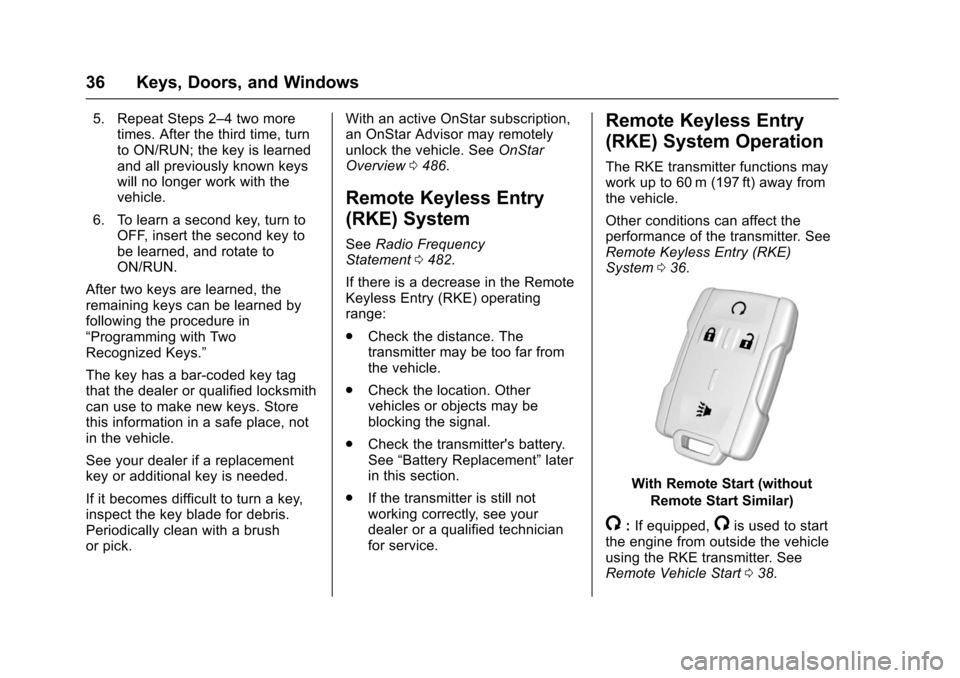
The RKE transmitter functions maywork up to 60 m (197 ft) away fromthe vehicle.
Other conditions can affect theperformance of the transmitter. SeeRemote Keyless Entry (RKE)System036.
With Remote Start (without
Remote Start Similar)
/:If equipped,/is used to startthe engine from outside the vehicleusing the RKE transmitter. SeeRemote Vehicle Start038.
Page 38 of 509
Chevrolet Silverado Owner Manual (GMNA-Localizing-U.S./Canada/Mexico-9956065) - 2017 - CRC - 4/29/16
Keys, Doors, and Windows 37
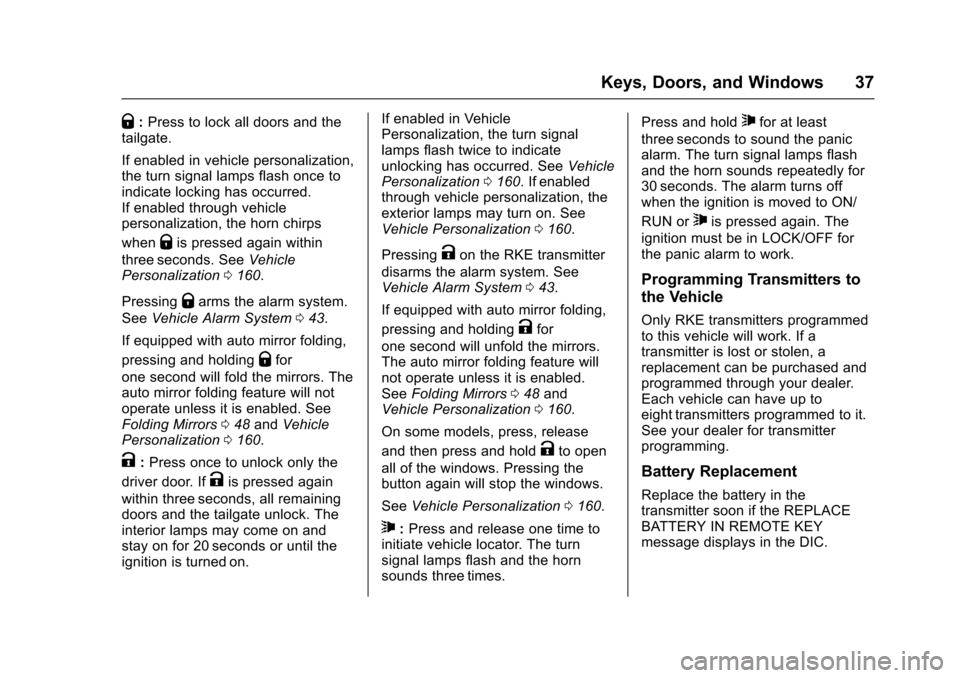
Q:Press to lock all doors and thetailgate.
If enabled in vehicle personalization,the turn signal lamps flash once toindicate locking has occurred.If enabled through vehiclepersonalization, the horn chirps
whenQis pressed again within
three seconds. SeeVehiclePersonalization0160.
PressingQarms the alarm system.
SeeVehicle Alarm System043.
If equipped with auto mirror folding,
pressing and holdingQfor
one second will fold the mirrors. Theauto mirror folding feature will notoperate unless it is enabled. SeeFolding Mirrors048andVehiclePersonalization0160.
K:Press once to unlock only the
driver door. IfKis pressed again
within three seconds, all remainingdoors and the tailgate unlock. Theinterior lamps may come on andstay on for 20 seconds or until theignition is turned on.
If enabled in VehiclePersonalization, the turn signallamps flash twice to indicateunlocking has occurred. SeeVehiclePersonalization0160.Ifenabledthrough vehicle personalization, theexterior lamps may turn on. SeeVehicle Personalization0160.
PressingKon the RKE transmitter
disarms the alarm system. SeeVehicle Alarm System043.
If equipped with auto mirror folding,
pressing and holdingKfor
one second will unfold the mirrors.The auto mirror folding feature willnot operate unless it is enabled.SeeFolding Mirrors048andVehicle Personalization0160.
On some models, press, release
and then press and holdKto open
all of the windows. Pressing thebutton again will stop the windows.
SeeVehicle Personalization0160.
7:Press and release one time toinitiate vehicle locator. The turnsignal lamps flash and the hornsounds three times.
Press and hold7for at least
three seconds to sound the panicalarm. The turn signal lamps flashand the horn sounds repeatedly for30 seconds. The alarm turns offwhen the ignition is moved to ON/
RUN or7is pressed again. The
ignition must be in LOCK/OFF forthe panic alarm to work.
Programming Transmitters to
the Vehicle
Only RKE transmitters programmedto this vehicle will work. If atransmitter is lost or stolen, areplacement can be purchased andprogrammed through your dealer.Each vehicle can have up toeight transmitters programmed to it.See your dealer for transmitterprogramming.
Battery Replacement
Replace the battery in thetransmitter soon if the REPLACEBATTERY IN REMOTE KEYmessage displays in the DIC.
Page 40 of 509
Chevrolet Silverado Owner Manual (GMNA-Localizing-U.S./Canada/Mexico-9956065) - 2017 - CRC - 4/29/16
Keys, Doors, and Windows 39
The engine will turn off during aremote vehicle start if:
.The coolant temperature getstoo high.
.The oil pressure gets low.
The RKE transmitter range may bereduced while the vehicle is running.
Other conditions can affect theperformance of the transmitter. SeeRemote Keyless Entry (RKE)System036orVehiclePersonalization0160.
Starting the Engine Using RemoteStart
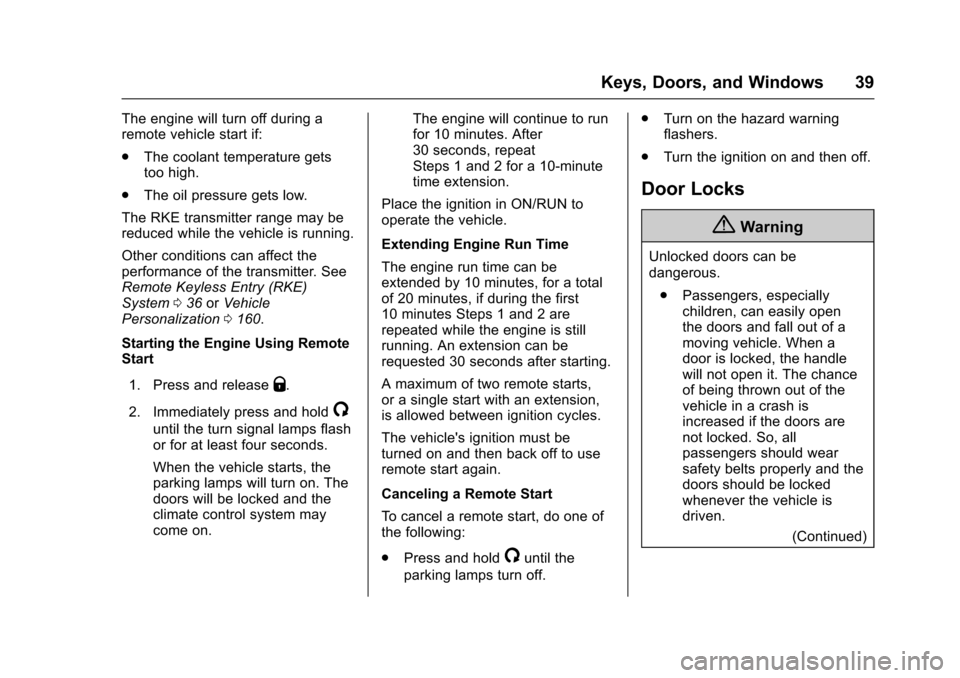
1. Press and releaseQ.
2. Immediately press and hold/
until the turn signal lamps flashor for at least four seconds.
When the vehicle starts, theparking lamps will turn on. Thedoors will be locked and theclimate control system maycome on.
The engine will continue to runfor 10 minutes. After30 seconds, repeatSteps 1 and 2 for a 10-minutetime extension.
Place the ignition in ON/RUN tooperate the vehicle.
Extending Engine Run Time
The engine run time can beextended by 10 minutes, for a totalof 20 minutes, if during the first10 minutes Steps 1 and 2 arerepeated while the engine is stillrunning. An extension can berequested 30 seconds after starting.
Amaximumoftworemotestarts,or a single start with an extension,is allowed between ignition cycles.
The vehicle's ignition must beturned on and then back off to useremote start again.
Canceling a Remote Start
To c a n c e l a r e m o t e s t a r t , d o o n e o fthe following:
.Press and hold/until the
parking lamps turn off.
.Turn on the hazard warningflashers.
.Turn the ignition on and then off.
Door Locks
{Warning
Unlocked doors can be
dangerous.
.Passengers, especiallychildren, can easily openthe doors and fall out of amoving vehicle. When adoor is locked, the handlewill not open it. The chanceof being thrown out of thevehicle in a crash isincreased if the doors arenot locked. So, allpassengers should wearsafety belts properly and thedoors should be lockedwhenever the vehicle isdriven.
(Continued)
Page 41 of 509
Chevrolet Silverado Owner Manual (GMNA-Localizing-U.S./Canada/Mexico-9956065) - 2017 - CRC - 4/29/16
40 Keys, Doors, and Windows
Warning (Continued)
.Yo u n g c h i l d r e n w h o g e t i n t ounlocked vehicles may beunable to get out. A childcan be overcome byextreme heat and can sufferpermanent injuries or evendeath from heat stroke.Always lock the vehiclewhenever leaving it.
.Outsiders can easily enterthrough an unlocked doorwhen you slow down or stopthe vehicle. Locking thedoors can help prevent thisfrom happening.
There are several ways to lock andunlock the vehicle.
From outside, use the RemoteKeyless Entry (RKE) transmitter orthe key in the driver door.
From inside, use the power doorlocks or manual door locks. To lockor unlock the door with the manuallocks, push down or pull up on themanual lock knob.
From inside, pull the door handleonce to unlock the door. Pull thehandle again to open the door.
SeeVehicle Alarm System043.
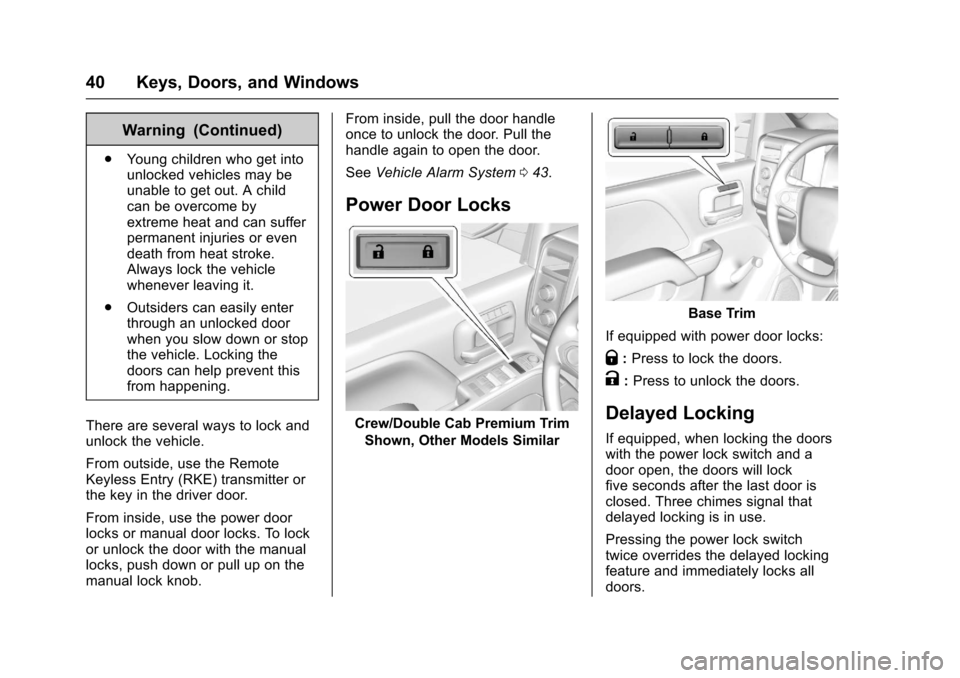
Power Door Locks
Crew/Double Cab Premium Trim
Shown, Other Models Similar
Base Trim
If equipped with power door locks:
Q:Press to lock the doors.
K:Press to unlock the doors.
Delayed Locking
If equipped, when locking the doorswith the power lock switch and adoor open, the doors will lockfive seconds after the last door isclosed. Three chimes signal thatdelayed locking is in use.
Pressing the power lock switchtwice overrides the delayed lockingfeature and immediately locks alldoors.
Page 42 of 509
Chevrolet Silverado Owner Manual (GMNA-Localizing-U.S./Canada/Mexico-9956065) - 2017 - CRC - 4/29/16
Keys, Doors, and Windows 41
This feature will not operate if thekey is in the ignition.
Turn delayed locking on or off usingvehicle personalization. SeeVehiclePersonalization0160.
Automatic Door Locks
If equipped, the doors will lockautomatically when all doors areclosed, the ignition is on, and theshift lever is moved out of P (Park)for automatic transmissions orvehicle speed is above 13 km/h(8 mph) for manual transmissions.
To u n l o c k t h e d o o r s :
.PressKon a power door lock
switch.
.If equipped with an automatictransmission, shift thetransmission into P (Park)
.If equipped with manualtransmission, remove the keyfrom the ignition when parked.
Automatic Door locking cannot bedisabled. Automatic door unlockingcan be programmed. SeeVehiclePersonalization0160.
Lockout Protection
When locking is requested with thedriver door open and the key in theignition, all the doors will lock andthen the driver door will unlock.
This can be manually overridden by
pressing and holdingQon the
power door lock switch.
Safety Locks
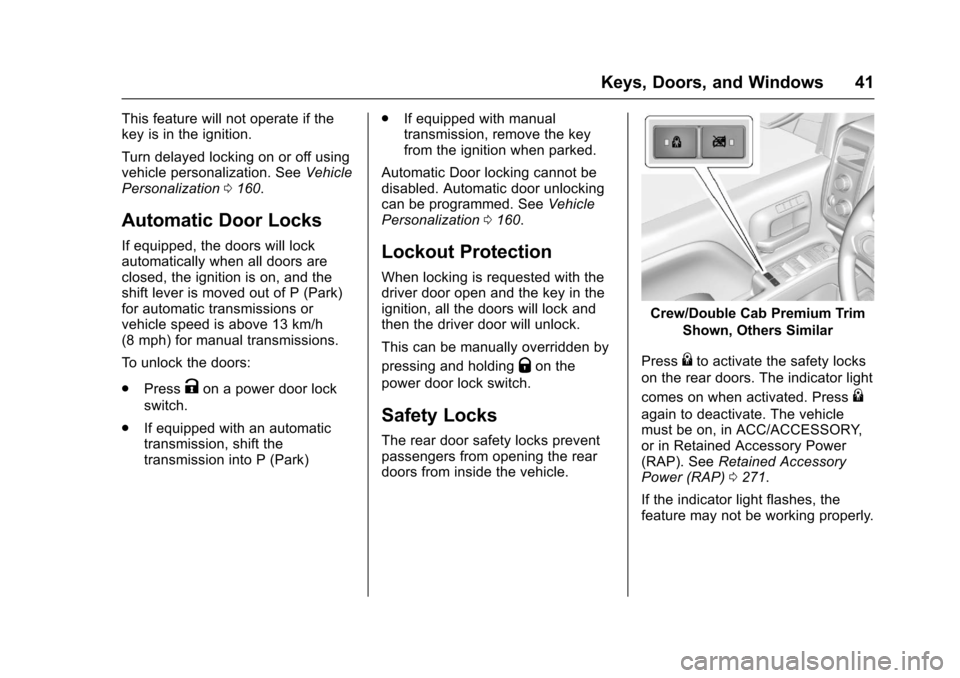
The rear door safety locks preventpassengers from opening the reardoors from inside the vehicle.
Crew/Double Cab Premium Trim
Shown, Others Similar
Press{to activate the safety locks
on the rear doors. The indicator light
comes on when activated. Press{
again to deactivate. The vehiclemust be on, in ACC/ACCESSORY,or in Retained Accessory Power(RAP). SeeRetained AccessoryPower (RAP)0271.
If the indicator light flashes, thefeature may not be working properly.
Page 43 of 509
Chevrolet Silverado Owner Manual (GMNA-Localizing-U.S./Canada/Mexico-9956065) - 2017 - CRC - 4/29/16
42 Keys, Doors, and Windows
Doors
Tailgate
{Warning
It is extremely dangerous to ride
on the tailgate, even when the
vehicle is operated at low speeds.
People riding on the tailgate can
easily lose their balance and fall
in response to vehicle
maneuvers. Falling from a moving
vehicle may result in serious
injuries or death. Do not allow
people to ride on the tailgate. Be
sure everyone in your vehicle is in
aseatandusingasafetybelt
properly.
If equipped, to lock or unlock thetailgate, use the RKE transmitter orthe key. SeeRemote Keyless Entry(RKE) System Operation036.
Open the tailgate by lifting up on itshandle while pulling thetailgate down.
To s h u t t h e t a i l g a t e , f i r m l y p u s h i tupward until it latches.
After closing the tailgate, pull it backto be sure it latches securely.
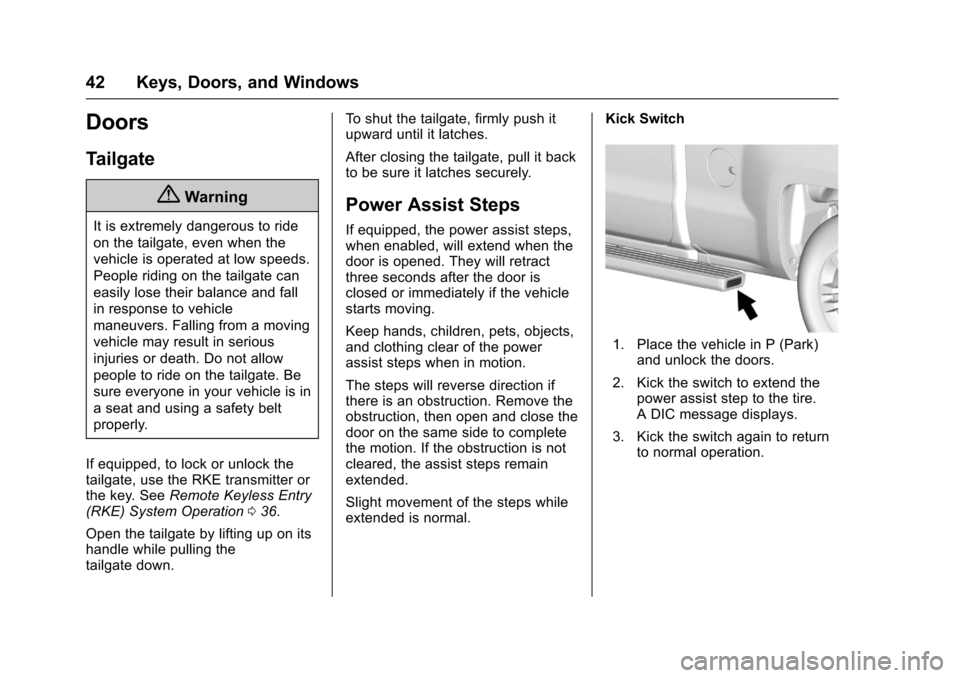
Power Assist Steps
If equipped, the power assist steps,when enabled, will extend when thedoor is opened. They will retractthree seconds after the door isclosed or immediately if the vehiclestarts moving.
Keep hands, children, pets, objects,and clothing clear of the powerassist steps when in motion.
The steps will reverse direction ifthere is an obstruction. Remove theobstruction, then open and close thedoor on the same side to completethe motion. If the obstruction is notcleared, the assist steps remainextended.
Slight movement of the steps whileextended is normal.
Kick Switch
1. Place the vehicle in P (Park)and unlock the doors.
2. Kick the switch to extend thepower assist step to the tire.ADICmessagedisplays.
3. Kick the switch again to returnto normal operation.
Page 45 of 509
Chevrolet Silverado Owner Manual (GMNA-Localizing-U.S./Canada/Mexico-9956065) - 2017 - CRC - 4/29/16
44 Keys, Doors, and Windows
Fast Flash :Vehicle is unsecured.Adoor,theliftgateorthehoodis open.
Slow Flash :Alarm system isarmed.
Arming the Alarm System
1. Turn off the vehicle.
2. Lock the vehicle in one ofthree ways:
.Use the RKE transmitter.
.Use the Keyless Accesssystem.
.With a door open, pressQ
on the interior of the door.
3. After 30 seconds, the alarmsystem will arm and theindicator light will begin to
slowly flash. PressingQon the
RKE transmitter a second timewill bypass the 30-seconddelay and immediately arm thealarm system.
The vehicle alarm system will notarm if the doors are locked withthe key.
If the driver door is opened withoutfirst unlocking with the RKEtransmitter, the horn will chirp andthe lights will flash to indicatepre-alarm. If the vehicle is notstarted, or the door is not unlocked
by pressingKon the RKE
transmitter during the 10-secondpre-alarm, the alarm will beactivated.
The alarm will also be activated if apassenger door, the liftgate, or thehood is opened without firstdisarming the system. When thealarm is activated, the turn signalsflash and the horn sounds for about30 seconds. The alarm system willthen re-arm to monitor for the nextunauthorized event.
Disarming the Alarm System
To d i s a r m t h e a l a r m s y s t e m o r t u r noff the alarm if it has been activated:
.PressKon the RKE transmitter.
.Unlock the vehicle using theKeyless Access system.
.Start the vehicle.
To a v o i d s e t t i n g o f f t h e a l a r m b yaccident:
.Lock the vehicle after alloccupants have exited.
.Always unlock a door with theRKE transmitter, or use theKeyless Access system.
Unlocking the driver door withthe key will not disarm thesystem or turn off the alarm.
How to Detect a Tamper
Condition
IfKis pressed on the RKE
transmitter and the horn chirps threetimes, an alarm occurred previouslywhile the alarm system was armed.
If the alarm has been activated, amessage will appear on the DIC.SeeSecurity Messages0156.
Inclination Sensor and
Intrusion Sensor
In addition to the standardtheft-deterrent system features, thissystem may also have an,inclination sensor and intrusionsensor.