remote start CHEVROLET SILVERADO 2017 3.G User Guide
[x] Cancel search | Manufacturer: CHEVROLET, Model Year: 2017, Model line: SILVERADO, Model: CHEVROLET SILVERADO 2017 3.GPages: 509, PDF Size: 8.87 MB
Page 64 of 509
Chevrolet Silverado Owner Manual (GMNA-Localizing-U.S./Canada/Mexico-9956065) - 2017 - CRC - 4/29/16
Seats and Restraints 63
Heated and Ventilated
Front Seats
{Warning
If you cannot feel temperature
change or pain to the skin, the
seat heater may cause burns. To
reduce the risk of burns, people
with such a condition should use
care when using the seat heater,
especially for long periods of
time. Do not place anything on
the seat that insulates against
heat, such as a blanket, cushion,
cover, or similar item. This may
cause the seat heater to
overheat. An overheated seat
heater may cause a burn or may
damage the seat.
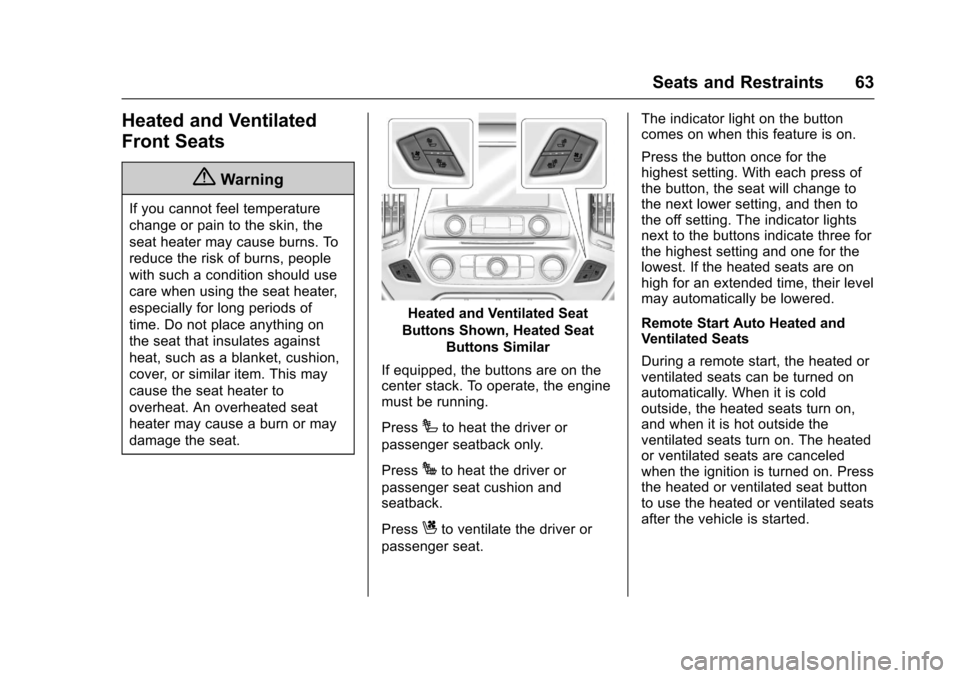
Heated and Ventilated Seat
Buttons Shown, Heated Seat
Buttons Similar
If equipped, the buttons are on thecenter stack. To operate, the enginemust be running.
PressIto heat the driver or
passenger seatback only.
PressJto heat the driver or
passenger seat cushion andseatback.
PressCto ventilate the driver or
passenger seat.
The indicator light on the buttoncomes on when this feature is on.
Press the button once for thehighest setting. With each press ofthe button, the seat will change tothe next lower setting, and then tothe off setting. The indicator lightsnext to the buttons indicate three forthe highest setting and one for thelowest. If the heated seats are onhigh for an extended time, their levelmay automatically be lowered.
Remote Start Auto Heated andVentilated Seats
During a remote start, the heated orventilated seats can be turned onautomatically. When it is coldoutside, the heated seats turn on,and when it is hot outside theventilated seats turn on. The heatedor ventilated seats are canceledwhen the ignition is turned on. Pressthe heated or ventilated seat buttonto use the heated or ventilated seatsafter the vehicle is started.
Page 65 of 509
Chevrolet Silverado Owner Manual (GMNA-Localizing-U.S./Canada/Mexico-9956065) - 2017 - CRC - 4/29/16
64 Seats and Restraints
The heated or ventilated seatindicator lights do not turn on duringaremotestart.
The temperature performance of anunoccupied seat may be reduced.This is normal.
The heated or ventilated seats willnot turn on during a remote startunless they are enabled in thevehicle personalization menu. SeeRemote Vehicle Start038andVehicle Personalization0160.
Rear Seats
Rear Seats (Double Cab
Full Bench)
Rear Seat Reminder (Full
Bench Only)
Look in Rear Seat ReminderFeature
If equipped, this message displaysunder certain conditions indicatingthere may be an item or passengerin the rear seat. Check beforeexiting the vehicle.
This feature will activate when asecond row door is opened whilethe vehicle is on or up to 10 minutesbefore the vehicle is turned on,including if the vehicle was startedremotely. There will be an alertwhen the vehicle is turned off. Thealert does not directly detect objectsin the rear seat; instead, undercertain conditions, it detects when arear door is opened and closed,indicating that there may besomething in the rear seat.
The feature is active only once eachtime the vehicle is turned on and off,and will require reactivation byopening and closing the second rowdoors. There may be an alert evenwhen there is nothing in the rearseat; for example, if a child enteredthe vehicle through the rear doorand left the vehicle without thevehicle being shut off.
The feature can be turned on or offthroughVehiclePersonalization0160.
Folding the Rear Seat
Caution
Folding a rear seat with the safety
belts still fastened may cause
damage to the seat or the safety
belts. Always unbuckle the safety
belts and return them to their
normal stowed position before
folding a rear seat.
Page 152 of 509
Chevrolet Silverado Owner Manual (GMNA-Localizing-U.S./Canada/Mexico-9956065) - 2017 - CRC - 4/29/16
Instruments and Controls 151
SERVICE BATTERY
CHARGING SYSTEM
On some vehicles, this messagedisplays if there is a problem withthe battery charging system. Undercertain conditions, the chargingsystem light may also turn on in theinstrument cluster. SeeChargingSystem Light0138.Drivingwiththisproblem could drain the battery.Turn off all unnecessaryaccessories. Have the electricalsystem checked as soon aspossible. See your dealer.
TRANSPORT MODE ON
This message is displayed when thevehicle is in transport mode. Somefeatures can be disabled while inthis mode, including RemoteKeyless Entry (RKE), remote start,and the vehicle alarm system. Takethe vehicle to your dealer for serviceto turn transport mode off.
Brake System Messages
BRAKE FLUID LOW
This message is displayed when thebrake fluid level is low. SeeBrakeFluid0377.
SERVICE BRAKE ASSIST
This message may be displayedwhen there is a problem with thebrake boost assist system. Whenthis message is displayed, the brakeboost assist motor might be heardoperating and you might noticepulsation in the brake pedal. This isnormal under these conditions. Takethe vehicle to your dealer forservice.
SERVICE TRAILER BRAKE
SYSTEM
On vehicles with the IntegratedTrailer Brake Control (ITBC) system,this message displays and a chimemay sound when there is a problemwith the ITBC system.
When this message displays, poweris no longer available to the trailerbrakes.
As soon as it is safe to do so,carefully pull your vehicle over tothe side of the road and turn theignition off. Check the wiringconnection to the trailer and turn theignition back on. If this message stilldisplays, either your vehicle or thetrailer needs service. See yourdealer.
See“Integrated Trailer BrakeControl System”underTo w i n gEquipment0335for moreinformation.
Compass Messages
Dashes may be displayed if thevehicle temporarily losescommunication with the GlobalPositioning System (GPS).
Door Ajar Messages
DOOR OPEN
This message displays and a chimemay sound if a door is not fullyclosed. Stop and turn off thevehicle, check the door for
Page 163 of 509
Chevrolet Silverado Owner Manual (GMNA-Localizing-U.S./Canada/Mexico-9956065) - 2017 - CRC - 4/29/16
162 Instruments and Controls
Radio
Select and the following maydisplay:
.Manage Favorites
.Number of Favorites Shown
.Audible Touch Feedback
.Te x t S c r o l l
.To n e S e t t i n g s
.Auto Volume
.Maximum Startup Volume
.Audio Cue Volume
Manage Favorites
This allows favorites to be edited.See“Manage Favorites”in“RadioSetup”underHome Page (BaseRadio)0186orHome Page (BaseRadio with Touchscreen)0188or“Manage Favorites”in“Settings”under“Radio”in the infotainmentmanual.
Number of Favorites Shown
Select to set the number of favoritesto display.
Select the desired number or selectAuto and the infotainment systemwill automatically adjust the numberof favorites shown.
Audible Touch Feedback
This allows Audible TouchFeedback to be turned on or off.
Select Off or On.
Text Scroll
Select to see text scroll on thescreen.
Select Off or On.
Tone Settings
Select to adjust the radio tone. See“To n e S e t t i n g s”inAM-FM Radio(Base Radio with Touchscreen)0191orAM-FM Radio (BaseRadio)0189.
Auto Volume
This feature adjusts the volumebased on vehicle speed andambient noise.
Select Off, Low, Medium-Low,Medium, Medium-High, or High.
Maximum Startup Volume
This feature sets the maximumstartup volume. If the vehicle isstarted and the volume is greaterthan this level, the volume isadjusted to this level. To set themaximum startup volume, turn theMENU knob or press + or✓toincrease or decrease.
Audio Cue Volume
This feature sets the volume ofaudio files played at system startupand shutdown.
Select On, then press + or✓toincrease or decrease the volume.
Vehicle
Select and the following maydisplay:
.Climate and Air Quality
.Collision/Detection Systems
.Comfort and Convenience
.Lighting
.Power Door Locks
.Remote Lock, Unlock, Start
Page 165 of 509
Chevrolet Silverado Owner Manual (GMNA-Localizing-U.S./Canada/Mexico-9956065) - 2017 - CRC - 4/29/16
164 Instruments and Controls
Auto Mirror Folding
When on, the outside rearviewmirrors will automatically fold orunfold when the Remote KeylessEntry (RKE) transmitter lock orunlock button is pressed and held.
Select Off or On.
Lighting
Select and the following maydisplay:
.Vehicle Locator Lights
.Exit Lighting
Vehicle Locator Lights
This feature will flash the exteriorlamps and allows some of theexterior lamps and most of theinterior lamps to turn on briefly
whenKon the Remote Keyless
Entry (RKE) transmitter is pressedto locate the vehicle.
Select Off or On.
Exit Lighting
This allows the selection of howlong the exterior lamps stay onwhen leaving the vehicle when it isdark outside.
Select Off, 30 Seconds, 60Seconds, or 120 Seconds.
Power Door Locks
Select and the following maydisplay:
.Auto Door Unlock
.Delayed Door Lock
Auto Door Unlock
This allows selection of which of thedoors will automatically unlock whenthe vehicle is shifted into P (Park)with an automatic transmission orwhen the vehicle is turned off with amanual transmission.
Select Off, All Doors, or Driver Door.
Delayed Door Lock
When on, this feature will delay thelocking of the doors. To override thedelay, press the power door lockswitch on the door.
Select Off or On.
Remote Lock, Unlock, Start
Select and the following maydisplay:
.Remote Unlock Light Feedback
.Remote Lock Feedback
.Remote Door Unlock
.Remote Start Auto Cool Seats
.Remote Start Auto Heat Seats
.Remote Window Operation
.Passive Door Unlock
.Passive Door Lock
.Remote Left in Vehicle Alert
Remote Unlock Light Feedback
When on, the exterior lamps willflash when unlocking the vehiclewith the RKE transmitter.
Select Off or Flash Lights.
Remote Lock Feedback
This allows selection of what type offeedback is given when locking thevehicle with the RKE transmitter.
Page 166 of 509
Chevrolet Silverado Owner Manual (GMNA-Localizing-U.S./Canada/Mexico-9956065) - 2017 - CRC - 4/29/16
Instruments and Controls 165
Select Off, Lights and Horn, LightsOnly, or Horn Only.
Remote Door Unlock
This allows selection of which doors
will unlock when pressingKon the
RKE transmitter.
Select All Doors or Driver Door.
Remote Start Auto Cool Seats
If equipped and turned on, thisfeature will turn the ventilated seatson when using remote start onwarm days.
Select Off or On.
Remote Start Auto Heat Seats
If equipped and turned on, thisfeature will turn the heated seats onwhen using remote start oncold days.
Select Off or On.
Remote Window Operation
This feature enables the window toopen by using the RKE transmitter.SeeRemote Keyless Entry (RKE)System Operation036.
Select Off or On.
Passive Door Unlock
This allows the selection of whatdoors will unlock when using thebutton on the driver door to unlockthe vehicle. SeeRemote KeylessEntry (RKE) System Operation036.
Select All Doors or DriverDoor Only.
Passive Door Lock
This feature can be turned on or off,or can be used to select feedbackwhen using the button on the driverdoor to lock the vehicle. SeeRemote Keyless Entry (RKE)System Operation036.
Select Off, On with HornChirp, or On.
Remote Left in Vehicle Alert
This feature sounds an alert whenthe RKE transmitter is left in thevehicle.
Select Off or On.
Bluetooth
Select and the following maydisplay:
.Pair New Device
.Discoverable
.Device Management
.Ringtones
.Voice Mail Numbers
.Te x t M e s s a g e A l e r t s
Pair New Device
Select to pair a new device. See“Pairing”underBluetooth (VoiceRecognition - Base Radio)0221orBluetooth (Infotainment Controls -Base Radio)0217orBluetooth(Overview)0216orBluetooth(Infotainment Controls - Base Radiowith Touchscreen)0226or“Pairing”in“Infotainment Controls”under“Bluetooth”in the infotainmentmanual.
Discoverable
This allows the system to find adevice.
Select Off or On.
Page 353 of 509
Chevrolet Silverado Owner Manual (GMNA-Localizing-U.S./Canada/Mexico-9956065) - 2017 - CRC - 4/29/16
352 Vehicle Care
cause cancer and birth defects orother reproductive harm. Engineexhaust, many parts and systems,many fluids, and some componentwear by-products contain and/oremit these chemicals.
SeeBattery - North America0378andJump Starting - NorthAmerica0432.
California Perchlorate
Materials Requirements
Certain types of automotiveapplications, such as airbaginitiators, safety belt pretensioners,and lithium batteries contained inRemote Keyless Entry transmitters,may contain perchlorate materials.Special handling may be necessary.For additional information, seewww.dtsc.ca.gov/hazardouswaste/perchlorate.
Accessories and
Modifications
Adding non-dealer accessories ormaking modifications to the vehiclecan affect vehicle performance andsafety, including such things asairbags, braking, stability, ride andhandling, emissions systems,aerodynamics, durability, andelectronic systems like antilockbrakes, traction control, and stabilitycontrol. These accessories ormodifications could even causemalfunction or damage not coveredby the vehicle warranty.
Damage to suspension componentscaused by modifying vehicle heightoutside of factory settings will not becovered by the vehicle warranty.
Damage to vehicle componentsresulting from modifications or theinstallation or use of non-GMcertified parts, including controlmodule or software modifications, isnot covered under the terms of thevehicle warranty and may affectremaining warranty coverage foraffected parts.
GM Accessories are designed tocomplement and function with othersystems on the vehicle. See yourdealer to accessorize the vehicleusing genuine GM Accessoriesinstalled by a dealer technician.
Also, seeAdding Equipment to theAirbag-Equipped Vehicle087.
Page 356 of 509

Chevrolet Silverado Owner Manual (GMNA-Localizing-U.S./Canada/Mexico-9956065) - 2017 - CRC - 4/29/16
Vehicle Care 355
1. Positive (+) Terminal. SeeJump Starting - NorthAmerica0432.
2.Battery - North America0378.
3. Coolant Surge Tank andPressure Cap. SeeCoolingSystem0368.
4.Engine Air Cleaner/Filter0367.
5. Automatic TransmissionDipstick (If Equipped). See“How to Check AutomaticTransmission Fluid”underAutomatic Transmission Fluid(6-Speed Transmission)0363orAutomatic TransmissionFluid (8-SpeedTr a n s m i s s i o n )0366.
6. Remote Negative (–)Location.SeeJump Starting - NorthAmerica0432.
7. Engine Cooling Fans (Out ofView). SeeCoolingSystem0368.
8. Engine Oil Fill Cap. See“Whento Add Engine Oil”underEngine Oil0359.
9. Engine Oil Dipstick. See“Checking Engine Oil”underEngine Oil0359.
10. Brake Fluid Reservoir. SeeBrake Fluid0377.
11 . W i n d s h i e l d Wa s h e r F l u i dReservoir. See“Adding WasherFluid”underWasherFluid0375.
12. Clutch Fluid Reservoir (IfEquipped). SeeHydraulicClutch0366.
13.Engine Compartment FuseBlock0390.
Page 358 of 509

Chevrolet Silverado Owner Manual (GMNA-Localizing-U.S./Canada/Mexico-9956065) - 2017 - CRC - 4/29/16
Vehicle Care 357
1. Positive (+) Terminal. SeeJump Starting - NorthAmerica0432.
2.Battery - North America0378.
3. Coolant Surge Tank andPressure Cap. SeeCoolingSystem0368.
4.Engine Air Cleaner/Filter0367.
5. Automatic TransmissionDipstick (If Equipped). See“How to Check AutomaticTransmission Fluid”underAutomatic Transmission Fluid(6-Speed Transmission)0363orAutomatic TransmissionFluid (8-SpeedTr a n s m i s s i o n )0366.
6. Remote Negative (–)Location(Out of View). SeeJumpStarting - North America0432.
7. Engine Cooling Fans (Out ofView). SeeCoolingSystem0368.
8. Engine Oil Fill Cap. See“Whento Add Engine Oil”underEngine Oil0359.
9. Engine Oil Dipstick. See“Checking Engine Oil”underEngine Oil0359.
10. Windshield Washer FluidReservoir. See“Adding WasherFluid”underWasherFluid0375.
11 . B r a k e F l u i d R e s e r v o i r. S e eBrake Fluid0377.
12.Engine Compartment FuseBlock0390.
Page 360 of 509
Chevrolet Silverado Owner Manual (GMNA-Localizing-U.S./Canada/Mexico-9956065) - 2017 - CRC - 4/29/16
Vehicle Care 359
1. Positive (+) Terminal. SeeJump Starting - NorthAmerica0432.
2.Battery - North America0378.
3. Coolant Surge Tank andPressure Cap. SeeCoolingSystem0368.
4.Engine Air Cleaner/Filter0367.
5. Automatic TransmissionDipstick (If Equipped). See“How to Check AutomaticTransmission Fluid”underAutomatic Transmission Fluid(6-Speed Transmission)0363orAutomatic TransmissionFluid (8-SpeedTr a n s m i s s i o n )0366.
6. Engine Oil Dipstick. See“Checking Engine Oil”underEngine Oil0359.
7. Engine Oil Fill Cap. See“Whento Add Engine Oil”underEngine Oil0359.
8. Engine Cooling Fan (Out ofView). SeeCoolingSystem0368.
9. Remote Negative (–)Location.SeeJump Starting - NorthAmerica0432.
10. Power Steering FluidReservoir. SeePower SteeringFluid (1500 Series)0375orPower Steering Fluid (2500/3500 Series)0375.
11 . W i n d s h i e l d Wa s h e r F l u i dReservoir. See“Adding WasherFluid”underWasherFluid0375.
12. Brake Fluid Reservoir. SeeBrake Fluid0377.
13. Auxiliary Battery (If Equipped).SeeBattery - NorthAmerica0378.
14.Engine Compartment FuseBlock0390.
If the vehicle has a diesel engineand/or an Allison Transmission, seethe Duramax diesel supplement.
For an eAssist vehicle, see theSilverado/Sierra eAssistsupplement.
Engine Oil
For diesel engine vehicles, see“Engine Oil”in the Duramax dieselsupplement.
To e n s u r e p r o p e r e n g i n eperformance and long life, carefulattention must be paid to engine oil.Following these simple, butimportant steps will help protectyour investment:
.Use engine oil approved to theproper specification and of theproper viscosity grade. See“Selecting the Right Engine Oil”in this section.
.Check the engine oil levelregularly and maintain theproper oil level. See“CheckingEngine Oil”and“When to AddEngine Oil”in this section.
.Change the engine oil at theappropriate time. SeeEngine OilLife System0362.
.Always dispose of engine oilproperly. See“What to Do withUsed Oil”in this section.