instrument panel CHEVROLET SILVERADO 2017 3.G Owner's Manual
[x] Cancel search | Manufacturer: CHEVROLET, Model Year: 2017, Model line: SILVERADO, Model: CHEVROLET SILVERADO 2017 3.GPages: 509, PDF Size: 8.87 MB
Page 172 of 509
Chevrolet Silverado Owner Manual (GMNA-Localizing-U.S./Canada/Mexico-9956065) - 2017 - CRC - 4/29/16
Lighting 171
Lighting
Exterior Lighting
Exterior Lamp Controls . . . . . . . 171Exterior Lamps OffReminder . . . . . . . . . . . . . . . . . . . 173Headlamp High/Low-BeamChanger . . . . . . . . . . . . . . . . . . . . 173Flash-to-Pass . . . . . . . . . . . . . . . . 174Daytime RunningLamps (DRL) . . . . . . . . . . . . . . . 174Automatic HeadlampSystem . . . . . . . . . . . . . . . . . . . . . . 174Hazard Warning Flashers . . . . . 175Turn and Lane-ChangeSignals . . . . . . . . . . . . . . . . . . . . . . 175Fog Lamps . . . . . . . . . . . . . . . . . . . 176AuxiliaryRoof-Mounted Lamp . . . . . . . . 176
Interior Lighting
Instrument Panel IlluminationControl . . . . . . . . . . . . . . . . . . . . . . 177Cargo Lamp . . . . . . . . . . . . . . . . . . 177Dome Lamps . . . . . . . . . . . . . . . . . 178Reading Lamps . . . . . . . . . . . . . . 178
Lighting Features
Entry Lighting . . . . . . . . . . . . . . . . 179Exit Lighting . . . . . . . . . . . . . . . . . . 179Battery Load Management . . . 179Battery Power Protection . . . . . 180
Exterior Lighting
Exterior Lamp Controls
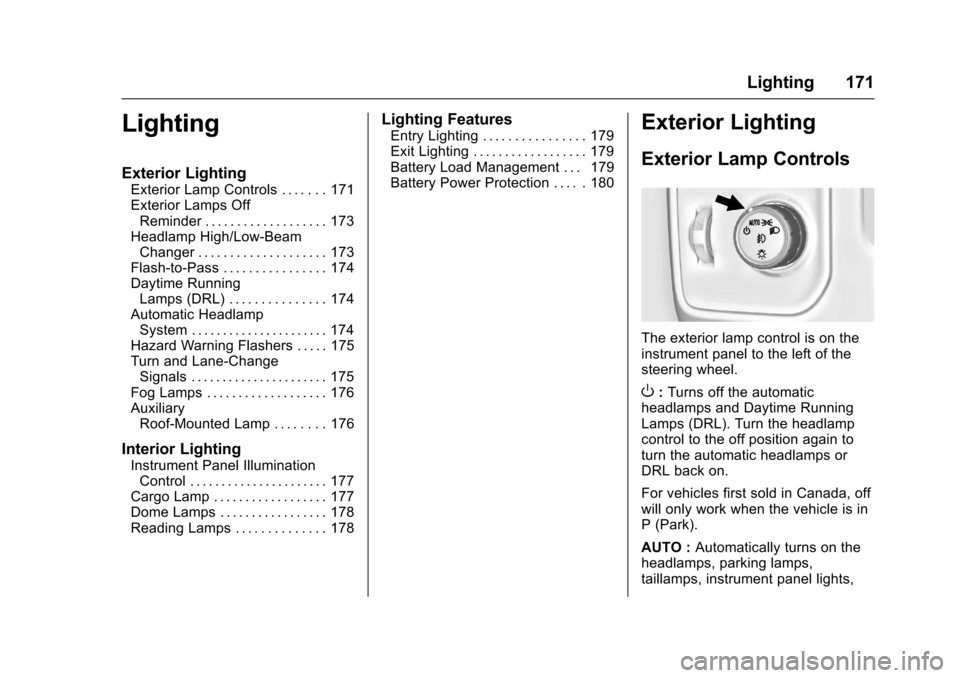
The exterior lamp control is on theinstrument panel to the left of thesteering wheel.
O:Turns off the automaticheadlamps and Daytime RunningLamps (DRL). Turn the headlampcontrol to the off position again toturn the automatic headlamps orDRL back on.
For vehicles first sold in Canada, offwill only work when the vehicle is inP(Park).
AUTO :Automatically turns on theheadlamps, parking lamps,taillamps, instrument panel lights,
Page 173 of 509
Chevrolet Silverado Owner Manual (GMNA-Localizing-U.S./Canada/Mexico-9956065) - 2017 - CRC - 4/29/16
172 Lighting
roof marker lamps (if equipped),front/rear sidemarker lamps, andlicense plate lamps.
When the vehicle is turned off andthe headlamps are in AUTO, theheadlamps turn off. When the key isremoved, they automatically turn onfor a set time. The time of the delaycan be changed using the DIC. SeeDriver Information Center (DIC)(Base Level)0145orDriverInformation Center (DIC)(Uplevel)0147.
;:Turns on the parking lampsincluding all lamps, except theheadlamps.
2:Turns on the headlampstogether with the parking lamps andinstrument panel lights.
When the headlamps are turned onwhile the vehicle is on, theheadlamps turn off automatically10 minutes after the ignition isturned off. When the headlamps areturned on while the vehicle is off,the headlamps will stay on for10 minutes before turning off toprevent the battery from beingdrained. Turn the headlamp control
off and then back to the headlampon position to make the headlampsstay on for an additional 10 minutes.To k e e p t h e l a m p s o n f o r m o r e t h a n10 minutes, the ignition must be inthe ACC/ACCESSORY or ON/RUNposition.
#:If equipped, turns on the foglamps. SeeFog Lamps0176.
IntelliBeam®System
If equipped, this system turns thevehicle's high-beam headlamps onand off according to surroundingtraffic conditions.
The system turns the high-beamheadlamps on when it is darkenough and there is no other trafficpresent.
This light comes on in theinstrument cluster when theIntelliBeam system is enabled.
Turning On and EnablingIntelliBeam
To e n a b l e t h e I n t e l l i B e a m s y s t e m ,with the turn signal lever in theneutral position, turn the exteriorlamp control to AUTO. The bluehigh-beam on light appears on theinstrument cluster when the highbeams are on.
Driving with IntelliBeam
The system only activates the highbeams when driving over 40 km/h(25 mph).
There is a sensor near the topcenter of the windshield thatautomatically controls the system.Keep this area of the windshieldclear of debris to allow for bestsystem performance.
The high-beam headlamps remainon, under the automatic control,until one of the following situationsoccurs:
.The system detects anapproaching vehicle'sheadlamps.
Page 174 of 509
Chevrolet Silverado Owner Manual (GMNA-Localizing-U.S./Canada/Mexico-9956065) - 2017 - CRC - 4/29/16
Lighting 173
.The system detects a precedingvehicle's taillamps.
.The outside light is brightenough that high-beamheadlamps are not required.
.The vehicle's speed drops below20 km/h (12 mph).
.The IntelliBeam system isdisabled by the high/low-beamchanger or the flash-to-passfeature. If this happens, the high/low-beam changer must beactivated two times withintwo seconds to reactivate theIntelliBeam system. Theinstrument cluster light will comeon to indicate the IntelliBeam isreactivated. SeeHeadlampHigh/Low-Beam Changer0173andFlash-to-Pass0174.
The high beams may not turn offautomatically if the system cannotdetect another vehicle's lampsbecause of any of the following:
.The other vehicle's lamps aremissing, damaged, obstructedfrom view, or otherwiseundetected.
.The other vehicle's lamps arecovered with dirt, snow, and/orroad spray.
.The other vehicle's lamps cannotbe detected due to denseexhaust, smoke, fog, snow, roadspray, mist, or other airborneobstructions.
.The vehicle's windshield is dirty,cracked, or obstructed bysomething that blocks the viewof the light sensor.
.The vehicle is loaded such thatthe front end points upward,causing the light sensor to aimhigh and not detect headlampsand taillamps.
.Driving on winding or hilly roads.
The automatic high-beamheadlamps may need to be disabledif any of the above conditions exist.
Exterior Lamps Off
Reminder
Areminderchimesoundswhentheheadlamps or parking lamps aremanually turned on, the ignition isoff, and a door is open. To disablethe chime, turn the lamps off.
Headlamp High/
Low-Beam Changer
$:Push the turn signal levertoward the instrument panel tochange the headlamps from low tohigh beam.
Pull the turn signal lever toward youand release it to return to low-beamheadlamps.
When the high-beam headlamps areon, this indicator light on theinstrument cluster will also be on.
Page 175 of 509
Chevrolet Silverado Owner Manual (GMNA-Localizing-U.S./Canada/Mexico-9956065) - 2017 - CRC - 4/29/16
174 Lighting
Flash-to-Pass
This feature lets you use thehigh-beam headlamps to signal adriver in front of you that you wantto pass. It works even if theheadlamps are in the automaticposition.
To u s e i t , p u l l t h e t u r n s i g n a l l e v e rtoward you, then release it.
If the headlamps are in theautomatic position or on low beam,the high-beam headlamps will turnon. Depending on the type ofheadlamp, they will either turn offafter a short duration or stay on aslong as you hold the lever towardyou. The high-beam indicator on theinstrument cluster will come on.Release the lever to return tonormal operation.
Daytime Running
Lamps (DRL)
DRL can make it easier for others tosee the front of the vehicle duringthe day. Fully functional DRL arerequired on all vehicles first sold inCanada.
The DRL system comes on whenthe following conditions are met:
.The ignition is on.
.The exterior lamp control isin AUTO.
.The transmission is not inP(Park).
.The light sensor determines it isdaytime.
When the DRL system is on, onlythe DRL are on. The taillamps,sidemarker lamps, instrument panellights, and other lamps will notbe on.
When it begins to get dark, theautomatic headlamp systemswitches from DRL to theheadlamps.
To t u r n o f f t h e D R L , t u r n t h e e x t e r i o rlamp control to the off position andthen release. For vehicles first soldin Canada, off will only work whenthe vehicle is in P (Park).
Automatic Headlamp
System
When the exterior lamp control isset to AUTO and it is dark enoughoutside, the headlamps come onautomatically.
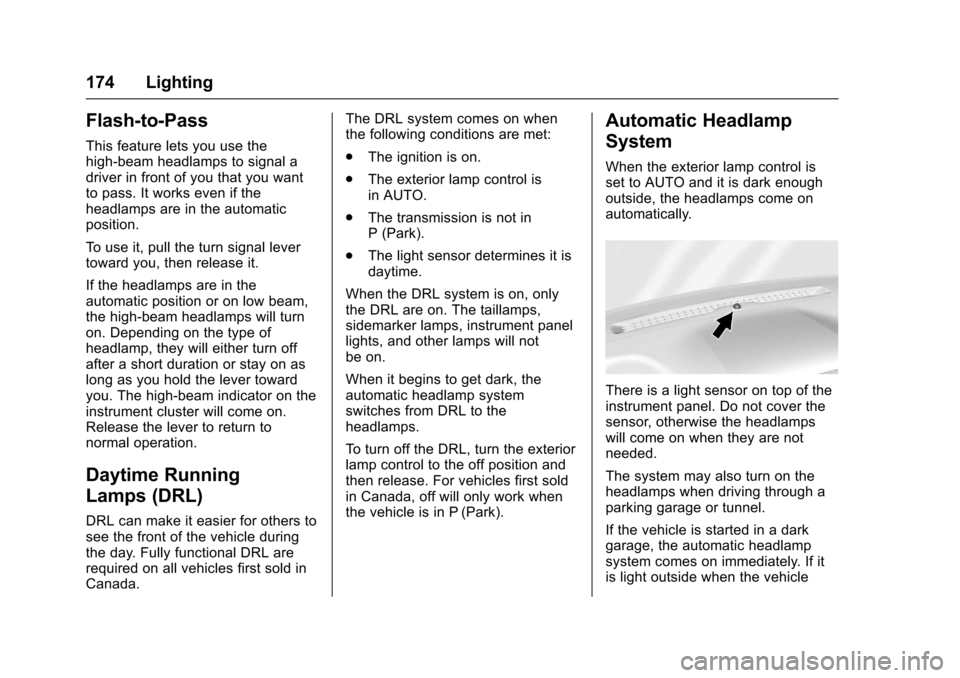
There is a light sensor on top of theinstrument panel. Do not cover thesensor, otherwise the headlampswill come on when they are notneeded.
The system may also turn on theheadlamps when driving through aparking garage or tunnel.
If the vehicle is started in a darkgarage, the automatic headlampsystem comes on immediately. If itis light outside when the vehicle
Page 176 of 509
Chevrolet Silverado Owner Manual (GMNA-Localizing-U.S./Canada/Mexico-9956065) - 2017 - CRC - 4/29/16
Lighting 175
leaves the garage, there is a slightdelay before the automaticheadlamp system changes to theDRL. During that delay, theinstrument cluster may not be asbright as usual. Make sure theinstrument panel brightness controlis in the full bright position. SeeInstrument Panel IlluminationControl0177.
When it is bright enough outside,the headlamps will turn off or maychange to Daytime RunningLamps (DRL).
The automatic headlamp systemturns off when the exterior lamp
control is turned toOor the ignition
is off.
Lights On with Wipers
If the windshield wipers areactivated in daylight with the engineon, and the exterior lamp control isin AUTO, the headlamps, parkinglamps, and other exterior lampscome on. The transition time for thelamps coming on varies based onwiper speed. When the wipers are
not operating, these lamps turn off.
Move the exterior lamp control toO
or;to disable this feature.
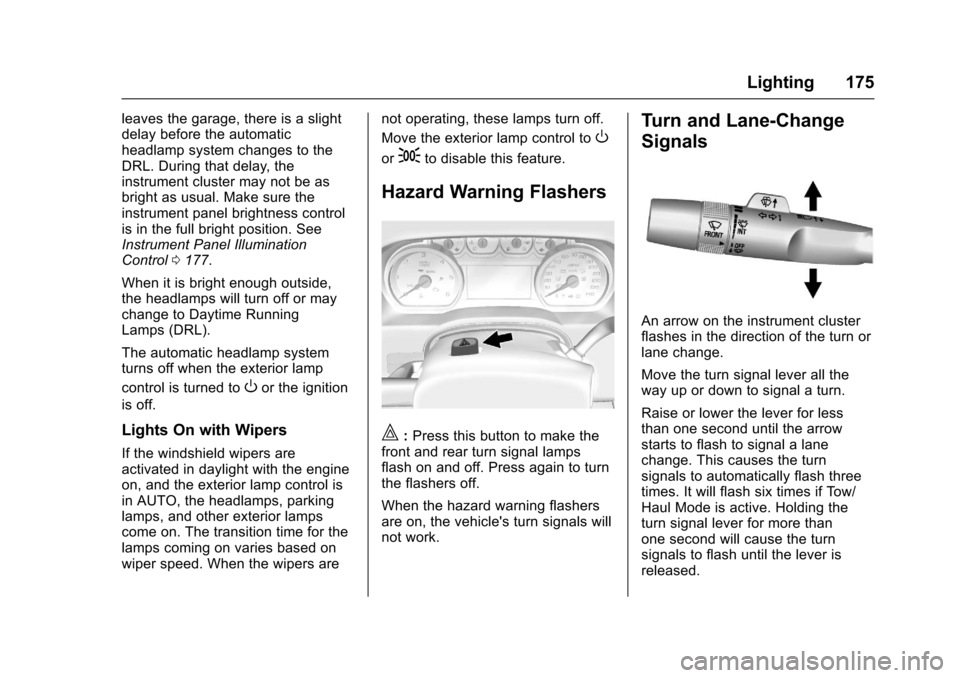
Hazard Warning Flashers
|:Press this button to make thefront and rear turn signal lampsflash on and off. Press again to turnthe flashers off.
When the hazard warning flashersare on, the vehicle's turn signals willnot work.
Turn and Lane-Change
Signals
An arrow on the instrument clusterflashes in the direction of the turn orlane change.
Move the turn signal lever all theway up or down to signal a turn.
Raise or lower the lever for lessthan one second until the arrowstarts to flash to signal a lanechange. This causes the turnsignals to automatically flash threetimes. It will flash six times if Tow/Haul Mode is active. Holding theturn signal lever for more thanone second will cause the turnsignals to flash until the lever isreleased.
Page 178 of 509
Chevrolet Silverado Owner Manual (GMNA-Localizing-U.S./Canada/Mexico-9956065) - 2017 - CRC - 4/29/16
Lighting 177
this button. Pressing the top of thebutton will turn off the roof-mountedlamp and indicator.
The emergency roof lamp circuit isfused at 30 amps, so the totalcurrent draw of the attached lampsshould be less than this value. Theattachment points for the roof lampcircuits are two blunt cut wiresabove the overhead console: a darkgreen with blue stripe switchedpower wire and a black ground wire.
For information on roof-mountedemergency lamp installation, seewww.gmupfitter.com or contact yourdealer.
If the vehicle has this button, thevehicle may have the snow plowprep package. SeeAdd-OnElectrical Equipment0345.
Interior Lighting
Instrument Panel
Illumination Control
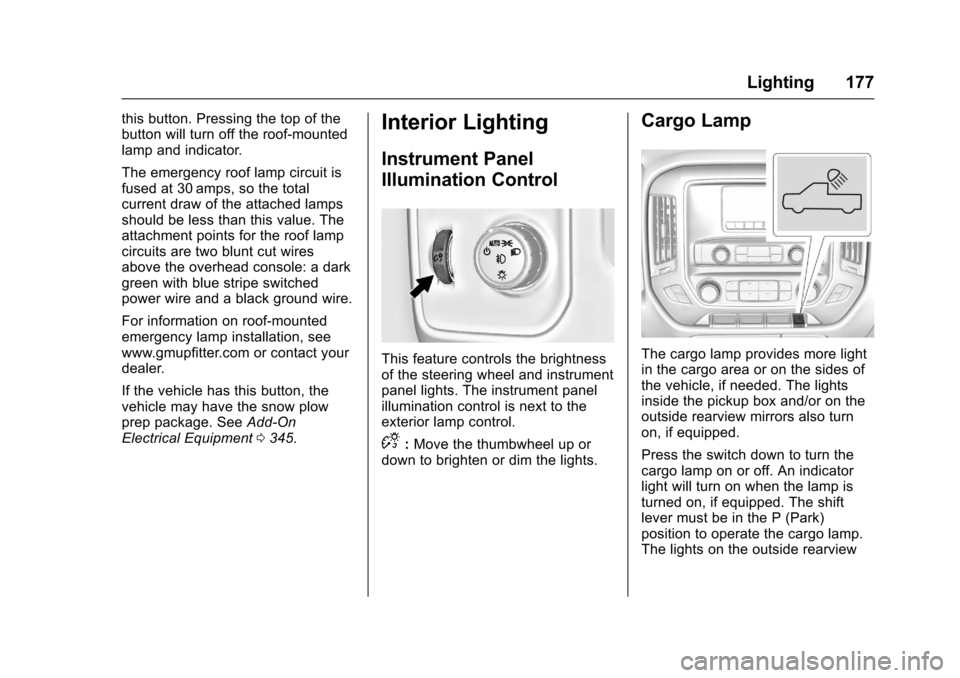
This feature controls the brightnessof the steering wheel and instrumentpanel lights. The instrument panelillumination control is next to theexterior lamp control.
D:Move the thumbwheel up ordown to brighten or dim the lights.
Cargo Lamp
The cargo lamp provides more lightin the cargo area or on the sides ofthe vehicle, if needed. The lightsinside the pickup box and/or on theoutside rearview mirrors also turnon, if equipped.
Press the switch down to turn thecargo lamp on or off. An indicatorlight will turn on when the lamp isturned on, if equipped. The shiftlever must be in the P (Park)position to operate the cargo lamp.The lights on the outside rearview
Page 217 of 509
Chevrolet Silverado Owner Manual (GMNA-Localizing-U.S./Canada/Mexico-9956065) - 2017 - CRC - 4/29/16
216 Infotainment System
Phone
Bluetooth (Overview)
Instructions for using the cell phonemay differ between infotainmentsystems. The base radio and baseradio with touchscreen instructionsare included in this manual. See theinfotainment manual for instructionson the uplevel radios.
Bluetooth-capable systems caninteract with many cell phones,allowing:
.Placement and receipt of calls inahands-freemode.
.Sharing of the cell phone’saddress book or contact list withthe vehicle.
To m i n i m i z e d r i v e r d i s t r a c t i o n ,before driving, and with the vehicleparked:
.Become familiar with thefeatures of the cell phone.Organize the phone book andcontact lists clearly and delete
duplicate or rarely used entries.If possible, program speed dialor other shortcuts.
.Review the controls andoperation of the infotainmentsystem.
.Pair cell phone(s) to the vehicle.The system may not work withall cell phones. See“Pairing”inthis section.
.If the cell phone has voicedialing capability, learn to usethat feature to access theaddress book or contact list.
.See“Deleting a Paired Phone”and/or“Deleting a BluetoothDevice”in this section.
{Warning
When using a cell phone, it can
be distracting to look too long or
too often at the screen of the
phone or the infotainment system.
Ta k i n g y o u r e y e s o f f t h e r o a d t o o
long or too often could cause a
crash resulting in injury or death.
Focus your attention on driving.
Vehicles with a Bluetooth systemcan use a Bluetooth-capable cellphone with a Hands-Free Profile tomake and receive phone calls. Theinfotainment system and voicerecognition are used to control thesystem. The system can be usedwhile in ON/RUN or ACC/ACCESSORY. The range of theBluetooth system can be up to 9.1 m(30 ft). Not all phones support allfunctions and not all phones workwith the Bluetooth system. For U.S.and Canada only, see www.gm.com/bluetooth for more information aboutcompatible phones.
Bluetooth Controls
Use the buttons on the instrumentpanel, faceplate, and the steeringwheel to operate the Bluetoothsystem.
Steering Wheel Controls
g:Press to answer incoming calls,confirm system information, andstart voice recognition.
Page 239 of 509
Chevrolet Silverado Owner Manual (GMNA-Localizing-U.S./Canada/Mexico-9956065) - 2017 - CRC - 4/29/16
238 Climate Controls
Y:Air is directed to the instrumentpanel outlets.
\:Air is divided between theinstrument panel and floor outlets.
[:Air is directed to the flooroutlets, with some air directed to thewindshield, side window, andsecond row floor outlets.
-:This mode clears the windowsof fog or moisture. Air is directed tothe windshield, floor outlets, andside window vents.
0:Press to clear the windshieldof fog or frost more quickly. Air isdirected to the windshield and theside window vents. The systemautomatically forces outside air intothe vehicle.
Do not drive the vehicle until all thewindows are clear.
SeeAir Vents0243.
@:Press to turn on recirculation.An indicator light comes on. Air isrecirculated to quickly cool theinside of the vehicle. It can also beused to help reduce outside air andodors that enter the vehicle.
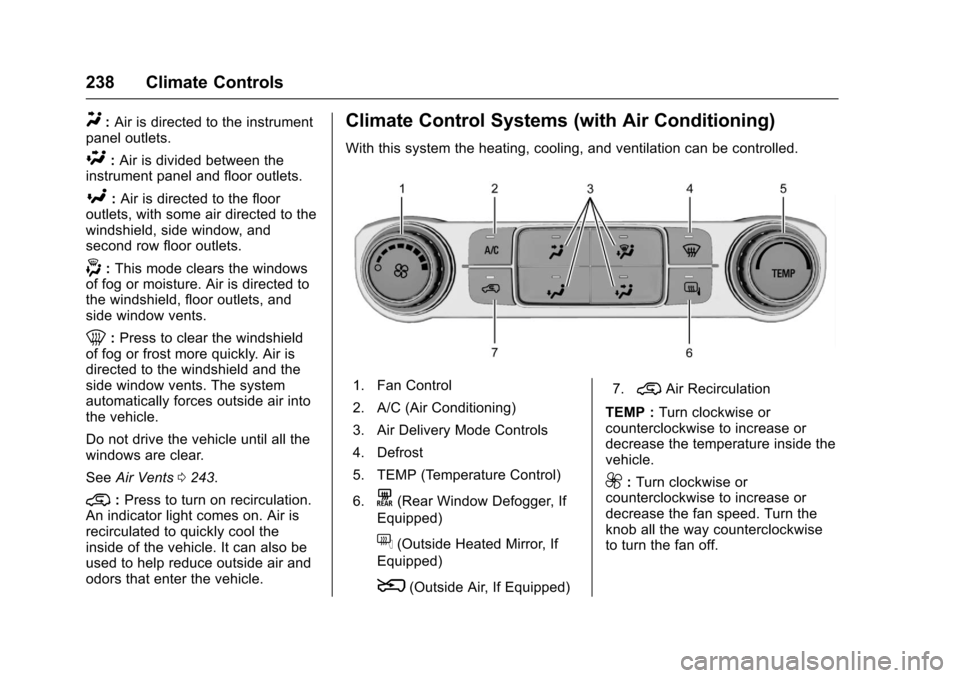
Climate Control Systems (with Air Conditioning)
With this system the heating, cooling, and ventilation can be controlled.
1. Fan Control
2. A/C (Air Conditioning)
3. Air Delivery Mode Controls
4. Defrost
5. TEMP (Temperature Control)
6.K(Rear Window Defogger, If
Equipped)
f(Outside Heated Mirror, If
Equipped)
8(Outside Air, If Equipped)
7.@Air Recirculation
TEMP :Turn clockwise orcounterclockwise to increase ordecrease the temperature inside thevehicle.
9:Turn clockwise orcounterclockwise to increase ordecrease the fan speed. Turn theknob all the way counterclockwiseto turn the fan off.
Page 240 of 509
Chevrolet Silverado Owner Manual (GMNA-Localizing-U.S./Canada/Mexico-9956065) - 2017 - CRC - 4/29/16
Climate Controls 239
Air Delivery Mode Controls :
PressY,\,[,or-to change
the direction of the airflow. Anindicator light comes on in theselected mode button.
Y:Air is directed to the instrumentpanel outlets.
\:Air is divided between theinstrument panel and floor outlets.
[:Air is directed to the flooroutlets, with some air directed to thewindshield and side window outlets.
-:This mode clears the windowsof fog or moisture. Air is directed tothe windshield, floor outlets, andside window vents.
0:Press to clear the windshieldof fog or frost more quickly. Air isdirected to the windshield and theside window vents. The systemautomatically forces outside air intothe vehicle and the air conditioningcompressor will run, unless theoutside temperature is close tofreezing.
Do not drive the vehicle until all thewindows are clear.
SeeAir Vents0243.
@:Press to turn on recirculation.An indicator light comes on. Air isrecirculated to quickly cool theinside of the vehicle. It can also beused to help reduce outside air andodors that enter the vehicle.
8:If equipped, press to turn theoutside air mode on. An indicatorlight on the button comes on toshow that outside is on. Whenselected, air from outside thevehicle circulates throughout thevehicle. The recirculation modecannot be used with the outsideair mode.
f:If equipped, press to turn theheated mirrors on or off. SeeHeated Mirrors049.
A/C :Press to turn the airconditioning system on or off. Anindicator light comes on to showthat the air conditioning is enabled.If the fan is turned off, the airconditioner will not run. The A/Clight will stay on even if the outsidetemperatures are below freezing.
Rear Window Defogger
K:If equipped, press to turn therear window defogger on or off. Anindicator light on the button comeson to show that the rear windowdefogger is on.
The rear window defogger onlyworks when the ignition is in ON/RUN. The defogger turns off if theignition is turned to ACC/ACCESSORY or LOCK/OFF.
If equipped with heated outsidemirrors, they turn on when the rearwindow defogger button is on. Theyhelp to clear fog or frost from thesurface of the mirrors.
Caution
Using a razor blade or sharp
object to clear the inside rear
window can damage the rear
window defogger. Repairs would
not be covered by the vehicle
warranty. Do not clear the inside
rear window with sharp objects.
Page 242 of 509
Chevrolet Silverado Owner Manual (GMNA-Localizing-U.S./Canada/Mexico-9956065) - 2017 - CRC - 4/29/16
Climate Controls 241
The recirculation light will not comeon when automatically controlled.
Press@to manually select
recirculation; press it again to selectoutside air.
Do not cover the solar sensor on thetop of the instrument panel near thewindshield. This sensor regulatesair temperature based on sun load.See“Sensors”later in this section.
Manual Operation
O:Press to turn the climate controlsystem on or off. Outside air stillenters the vehicle, and is directed tothe floor. This direction can bechanged by pressing the airdelivery mode.
9:Turn clockwise orcounterclockwise to increase ordecrease the fan speed. Press theknob to turn the fan off.
Press AUTO to return to automaticoperation.
Driver and PassengerTe m p e r a t u r e C o n t r o l :Thetemperature can be adjustedseparately for the driver andpassenger.
Turn the knob clockwise orcounterclockwise to increase ordecrease the driver or passengertemperature setting.
SYNC :Press to link the passengertemperature setting to the driversetting. The SYNC indicator light willturn on. When the passenger settingis adjusted, the SYNC indicator lightis off.
The driver side or passenger sidetemperature display shows thetemperature setting increasing ordecreasing.
Air Delivery Mode Control :
PressY,\,[,or-to change
the direction of the airflow. Anindicator light comes on in theselected mode button.
Changing the mode cancels theautomatic operation and the systemgoes into manual mode. PressAUTO to return to automaticoperation.
Y:Air is directed to the instrumentpanel outlets.
\:Air is divided between theinstrument panel and floor outlets.Some air is directed toward thewindshield and side window outlets.
[:Air is directed to the flooroutlets, with some to the windshield,side window outlets, and secondrow floor outlets.
-:This mode clears the windowsof fog or moisture. Air is directed tothe windshield, floor outlets, andside window vents. The systemautomatically forces outside air intothe vehicle and the air conditioningcompressor will run, unless theoutside temperature is close tofreezing.
0:Press to clear the windshieldof fog or frost more quickly. Air isdirected to the windshield and theside window vents. The air