warning light CHEVROLET SILVERADO 2017 3.G Service Manual
[x] Cancel search | Manufacturer: CHEVROLET, Model Year: 2017, Model line: SILVERADO, Model: CHEVROLET SILVERADO 2017 3.GPages: 509, PDF Size: 8.87 MB
Page 295 of 509
Chevrolet Silverado Owner Manual (GMNA-Localizing-U.S./Canada/Mexico-9956065) - 2017 - CRC - 4/29/16
294 Driving and Operating
Achimesoundsandthewarninglight flashes when the parking brakeis applied and the vehicle is movingat least 8 km/h (5 mph).
To r e l e a s e t h e p a r k i n g b r a k e , h o l dthe regular brake pedal down. Thenpull the bottom edge of the leverwith the parking brake symbol,located to the right of the steeringcolumn.
If the ignition is on when the parkingbrake is released, the brake systemwarning light goes off.
Caution
Driving with the parking brake on
can overheat the brake system
and cause premature wear or
damage to brake system parts.
Make sure that the parking brake
is fully released and the brake
warning light is off before driving.
If you are towing a trailer and areparking on any hill, seeDrivingCharacteristics and TowingTips0315.
Brake Assist
The Brake Assist feature isdesigned to assist the driver instopping or decreasing vehiclespeed in emergency drivingconditions. This feature uses thestability system hydraulic brakecontrol module to supplement thepower brake system underconditions where the driver hasquickly and forcefully applied thebrake pedal in an attempt to quicklystop or slow down the vehicle. Thestability system hydraulic brakecontrol module increases brakepressure at each corner of thevehicle until the ABS activates.Minor brake pedal pulsation orpedal movement during this time isnormal and the driver shouldcontinue to apply the brake pedal asthe driving situation dictates TheBrake Assist feature willautomatically disengage when thebrake pedal is released or brakepedal pressure is quicklydecreased.
Hill Start Assist (HSA)
This vehicle has a Hill Start Assist(HSA) feature, which may be usefulwhen the vehicle is stopped on agrade. This feature is designed toprevent the vehicle from rolling,either forward or rearward, duringvehicle drive off. After youcompletely stop and hold the vehiclein a complete standstill on a grade,HSA will automatically activate.During the transition period betweenwhen you release the brake pedaland start to accelerate to drive offon a grade, HSA holds the brakingpressure for a maximum oftwo seconds to ensure that there isno rolling. The brakes willautomatically release when theaccelerator pedal is applied withinthe two-second window. If thevehicle is equipped with theIntegrated Trailer Brake Control(ITBC) system, HSA may also applythe trailer brakes. It will not activateif the vehicle is in a drive gear and
Page 304 of 509
Chevrolet Silverado Owner Manual (GMNA-Localizing-U.S./Canada/Mexico-9956065) - 2017 - CRC - 4/29/16
Driving and Operating 303
Parking Assist
With RPA, and if equipped with FPA,as the vehicle moves at speeds ofless than 8 km/h (5 mph) thesensors on the bumpers may detectobjects up to 2.5 m (8 ft) behind and1.2 m (4 ft) in front of the vehiclewithin a zone 25 cm (10 in) high offthe ground and below bumper level.These detection distances may beshorter during warmer or humidweather. Blocked sensors will notdetect objects and can also causefalse detections. Keep the sensorsclean of mud, dirt, snow, ice, andslush; and clean sensors after a carwash in freezing temperatures.
{Warning
The Parking Assist system does
not detect children, pedestrians,
bicyclists, animals, or objects
located below the bumper or that
are too close or too far from the
vehicle. It is not available at
speeds greater than 8 km/h
(5 mph). To prevent injury, death,
(Continued)
Warning (Continued)
or vehicle damage, even with
Parking Assist, always check the
area around the vehicle and
check all mirrors before moving
forward or backing.
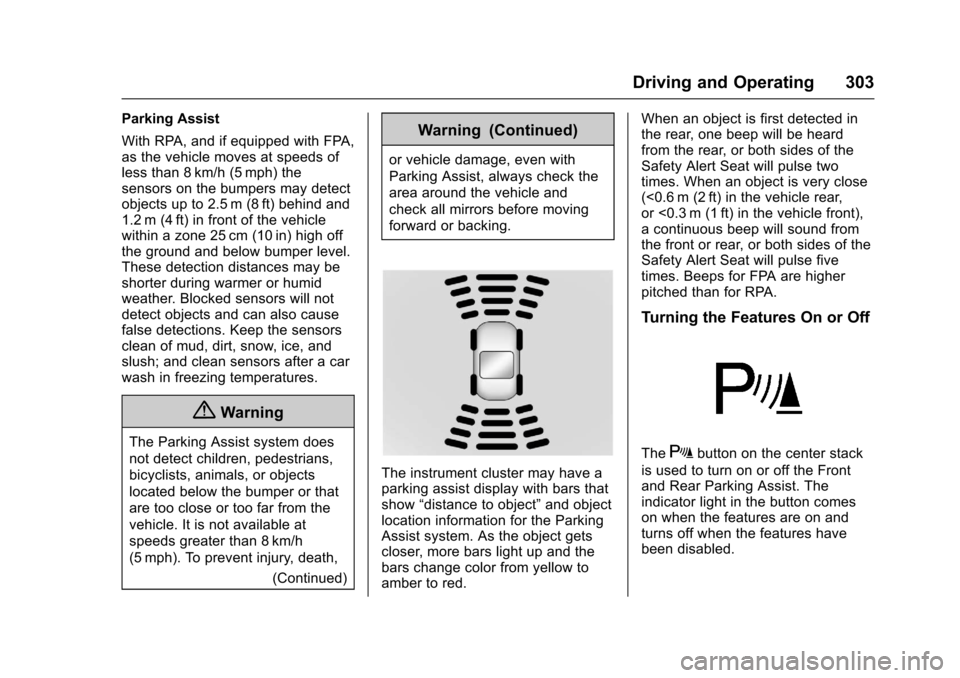
The instrument cluster may have aparking assist display with bars thatshow“distance to object”and objectlocation information for the ParkingAssist system. As the object getscloser, more bars light up and thebars change color from yellow toamber to red.
When an object is first detected inthe rear, one beep will be heardfrom the rear, or both sides of theSafety Alert Seat will pulse twotimes. When an object is very close(<0.6 m (2 ft) in the vehicle rear,or <0.3 m (1 ft) in the vehicle front),acontinuousbeepwillsoundfromthe front or rear, or both sides of theSafety Alert Seat will pulse fivetimes. Beeps for FPA are higherpitched than for RPA.
Turning the Features On or Off
TheXbutton on the center stack
is used to turn on or off the Frontand Rear Parking Assist. Theindicator light in the button comeson when the features are on andturns off when the features havebeen disabled.
Page 305 of 509
Chevrolet Silverado Owner Manual (GMNA-Localizing-U.S./Canada/Mexico-9956065) - 2017 - CRC - 4/29/16
304 Driving and Operating
Front and Rear Parking Assist canbe turned off, on, or on with towbarthrough vehicle personalization. See“Park Assist”underVehiclePersonalization0160.Iftheparkingassist is turned off through vehiclepersonalization, the parking assistbutton on the center stack will bedisabled. To turn the parking assiston again, select On in the vehiclepersonalization menu. The On withTo w b a r s e t t i n g a l l o w s f o r t h eparking assist to work properly withasmallitemattachedtothetrailerhitch. Turn off parking assist whentowing a trailer.
To t u r n t h e r e a r p a r k i n g a s s i s tsymbols or guidance lines on or off,see“Rear Camera”underVehiclePersonalization0160.
Assistance Systems for
Driving
If equipped, when driving thevehicle in a forward gear, ForwardCollision Alert (FCA), LaneDeparture Warning (LDW), and/or
Lane Keep Assist (LKA) can help toavoid a crash or reduce crashdamage.
Forward Collision Alert
(FCA) System
If equipped, the FCA system mayhelp to avoid or reduce the harmcaused by front-end crashes. Whenapproaching a vehicle ahead tooquickly, FCA provides a red flashingalert on the windshield and rapidlybeeps or pulses the driver seat.FCA also lights an amber visualalert if following another vehiclemuch too closely.
FCA detects vehicles within adistance of approximately 60 m(197 ft) and operates at speedsabove 40 km/h (25 mph).
{Warning
FCA is a warning system and
does not apply the brakes. When
approaching a slower-moving or
stopped vehicle ahead too rapidly,
(Continued)
Warning (Continued)
or when following a vehicle too
closely, FCA may not provide a
warning with enough time to help
avoid a crash. It also may not
provide any warning at all. FCA
does not warn of pedestrians,
animals, signs, guardrails,
bridges, construction barrels,
or other objects. Be ready to take
action and apply the brakes. See
Defensive Driving0248.
FCA can be disabled with the FCAsteering wheel control.
Detecting the Vehicle Ahead
FCA warnings will not occur unlessthe FCA system detects a vehicleahead. When a vehicle is detected,the vehicle ahead indicator will
Page 309 of 509
Chevrolet Silverado Owner Manual (GMNA-Localizing-U.S./Canada/Mexico-9956065) - 2017 - CRC - 4/29/16
308 Driving and Operating
marking without using a turn signalin that direction. LDW uses acamera sensor to detect the lanemarkings at speeds of 56 km/h(35 mph) or greater.
{Warning
The LDW system does not steer
the vehicle. The LDW system
may not:
.Provide enough time toavoid a crash.
.Detect lane markings underpoor weather or visibilityconditions. This can occur ifthe windshield orheadlamps are blocked bydirt, snow, or ice; if they arenot in proper condition; or ifthe sun shines directly intothe camera.
.Detect road edges.
.Detect lanes on winding orhilly roads.
(Continued)
Warning (Continued)
If LDW only detects lane
markings on one side of the road,
it will only warn you when
departing the lane on the side
where it has detected a lane
marking. Always keep your
attention on the road and
maintain proper vehicle position
within the lane, or vehicle
damage, injury, or death could
occur. Always keep the
windshield, headlamps, and
camera sensors clean and in
good repair. Do not use LDW in
bad weather conditions.
How the System Works
The LDW camera sensor is on thewindshield ahead of the rearviewmirror.
To t u r n L D W o n a n d o f f , p r e s s@on
the center stack. The controlindicator will light when LDW is on.
When LDW is on,@is green if
LDW is available to warn of a lanedeparture. If the vehicle crosses adetected lane marking without using
the turn signal in that direction,@
changes to amber and flashes.Additionally, there will be threebeeps, or the driver seat will pulsethree times on the right or left,depending on the lane departuredirection.
When the System Does Not
Seem to Work Properly
The system may not detect lanes aswell when there are:
.Close vehicles ahead.
.Sudden lighting changes, suchas when driving through tunnels.
.Banked roads.
Page 311 of 509
Chevrolet Silverado Owner Manual (GMNA-Localizing-U.S./Canada/Mexico-9956065) - 2017 - CRC - 4/29/16
310 Driving and Operating
{Warning
Using LKA while towing a trailer
or on slippery roads could cause
loss of control of the vehicle and
acrash.Turnthesystemoff.
How the System Works
The LKA camera sensor is on thewindshield ahead of the rearviewmirror.
To t u r n L K A o n a n d o f f , p r e s sA
on the center stack.
When on,Ais green if LKA is
available to assist and provide LDWalerts. It may assist by gentlyturning the steering wheel and
displayAas amber if the vehicle
approaches a detected lane markingwithout using a turn signal in thatdirection. It may also provide an
LDW alert by flashingAamber
as the lane marking is crossed.Additionally, there will be threebeeps, or the driver seat will pulse
three times, on the right or left,depending on the lane departuredirection.
The LKA system does notcontinuously steer the vehicle.If LKA does not detect active driversteering, an alert and chime may beprovided. Move the steering wheelto dismiss.
When the System Does Not
Seem to Work Properly
The system performance may beaffected by:
.Close vehicles ahead.
.Sudden lighting changes, suchas when driving through tunnels.
.Banked roads.
.Roads with poor lane markings,such as two-lane roads.
If the LKA system is not functioningproperly when lane markings areclearly visible, cleaning thewindshield may help.
LKA assistance and/or LDW alertsmay occur due to tar marks,shadows, cracks in the road,temporary or construction lanemarkings, or other roadimperfections. This is normal systemoperation; the vehicle does not needservice. Turn LKA off if theseconditions continue.
Page 316 of 509
Chevrolet Silverado Owner Manual (GMNA-Localizing-U.S./Canada/Mexico-9956065) - 2017 - CRC - 4/29/16
Driving and Operating 315
{Warning
Attempting to refuel without using
the funnel adapter may cause fuel
spillage and damage the capless
fuel system. This could cause a
fire and you or others could be
badly burned and the vehicle
could be damaged.
3. Remove and clean the funneladapter and return to thestorage location.
Filling a Portable Fuel
Container
{Warning
Filling a portable fuel container
while it is in the vehicle can cause
fuel vapors that can ignite either
by static electricity or other
(Continued)
Warning (Continued)
means. You or others could be
badly burned and the vehicle
could be damaged. Always:
.Use approved fuelcontainers.
.Remove the container fromthe vehicle, trunk, or pickupbed before filling.
.Place the container on theground.
.Place the nozzle inside thefill opening of the containerbefore dispensing fuel, andkeep it in contact with the fillopening until filling iscomplete.
.Fill the container no morethan 95% full to allow forexpansion.
.Do not smoke, lightmatches, or use lighterswhile pumping fuel.
.Avoid using cell phones orother electronic devices.
Trailer Towing
General Towing
Information
Only use towing equipment that hasbeen designed for the vehicle.Contact your dealer or traileringdealer for assistance with preparingthe vehicle for towing a trailer. Readthe entire section before towing atrailer.
For towing a disabled vehicle, seeTo w i n g t h e V e h i c l e0436.Fortowing the vehicle behind anothervehicle such as a motor home, seeRecreational Vehicle Towing0437.
Driving Characteristics
and Towing Tips
Driving with a Trailer
When towing a trailer:
.Become familiar with the stateand local laws that apply totrailer towing.
Page 345 of 509
Chevrolet Silverado Owner Manual (GMNA-Localizing-U.S./Canada/Mexico-9956065) - 2017 - CRC - 4/29/16
344 Driving and Operating
AGMdealermaybeabletodiagnose and repair problems withthe trailer. However, any diagnosisand repair of the trailer is notcovered under the vehicle warranty.Contact your trailer dealer forassistance with trailer repairs andtrailer warranty information.
Trailer Sway
Control (TSC)
Vehicles with StabiliTrak have aTrailer Sway Control (TSC) feature.Trailer sway is unintendedside-to-side motion of a trailer whilebeing towed. If the vehicle is towingatrailerandtheTSCdetectsthatsway is increasing, the vehiclebrakes are selectively applied ateach wheel, to help reduceexcessive trailer sway. If the vehicleis equipped with the IntegratedTrailer Brake Control (ITBC) system,and the trailer has the electricactuated brake system, StabiliTrakmay also apply the trailer brakes.
If TSC is enabled, the TractionControl System (TCS)/StabiliTrakwarning light will flash on theinstrument cluster. Vehicle speedmust be reduced. If trailer swaycontinues, StabiliTrak can reduceengine torque to help slow thevehicle. SeeTr a c t i o n C o n t r o l /Electronic Stability Control0295.
{Warning
Even if the vehicle is equipped
with TSC, trailer sway could result
in loss of control and the vehicle
could crash. If excessive trailer
sway is detected, slow down to a
safe speed. Check the trailer and
vehicle to help correct possible
causes. These could include an
improperly or overloaded trailer,
unrestrained cargo, improper
(Continued)
Warning (Continued)
trailer hitch configuration,
excessive vehicle-trailer speed,
or improperly inflated or incorrect
vehicle or trailer tires. SeeTo w i n g
Equipment0335for trailer ratings
and hitch setup
recommendations.
Adding non-dealer accessories canaffect the vehicle performance.SeeAccessories andModifications0352.
Page 346 of 509
Chevrolet Silverado Owner Manual (GMNA-Localizing-U.S./Canada/Mexico-9956065) - 2017 - CRC - 4/29/16
Driving and Operating 345
Conversions and
Add-Ons
Add-On Electrical
Equipment
{Warning
The Data Link Connector (DLC) is
used for vehicle service and
Emission Inspection/Maintenance
testing. SeeMalfunction Indicator
Lamp (Check Engine Light)
0138.Adeviceconnectedtothe
DLC—such as an aftermarket
fleet or driver-behavior tracking
device—may interfere with
vehicle systems. This could affect
vehicle operation and cause a
crash. Such devices may also
access information stored in the
vehicle’ssystems.
Caution
Some electrical equipment can
damage the vehicle or cause
components to not work and
would not be covered by the
vehicle warranty. Always check
with your dealer before adding
electrical equipment.
Add-on equipment can drain thevehicle's 12-volt battery, even if thevehicle is not operating.
The vehicle has an airbag system.Before attempting to add anythingelectrical to the vehicle, seeServicing the Airbag-EquippedVehicle086andAdding Equipmentto the Airbag-EquippedVehicle087.
For information on wiring auxiliaryswitches, see www.gmupfitter.comor contact your dealer.
Adding a Snow Plow or
Similar Equipment
Caution
Do not exceed 72 km/h (45 mph)
with a snow plow mounted to the
vehicle. The vehicle could
overheat and be damaged.
Before installing a snow plow on thevehicle, follow these guidelines:
Caution
If the vehicle does not have the
snow plow prep package, RPO
VYU, adding a plow can damage
the vehicle, and the repairs would
not be covered by the vehicle
warranty. Unless the vehicle was
built to carry a snow plow, do not
add one to the vehicle. If the
vehicle has RPO VYU, then the
payload the vehicle can carry will
be reduced when a snow plow is
installed. The vehicle can be
(Continued)
Page 351 of 509
Chevrolet Silverado Owner Manual (GMNA-Localizing-U.S./Canada/Mexico-9956065) - 2017 - CRC - 4/29/16
350 Vehicle Care
Vehicle Care
General Information
General Information . . . . . . . . . . 351California Proposition65 Warning . . . . . . . . . . . . . . . . . 351California PerchlorateMaterials Requirements . . . . . 352Accessories andModifications . . . . . . . . . . . . . . . . 352
Vehicle Checks
Doing Your OwnService Work . . . . . . . . . . . . . . . 353Hood . . . . . . . . . . . . . . . . . . . . . . . . . 353Engine CompartmentOverview . . . . . . . . . . . . . . . . . . . . 354Engine Oil . . . . . . . . . . . . . . . . . . . . 359Engine Oil Life System . . . . . . . 362Automatic Transmission Fluid(6-Speed Transmission) . . . . . 363Automatic Transmission Fluid(8-Speed Transmission) . . . . . 366Manual Transmission Fluid . . . 366Hydraulic Clutch . . . . . . . . . . . . . . 366Engine Air Cleaner/Filter . . . . . . 367Cooling System . . . . . . . . . . . . . . 368Engine Coolant . . . . . . . . . . . . . . . 369Engine Overheating . . . . . . . . . . 372
Overheated Engine ProtectionOperating Mode . . . . . . . . . . . . . 374Engine Fan . . . . . . . . . . . . . . . . . . . 374Power Steering Fluid (1500Series) . . . . . . . . . . . . . . . . . . . . . . 375Power Steering Fluid (2500/3500 Series) . . . . . . . . . . . . . . . . 375Washer Fluid . . . . . . . . . . . . . . . . . 375Brakes . . . . . . . . . . . . . . . . . . . . . . . 376Brake Fluid . . . . . . . . . . . . . . . . . . . 377Battery - North America . . . . . . 378Four-Wheel Drive . . . . . . . . . . . . . 379Front Axle . . . . . . . . . . . . . . . . . . . . 380Rear Axle . . . . . . . . . . . . . . . . . . . . 380Noise Control System . . . . . . . . 382Starter Switch Check . . . . . . . . . 383Automatic Transmission ShiftLock Control FunctionCheck . . . . . . . . . . . . . . . . . . . . . . . 383Ignition Transmission LockCheck . . . . . . . . . . . . . . . . . . . . . . . 383Park Brake and P (Park)Mechanism Check . . . . . . . . . . 384Wiper Blade Replacement . . . . 384Glass Replacement . . . . . . . . . . 385
Headlamp Aiming
Headlamp Aiming . . . . . . . . . . . . 385
Bulb Replacement
Bulb Replacement . . . . . . . . . . . . 385
Halogen Bulbs . . . . . . . . . . . . . . . . 385High Intensity Discharge (HID)Lighting . . . . . . . . . . . . . . . . . . . . . 386LED Lighting . . . . . . . . . . . . . . . . . 386Headlamps, Front Turn Signal,Sidemarker, and ParkingLamps . . . . . . . . . . . . . . . . . . . . . . 386Fog Lamps . . . . . . . . . . . . . . . . . . . 387Ta i l l a m p s ( C h a s s i s C a bModels) . . . . . . . . . . . . . . . . . . . . . 387Ta i l l a m p s , T u r n S i g n a l ,Stoplamps, and Back-UpLamps . . . . . . . . . . . . . . . . . . . . . . 387Center High-MountedStoplamp (CHMSL) andCargo Lamp . . . . . . . . . . . . . . . . . 389Replacement Bulbs . . . . . . . . . . . 389
Electrical System
High Voltage Devices andWiring . . . . . . . . . . . . . . . . . . . . . . . 389Electrical System Overload . . . 389Fuses . . . . . . . . . . . . . . . . . . . . . . . . 390Engine Compartment FuseBlock . . . . . . . . . . . . . . . . . . . . . . . . 390Instrument Panel Fuse Block(Right) . . . . . . . . . . . . . . . . . . . . . . 393Instrument Panel FuseBlock (Left) . . . . . . . . . . . . . . . . . 395
Page 372 of 509
Chevrolet Silverado Owner Manual (GMNA-Localizing-U.S./Canada/Mexico-9956065) - 2017 - CRC - 4/29/16
Vehicle Care 371
the FULL COLD mark. If it is not,there may be a leak in the coolingsystem.
If coolant is visible but the coolantlevel is not at or above the FULLCOLD mark, see“How to AddCoolant to the Coolant Surge Tankfor Gasoline Engines,”following.
How to Add Coolant to the
Coolant Surge Tank for
Gasoline Engines
If the vehicle has a diesel engine,see“Cooling System”in theDuramax diesel supplement for theproper coolant fill procedure.
{Warning
Yo u c a n b e b u r n e d i f y o u s p i l l
coolant on hot engine parts.
Coolant contains ethylene glycol
and it will burn if the engine parts
are hot enough. Do not spill
coolant on a hot engine.
Caution
This vehicle has a specific
coolant fill procedure. Failure to
follow this procedure could cause
the engine to overheat and be
severely damaged.
{Warning
Steam and scalding liquids from a
hot cooling system can blow out
and burn you badly. Never turn
the cap when the cooling system,
including the surge tank pressure
cap, is hot. Wait for the cooling
system and surge tank pressure
cap to cool.
If no coolant is visible in the surgetank, add coolant.
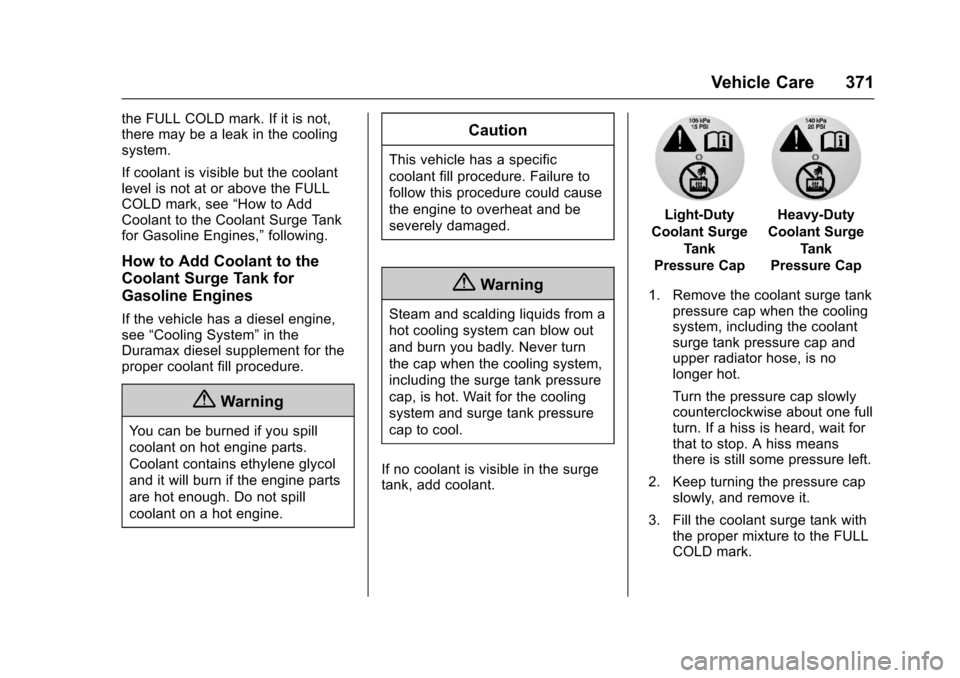
Light-Duty
Coolant Surge
Tank
Pressure Cap
Heavy-Duty
Coolant Surge
Tank
Pressure Cap
1. Remove the coolant surge tankpressure cap when the coolingsystem, including the coolantsurge tank pressure cap andupper radiator hose, is nolonger hot.
Turn the pressure cap slowlycounterclockwise about one fullturn. If a hiss is heard, wait forthat to stop. A hiss meansthere is still some pressure left.
2. Keep turning the pressure capslowly, and remove it.
3. Fill the coolant surge tank withthe proper mixture to the FULLCOLD mark.