cam CHEVROLET SILVERADO 2019 User Guide
[x] Cancel search | Manufacturer: CHEVROLET, Model Year: 2019, Model line: SILVERADO, Model: CHEVROLET SILVERADO 2019Pages: 474, PDF Size: 7.28 MB
Page 107 of 474
Chevrolet Silverado Owner Manual (GMNA-Localizing-U.S./Canada/Mexico-
1500-11698642) - 2019 - CRC - 2/20/19
106 Seats and Restraints
Wherever a child restraint is
installed, be sure to follow the
instructions that came with the child
restraint and secure the child
restraint properly.
Keep in mind that an unsecured
child restraint can move around in a
collision or sudden stop and injure
people in the vehicle. Be sure to
properly secure any child restraint in
the vehicle—even when no child is
in it.
Lower Anchors and
Tethers for Children
(LATCH System)
The LATCH system secures a child
restraint during driving or in a crash.
LATCH attachments on the child
restraint are used to attach the child
restraint to the anchors in the
vehicle. This system is designed to
make installation of a child restraint
easier.
In order to use the LATCH system in
your vehicle, you need a child
restraint that has LATCH
attachments. LATCH-compatible rear-facing and forward-facing child
seats can be properly installed
using either the LATCH anchors or
the vehicle’
s seat belts. Do not use
both the seat belts and the LATCH
anchorage system to secure a
rear-facing or forward-facing
child seat.
Booster seats use the vehicle’s seat
belts to secure the child and the
booster seat. If the manufacturer
recommends that the booster seat
be secured with the LATCH system,
this can be done as long as the
booster seat can be positioned
properly and there is no interference
with the proper positioning of the
lap-shoulder belt on the child.
Make sure to follow the instructions
that came with the child restraint,
and also the instructions in this
manual.
When installing a child restraint with
a top tether, you must also use
either the lower anchors or the seat
belts to properly secure the child
restraint. A child restraint must
never be installed using only the top
tether and anchor. The LATCH anchorage system can
be used until the combined weight
of the child plus the child restraint is
29.5 kg (65 lbs). Use the seat belt
alone instead of the LATCH
anchorage system once the
combined weight is more than
29.5 kg (65 lbs).
See
Securing Child Restraints (With
the Seat Belt in the Front Passenger
Seat) 0121 or
Securing Child Restraints (In the
Center Front Seat) 0124 or
Securing Child Restraints (With the
Seat Belt in the Rear Seat) 0117.
Child restraints built after March
2014 will be labeled with the
specific child weight up to which the
LATCH system can be used to
install the restraint.
The following explains how to attach
a child restraint with these
attachments in the vehicle.
Page 111 of 474

Chevrolet Silverado Owner Manual (GMNA-Localizing-U.S./Canada/Mexico-
1500-11698642) - 2019 - CRC - 2/20/19
110 Seats and Restraints
Center Anchor and Loop (Doubleand Crew Cab)Passenger Side Loop (Double and Crew Cab)
For double and crew cab models,
the top tether is routed through
loops (2) to the top tether
anchors (1). Be sure to use the
correct anchor for the seating
position where the child restraint will
be placed.
Be sure to read the following
instructions to properly install a child
restraint using these loops and
anchors.
Do not secure a child restraint in a
position without a top tether anchor
if a national or local law requires that the top tether be attached, or if
the instructions that come with the
child restraint say that the top tether
must be attached.
According to accident statistics,
children and infants are safer when
properly restrained in a child
restraint system or infant restraint
system secured in a rear seating
position. See
Where to Put the
Restraint 0104 for additional
information.Securing a Child Restraint
Designed for the LATCH
System
{Warning
A child could be seriously injured
or killed in a crash if the child
restraint is not properly attached
to the vehicle using either the
LATCH anchors or the vehicle
seat belt. Follow the instructions
that came with the child restraint
and the instructions in this
manual.
Page 118 of 474
Chevrolet Silverado Owner Manual (GMNA-Localizing-U.S./Canada/Mexico-
1500-11698642) - 2019 - CRC - 2/20/19
Seats and Restraints 117
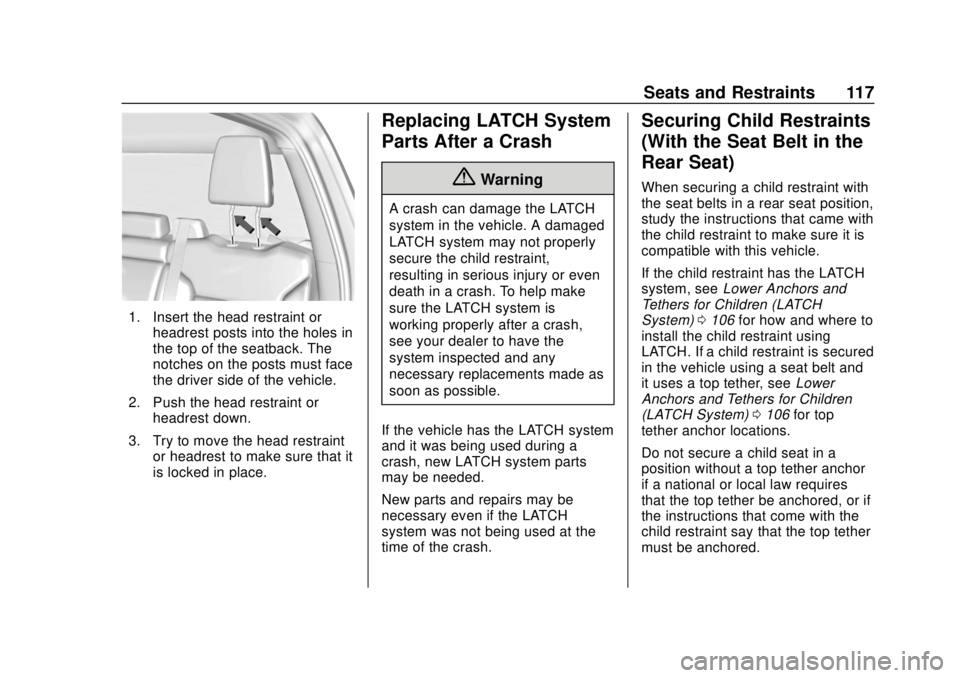
1. Insert the head restraint orheadrest posts into the holes in
the top of the seatback. The
notches on the posts must face
the driver side of the vehicle.
2. Push the head restraint or headrest down.
3. Try to move the head restraint or headrest to make sure that it
is locked in place.
Replacing LATCH System
Parts After a Crash
{Warning
A crash can damage the LATCH
system in the vehicle. A damaged
LATCH system may not properly
secure the child restraint,
resulting in serious injury or even
death in a crash. To help make
sure the LATCH system is
working properly after a crash,
see your dealer to have the
system inspected and any
necessary replacements made as
soon as possible.
If the vehicle has the LATCH system
and it was being used during a
crash, new LATCH system parts
may be needed.
New parts and repairs may be
necessary even if the LATCH
system was not being used at the
time of the crash.
Securing Child Restraints
(With the Seat Belt in the
Rear Seat)
When securing a child restraint with
the seat belts in a rear seat position,
study the instructions that came with
the child restraint to make sure it is
compatible with this vehicle.
If the child restraint has the LATCH
system, see Lower Anchors and
Tethers for Children (LATCH
System) 0106 for how and where to
install the child restraint using
LATCH. If a child restraint is secured
in the vehicle using a seat belt and
it uses a top tether, see Lower
Anchors and Tethers for Children
(LATCH System) 0106 for top
tether anchor locations.
Do not secure a child seat in a
position without a top tether anchor
if a national or local law requires
that the top tether be anchored, or if
the instructions that come with the
child restraint say that the top tether
must be anchored.
Page 119 of 474
Chevrolet Silverado Owner Manual (GMNA-Localizing-U.S./Canada/Mexico-
1500-11698642) - 2019 - CRC - 2/20/19
118 Seats and Restraints
In Canada, the law requires that
forward-facing child restraints have
a top tether, and that the tether be
attached.
If the child restraint or vehicle seat
position does not have the LATCH
system, you will be using the seat
belt to secure the child restraint. Be
sure to follow the instructions that
came with the child restraint.
If more than one child restraint
needs to be installed in the rear
seat, be sure to readWhere to Put
the Restraint 0104.
Double Cab
1. Remove the head restraint or
headrest prior to installing a
forward-facing child restraint in
an outboard rear seating
position. See “Head Restraint
or Headrest Removal and
Reinstallation” underLower
Anchors and Tethers for
Children (LATCH System)
0 106.
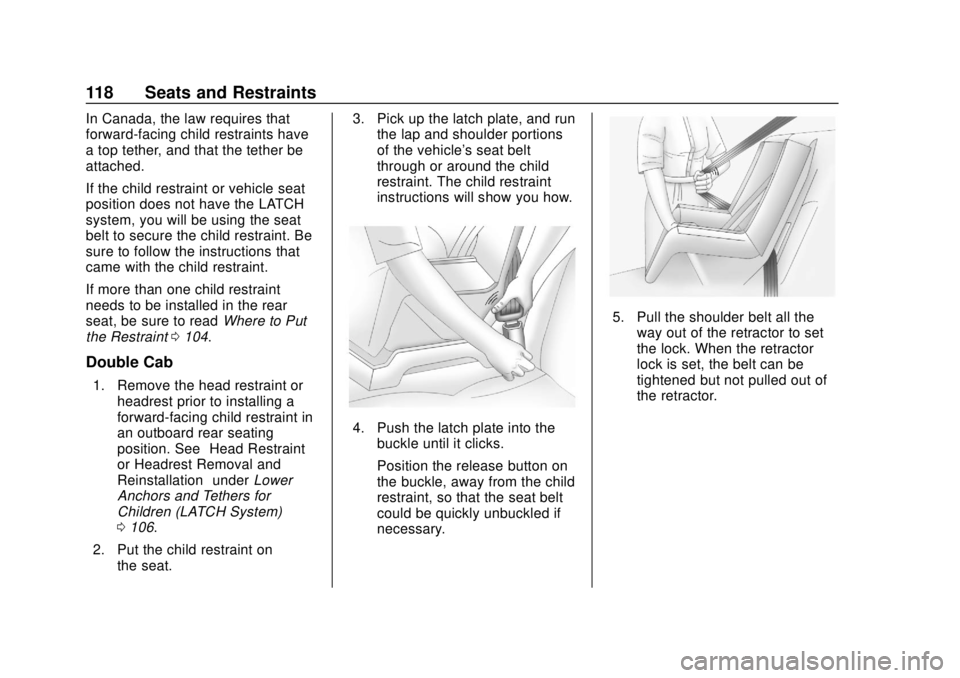
2. Put the child restraint on the seat. 3. Pick up the latch plate, and run
the lap and shoulder portions
of the vehicle's seat belt
through or around the child
restraint. The child restraint
instructions will show you how.
4. Push the latch plate into thebuckle until it clicks.
Position the release button on
the buckle, away from the child
restraint, so that the seat belt
could be quickly unbuckled if
necessary.
5. Pull the shoulder belt all the
way out of the retractor to set
the lock. When the retractor
lock is set, the belt can be
tightened but not pulled out of
the retractor.
Page 123 of 474
Chevrolet Silverado Owner Manual (GMNA-Localizing-U.S./Canada/Mexico-
1500-11698642) - 2019 - CRC - 2/20/19
122 Seats and Restraints
If the vehicle does not have a rear
seat that will accommodate a
rear-facing child restraint, a
rear-facing child restraint should not
be installed in the vehicle, even if
the airbag is off.
If the child restraint uses a top
tether, seeLower Anchors and
Tethers for Children (LATCH
System) 0106 for top tether anchor
locations.
Do not secure a child seat in a
position without a top tether anchor
if a national or local law requires
that the top tether be anchored, or if
the instructions that come with the
child restraint say that the top tether
must be anchored.
In Canada, the law requires that
forward-facing child restraints have
a top tether, and that the tether be
attached.
When using the lap-shoulder belt to
secure the child restraint in this
position, follow the instructions that
came with the child restraint and the
following instructions: 1. Move the seat as far back as it
will go before securing the
forward-facing child restraint.
Move the seat upward or the
seatback to an upright position,
if needed, to get a tight
installation of the child
restraint.
When the passenger sensing
system has turned off the front
outboard passenger frontal
airbag, the OFF indicator on
the passenger airbag status
indicator should light and stay
lit when you start the vehicle.
See Passenger Airbag Status
Indicator 0148.
2. Put the child restraint on the seat.
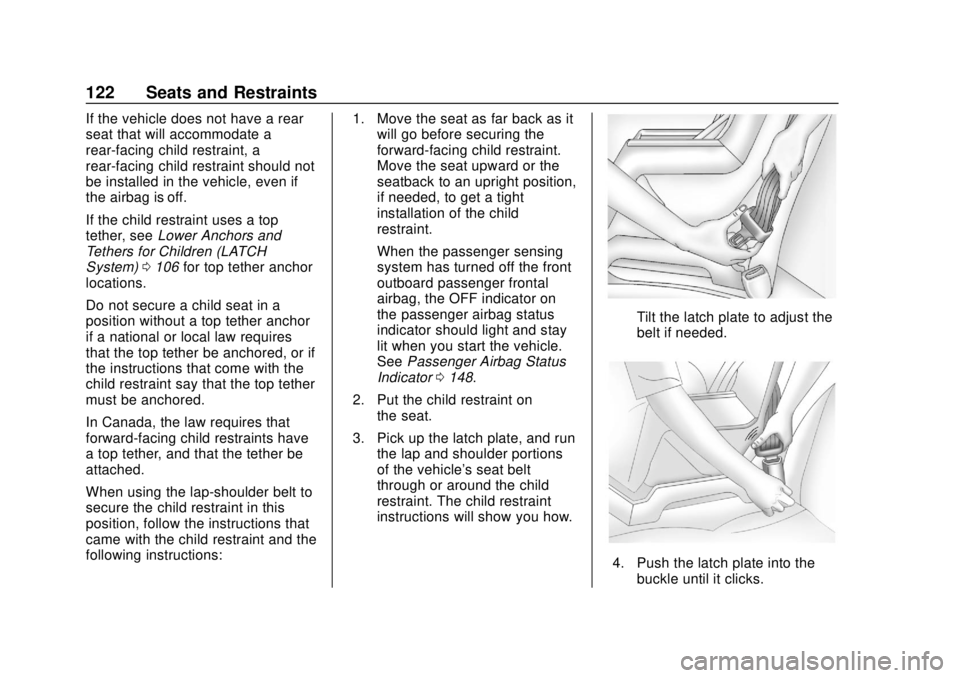
3. Pick up the latch plate, and run the lap and shoulder portions
of the vehicle's seat belt
through or around the child
restraint. The child restraint
instructions will show you how.
Tilt the latch plate to adjust the
belt if needed.
4. Push the latch plate into thebuckle until it clicks.
Page 124 of 474
Chevrolet Silverado Owner Manual (GMNA-Localizing-U.S./Canada/Mexico-
1500-11698642) - 2019 - CRC - 2/20/19
Seats and Restraints 123
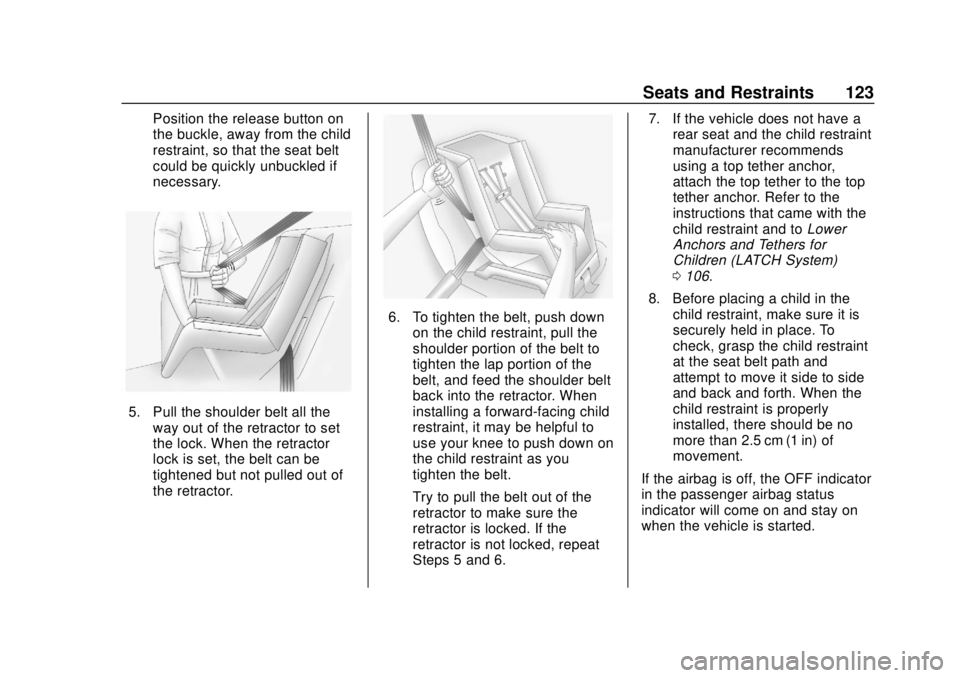
Position the release button on
the buckle, away from the child
restraint, so that the seat belt
could be quickly unbuckled if
necessary.
5. Pull the shoulder belt all theway out of the retractor to set
the lock. When the retractor
lock is set, the belt can be
tightened but not pulled out of
the retractor.
6. To tighten the belt, push downon the child restraint, pull the
shoulder portion of the belt to
tighten the lap portion of the
belt, and feed the shoulder belt
back into the retractor. When
installing a forward-facing child
restraint, it may be helpful to
use your knee to push down on
the child restraint as you
tighten the belt.
Try to pull the belt out of the
retractor to make sure the
retractor is locked. If the
retractor is not locked, repeat
Steps 5 and 6. 7. If the vehicle does not have a
rear seat and the child restraint
manufacturer recommends
using a top tether anchor,
attach the top tether to the top
tether anchor. Refer to the
instructions that came with the
child restraint and to Lower
Anchors and Tethers for
Children (LATCH System)
0 106.
8. Before placing a child in the child restraint, make sure it is
securely held in place. To
check, grasp the child restraint
at the seat belt path and
attempt to move it side to side
and back and forth. When the
child restraint is properly
installed, there should be no
more than 2.5 cm (1 in) of
movement.
If the airbag is off, the OFF indicator
in the passenger airbag status
indicator will come on and stay on
when the vehicle is started.
Page 170 of 474
Chevrolet Silverado Owner Manual (GMNA-Localizing-U.S./Canada/Mexico-
1500-11698642) - 2019 - CRC - 2/20/19
Instruments and Controls 169
The menu may contain the
following:
Rear Seat Reminder
This allows for a chime and a
message when the rear door has
been opened before or during
operation of the vehicle.
Touch Off or On.
Climate and Air Quality
Touch and the following may
display:
.Auto Fan Speed
. Auto Defog
. Auto Rear Defog
Auto Fan Speed
This setting specifies the amount of
airflow when the climate control fan
setting is Auto Fan.
Touch Low, Medium, or High.
Auto Defog
This setting automatically directs air
to the windshield to assist in
defogging, based on temperature
and humidity conditions. Touch Off or On.
Auto Rear Defog
This setting automatically turns the
rear defogger on based on
temperature and humidity
conditions.
Touch Off or On.
Collision/Detection Systems
Touch and the following may
display:
.
Alert Type
. Forward Collision System
. Front Pedestrian Detection
. Lane Change Alert
. Park Assist
. Rear Camera Park Assist
Symbols
. Rear Cross Traffic Alert
Alert Type
This feature sets the type of alert
from the driver assistance systems
to help avoid crashes.
Touch Beeps or Safety Alert Seat. Forward Collision System
This feature will turn on or off
Forward Collision Alert (FCA) and
Forward Automatic Braking (FAB).
The Off setting disables all FCA and
FAB functions. With the Alert and
Brake setting, both FCA and FAB
are available. The Alert setting
disables FAB. See
Forward
Automatic Braking (FAB) 0264.
Touch Off, Alert, or Alert and Brake.
Front Pedestrian Detection
This feature may help avoid or
reduce the harm caused by
front-end crashes with nearby
pedestrians. See Front Pedestrian
Braking (FPB) System 0265.
Touch Off, Alert, or Alert and Brake.
Lane Change Alert
This allows the feature to be turned
on or off. See Lane Change Alert
(LCA) 0268.
When Lane Change Alert is
disabled, Side Blind Zone Alert is
also disabled.
Touch Off or On.
Page 171 of 474
Chevrolet Silverado Owner Manual (GMNA-Localizing-U.S./Canada/Mexico-
1500-11698642) - 2019 - CRC - 2/20/19
170 Instruments and Controls
Park Assist
This allows the feature to be turned
on or off. SeeAssistance Systems
for Parking or Backing 0255.
Select Off, On, or On with Towbar.
Rear Camera Park Assist Symbols
This setting enables the Rear
Camera Park Assist Symbols. See
Assistance Systems for Parking or
Backing 0255.
Touch Off or On.
Rear Cross Traffic Alert
This allows the Rear Cross Traffic
Alert feature to be turned on or off.
See Assistance Systems for Parking
or Backing 0255.
Touch Off or On.
Comfort and Convenience
Touch and the following may
display:
. Chime Volume
. Reverse Tilt Mirror
. Remote Mirror Folding Chime Volume
This determines the chime volume
level.
Touch the controls on the
infotainment display to adjust the
volume.
Reverse Tilt Mirror
This allows the feature to be turned
on or off. See
Reverse Tilt Mirrors
0 59.
Touch Off, On - Driver and
Passenger, On - Driver, or On -
Passenger.
Remote Mirror Folding
When on, the outside mirrors will
remotely fold or unfold when the
Remote Keyless Entry (RKE)
transmitter
QorKbutton is
pressed and held. See Folding
Mirrors 056.
Touch Off or On.
Lighting
Touch and the following may
display: .
Vehicle Locator Lights
. Exit Lighting
Vehicle Locator Lights
This setting flashes the vehicle’ s
headlamps when
Kis pressed on
the Remote Keyless Entry (RKE)
transmitter.
Touch Off or On.
Exit Lighting
This setting specifies how long the
headlamps stay on after the vehicle
is turned off and exited.
Touch Off, 30 Seconds, 60 Seconds,
or 120 Seconds.
Power Door Locks
Touch and the following may
display:
. Open Door Anti Lock Out
. Auto Door Unlock
. Delayed Door Lock
Page 198 of 474
Chevrolet Silverado Owner Manual (GMNA-Localizing-U.S./Canada/Mexico-
1500-11698642) - 2019 - CRC - 2/20/19
Driving and Operating 197
Driving and
Operating
Driving Information
Distracted Driving . . . . . . . . . . . . 198
Defensive Driving . . . . . . . . . . . . . 199
Drunk Driving . . . . . . . . . . . . . . . . . 199
Control of a Vehicle . . . . . . . . . . . 199
Braking . . . . . . . . . . . . . . . . . . . . . . . 199
Steering . . . . . . . . . . . . . . . . . . . . . . 200
Off-Road Recovery . . . . . . . . . . . 200
Loss of Control . . . . . . . . . . . . . . . 201
Off-Road Driving . . . . . . . . . . . . . 201
Driving on Wet Roads . . . . . . . . 206
Hill and Mountain Roads . . . . . 207
Winter Driving . . . . . . . . . . . . . . . . 207
If the Vehicle Is Stuck . . . . . . . . 209
Vehicle Load Limits . . . . . . . . . . . 210
Truck-Camper LoadingInformation . . . . . . . . . . . . . . . . . . 215
Starting and Operating
New Vehicle Break-In . . . . . . . . . 217
Ignition Positions (KeyAccess) . . . . . . . . . . . . . . . . . . . . . 218
Ignition Positions (Keyless Access) . . . . . . . . . . . . . . . . . . . . . 220
Starting the Engine . . . . . . . . . . . 222 Stop/Start System . . . . . . . . . . . . 223
Engine Heater . . . . . . . . . . . . . . . . 224
Retained Accessory
Power (RAP) . . . . . . . . . . . . . . . . 226
Shifting Into Park . . . . . . . . . . . . . 226
Shifting out of Park . . . . . . . . . . . 227
Parking over Things
That Burn . . . . . . . . . . . . . . . . . . . 228
Active Fuel Management . . . . . 228
Extended Parking . . . . . . . . . . . . 228
Engine Exhaust
Engine Exhaust . . . . . . . . . . . . . . 229
Running the Vehicle While Parked . . . . . . . . . . . . . . . . . . . . . . 229
Automatic Transmission
Automatic Transmission . . . . . . 230
Manual Mode . . . . . . . . . . . . . . . . . 233
Tow/Haul Mode . . . . . . . . . . . . . . . 235
Drive Systems
Four-Wheel Drive . . . . . . . . . . . . . 236
Brakes
Antilock BrakeSystem (ABS) . . . . . . . . . . . . . . . 241
Electric Parking Brake . . . . . . . . 242
Brake Assist . . . . . . . . . . . . . . . . . . 243
Hill Start Assist (HSA) . . . . . . . . 244
Ride Control Systems
Traction Control/Electronic Stability Control . . . . . . . . . . . . . 244
Hill Descent Control (HDC) . . . 246
Driver Mode Control . . . . . . . . . . 247
Limited-Slip Differential . . . . . . . 251
Locking Rear Axle . . . . . . . . . . . . 251
Cruise Control
Cruise Control . . . . . . . . . . . . . . . . 251
Driver Assistance Systems
Driver Assistance Systems . . . 254
Assistance Systems for Parking or Backing . . . . . . . . . . 255
Assistance Systems for Driving . . . . . . . . . . . . . . . . . . . . . . 261
Forward Collision Alert (FCA) System . . . . . . . . . . . . . . . . . . . . . . 261
Forward Automatic Braking (FAB) . . . . . . . . . . . . . . . 264
Front Pedestrian Braking (FPB) System . . . . . . . . . . . . . . . 265
Side Blind Zone Alert (SBZA) . . . . . . . . . . . . . . . . 267
Lane Change Alert (LCA) . . . . . 268
Lane Departure Warning (LDW) . . . . . . . . . . . . . 270
Lane Keep Assist (LKA) . . . . . . 270
Page 216 of 474
Chevrolet Silverado Owner Manual (GMNA-Localizing-U.S./Canada/Mexico-
1500-11698642) - 2019 - CRC - 2/20/19
Driving and Operating 215
Caution
Overloading the vehicle may
cause damage. Repairs would not
be covered by the vehicle
warranty. Do not overload the
vehicle.
Remember not to exceed the
Gross Axle Weight
Rating (GAWR) of the front or
rear axle.* Equipment Maximum
Weight
Ladder Rack
and Cargo 340 kg (750 lb)
Cross Toolbox
and Cargo 181 kg (400 lb)
Side Boxes
and Cargo 113 kg per
side (250 lb
per side)
* The combined weight for all
rail-mounted equipment should
not exceed 454 kg (1,000 lb).
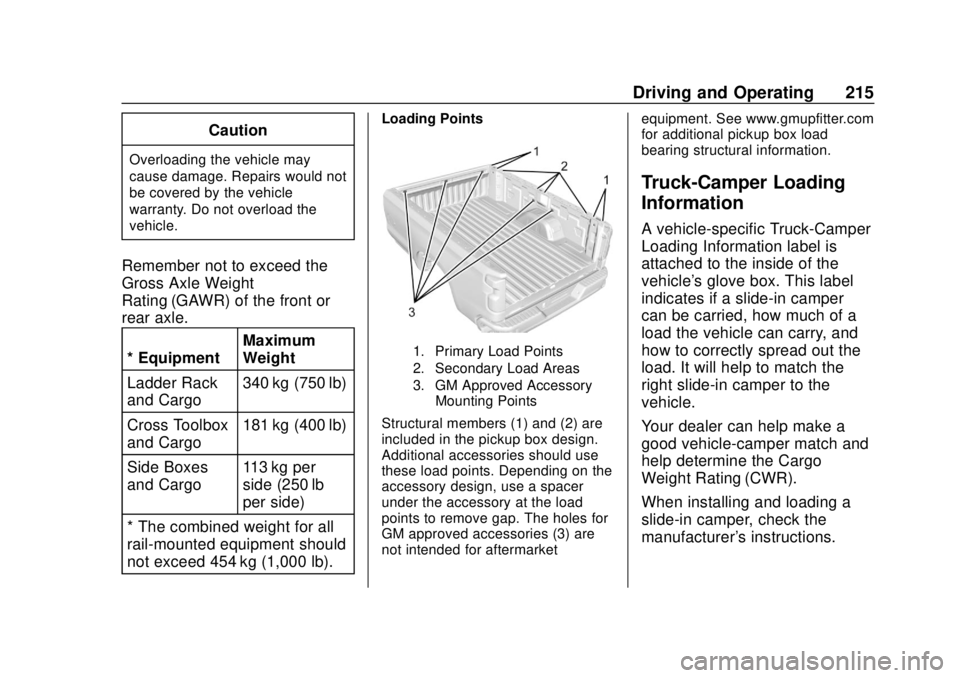
Loading Points
1. Primary Load Points
2. Secondary Load Areas
3. GM Approved Accessory Mounting Points
Structural members (1) and (2) are
included in the pickup box design.
Additional accessories should use
these load points. Depending on the
accessory design, use a spacer
under the accessory at the load
points to remove gap. The holes for
GM approved accessories (3) are
not intended for aftermarket equipment. See www.gmupfitter.com
for additional pickup box load
bearing structural information.
Truck-Camper Loading
Information
A vehicle-specific Truck-Camper
Loading Information label is
attached to the inside of the
vehicle's glove box. This label
indicates if a slide-in camper
can be carried, how much of a
load the vehicle can carry, and
how to correctly spread out the
load. It will help to match the
right slide-in camper to the
vehicle.
Your dealer can help make a
good vehicle-camper match and
help determine the Cargo
Weight Rating (CWR).
When installing and loading a
slide-in camper, check the
manufacturer's instructions.