front seat CHEVROLET SILVERADO 2019 Repair Manual
[x] Cancel search | Manufacturer: CHEVROLET, Model Year: 2019, Model line: SILVERADO, Model: CHEVROLET SILVERADO 2019Pages: 474, PDF Size: 7.28 MB
Page 262 of 474
Chevrolet Silverado Owner Manual (GMNA-Localizing-U.S./Canada/Mexico-
1500-11698642) - 2019 - CRC - 2/20/19
Driving and Operating 261
Use caution while backing up when
towing a trailer, as the RCTA
detection zones that extend out
from the back of the vehicle do not
move further back when a trailer is
towed.
RCTA is disabled when the trailer
connection status is displayed.
RCTA can be turned off through
“Collision/Detection Systems”under
Vehicle Personalization 0168.
Turning the Features On or Off
PressXon the center stack to
turn on or off the Front and Rear
Park Assist. The indicator light next
to the button comes on when the
features are on and turns off when
the features have been disabled. Front and Rear Park Assist can be
turned Off, On, or On with Towbar
through vehicle personalization. See
“Park Assist”
underVehicle
Personalization 0168. If Park Assist
is turned off through vehicle
personalization, the Park Assist
button will be disabled. To turn Park
Assist on again, select On in the
vehicle personalization menu. The
On with Towbar setting allows for
Park Assist to work properly with a
trailer hitch. Some larger trailer
hitches may not be compatible.
Turn off Park Assist when towing a
trailer.
To turn the RPA symbols on or off,
see “Rear Camera Park Assist
Symbols” underVehicle
Personalization 0168.Assistance Systems for
Driving
If equipped, when driving the
vehicle in a forward gear, Forward
Collision Alert (FCA), Lane
Departure Warning (LDW), Lane
Keep Assist (LKA), Side Blind Zone Alert (SBZA), Lane Change Alert
(LCA), Forward Automatic Braking
(FAB), and/or the Front Pedestrian
Braking (FPB) System can help to
avoid a crash or reduce crash
damage.
Forward Collision Alert
(FCA) System
If equipped, the FCA system may
help to avoid or reduce the harm
caused by front-end crashes. When
approaching a vehicle ahead too
quickly, FCA provides a red flashing
alert on the windshield and rapidly
beeps or pulses the driver seat.
FCA also lights an amber visual
alert if following another vehicle
much too closely.
FCA detects vehicles within a
distance of approximately 60 m
(197 ft) and operates at speeds
above 8 km/h (5 mph).
Page 264 of 474
Chevrolet Silverado Owner Manual (GMNA-Localizing-U.S./Canada/Mexico-
1500-11698642) - 2019 - CRC - 2/20/19
Driving and Operating 263
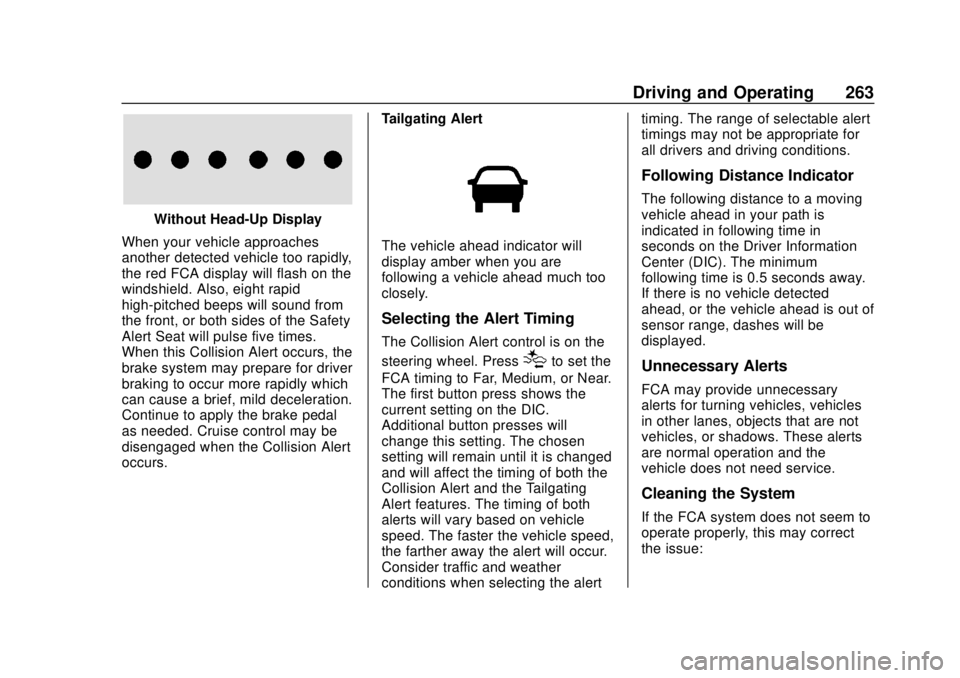
Without Head-Up Display
When your vehicle approaches
another detected vehicle too rapidly,
the red FCA display will flash on the
windshield. Also, eight rapid
high-pitched beeps will sound from
the front, or both sides of the Safety
Alert Seat will pulse five times.
When this Collision Alert occurs, the
brake system may prepare for driver
braking to occur more rapidly which
can cause a brief, mild deceleration.
Continue to apply the brake pedal
as needed. Cruise control may be
disengaged when the Collision Alert
occurs. Tailgating Alert
The vehicle ahead indicator will
display amber when you are
following a vehicle ahead much too
closely.
Selecting the Alert Timing
The Collision Alert control is on the
steering wheel. Press
[to set the
FCA timing to Far, Medium, or Near.
The first button press shows the
current setting on the DIC.
Additional button presses will
change this setting. The chosen
setting will remain until it is changed
and will affect the timing of both the
Collision Alert and the Tailgating
Alert features. The timing of both
alerts will vary based on vehicle
speed. The faster the vehicle speed,
the farther away the alert will occur.
Consider traffic and weather
conditions when selecting the alert timing. The range of selectable alert
timings may not be appropriate for
all drivers and driving conditions.
Following Distance Indicator
The following distance to a moving
vehicle ahead in your path is
indicated in following time in
seconds on the Driver Information
Center (DIC). The minimum
following time is 0.5 seconds away.
If there is no vehicle detected
ahead, or the vehicle ahead is out of
sensor range, dashes will be
displayed.
Unnecessary Alerts
FCA may provide unnecessary
alerts for turning vehicles, vehicles
in other lanes, objects that are not
vehicles, or shadows. These alerts
are normal operation and the
vehicle does not need service.
Cleaning the System
If the FCA system does not seem to
operate properly, this may correct
the issue:
Page 266 of 474
Chevrolet Silverado Owner Manual (GMNA-Localizing-U.S./Canada/Mexico-
1500-11698642) - 2019 - CRC - 2/20/19
Driving and Operating 265
{Warning
FAB may automatically brake the
vehicle suddenly in situations
where it is unexpected and
undesired. It could respond to a
turning vehicle ahead, guardrails,
signs, and other non-moving
objects. To override FAB, firmly
press the accelerator pedal, if it is
safe to do so.
Intelligent Brake Assist (IBA)
IBA may activate when the brake
pedal is applied quickly by providing
a boost to braking based on the
speed of approach and distance to
a vehicle ahead.
Minor brake pedal pulsations or
pedal movement during this time is
normal and the brake pedal should
continue to be applied as needed.
IBA will automatically disengage
only when the brake pedal is
released.
{Warning
IBA may increase vehicle braking
in situations when it may not be
necessary. You could block the
flow of traffic. If this occurs, take
your foot off the brake pedal and
then apply the brakes as needed.
FAB and IBA can be disabled. See
“Collision/Detection Systems” under
Vehicle Personalization 0168.
{Warning
Using FAB or IBA while towing a
trailer could cause you to lose
control of the vehicle and crash.
Turn the system to Alert or Off
when towing a trailer.
A system unavailable message may
display if:
. The front of the vehicle or
windshield is not clean.
. Heavy rain or snow is interfering
with object detection. .
There is a problem with the
StabiliTrak/Electronic Stability
Control (ESC) system.
The FAB system does not need
service.
Front Pedestrian Braking
(FPB) System
If equipped, the FPB system may
help avoid or reduce the harm
caused by front-end crashes with
nearby pedestrians when driving in
a forward gear. FPB displays an
amber indicator,
~, when a nearby
pedestrian is detected directly
ahead. When approaching a
detected pedestrian too quickly,
FPB provides a red flashing alert on
the windshield and rapidly beeps or
pulses the driver seat. FPB can
provide a boost to braking or
automatically brake the vehicle. This
system includes Intelligent Brake
Assist (IBA), and the Forward
Automatic Braking (FAB) system
may also respond to pedestrians.
See Forward Automatic Braking
(FAB) 0264.
Page 268 of 474
Chevrolet Silverado Owner Manual (GMNA-Localizing-U.S./Canada/Mexico-
1500-11698642) - 2019 - CRC - 2/20/19
Driving and Operating 267
Alert Seat will pulse five times.
When this Pedestrian Alert occurs,
the brake system may prepare for
driver braking to occur more rapidly
which can cause a brief, mild
deceleration. Continue to apply the
brake pedal as needed. Cruise
control may be disengaged when
the Front Pedestrian Alert occurs.
Automatic Braking
If FPB detects it is about to crash
into a pedestrian directly ahead, and
the brakes have not been applied,
FPB may automatically brake
moderately or brake hard. This can
help to avoid some very low speed
pedestrian crashes or reduce
pedestrian injury. FPB can
automatically brake to detected
pedestrians between 8 km/h (5 mph)
and 80 km/h (50 mph). Automatic
braking levels may be reduced
under certain conditions, such as
higher speeds.
If this happens, Automatic Braking
may engage the Electric Parking
Brake (EPB) to hold the vehicle at a
stop. Release the EPB. A firm pressof the accelerator pedal will also
release Automatic Braking and
the EPB.
{Warning
FPB may alert or automatically
brake the vehicle suddenly in
situations where it is unexpected
and undesired. It could falsely
alert or brake for objects similar in
shape or size to pedestrians,
including shadows. This is normal
operation and the vehicle does
not need service. To override
Automatic Braking, firmly press
the accelerator pedal, if it is safe
to do so.
Automatic Braking can be disabled
through vehicle personalization. See
“Front Pedestrian Detection” in
“Collision/Detection Systems” under
Vehicle Personalization 0168.
{Warning
Using the Front Pedestrian
Braking system while towing a
trailer could cause you to lose
control of the vehicle and crash.
Turn the system to Alert or Off
when towing a trailer.
Cleaning the System
If FPB does not seem to operate
properly, cleaning the outside of the
windshield in front of the rearview
mirror may correct the issue.
Side Blind Zone
Alert (SBZA)
If equipped, the SBZA system is a
lane-changing aid that assists
drivers with avoiding crashes that
occur with moving vehicles in the
side blind zone (or spot) areas.
When the vehicle is in a forward
gear, the left or right side mirror
display will light up if a moving
vehicle is detected in that blind
zone. If the turn signal is activated
Page 285 of 474
Chevrolet Silverado Owner Manual (GMNA-Localizing-U.S./Canada/Mexico-
1500-11698642) - 2019 - CRC - 2/20/19
284 Driving and Operating
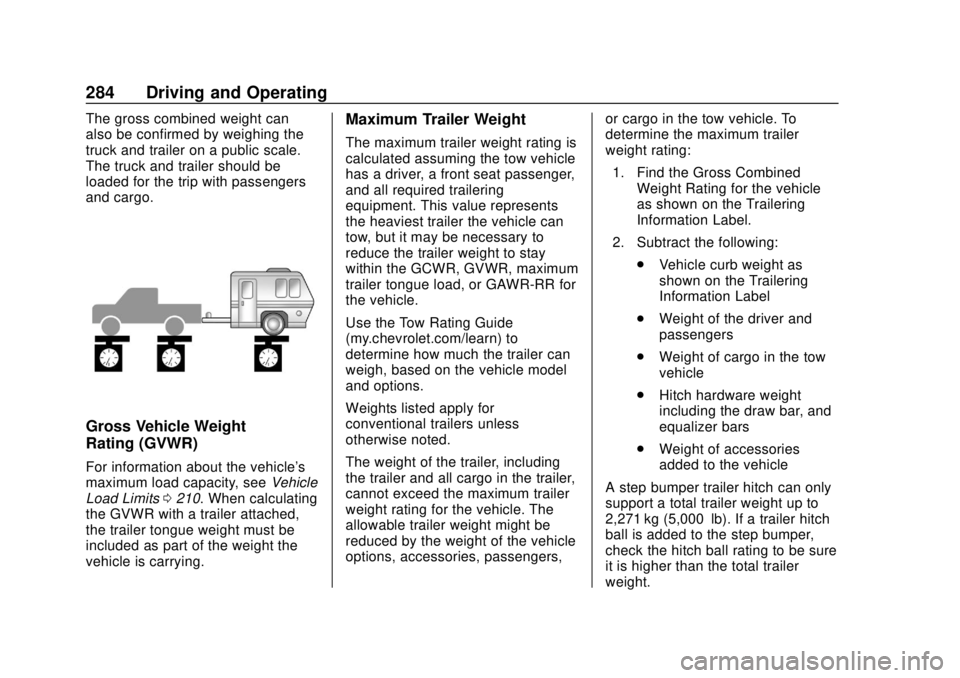
The gross combined weight can
also be confirmed by weighing the
truck and trailer on a public scale.
The truck and trailer should be
loaded for the trip with passengers
and cargo.
Gross Vehicle Weight
Rating (GVWR)
For information about the vehicle's
maximum load capacity, seeVehicle
Load Limits 0210. When calculating
the GVWR with a trailer attached,
the trailer tongue weight must be
included as part of the weight the
vehicle is carrying.
Maximum Trailer Weight
The maximum trailer weight rating is
calculated assuming the tow vehicle
has a driver, a front seat passenger,
and all required trailering
equipment. This value represents
the heaviest trailer the vehicle can
tow, but it may be necessary to
reduce the trailer weight to stay
within the GCWR, GVWR, maximum
trailer tongue load, or GAWR-RR for
the vehicle.
Use the Tow Rating Guide
(my.chevrolet.com/learn) to
determine how much the trailer can
weigh, based on the vehicle model
and options.
Weights listed apply for
conventional trailers unless
otherwise noted.
The weight of the trailer, including
the trailer and all cargo in the trailer,
cannot exceed the maximum trailer
weight rating for the vehicle. The
allowable trailer weight might be
reduced by the weight of the vehicle
options, accessories, passengers, or cargo in the tow vehicle. To
determine the maximum trailer
weight rating:
1. Find the Gross Combined Weight Rating for the vehicle
as shown on the Trailering
Information Label.
2. Subtract the following: .Vehicle curb weight as
shown on the Trailering
Information Label
. Weight of the driver and
passengers
. Weight of cargo in the tow
vehicle
. Hitch hardware weight
including the draw bar, and
equalizer bars
. Weight of accessories
added to the vehicle
A step bumper trailer hitch can only
support a total trailer weight up to
2,271 kg (5,000 lb). If a trailer hitch
ball is added to the step bumper,
check the hitch ball rating to be sure
it is higher than the total trailer
weight.
Page 358 of 474
Chevrolet Silverado Owner Manual (GMNA-Localizing-U.S./Canada/Mexico-
1500-11698642) - 2019 - CRC - 2/20/19
Vehicle Care 357
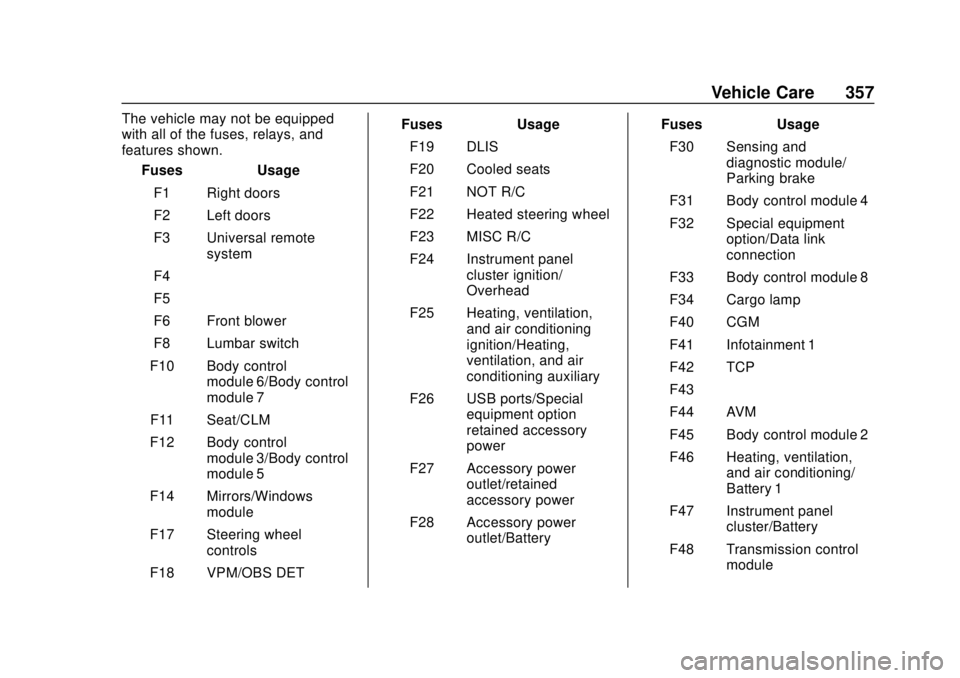
The vehicle may not be equipped
with all of the fuses, relays, and
features shown.Fuses Usage
F1 Right doors
F2 Left doors
F3 Universal remote system
F4 –
F5 –
F6 Front blower
F8 Lumbar switch
F10 Body control module 6/Body control
module 7
F11 Seat/CLM
F12 Body control module 3/Body control
module 5
F14 Mirrors/Windows module
F17 Steering wheel controls
F18 VPM/OBS DET Fuses Usage
F19 DLIS
F20 Cooled seats
F21 NOT R/C
F22 Heated steering wheel
F23 MISC R/C
F24 Instrument panel cluster ignition/
Overhead
F25 Heating, ventilation, and air conditioning
ignition/Heating,
ventilation, and air
conditioning auxiliary
F26 USB ports/Special equipment option
retained accessory
power
F27 Accessory power outlet/retained
accessory power
F28 Accessory power outlet/Battery Fuses Usage
F30 Sensing and diagnostic module/
Parking brake
F31 Body control module 4
F32 Special equipment option/Data link
connection
F33 Body control module 8
F34 Cargo lamp
F40 CGM
F41 Infotainment 1
F42 TCP
F43 –
F44 AVM
F45 Body control module 2
F46 Heating, ventilation, and air conditioning/
Battery 1
F47 Instrument panel cluster/Battery
F48 Transmission control module
Page 360 of 474
Chevrolet Silverado Owner Manual (GMNA-Localizing-U.S./Canada/Mexico-
1500-11698642) - 2019 - CRC - 2/20/19
Vehicle Care 359
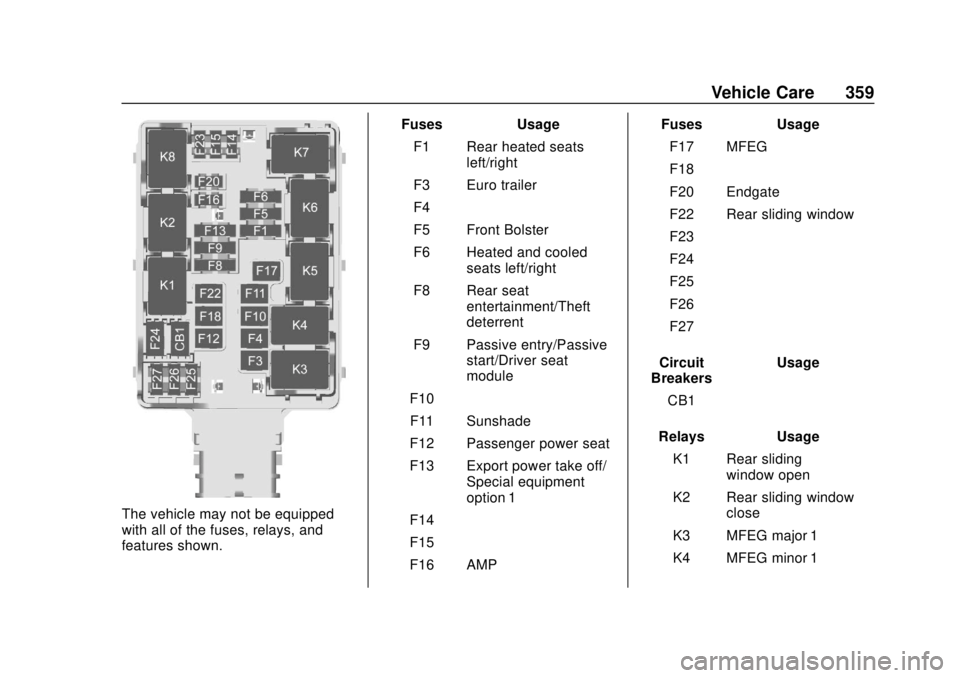
The vehicle may not be equipped
with all of the fuses, relays, and
features shown.Fuses Usage
F1 Rear heated seats left/right
F3 Euro trailer
F4 –
F5 Front Bolster
F6 Heated and cooled seats left/right
F8 Rear seat entertainment/Theft
deterrent
F9 Passive entry/Passive start/Driver seat
module
F10 –
F11 Sunshade
F12 Passenger power seat
F13 Export power take off/ Special equipment
option 1
F14 –
F15 –
F16 AMP Fuses Usage
F17 MFEG
F18 –
F20 Endgate
F22 Rear sliding window
F23 –
F24 –
F25 –
F26 –
F27 –
Circuit
Breakers Usage
CB1 –
Relays Usage K1 Rear sliding window open
K2 Rear sliding window close
K3 MFEG major 1
K4 MFEG minor 1
Page 368 of 474
Chevrolet Silverado Owner Manual (GMNA-Localizing-U.S./Canada/Mexico-
1500-11698642) - 2019 - CRC - 2/20/19
Vehicle Care 367
Curb Weight:The weight of a
motor vehicle with standard and
optional equipment including the
maximum capacity of fuel, oil,
and coolant, but without
passengers and cargo.
DOT Markings
:A code molded
into the sidewall of a tire
signifying that the tire is in
compliance with the U.S.
Department of Transportation
(DOT) Motor Vehicle Safety
Standards. The DOT code
includes the Tire Identification
Number (TIN), an alphanumeric
designator which can also
identify the tire manufacturer,
production plant, brand, and
date of production.
GVWR
:Gross Vehicle Weight
Rating. See Vehicle Load Limits
0 210.
GAWR FRT
:Gross Axle Weight
Rating for the front axle. See
Vehicle Load Limits 0210. GAWR RR
:Gross Axle Weight
Rating for the rear axle. See
Vehicle Load Limits 0210.
Intended Outboard Sidewall
:
The side of an asymmetrical tire
that must always face outward
when mounted on a vehicle.
Kilopascal (kPa)
:The metric
unit for air pressure.
Light Truck (LT-Metric) Tire
:A
tire used on light duty trucks and
some multipurpose passenger
vehicles.
Load Index
:An assigned
number ranging from 1 to 279
that corresponds to the load
carrying capacity of a tire.
Maximum Inflation Pressure
:
The maximum air pressure to
which a cold tire can be inflated.
The maximum air pressure is
molded onto the sidewall. Maximum Load Rating
:The
load rating for a tire at the
maximum permissible inflation
pressure for that tire.
Maximum Loaded Vehicle
Weight
:The sum of curb
weight, accessory weight,
vehicle capacity weight, and
production options weight.
Normal Occupant Weight
:The
number of occupants a vehicle
is designed to seat multiplied by
68 kg (150 lb). See Vehicle Load
Limits 0210.
Occupant Distribution
:
Designated seating positions.
Outward Facing Sidewall
:The
side of an asymmetrical tire that
has a particular side that faces
outward when mounted on a
vehicle. The side of the tire that
contains a whitewall, bears
white lettering, or bears
manufacturer, brand, and/or
model name molding that is
Page 388 of 474
Chevrolet Silverado Owner Manual (GMNA-Localizing-U.S./Canada/Mexico-
1500-11698642) - 2019 - CRC - 2/20/19
Vehicle Care 387
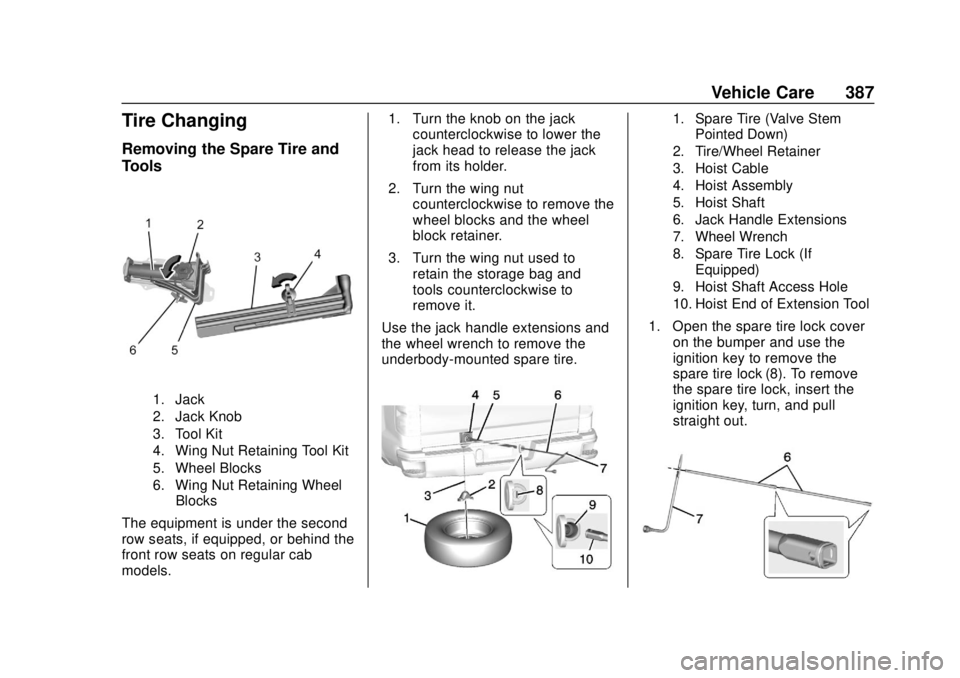
Tire Changing
Removing the Spare Tire and
Tools
1. Jack
2. Jack Knob
3. Tool Kit
4. Wing Nut Retaining Tool Kit
5. Wheel Blocks
6. Wing Nut Retaining WheelBlocks
The equipment is under the second
row seats, if equipped, or behind the
front row seats on regular cab
models. 1. Turn the knob on the jack
counterclockwise to lower the
jack head to release the jack
from its holder.
2. Turn the wing nut counterclockwise to remove the
wheel blocks and the wheel
block retainer.
3. Turn the wing nut used to retain the storage bag and
tools counterclockwise to
remove it.
Use the jack handle extensions and
the wheel wrench to remove the
underbody-mounted spare tire.
1. Spare Tire (Valve Stem Pointed Down)
2. Tire/Wheel Retainer
3. Hoist Cable
4. Hoist Assembly
5. Hoist Shaft
6. Jack Handle Extensions
7. Wheel Wrench
8. Spare Tire Lock (If Equipped)
9. Hoist Shaft Access Hole
10. Hoist End of Extension Tool
1. Open the spare tire lock cover on the bumper and use the
ignition key to remove the
spare tire lock (8). To remove
the spare tire lock, insert the
ignition key, turn, and pull
straight out.
Page 462 of 474

Chevrolet Silverado Owner Manual (GMNA-Localizing-U.S./Canada/Mexico-
1500-11698642) - 2019 - CRC - 2/20/19
Index 461
IndexA
Accessories andModifications . . . . . . . . . . . . . . . . . . 314
Accessory Power . . . . . . . . . . . . . . . 226
Active Fuel Management . . . . . . . 228
Add-On Electrical Equipment . . . 307
Adding a Snow Plow or Similar Equipment . . . . . . . . . . . . . 308
Additional Information OnStar . . . . . . . . . . . . . . . . . . . . . . . 451
Additional Maintenance and Care . . . . . . . . . . . . . . . . . . . . . . 424
Adjustments Lumbar, Front Seats . . . . . . . . . . . . 71
Air Cleaner/Filter, Engine . . . . . . . 327
Air Conditioning . . . . . . . . . . . 189, 191
Air Filter Life System . . . . . . . . . . . . . . . . . . . 326
Air Filter, Passenger
Compartment . . . . . . . . . . . . . . . . . 195
Air Vents . . . . . . . . . . . . . . . . . . . . . . . 195
Airbag System Check . . . . . . . . . . . . . . . . . . . . . . . . . . 98
How Does an AirbagRestrain? . . . . . . . . . . . . . . . . . . . . . 90
Passenger Sensing System . . . . 92
What Makes an Airbag Inflate? . . . . . . . . . . . . . . . . . . . . . . . . 90 Airbag System (cont'd)
What Will You See after an
Airbag Inflates? . . . . . . . . . . . . . . . 91
When Should an Airbag
Inflate? . . . . . . . . . . . . . . . . . . . . . . . . 89
Where Are the Airbags? . . . . . . . . 88
Airbags Adding Equipment to theVehicle . . . . . . . . . . . . . . . . . . . . . . . . 97
Passenger Status Indicator . . . 148
Readiness Light . . . . . . . . . . . . . . 148
Servicing Airbag-Equipped Vehicles . . . . . . . . . . . . . . . . . . . . . . . 96
System Check . . . . . . . . . . . . . . . . . . 86
Alarm Vehicle Security . . . . . . . . . . . . . . . . 53
Alert Lane Change . . . . . . . . . . . . . . . . . 268
Side Blind Zone (SBZA) . . . . . . 267
All-Season Tires . . . . . . . . . . . . . . . . 361
All-Terrain Tires . . . . . . . . . . . . . . . . . 362
Antilock Brake System (ABS) . . . 241 Warning Light . . . . . . . . . . . . . . . . . 153
Appearance Care Exterior . . . . . . . . . . . . . . . . . . . . . . . 405
Interior . . . . . . . . . . . . . . . . . . . . . . . . 410
Assistance Program, Roadside . . . . . . . . . . . . . . . . . . . . . . 439