key CHEVROLET SILVERADO 2020 Repair Manual
[x] Cancel search | Manufacturer: CHEVROLET, Model Year: 2020, Model line: SILVERADO, Model: CHEVROLET SILVERADO 2020Pages: 495, PDF Size: 8.09 MB
Page 215 of 495
Chevrolet Silverado Owner Manual (GMNA-Localizing-U.S./Canada/Mexico-
13337620) - 2020 - CTC - 1/27/20
214 Driving and Operating
2. Move the shift lever intoP (Park) by pulling the shift
lever toward you and moving it
up as far as it will go.
3. Be sure the transfer case, if equipped, is in a drive gear,
not in N (Neutral).
4. Turn the ignition off. For Key Access, push the ignition key
in, toward the steering column,
and then turn the ignition off.
5. For Key Access, remove the key and take it with you. If you
can leave the vehicle with the
ignition key in your hand, the
vehicle is in P (Park).
For Keyless Access, take the
Remote Keyless Entry (RKE)
transmitter with you.Leaving the Vehicle with the
Engine Running
{Warning
It can be dangerous to leave the
vehicle with the engine running.
The vehicle could move suddenly
if the shift lever is not fully in
P (Park) with the parking brake
firmly set.
If you have four-wheel drive and
the transfer case is in N (Neutral),
the vehicle will be free to roll,
even if the shift lever is in
P (Park). So be sure the transfer
case is in a drive gear –not in
N (Neutral).
And, if you leave the vehicle with
the engine running, it could
overheat and even catch fire. You
or others could be injured. Do not
leave the vehicle with the engine
running unless you have to. If you have to leave the vehicle with
the engine running, be sure the
vehicle is in P (Park) and the
parking brake is firmly set before
you leave it. After moving the shift
lever into P (Park), hold the regular
brake pedal down. Then, see if you
can move the shift lever away from
P (Park) without first pulling it toward
you. If you can, it means that the
shift lever was not fully locked into
P (Park).
Torque Lock
If you are parking on a hill and you
do not shift the transmission into
P (Park) properly, the weight of the
vehicle may put too much force on
the parking pawl in the
transmission. You may find it difficult
to pull the shift lever out of P (Park).
This is called torque lock. To
prevent torque lock, set the parking
brake and then shift into P (Park)
properly before you leave the
driver seat.
When you are ready to drive, move
the shift lever out of P (Park) before
you release the parking brake.
Page 221 of 495
Chevrolet Silverado Owner Manual (GMNA-Localizing-U.S./Canada/Mexico-
13337620) - 2020 - CTC - 1/27/20
220 Driving and Operating
The transmission uses adaptive
shift controls. The adaptive shift
control process continually
compares key shift parameters to
pre-programmed ideal shifts stored
in the transmission’s computer. The
transmission constantly makes
adjustments to improve vehicle
performance according to how the
vehicle is being used, such as with
a heavy load or when the
temperature changes. During this
adaptive shift control process,
shifting might feel different as the
transmission determines the best
settings.
When temperatures are very cold,
the transmission's gear shifting
could be delayed providing more
stable shifts until the engine warms
up. Shifts could be more noticeable
with a cold transmission. This
difference in shifting is normal.
If equipped with the 2.7L L4 engine,
engine speeds may be increased
while driving at highway speeds
while the engine is still warming up.L :
This position allows selection of
a range of gears appropriate for
current driving conditions.
If equipped, see “Range Selection
Mode” underManual Mode 0220.
Caution
Spinning the tires or holding the
vehicle in one place on a hill
using only the accelerator pedal
may damage the transmission.
The repair will not be covered by
the vehicle warranty. If the vehicle
is stuck, do not spin the tires.
When stopping on a hill, use the
brakes to hold the vehicle in
place.
Manual Mode
Range Selection Mode
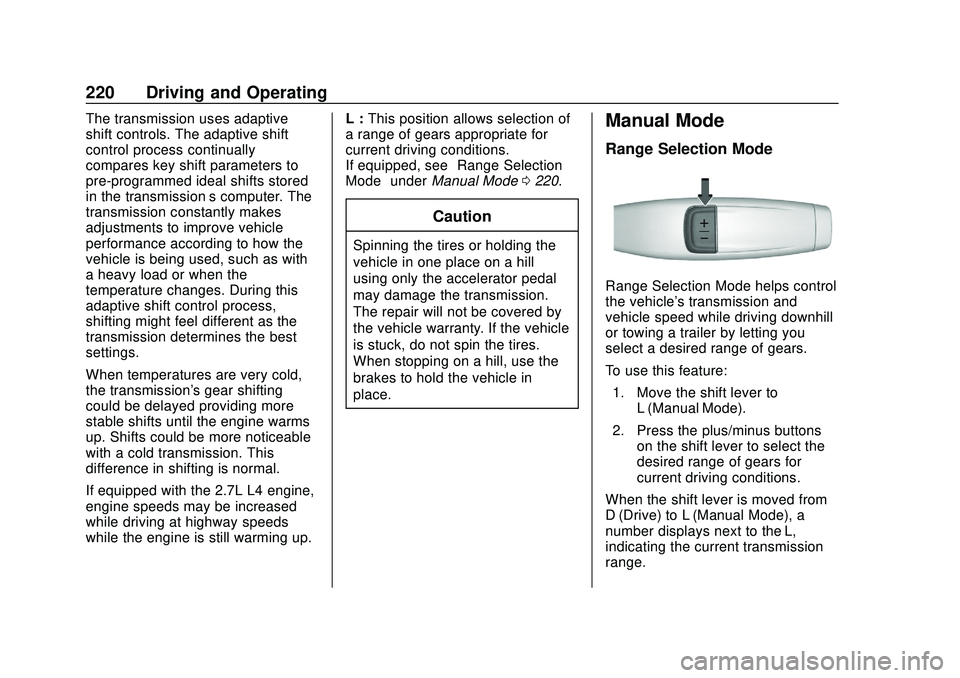
Range Selection Mode helps control
the vehicle's transmission and
vehicle speed while driving downhill
or towing a trailer by letting you
select a desired range of gears.
To use this feature:
1. Move the shift lever to L (Manual Mode).
2. Press the plus/minus buttons on the shift lever to select the
desired range of gears for
current driving conditions.
When the shift lever is moved from
D (Drive) to L (Manual Mode), a
number displays next to the L,
indicating the current transmission
range.
Page 228 of 495
Chevrolet Silverado Owner Manual (GMNA-Localizing-U.S./Canada/Mexico-
13337620) - 2020 - CTC - 1/27/20
Driving and Operating 227
Shifting Into N (Neutral)
To shift into N (Neutral):1. Start the vehicle.
2. Shift the transmission to N (Neutral).
3. Shift the transfer case to 2
m.
4. Apply the parking brake and/or brake pedal.
5. Press 2
mfive times in
10 seconds until the N (Neutral)
graphic starts flashing in the
instrument cluster. When the
shift is complete, the graphic
stops flashing. If the parking
brake and/or brake pedal is not
applied within 20 seconds, the
transfer case will remain in the
original state.
6. If the transmission is not shifted into N (Neutral) or the
vehicle has not slowed to
5 km/h (3 mph) within
20 seconds, the transfer case
will remain in its original state.
This will be indicated in the
instrument cluster. Shifting Out of N (Neutral)
To shift out of N (Neutral):
1. Turn the ignition on with the engine off. See Ignition
Positions (Keyless Access)
0 205 or
Ignition Positions (Key Access)
0 207.
2. Set the parking brake. See Electric Parking Brake 0229.
3. Shift the transmission to N (Neutral).
4. Shift the transfer case to 2
m.
Transfer case shifts out of
N (Neutral) can only be made
into 2
m. When the shift to 2mis
complete, the graphic in the
instrument cluster will stop
flashing. If the transfer case
cannot complete a shift, the
graphic will return to the
previously selected setting. Single Speed Transfer Case
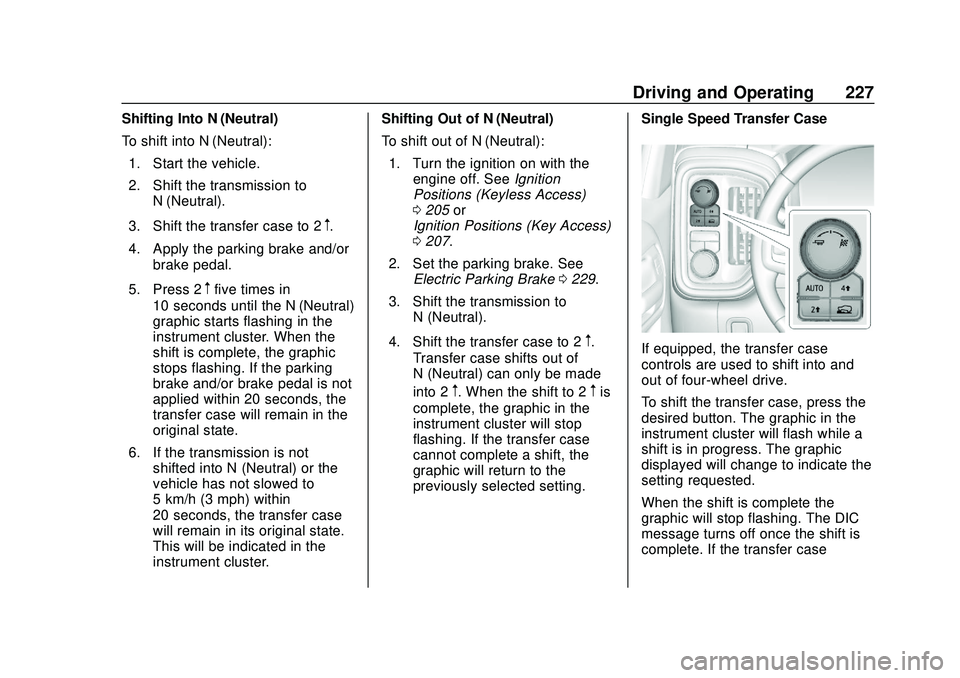
If equipped, the transfer case
controls are used to shift into and
out of four-wheel drive.
To shift the transfer case, press the
desired button. The graphic in the
instrument cluster will flash while a
shift is in progress. The graphic
displayed will change to indicate the
setting requested.
When the shift is complete the
graphic will stop flashing. The DIC
message turns off once the shift is
complete. If the transfer case
Page 316 of 495
Chevrolet Silverado Owner Manual (GMNA-Localizing-U.S./Canada/Mexico-
13337620) - 2020 - CTC - 1/27/20
Driving and Operating 315
.Average Fuel Economy
. Reverse Lights Alert
. Electric Brakes Alert
Touch Save to save the new value
to the Trailer Profile. Touching Back
will still save the previously entered
information.
Trailer Name
Touch to edit the Trailer Profile’s
name. Use at least one character
and no spaces. Touch Save.
Towing Assistance Setup
A trailer should be connected to
complete this portion of profile
setup.
Touch to set up the Transparent
Trailer feature for the Trailer Profile.
See "Transparent Trailer Setup"
under "Towing Assistance" for
details on the setup.
Tire Pressure Setup
Touch to set up the Trailer Tire
Pressure Monitoring System
(TTPMS) for the Trailer Profile. See
“Trailer Tire Pressure Setup”
previously in this section for details on the setup. Also, touch Tire
Pressure Setup if the trailer tires
were rotated or if the tire pressure
sensors in the tires were replaced
for this Trailer Profile. The vehicle
will need to relearn the tire sensors
and their locations.
If TTPMS had been set up
previously, the Select Number of
Sensors screen will appear after
touching Tire Pressure Setup. If the
number of sensors has changed,
select the number and touch Next.
If a new number of sensors is
selected, the Relearn Sensors
pop-up will appear. Touch Cancel to
go back or touch Relearn to
overwrite the current sensors and
begin the relearning process. See
“Trailer Tire Pressure Setup”
previously in this section.
If number of sensors has not
changed, touch Next and the Learn
sensors screen will appear.
On the Learn Sensors screen.
Touch Relearn to overwrite the
current sensors and begin the
relearning process. See
“Trailer Tire
Pressure Setup” previously in this
section.
On the Learn Sensors screen, touch
Next to go to the Edit
Recommended Tire Pressure
screen.
On the Edit Recommended Tire
Pressure screen, touch a number on
the keypad to change the
Recommended Tire Pressure for the
trailer ’s tires. This will change the
number at which the vehicle
displays alerts related to trailer tire
pressure. Touch Done to return to
the Trailer Profile view.
Trailer Maintenance
Touch to view a list of maintenance
reminders for the Trailer Profile.
Touch a reminder to view, reset,
delete, or edit it.
Reset Reminder
Touch Maintenance Complete in the
reminder view to reset the reminder.
On the pop-up, touch Reset to reset
the time and mileage values for the
Page 326 of 495

Chevrolet Silverado Owner Manual (GMNA-Localizing-U.S./Canada/Mexico-
13337620) - 2020 - CTC - 1/27/20
Vehicle Care 325
California Proposition
65 Warning
{Warning
Most motor vehicles, including
this one, as well as many of its
service parts and fluids, contain
and/or emit chemicals known to
the State of California to cause
cancer and birth defects or other
reproductive harm. Engine
exhaust, many parts and
systems, many fluids, and some
component wear by-products
contain and/or emit these
chemicals. For more information
go to www.P65Warnings.ca.gov/
passenger-vehicle.
See Battery - North America 0354
and
Jump Starting - North America
0 415 and the back cover.
California Perchlorate
Materials Requirements
Certain types of automotive
applications, such as airbag
initiators, seat belt pretensioners,
and lithium batteries contained in
electronic keys, may contain
perchlorate materials. Perchlorate
Material –special handling may
apply. See www.dtsc.ca.gov/
hazardouswaste/perchlorate.
Accessories and
Modifications
Adding non-dealer accessories or
making modifications to the vehicle
can affect vehicle performance and
safety, including such things as
airbags, braking, stability, ride and
handling, emissions systems,
aerodynamics, durability, and
electronic systems like antilock
brakes, traction control, and stability
control. These accessories or
modifications could even cause
malfunction or damage not covered
by the vehicle warranty. Damage to suspension components
caused by modifying vehicle height
outside of factory settings will not be
covered by the vehicle warranty.
Damage to vehicle components
resulting from modifications or the
installation or use of non-GM
certified parts, including control
module or software modifications, is
not covered under the terms of the
vehicle warranty and may affect
remaining warranty coverage for
affected parts.
GM Accessories are designed to
complement and function with other
systems on the vehicle. See your
dealer to accessorize the vehicle
using genuine GM Accessories
installed by a dealer technician.
Also, see
Adding Equipment to the
Airbag-Equipped Vehicle 080.
Page 346 of 495
Chevrolet Silverado Owner Manual (GMNA-Localizing-U.S./Canada/Mexico-
13337620) - 2020 - CTC - 1/27/20
Vehicle Care 345
Automatic Coolant Service Fill
Instructions (L3B Engine)
See 3.0L Duramax Diesel
supplement for the diesel engine
procedure.
If equipped, this feature assists in
filling and removing air from the
cooling system after service of
components or when coolant is
added after being too low.
To activate the fill and air removal
process:1. With a cold system, add coolant to the indicated mark
on the surge tank.
2. Replace the cap on the surge tank.
3. Connect the vehicle to a battery charger.
4. Set the ignition to Service or Accessory Mode. See Ignition
Positions (Keyless Access)
0 205 or
Ignition Positions (Key Access)
0 207.
5. Turn off the air conditioning. 6. Set the parking brake.
7. At the same time, press the
accelerator and the brake for
automatic transmission
vehicles for two seconds, then
release.
At the end of the cycle, check the
coolant level in the surge tank and
add coolant if it is low. Turn off the
vehicle, allow the Electronic Control
Module (ECM) to go to sleep, about
two minutes, and repeat Steps 3–7.
Listen for pump activation and
movement of the control valves
while watching the level of the
coolant in the surge tank. If the tank
empties, turn the ignition off,
carefully remove the surge tank cap,
refill to the indicated mark, and
repeat Steps 3–6. The fill and air
removal process will run for
approximately 10 minutes.
How to Add Coolant to the
Coolant Surge Tank for
Gasoline Engines Except L3B
If the vehicle has a diesel engine,
see “Cooling System” in the
Duramax diesel supplement for the
proper coolant fill procedure.
{Warning
Spilling coolant on hot engine
parts can burn you. Coolant
contains ethylene glycol and it will
burn if the engine parts are hot
enough.
{Warning
Plain water, or other liquids such
as alcohol, can boil before the
proper coolant mixture will. With
plain water or the wrong mixture,
the engine could get too hot but
there would not be an overheat
(Continued)
Page 356 of 495
Chevrolet Silverado Owner Manual (GMNA-Localizing-U.S./Canada/Mexico-
13337620) - 2020 - CTC - 1/27/20
Vehicle Care 355
SeeCalifornia Proposition
65 Warning 0325 and the back
cover.
Vehicle Storage
{Warning
Batteries have acid that can burn
you and gas that can explode.
You can be badly hurt if you are
not careful. See Jump Starting -
North America 0415 for tips on
working around a battery without
getting hurt.
Infrequent Usage: Remove the
black, negative (−) cable from the
battery to keep the battery from
running down.
Extended Storage: Remove the
black, negative (−) cable from the
battery or use a battery trickle
charger.
Negative Battery Cable
Disconnection
{Warning
Before disconnecting the negative
battery cable, turn off all features,
turn the ignition off, and remove
the key, if equipped, from the
vehicle. If this is not done, you or
others could be injured, and the
vehicle could be damaged.
Caution
If the battery is disconnected with
the ignition on or the vehicle in
Retained Accessory Power
(RAP), the OnStar back-up
battery will be permanently
discharged and will need to be
replaced.
1. Make sure the lamps, features, and accessories are turned off.
2. Turn the ignition off and remove the key, if equipped. For vehicles equipped with the Stop/
Start system:
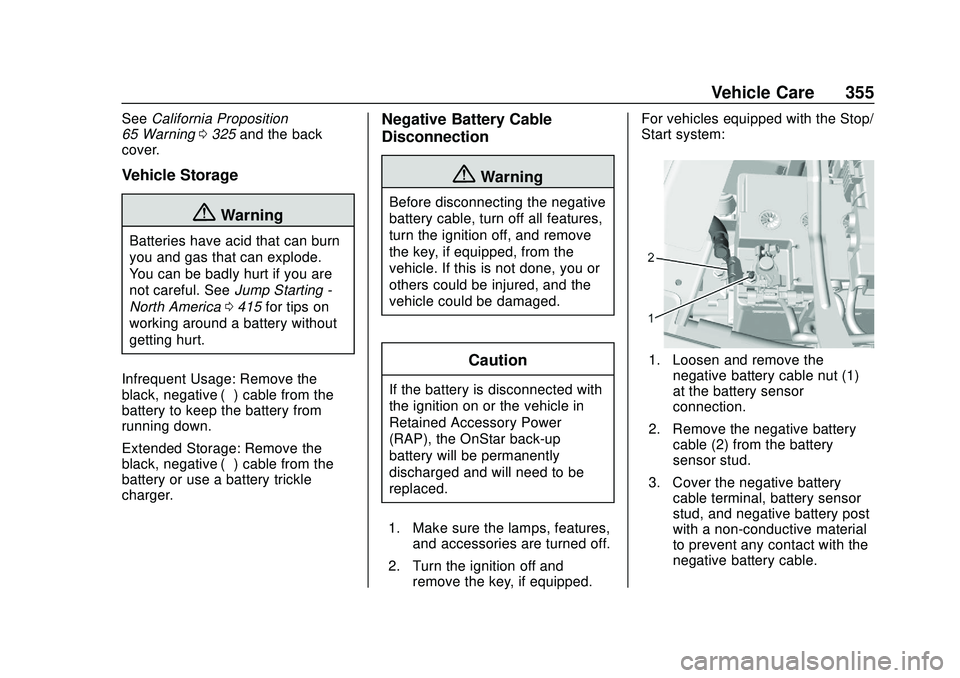
1. Loosen and remove the
negative battery cable nut (1)
at the battery sensor
connection.
2. Remove the negative battery cable (2) from the battery
sensor stud.
3. Cover the negative battery cable terminal, battery sensor
stud, and negative battery post
with a non-conductive material
to prevent any contact with the
negative battery cable.
Page 360 of 495
Chevrolet Silverado Owner Manual (GMNA-Localizing-U.S./Canada/Mexico-
13337620) - 2020 - CTC - 1/27/20
Vehicle Care 359
1. Before starting this check, besure there is enough room
around the vehicle.
2. Apply both the parking brake and the regular brake.
Do not use the accelerator
pedal, and be ready to turn off
the engine immediately if it
starts.
3. Try to start the engine in each gear. The vehicle should start
only in P (Park) or N (Neutral).
If the vehicle starts in any other
position, contact your dealer for
service.
Automatic Transmission
Shift Lock Control
Function Check
{Warning
When you are doing this
inspection, the vehicle could
move suddenly. If the vehicle
moves, you or others could be
injured. 1. Before starting this check, be
sure there is enough room
around the vehicle. It should be
parked on a level surface.
2. Apply the parking brake. Be ready to apply the regular
brake immediately if the vehicle
begins to move.
3. With the engine off, turn the ignition on, but do not start the
engine. Without applying the
regular brake, try to move the
shift lever out of P (Park) with
normal effort. If the shift lever
moves out of P (Park), contact
your dealer for service.
Ignition Transmission
Lock Check
If equipped with Key Access
ignition, while parked, and with the
parking brake set, try to turn the
ignition off in each shift lever
position. The ignition should turn to
off only when the shift lever is in
P (Park). The ignition key should come out
only when the ignition is off. Contact
your dealer if service is required.
Park Brake and P (Park)
Mechanism Check
{Warning
When you are doing this check,
the vehicle could begin to move.
You or others could be injured
and property could be damaged.
Make sure there is room in front
of the vehicle in case it begins to
roll. Be ready to apply the regular
brake at once should the vehicle
begin to move.
Park on a fairly steep hill, with the
vehicle facing downhill. Keeping
your foot on the regular brake, set
the parking brake.
. To check the parking brake's
holding ability: With the engine
running and the transmission in
N (Neutral), slowly remove foot
Page 404 of 495
Chevrolet Silverado Owner Manual (GMNA-Localizing-U.S./Canada/Mexico-
13337620) - 2020 - CTC - 1/27/20
Vehicle Care 403
5. Wheel Blocks
6. Wing Nut Retaining WheelBlocks
The equipment is under the second
row seats, if equipped, or behind the
front row seats on regular cab
models.
1. Turn the knob on the jack counterclockwise to lower the
jack head to release the jack
from its holder.
2. Turn the wing nut counterclockwise to remove the
wheel blocks and the wheel
block retainer.
3. Turn the wing nut used to retain the storage bag and
tools counterclockwise to
remove it.
Use the jack handle extensions and
the wheel wrench to remove the
underbody-mounted spare tire.
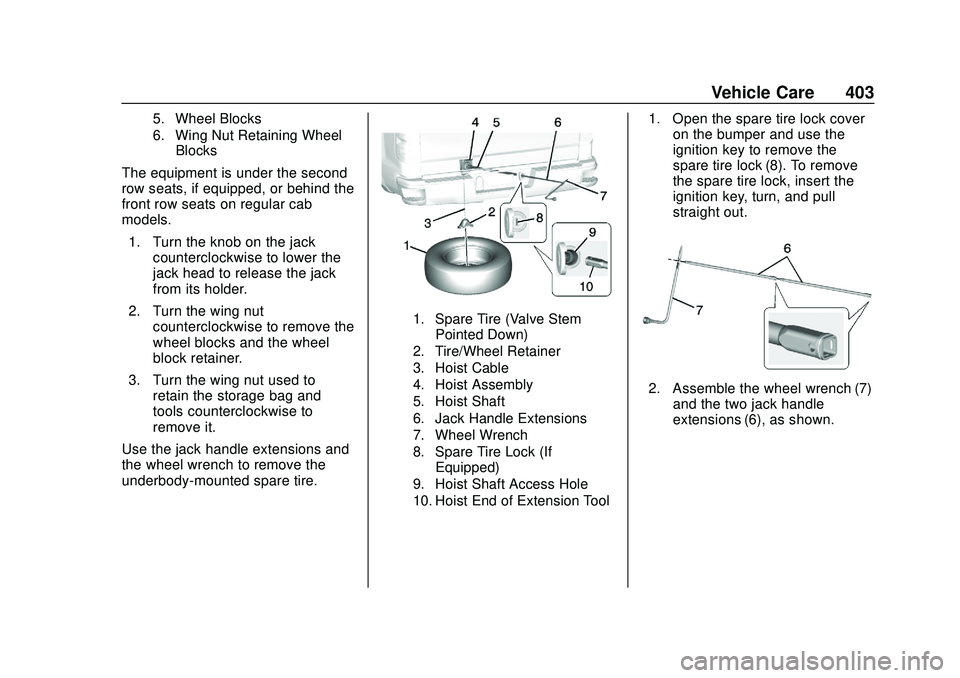
1. Spare Tire (Valve Stem Pointed Down)
2. Tire/Wheel Retainer
3. Hoist Cable
4. Hoist Assembly
5. Hoist Shaft
6. Jack Handle Extensions
7. Wheel Wrench
8. Spare Tire Lock (If Equipped)
9. Hoist Shaft Access Hole
10. Hoist End of Extension Tool
1. Open the spare tire lock cover on the bumper and use the
ignition key to remove the
spare tire lock (8). To remove
the spare tire lock, insert the
ignition key, turn, and pull
straight out.
2. Assemble the wheel wrench (7)and the two jack handle
extensions (6), as shown.
Page 423 of 495
Chevrolet Silverado Owner Manual (GMNA-Localizing-U.S./Canada/Mexico-
13337620) - 2020 - CTC - 1/27/20
422 Vehicle Care
{Warning
Shifting a four-wheel-drive
vehicle's transfer case into
N (Neutral) can allow the vehicle
to move even if the transmission
is in P (Park). You or others could
be injured. Set the parking brake
and use wheel blocks before
shifting the transfer case to
N (Neutral).
To dinghy tow: 1. Position the vehicle being towed behind the tow vehicle,
facing forward and on a level
surface.
2. Securely attach the vehicle being towed to the tow vehicle.
3. Start the engine.
4. Shift the transfer case to N (Neutral). See “Shifting into
N (Neutral)” underFour-Wheel
Drive 0223. 5. With the engine running,
release the parking brake and
verify that the transfer case is
in N (Neutral) by shifting the
transmission to D (Drive) and
then to R (Reverse). There
should be no movement while
shifting the transmission.
6. Shift the transmission to D (Drive).
7. If equipped with an ignition key, turn the ignition to ACC/
ACCESSORY. If equipped with
Keyless Access, turn the
engine off. Disregard the Shift
to P (Park) DIC message. See
Ignition Positions (Keyless
Access) 0205 or
Ignition Positions (Key Access)
0 207.
{Warning
To avoid death, serious injury,
or property damage, before
dinghy towing the vehicle, always
disconnect and secure the
(Continued)
Warning (Continued)
negative battery cable and cover
the negative battery post and
cable with a non-conductive
material. If the battery is left
connected or the battery cable
contacts the post, the Electric
Parking Brake may activate
during towing, which could cause
a crash.
8. Disconnect the negative (–) battery cable. See “Negative
Battery Cable Disconnection”
in Battery - North America
0 354.
9. Shift the transmission to P (Park).
Caution
If the steering column is locked,
vehicle damage may occur.
10. Move the steering wheel to make sure the steering column
is unlocked.