automatic CHEVROLET SILVERADO 2500 2018 User Guide
[x] Cancel search | Manufacturer: CHEVROLET, Model Year: 2018, Model line: SILVERADO 2500, Model: CHEVROLET SILVERADO 2500 2018Pages: 489, PDF Size: 6.81 MB
Page 28 of 489
Chevrolet Silverado LD 1500 and Silverado 2500/3500 Owner Manual (GMNA-
Localizing-U.S./Canada-12162993) - 2019 - crc - 4/4/18
In Brief 27
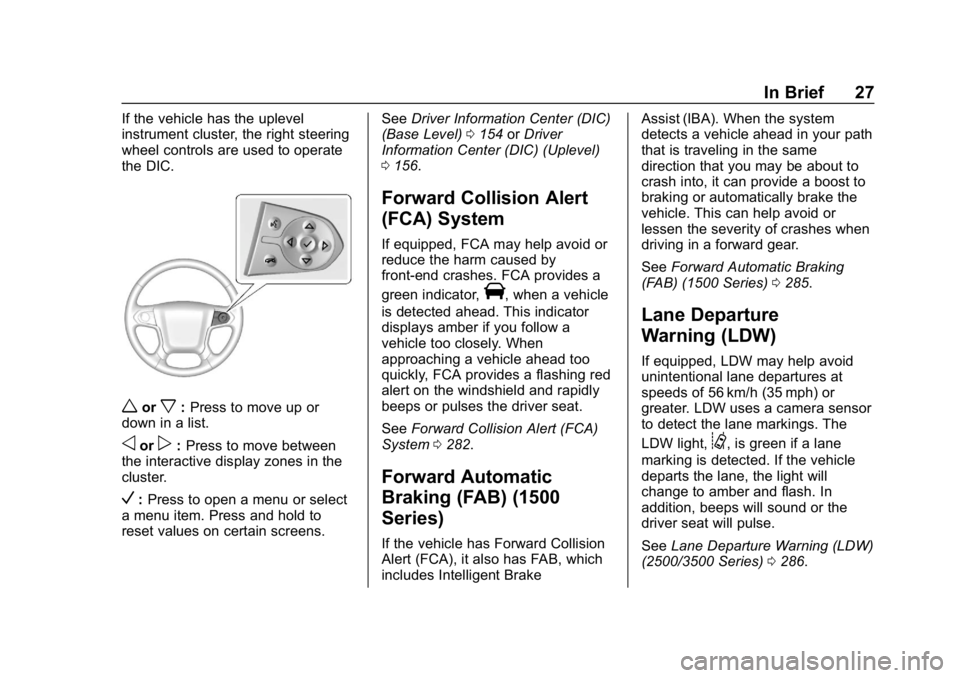
If the vehicle has the uplevel
instrument cluster, the right steering
wheel controls are used to operate
the DIC.
worx:Press to move up or
down in a list.
oorp: Press to move between
the interactive display zones in the
cluster.
V: Press to open a menu or select
a menu item. Press and hold to
reset values on certain screens. See
Driver Information Center (DIC)
(Base Level) 0154 orDriver
Information Center (DIC) (Uplevel)
0 156.
Forward Collision Alert
(FCA) System
If equipped, FCA may help avoid or
reduce the harm caused by
front-end crashes. FCA provides a
green indicator,
V, when a vehicle
is detected ahead. This indicator
displays amber if you follow a
vehicle too closely. When
approaching a vehicle ahead too
quickly, FCA provides a flashing red
alert on the windshield and rapidly
beeps or pulses the driver seat.
See Forward Collision Alert (FCA)
System 0282.
Forward Automatic
Braking (FAB) (1500
Series)
If the vehicle has Forward Collision
Alert (FCA), it also has FAB, which
includes Intelligent Brake Assist (IBA). When the system
detects a vehicle ahead in your path
that is traveling in the same
direction that you may be about to
crash into, it can provide a boost to
braking or automatically brake the
vehicle. This can help avoid or
lessen the severity of crashes when
driving in a forward gear.
See
Forward Automatic Braking
(FAB) (1500 Series) 0285.
Lane Departure
Warning (LDW)
If equipped, LDW may help avoid
unintentional lane departures at
speeds of 56 km/h (35 mph) or
greater. LDW uses a camera sensor
to detect the lane markings. The
LDW light,
@, is green if a lane
marking is detected. If the vehicle
departs the lane, the light will
change to amber and flash. In
addition, beeps will sound or the
driver seat will pulse.
See Lane Departure Warning (LDW)
(2500/3500 Series) 0286.
Page 30 of 489
Chevrolet Silverado LD 1500 and Silverado 2500/3500 Owner Manual (GMNA-
Localizing-U.S./Canada-12162993) - 2019 - crc - 4/4/18
In Brief 29
Universal Remote System
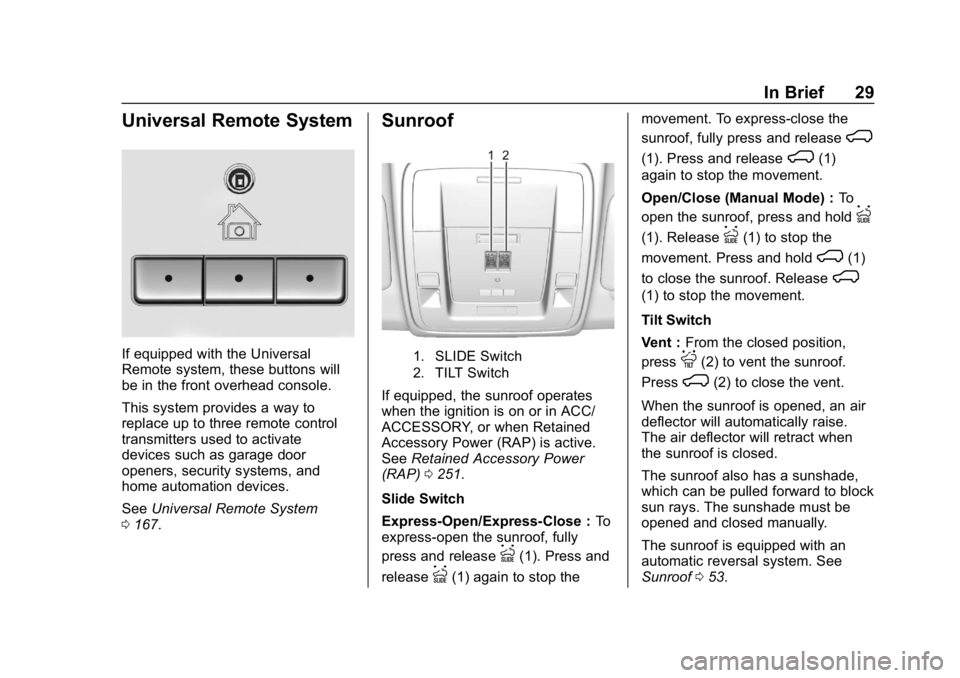
If equipped with the Universal
Remote system, these buttons will
be in the front overhead console.
This system provides a way to
replace up to three remote control
transmitters used to activate
devices such as garage door
openers, security systems, and
home automation devices.
SeeUniversal Remote System
0 167.
Sunroof
1. SLIDE Switch
2. TILT Switch
If equipped, the sunroof operates
when the ignition is on or in ACC/
ACCESSORY, or when Retained
Accessory Power (RAP) is active.
See Retained Accessory Power
(RAP) 0251.
Slide Switch
Express-Open/Express-Close : To
express-open the sunroof, fully
press and release
I(1). Press and
release
I(1) again to stop the movement. To express-close the
sunroof, fully press and release
K
(1). Press and releaseK(1)
again to stop the movement.
Open/Close (Manual Mode) : To
open the sunroof, press and hold
I
(1). ReleaseI(1) to stop the
movement. Press and hold
K(1)
to close the sunroof. Release
K
(1) to stop the movement.
Tilt Switch
Vent : From the closed position,
press
J(2) to vent the sunroof.
Press
K(2) to close the vent.
When the sunroof is opened, an air
deflector will automatically raise.
The air deflector will retract when
the sunroof is closed.
The sunroof also has a sunshade,
which can be pulled forward to block
sun rays. The sunshade must be
opened and closed manually.
The sunroof is equipped with an
automatic reversal system. See
Sunroof 053.
Page 31 of 489
Chevrolet Silverado LD 1500 and Silverado 2500/3500 Owner Manual (GMNA-
Localizing-U.S./Canada-12162993) - 2019 - crc - 4/4/18
30 In Brief
Performance and
Maintenance
Traction Control/
Electronic Stability
Control
The vehicle has a Traction Control
System (TCS) that limits wheel spin
and the StabiliTrak/Electronic
Stability Control (ESC) system that
assists with directional control of the
vehicle in difficult driving conditions.
Both systems come on
automatically when the vehicle is
started and begins to move.
.To turn off TCS, press and
release
gon the center stack.
The traction off light
idisplays
in the instrument cluster. The
appropriate Driver Information
Center (DIC) message displays.
. To turn off both TCS and
StabiliTrak/ESC, press and hold
guntiliandgilluminate in the instrument cluster and the
appropriate DIC message
displays.
. Press and release
gagain to
turn on both systems.
StabiliTrak/ESC will automatically
turn on if the vehicle exceeds
56 km/h (35 mph). Traction control
will remain off.
See Traction Control/Electronic
Stability Control 0273.
Tire Pressure Monitor
This vehicle may have a Tire
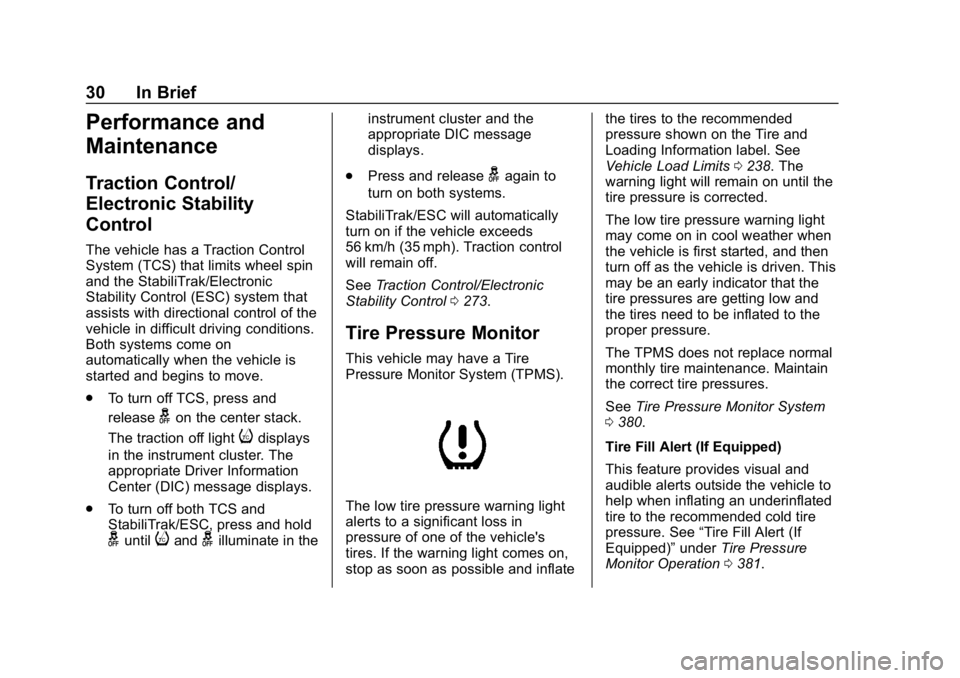
Pressure Monitor System (TPMS).
The low tire pressure warning light
alerts to a significant loss in
pressure of one of the vehicle's
tires. If the warning light comes on,
stop as soon as possible and inflate the tires to the recommended
pressure shown on the Tire and
Loading Information label. See
Vehicle Load Limits
0238. The
warning light will remain on until the
tire pressure is corrected.
The low tire pressure warning light
may come on in cool weather when
the vehicle is first started, and then
turn off as the vehicle is driven. This
may be an early indicator that the
tire pressures are getting low and
the tires need to be inflated to the
proper pressure.
The TPMS does not replace normal
monthly tire maintenance. Maintain
the correct tire pressures.
See Tire Pressure Monitor System
0 380.
Tire Fill Alert (If Equipped)
This feature provides visual and
audible alerts outside the vehicle to
help when inflating an underinflated
tire to the recommended cold tire
pressure. See “Tire Fill Alert (If
Equipped)” underTire Pressure
Monitor Operation 0381.
Page 33 of 489
Chevrolet Silverado LD 1500 and Silverado 2500/3500 Owner Manual (GMNA-
Localizing-U.S./Canada-12162993) - 2019 - crc - 4/4/18
32 In Brief
Driving for Better Fuel
Economy
Driving habits can affect fuel
mileage. Here are some driving tips
to get the best fuel economy
possible:
.Set the climate controls to the
desired temperature after the
engine is started, or turn them
off when not required.
. Avoid fast starts and accelerate
smoothly.
. Brake gradually and avoid
abrupt stops.
. Avoid idling the engine for long
periods of time.
. When road and weather
conditions are appropriate, use
cruise control.
. Always follow posted speed
limits or drive more slowly when
conditions require.
. Keep vehicle tires properly
inflated.
. Combine several trips into a
single trip. .
Replace the vehicle's tires with
the same TPC Spec number
molded into the tire's sidewall
near the size.
. Follow recommended scheduled
maintenance.
Roadside Assistance
Program
U.S.: 1-800-243-8872
TTY Users (U.S. Only):
1-888-889-2438
Canada: 1-800-268-6800
New Chevrolet owners are
automatically enrolled in the
Roadside Assistance Program.
See Roadside Assistance Program
0 453.
Page 34 of 489
Chevrolet Silverado LD 1500 and Silverado 2500/3500 Owner Manual (GMNA-
Localizing-U.S./Canada-12162993) - 2019 - crc - 4/4/18
Keys, Doors, and Windows 33
Keys, Doors, and
Windows
Keys and Locks
Keys . . . . . . . . . . . . . . . . . . . . . . . . . . . 33
Remote Keyless Entry (RKE)System . . . . . . . . . . . . . . . . . . . . . . . 36
Remote Keyless Entry (RKE) System Operation . . . . . . . . . . . . 36
Remote Vehicle Start . . . . . . . . . . 38
Door Locks . . . . . . . . . . . . . . . . . . . . 39
Power Door Locks . . . . . . . . . . . . . 40
Automatic Door Locks . . . . . . . . . 40
Lockout Protection . . . . . . . . . . . . . 41
Safety Locks . . . . . . . . . . . . . . . . . . . 41
Doors
Tailgate . . . . . . . . . . . . . . . . . . . . . . . . 42
Power Assist Steps . . . . . . . . . . . . 42
Vehicle Security
Vehicle Security . . . . . . . . . . . . . . . . 43
Vehicle Alarm System . . . . . . . . . 43
Immobilizer . . . . . . . . . . . . . . . . . . . . 44
Immobilizer Operation . . . . . . . . . 45
Exterior Mirrors
Convex Mirrors . . . . . . . . . . . . . . . . 45
Manual Mirrors . . . . . . . . . . . . . . . . . 45 Trailer-Tow Mirrors . . . . . . . . . . . . . 46
Power Mirrors . . . . . . . . . . . . . . . . . . 46
Folding Mirrors . . . . . . . . . . . . . . . . . 47
Heated Mirrors . . . . . . . . . . . . . . . . . 48
Automatic Dimming Mirror . . . . . 48
Blind Spot Mirrors . . . . . . . . . . . . . . 48
Reverse Tilt Mirrors . . . . . . . . . . . . 49
Interior Mirrors
Interior Rearview Mirrors . . . . . . . 49
Manual Rearview Mirror . . . . . . . . 49
Automatic Dimming Rearview
Mirror . . . . . . . . . . . . . . . . . . . . . . . . . 50
Windows
Windows . . . . . . . . . . . . . . . . . . . . . . . 50
Manual Windows . . . . . . . . . . . . . . 50
Power Windows . . . . . . . . . . . . . . . 50
Rear Windows . . . . . . . . . . . . . . . . . 52
Sun Visors . . . . . . . . . . . . . . . . . . . . . 53
Roof
Sunroof . . . . . . . . . . . . . . . . . . . . . . . . 53
Keys and Locks
Keys
{Warning
Leaving children in a vehicle with
the ignition key is dangerous and
children or others could be
seriously injured or killed. They
could operate the power windows
or other controls or make the
vehicle move. The windows will
function with the keys in the
ignition, and children or others
could be caught in the path of a
closing window. Do not leave
children in a vehicle with the
ignition key.
Page 41 of 489
Chevrolet Silverado LD 1500 and Silverado 2500/3500 Owner Manual (GMNA-
Localizing-U.S./Canada-12162993) - 2019 - crc - 4/4/18
40 Keys, Doors, and Windows
Warning (Continued)
passengers should wear
seat belts properly and the
doors should be locked
whenever the vehicle is
driven.
. Young children who get into
unlocked vehicles may be
unable to get out. A child
can be overcome by
extreme heat and can suffer
permanent injuries or even
death from heat stroke.
Always lock the vehicle
whenever leaving it.
. Outsiders can easily enter
through an unlocked door
when you slow down or stop
the vehicle. Locking the
doors can help prevent this
from happening.
There are several ways to lock and
unlock the vehicle.
From outside, use the Remote
Keyless Entry (RKE) transmitter or
the key in the driver door. From inside, use the power door
locks or manual door locks. To lock
or unlock the door with the manual
locks, push down or pull up on the
manual lock knob.
From inside, pull the door handle
once to unlock the door. Pull the
handle again to open the door.
See
Vehicle Alarm System 043.
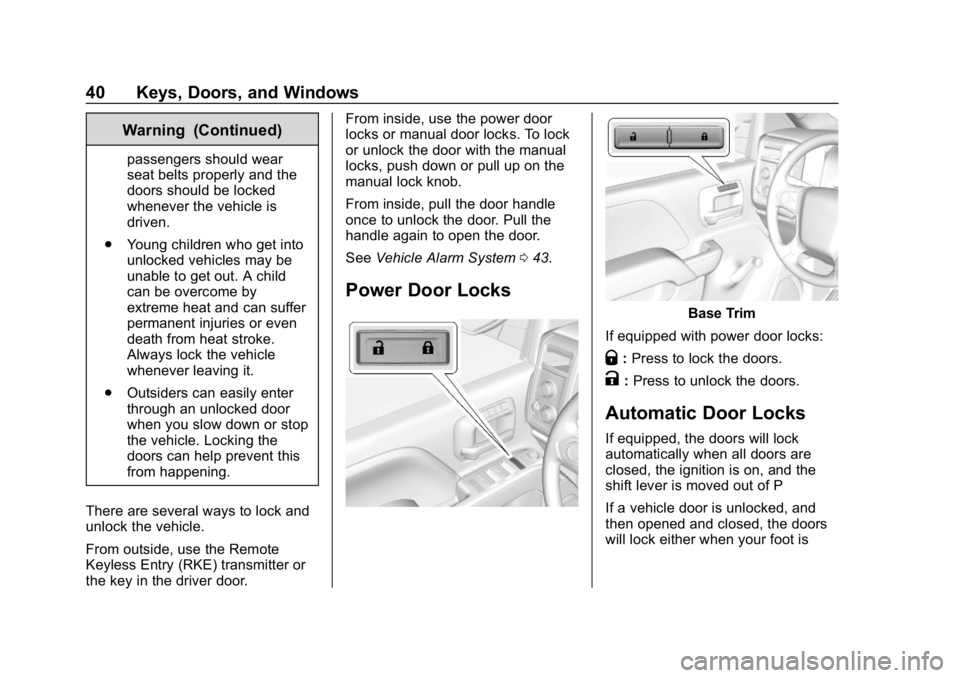
Power Door Locks
Base Trim
If equipped with power door locks:
Q: Press to lock the doors.
K:Press to unlock the doors.
Automatic Door Locks
If equipped, the doors will lock
automatically when all doors are
closed, the ignition is on, and the
shift lever is moved out of P
If a vehicle door is unlocked, and
then opened and closed, the doors
will lock either when your foot is
Page 42 of 489
Chevrolet Silverado LD 1500 and Silverado 2500/3500 Owner Manual (GMNA-
Localizing-U.S./Canada-12162993) - 2019 - crc - 4/4/18
Keys, Doors, and Windows 41
removed from the brake or the
vehicle speed becomes faster than
13 km/h (8 mph).
To unlock the doors:
.Press
Kon a power door lock
switch.
. Shift the transmission into
P (Park)
Automatic door locking cannot be
disabled. Automatic door unlocking
can be programmed. See Vehicle
Personalization 0160.
Lockout Protection
If the ignition is on or in ACC/
ACCESSORY and the power door
lock switch is pressed with the
driver door open, all the doors will
lock and only the driver door will
unlock.
If the vehicle is off and locking is
selected while a door is open, when
all doors are closed the vehicle will
check for RKE transmitters inside.
If an RKE transmitter is detected,
and the number of RKE transmitters has not reduced, the driver door will
unlock and the horn will chirp three
times.
This can be manually overridden by
pressing and holding
Qon the
power door lock switch.
Unlocked Door Anti-Lockout
If Unlocked Door Anti-Lockout is
turned on and the vehicle is off, the
driver door is open, and locking is
requested, all the doors will lock and
the driver door will remain open.
Press the button again to lock the
driver door. The Unlocked Door
Anti-Lockout feature can be turned
on or off. See Vehicle
Personalization 0160.
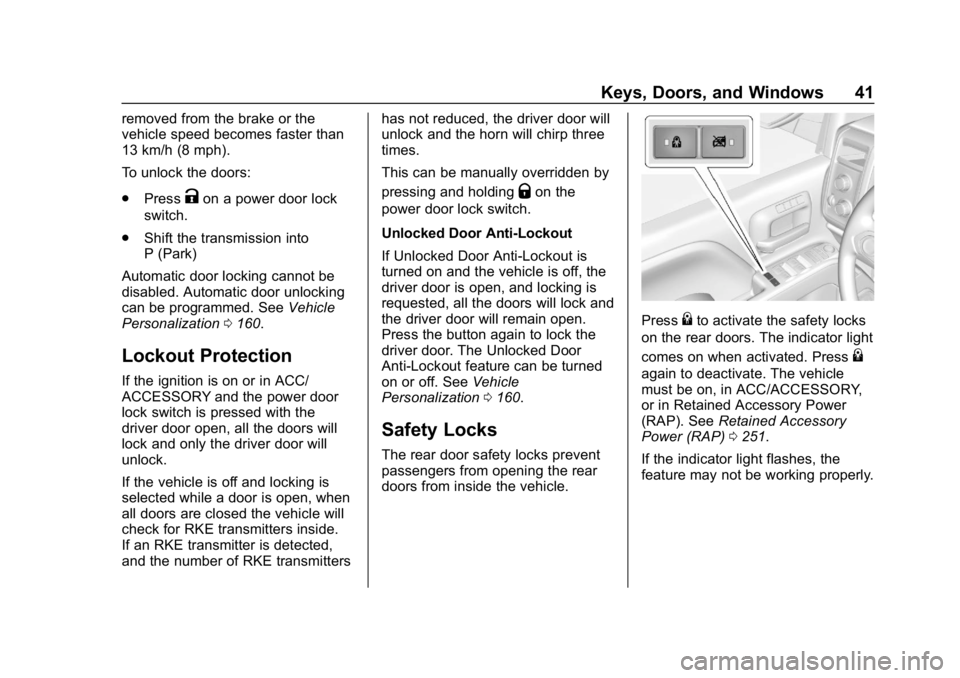
Safety Locks
The rear door safety locks prevent
passengers from opening the rear
doors from inside the vehicle.
Press{to activate the safety locks
on the rear doors. The indicator light
comes on when activated. Press
{
again to deactivate. The vehicle
must be on, in ACC/ACCESSORY,
or in Retained Accessory Power
(RAP). See Retained Accessory
Power (RAP) 0251.
If the indicator light flashes, the
feature may not be working properly.
Page 44 of 489
Chevrolet Silverado LD 1500 and Silverado 2500/3500 Owner Manual (GMNA-
Localizing-U.S./Canada-12162993) - 2019 - crc - 4/4/18
Keys, Doors, and Windows 43
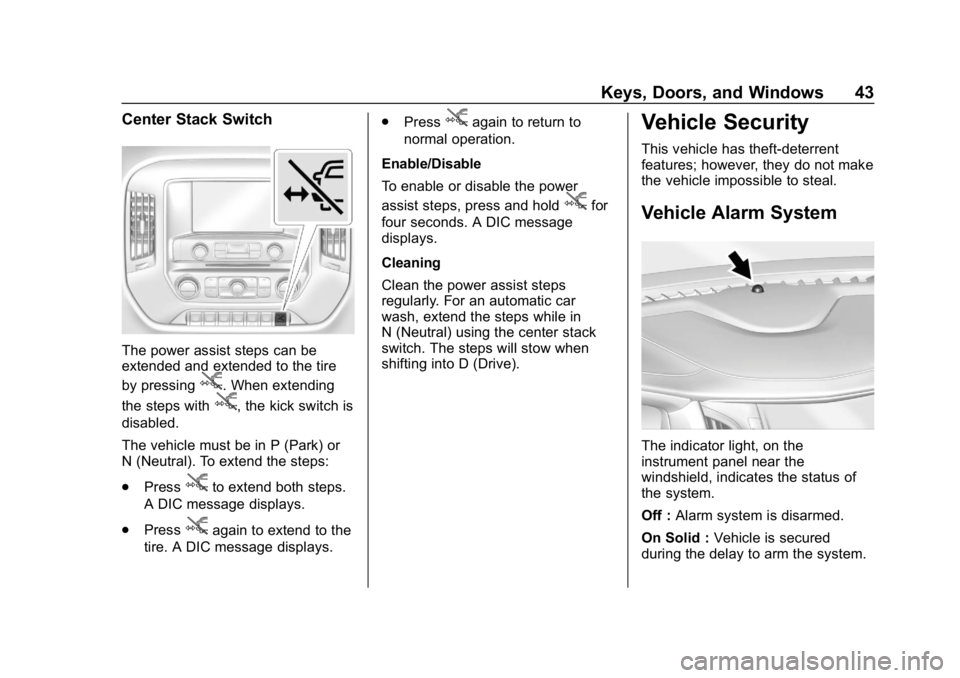
Center Stack Switch
The power assist steps can be
extended and extended to the tire
by pressing
j. When extending
the steps with
j, the kick switch is
disabled.
The vehicle must be in P (Park) or
N (Neutral). To extend the steps:
. Press
jto extend both steps.
A DIC message displays.
. Press
jagain to extend to the
tire. A DIC message displays. .
Press
jagain to return to
normal operation.
Enable/Disable
To enable or disable the power
assist steps, press and hold
jfor
four seconds. A DIC message
displays.
Cleaning
Clean the power assist steps
regularly. For an automatic car
wash, extend the steps while in
N (Neutral) using the center stack
switch. The steps will stow when
shifting into D (Drive).
Vehicle Security
This vehicle has theft-deterrent
features; however, they do not make
the vehicle impossible to steal.
Vehicle Alarm System
The indicator light, on the
instrument panel near the
windshield, indicates the status of
the system.
Off : Alarm system is disarmed.
On Solid : Vehicle is secured
during the delay to arm the system.
Page 46 of 489
Chevrolet Silverado LD 1500 and Silverado 2500/3500 Owner Manual (GMNA-
Localizing-U.S./Canada-12162993) - 2019 - crc - 4/4/18
Keys, Doors, and Windows 45
Immobilizer Operation
This vehicle has a passive
theft-deterrent system.
The system does not have to be
manually armed or disarmed.
The vehicle is automatically
immobilized when the vehicle is
turned off.
The system is automatically
disarmed when the ignition is turned
from off to on.
The security light, in the instrument
cluster, comes on if there is a
problem with arming or disarming
the theft-deterrent system.
When trying to start the vehicle, the
security light comes on briefly when
the ignition is turned on.If the engine does not start and the
security light stays on, there is a
problem with the system. Turn the
ignition off and try again.
If the engine still does not start, and
the key appears to be undamaged,
try another ignition key. It may be
necessary to check the fuse. See
Fuses and Circuit Breakers
0362.
If the engine still does not start with
the other key, the vehicle needs
service. If the vehicle does start, the
first key may be faulty. See your
dealer.
It is possible for the immobilizer
system to learn new or replacement
keys. Up to eight keys can be
programmed for the vehicle. To
program additional keys, see Keys
0 33. To program additional
transmitters, see your dealer.
Do not leave the key or device that
disarms or deactivates the vehicle
theft system in the vehicle.
See your dealer to get a new key
blank cut exactly as the ignition key
that operates the system.
Exterior Mirrors
Convex Mirrors
{Warning
A convex mirror can make things,
like other vehicles, look farther
away than they really are. If you
cut too sharply into the right lane,
you could hit a vehicle on the
right. Check the inside mirror or
glance over your shoulder before
changing lanes.
The passenger side mirror is convex
shaped. A convex mirror's surface is
curved so more can be seen from
the driver seat.
Manual Mirrors
If equipped, adjust manual mirrors
by moving the mirror up and down
or left to right to see a little of the
side of the vehicle and to have a
clear view behind the vehicle.
Page 48 of 489
Chevrolet Silverado LD 1500 and Silverado 2500/3500 Owner Manual (GMNA-
Localizing-U.S./Canada-12162993) - 2019 - crc - 4/4/18
Keys, Doors, and Windows 47
3. Adjust each outside mirror sothat a little of the vehicle and
the area behind it can be seen.
4. Press either (1) or (2) again to deselect the mirror.
If you do not deselect the mirror, the
feature will turn off after about
one minute.
If equipped, the mirrors may include
a memory function that works with
the memory seats. See Memory
Seats 060.
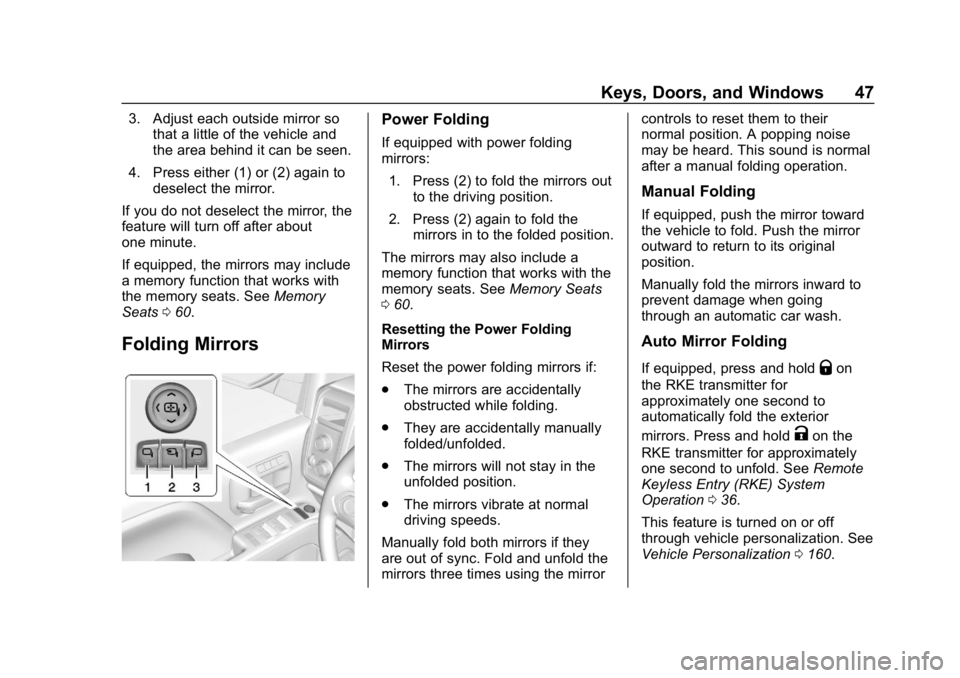
Folding Mirrors
Power Folding
If equipped with power folding
mirrors:
1. Press (2) to fold the mirrors out to the driving position.
2. Press (2) again to fold the mirrors in to the folded position.
The mirrors may also include a
memory function that works with the
memory seats. See Memory Seats
0 60.
Resetting the Power Folding
Mirrors
Reset the power folding mirrors if:
. The mirrors are accidentally
obstructed while folding.
. They are accidentally manually
folded/unfolded.
. The mirrors will not stay in the
unfolded position.
. The mirrors vibrate at normal
driving speeds.
Manually fold both mirrors if they
are out of sync. Fold and unfold the
mirrors three times using the mirror controls to reset them to their
normal position. A popping noise
may be heard. This sound is normal
after a manual folding operation.
Manual Folding
If equipped, push the mirror toward
the vehicle to fold. Push the mirror
outward to return to its original
position.
Manually fold the mirrors inward to
prevent damage when going
through an automatic car wash.
Auto Mirror Folding
If equipped, press and holdQon
the RKE transmitter for
approximately one second to
automatically fold the exterior
mirrors. Press and hold
Kon the
RKE transmitter for approximately
one second to unfold. See Remote
Keyless Entry (RKE) System
Operation 036.
This feature is turned on or off
through vehicle personalization. See
Vehicle Personalization 0160.