lights CHEVROLET SILVERADO 2500 2020 Owner's Manual
[x] Cancel search | Manufacturer: CHEVROLET, Model Year: 2020, Model line: SILVERADO 2500, Model: CHEVROLET SILVERADO 2500 2020Pages: 500, PDF Size: 9.71 MB
Page 276 of 500
Chevrolet Silverado Owner Manual (GMNA-Localizing-U.S./Canada/Mexico-
13337620) - 2020 - CRC - 4/11/19
Driving and Operating 275
and a vehicle is also detected on
the same side, the display will flash
as an extra warning not to change
lanes. Since this system is part of
the Lane Change Alert (LCA)
system, read the entire LCA section
before using this feature.
Lane Change Alert (LCA)
(1500 Series)
If equipped, the LCA system is a
lane-changing aid that assists
drivers with avoiding lane change
crashes that occur with moving
vehicles in the side blind zone (or
spot) areas or with vehicles rapidly
approaching these areas from
behind. The LCA warning display
will light up in the corresponding
outside side mirror and will flash if
the turn signal is on.
{Warning
LCA does not alert the driver to
vehicles outside of the system
detection zones, pedestrians,(Continued)
Warning (Continued)
bicyclists, or animals. It may not
provide alerts when changing
lanes under all driving conditions.
Failure to use proper care when
changing lanes may result in
injury, death, or vehicle damage.
Before making a lane change,
always check mirrors, glance over
your shoulder, and use the turn
signals.
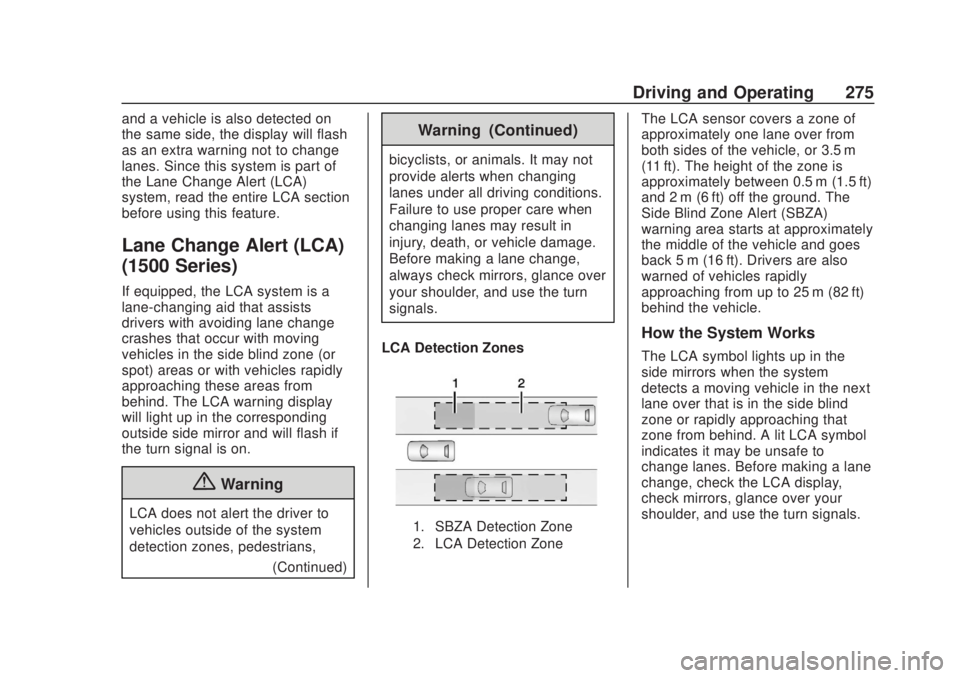
LCA Detection Zones
1. SBZA Detection Zone
2. LCA Detection Zone
The LCA sensor covers a zone of
approximately one lane over from
both sides of the vehicle, or 3.5 m
(11 ft). The height of the zone is
approximately between 0.5 m (1.5 ft)
and 2 m (6 ft) off the ground. The
Side Blind Zone Alert (SBZA)
warning area starts at approximately
the middle of the vehicle and goes
back 5 m (16 ft). Drivers are also
warned of vehicles rapidly
approaching from up to 25 m (82 ft)
behind the vehicle.
How the System Works
The LCA symbol lights up in the
side mirrors when the system
detects a moving vehicle in the next
lane over that is in the side blind
zone or rapidly approaching that
zone from behind. A lit LCA symbol
indicates it may be unsafe to
change lanes. Before making a lane
change, check the LCA display,
check mirrors, glance over your
shoulder, and use the turn signals.
Page 311 of 500
Chevrolet Silverado Owner Manual (GMNA-Localizing-U.S./Canada/Mexico-
13337620) - 2020 - CRC - 4/11/19
310 Driving and Operating
Trailer Tires
Special Trailer (ST) tires differ from
vehicle tires. Trailer tires are
designed with stiff sidewalls to help
prevent sway and to support heavy
loads. These features can make it
difficult to determine if the trailer tire
pressures are low only based on a
visual inspection.
Always check all trailer tire
pressures before each trip when the
tires are cool. Low trailer tire
pressure is a leading cause of trailer
tire blow-outs.
If the vehicle is equipped with a
trailer tire pressure monitoring
system, see the trailer tire pressure
monitoring system description and
the trailering app.
Trailer tires deteriorate over time.
The trailer tire sidewall will show the
week and year the tire was
manufactured. Many trailer tire
manufacturers recommend
replacing tires more than six
years old.Overloading is another leading
cause of trailer tire blow-outs. Never
load your trailer with more weight
than the tires are designed to
support. The load rating is located
on the trailer tire sidewall.
Always know the maximum speed
rating for the trailer tires before
driving. This may be significantly
lower than the vehicle tire speed
rating. The speed rating may be on
the trailer tire sidewall. If the speed
rating is not shown, the default
trailer tire speed rating is 105 km/h
(65 mph).
Trailering App
Trailer Light App
If equipped, the Trailer Lights App is
on the Home Page of the
infotainment display.
Touch Start to cycle the trailer lamps
on and off to determine if they are
working. The test follows this
sequence:
1. The running lights turn on first
and remain on throughout the
sequence.
2. The brake lights turn on for about two seconds.
3. The left turn signal light flashes three times.
4. The right turn signal light flashes three times.
5. The reverse lights turn on for about two seconds.
6. Steps 2–5 repeat for approximately one minute and
45 seconds, or until the test
deactivates.
Touch Stop to stop the test. The test
will automatically end after
one minute and 45 seconds.
The sequence also deactivates
when any of the following occur:
. The ignition is turned off.
. The transmission is shifted out
of P (Park).
. The brake pedal is pressed.
. The turn signal is activated.
Page 312 of 500
Chevrolet Silverado Owner Manual (GMNA-Localizing-U.S./Canada/Mexico-
13337620) - 2020 - CRC - 4/11/19
Driving and Operating 311
.The hazard warning lights are
activated.
Trailering App
If equipped, the Trailering App is on
the Home Page of the infotainment
display.
If equipped this feature allows
profiles for connected trailers to be
created to view status, to store and
track trailer usage information, and
to set up towing assistance
features.
The Trailering App Preview will
appear when the Trailering App is
opened for the first time from the
Home Page. Touch GET STARTED
in the Trailering App to go into
the app.
When a trailer is electrically
connected, there will be an option to
create a profile, use a guest profile,
or cancel. After Cancel is selected a
third time, Don’t Remind Me will
display and touching that will turn off
the trailer detection pop-up. To turn
the Trailer Detection Alert on, select
ON in the Settings tab. When a trailer is electrically
connected and after a Trailer Profile
has been created, the trailer
detection pop-up will appear with a
list of all of the custom Trailer
Profiles made on the vehicle. To
load an existing Trailer Profile,
select one of the Trailer Profiles
listed, or load the Guest Trailer
Profile by selecting GUEST
TRAILER. Touching Cancel,
Accessory/No trailer, or shifting the
vehicle from P (Park), will select
Accessory/No trailer as the active
Trailer Profile and will dismiss the
pop- up.
Create a Trailer Profile
1. Touch Create Profile on the pop-up or touch + Add Trailer
in the Trailering App.
2. Create a name for the trailer.
3. Select the hitch type. A checklist profile will be
created based on the type
selected.
4. Select the trailer type. A pop-up will indicate the setup is
complete. Touch DONE to complete
the process or touch TRAILER
FEATURE SETUP to set up the
Tow/Haul Mode reminder, Trailer
Tire Pressure Monitoring System,
if equipped, maintenance reminders,
or towing assistance, if equipped.
Import a Trailer Profile
A trailer profile saved to an OnStar
account can be imported to the
vehicle.
1. Touch Import Profile on the pop-up.
2. Select a trailer profile from the list.
3. Touch IMPORT.
A pop-up will indicate the import
was successful. Touch OK to return
to the trailer list and select the trailer
profile. The Tow/Haul Mode
reminder, Brake Gain Setting and
Trailer Tire Pressure sensor
learning, if equipped, do not import.
Page 313 of 500
Chevrolet Silverado Owner Manual (GMNA-Localizing-U.S./Canada/Mexico-
13337620) - 2020 - CRC - 4/11/19
312 Driving and Operating
Trailer Feature Setup
Tow/Haul Mode Reminder
To turn the Tow/Haul Mode
Reminder setting on, touch Yes. To
turn it off, touch No.
Trailer Tire Pressure Setup
If the Trailer Tire Pressure
Monitoring System (TTPMS) is
detected, touch the Tire Pressure
Monitoring icon to set up tire
pressure monitoring.Touch Yes to
set up the sensors or touch No to
return to the previous screen.
A trailer must be electrically
connected to the vehicle before
starting the sensor-to-vehicle learn
process.
After selecting Start from the Learn
Sensors screen, use the Tool
Method or the Manual Method
(described below) to learn each tire
sensor, during which the current tire
number will be highlighted.
Each sensor has a minimum of
two minutes to learn, shown by a
timer. After a sensor is learned, a
checkmark appears next to the tire,the vehicle horn will sound, the
vehicle’s brake lamps will flash, and
all working trailer lamps will flash.
It then moves to the next sensor.
To cancel the process touch Stop.
The recommended tire pressure
must be entered for the trailer tires.
This allows the vehicle to alert when
the tire pressure is high or low.
TTPMS must learn the location of
the installed tire sensors to show
correct air pressure and
temperature for each tire. To set up,
use one of the following options or
see a tire or trailer dealer for
service. The learning process must
be repeated when the trailer tires
are rotated or replaced. See
“Editing
a Trailer Profile” later in this section
for tire pressure sensor relearn
information.
Tool Method: A TTPMS activation
tool can be purchased separately to
learn the sensor locations.
Manual Method: Without the tool,
the air pressure can be increased or
decreased in each tire for
10 seconds. Do not exceed the maximum inflation pressure found
on the tire sidewalls. Make sure to
re-adjust tire pressure to the
recommended level when the
process is complete.
Sensor Learning Steps
To complete the sensor-to-vehicle
learn process:
1. Touch Start on the Learn Sensors screen. The horn
chirps twice and the Learning
Active screen appears on the
infotainment display.
2. Start with the driver side front trailer tire.
3. Activate the tool near the valve stem or adjust the air pressure
of this tire until the horn chirps
and all working vehicle and
trailer lights flash.
The process stops without
saving the sensor locations if
this step takes more than
two minutes.
Page 315 of 500
Chevrolet Silverado Owner Manual (GMNA-Localizing-U.S./Canada/Mexico-
13337620) - 2020 - CRC - 4/11/19
314 Driving and Operating
4. Ensure rear trailer camera isconnected.
5. Follow instructions to drive forward to complete calibration.
6. Return to the vehicle to complete the setup..
Status View
The Status view shows:
.Truck
. Connections
. Trailer
. Maintenance
. Cameras
Upon entry, the most recent items
will be shown. Select MORE to view
all options.
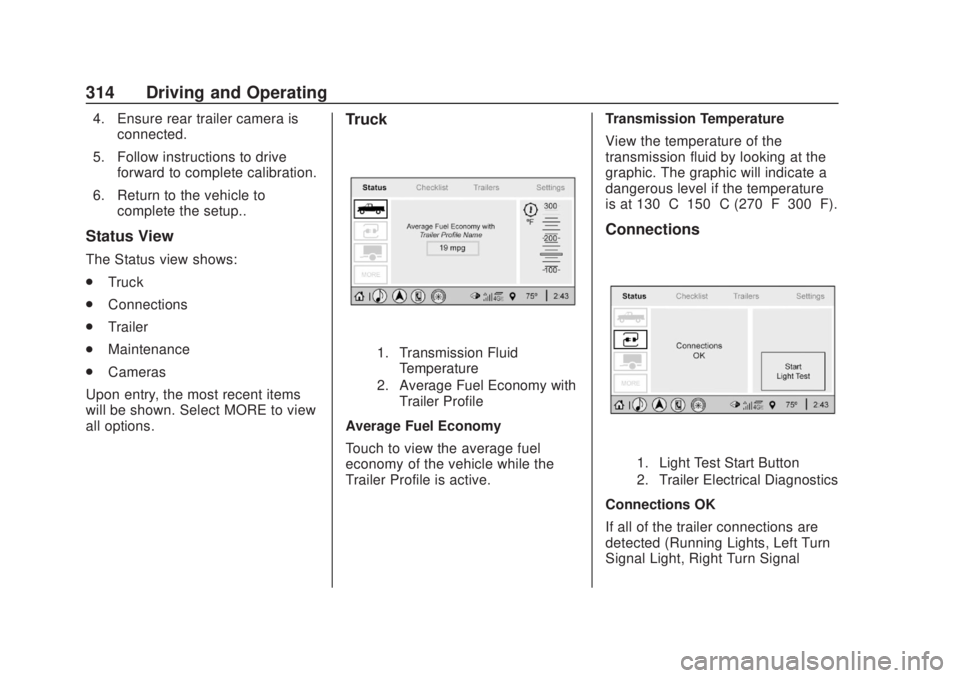
Truck
1. Transmission Fluid Temperature
2. Average Fuel Economy with Trailer Profile
Average Fuel Economy
Touch to view the average fuel
economy of the vehicle while the
Trailer Profile is active. Transmission Temperature
View the temperature of the
transmission fluid by looking at the
graphic. The graphic will indicate a
dangerous level if the temperature
is at 130 °C–150 °C (270 °F–300 °F).
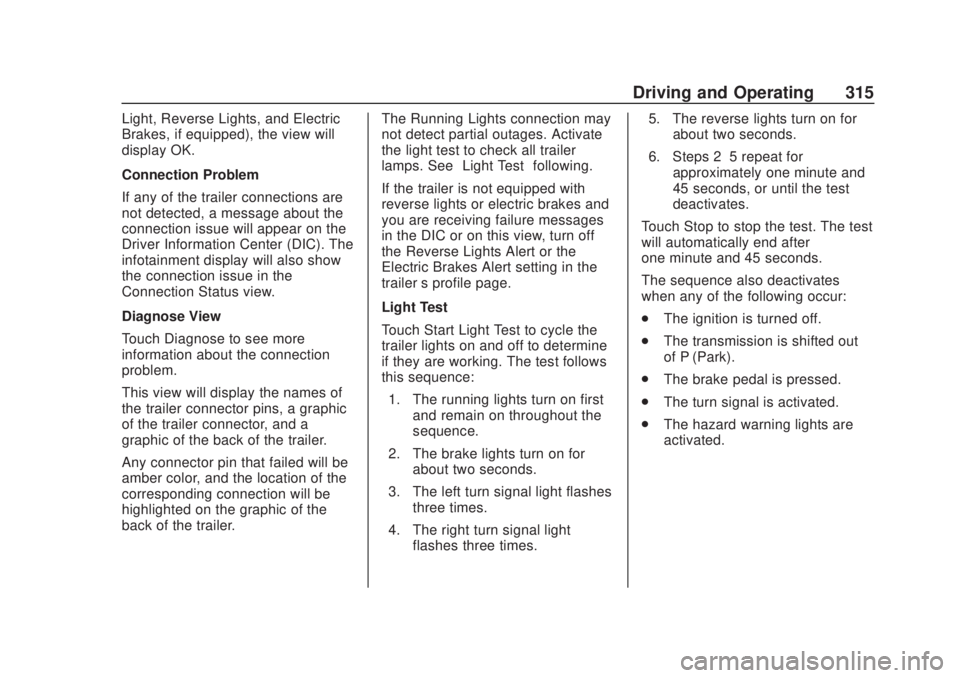
Connections
1. Light Test Start Button
2. Trailer Electrical Diagnostics
Connections OK
If all of the trailer connections are
detected (Running Lights, Left Turn
Signal Light, Right Turn Signal
Page 316 of 500
Chevrolet Silverado Owner Manual (GMNA-Localizing-U.S./Canada/Mexico-
13337620) - 2020 - CRC - 4/11/19
Driving and Operating 315
Light, Reverse Lights, and Electric
Brakes, if equipped), the view will
display OK.
Connection Problem
If any of the trailer connections are
not detected, a message about the
connection issue will appear on the
Driver Information Center (DIC). The
infotainment display will also show
the connection issue in the
Connection Status view.
Diagnose View
Touch Diagnose to see more
information about the connection
problem.
This view will display the names of
the trailer connector pins, a graphic
of the trailer connector, and a
graphic of the back of the trailer.
Any connector pin that failed will be
amber color, and the location of the
corresponding connection will be
highlighted on the graphic of the
back of the trailer.The Running Lights connection may
not detect partial outages. Activate
the light test to check all trailer
lamps. See
“Light Test”following.
If the trailer is not equipped with
reverse lights or electric brakes and
you are receiving failure messages
in the DIC or on this view, turn off
the Reverse Lights Alert or the
Electric Brakes Alert setting in the
trailer ’s profile page.
Light Test
Touch Start Light Test to cycle the
trailer lights on and off to determine
if they are working. The test follows
this sequence: 1. The running lights turn on first and remain on throughout the
sequence.
2. The brake lights turn on for about two seconds.
3. The left turn signal light flashes three times.
4. The right turn signal light flashes three times. 5. The reverse lights turn on for
about two seconds.
6. Steps 2–5 repeat for approximately one minute and
45 seconds, or until the test
deactivates.
Touch Stop to stop the test. The test
will automatically end after
one minute and 45 seconds.
The sequence also deactivates
when any of the following occur:
. The ignition is turned off.
. The transmission is shifted out
of P (Park).
. The brake pedal is pressed.
. The turn signal is activated.
. The hazard warning lights are
activated.
Page 320 of 500
Chevrolet Silverado Owner Manual (GMNA-Localizing-U.S./Canada/Mexico-
13337620) - 2020 - CRC - 4/11/19
Driving and Operating 319
.Average Fuel Economy
. Reverse Lights Alert
. Electric Brakes Alert
Touch Save to save the new value
to the Trailer Profile. Touching Back
will still save the previously entered
information.
Trailer Name
Touch to edit the Trailer Profile’s
name. Use at least one character
and no spaces. Touch Save.
Towing Assistance Setup
A trailer should be connected to
complete this portion of profile
setup.
Touch to set up the Transparent
Trailer feature for the Trailer Profile.
See "Transparent Trailer Setup"
under "Towing Assistance" for
details on the setup.
Tire Pressure Setup
Touch to set up the Trailer Tire
Pressure Monitoring System
(TTPMS) for the Trailer Profile. See
“Trailer Tire Pressure Setup” previously in this section for details
on the setup. Also, touch Tire
Pressure Setup if the trailer tires
were rotated or if the tire pressure
sensors in the tires were replaced
for this Trailer Profile. The vehicle
will need to relearn the tire sensors
and their locations.
If TTPMS had been set up
previously, the Select Number of
Sensors screen will appear after
touching Tire Pressure Setup. If the
number of sensors has changed,
select the number and touch Next.
If a new number of sensors is
selected, the Relearn Sensors
pop-up will appear. Touch Cancel to
go back or touch Relearn to
overwrite the current sensors and
begin the relearning process. See
“Trailer Tire Pressure Setup”
previously in this section.
If number of sensors has not
changed, touch Next and the Learn
sensors screen will appear.
On the Learn Sensors screen.
Touch Relearn to overwrite the
current sensors and begin therelearning process. See
“Trailer Tire
Pressure Setup” previously in this
section.
On the Learn Sensors screen, touch
Next to go to the Edit
Recommended Tire Pressure
screen.
On the Edit Recommended Tire
Pressure screen, touch a number on
the keypad to change the
Recommended Tire Pressure for the
trailer ’s tires. This will change the
number at which the vehicle
displays alerts related to trailer tire
pressure. Touch Done to return to
the Trailer Profile view.
Trailer Maintenance
Touch to view a list of maintenance
reminders for the Trailer Profile.
Touch a reminder to view, reset,
delete, or edit it.
Reset Reminder
Touch Maintenance Complete in the
reminder view to reset the reminder.
On the pop-up, touch Reset to reset
the time and mileage values for the
Page 321 of 500
Chevrolet Silverado Owner Manual (GMNA-Localizing-U.S./Canada/Mexico-
13337620) - 2020 - CRC - 4/11/19
320 Driving and Operating
reminder. Touch Cancel to return to
the previous view and nothing will
change.
Edit Reminder
Touch to edit the mileage or time
settings for the reminder. Touch
Save to save the new settings to the
Trailer Profile.
Delete Reminder
Touch to delete the maintenance
reminder. On the pop-up, touch
Delete to delete the reminder or
touch Cancel to return to the
previous view and nothing will
change.
New Maintenance Reminder
Touch + New Maintenance
Reminder to set up a new reminder.
Suggested reminders that were
previously set will have checkmarks
next to them. Suggested reminders
that have not been set will have
empty boxes next to them. The
maximum number of reminders
is 50.Mileage
Touch to edit the Trailer Profile’s
mileage.
Effect on Maintenance Reminders
If the mileage is reset or changed,
and mileage has already
accumulated, any maintenance
reminders that have been set up will
be adjusted accordingly.
Average Fuel Economy
Touch to reset the average fuel
economy for the Trailer Profile.
Touch Reset to change, or touch
Cancel to go back to the
previous view.
Reverse Lights Alert
Turn on to receive failure messages
about the reverse lights. Turn off to
not receive failure messages about
the reverse lights, unless they are
later detected. This setting cannot
be edited when the Trailer Profile is
inactive or when the trailer is
disconnected.
Electric Brakes Alert
Turn on to receive failure messages
about the electric trailer brakes.
Turn off to not receive failure
messages about the electric trailer
brakes, unless they are later
detected. This setting cannot be
edited when the Trailer Profile is
inactive or when the trailer is
disconnected.
Delete Trailer
Touch to delete the Trailer Profile
and all of its settings.
On the pop-up, touch Delete to
delete the Trailer Profile. Touch
Cancel to dismiss the pop-up and
return to the previous view.
Settings View
Within the Trailering App, touch the
Settings tab to modify the following
settings:
.
Trailer Detection Alert
. Maintenance Alerts
. Theft Alert
. Tow/Haul Mode Reminder
Page 449 of 500
Chevrolet Silverado Owner Manual (GMNA-Localizing-U.S./Canada/Mexico-
13337620) - 2020 - CRC - 4/2/19
448 Service and Maintenance
Additional
Maintenance and Care
Your vehicle is an important
investment and caring for it properly
may help to avoid future costly
repairs. To maintain vehicle
performance, additional
maintenance services may be
required.
It is recommended that your dealer
perform these services—their
trained dealer technicians know
your vehicle best. Your dealer can
also perform a thorough
assessment with a multi-point
inspection to recommend when your
vehicle may need attention.
The following list is intended to
explain the services and conditions
to look for that may indicate
services are required.
Battery
The 12-volt battery supplies power
to start the engine and operate any
additional electrical accessories. .
To avoid break-down or failure to
start the vehicle, maintain a
battery with full cranking power.
. Trained dealer technicians have
the diagnostic equipment to test
the battery and ensure that the
connections and cables are
corrosion-free.
Belts
. Belts may need replacing if they
squeak or show signs of
cracking or splitting.
. Trained dealer technicians have
access to tools and equipment
to inspect the belts and
recommend adjustment or
replacement when necessary.
Brakes
Brakes stop the vehicle and are
crucial to safe driving.
. Signs of brake wear may include
chirping, grinding, or squealing
noises, or difficulty stopping. .
Trained dealer technicians have
access to tools and equipment
to inspect the brakes and
recommend quality parts
engineered for the vehicle.
Fluids
Proper fluid levels and approved
fluids protect the vehicle’s systems
and components. See
Recommended Fluids and
Lubricants 0451 for GM approved
fluids.
. Engine oil and windshield
washer fluid levels should be
checked at every fuel fill.
. Instrument cluster lights may
come on to indicate that fluids
may be low and need to be
filled.
Hoses
Hoses transport fluids and should
be regularly inspected to ensure
that there are no cracks or leaks.
With a multi-point inspection, your
dealer can inspect the hoses and
advise if replacement is needed.
Page 491 of 500

Chevrolet Silverado Owner Manual (GMNA-Localizing-U.S./Canada/Mexico-
13337620) - 2020 - CRC - 4/2/19
490 Index
Extended Parking . . . . . . . . . . . . . . . 219
Extender, Seat Belt . . . . . . . . . . . . . . 71
Exterior Cargo Lamps . . . . . . . . . . 172
Exterior Lamp Controls . . . . . . . . . 165
Exterior Lamps Off Reminder . . . 167
Exterior Lighting BatterySaver . . . . . . . . . . . . . . . . . . . . . . . . . 175
F
Fan
Engine . . . . . . . . . . . . . . . . . . . . . . . . 353
Filter,
Engine Air Cleaner . . . . . . . . . . . 344
Flash-to-Pass . . . . . . . . . . . . . . . . . . . 168
Flashers, Hazard Warning . . . . . . 169
Flat Tire . . . . . . . . . . . . . . . . . . . . . . . . 405 Changing . . . . . . . . . . . . . . . . . . . . . 407
FlexFuel E85 . . . . . . . . . . . . . . . . . . . . . . . . . . . 282
Floor Console Storage . . . . . . . . . . 115
Floor Mats . . . . . . . . . . . . . . . . . . . . . . 437
Fluid Automatic Transmission . . . . . . 343
Brakes . . . . . . . . . . . . . . . . . . . . . . . . 357
Four-Wheel DriveTransfer Case . . . . . . . . . . . . . . . 227
Power Steering . . . . . . . . . . . . . . . 353
Washer . . . . . . . . . . . . . . . . . . . . . . . 354 Fog Lamps . . . . . . . . . . . . . . . . . . . . . 170
Folding Mirrors . . . . . . . . . . . . . . . . . . 43
Forward Collision Alert
(FCA) System . . . . . . . . . . . . . . . . . 268
Four-Wheel Drive . . . . . . . . . . 227, 360
Four-Wheel-Drive Light . . . . . . . . . 141
Frequency Statement Radio . . . . . . . . . . . . . . . . . . . . . . . . . 471
Front Axle . . . . . . . . . . . . . . . . . . . . . . 361
Front Fog Lamp Light . . . . . . . . . . . . . . . . . . . . . . . . . . 147
Front Pedestrian Braking (FPB) System . . . . . . . . . . . . . . . . . 272
Front Seats Adjustment . . . . . . . . . . . . . . . . . . . . . 55
Heated and Ventilated . . . . . . . . . . 61
Fuel Additives . . . . . . . . . . . . . . . . . . . . . 282
Economy, Driving for Better . . . 186
Filling a Portable FuelContainer . . . . . . . . . . . . . . . . . . . 286
Filling the Tank . . . . . . . . . . 283, 285
Foreign Countries . . . . . . . . . . . . 282
Gauge . . . . . . . . . . . . . . . . . . . . . . . . 132
Low Fuel Warning Light . . . . . . . 146
Management, Active . . . . . . . . . . 219
Prohibited Fuels . . . . . . . . . . . . . . 281
Recommended . . . . . . . . . . . . . . . 281 Fuel (cont'd)
Top Tier . . . . . . . . . . . . . . . . . . . . . . 280
Full-Size Spare Tire . . . . . . . . . . . . 418
Fuses Engine Compartment FuseBlock . . . . . . . . . . . . . . . . . . . . . . . . 371
Fuses and Circuit Breakers . . . 370
Instrument Panel Fuse Block . . . . . . . . . . . . . . . . . . . 374, 376
G
Garage Door Opener . . . . . . . . . . . 161
Programming . . . . . . . . . . . . . . . . . 161
Gas Strut(s) . . . . . . . . . . . . . . . . . . . . 365
Gauges
Engine CoolantTemperature . . . . . . . . . . . . . . . . 134
Engine Oil Pressure . . . . . . . . . . 133
Fuel . . . . . . . . . . . . . . . . . . . . . . . . . . 132
Odometer . . . . . . . . . . . . . . . . . . . . . 131
Speedometer . . . . . . . . . . . . . . . . . 131
Tachometer . . . . . . . . . . . . . . . . . . . 132
Trip Odometer . . . . . . . . . . . . . . . . 131
Voltmeter . . . . . . . . . . . . . . . . . . . . . 135
Warning Lights and Indicators . . . . . . . . . . . . . . . . . . . 126
General Information Service and Maintenance . . . . . 439