light CHEVROLET SILVERADO EV 2024 User Guide
[x] Cancel search | Manufacturer: CHEVROLET, Model Year: 2024, Model line: SILVERADO EV, Model: CHEVROLET SILVERADO EV 2024Pages: 429, PDF Size: 8.98 MB
Page 25 of 429
Chevrolet Silverado EV Owner Manual (GMNA-Localizing-U.S./Canada-
16702912) - 2024 - CRC - 1/23/23
24 Keys, Doors, and Windows
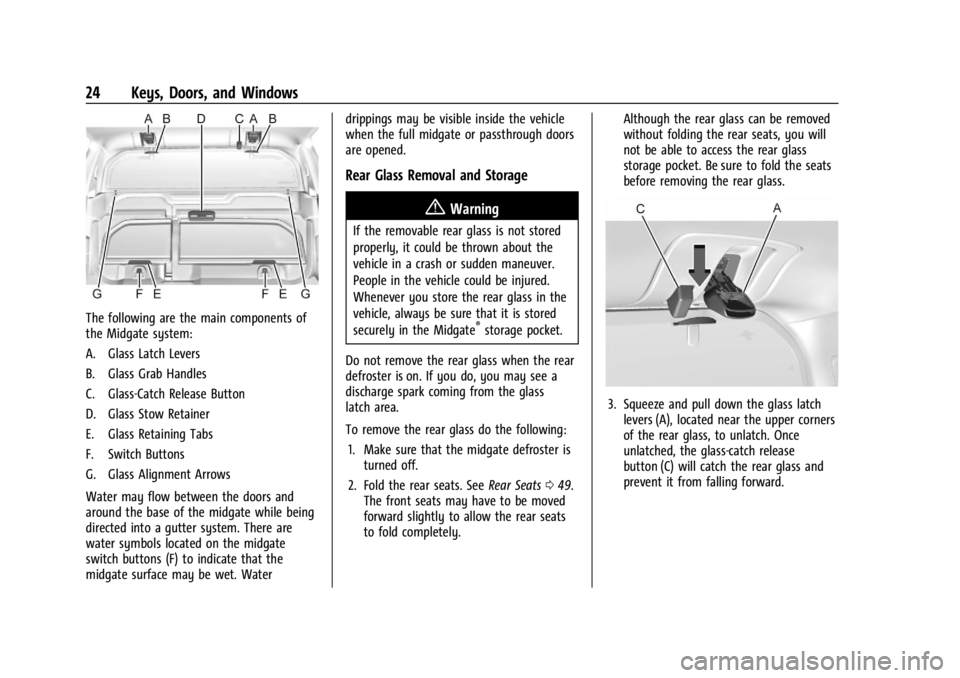
The following are the main components of
the Midgate system:
A. Glass Latch Levers
B. Glass Grab Handles
C. Glass-Catch Release Button
D. Glass Stow Retainer
E. Glass Retaining Tabs
F. Switch Buttons
G. Glass Alignment Arrows
Water may flow between the doors and
around the base of the midgate while being
directed into a gutter system. There are
water symbols located on the midgate
switch buttons (F) to indicate that the
midgate surface may be wet. Waterdrippings may be visible inside the vehicle
when the full midgate or passthrough doors
are opened.
Rear Glass Removal and Storage
{Warning
If the removable rear glass is not stored
properly, it could be thrown about the
vehicle in a crash or sudden maneuver.
People in the vehicle could be injured.
Whenever you store the rear glass in the
vehicle, always be sure that it is stored
securely in the Midgate
®storage pocket.
Do not remove the rear glass when the rear
defroster is on. If you do, you may see a
discharge spark coming from the glass
latch area.
To remove the rear glass do the following: 1. Make sure that the midgate defroster is turned off.
2. Fold the rear seats. See Rear Seats049.
The front seats may have to be moved
forward slightly to allow the rear seats
to fold completely. Although the rear glass can be removed
without folding the rear seats, you will
not be able to access the rear glass
storage pocket. Be sure to fold the seats
before removing the rear glass.
3. Squeeze and pull down the glass latch
levers (A), located near the upper corners
of the rear glass, to unlatch. Once
unlatched, the glass-catch release
button (C) will catch the rear glass and
prevent it from falling forward.
Page 28 of 429
Chevrolet Silverado EV Owner Manual (GMNA-Localizing-U.S./Canada-
16702912) - 2024 - CRC - 1/23/23
Keys, Doors, and Windows 27
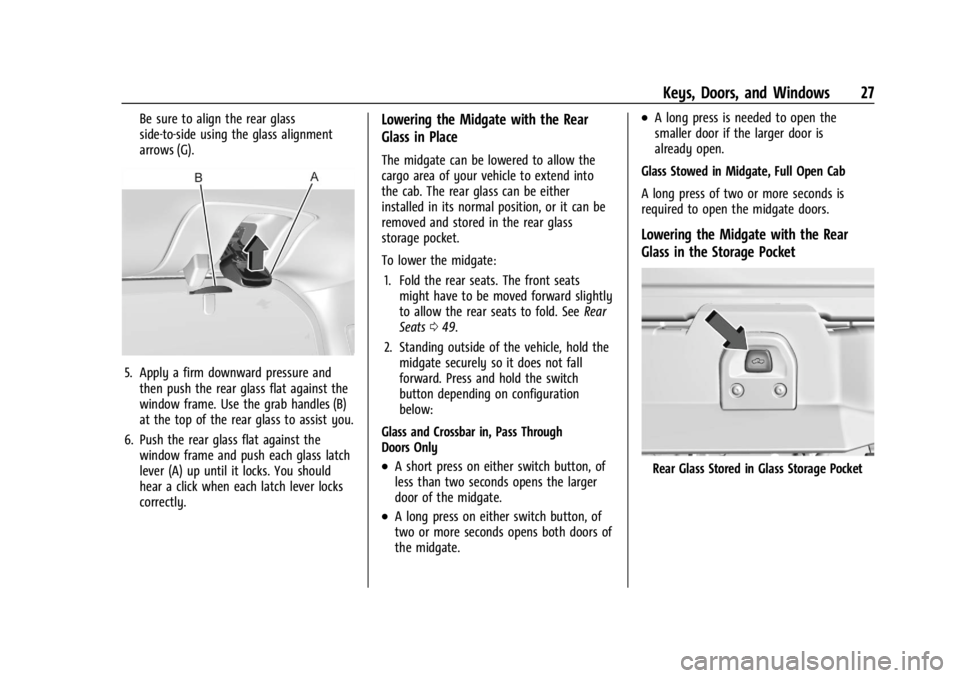
Be sure to align the rear glass
side-to-side using the glass alignment
arrows (G).
5. Apply a firm downward pressure andthen push the rear glass flat against the
window frame. Use the grab handles (B)
at the top of the rear glass to assist you.
6. Push the rear glass flat against the window frame and push each glass latch
lever (A) up until it locks. You should
hear a click when each latch lever locks
correctly.
Lowering the Midgate with the Rear
Glass in Place
The midgate can be lowered to allow the
cargo area of your vehicle to extend into
the cab. The rear glass can be either
installed in its normal position, or it can be
removed and stored in the rear glass
storage pocket.
To lower the midgate:
1. Fold the rear seats. The front seats might have to be moved forward slightly
to allow the rear seats to fold. See Rear
Seats 049.
2. Standing outside of the vehicle, hold the midgate securely so it does not fall
forward. Press and hold the switch
button depending on configuration
below:
Glass and Crossbar in, Pass Through
Doors Only
.A short press on either switch button, of
less than two seconds opens the larger
door of the midgate.
.A long press on either switch button, of
two or more seconds opens both doors of
the midgate.
.A long press is needed to open the
smaller door if the larger door is
already open.
Glass Stowed in Midgate, Full Open Cab
A long press of two or more seconds is
required to open the midgate doors.
Lowering the Midgate with the Rear
Glass in the Storage Pocket
Rear Glass Stored in Glass Storage Pocket
Page 34 of 429
Chevrolet Silverado EV Owner Manual (GMNA-Localizing-U.S./Canada-
16702912) - 2024 - CRC - 1/23/23
Keys, Doors, and Windows 33
Vehicle Alarm System
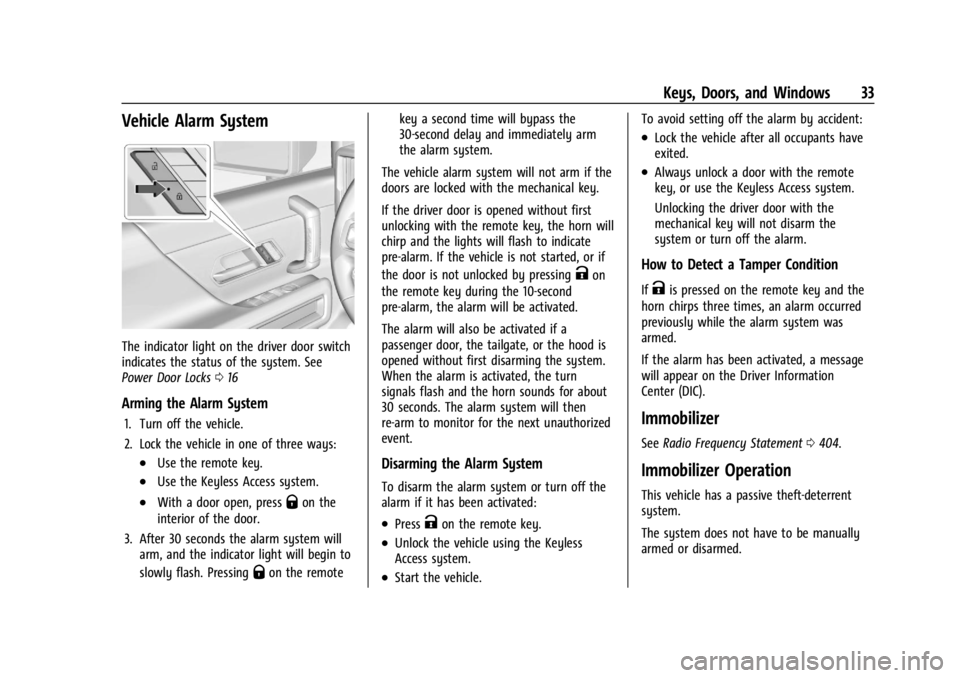
The indicator light on the driver door switch
indicates the status of the system. See
Power Door Locks016
Arming the Alarm System
1. Turn off the vehicle.
2. Lock the vehicle in one of three ways:
.Use the remote key.
.Use the Keyless Access system.
.With a door open, pressQon the
interior of the door.
3. After 30 seconds the alarm system will arm, and the indicator light will begin to
slowly flash. Pressing
Qon the remote key a second time will bypass the
30-second delay and immediately arm
the alarm system.
The vehicle alarm system will not arm if the
doors are locked with the mechanical key.
If the driver door is opened without first
unlocking with the remote key, the horn will
chirp and the lights will flash to indicate
pre-alarm. If the vehicle is not started, or if
the door is not unlocked by pressing
Kon
the remote key during the 10-second
pre-alarm, the alarm will be activated.
The alarm will also be activated if a
passenger door, the tailgate, or the hood is
opened without first disarming the system.
When the alarm is activated, the turn
signals flash and the horn sounds for about
30 seconds. The alarm system will then
re-arm to monitor for the next unauthorized
event.
Disarming the Alarm System
To disarm the alarm system or turn off the
alarm if it has been activated:
.PressKon the remote key.
.Unlock the vehicle using the Keyless
Access system.
.Start the vehicle. To avoid setting off the alarm by accident:
.Lock the vehicle after all occupants have
exited.
.Always unlock a door with the remote
key, or use the Keyless Access system.
Unlocking the driver door with the
mechanical key will not disarm the
system or turn off the alarm.
How to Detect a Tamper Condition
IfKis pressed on the remote key and the
horn chirps three times, an alarm occurred
previously while the alarm system was
armed.
If the alarm has been activated, a message
will appear on the Driver Information
Center (DIC).
Immobilizer
See Radio Frequency Statement 0404.
Immobilizer Operation
This vehicle has a passive theft-deterrent
system.
The system does not have to be manually
armed or disarmed.
Page 35 of 429
Chevrolet Silverado EV Owner Manual (GMNA-Localizing-U.S./Canada-
16702912) - 2024 - CRC - 1/23/23
34 Keys, Doors, and Windows
The vehicle is automatically immobilized
when the vehicle is turned off.
The immobilization system is disarmed
when the vehicle is turned on and a valid
remote key is present in the vehicle.
The security light in the instrument cluster
comes on if there is a problem with arming
or disarming the theft-deterrent system.
The system has one or more remote keys
matched to an immobilizer control unit in
the vehicle. Only a correctly matched
remote key will start the vehicle. If the
remote key is ever damaged, you may not
be able to start your vehicle.
When trying to start the vehicle, the
security light may come on briefly.
If the vehicle does not start and the security
light stays on, there is a problem with the
system. Turn the vehicle off and try again.If the vehicle will not turn on or off, and the
remote key appears to be undamaged, try
another remote key. You may also try
placing the remote key in the backup
location. See
Remote Key Operation 09.
If the vehicle will not turn on or off with
the other remote key or in the backup
location, the vehicle needs service. If the
vehicle does turn on or off, the first remote
key may be faulty. See your dealer.
It is possible for the immobilizer system to
learn new or replacement remote keys. Up
to eight remote keys can be programmed
for the vehicle. To program additional
remote keys, see “Programming Remote
Keys to the Vehicle” underRemote Key
Operation 09.
Do not leave the remote key or device that
disarms or deactivates the theft-deterrent
system in the vehicle.
Exterior Mirrors
Power Mirrors
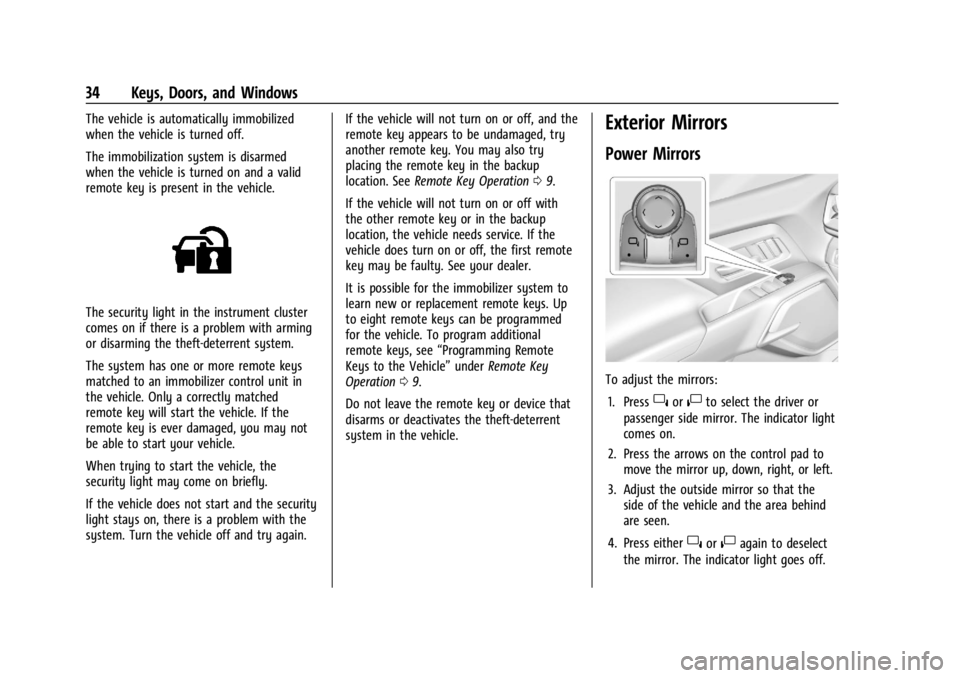
To adjust the mirrors:
1. Press
}or|to select the driver or
passenger side mirror. The indicator light
comes on.
2. Press the arrows on the control pad to move the mirror up, down, right, or left.
3. Adjust the outside mirror so that the side of the vehicle and the area behind
are seen.
4. Press either
}or|again to deselect
the mirror. The indicator light goes off.
Page 36 of 429
Chevrolet Silverado EV Owner Manual (GMNA-Localizing-U.S./Canada-
16702912) - 2024 - CRC - 1/23/23
Keys, Doors, and Windows 35
Puddle Lamps
Puddle lamps project light to the area of
ground below the front and rear doors, on
both the driver and passenger side. See
Entry Lighting0144 and
Exit Lighting 0145.
Memory Mirrors
The vehicle may have memory mirrors. See
Memory Seats 045.
Lane Change Alert (LCA)
The vehicle may have LCA. See Lane Change
Alert (LCA) 0269.
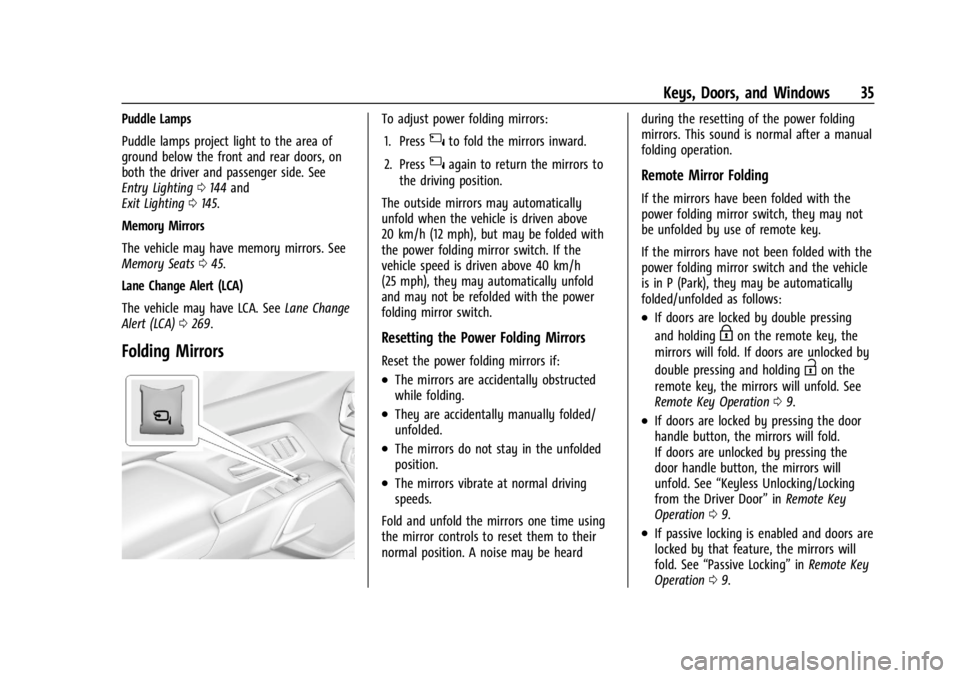
Folding Mirrors
To adjust power folding mirrors:
1. Press
{to fold the mirrors inward.
2. Press
{again to return the mirrors to
the driving position.
The outside mirrors may automatically
unfold when the vehicle is driven above
20 km/h (12 mph), but may be folded with
the power folding mirror switch. If the
vehicle speed is driven above 40 km/h
(25 mph), they may automatically unfold
and may not be refolded with the power
folding mirror switch.
Resetting the Power Folding Mirrors
Reset the power folding mirrors if:
.The mirrors are accidentally obstructed
while folding.
.They are accidentally manually folded/
unfolded.
.The mirrors do not stay in the unfolded
position.
.The mirrors vibrate at normal driving
speeds.
Fold and unfold the mirrors one time using
the mirror controls to reset them to their
normal position. A noise may be heard during the resetting of the power folding
mirrors. This sound is normal after a manual
folding operation.
Remote Mirror Folding
If the mirrors have been folded with the
power folding mirror switch, they may not
be unfolded by use of remote key.
If the mirrors have not been folded with the
power folding mirror switch and the vehicle
is in P (Park), they may be automatically
folded/unfolded as follows:
.If doors are locked by double pressing
and holding
Hon the remote key, the
mirrors will fold. If doors are unlocked by
double pressing and holding
Ion the
remote key, the mirrors will unfold. See
Remote Key Operation 09.
.If doors are locked by pressing the door
handle button, the mirrors will fold.
If doors are unlocked by pressing the
door handle button, the mirrors will
unfold. See “Keyless Unlocking/Locking
from the Driver Door” inRemote Key
Operation 09.
.If passive locking is enabled and doors are
locked by that feature, the mirrors will
fold. See “Passive Locking” inRemote Key
Operation 09.
Page 41 of 429
Chevrolet Silverado EV Owner Manual (GMNA-Localizing-U.S./Canada-
16702912) - 2024 - CRC - 1/23/23
40 Keys, Doors, and Windows
4. Open the window and continue to pressthe switch briefly after the window has
fully opened.
Remote Window Operation
If equipped, this feature allows the windows
to be opened remotely. If enabled in vehicle
settings, double press and hold
Kon the
remote key. To view available settings from
the infotainment screen, touch Settings >
Vehicle > Remote Lock, Unlock, Start.
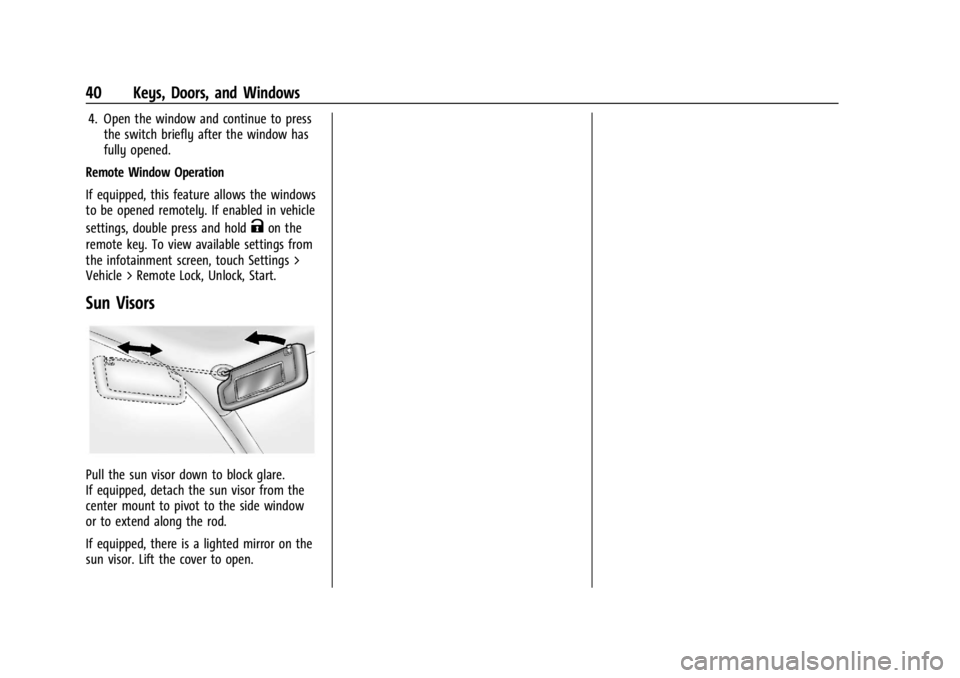
Sun Visors
Pull the sun visor down to block glare.
If equipped, detach the sun visor from the
center mount to pivot to the side window
or to extend along the rod.
If equipped, there is a lighted mirror on the
sun visor. Lift the cover to open.
Page 49 of 429
Chevrolet Silverado EV Owner Manual (GMNA-Localizing-U.S./Canada-
16702912) - 2024 - CRC - 1/13/23
48 Seats and Restraints
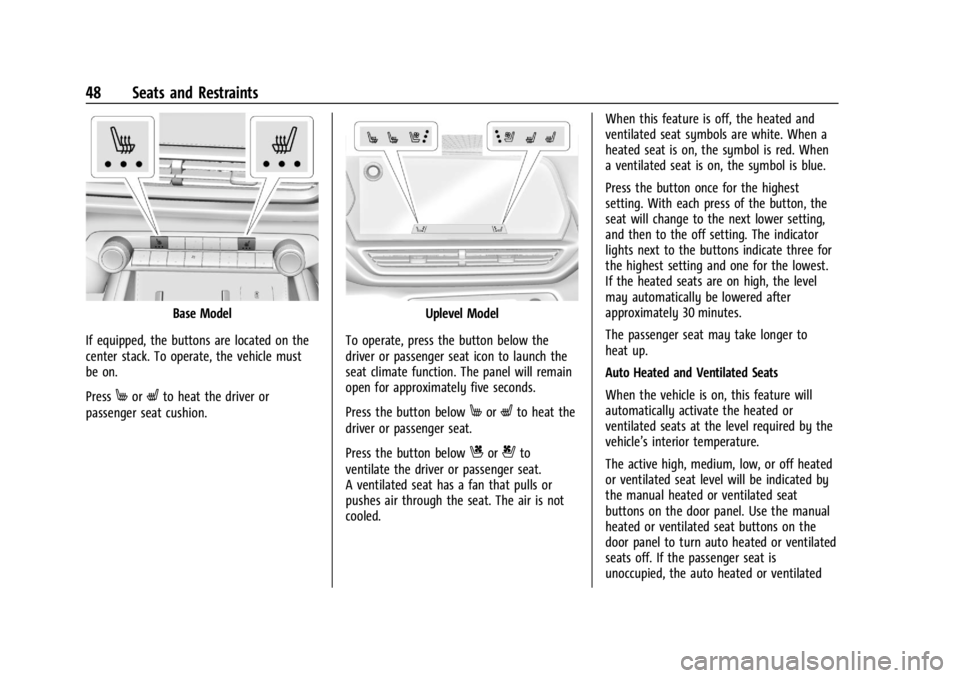
Base Model
If equipped, the buttons are located on the
center stack. To operate, the vehicle must
be on.
Press
MorLto heat the driver or
passenger seat cushion.
Uplevel Model
To operate, press the button below the
driver or passenger seat icon to launch the
seat climate function. The panel will remain
open for approximately five seconds.
Press the button below
MorLto heat the
driver or passenger seat.
Press the button below
Cor{to
ventilate the driver or passenger seat.
A ventilated seat has a fan that pulls or
pushes air through the seat. The air is not
cooled. When this feature is off, the heated and
ventilated seat symbols are white. When a
heated seat is on, the symbol is red. When
a ventilated seat is on, the symbol is blue.
Press the button once for the highest
setting. With each press of the button, the
seat will change to the next lower setting,
and then to the off setting. The indicator
lights next to the buttons indicate three for
the highest setting and one for the lowest.
If the heated seats are on high, the level
may automatically be lowered after
approximately 30 minutes.
The passenger seat may take longer to
heat up.
Auto Heated and Ventilated Seats
When the vehicle is on, this feature will
automatically activate the heated or
ventilated seats at the level required by the
vehicle’s interior temperature.
The active high, medium, low, or off heated
or ventilated seat level will be indicated by
the manual heated or ventilated seat
buttons on the door panel. Use the manual
heated or ventilated seat buttons on the
door panel to turn auto heated or ventilated
seats off. If the passenger seat is
unoccupied, the auto heated or ventilated
Page 50 of 429
Chevrolet Silverado EV Owner Manual (GMNA-Localizing-U.S./Canada-
16702912) - 2024 - CRC - 1/13/23
Seats and Restraints 49
seats feature will not activate that seat. To
enable or disable auto heated or ventilated
seats, select Settings > Vehicle > Climate
and Air Quality > Auto Cooled or Auto
Heated Seats > ON or OFF.
Remote Start Heated and Ventilated Seats
During a remote start, the heated or
ventilated seats, if equipped, can be turned
on automatically. When it is cold outside,
the heated seats turn on, and when it is hot
outside the ventilated seats turn on. If the
auto heated or ventilated seats feature is
not on when then vehicle is turned on, the
heated or ventilated seats may be canceled.
If necessary, press the heated or ventilated
seat button to use the heated or ventilated
seats after the vehicle is started.
The heated or ventilated seat indicator lights
may turn on during a remote start.
The temperature performance of an
unoccupied seat may be reduced. This is
normal.
To enable or disable remote start heated or
ventilated seats, select Settings > Vehicle >
Remote Lock, Unlock, and Start > Remote
Start Auto Heat Seats or Remote Start Auto
Cool Seats > ON or OFF. SeeRemote Vehicle
Start 014.Rear Seats
Rear Seat Reminder
If equipped, the message REAR SEAT
REMINDER LOOK IN REAR SEAT displays
under certain conditions indicating there
may be an item or passenger in the rear
seat. Check before exiting the vehicle.
This feature will activate when a second row
door is opened while the vehicle is on or up
to 10 minutes before the vehicle is turned
on. There will be an alert when the vehicle
is turned off. The alert does not directly
detect objects in the rear seat; instead,
under certain conditions, it detects when a
rear door is opened and closed, indicating
that there may be something in the
rear seat.
The feature is active only once each time
the vehicle is turned on and off, and will
require reactivation by opening and closing
the second row doors. There may be an
alert even when there is nothing in the rear
seat; for example, if a child entered the
vehicle through the rear door and left the
vehicle without the vehicle being shut off. The feature can be turned on or off. Select
Settings > Vehicle > Rear Seat Reminder >
ON or OFF.Folding the Rear Seat Cushion (Uplevel
Models)
Either side of the rear seat cushion can be
folded down for added cargo space.
{Warning
Folding a rear seat with the seat belts
still fastened may cause damage to the
seat or the seat belts. Always unbuckle
the seat belts and return them to their
normal stowed position before folding a
rear seat.
{Warning
Do not operate the vehicle with the rear
seat cushion(s) folded down and the rear
seatbacks in the upright position. The
folded seat cushion is not locked. It can
move when the vehicle is in motion.
People in the vehicle could be injured in a
sudden stop or crash. Be sure to return
the seat cushion to the seating position
(Continued)
Page 53 of 429
Chevrolet Silverado EV Owner Manual (GMNA-Localizing-U.S./Canada-
16702912) - 2024 - CRC - 1/13/23
52 Seats and Restraints
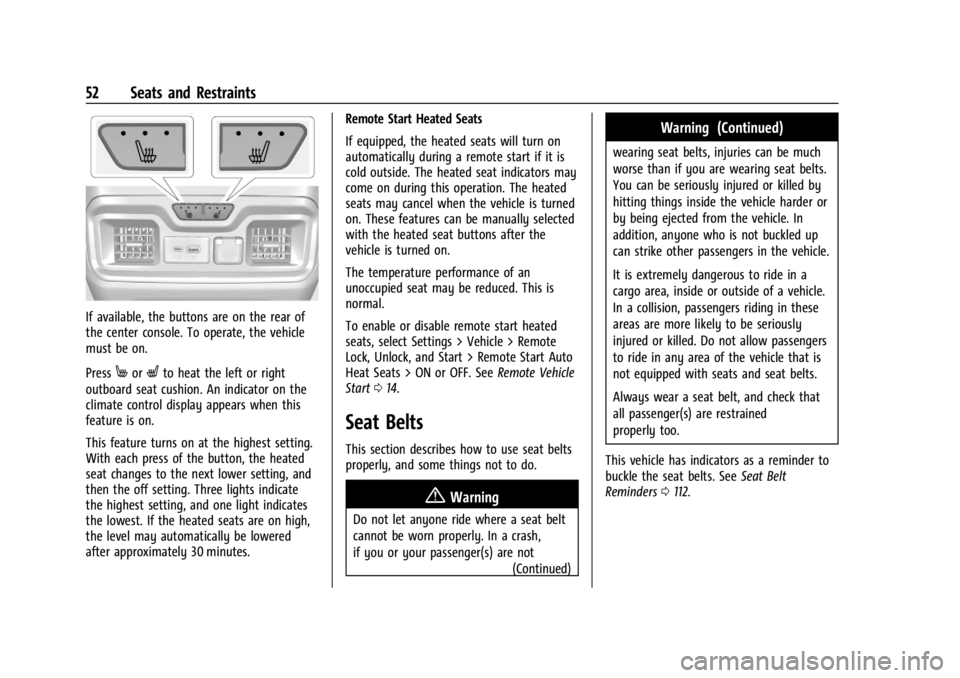
If available, the buttons are on the rear of
the center console. To operate, the vehicle
must be on.
Press
MorLto heat the left or right
outboard seat cushion. An indicator on the
climate control display appears when this
feature is on.
This feature turns on at the highest setting.
With each press of the button, the heated
seat changes to the next lower setting, and
then the off setting. Three lights indicate
the highest setting, and one light indicates
the lowest. If the heated seats are on high,
the level may automatically be lowered
after approximately 30 minutes. Remote Start Heated Seats
If equipped, the heated seats will turn on
automatically during a remote start if it is
cold outside. The heated seat indicators may
come on during this operation. The heated
seats may cancel when the vehicle is turned
on. These features can be manually selected
with the heated seat buttons after the
vehicle is turned on.
The temperature performance of an
unoccupied seat may be reduced. This is
normal.
To enable or disable remote start heated
seats, select Settings > Vehicle > Remote
Lock, Unlock, and Start > Remote Start Auto
Heat Seats > ON or OFF. See
Remote Vehicle
Start 014.
Seat Belts
This section describes how to use seat belts
properly, and some things not to do.
{Warning
Do not let anyone ride where a seat belt
cannot be worn properly. In a crash,
if you or your passenger(s) are not
(Continued)
Warning (Continued)
wearing seat belts, injuries can be much
worse than if you are wearing seat belts.
You can be seriously injured or killed by
hitting things inside the vehicle harder or
by being ejected from the vehicle. In
addition, anyone who is not buckled up
can strike other passengers in the vehicle.
It is extremely dangerous to ride in a
cargo area, inside or outside of a vehicle.
In a collision, passengers riding in these
areas are more likely to be seriously
injured or killed. Do not allow passengers
to ride in any area of the vehicle that is
not equipped with seats and seat belts.
Always wear a seat belt, and check that
all passenger(s) are restrained
properly too.
This vehicle has indicators as a reminder to
buckle the seat belts. See Seat Belt
Reminders 0112.
Page 55 of 429
Chevrolet Silverado EV Owner Manual (GMNA-Localizing-U.S./Canada-
16702912) - 2024 - CRC - 1/13/23
54 Seats and Restraints
Restraints”in the Index for information
about the importance of proper
restraint use.
If the driver seat belt or the front passenger
seat belt is unbuckled when driving, the seat
belt reminder chime and light(s) will come
on. See Seat Belt Reminders 0112. This
feature may not function properly if the
airbag readiness light is on. See Airbag
Readiness Light 0113.
How to Wear Seat Belts Properly
Follow these rules for everyone's protection.
There are additional things to know about
seat belts and children, including smaller
children and infants. If a child will be riding
in the vehicle, see Older Children070 or
Infants and Young Children 071. Review and
follow the rules for children in addition to
the following rules.
It is very important for all occupants to
buckle up. Statistics show that unbelted
people are hurt more often in crashes than
those who are wearing seat belts.
There are important things to know about
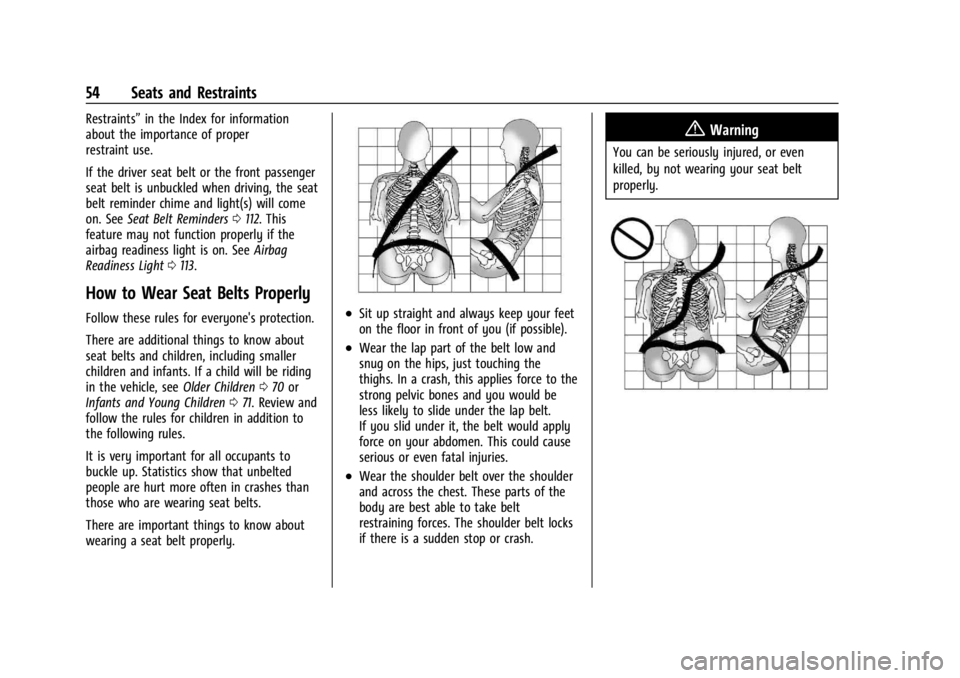
wearing a seat belt properly..Sit up straight and always keep your feet
on the floor in front of you (if possible).
.Wear the lap part of the belt low and
snug on the hips, just touching the
thighs. In a crash, this applies force to the
strong pelvic bones and you would be
less likely to slide under the lap belt.
If you slid under it, the belt would apply
force on your abdomen. This could cause
serious or even fatal injuries.
.Wear the shoulder belt over the shoulder
and across the chest. These parts of the
body are best able to take belt
restraining forces. The shoulder belt locks
if there is a sudden stop or crash.
{Warning
You can be seriously injured, or even
killed, by not wearing your seat belt
properly.