ECU CHEVROLET SILVERADO EV 2024 Workshop Manual
[x] Cancel search | Manufacturer: CHEVROLET, Model Year: 2024, Model line: SILVERADO EV, Model: CHEVROLET SILVERADO EV 2024Pages: 429, PDF Size: 8.98 MB
Page 197 of 429
Chevrolet Silverado EV Owner Manual (GMNA-Localizing-U.S./Canada-
16702912) - 2024 - CRC - 1/17/23
196 Driving and Operating
Weight Rating (GAWR). To determine
the actual loads on the front and rear
axles, weigh the vehicle at a weigh
station. Your dealer can help with this.
Be sure to spread the load equally on
both sides of the centerline.
The Certification/Tire label also contains
important information about the Front
Axle Reserve Capacity.
{Warning
In the case of a sudden stop or
collision, things carried in the bed of
your truck could shift forward and
come into the passenger area,
injuring you and others. If you put
things in the bed of your truck, you
should make sure they are properly
secured.
Caution
Overloading the vehicle may cause
damage. Repairs would not be covered by
the vehicle warranty. Do not overload the
vehicle.
Using heavier suspension components
to get added durability might not
change the weight ratings. Ask your
dealer to help load the vehicle the
right way.
{Warning
Things you put inside the vehicle can
strike and injure people in a sudden
stop or turn, or in a crash.
.Put things in the cargo area of the
vehicle. Try to spread the weight
evenly.
.Never stack heavier things, like
suitcases, inside the vehicle so
that some of them are above the
tops of the seats.
.Do not leave an unsecured child
restraint in the vehicle.
.When you carry something inside
the vehicle, secure it whenever
you can.
.Do not leave a seat folded down
unless you need to. There is also important loading
information for off-road driving in this
manual. See
“Loading the Vehicle for
Off-Road Driving“ underOff-Road
Driving 0185.
Add-On Equipment
When carrying removable items, a limit
on how many people carried inside the
vehicle may be necessary. Be sure to
weigh the vehicle before buying and
installing the new equipment.
Caution
Overloading the vehicle may cause
damage. Repairs would not be covered by
the vehicle warranty. Do not overload the
vehicle.
Remember not to exceed the Gross Axle
Weight Rating (GAWR) of the front or
rear axle.
Page 279 of 429
Chevrolet Silverado EV Owner Manual (GMNA-Localizing-U.S./Canada-
16702912) - 2024 - CRC - 1/17/23
278 Driving and Operating
.All files can be viewed on the playback
app or when the SD card is read by a
personal computer (PC).
.Once the SD card is full, the oldest files
will be overwritten.
To Delete Data : Remove the SD card from
the vehicle and insert into a PC to manually
delete the file.
Error messages can occur if:
.No SD card is present.
.An empty SD card is present.
.The video files are the wrong format.
.The video files are corrupt.
.The SD card is full.
.There is a system error.
Other files should not be stored on the
same SD card as the surround vision
recorder files. Storing other files on the
same card may increase recording start up
and playback time or result in a loss of
data. An error message may be displayed if
no surround vision recorded video file is
available for playback.
Charging
When to Charge
When the high voltage battery is low, the
following charging messages may display on
the Driver Information Center (DIC):
CHARGE VEHICLE SOON : The battery needs
to be charged soon.
REDUCED ACCELERATION DRIVE WITH CARE :
The accelerator pedal response is reduced
and the remaining range value changes to
LOW, charge the vehicle immediately. See
Propulsion Power Messages 0136.
OUT OF ENERGY, CHARGE VEHICLE NOW :
The battery charge is fully depleted. The
vehicle will slow to a stop. Brake and
steering assist will continue operating. Once
stopped, turn the vehicle off.
Plug-In Charging
Plug-in charge times vary based on the
battery condition, charge level, and the
outside temperature. See Charging0123 for
charge mode selection.
Do not allow the vehicle to remain in
temperature extremes for long periods
without being driven or plugged in. When temperatures are below 0 °C (32 °F) and
above 32 °C (90 °F), plug in the vehicle to
maximize high voltage battery life.
In extreme temperature conditions, a full
charge will take additional time.
Charging will slow down as the battery fills
up. Charge the battery to 80% for daily
driving, or when driving in mountainous
terrain. The vehicle can be charged above
80% for long trips when not driving in
mountainous terrain.
It is normal to hear fans, pumps, and
electrical devices clicking while the vehicle is
turned off and charging.
The vehicle does not require indoor charging
area ventilation before, during, or after
charging.
The vehicle cannot be driven while the
charge cord is plugged into the vehicle.Caution
To avoid damage to the vehicle, make
sure the charging cord plug is in good
condition, is not worn or damaged, and is
connected securely to the vehicle's
charging port. If vehicle charging is
(Continued)
Page 287 of 429
Chevrolet Silverado EV Owner Manual (GMNA-Localizing-U.S./Canada-
16702912) - 2024 - CRC - 1/17/23
286 Driving and Operating
Charge Cord
IMPORTANT SAFETY INSTRUCTIONS
This symbol indicates risk of electrical shock.
SeeRadio Frequency Statement 0404.
The vehicle comes with a portable charge
cord used to charge the high voltage
battery. When used correctly, the Charge
Cord provides a safe connection between a
standard electrical outlet and your vehicle's
on-board charger.
When storing the charge cord in the vehicle,
ensure the charge cord bag is secured.
Depending on the storage location, tether
the charge cord bag to vehicle.
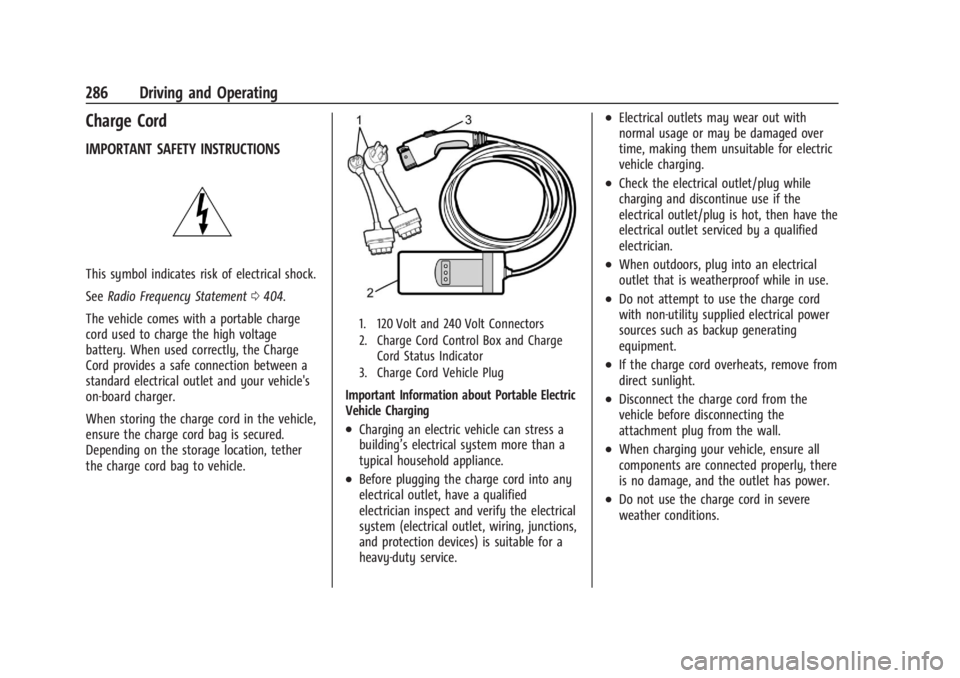
1. 120 Volt and 240 Volt Connectors
2. Charge Cord Control Box and Charge Cord Status Indicator
3. Charge Cord Vehicle Plug
Important Information about Portable Electric
Vehicle Charging
.Charging an electric vehicle can stress a
building’s electrical system more than a
typical household appliance.
.Before plugging the charge cord into any
electrical outlet, have a qualified
electrician inspect and verify the electrical
system (electrical outlet, wiring, junctions,
and protection devices) is suitable for a
heavy-duty service.
.Electrical outlets may wear out with
normal usage or may be damaged over
time, making them unsuitable for electric
vehicle charging.
.Check the electrical outlet/plug while
charging and discontinue use if the
electrical outlet/plug is hot, then have the
electrical outlet serviced by a qualified
electrician.
.When outdoors, plug into an electrical
outlet that is weatherproof while in use.
.Do not attempt to use the charge cord
with non-utility supplied electrical power
sources such as backup generating
equipment.
.If the charge cord overheats, remove from
direct sunlight.
.Disconnect the charge cord from the
vehicle before disconnecting the
attachment plug from the wall.
.When charging your vehicle, ensure all
components are connected properly, there
is no damage, and the outlet has power.
.Do not use the charge cord in severe
weather conditions.
Page 296 of 429
Chevrolet Silverado EV Owner Manual (GMNA-Localizing-U.S./Canada-
16702912) - 2024 - CRC - 1/17/23
Driving and Operating 295
The trailer structure, the tires, and the
brakes must be all be rated to carry the
intended cargo. Inadequate trailer
equipment can cause the combination to
operate in an unexpected or unsafe manner.
Before driving, inspect all trailer hitch parts
and attachments, safety chains, electrical
connectors, lamps, tires, and mirrors. See
Towing Equipment0301. If the trailer has
electric brakes, start the combination
moving and then manually apply the trailer
brake controller to check the trailer brakes
work. During the trip, occasionally check
that the cargo and trailer are secure and
that the lamps and any trailer brakes are
working.
Towing with a Stability Control System
When towing, the stability control system
might be heard. The system reacts to
vehicle movement caused by the trailer,
which mainly occurs during cornering. This is
normal when towing heavier trailers.
Following Distance
Stay at least twice as far behind the vehicle
ahead as you would when driving without a
trailer to help to avoid heavy braking and
sudden turns.
Passing
More passing distance is needed when
towing a trailer. The combination of the
vehicle and trailer will not accelerate as
quickly and is much longer than the vehicle
alone. It is necessary to go much farther
beyond the passed vehicle before returning
to the lane. Pass on level roadways. Avoid
passing on hills if possible.
Backing Up
Hold the bottom of the steering wheel with
one hand. To move the trailer to the left,
move that hand to the left. To move the
trailer to the right, move that hand to the
right. Always back up slowly and, if possible,
have someone guide you.
Making Turns
Caution
Turn more slowly and make wider arcs
when towing a trailer to prevent damage
to your vehicle. Making very sharp turns
could cause the trailer to contact the
vehicle. Make wider turns than normal when towing,
so the trailer does not go over soft
shoulders, over curbs, or strike road signs,
trees, or other objects. Always signal turns
well in advance. Do not steer or brake
suddenly.
Driving on Grades
Reduce speed before starting down a long or
steep downhill grade. Use regenerative
braking to help slow the vehicle or maintain
speed by keeping the vehicle in gear and
limiting the initial battery charge to 80% or
less. Avoid using Regen on Demand. See
Hill
and Mountain Roads 0190.
Viewing Systems
If equipped, the viewing systems on the
vehicle can improve visibility while hitching,
backing up, and driving with a trailer. See
Advanced Driver Assistance Systems 0244.
Parking on Hills
{Warning
To prevent serious injury or death,
always park your vehicle and trailer on a
level surface when possible.
Page 302 of 429
Chevrolet Silverado EV Owner Manual (GMNA-Localizing-U.S./Canada-
16702912) - 2024 - CRC - 1/17/23
Driving and Operating 301
Rear Gross Axle Weight Rating
(GAWR-RR)
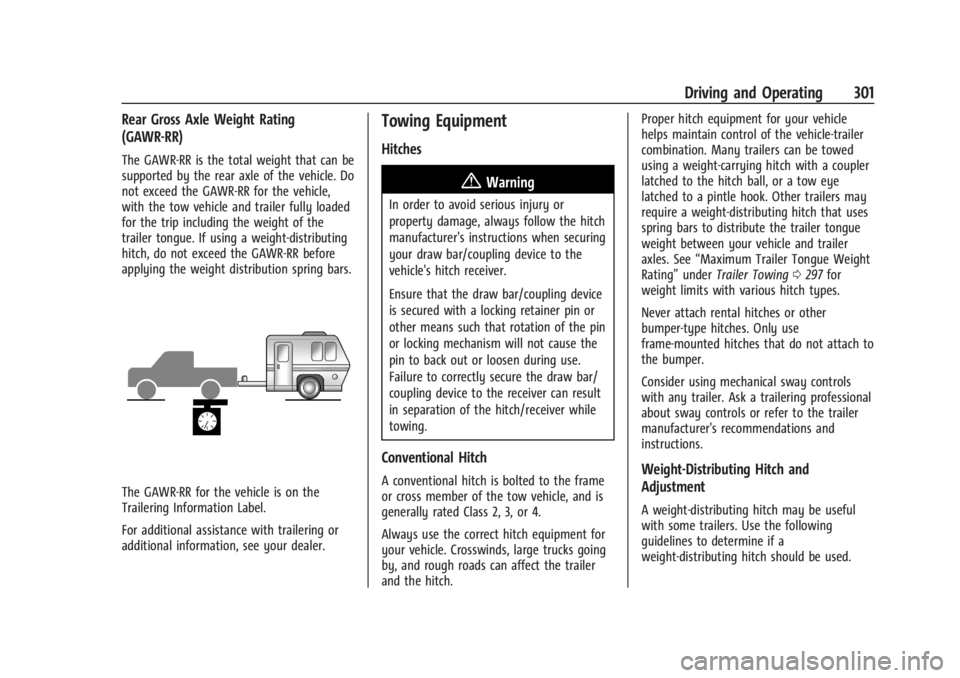
The GAWR-RR is the total weight that can be
supported by the rear axle of the vehicle. Do
not exceed the GAWR-RR for the vehicle,
with the tow vehicle and trailer fully loaded
for the trip including the weight of the
trailer tongue. If using a weight-distributing
hitch, do not exceed the GAWR-RR before
applying the weight distribution spring bars.
The GAWR-RR for the vehicle is on the
Trailering Information Label.
For additional assistance with trailering or
additional information, see your dealer.
Towing Equipment
Hitches
{Warning
In order to avoid serious injury or
property damage, always follow the hitch
manufacturer's instructions when securing
your draw bar/coupling device to the
vehicle's hitch receiver.
Ensure that the draw bar/coupling device
is secured with a locking retainer pin or
other means such that rotation of the pin
or locking mechanism will not cause the
pin to back out or loosen during use.
Failure to correctly secure the draw bar/
coupling device to the receiver can result
in separation of the hitch/receiver while
towing.
Conventional Hitch
A conventional hitch is bolted to the frame
or cross member of the tow vehicle, and is
generally rated Class 2, 3, or 4.
Always use the correct hitch equipment for
your vehicle. Crosswinds, large trucks going
by, and rough roads can affect the trailer
and the hitch.Proper hitch equipment for your vehicle
helps maintain control of the vehicle-trailer
combination. Many trailers can be towed
using a weight-carrying hitch with a coupler
latched to the hitch ball, or a tow eye
latched to a pintle hook. Other trailers may
require a weight-distributing hitch that uses
spring bars to distribute the trailer tongue
weight between your vehicle and trailer
axles. See
“Maximum Trailer Tongue Weight
Rating” underTrailer Towing 0297 for
weight limits with various hitch types.
Never attach rental hitches or other
bumper-type hitches. Only use
frame-mounted hitches that do not attach to
the bumper.
Consider using mechanical sway controls
with any trailer. Ask a trailering professional
about sway controls or refer to the trailer
manufacturer's recommendations and
instructions.Weight-Distributing Hitch and
Adjustment
A weight-distributing hitch may be useful
with some trailers. Use the following
guidelines to determine if a
weight-distributing hitch should be used.
Page 321 of 429
Chevrolet Silverado EV Owner Manual (GMNA-Localizing-U.S./Canada-
16702912) - 2024 - CRC - 1/17/23
320 Driving and Operating
Delete/Remove Trailer
Touch to remove the Trailer Profile and all
of its settings.
On the pop-up, touch Remove to delete the
Trailer Profile. Touch Cancel to dismiss the
pop-up and return to the previous view.
When selecting Remove, it will display if
there is a connected OnStar plan active with
the vehicle. Removing a trailer profile
deletes the profile from the vehicle but the
profile still associates with the user account.
However, if there is not a connected OnStar
plan and Remove is selected, DELETE
displays and the profile deletes
permanently.
Set as Default Trailer
Touch Set as Default Trailer to select the
current profile as the default trailer profile.
The default trailer profile automatically is
selected each time a new connection is
detected. The Trailer Detection Alert will no
longer appear on the infotainment screen.
If this setting is turned off, the current
trailer profile is not the default trailer.GCW Alerts
Touch GCW Alert to enable/disable the GCW
Alert for the selected profile. These alerts
are based on the Trailer Profile, so the
settings for each Trailer Profile must be
turned on or off.
Turn this setting off to stop receiving GCW
Alerts when that Trailer Profile is active.
Theft Alert
If Theft Alerts are enabled, an alarm will
sound anytime the trailer is disconnected
from the vehicle while the vehicle is off.
Touch Theft Alert to enable/disable Theft
Alerts for the selected profile. These alerts
are based on the Trailer Profile, so the
settings for each Trailer Profile must be
turned on or off.
This setting defaults for each Trailer Profile,
including the Guest Trailer Profile.
A smartphone receives a notification that
the trailer related to the selected Trailer
Profile is disconnected from the vehicle,
if the setting is on for the active Trailer
Profile, the vehicle has an OnStar or
connected service plan and the smartphone
number has been added to the account for
this notification.If the setting is turned off for a given Trailer
Profile, the smartphone will not receive this
security notification even if the Trailer
Profile is active.
Tow/Haul Mode Reminder
When the vehicle detects a new trailer
connection, and if the Tow/Haul Mode
Reminder setting is enabled, a courtesy
message displays reminding you to turn on
Tow/Haul mode if appropriate. See
Driver
Mode Control 0209.
Touch Tow/Haul Mode Reminder to turn on/
off for the selected profile. The status of
Tow/Haul Mode Reminder Alerts are specific
to each trailer profile. You must specify
whether you want to enable theft alerts for
each trailer profile.
If Tow/Haul mode is off and Tow/Haul
Mode Reminder is on for a Trailer Profile,
each time the vehicle is turned on, a
reminder appears to turn on Tow/Haul
Mode when the Trailer Profile is active.
If Tow/Haul mode is on and Tow/Haul Mode
Reminder is on for a Trailer Profile, the
reminder does not appear when the Trailer
Profile is active.
Page 332 of 429
Chevrolet Silverado EV Owner Manual (GMNA-Localizing-U.S./Canada-
16702912) - 2024 - CRC - 1/13/23
Vehicle Care 331
Warning (Continued)
structure or anything that can burn.
Ventilate the vehicle by opening a
window or a door.
Contact Customer Assistance as soon as
possible to determine whether an
inspection is needed. SeeCustomer
Assistance Offices 0398.
If the vehicle is in a crash, the sensing
system may shut down the high voltage
system. When this occurs, the high voltage
battery is disconnected and the vehicle will
not start. The SERVICE VEHICLE SOON
message in the Driver Information Center
(DIC) will display. Before the vehicle can
operate again, it must be serviced at your
dealer. If a crash occurs or an airbag(s)
inflates, see “If a Crash Occurs” under
Collision Damage Repair 0402 and
What Will You See after an Airbag Inflates?
0 64 for additional information.
Keep the vehicle plugged in, even when fully
charged, to keep the high voltage battery
temperature ready for the next drive. This is
important when outside temperatures are
extremely hot or cold. Propulsion power may be reduced in
extremely cold temperatures, or if the high
voltage battery is too cold. The message
BATTERY TOO COLD, PLUG IN TO WARM will
display. If the message displays, a level 2
charger is required to heat the battery to a
minimum temperature to enable propulsion
or charging.
A vehicle cover, which can reduce sun
loading on the vehicle and improve high
voltage battery life, is available from your
dealer.
See
Radio Frequency Statement 0404.
Federal Communications Commission (FCC)
Radiation Exposure Statement
This equipment has been evaluated to be
installed and operated at a minimum
distance of 5.7 cm (2.2 in) between the
device and your body. The vehicle design
ensures this distance is maintained during
normal use. Changes or modifications to any
of these systems by other than an
authorized service facility could void
authorization to use this equipment. Innovation, Science, and Economic
Development (ISED) Radiation Exposure
Statement
This equipment complies with RSS-102
radiation exposure limits set forth for an
uncontrolled environment. This equipment
should be installed and operated with a
minimum distance of 5.7 cm (2.2 in) between
the radiator and any part of your body. The
vehicle design ensures this distance is
maintained during normal use. Changes or
modifications to any of these systems by
other than an authorized service facility
could void authorization to use this
equipment.
Vehicle Storage
The best way to store the vehicle for any
length of time is to plug in the charge cord
and leave it plugged in. The vehicle
monitors and maintains the 12-volt battery
daily. It is okay to leave the vehicle plugged
in for extended periods of time. Once
charged to full, very little energy is required
to maintain the 12-volt battery and high
voltage battery.
If it is not possible to charge the vehicle
with the charge cord left plugged in, be sure
to fully charge the high voltage battery
Page 343 of 429
Chevrolet Silverado EV Owner Manual (GMNA-Localizing-U.S./Canada-
16702912) - 2024 - CRC - 1/13/23
342 Vehicle Care
FusesUsage
F10 WCM_VKM –Wireless
Charger Module
TVR_APA_PFA
F11 2ND HTD SEAT –2nd Row
Heated Seat
2ND HTD SEAT –2nd Row
Heated Seat 1
F12 SPARE
F13 TPIM TPIM 2
F14 SPARE F15 SPARE
F16 Tonneau Accessory F17 SDM_AOS SRR
F18 SPARE
F19 SPARE
F20 OBCM 2 MSM
F21 HSM ROW HSM ROW 1 Fuses
Usage
F22 SPARE
F23 MJR END HIGH
F24 TPIM 1 & VBAT 1 –Traction
Power Inverter Module 1
F25 SPARE
F26 TPIM 2 & VBAT 1 –Traction
Power Inverter Module 1
F27 DSP
F28 ELM 7 –Exterior Lighting
Module 7
F29 SPARE
F30 MJR END LOW F31 ELM 2 –Exterior Lighting
Module 2
F32 RFR/PLCM
F33 MIDGATE CONTROL LOW
F34 ACP_VPM F35 AMP –Amplifier
F36 CO-DRVR_PWR_ST F37 SPARE Fuses
Usage
F38 ELM 6 –Exterior Lighting
Module 6
F39 RT WNDW –Right Hand
Power Window
F40 LT WNDW –Left Hand
Power Window
Circuit
Breakers Usage
CB01 –
CB02 –
Instrument Panel Fuse Block
(Right)
The instrument panel fuse block is located
behind the glove box. It is accessible by
removing the hush panel located underneath
the glove box. To remove the hush panel,
remove the four push-pins that secure the
hush panel.
Page 362 of 429
Chevrolet Silverado EV Owner Manual (GMNA-Localizing-U.S./Canada-
16702912) - 2024 - CRC - 1/13/23
Vehicle Care 361
Your dealer will know the kind of wheel that
is needed.
Each new wheel should have the same
load-carrying capacity, diameter, width,
offset, and be mounted the same way as
the one it replaces.
Replace wheels, wheel bolts, wheel nuts,
or Tire Pressure Monitor System (TPMS)
sensors with new GM original equipment
parts.
{Warning
Using the wrong replacement wheels,
wheel bolts, or wheel nuts can be
dangerous. It could affect the braking and
handling of the vehicle. Tires can lose air
and cause loss of control, resulting in a
crash. Always use the correct wheel,
wheel bolts, and wheel nuts for
replacement.
{Warning
Replacing a wheel with a used one is
dangerous. How it has been used or how
far it has been driven may be unknown.(Continued)
Warning (Continued)
It could fail suddenly and cause a crash.
When replacing wheels, use a new GM
original equipment wheel.
Caution
The wrong wheel can also cause
problems with bearing life, brake cooling,
speedometer or odometer calibration,
headlamp aim, bumper height, vehicle
ground clearance, and tire or tire chain
clearance to the body and chassis.
Tire Chains
{Warning
If the vehicle has LT275/50R22 or
LT275/50R24 size tires, do not use tire
chains. There is not enough clearance.
Tire chains used on a vehicle without the
proper amount of clearance can cause
damage to the brakes, suspension,
or other vehicle parts. The area damaged
by the tire chains could cause loss of
control and a crash. Use another type of(Continued)
Warning (Continued)
traction device only if its manufacturer
recommends it for the vehicle's tire size
combination and road conditions. Follow
that manufacturer's instructions. To avoid
vehicle damage, drive slow and readjust
or remove the traction device if it
contacts the vehicle. Do not spin the
wheels. If traction devices are used,
install them on the tires of the drive
axle only.
Caution
If the vehicle is equipped with a tire size
other than LT275/50R22 or LT275/50R24
use tire chains only where legal and only
when necessary. Use chains that are the
proper size for the tires. Install them on
the tires of the drive axle only. Tighten
them as tightly as possible with the ends
securely fastened. Drive slowly and follow
the chain manufacturer's instructions.
If the chains contact the vehicle, stop and
retighten them. If the contact continues,
(Continued)
Page 375 of 429
Chevrolet Silverado EV Owner Manual (GMNA-Localizing-U.S./Canada-
16702912) - 2024 - CRC - 1/13/23
374 Vehicle Care
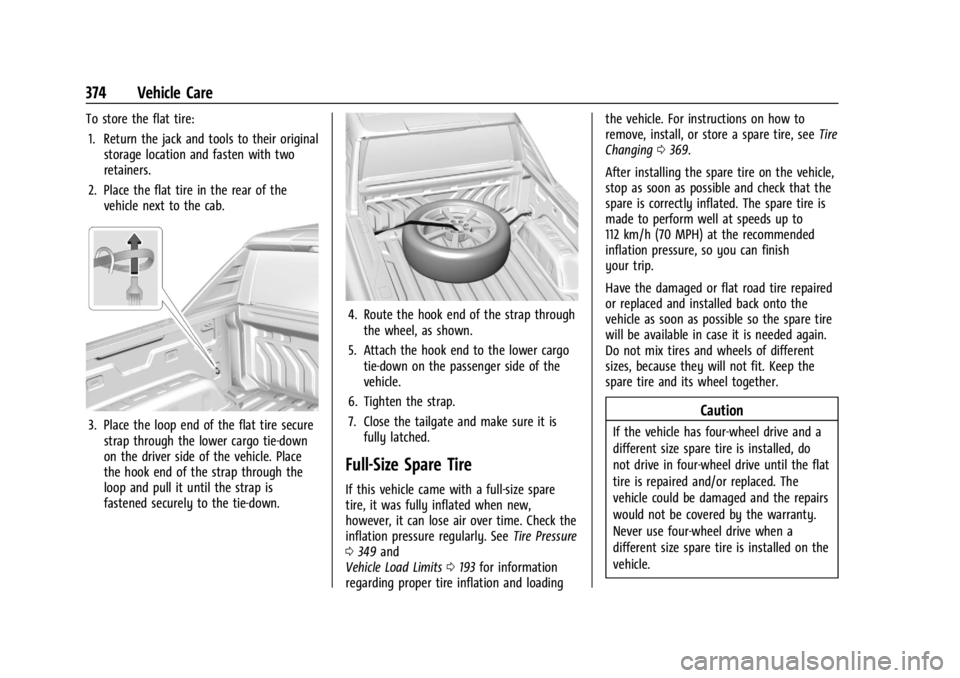
To store the flat tire:1. Return the jack and tools to their original storage location and fasten with two
retainers.
2. Place the flat tire in the rear of the vehicle next to the cab.
3. Place the loop end of the flat tire securestrap through the lower cargo tie-down
on the driver side of the vehicle. Place
the hook end of the strap through the
loop and pull it until the strap is
fastened securely to the tie-down.
4. Route the hook end of the strap throughthe wheel, as shown.
5. Attach the hook end to the lower cargo tie-down on the passenger side of the
vehicle.
6. Tighten the strap.
7. Close the tailgate and make sure it is fully latched.
Full-Size Spare Tire
If this vehicle came with a full-size spare
tire, it was fully inflated when new,
however, it can lose air over time. Check the
inflation pressure regularly. See Tire Pressure
0 349 and
Vehicle Load Limits 0193 for information
regarding proper tire inflation and loading the vehicle. For instructions on how to
remove, install, or store a spare tire, see
Tire
Changing 0369.
After installing the spare tire on the vehicle,
stop as soon as possible and check that the
spare is correctly inflated. The spare tire is
made to perform well at speeds up to
112 km/h (70 MPH) at the recommended
inflation pressure, so you can finish
your trip.
Have the damaged or flat road tire repaired
or replaced and installed back onto the
vehicle as soon as possible so the spare tire
will be available in case it is needed again.
Do not mix tires and wheels of different
sizes, because they will not fit. Keep the
spare tire and its wheel together.
Caution
If the vehicle has four-wheel drive and a
different size spare tire is installed, do
not drive in four-wheel drive until the flat
tire is repaired and/or replaced. The
vehicle could be damaged and the repairs
would not be covered by the warranty.
Never use four-wheel drive when a
different size spare tire is installed on the
vehicle.