ECU CHEVROLET SILVERADO EV 2024 Repair Manual
[x] Cancel search | Manufacturer: CHEVROLET, Model Year: 2024, Model line: SILVERADO EV, Model: CHEVROLET SILVERADO EV 2024Pages: 429, PDF Size: 8.98 MB
Page 379 of 429
Chevrolet Silverado EV Owner Manual (GMNA-Localizing-U.S./Canada-
16702912) - 2024 - CRC - 1/13/23
378 Vehicle Care
Towing the Vehicle
Transporting a Disabled Vehicle
Caution
Incorrectly transporting a disabled vehicle
may cause damage to the vehicle. Use
proper tire straps to secure the vehicle to
the flatbed tow truck. Do not strap or
hook to any frame, underbody,
or suspension component not specified
below. Do not move vehicles with drive
axle tires on the ground. Damage is not
covered by the vehicle warranty.
Caution
The vehicle may be equipped with an
electric parking brake and/or an
electronic shifter. In the event of a loss of
12-volt battery power, the electric parking
brake cannot be released, and the vehicle
cannot be shifted to N (Neutral). Tire
skates or dollies must be used under the
non-rolling tires to prevent damage while
loading/unloading the vehicle. Dragging
the vehicle will cause damage not
covered by the vehicle warranty.
Caution
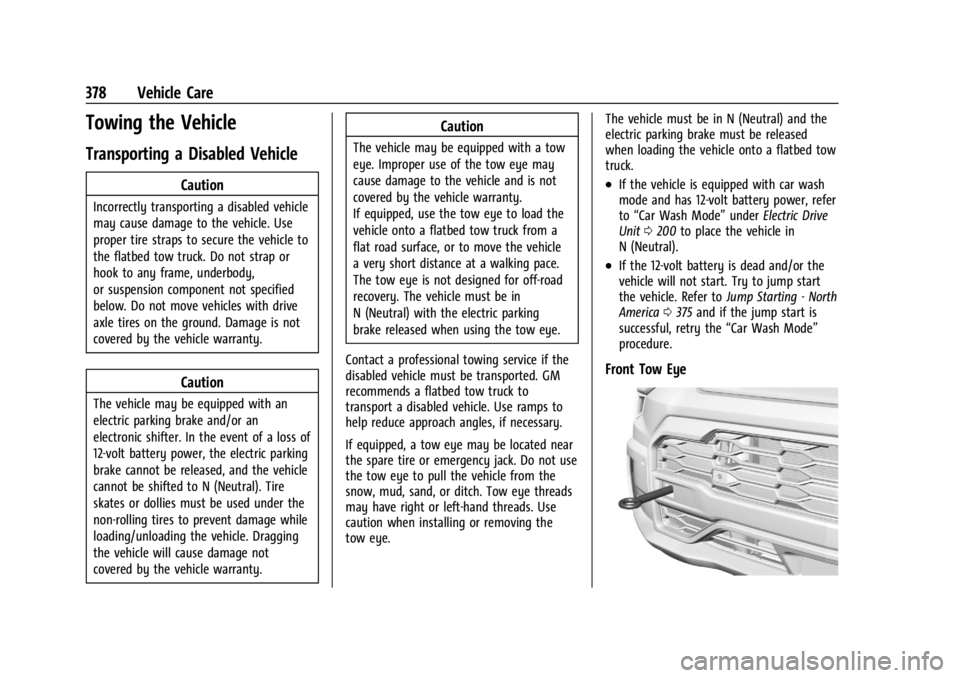
The vehicle may be equipped with a tow
eye. Improper use of the tow eye may
cause damage to the vehicle and is not
covered by the vehicle warranty.
If equipped, use the tow eye to load the
vehicle onto a flatbed tow truck from a
flat road surface, or to move the vehicle
a very short distance at a walking pace.
The tow eye is not designed for off-road
recovery. The vehicle must be in
N (Neutral) with the electric parking
brake released when using the tow eye.
Contact a professional towing service if the
disabled vehicle must be transported. GM
recommends a flatbed tow truck to
transport a disabled vehicle. Use ramps to
help reduce approach angles, if necessary.
If equipped, a tow eye may be located near
the spare tire or emergency jack. Do not use
the tow eye to pull the vehicle from the
snow, mud, sand, or ditch. Tow eye threads
may have right or left-hand threads. Use
caution when installing or removing the
tow eye. The vehicle must be in N (Neutral) and the
electric parking brake must be released
when loading the vehicle onto a flatbed tow
truck.
.If the vehicle is equipped with car wash
mode and has 12-volt battery power, refer
to
“Car Wash Mode” underElectric Drive
Unit 0200 to place the vehicle in
N (Neutral).
.If the 12-volt battery is dead and/or the
vehicle will not start. Try to jump start
the vehicle. Refer to Jump Starting - North
America 0375 and if the jump start is
successful, retry the “Car Wash Mode”
procedure.
Front Tow Eye
Page 388 of 429
Chevrolet Silverado EV Owner Manual (GMNA-Localizing-U.S./Canada-
16702912) - 2024 - CRC - 1/13/23
Vehicle Care 387
Care of Seat Belts
Keep belts clean and dry.
{Warning
Do not bleach or dye seat belt webbing.
It may severely weaken the webbing. In
a crash, they might not be able to
provide adequate protection. Clean and
rinse seat belt webbing only with mild
soap and lukewarm water. Allow the
webbing to dry.
Floor Mats
{Warning
If a floor mat is the wrong size or is not
properly installed, it can interfere with
the pedals. Interference with the pedals
can cause unintended acceleration and/or
increased stopping distance which can
cause a crash and injury. Make sure the
floor mat does not interfere with the
pedals.Use the following guidelines for proper floor
mat use:
.The original equipment floor mats are
designed for your vehicle. If the floor
mats need to be replaced, it is
recommended that GM-certified floor
mats are purchased. Non-GM floor mats
may not fit properly and may interfere
with the pedals. Always check that the
floor mats do not interfere with the
pedals.
.Do not use a floor mat if the vehicle is
not equipped with a floor mat retainer on
the driver side floor.
.Use the floor mat with the correct side
up. Do not turn it over.
.Do not place anything on top of the
driver side floor mat.
.Use only a single floor mat on the
driver side.
.Do not place one floor mat on top of
another.
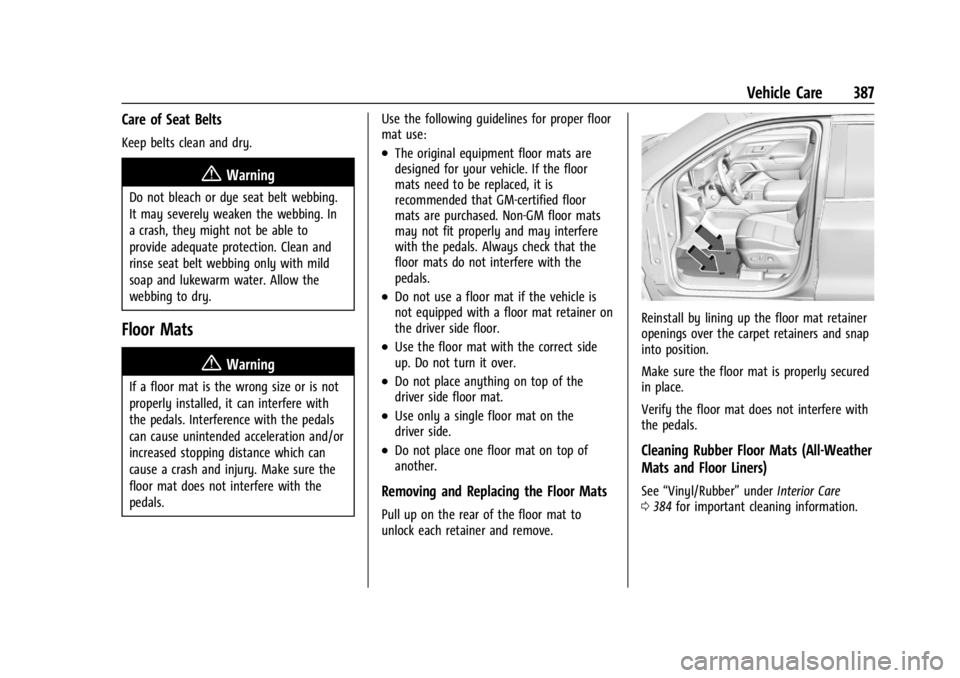
Removing and Replacing the Floor Mats
Pull up on the rear of the floor mat to
unlock each retainer and remove.
Reinstall by lining up the floor mat retainer
openings over the carpet retainers and snap
into position.
Make sure the floor mat is properly secured
in place.
Verify the floor mat does not interfere with
the pedals.
Cleaning Rubber Floor Mats (All-Weather
Mats and Floor Liners)
See
“Vinyl/Rubber” underInterior Care
0 384 for important cleaning information.
Page 392 of 429
Chevrolet Silverado EV Owner Manual (GMNA-Localizing-U.S./Canada-
16702912) - 2024 - CRC - 1/13/23
Service and Maintenance 391
Visible and Functional Inspections
.Seat belt components
.Accelerator pedal
.Passenger compartment air filter,
if equipped
.Hoses
.Shocks and struts
.Steering components
.Axle boots or driveshaft and u-joints
.Compartment lift struts, if equipped
.Floor mats secured, no interference with
pedals
.Horn
.Starter switch
Lubricate
.Chassis components
Owner Checks and Services
.At least twice a year, have underbody
flushing service performed. See
"Underbody Maintenance" in Exterior Care
0 379.
Page 397 of 429
Chevrolet Silverado EV Owner Manual (GMNA-Localizing-U.S./Canada-
16702912) - 2024 - CRC - 1/13/23
396 Customer Information
Customer Information
Customer Information
Customer Satisfaction Procedure . . . . . . 396
Customer Assistance Offices . . . . . . . . . . . 398
Customer Assistance for Text Telephone(TTY) Users . . . . . . . . . . . . . . . . . . . . . . . . . . 398
Online Account . . . . . . . . . . . . . . . . . . . . . . . . 398
GM Mobility Reimbursement Program . . . . . . . . . . . . . . . . . . . . . . . . . . . . . 399
Roadside Assistance Program . . . . . . . . . . 399
Scheduling Service Appointments . . . . . . 401
Courtesy Transportation Program . . . . . 401
Collision Damage Repair . . . . . . . . . . . . . . 402
Publication Ordering Information . . . . . 404
Radio Frequency Statement . . . . . . . . . . . 404
Reporting Safety Defects
Reporting Safety Defects to the United States Government . . . . . . . . . . . . . . . . . . 404
Reporting Safety Defects to the Canadian Government . . . . . . . . . . . . . . . 405
Reporting Safety Defects to General Motors . . . . . . . . . . . . . . . . . . . . . . . . . . . . . . 405
Vehicle Data Recording and Privacy
Vehicle Data Recording and Privacy . . . 405
Cybersecurity . . . . . . . . . . . . . . . . . . . . . . . . . 406
Event Data Recorders . . . . . . . . . . . . . . . . . 406
OnStar . . . . . . . . . . . . . . . . . . . . . . . . . . . . . . . . 407
Infotainment System . . . . . . . . . . . . . . . . . . 407Customer Information
Customer Satisfaction Procedure
Your satisfaction and goodwill are important
to your dealer and to Chevrolet. Normally,
any concerns with the sales transaction or
the operation of the vehicle will be resolved
by your dealer's sales or service
departments. Sometimes, however, despite
the best intentions of all concerned,
misunderstandings can occur. If your concern
has not been resolved to your satisfaction,
the following steps should be taken:
STEP ONE : Discuss your concern with a
member of dealership management.
Normally, concerns can be quickly resolved
at that level. If the matter has already been
reviewed with the sales, service, or parts
manager, contact the owner of your
dealership or the general manager.
STEP TWO : If after contacting a member of
dealership management, it appears your
concern cannot be resolved by your
dealership without further help, in the U.S.,
call the Chevrolet Customer Assistance
Center at 1-800-222-1020. In Canada, call
General Motors of Canada Customer Care
Centre at 1-800-263-3777 (English),
or 1-800-263-7854 (French).
Page 401 of 429
Chevrolet Silverado EV Owner Manual (GMNA-Localizing-U.S./Canada-
16702912) - 2024 - CRC - 1/13/23
400 Customer Information
In the U.S., anyone driving the vehicle is
covered. In Canada, a person driving the
vehicle without permission from the owner
is not covered.
Roadside Assistance is not a part of the New
Vehicle Limited Warranty. General Motors
North America and Chevrolet reserve the
right to make any changes or discontinue
the Roadside Assistance program at any
time without notification.
General Motors North America and Chevrolet
reserve the right to limit services or
payment to an owner or driver if they
decide the claims are made too often, or the
same type of claim is made many times.
Services Provided
.Lock-Out Service:Service to unlock the
vehicle if you are locked out. A remote
unlock may be available if you have
OnStar. For security reasons, the driver
must present identification before this
service is given.
.Tow from a Public Road or Highway: Tow
to the nearest certified Chevrolet EV
dealer for warranty service, or if the
vehicle was in a crash and cannot be driven. Assistance is not given when the
vehicle is stuck in the sand, mud,
or snow.
If the vehicle is out of charge, Roadside
will tow the vehicle to the nearest
charging station or to the customer’s
home, whichever is closest.
.Flat Tire Change:
Service to change a flat
tire with the spare tire. The spare tire,
if equipped, must be in good condition
and properly inflated. It is the owner’s
responsibility for the repair or
replacement of the tire if it is not covered
by the warranty.
.Battery Jump Start: Service to jump start
a dead battery.
.Trip Interruption Benefits and Assistance:
If your trip is interrupted due to a
warranty event, incidental expenses may
be reimbursed. Items considered are
reasonable and customary hotel, meals,
rental car, or a vehicle being delivered
back to the customer, up to 500 miles.
Contact Chevrolet Roadside Assistance for
Trip Interruption eligibility at the time of
vehicle disablement.
Services Not Included in Roadside
Assistance
.Impound towing caused by violation of
any laws.
.Legal fines.
.Mounting, dismounting, or changing of
snow tires, chains, or other traction
devices.
Service is not provided if a vehicle is in an
area that is not accessible to the service
vehicle or is not a regularly traveled or
maintained public road, which includes ice
and winter roads. Off-road use is not
covered.
Services Specific to Canadian Vehicles
.Lock-Out Service: Vehicle registration is
required.
.Trip Interruption Benefits and Assistance:
Must be over 150 km (93 mi) from where
the trip was started to qualify.
Pre-authorization, original detailed
receipts, and a copy of the repair orders
are required. Once authorization has been
received, the Roadside Assistance advisor
will help to make arrangements and
explain how to receive payment.
Page 407 of 429
Chevrolet Silverado EV Owner Manual (GMNA-Localizing-U.S./Canada-
16702912) - 2024 - CRC - 1/13/23
406 Customer Information
Cybersecurity
GM collects information about the use of
your vehicle including operational and safety
related information. We collect this
information to provide, evaluate, improve,
and troubleshoot our products and services
and to develop new products and services.
The protection of vehicle electronics systems
and customer data from unauthorized
outside electronic access or control is
important to GM. GM maintains appropriate
security standards, practices, guidelines and
controls aimed at defending the vehicle and
the vehicle service ecosystem against
unauthorized electronic access, detecting
possible malicious activity in related
networks, and responding to suspected
cybersecurity incidents in a timely,
coordinated and effective manner. Security
incidents could impact your safety or
compromise your private data. To minimize
security risks, please do not connect your
vehicle electronic systems to unauthorized
devices or connect your vehicle to any
unknown or untrusted networks (such as
Bluetooth, WIFI or similar technology). In
the event you suspect any security incident
impacting your data or the safe operation of
your vehicle, please stop operating your
vehicle and contact your dealer.
Event Data Recorders
This vehicle is equipped with an Event Data
Recorder (EDR). The main purpose of an EDR
is to record, in certain crash or near
crash-like situations, such as an air bag
deployment or hitting a road obstacle, data
that will assist in understanding how a
vehicle’s systems performed. The EDR is
designed to record data related to vehicle
dynamics and safety systems for a short
period of time, typically 30 seconds or less.
The EDR in this vehicle is designed to record
such data as:
.How various systems in your vehicle were
operating;
.Whether or not the driver and passenger
safety belts were buckled/fastened;
.How far (if at all) the driver was
depressing the accelerator and/or brake
pedal; and,
.How fast the vehicle was traveling.
These data can help provide a better
understanding of the circumstances in which
crashes and injuries occur.
Note
EDR data are recorded by your vehicle only
if a non-trivial crash situation occurs; no
data are recorded by the EDR under normal driving conditions and no personal data
(e.g., name, gender, age, and crash location)
are recorded. However, other parties, such
as law enforcement, could combine the EDR
data with the type of personally identifying
data routinely acquired during a crash
investigation.
To read data recorded by an EDR, special
equipment is required, and access to the
vehicle or the EDR is needed. In addition to
the vehicle manufacturer, other parties, such
as law enforcement, that have the special
equipment, can read the information if they
have access to the vehicle or the EDR.
GM will not access these data or share it
with others except: with the consent of the
vehicle owner or, if the vehicle is leased,
with the consent of the lessee; in response
to an official request by police or similar
government office; as part of GM's defense
of litigation through the discovery process;
or, as permitted by law. Data that GM
collects or receives may also be used for GM
research needs or may be made available to
others for research purposes, where a need
is shown and the data is not tied to a
specific vehicle or vehicle owner.
Page 409 of 429
Chevrolet Silverado EV Owner Manual (GMNA-Localizing-U.S./Canada-
16702912) - 2024 - CRC - 1/13/23
408 OnStar
OnStar
OnStar Overview
OnStar Overview . . . . . . . . . . . . . . . . . . . . . . 408
OnStar Services
Emergency . . . . . . . . . . . . . . . . . . . . . . . . . . . . 409
Security . . . . . . . . . . . . . . . . . . . . . . . . . . . . . . . 409
OnStar Additional Information
OnStar Additional Information . . . . . . . . . 410
OnStar Overview
=Voice Command Button
QBlue OnStar Button
>Red Emergency Button
This vehicle may be equipped with a
comprehensive, in-vehicle system that can
connect to an OnStar Advisor for Emergency,
Security, Navigation, Connections, and
Diagnostics Services. OnStar services may
require a paid service plan and data plan.
OnStar requires the vehicle battery and
electrical system, cellular service, and GPS
satellite signals to be available and
operating. OnStar acts as a link to existing
emergency service providers. OnStar may
collect information about you and your
vehicle, including location information. See
OnStar User Terms, Privacy Statement, and
Software Terms for more details including
system limitations at www.onstar.com (U.S.)
or www.onstar.ca (Canada). The OnStar system status light is next to
the OnStar buttons. If the status light is:
.Solid Green: System is ready.
.Flashing Green: On a call.
.Red: Indicates a problem.
.Off: System is off. PressQtwice to
speak with an OnStar Advisor.
Press
Qor call 1-888-4ONSTAR
(1-888-466-7827) to speak to an Advisor.
Functionality of the Voice Command button
may vary by vehicle and region.
Press
=to:
.Open the OnStar app on the infotainment
display. If equipped, the infotainment
system has OnStar controls in the
embedded OnStar app on the
infotainment home screen. Most OnStar
functions that can be performed with the
buttons can be done using the app. To
open the app, touch the OnStar icon on
the home screen. App updates require a
corresponding service plan. Features vary
by region and model. Features are subject
to change. For more information,
press
Q.
Page 410 of 429
Chevrolet Silverado EV Owner Manual (GMNA-Localizing-U.S./Canada-
16702912) - 2024 - CRC - 1/13/23
OnStar 409
Or
.Give OnStar Turn-by-Turn Navigation voice
commands.
.Obtain and customize the Wi-Fi hotspot
name or SSID and password, if equipped.
Press
Qto connect to an Advisor to:
.Verify account information or update
contact information.
.Get driving directions.
.Receive a Diagnostic check of the vehicle's
key operating systems.
.Receive Roadside Assistance.
.Manage Wi-Fi Settings, if equipped.
Press
>to get a priority connection to an
OnStar Advisor available 24/7 to:
.Get help for an emergency.
.Be a Good Samaritan or respond to an
AMBER Alert.
.Get assistance in severe weather or other
crisis situations and find evacuation
routes.
OnStar Services
Emergency
Emergency Services require an active safety
and security plan. With Automatic Crash
Response, built-in sensors can automatically
alert a specially trained OnStar Advisor who
is immediately connected in to the vehicle
to help.
Press
>for a priority connection to an
OnStar Advisor who can contact emergency
service providers, direct them to your exact
location, and relay important information.
With OnStar Crisis Assist, specially trained
Advisors are available 24 hours a day, 7 days
a week, to provide a central point of
contact, assistance, and information during a
crisis.
With Roadside Assistance, Advisors can
locate a nearby service provider to help with
a flat tire or a battery jump.
Security
If equipped, OnStar provides these services:
.With Stolen Vehicle Assistance, OnStar
Advisors can use GPS to pinpoint the
vehicle and help authorities quickly
recover it.
.With Remote Ignition Block, if equipped,
OnStar can block the vehicle from being
restarted.
.With Stolen Vehicle Slowdown,
if equipped, OnStar can work with law
enforcement to gradually slow the
vehicle down.
Theft Alarm Notification
If equipped, if the doors are locked and the
vehicle alarm sounds, a notification by text,
e-mail, or phone call will be sent. If the
vehicle is stolen, an OnStar Advisor can work
with authorities to recover the vehicle.
Page 413 of 429
Chevrolet Silverado EV Owner Manual (GMNA-Localizing-U.S./Canada-
16702912) - 2024 - CRC - 1/13/23
412 OnStar
Vehicle and Power Issues
OnStar services require a vehicle electrical
system, wireless service, and GPS satellite
technologies to be available and operating
for features to function properly. These
systems may not operate if the battery is
discharged or disconnected.
Add-on Electrical Equipment
The OnStar system is integrated into the
electrical architecture of the vehicle. Do not
add any electrical equipment. SeeAdd-On
Electrical Equipment 0321. Added electrical
equipment may interfere with the operation
of the OnStar system and cause it to not
operate.
Vehicle Software Updates
OnStar or GM may remotely deliver
software updates or changes to the vehicle
without further notice or consent. These
updates or changes may enhance or
maintain safety, security, or the operation
of the vehicle or the vehicle systems.
Software updates or changes may affect or
erase data or settings that are stored in the
vehicle, such as saved navigation
destinations or pre-set radio stations.
Neither OnStar nor GM is responsible for
any affected or erased data or settings. These updates or changes may also collect
personal information. Such collection is
described in the OnStar privacy statement or
separately disclosed at the time of
installation. These updates or changes may
also cause a system to automatically
communicate with GM servers to collect
information about vehicle system status,
identify whether updates or changes are
available, or deliver updates or changes. An
active OnStar agreement constitutes consent
to these software updates or changes and
agreement that either OnStar or GM may
remotely deliver them to the vehicle.
Privacy
The complete OnStar Privacy Statement may
be found at www.onstar.com (U.S.),
or www.onstar.ca (Canada). We recommend
that you review it. If you have any
questions, call 1-888-4ONSTAR
(1-888-466-7827) or press
Qto speak with
an Advisor. Users of wireless
communications are cautioned that the
privacy of any information sent via wireless
cellular communications cannot be assured.
Third parties may unlawfully intercept or
access transmissions and private
communications without consent.
OnStar –Software Acknowledgements
To obtain the source code under GPL, LGPL,
MPL, and other open source licenses, that is
contained in this product, please visit
www.opensourceautomotive.com/an/GM. In
addition to the source code, all referred
license terms, warranty disclaimers, and
copyright notices are available for download.
This offer is valid for a period of three years
after our last shipment of this product. This
offer is valid to anyone in receipt of this
information.
*Provided through Continental Automotive
Systems, Inc., who is solely responsible for
provisions of related OSS compliance.
Page 415 of 429
Chevrolet Silverado EV Owner Manual (GMNA-Localizing-U.S./Canada-
16702912) - 2024 - CRC - 1/13/23
414 Connected Services
Ensuring Security
.Change the default passwords for the
Wi-Fi hotspot and myChevrolet mobile
application. Make these passwords
different from each other and use a
combination of letters and numbers to
increase the security.
.Change the default name of the SSID
(Service Set Identifier). This is your
network’s name that is visible to other
wireless devices. Choose a unique name
and avoid family names or vehicle
descriptions.
Wi-Fi Hotspot (If Equipped)
The vehicle may have a built-in Wi-Fi
hotspot that provides access to the Internet
and web content at 4G LTE speed. Up to
seven mobile devices can be connected.
A data plan is required. Use the in-vehicle
controls only when it is safe to do so. 1. To retrieve Wi-Fi hotspot information, press
=to open the OnStar app on the
infotainment display, then select Wi-Fi
Hotspot. On some vehicles, touch Wi-Fi
or Wi-Fi Settings on the screen.
2. The Wi-Fi settings will display the Wi-Fi hotspot name (SSID), password, and on
some vehicles, the connection type (no Internet connection, 3G, 4G, 4G LTE), and
signal quality (poor, good, excellent). The
LTE icon shows connection to Wi-Fi. It is
possible that the icon may not illuminate
even though the vehicle has an active
connection.
3. To change the SSID or password, press
Qor call 1-888-4ONSTAR to connect
with an Advisor. On some vehicles, the
SSID and password can be changed in
the Wi-Fi Hotspot menu.
After initial set-up, your vehicle’s Wi-Fi
hotspot will connect automatically to your
mobile devices. Manage data usage by
turning Wi-Fi on or off on your mobile
device, using the myChevrolet mobile app,
or by contacting an OnStar Advisor. On
some vehicles, Wi-Fi can also be managed
from the Wi-Fi Hotspot menu.
MyChevrolet Mobile App (If Available)
Download the myChevrolet mobile app to
compatible Apple and Android smartphones.
Chevrolet users can access the following
services from a smartphone:
.Remotely start/stop the vehicle,
if factory-equipped.
.Lock/unlock doors, if equipped with
automatic locks.
.Activate the horn and lamps.
.Check the vehicle’s energy level, range or
tire pressure, if factory-equipped with the
Tire Pressure Monitor System.
.Send destinations to the vehicle.
.Locate the vehicle on a map
(U.S. market only).
.Turn the vehicle's Wi-Fi hotspot on/off,
manage settings, and monitor data
consumption, if equipped.
.Locate a dealer and schedule service.
.Request Roadside Assistance.
.Set a parking reminder with pin drop,
take a photo, make a note, and set a
timer.
.Connect with Chevrolet on social media.
Features are subject to change. For
myChevrolet mobile app information and
compatibility, see www.chevrolet.com.
An active OnStar or connected service plan
may be required. A compatible device,
factory-installed remote start, and power
locks are required. Data rates apply. See
www.onstar.com for details and system
limitations.