window CHEVROLET SILVERADO EV 2024 Workshop Manual
[x] Cancel search | Manufacturer: CHEVROLET, Model Year: 2024, Model line: SILVERADO EV, Model: CHEVROLET SILVERADO EV 2024Pages: 429, PDF Size: 8.98 MB
Page 183 of 429
Chevrolet Silverado EV Owner Manual (GMNA-Localizing-U.S./Canada-
16702912) - 2024 - CRC - 1/17/23
182 Driving and Operating
Keep the inside of the windows clean to
reduce fogging. Turn off the front defroster
and rear defogger when they are not
needed.
Avoid driving with the windows open at
highway speeds.
Use the battery gauge on the instrument
cluster to view the effect of climate control
settings on your estimated driving range.
SeeBattery Gauge (High Voltage) 0110.
Outside Temperature
In cold weather conditions, it is best to plug
in the vehicle overnight, then remote start
the vehicle.
Allow the vehicle to warm up for
20 minutes before driving.
If possible, use a level 2 (240 volt) high
power charge station for best results. This
allows the interior of the vehicle and high
voltage battery to warm to the optimal
temperature.
In colder temperatures, while these
efficiency tips will help, the driving range
will be lower due to higher energy usage
including energy spent heating the cabin.
Vehicle Charging/Maintenance
Charging
Keep the vehicle plugged in, even when fully
charged, to maintain the battery
temperature ready for the next drive. This is
important when outside temperatures are
extremely hot or cold.
Maintenance
Always keep the tires properly inflated and
aligned.
Avoid unnecessary use of electrical
accessories. Power used for functions other
than propelling the vehicle will reduce
driving range.
Cargo Weight
The weight of excess cargo in the vehicle
affects efficiency and driving range. Avoid
carrying more than is needed.
Using a rooftop carrier will reduce efficiency
due to additional weight and drag.
Distracted Driving
Distraction comes in many forms and can
take your focus from the task of driving.
Exercise good judgment and do not let other
activities divert your attention away from the road. Many local governments have
enacted laws regarding driver distraction.
Become familiar with the local laws in
your area.
To avoid distracted driving, keep your eyes
on the road, keep your hands on the
steering wheel, and focus your attention on
driving.
.Do not use a phone in demanding driving
situations. Use a hands-free method to
place or receive necessary phone calls.
.Watch the road. Do not read, take notes,
or look up information on phones or
other electronic devices.
.Designate a front seat passenger to
handle potential distractions.
.Become familiar with vehicle features
before driving, such as programming
favorite radio stations and adjusting
climate control and seat settings. Program
all trip information into any navigation
device prior to driving.
.Wait until the vehicle is parked to
retrieve items that have fallen to the
floor.
.Stop or park the vehicle to tend to
children.
Page 193 of 429
Chevrolet Silverado EV Owner Manual (GMNA-Localizing-U.S./Canada-
16702912) - 2024 - CRC - 1/17/23
192 Driving and Operating
If you stay in your vehicle while waiting,
signal for help and keep everyone in the
vehicle safe by turning on the hazard
warning flashers and tying a red cloth to an
outside mirror.
To conserve battery energy while waiting
for help, run the vehicle for only short
periods as needed to warm the vehicle and
then shut the vehicle off and partially close
the window. Moving about to keep warm
also helps. For additional tips to help
conserve battery energy in cold weather, see
Driving for Better Energy Efficiency0181.
If the Vehicle Is Stuck
Slowly and cautiously spin the wheels to
free the vehicle when stuck in sand, mud,
ice, or snow. See “Rocking the Vehicle to Get
It Out” later in this section.
The Traction Control/Electronic Stability
Control can often help to free a stuck
vehicle. See Traction Control/Electronic
Stability Control 0207. If TCS/ESC cannot
free the vehicle, see “Rocking the Vehicle to
Get it Out” following.
{Warning
If the vehicle’s tires spin at high speed,
they can explode, and you or others
could be injured. Spin the wheels as little
as possible and avoid going above
56 km/h (35 mph).
For information about using tire chains on
the vehicle, see Tire Chains0361.
Rocking the Vehicle to Get It Out
Turn the steering wheel left and right to
clear the area around the front wheels. Turn
the TCS off. Shift back and forth between
R (Reverse) and a forward gear, spinning the
wheels as little as possible. To prevent
battery wear, wait until the wheels stop
spinning before shifting gears. Slowly
spinning the wheels in the forward and
reverse directions causes a rocking motion
that could free the vehicle. If that does not
get the vehicle out after a few tries, it
might need to be towed out using recovery
hooks if equipped.
Recovery Hooks
If equipped, there are recovery hooks at the
front of the vehicle. Use them if the vehicle
is stuck in sand, mud, ice, or snow to pull
the vehicle back to the road and continue
driving.
{Warning
Never pull on recovery hooks from the
side. The hooks could break and you and
others could be injured. When using
recovery hooks, always pull the vehicle
from the front.
Caution
Never use recovery hooks to tow the
vehicle. The vehicle could be damaged,
and the repairs would not be covered by
the vehicle warranty.
Page 274 of 429
Chevrolet Silverado EV Owner Manual (GMNA-Localizing-U.S./Canada-
16702912) - 2024 - CRC - 1/17/23
Driving and Operating 273
Navigation System Traffic Sign Detection
The currently displayed sign can either
originate from sign detection using the
camera, or from the navigation system map
data. If the currently displayed sign
originates from map data and the map
information changes, a new sign will be
displayed. This may lead to detection of a
new sign although no sign on the road may
have been passed. If the map data is
unavailable, Traffic Sign Assistant will turn
off automatically.
Limitations
Traffic sign memory may not operate
correctly if:
.The area of the windshield, where the
front camera is located, is not clean or is
affected by foreign objects, e.g. stickers,
window tinting, etc.
.Traffic signs are completely or partially
covered, are too low or high or difficult to
discern.
.Traffic signs are incorrectly mounted or
are damaged.
.Traffic signs do not comply with the
approved traffic sign standards.
.The speed limit is displayed by certain
types of electronic speed signs.
.There are adverse environmental
conditions, e.g. heavy rain, snow, direct
sunlight or shadows.
.The headlights are dirty or not correctly
aligned when driving at night.
.The navigation map data is out of date.
.The navigation map is unavailable.
Driver Attention Assist
If equipped, Driver Attention Assist alerts
the driver to pay closer attention to the
road ahead. Driver Attention Assist uses a
camera-based Driver Monitoring System. The
Driver Monitoring System on the steering
column continually monitors the driver's
head movements and eye gaze location to
determine if the driver is drowsy or
distracted. Depending on the level of the
driver’s distraction or drowsiness, Driver
Attention Assist will provide visual warnings,
chimes, and haptic movements to gently
guide the driver to look back at the road.
Sunglasses, hats, or other types of clothing
that change the shape of the head may
interfere with camera performance. To
improve camera performance, raise or lower
the steering wheel, or change the seat
position.
Driver Attention Assist does not record video
or audio. It is only active while driving with
the feature enabled.
How to Activate Driver Attention Assist
Driver Attention Assist turns on
automatically every time the vehicle is
started. The feature can be enabled or
disabled through vehicle settings. To view
Page 297 of 429
Chevrolet Silverado EV Owner Manual (GMNA-Localizing-U.S./Canada-
16702912) - 2024 - CRC - 1/17/23
296 Driving and Operating
When parking your vehicle and trailer on
a hill:1. Press and hold the brake pedal, but do not shift into P (Park). Turn the wheels
toward the curb if facing downhill or
toward traffic if facing uphill.
2. Have someone place chocks under the trailer wheels.
3. When the wheel chocks are in place, gradually release the brake pedal to
allow the chocks to absorb the load of
the trailer.
4. Reapply the brake pedal. Then apply the electric parking brake and shift into
P (Park).
5. Release the brake pedal.
Leaving After Parking on a Hill
1. Apply and hold the brake pedal.
.Start the vehicle.
.Shift into the desired gear.
.Release the parking brake.
2. Let up on the brake pedal.
3. Drive slowly until the trailer is clear of the chocks.
4. Stop and have someone pick up and store the chocks.
Launching and Retrieving a Boat
Backing the Trailer into the Water
{Warning
.Have all passengers get out of the
vehicle before backing onto the sloped
part of the ramp. Lower the driver and
passenger side windows before
backing onto the ramp. This will
provide a means of escape in the
unlikely event the vehicle slides into
the water.
.If the boat launch surface is slippery,
have the driver remain in the vehicle
with the brake pedal applied while the
boat is being launched. The boat
launch can be especially slippery at
low tide when part of the ramp was
previously submerged at high tide. Do
not back onto the ramp to launch the
boat if you are not sure the vehicle
can maintain traction.
.Do not move the vehicle if someone is
in the path of the trailer. Some parts
of the trailer might be underwater and
not visible to people who are assisting
in launching the boat. Disconnect the trailer wiring before backing
the trailer into the water to prevent damage
to the electrical circuits. Reconnect the
wiring to the trailer after removing the
trailer from the water. If the trailer has
electric brakes that can function when the
trailer is submerged, it might help to leave
the electrical trailer connector attached to
maintain trailer brake functionality while on
the boat ramp.
To back the trailer into the water:
1. Slowly back down the boat ramp until the boat is floating, but no further than
necessary.
2. Press and hold the brake pedal, but do not shift into P (Park).
3. Have someone place chocks under the front wheels of the vehicle.
4. Gradually release the brake pedal to allow the chocks to absorb the load of
the trailer.
5. Reapply the brake pedal. Then apply the parking brake and shift into P (Park).
6. Release the brake pedal.
Page 332 of 429
Chevrolet Silverado EV Owner Manual (GMNA-Localizing-U.S./Canada-
16702912) - 2024 - CRC - 1/13/23
Vehicle Care 331
Warning (Continued)
structure or anything that can burn.
Ventilate the vehicle by opening a
window or a door.
Contact Customer Assistance as soon as
possible to determine whether an
inspection is needed. SeeCustomer
Assistance Offices 0398.
If the vehicle is in a crash, the sensing
system may shut down the high voltage
system. When this occurs, the high voltage
battery is disconnected and the vehicle will
not start. The SERVICE VEHICLE SOON
message in the Driver Information Center
(DIC) will display. Before the vehicle can
operate again, it must be serviced at your
dealer. If a crash occurs or an airbag(s)
inflates, see “If a Crash Occurs” under
Collision Damage Repair 0402 and
What Will You See after an Airbag Inflates?
0 64 for additional information.
Keep the vehicle plugged in, even when fully
charged, to keep the high voltage battery
temperature ready for the next drive. This is
important when outside temperatures are
extremely hot or cold. Propulsion power may be reduced in
extremely cold temperatures, or if the high
voltage battery is too cold. The message
BATTERY TOO COLD, PLUG IN TO WARM will
display. If the message displays, a level 2
charger is required to heat the battery to a
minimum temperature to enable propulsion
or charging.
A vehicle cover, which can reduce sun
loading on the vehicle and improve high
voltage battery life, is available from your
dealer.
See
Radio Frequency Statement 0404.
Federal Communications Commission (FCC)
Radiation Exposure Statement
This equipment has been evaluated to be
installed and operated at a minimum
distance of 5.7 cm (2.2 in) between the
device and your body. The vehicle design
ensures this distance is maintained during
normal use. Changes or modifications to any
of these systems by other than an
authorized service facility could void
authorization to use this equipment. Innovation, Science, and Economic
Development (ISED) Radiation Exposure
Statement
This equipment complies with RSS-102
radiation exposure limits set forth for an
uncontrolled environment. This equipment
should be installed and operated with a
minimum distance of 5.7 cm (2.2 in) between
the radiator and any part of your body. The
vehicle design ensures this distance is
maintained during normal use. Changes or
modifications to any of these systems by
other than an authorized service facility
could void authorization to use this
equipment.
Vehicle Storage
The best way to store the vehicle for any
length of time is to plug in the charge cord
and leave it plugged in. The vehicle
monitors and maintains the 12-volt battery
daily. It is okay to leave the vehicle plugged
in for extended periods of time. Once
charged to full, very little energy is required
to maintain the 12-volt battery and high
voltage battery.
If it is not possible to charge the vehicle
with the charge cord left plugged in, be sure
to fully charge the high voltage battery
Page 343 of 429
Chevrolet Silverado EV Owner Manual (GMNA-Localizing-U.S./Canada-
16702912) - 2024 - CRC - 1/13/23
342 Vehicle Care
FusesUsage
F10 WCM_VKM –Wireless
Charger Module
TVR_APA_PFA
F11 2ND HTD SEAT –2nd Row
Heated Seat
2ND HTD SEAT –2nd Row
Heated Seat 1
F12 SPARE
F13 TPIM TPIM 2
F14 SPARE F15 SPARE
F16 Tonneau Accessory F17 SDM_AOS SRR
F18 SPARE
F19 SPARE
F20 OBCM 2 MSM
F21 HSM ROW HSM ROW 1 Fuses
Usage
F22 SPARE
F23 MJR END HIGH
F24 TPIM 1 & VBAT 1 –Traction
Power Inverter Module 1
F25 SPARE
F26 TPIM 2 & VBAT 1 –Traction
Power Inverter Module 1
F27 DSP
F28 ELM 7 –Exterior Lighting
Module 7
F29 SPARE
F30 MJR END LOW F31 ELM 2 –Exterior Lighting
Module 2
F32 RFR/PLCM
F33 MIDGATE CONTROL LOW
F34 ACP_VPM F35 AMP –Amplifier
F36 CO-DRVR_PWR_ST F37 SPARE Fuses
Usage
F38 ELM 6 –Exterior Lighting
Module 6
F39 RT WNDW –Right Hand
Power Window
F40 LT WNDW –Left Hand
Power Window
Circuit
Breakers Usage
CB01 –
CB02 –
Instrument Panel Fuse Block
(Right)
The instrument panel fuse block is located
behind the glove box. It is accessible by
removing the hush panel located underneath
the glove box. To remove the hush panel,
remove the four push-pins that secure the
hush panel.
Page 366 of 429
Chevrolet Silverado EV Owner Manual (GMNA-Localizing-U.S./Canada-
16702912) - 2024 - CRC - 1/13/23
Vehicle Care 365
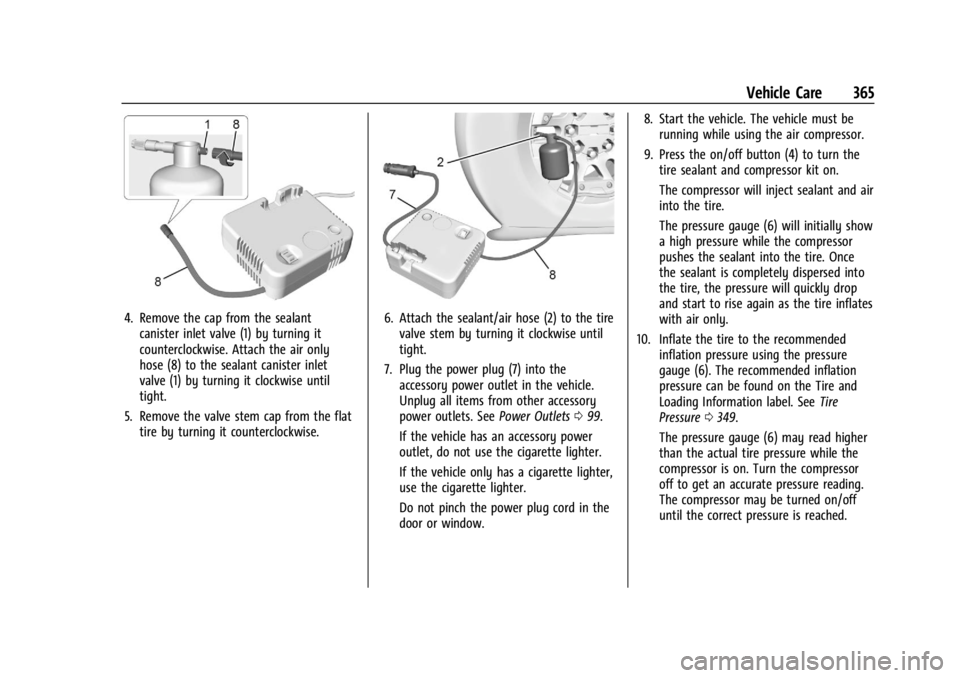
4. Remove the cap from the sealantcanister inlet valve (1) by turning it
counterclockwise. Attach the air only
hose (8) to the sealant canister inlet
valve (1) by turning it clockwise until
tight.
5. Remove the valve stem cap from the flat tire by turning it counterclockwise.6. Attach the sealant/air hose (2) to the tirevalve stem by turning it clockwise until
tight.
7. Plug the power plug (7) into the accessory power outlet in the vehicle.
Unplug all items from other accessory
power outlets. See Power Outlets099.
If the vehicle has an accessory power
outlet, do not use the cigarette lighter.
If the vehicle only has a cigarette lighter,
use the cigarette lighter.
Do not pinch the power plug cord in the
door or window. 8. Start the vehicle. The vehicle must be
running while using the air compressor.
9. Press the on/off button (4) to turn the tire sealant and compressor kit on.
The compressor will inject sealant and air
into the tire.
The pressure gauge (6) will initially show
a high pressure while the compressor
pushes the sealant into the tire. Once
the sealant is completely dispersed into
the tire, the pressure will quickly drop
and start to rise again as the tire inflates
with air only.
10. Inflate the tire to the recommended inflation pressure using the pressure
gauge (6). The recommended inflation
pressure can be found on the Tire and
Loading Information label. See Tire
Pressure 0349.
The pressure gauge (6) may read higher
than the actual tire pressure while the
compressor is on. Turn the compressor
off to get an accurate pressure reading.
The compressor may be turned on/off
until the correct pressure is reached.
Page 369 of 429
Chevrolet Silverado EV Owner Manual (GMNA-Localizing-U.S./Canada-
16702912) - 2024 - CRC - 1/13/23
368 Vehicle Care
If the vehicle only has a cigarette lighter,
use the cigarette lighter.
Do not pinch the power plug cord in the
door or window.
7. Start the vehicle. The vehicle must be running while using the air compressor.
8. Press the on/off button (4) to turn the tire sealant and compressor kit on.
The compressor will inflate the tire with
air only.
9. Inflate the tire to the recommended inflation pressure using the pressure
gauge (6). The recommended inflation
pressure can be found on the Tire and
Loading Information label. See Tire
Pressure 0349.
The pressure gauge (6) may read higher
than the actual tire pressure while the
compressor is on. Turn the compressor
off to get an accurate pressure reading.
The compressor may be turned on/off
until the correct pressure is reached.
Caution
If the recommended pressure cannot be
reached after approximately 25 minutes,
the vehicle should not be driven farther.
(Continued)
Caution (Continued)
The tire is too severely damaged and the
tire sealant and compressor kit cannot
inflate the tire. Remove the power plug
from the accessory power outlet and
unscrew the inflating hose from the tire
valve. See Roadside Assistance Program
0 399.
10. Press the on/off button (4) to turn the tire sealant and compressor kit off.
Be careful while handling the compressor
as it could be warm after usage.
11. Unplug the power plug (7) from the accessory power outlet in the vehicle.
12. Turn the air only hose (8) counterclockwise to remove it from the
tire valve stem.
13. Replace the tire valve stem cap.
14. Return the air only hose (8) and power plug (7) back to their original storage
location.
15. Return the equipment to its original storage location in the vehicle.
Accessory adapters that can be used to
inflate an air mattress or a ball, etc., are
located on the bottom of the compressor kit
Storing the Tire Sealant and
Compressor Kit
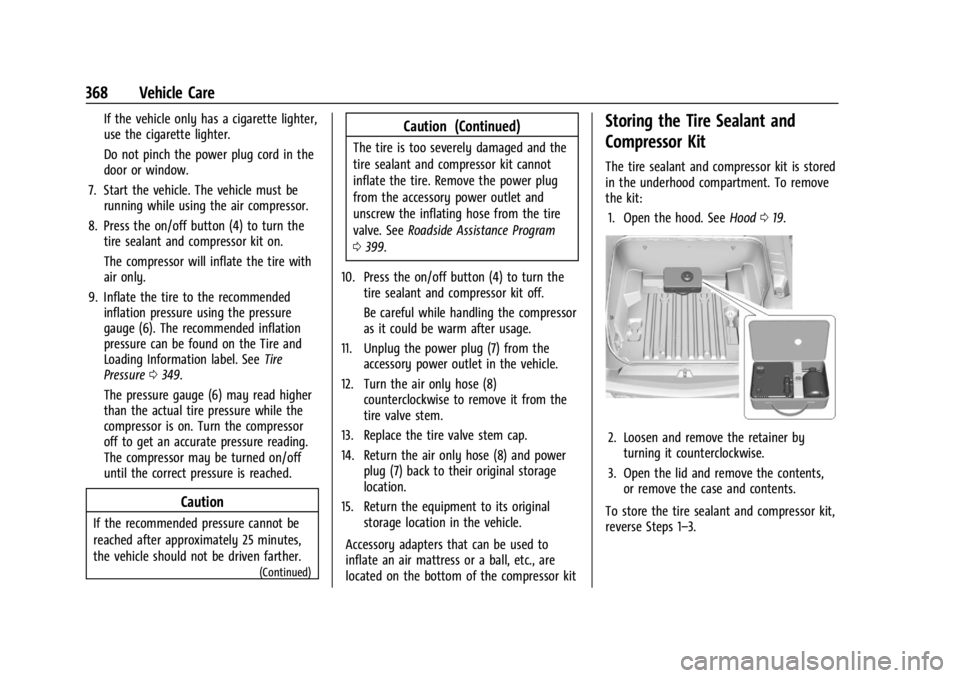
The tire sealant and compressor kit is stored
in the underhood compartment. To remove
the kit: 1. Open the hood. See Hood019.
2. Loosen and remove the retainer by
turning it counterclockwise.
3. Open the lid and remove the contents, or remove the case and contents.
To store the tire sealant and compressor kit,
reverse Steps 1–3.
Page 381 of 429
Chevrolet Silverado EV Owner Manual (GMNA-Localizing-U.S./Canada-
16702912) - 2024 - CRC - 1/13/23
380 Vehicle Care
Caution
Avoid using high-pressure washes closer
than 30 cm (12 in) to the surface of the
vehicle. Use of power washers exceeding
8 274 kPa (1,200 psi) can result in
damage or removal of paint and decals.
Cleaning Underhood Components
Caution
Do not power wash any component
under the hood that has this
e
symbol.
This could cause damage that would not
be covered by the vehicle warranty.
Solvents or aggressive cleaners may harm
underhood components. The usages of these
chemicals should be avoided.
Recommend water only.
A pressure washer may be used, but care
must be utilized. The following criteria must
be followed:
.Water pressure must be kept below
14 000 KPa (2,000 PSI).
.Water temperature must be below 80 °C
(180 °F).
.Spray nozzle with a 40 degree wide angle
spray pattern or wider must be used.
.Nozzle must be kept at least 30 cm (1 ft)
away from all surfaces.
Automatic Car Wash
Caution
Some automatic car washes can cause
damage to the vehicle, wheels and
ground effects. Automatic car washes are
not recommended, due to lack of
clearance for the undercarriage and/or
wide rear tires and wheels.
Caution
Automatic car washes can cause damage
to the vehicle, wheels, ground effects,
and convertible top (if equipped).
Do not use automatic car washes due to
lack of clearance for the undercarriage,
wide rear tires, and wheels.
If using an automatic car wash, follow the
car wash instructions. The windshield wiper
and rear window wiper, if equipped, must be turned off. Remove any accessories that
may be damaged or interfere with the car
wash equipment.
Rinse the vehicle well, before washing and
after, to remove all cleaning agents
completely. If they are allowed to dry on
the surface, they could stain.
Dry the finish with a soft, clean chamois or
an all-cotton towel to avoid surface
scratches and water spotting.
Finish Care
Application of aftermarket clearcoat sealant/
wax materials is not recommended.
If painted surfaces are damaged, see your
dealer to have the damage assessed and
repaired. Foreign materials such as calcium
chloride and other salts, ice melting agents,
road oil and tar, tree sap, bird droppings,
chemicals from industrial chimneys, etc., can
damage the vehicle's finish if they remain
on painted surfaces. Wash the vehicle as
soon as possible. If necessary, use
non-abrasive cleaners that are marked safe
for painted surfaces to remove foreign
matter.
Page 385 of 429
Chevrolet Silverado EV Owner Manual (GMNA-Localizing-U.S./Canada-
16702912) - 2024 - CRC - 1/13/23
384 Vehicle Care
Do not directly power wash the transfer
case and/or front/rear axle output seals.
High pressure water can overcome the seals
and contaminate the fluid. Contaminated
fluid will decrease the life of the transfer
case and/or axles and should be replaced.
Sheet Metal Damage
If the vehicle is damaged and requires sheet
metal repair or replacement, make sure the
body repair shop applies anti-corrosion
material to parts repaired or replaced to
restore corrosion protection.
Original manufacturer replacement parts will
provide the corrosion protection while
maintaining the vehicle warranty.
Finish Damage
Quickly repair minor chips and scratches
with touch-up materials available from your
dealer to avoid corrosion. Larger areas of
finish damage can be corrected in your
dealer's body and paint shop.
Chemical Paint Spotting
Airborne pollutants can fall upon and attack
painted vehicle surfaces causing blotchy,
ring-shaped discolorations, and small,irregular dark spots etched into the paint
surface. Refer to
“Finish Care”previously in
this section.
Interior Care
To prevent dirt particle abrasions, regularly
clean the vehicle's interior. Before using
cleaners, read and follow all safety
instructions on the label. While cleaning the
interior, open the doors and windows to get
proper ventilation. Newspapers or dark
garments can transfer color to the vehicle’s
interior.
Caution
Immediately remove cleaners, hand
lotions, sunscreen, and insect repellent
from all interior surfaces or permanent
damage may result.
Caution
Use cleaners specifically designed for the
surfaces being cleaned to prevent
permanent damage to the vehicle. Apply
all cleaners directly to a cleaning cloth.
Do not spray cleaners on any switches or
controls. When using liquid soap cleaners, follow the
directions on the specific cleaner or soap
solution for dilution instructions.
Caution
To prevent damage:
.Never use a razor or any other sharp
object to remove soil from any interior
surface
.Never use a brush with stiff bristles.
.Never rub any surface aggressively or
with too much pressure.
.Do not get any exposed electrical
components wet.
.Do not use laundry detergents or
dishwashing soaps with degreasers. Do
not use solutions that contain strong
or caustic soap.
.Do not heavily saturate the upholstery
when cleaning.
.Do not use solvents or cleaners
containing solvents.
.Do not use disinfecting wipes that are
scented or contain bleach. Do not use
wipes or cleaners that show a color
(Continued)