service CHEVROLET SILVERADO EV 2024 Owners Manual
[x] Cancel search | Manufacturer: CHEVROLET, Model Year: 2024, Model line: SILVERADO EV, Model: CHEVROLET SILVERADO EV 2024Pages: 429, PDF Size: 8.98 MB
Page 1 of 429

2024 Silverado EV
Silverado EV
Owner’s Manual
2024
United States
Scan to Access
United States and CanadaCustomer Assistance1-800-263-3777
Connected Services
1-888-4-ONSTAR
Customer Assistance
1-800-222-1020
Roadside Assistance 1-800-243-8872
• Owner’s Manuals
• Warranty Information
• Connected Services
• My Chevrolet Rewards
• myChevrolet Mobile App
• How-To Videos
• Vehicle Diagnostics
• Scheduled Maintenance
• Vehicle Features
• Many Additional Resources
Canada
United States
24SilveradoEV_enUS_16702912A_2023FEB27
Roadside Assistance 1-800-268-6800
Canada
C
M
Y
CM
MY
CY
CMY
K
24_CHEV_Silverado EV_COV_en_US_24SilveradoEV_enUS_16702912A_2023FEB27_2023FEB27.pdf 1 2/9/2023 7:55:40 AM
Page 2 of 429
Chevrolet Silverado EV Owner Manual (GMNA-Localizing-U.S./Canada-
16702912) - 2024 - CRC - 1/17/23
Contents
Introduction . . . . . . . . . . . . . . . . . . . . . . . . . . . . . . 1
Keys, Doors, and Windows . . . . . . . . . . . . . . . 8
Seats and Restraints . . . . . . . . . . . . . . . . . . . . . 41
Storage . . . . . . . . . . . . . . . . . . . . . . . . . . . . . . . . . . 91
Instruments and Controls . . . . . . . . . . . . . . . 96
Lighting . . . . . . . . . . . . . . . . . . . . . . . . . . . . . . . . 140
Infotainment System . . . . . . . . . . . . . . . . . . . 147
Climate Controls . . . . . . . . . . . . . . . . . . . . . . . . 174
Driving and Operating . . . . . . . . . . . . . . . . . . 180
Vehicle Care . . . . . . . . . . . . . . . . . . . . . . . . . . . . 323
Service and Maintenance . . . . . . . . . . . . . . . 388
Technical Data . . . . . . . . . . . . . . . . . . . . . . . . . 394
Customer Information . . . . . . . . . . . . . . . . . . 396
Reporting Safety Defects . . . . . . . . . . . . . . . 404
OnStar . . . . . . . . . . . . . . . . . . . . . . . . . . . . . . . . . 408
Connected Services . . . . . . . . . . . . . . . . . . . . . 413
Index . . . . . . . . . . . . . . . . . . . . . . . . . . 416
Introduction
California Proposition 65 Warning
Litho in U.S.A.
Part No. 24SilveradoEV_enUS_16702912A_2023FEB27©2023 General Motors LLC. All Rights Reserved.
Page 3 of 429
Chevrolet Silverado EV Owner Manual (GMNA-Localizing-U.S./Canada-
16702912) - 2024 - CRC - 1/17/23
2 Introduction
Introduction
The names, logos, emblems, slogans, vehicle
model names, and vehicle body designs
appearing in this manual including, but not
limited to, GM, the GM logo, CHEVROLET,
the CHEVROLET Emblem, and SILVERADO, are
trademarks and/or service marks of General
Motors LLC, its subsidiaries, affiliates,
or licensors.
For vehicles first sold in Canada, substitute
the name“General Motors of Canada
Company” for Chevrolet Motor Division
wherever it appears in this manual.
This manual describes features that may or
may not be on the vehicle because of
optional equipment that was not purchased
on the vehicle, model variants, country
specifications, features/applications that may
not be available in your region, or changes
subsequent to the printing of this owner’s
manual, including changes in standard or
optional content. Refer to the purchase documentation
relating to your specific vehicle to confirm
the features.
Keep this manual in the vehicle for quick
reference.
Canadian Vehicle Owners
A French language manual can be obtained
from your dealer, at www.helminc.com,
or from:
Propriétaires Canadiens
On peut obtenir un exemplaire de ce guide
en français auprès du concessionnaire ou à
l'adresse suivante:
Helm, Incorporated
Attention: Customer Service
47911 Halyard Drive
Plymouth, MI 48170
USA
Using this Manual
To quickly locate information about the
vehicle, use the Index in the back of the
manual. It is an alphabetical list of what is
in the manual and the page number where
it can be found.
Danger, Warning, and Caution
Warning messages found on vehicle labels
and in this manual describe hazards and
what to do to avoid or reduce them.
{Danger
Danger indicates a hazard with a high
level of risk which will result in serious
injury or death.
{Warning
Warning indicates a hazard that could
result in injury or death.
Caution
Caution indicates a hazard that could
result in property or vehicle damage.
Page 4 of 429
Chevrolet Silverado EV Owner Manual (GMNA-Localizing-U.S./Canada-
16702912) - 2024 - CRC - 1/17/23
Introduction 3
A circle with a slash through it is a safety
symbol which means“Do not,” “Do not do
this,” or“Do not let this happen.”
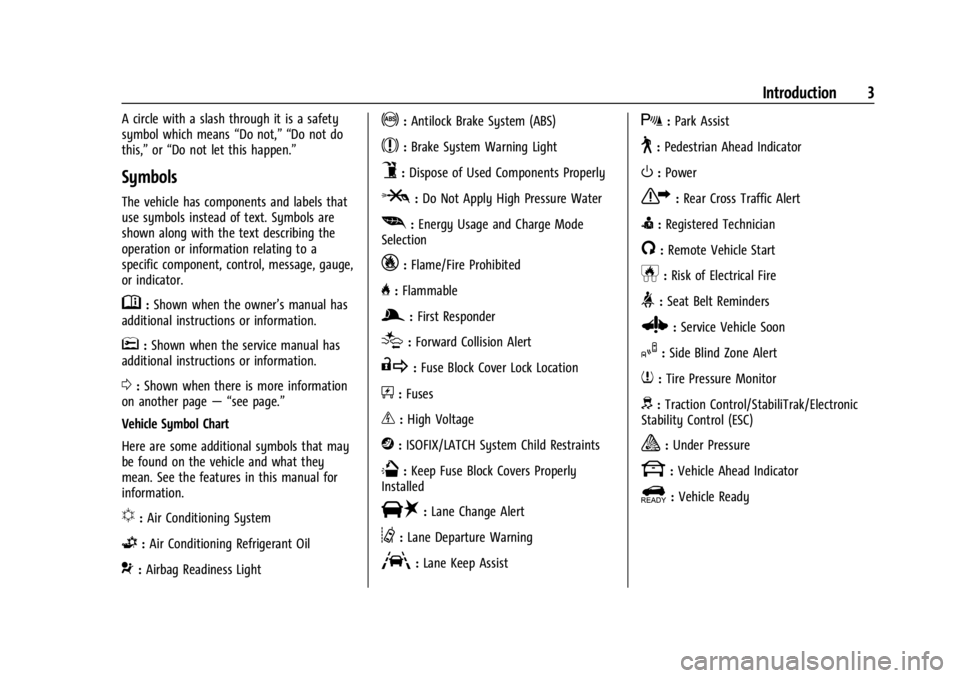
Symbols
The vehicle has components and labels that
use symbols instead of text. Symbols are
shown along with the text describing the
operation or information relating to a
specific component, control, message, gauge,
or indicator.
M:Shown when the owner’s manual has
additional instructions or information.
*: Shown when the service manual has
additional instructions or information.
0: Shown when there is more information
on another page — “see page.”
Vehicle Symbol Chart
Here are some additional symbols that may
be found on the vehicle and what they
mean. See the features in this manual for
information.
u: Air Conditioning System
G:Air Conditioning Refrigerant Oil
9:Airbag Readiness Light
!:Antilock Brake System (ABS)
$:Brake System Warning Light
9:Dispose of Used Components Properly
P:Do Not Apply High Pressure Water
[: Energy Usage and Charge Mode
Selection
_: Flame/Fire Prohibited
H: Flammable
g:First Responder
[:Forward Collision Alert
R:Fuse Block Cover Lock Location
+:Fuses
_:High Voltage
j:ISOFIX/LATCH System Child Restraints
Q:Keep Fuse Block Covers Properly
Installed
|: Lane Change Alert
@:Lane Departure Warning
A:Lane Keep Assist
X: Park Assist
~:Pedestrian Ahead Indicator
O:Power
7:Rear Cross Traffic Alert
I:Registered Technician
/:Remote Vehicle Start
h:Risk of Electrical Fire
>:Seat Belt Reminders
Z: Service Vehicle Soon
I:Side Blind Zone Alert
7:Tire Pressure Monitor
d:Traction Control/StabiliTrak/Electronic
Stability Control (ESC)
a: Under Pressure
k: Vehicle Ahead Indicator
]:Vehicle Ready
Page 6 of 429

Chevrolet Silverado EV Owner Manual (GMNA-Localizing-U.S./Canada-
16702912) - 2024 - CRC - 1/17/23
Introduction 5
1.Air Vents 0177.
2. Windshield Wiper/Washer 098.
Turn and Lane-Change Signals 0143.
3. Instrument Cluster (Base Level) 0107 or
Instrument Cluster (Uplevel) 0109.
4. Shift Switches. See Electric Drive Unit
0 200.
5. Infotainment Controls. See Overview
0 148.
6. Infotainment Display. See AM-FM Radio
0 152.
7. Light Sensor. See Automatic Headlamp
System 0142.
Vehicle Alarm System. See Vehicle
Security 032.
8. Dual Automatic Climate Control System
0174.
9. Power Outlets 099.
10. USB Port 0154.
11. Steering Wheel Controls 0149.
Driver Information Center (DIC) Controls.
See Driver Information Center (DIC) (Base
Level) 0129 or
Driver Information Center (DIC) (Uplevel)
0 130.
12. Horn 098. 13.
Steering Wheel Adjustment 097 (Out
of View).
14. Trailer Brake Control Panel. See “Integrated Trailer Brake Control System”
under Towing Equipment 0301.
15. Adaptive Cruise Control (Advanced) 0217.
Forward Collision Alert (FCA) System
0 261.
16. Data Link Connector (DLC) (Out of View). SeeService Vehicle Soon Light (Propulsion
System Failure) 0115.
17. Manual Hood Release.
18. Fuse Block Cover.
19. Electric Parking Brake 0205
Tow/Haul Mode. See Driver Mode Control
0 209.
Lane Keep Assist (LKA) 0274.
Power Hood Release. See Hood019.
Instrument Panel Illumination Control
0 143.
Page 8 of 429

Chevrolet Silverado EV Owner Manual (GMNA-Localizing-U.S./Canada-
16702912) - 2024 - CRC - 1/17/23
Introduction 7
1.Air Vents 0177.
2. Windshield Wiper/Washer 098.
Turn and Lane-Change Signals 0143.
3. Regenerative Braking 0206.
4. Instrument Cluster (Base Level) 0107 or
Instrument Cluster (Uplevel) 0109.
5. Driver Monitoring System.
6. Shift Switches. See Electric Drive Unit
0 200.
7. Infotainment Controls. See Overview
0 148.
8. Infotainment Display. See AM-FM Radio
0 152.
9. Light Sensor. See Automatic Headlamp
System 0142.
Vehicle Alarm System. See Vehicle
Security 032.
10. Dual Automatic Climate Control System
0174.
11. USB Port 0154.
12. Power Outlets 099.
13. Wireless Charging 0104. 14.
Steering Wheel Controls 0149.
Driver Information Center (DIC) Controls.
See Driver Information Center (DIC) (Base
Level) 0129 or
Driver Information Center (DIC) (Uplevel)
0 130.
15. Horn 098.
16. Steering Wheel Adjustment 097 (Out
of View).
17. Trailer Brake Control Panel. See “Integrated Trailer Brake Control System”
under Towing Equipment 0301.
18. Adaptive Cruise Control (Advanced) 0217.
Forward Collision Alert (FCA) System
0 261.
Heated Steering Wheel 097 (If
Equipped).
19. Data Link Connector (DLC) (Out of View). SeeService Vehicle Soon Light (Propulsion
System Failure) 0115.
20. Manual Hood Release.
21. Fuse Block Cover. 22.
Electric Parking Brake 0205.
Air Suspension 0211.
Lane Keep Assist (LKA) 0274.
Power Hood Release. See Hood019.
Power Tailgate Release. See Tailgate
0 28.
Instrument Panel Illumination Control
0 143.
Page 10 of 429
Chevrolet Silverado EV Owner Manual (GMNA-Localizing-U.S./Canada-
16702912) - 2024 - CRC - 1/23/23
Keys, Doors, and Windows 9
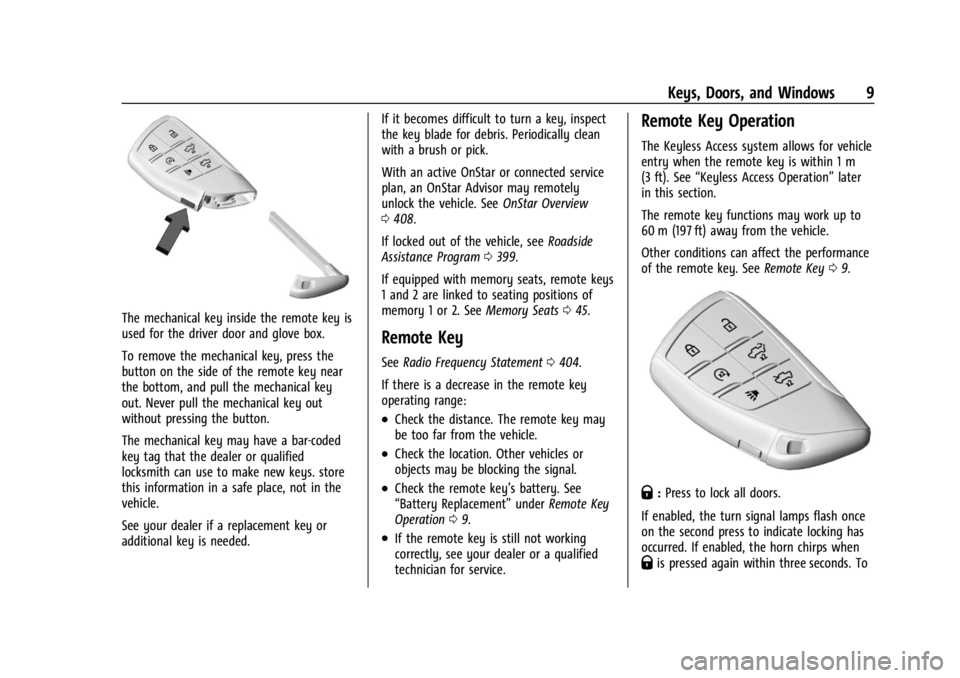
The mechanical key inside the remote key is
used for the driver door and glove box.
To remove the mechanical key, press the
button on the side of the remote key near
the bottom, and pull the mechanical key
out. Never pull the mechanical key out
without pressing the button.
The mechanical key may have a bar-coded
key tag that the dealer or qualified
locksmith can use to make new keys. store
this information in a safe place, not in the
vehicle.
See your dealer if a replacement key or
additional key is needed.If it becomes difficult to turn a key, inspect
the key blade for debris. Periodically clean
with a brush or pick.
With an active OnStar or connected service
plan, an OnStar Advisor may remotely
unlock the vehicle. See
OnStar Overview
0 408.
If locked out of the vehicle, see Roadside
Assistance Program 0399.
If equipped with memory seats, remote keys
1 and 2 are linked to seating positions of
memory 1 or 2. See Memory Seats045.
Remote Key
See Radio Frequency Statement 0404.
If there is a decrease in the remote key
operating range:
.Check the distance. The remote key may
be too far from the vehicle.
.Check the location. Other vehicles or
objects may be blocking the signal.
.Check the remote key’s battery. See
“Battery Replacement” underRemote Key
Operation 09.
.If the remote key is still not working
correctly, see your dealer or a qualified
technician for service.
Remote Key Operation
The Keyless Access system allows for vehicle
entry when the remote key is within 1 m
(3 ft). See “Keyless Access Operation” later
in this section.
The remote key functions may work up to
60 m (197 ft) away from the vehicle.
Other conditions can affect the performance
of the remote key. See Remote Key09.
Q:Press to lock all doors.
If enabled, the turn signal lamps flash once
on the second press to indicate locking has
occurred. If enabled, the horn chirps when
Qis pressed again within three seconds. To
Page 21 of 429
Chevrolet Silverado EV Owner Manual (GMNA-Localizing-U.S./Canada-
16702912) - 2024 - CRC - 1/23/23
20 Keys, Doors, and Windows
If the hood is not closed, the electronic drive
unit lockout prevents the vehicle from
shifting out of P (Park). Close the hood to
shift out of P (Park). Confirm the hood is
closed by checking that the hood is flush
with the surrounding components.
If the hood is closed but the ajar message is
present, the electronic drive unit lockout can
be overridden. Hold the brake for
20 seconds and then shift into D (Drive). The
vehicle will not exceed 42 km/h (26 mph).
See your dealer for service.
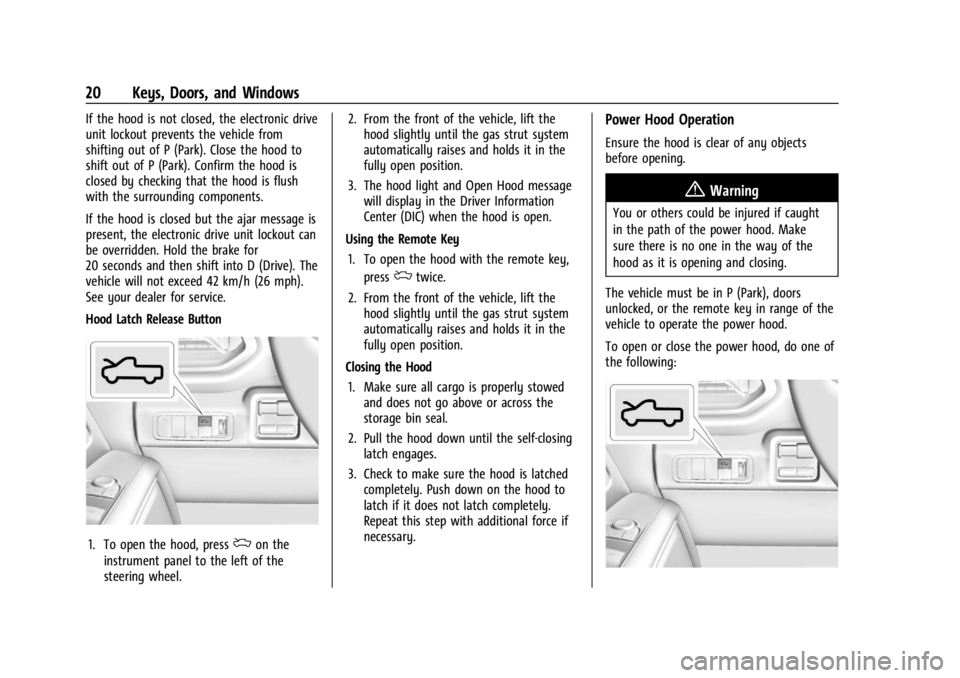
Hood Latch Release Button
1. To open the hood, pressdon the
instrument panel to the left of the
steering wheel. 2. From the front of the vehicle, lift the
hood slightly until the gas strut system
automatically raises and holds it in the
fully open position.
3. The hood light and Open Hood message will display in the Driver Information
Center (DIC) when the hood is open.
Using the Remote Key 1. To open the hood with the remote key, press
dtwice.
2. From the front of the vehicle, lift the hood slightly until the gas strut system
automatically raises and holds it in the
fully open position.
Closing the Hood 1. Make sure all cargo is properly stowed and does not go above or across the
storage bin seal.
2. Pull the hood down until the self-closing latch engages.
3. Check to make sure the hood is latched completely. Push down on the hood to
latch if it does not latch completely.
Repeat this step with additional force if
necessary.
Power Hood Operation
Ensure the hood is clear of any objects
before opening.
{Warning
You or others could be injured if caught
in the path of the power hood. Make
sure there is no one in the way of the
hood as it is opening and closing.
The vehicle must be in P (Park), doors
unlocked, or the remote key in range of the
vehicle to operate the power hood.
To open or close the power hood, do one of
the following:
Page 23 of 429
Chevrolet Silverado EV Owner Manual (GMNA-Localizing-U.S./Canada-
16702912) - 2024 - CRC - 1/23/23
22 Keys, Doors, and Windows
Off (Manual Operation)
Press and release the touch pad on the front
fascia. Lift the hood to open to a desired
height.
Pull down on the hood until the power
assist engages to close. A chime will sound
to indicate power activation. The power
assist will only activate when the hood is
above a minimum open position.
To prevent damage to the vehicle, do not
move the hood too quickly or use excessive
force.
Obstacle Detection Features
If the hood encounters an obstacle during a
power open or close cycle, the hood will
automatically reverse direction and move
away from the obstacle. After removing the
obstruction, the power hood operation can
be used again.
If the vehicle is locked while the hood is
closing and an obstacle is encountered that
prevents the hood from completely closing,
the horn will sound an alert that the hood
did not close.
Falling Hood Detection
If the power hood encounters excess weight
or a possible mechanical failure, a repetitive
chime will sound and the hood will
automatically lower to a stable position.
If the hood stops before fulling closing,
carefully push the hood closed while
keeping hands away from the edges of
the hood.
If the hood continues to automatically close
after opening, see your dealer for service
before using the power hood.
Interfering with the power hood motion or
manually closing the hood too quickly may
activate the falling hood detection feature.
Allow the hood to complete its operation
and wait a few seconds before manually
closing the hood.
Operating the Hood When There is No
Electrical Power
The manual release cable should only be
used for service and/or emergency use, such
as loss of vehicle electrical power. Do not
store any cargo in the area near the hood
release cable.To open the hood:
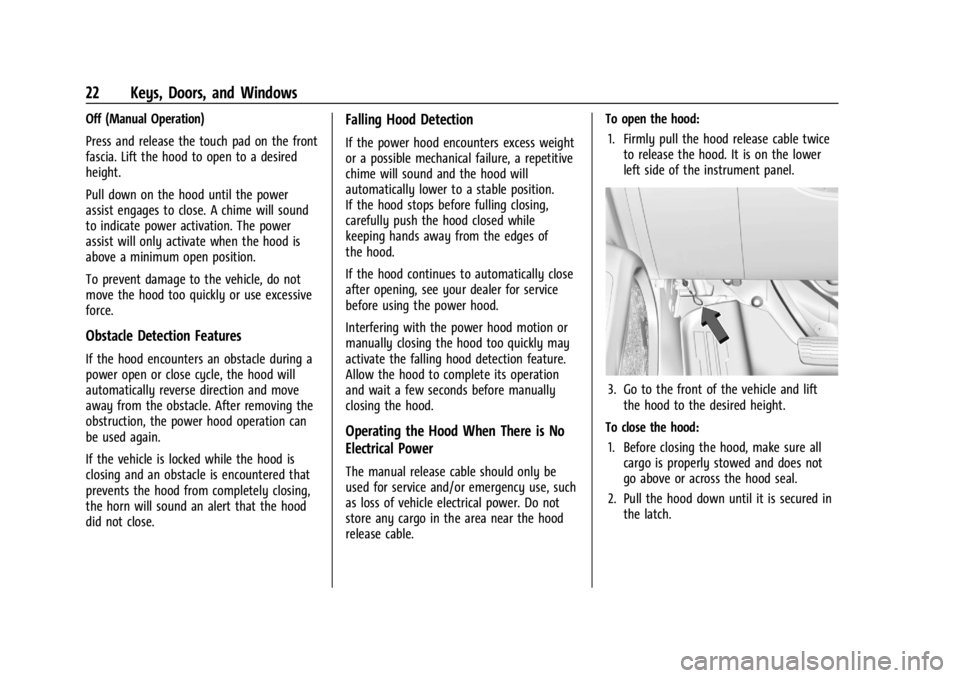
1. Firmly pull the hood release cable twice to release the hood. It is on the lower
left side of the instrument panel.
3. Go to the front of the vehicle and liftthe hood to the desired height.
To close the hood: 1. Before closing the hood, make sure all cargo is properly stowed and does not
go above or across the hood seal.
2. Pull the hood down until it is secured in the latch.
Page 35 of 429
Chevrolet Silverado EV Owner Manual (GMNA-Localizing-U.S./Canada-
16702912) - 2024 - CRC - 1/23/23
34 Keys, Doors, and Windows
The vehicle is automatically immobilized
when the vehicle is turned off.
The immobilization system is disarmed
when the vehicle is turned on and a valid
remote key is present in the vehicle.
The security light in the instrument cluster
comes on if there is a problem with arming
or disarming the theft-deterrent system.
The system has one or more remote keys
matched to an immobilizer control unit in
the vehicle. Only a correctly matched
remote key will start the vehicle. If the
remote key is ever damaged, you may not
be able to start your vehicle.
When trying to start the vehicle, the
security light may come on briefly.
If the vehicle does not start and the security
light stays on, there is a problem with the
system. Turn the vehicle off and try again.If the vehicle will not turn on or off, and the
remote key appears to be undamaged, try
another remote key. You may also try
placing the remote key in the backup
location. See
Remote Key Operation 09.
If the vehicle will not turn on or off with
the other remote key or in the backup
location, the vehicle needs service. If the
vehicle does turn on or off, the first remote
key may be faulty. See your dealer.
It is possible for the immobilizer system to
learn new or replacement remote keys. Up
to eight remote keys can be programmed
for the vehicle. To program additional
remote keys, see “Programming Remote
Keys to the Vehicle” underRemote Key
Operation 09.
Do not leave the remote key or device that
disarms or deactivates the theft-deterrent
system in the vehicle.
Exterior Mirrors
Power Mirrors
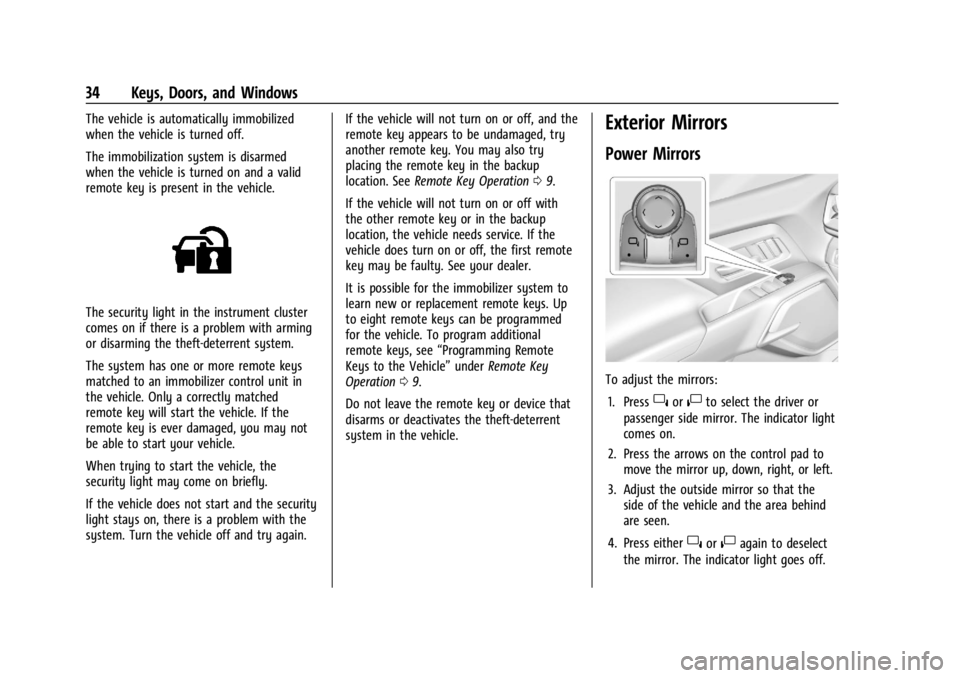
To adjust the mirrors:
1. Press
}or|to select the driver or
passenger side mirror. The indicator light
comes on.
2. Press the arrows on the control pad to move the mirror up, down, right, or left.
3. Adjust the outside mirror so that the side of the vehicle and the area behind
are seen.
4. Press either
}or|again to deselect
the mirror. The indicator light goes off.