radio onstar CHEVROLET SILVERADO EV 2024 Owners Manual
[x] Cancel search | Manufacturer: CHEVROLET, Model Year: 2024, Model line: SILVERADO EV, Model: CHEVROLET SILVERADO EV 2024Pages: 429, PDF Size: 8.98 MB
Page 10 of 429
Chevrolet Silverado EV Owner Manual (GMNA-Localizing-U.S./Canada-
16702912) - 2024 - CRC - 1/23/23
Keys, Doors, and Windows 9
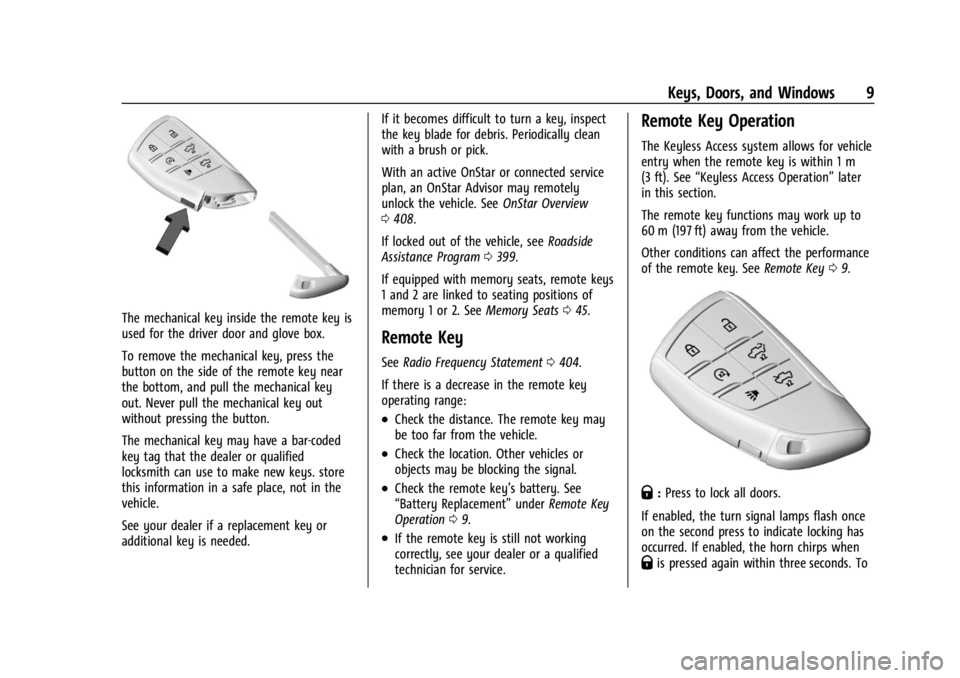
The mechanical key inside the remote key is
used for the driver door and glove box.
To remove the mechanical key, press the
button on the side of the remote key near
the bottom, and pull the mechanical key
out. Never pull the mechanical key out
without pressing the button.
The mechanical key may have a bar-coded
key tag that the dealer or qualified
locksmith can use to make new keys. store
this information in a safe place, not in the
vehicle.
See your dealer if a replacement key or
additional key is needed.If it becomes difficult to turn a key, inspect
the key blade for debris. Periodically clean
with a brush or pick.
With an active OnStar or connected service
plan, an OnStar Advisor may remotely
unlock the vehicle. See
OnStar Overview
0 408.
If locked out of the vehicle, see Roadside
Assistance Program 0399.
If equipped with memory seats, remote keys
1 and 2 are linked to seating positions of
memory 1 or 2. See Memory Seats045.
Remote Key
See Radio Frequency Statement 0404.
If there is a decrease in the remote key
operating range:
.Check the distance. The remote key may
be too far from the vehicle.
.Check the location. Other vehicles or
objects may be blocking the signal.
.Check the remote key’s battery. See
“Battery Replacement” underRemote Key
Operation 09.
.If the remote key is still not working
correctly, see your dealer or a qualified
technician for service.
Remote Key Operation
The Keyless Access system allows for vehicle
entry when the remote key is within 1 m
(3 ft). See “Keyless Access Operation” later
in this section.
The remote key functions may work up to
60 m (197 ft) away from the vehicle.
Other conditions can affect the performance
of the remote key. See Remote Key09.
Q:Press to lock all doors.
If enabled, the turn signal lamps flash once
on the second press to indicate locking has
occurred. If enabled, the horn chirps when
Qis pressed again within three seconds. To
Page 154 of 429
Chevrolet Silverado EV Owner Manual (GMNA-Localizing-U.S./Canada-
16702912) - 2024 - CRC - 1/13/23
Infotainment System 153
To turn RDS features on or off, see "Audio
Settings" previously.
The following RDS features may be
supported by radio broadcasters in your
listening area:
RDS features
.Display radio station call letters
.Display messages from radio stations
.Provide radio station category information
(when available)
Satellite Radio
SiriusXM Radio Service
If equipped, vehicles with a valid SiriusXM
radio subscription can receive SiriusXM
programming.
SiriusXM radio has a wide variety of
programming and commercial-free music,
coast to coast, in digital-quality sound. In
the U.S., see www.siriusxm.com or call
1-888-601-6296. In Canada, see
www.siriusxm.ca or call 1-877-438-9677.
When SiriusXM is active, the channel name,
number, song title, and artist appear on the
display.
SiriusXM with 360L
SiriusXM with 360L interface has enhanced
in-vehicle listening experience for
subscribers. The experience now offers more
categories and system learned
recommendations toward discovering more
personalized content.
To use the full SiriusXM 360L program,
including streaming content and listening
recommendations, OnStar Connected Access
is required and Terms and Conditions
accepted. Connected vehicle services vary by
model and require a complete working
electrical system, cell reception, and GPS
signal.
Reference the SiriusXM user guide for use
and subscription information.
Playing SiriusXM Content
Touchr,j,ror[on the now playing
screen to rewind, pause, play, or fast
forward content.
Finding a Channel
From the SiriusXM now playing screen,
touch
oCH or CHpto open the SXM tuner
channel list. To directly tune to a channel, touch the
Tune icon to enter a channel number using
the keypad.
Browsing Content
Touch(to view different browsing
content.
Browse will include Channels, Music, On
Demand shows and episodes, Sports and
News content.
SiriusXM Settings
From the SiriusXM now playing screen,
touch the user settings icon in the upper
right to display the SiriusXM settings
The settings include subscription
information, help and support, and listener
preferences.
Radio Reception
Unplug electronic devices from the accessory
power outlets if there is interference or
static in the radio.
FM
FM signals only reach about 16 to 65 km (10
to 40 mi). Although the radio has a built-in
electronic circuit that automatically works to
Page 173 of 429
Chevrolet Silverado EV Owner Manual (GMNA-Localizing-U.S./Canada-
16702912) - 2024 - CRC - 1/13/23
172 Infotainment System
Trial length and service availability may vary
by model, model year or trim. Service will
automatically stop at the end of your trial
subscription period unless you decide to
continue service. If you do not wish to enjoy
your trial, you can cancel by calling the
number below. All SiriusXM services require
a subscription, each sold separately by
SiriusXM after the trial period. Service
subject to the applicable SiriusXM Customer
Agreement and Privacy Policy, visit
www.siriusxm.com (USA) or www.siriusxm.ca
(Canada) to see complete terms and how to
cancel which includes calling 1-866-635-2349
(USA) or 1-888-539-7474 (Canada). Some
services and features are subject to device
capabilities and location availability. Content
varies by SiriusXM subscription package. All
fees, content and features are subject to
change.
SiriusXM with 360L: Some features,
including streaming content and listening
recommendations, require an active OnStarConnected Access plan and may vary by
vehicle model. Content varies by SiriusXM
subscription plan. GM connected vehicle
services vary by vehicle model and require
active service plan, working electrical
system, cell reception and GPS signal. See
onstar.com for details and limitations.
SiriusXM, Pandora, Stitcher and all related
logos are trademarks of Sirius XM Radio Inc.
and its respective subsidiaries.
SiriusXM satellite service is only available in
the 48 contiguous United States (and Puerto
Rico with limited availability) and Canada.
In Canada: Some deterioration of service
may occur in extreme northern latitudes.
This is beyond the control of SiriusXM.
Explicit Language Notice: Channels with
frequent explicit language are indicated with
an
“XL” after the channel name.
Family-friendly packages are available by
contacting SiriusXM:
.USA Customers —See www.siriusxm.com
or call 1-888-601-6296.
.Canada Customers —See
www.siriusxm.ca or call 1-877-438-9677.
It is prohibited to copy, decompile,
disassemble, reverse engineer, hack,
manipulate, or otherwise make available any technology or software incorporated in
receivers compatible with the SiriusXM
Satellite Radio System or that support the
SiriusXM website, the Online Service or any
of its content.
General Requirements:
1. A License Agreement from SiriusXM is required for any product that
incorporates SiriusXM Technology and/or
for use of any of the SiriusXM marks to
be manufactured, distributed,
or marketed in the SiriusXM
Service Area.
2. For products to be distributed, marketed, and/or sold in Canada, a separate
agreement is required with Sirius XM
Canada Inc.TouchSense Technology and TouchSense
System 1000 Series Licensed from
Immersion Corporation. TouchSense System
1000 is protected under one or more of the
Page 275 of 429
Chevrolet Silverado EV Owner Manual (GMNA-Localizing-U.S./Canada-
16702912) - 2024 - CRC - 1/17/23
274 Driving and Operating
available settings from the infotainment
screen, touch Settings > Vehicle >
Collision/Detection Systems.
Drowsiness Alerts
Depending on the drowsiness level, Driver
Attention Assist will display escalating alerts
in the instrument cluster. These alerts
progress as the drowsiness level increases.
Each level is designated by a coffee cup and
a DIC message recommending that the
driver consider taking a rest break.
Depending on the driver’s drowsiness level,
the system will also send chimes or haptic
alerts, if equipped with Safety Alert Seat.
The higher alerts will be seen more
frequently. Not all alerts may occur during a
drowsy event.
When the maximum drowsiness alert occurs,
the driver will be presented with the
following options on the infotainment
screen:
.Phone a Friend
.Place an OnStar call
.Navigate to Nearest Point of Interest (POI)
Select an option from the list and follow the
instructions displayed on infotainment
screen.
Attention Alerts
Depending on the attention level, Driver
Attention Assist will display escalating alerts
in the instrument cluster that advance from
level one to level two as the attention level
decreases. Depending on the driver’s
distraction level, the system will also send
chimes or haptic alerts, if equipped with
Safety Alert Seat. See Driver Attention Assist
Light 0122.
When Teen Driver is Active, the radio will
momentarily be set to mute when alert
level two is active. See Teen Driver0168.
Cleaning the Camera
The camera lens cover on the steering
column may become dirty over time. If this
occurs, clean the lens cover with a soft cloth
sprayed with glass cleaner. Wipe the lens
gently, then dry it. Never use abrasive
cloths, cleaners, or corrosive chemicals of
any kind on the lens cover.
Limitations
Some factors can impact the performance of
the Driver Attention Assist feature, causing
it to not to function as intended. These
include (but are not limited to):
.Damage to the Driver Monitoring System,
camera, or lens.
.The camera being blocked by the steering
wheel, hands, or objects.
If there is a problem with the system, a DIC
message or icon in the instrument cluster
may display.
Lane Keep Assist (LKA)
If equipped, LKA may help avoid crashes due
to unintentional lane departures. This
system uses a camera to detect lane
markings. The LKA system can be ready to
assist at speeds between approximately
60 km/h (37 mph) and 180 km/h (112 mph).
On some vehicles, the system will instead
operate above 50 km/h (31 mph). LKA may
assist by gently turning the steering wheel
if the vehicle approaches a detected lane
marking. It may also provide a Lane
Departure Warning (LDW) alert if the vehicle
unintentionally crosses a detected lane
marking.
Page 397 of 429
Chevrolet Silverado EV Owner Manual (GMNA-Localizing-U.S./Canada-
16702912) - 2024 - CRC - 1/13/23
396 Customer Information
Customer Information
Customer Information
Customer Satisfaction Procedure . . . . . . 396
Customer Assistance Offices . . . . . . . . . . . 398
Customer Assistance for Text Telephone(TTY) Users . . . . . . . . . . . . . . . . . . . . . . . . . . 398
Online Account . . . . . . . . . . . . . . . . . . . . . . . . 398
GM Mobility Reimbursement Program . . . . . . . . . . . . . . . . . . . . . . . . . . . . . 399
Roadside Assistance Program . . . . . . . . . . 399
Scheduling Service Appointments . . . . . . 401
Courtesy Transportation Program . . . . . 401
Collision Damage Repair . . . . . . . . . . . . . . 402
Publication Ordering Information . . . . . 404
Radio Frequency Statement . . . . . . . . . . . 404
Reporting Safety Defects
Reporting Safety Defects to the United States Government . . . . . . . . . . . . . . . . . . 404
Reporting Safety Defects to the Canadian Government . . . . . . . . . . . . . . . 405
Reporting Safety Defects to General Motors . . . . . . . . . . . . . . . . . . . . . . . . . . . . . . 405
Vehicle Data Recording and Privacy
Vehicle Data Recording and Privacy . . . 405
Cybersecurity . . . . . . . . . . . . . . . . . . . . . . . . . 406
Event Data Recorders . . . . . . . . . . . . . . . . . 406
OnStar . . . . . . . . . . . . . . . . . . . . . . . . . . . . . . . . 407
Infotainment System . . . . . . . . . . . . . . . . . . 407Customer Information
Customer Satisfaction Procedure
Your satisfaction and goodwill are important
to your dealer and to Chevrolet. Normally,
any concerns with the sales transaction or
the operation of the vehicle will be resolved
by your dealer's sales or service
departments. Sometimes, however, despite
the best intentions of all concerned,
misunderstandings can occur. If your concern
has not been resolved to your satisfaction,
the following steps should be taken:
STEP ONE : Discuss your concern with a
member of dealership management.
Normally, concerns can be quickly resolved
at that level. If the matter has already been
reviewed with the sales, service, or parts
manager, contact the owner of your
dealership or the general manager.
STEP TWO : If after contacting a member of
dealership management, it appears your
concern cannot be resolved by your
dealership without further help, in the U.S.,
call the Chevrolet Customer Assistance
Center at 1-800-222-1020. In Canada, call
General Motors of Canada Customer Care
Centre at 1-800-263-3777 (English),
or 1-800-263-7854 (French).
Page 411 of 429
Chevrolet Silverado EV Owner Manual (GMNA-Localizing-U.S./Canada-
16702912) - 2024 - CRC - 1/13/23
410 OnStar
OnStar Additional
Information
In-Vehicle Audio Messages
Audio messages may play important
information at the following times:
.Prior to vehicle purchase. PressQto set
up an account.
.After change in ownership and at
90 days.
Transferring Service
PressQto request account transfer
eligibility information. The Advisor can
cancel or change account information.
Selling/Transferring the Vehicle
Call 1-888-4ONSTAR (1-888-466-7827)
immediately to terminate your OnStar or
connected services if the vehicle is disposed
of, sold, transferred, or if the lease ends.
Reactivation for Subsequent Owners
PressQand follow the prompts to speak to
an Advisor as soon as possible. The Advisor
will update vehicle records and explain
OnStar or connected service options.
How OnStar Service Works
Automatic Crash Response, Emergency
Services, Crisis Assist, Stolen Vehicle
Assistance, Remote Services, and Roadside
Assistance are available on most vehicles.
Not all OnStar services are available
everywhere or on all vehicles. For more
information, a full description of OnStar
services, system limitations, and OnStar User
Terms, Privacy Statement, and Software
Terms:
.Call 1-888-4ONSTAR (1-888-466-7827).
.See www.onstar.com (U.S.).
.See www.onstar.ca (Canada).
.Call TTY 1-877-248-2080.
.PressQto speak with an Advisor.
OnStar or connected services cannot work
unless the vehicle is in a place where OnStar
has an agreement with a wireless service
provider for service in that area. The
wireless service provider must also have
coverage, network capacity, reception, and
technology compatible with OnStar or
connected services. Service involving location
information about the vehicle cannot work
unless GPS signals are available,
unobstructed, and compatible with the
OnStar hardware. OnStar or connected services may not work if the OnStar
equipment is not properly installed or it has
not been properly maintained. If equipment
or software is added, connected,
or modified, OnStar or connected services
may not work. Other problems beyond the
control of OnStar
—such as hills, tall
buildings, tunnels, weather, electrical system
design and architecture of the vehicle,
damage to the vehicle in a crash, or wireless
phone network congestion or jamming —
may prevent service.
See Radio Frequency Statement 0404.
Services for People with Disabilities
Advisors provide services to help with
physical disabilities and medical conditions.
Press
Qto help:
.Find a hotel, restaurant, etc., that meets
accessibility needs.
.Provide directions to the closest hospital
or pharmacy in urgent situations.
TTY Users
OnStar has the ability to communicate to
deaf, hard-of-hearing, or speech-impaired
customers while in the vehicle. If equipped,
Page 413 of 429
Chevrolet Silverado EV Owner Manual (GMNA-Localizing-U.S./Canada-
16702912) - 2024 - CRC - 1/13/23
412 OnStar
Vehicle and Power Issues
OnStar services require a vehicle electrical
system, wireless service, and GPS satellite
technologies to be available and operating
for features to function properly. These
systems may not operate if the battery is
discharged or disconnected.
Add-on Electrical Equipment
The OnStar system is integrated into the
electrical architecture of the vehicle. Do not
add any electrical equipment. SeeAdd-On
Electrical Equipment 0321. Added electrical
equipment may interfere with the operation
of the OnStar system and cause it to not
operate.
Vehicle Software Updates
OnStar or GM may remotely deliver
software updates or changes to the vehicle
without further notice or consent. These
updates or changes may enhance or
maintain safety, security, or the operation
of the vehicle or the vehicle systems.
Software updates or changes may affect or
erase data or settings that are stored in the
vehicle, such as saved navigation
destinations or pre-set radio stations.
Neither OnStar nor GM is responsible for
any affected or erased data or settings. These updates or changes may also collect
personal information. Such collection is
described in the OnStar privacy statement or
separately disclosed at the time of
installation. These updates or changes may
also cause a system to automatically
communicate with GM servers to collect
information about vehicle system status,
identify whether updates or changes are
available, or deliver updates or changes. An
active OnStar agreement constitutes consent
to these software updates or changes and
agreement that either OnStar or GM may
remotely deliver them to the vehicle.
Privacy
The complete OnStar Privacy Statement may
be found at www.onstar.com (U.S.),
or www.onstar.ca (Canada). We recommend
that you review it. If you have any
questions, call 1-888-4ONSTAR
(1-888-466-7827) or press
Qto speak with
an Advisor. Users of wireless
communications are cautioned that the
privacy of any information sent via wireless
cellular communications cannot be assured.
Third parties may unlawfully intercept or
access transmissions and private
communications without consent.
OnStar –Software Acknowledgements
To obtain the source code under GPL, LGPL,
MPL, and other open source licenses, that is
contained in this product, please visit
www.opensourceautomotive.com/an/GM. In
addition to the source code, all referred
license terms, warranty disclaimers, and
copyright notices are available for download.
This offer is valid for a period of three years
after our last shipment of this product. This
offer is valid to anyone in receipt of this
information.
*Provided through Continental Automotive
Systems, Inc., who is solely responsible for
provisions of related OSS compliance.
Page 417 of 429

Chevrolet Silverado EV Owner Manual (GMNA-Localizing-U.S./Canada-
16702912) - 2024 - CRC - 1/13/23
416 Index
IndexA
Accessories and Modifications . . . . . . . . . . . 324
AdaptiveCruise Control . . . . . . . . . . . . . . . . . . . . . . . . . . 217
Add-On Electrical Equipment . . . . . . . . . . . . . . 321
Additional
OnStar Information . . . . . . . . . . . . . . . . . . . . 410
Adjustments Lumbar, Front Seats . . . . . . . . . . . . . . . . . . . . 45
Advanced
Driver Assistance Systems . . . . . . . . . . . . . 244
Agreements Trademarks and License . . . . . . . . . . . . . . . . 171
Air
Conditioning . . . . . . . . . . . . . . . . . . . . . . . . . . . 174
Filter, Passenger Compartment . . . . . . . . 178
Suspension . . . . . . . . . . . . . . . . . . . . . . . . . . . . . 211
Suspension Light . . . . . . . . . . . . . . . . . . . . . . . . 119
Vents . . . . . . . . . . . . . . . . . . . . . . . . . . . . . . . . . . . 177
Airbag System . . . . . . . . . . . . . . . . . . . . . . . . . . . . 60 Check . . . . . . . . . . . . . . . . . . . . . . . . . . . . . . . . . . . 69
How Does an Airbag Restrain? . . . . . . . . . . 63
Passenger Sensing System . . . . . . . . . . . . . . 65
What Makes an Airbag Inflate? . . . . . . . . . 63
What Will You See after an AirbagInflates? . . . . . . . . . . . . . . . . . . . . . . . . . . . . . . 64
When Should an Airbag Inflate? . . . . . . . . 62
Where Are the Airbags? . . . . . . . . . . . . . . . . 61 Airbags
Adding Equipment to the Vehicle . . . . . . . 68
Passenger Status Indicator . . . . . . . . . . . . . . 114
Readiness Light . . . . . . . . . . . . . . . . . . . . . . . . . 113
Replacing System Parts after a
Crash . . . . . . . . . . . . . . . . . . . . . . . . . . . . . . . . . 69
Servicing Airbag-Equipped Vehicles . . . . . . 68
Alarm Vehicle Security . . . . . . . . . . . . . . . . . . . . . . . . 33
Alert Blind Zone Steering Assist (BZSA) . . . . . . . 271
Lane Change (LCA) . . . . . . . . . . . . . . . . . . . . . 269
Rear Cross Traffic . . . . . . . . . . . . . . . . . . . . . . 260
Rear Pedestrian . . . . . . . . . . . . . . . . . . . . . . . . 259
Side Blind Zone (SBZA) . . . . . . . . . . . . . . . . . 268
All-Season Tires . . . . . . . . . . . . . . . . . . . . . . . . . . 345
AM-FM Radio . . . . . . . . . . . . . . . . . . . . . . . . . . . . . 152
Antenna
Multi-band . . . . . . . . . . . . . . . . . . . . . . . . . . . . . 154
Antilock Brake System (ABS) . . . . . . . . . . . . . 204 Warning Light . . . . . . . . . . . . . . . . . . . . . . . . . . 116
Appearance Care Exterior . . . . . . . . . . . . . . . . . . . . . . . . . . . . . . . . 379
Interior . . . . . . . . . . . . . . . . . . . . . . . . . . . . . . . . 384
Apple CarPlay and Android Auto . . . . . . . . . 165
Assistance Program, Roadside . . . . . . . . . . . . 399
Assistance Systems
Advanced . . . . . . . . . . . . . . . . . . . . . . . . . . . . . . 244
Page 425 of 429

Chevrolet Silverado EV Owner Manual (GMNA-Localizing-U.S./Canada-
16702912) - 2024 - CRC - 1/13/23
424 Index
ReplacementGlass . . . . . . . . . . . . . . . . . . . . . . . . . . . . . . . . . . 333
Replacement Parts Airbags . . . . . . . . . . . . . . . . . . . . . . . . . . . . . . . . . 69
Maintenance . . . . . . . . . . . . . . . . . . . . . . . . . . . 392
Replacing Airbag System . . . . . . . . . . . . . . . . . . . . . . . . . . 69
LATCH System Parts After a Crash . . . . . . 85
Seat Belt System Parts after a Crash . . . . 59
Reporting Safety Defects Canadian Government . . . . . . . . . . . . . . . . . 405
General Motors . . . . . . . . . . . . . . . . . . . . . . . . 405
U.S. Government . . . . . . . . . . . . . . . . . . . . . . . 404
Requirements Electrical Battery Charging . . . . . . . . . . . . . 293
Restraints
Where to Put . . . . . . . . . . . . . . . . . . . . . . . . . . . 75
Reverse Tilt Mirrors . . . . . . . . . . . . . . . . . . . . . . . 36
Ride Control Systems Air Suspension . . . . . . . . . . . . . . . . . . . . . . . . . . 211
Enhanced Traction System (ETS) . . . . . . . . 211
Roads Driving, Wet . . . . . . . . . . . . . . . . . . . . . . . . . . . 189
Roadside Assistance Program . . . . . . . . . . . . 399
Rotation, Tires . . . . . . . . . . . . . . . . . . . . . . . . . . . 356S
Safety Locks . . . . . . . . . . . . . . . . . . . . . . . . . . . . . . . . . . . . 17
Pedestrian Signal . . . . . . . . . . . . . . . . . . . . . . . 98
Safety Defects Reporting
Canadian Government . . . . . . . . . . . . . . . . . 405
General Motors . . . . . . . . . . . . . . . . . . . . . . . . 405
U.S. Government . . . . . . . . . . . . . . . . . . . . . . . 404
Safety System Check . . . . . . . . . . . . . . . . . . . . . 59
Satellite Radio . . . . . . . . . . . . . . . . . . . . . . . . . . . . 153
Scheduling Appointments . . . . . . . . . . . . . . . . 401
Sealant Kit, Tire . . . . . . . . . . . . . . . . . . . . . . . . . . 363
Seat Belts . . . . . . . . . . . . . . . . . . . . . . . . . . . . . . . . . .52 Buckle To Drive . . . . . . . . . . . . . . . . . . . . . . . . . 53
Care . . . . . . . . . . . . . . . . . . . . . . . . . . . . . . . . . . . . 59
Extender . . . . . . . . . . . . . . . . . . . . . . . . . . . . . . . . 59
How to Wear Seat Belts Properly . . . . . . . 54
Lap-Shoulder Belt . . . . . . . . . . . . . . . . . . . . . . . 56
Reminders . . . . . . . . . . . . . . . . . . . . . . . . . . . . . . 112
Replacing after a Crash . . . . . . . . . . . . . . . . . 59
Use During Pregnancy . . . . . . . . . . . . . . . . . . 58
Seats Adjustment, Front . . . . . . . . . . . . . . . . . . . . . . 43
Head Restraints . . . . . . . . . . . . . . . . . . . . . . . . . 41
Heated and Ventilated, Front . . . . . . . . . . . 47
Heated, Rear . . . . . . . . . . . . . . . . . . . . . . . . . . . . . 51
Lumbar Adjustment, Front . . . . . . . . . . . . . . 45
Memory . . . . . . . . . . . . . . . . . . . . . . . . . . . . . . . . 45 Seats (cont'd)
Power Adjustment, Front . . . . . . . . . . . . . . . 43
Rear . . . . . . . . . . . . . . . . . . . . . . . . . . . . . . . . . . . . 49
Reclining Seatbacks . . . . . . . . . . . . . . . . . . . . . 43
Underseat Storage . . . . . . . . . . . . . . . . . . . . . . 92
Securing Child Restraints . . . . . . . . . . . . . . 86, 88
Security Light . . . . . . . . . . . . . . . . . . . . . . . . . . . . . . . . . . . . 121
OnStar . . . . . . . . . . . . . . . . . . . . . . . . . . . . . . . . . 409
Vehicle . . . . . . . . . . . . . . . . . . . . . . . . . . . . . . . . . 32
Vehicle Alarm . . . . . . . . . . . . . . . . . . . . . . . . . . . 33
Service . . . . . . . . . . . . . . . . . . . . . . . . . . . . . . . . . . . 179
Accessories and Modifications . . . . . . . . . 324
Doing Your Own Work . . . . . . . . . . . . . . . . . 324
Electric Parking Brake Light . . . . . . . . . . . . . 116
Maintenance Records . . . . . . . . . . . . . . . . . . 393
Maintenance, General Information . . . . . 388
Parts Identification . . . . . . . . . . . . . . . . . . . . . 394
Scheduling Appointments . . . . . . . . . . . . . . 401
Vehicle Soon Light . . . . . . . . . . . . . . . . . . . . . . 115
Servicing the Airbag . . . . . . . . . . . . . . . . . . . . . . 68
Settings . . . . . . . . . . . . . . . . . . . . . . . . . . . . . . . . . . 166
Shifting
Into Park . . . . . . . . . . . . . . . . . . . . . . . . . . . . . . 199
Out of Park . . . . . . . . . . . . . . . . . . . . . . . . . . . . 199
Signals, Turn and Lane-Change . . . . . . . . . . . .143
Software Updates . . . . . . . . . . . . . . . . . . . . . . . . . 152
Specifications and Capacities . . . . . . . . . . . . . 395