radio controls CHEVROLET SONIC 2013 2.G User Guide
[x] Cancel search | Manufacturer: CHEVROLET, Model Year: 2013, Model line: SONIC, Model: CHEVROLET SONIC 2013 2.GPages: 382, PDF Size: 6.71 MB
Page 122 of 382
Black plate (28,1)Chevrolet Sonic Owner Manual - 2013 - 2nd PrintReady - 10/11/12
5-28 Instruments and Controls
Press MENU/TUNE when Delayed
Door Lock is highlighted. Turn the
MENU/TUNE knob to select On or
Off. Press MENU/TUNE to confirm
and go back to the last menu.
Remote Lock, Unlock, Start
Select Remote Lock, Unlock, Start
and the following will be displayed:
.Remote Unlock Feedback
.Remote Lock Feedback
.Remote Door Unlock
Remote Unlock Feedback
When on, the exterior lamps will
flash when unlocking the vehicle
with the RKE transmitter.
Press MENU/TUNE when Remote
Unlock Feedback is highlighted.
Turn the MENU/TUNE knob to
select On or Off. Press MENU/
TUNE to confirm and go back to the
last menu. Remote Lock Feedback
This allows selection of what type of
feedback is given when locking the
vehicle with the RKE transmitter.
Press MENU/TUNE when Remote
Lock Feedback is highlighted. Turn
the MENU/TUNE knob to select
Lights and Horn, Lights Only, Horn
Only, or Off. Press MENU/TUNE to
confirm and go back to the
last menu.
Remote Door Unlock
This allows selection of which doors
will unlock when pressing
Kon the
RKE transmitter.
Press MENU/TUNE when Remote
Door Unlock is highlighted. Turn the
MENU/TUNE knob to select All
Doors or Driver Door Only. When
set to Driver Door Only, the driver
door will unlock the first time
Kis
pressed and all doors will unlock
when
Kis pressed a second time.
When set to All Doors, all of the doors will unlock at the first press of
K. Press MENU/TUNE to confirm
and go back to the last menu.
Return to Factory Settings
Select Return to Factory Settings to
return all of the vehicle
personalization to the default
settings. Turn the MENU/TUNE
knob to select Yes or No. Press
MENU/TUNE to confirm and go
back to the last menu.
Personalization Menu (Radio
With Touchscreen)
Settings can be made with the
ignition ON and the vehicle not
moving.
The following are all possible
personalization features. Depending
on the vehicle, some may not be
available.
D(Home): Press to access the
Home Page Menu.
QorR: Press to scroll through the
menus or setup items.
Page 123 of 382
Black plate (29,1)Chevrolet Sonic Owner Manual - 2013 - 2nd PrintReady - 10/11/12
Instruments and Controls 5-29
4:Press to exit, or return to the
previous screen or menu.
To access the menu:
1. Press
D.
2. Press Settings.
The following list of menu items may
be available:
.Time & Date Settings
.Radio Settings
.Connection Settings
.Vehicle Settings
.Language
.Text Scroll
.Touch Beep Sound
.Max Startup Volume
.System Version
.DivX®VOD
Press the menu item to select it.
Each of the menus is detailed in the
following information. Settings menus and functions may
vary depending on vehicle option.
Time & Date Settings
Select to change the settings:
.Set Time Format: Select 12h
or 24h.
.Set Date Format: PressSorT
to select the date display.
.Set Time & Date: Select, then
press
yorzto adjust the
value.
.Automatic Clock Sync: Select to
display the real or user time on
the radio. Select On or Off.
Radio Settings
Select and the following may be
displayed:
.Auto Volume
.Radio Tune Bar
.Radio Text
.XM Categories
.Radio Factory Settings Auto Volume
This feature adjusts the radio
volume to compensate for road and
wind noise as the vehicle speeds up
or slows down, so that the volume
level is consistent.
Press
SorTto select Off, Low,
Medium, or High. Press
4.
Radio Tune Bar
Select to display the radio station
tune bar.
Select On or Off. Press
4.
Radio Text
Select to display the radio broadcast
information.
Select On or Off. Press
4.
XM Categories
Select to set the selection of XM
categories. Press
4.
Page 124 of 382
Black plate (30,1)Chevrolet Sonic Owner Manual - 2013 - 2nd PrintReady - 10/11/12
5-30 Instruments and Controls
Radio Factory Settings
Select to restore the radio to the
factory settings. Press
4.
Connection Settings
Select and the following may be
displayed:
.Bluetooth Settings
.Change Ringtone
.Ringtone Volume
Bluetooth Settings
Select this feature to:
.Connect, disconnect, or delete a
device
.Change or set a Personal
Identification Number (PIN)
.Turn on or off the Bluetooth
connection
.Check the device information
Change Ringtone
Select to set different ringtones.
Press
4. Ringtone Volume
Select to set the ringtone volume.
Press
SorT. Press4.
Vehicle Settings
Select and the following may be
displayed:
.Comfort and Convenience
.Lighting
.Power Door Locks
.Lock, Unlock Settings
.Vehicle Factory Settings
Comfort and Convenience
Select the and the following may be
displayed:
.Chime Volume
.Auto Wipe in Reverse Gear
Chime Volume
Select to set the chime volume
level.
Select Normal or High. Press
4. Auto Wipe in Reverse Gear
Select to set this feature on or off.
When on, and the front wipers are
on, the rear window wiper will turn
on automatically when the vehicle is
shifted into R (Reverse).
Select On or Off. Press
4.
Lighting
Select and the following may be
displayed:
.Exit Lighting
.Vehicle Locator Lights
Exit Lighting
Select to set how long the exterior
lamps stay on when leaving the
vehicle and it is dark outside.
Press
SorTto select Off, 30 Sec,
60 Sec, or 120 Sec. Press
4.
Page 133 of 382
Black plate (1,1)Chevrolet Sonic Owner Manual - 2013 - 2nd PrintReady - 10/11/12
Infotainment System 7-1
Infotainment
System
Introduction
Infotainment . . . . . . . . . . . . . . . . . . . 7-1
Theft-Deterrent Feature . . . . . . . 7-2
Overview (AM-FM Radio) . . . . . 7-3
Overview (Radio withCD/USB) . . . . . . . . . . . . . . . . . . . . 7-5
Overview (Radio with Touchscreen) . . . . . . . . . . . . . . . . 7-7
Home Page (Radio with Touchscreen) . . . . . . . . . . . . . . . . 7-7
Operation . . . . . . . . . . . . . . . . . . . . . 7-8
Radio
AM-FM Radio . . . . . . . . . . . . . . . . 7-12
Satellite Radio . . . . . . . . . . . . . . . 7-16
Radio Reception . . . . . . . . . . . . . 7-17
Satellite Radio Antenna . . . . . . 7-18
Multi-Band Antenna . . . . . . . . . . 7-18
Audio Players
CD Player . . . . . . . . . . . . . . . . . . . 7-18
USB Port . . . . . . . . . . . . . . . . . . . . 7-20
Auxiliary Devices . . . . . . . . . . . . 7-24
Bluetooth Audio . . . . . . . . . . . . . . 7-25
Phone
Bluetooth (Overview) . . . . . . . . 7-26
Bluetooth (Infotainment Controls) . . . . . . . . . . . . . . . . . . . 7-28
Bluetooth (Voice Recognition) . . . . . . . . . . . . . . . 7-37
Hands-Free Phone . . . . . . . . . . 7-42
Downloadable Applications
Smartphone Link (Overview) . . . . . . . . . . . . . . . . . 7-45
Smartphone Link (Pandora) . . . . . . . . . . . . . . . . . . 7-47
Smartphone Link (Stitcher) . . . . . . . . . . . . . . . . . . . 7-48
Bluetooth Phone/Devices
Pictures and Movies (AudioSystem) . . . . . . . . . . . . . . . . . . . . 7-50
Pictures and Movies (Picture System) . . . . . . . . . . . . . . . . . . . . 7-55
Pictures and Movies (Movie System) . . . . . . . . . . . . . . . . . . . . 7-56
Trademarks and License
Agreements
Trademarks and LicenseAgreements . . . . . . . . . . . . . . . . 7-58
Introduction
Infotainment
Determine which radio the vehicle
has and read the following pages to
become familiar with its features.
{WARNING
Taking your eyes off the road for
extended periods could cause a
crash resulting in injury or death
to you or others. Do not give
extended attention to infotainment
tasks while driving.
This system provides access to
many audio and non-audio listings.
To minimize taking your eyes off the
road while driving, do the following
while the vehicle is parked:
.Become familiar with the
operation and controls of the
audio system.
Page 140 of 382

Black plate (8,1)Chevrolet Sonic Owner Manual - 2013 - 2nd PrintReady - 10/11/12
7-8 Infotainment System
7telephone:Press to activate
the phone features (if equipped).
See Bluetooth (Voice Recognition)
on page 7‑37 orBluetooth
(Overview) on page 7‑26 or
Bluetooth (Infotainment Controls) on
page 7‑28.
^smartphone link: Press to listen
to Pandora or Stitcher. See
Smartphone Link (Overview) on
page 7‑45 orSmartphone Link
(Pandora) on page 7‑47 or
Smartphone Link (Stitcher) on
page 7‑48.
8settings: Press to access the
Personalization menu. See Vehicle
Personalization on page 5‑26.
Operation
Radio Controls Without
Touchscreen
The infotainment system is operated
by using the pushbuttons,
multifunction knobs, menus shown
on the display, and steering wheel
controls, if equipped.
Turning the System On or Off
O/VOL (Power/Volume): Press to
turn the system on and off.
Automatic Switch-Off
If the infotainment system is on after
the ignition is turned off, the system
will turn off automatically after
10 minutes.
Volume Control
O/VOL (Power/Volume): Turn to
adjust the volume.
5/>(Phone/Mute): For vehicles
with OnStar, press and hold
5/>
to mute the infotainment system.
Press and hold
5/>again, or turn
the
O/VOL knob to cancel mute.
For vehicles without OnStar, press
5/>to mute the infotainment
system. Press
5/>again, or turn
the
O/VOL knob to cancel mute.
Menu System
Controls
The MENU/TUNE knob, MENU/
TUNE button, and
/BACK button
are used to navigate the menu
system.
MENU/TUNE Knob:
Turn to:
.Enter the menu system.
.Highlight a menu option.
.Select a value.
MENU/TUNE Button:
Press to:
.Select or activate the highlighted
menu option.
.Confirm a set value.
.Turn a system setting on or off.
/BACK:
Press to:
.Exit a menu.
Page 142 of 382
Black plate (10,1)Chevrolet Sonic Owner Manual - 2013 - 2nd PrintReady - 10/11/12
7-10 Infotainment System
1. Press the TONE button.
2. Select Treble, Midrange,or Bass.
3. Turn the MENU/TUNE knob to select the value between
-12 and +12.
Press the
/BACK button to go
back to the Tone Settings menu.
Adjusting the Fader and Balance
1. Press the TONE button.
2. Select Fader or Balance.
3. Turn the MENU/TUNE knob to select the value between
-15 and +15.
Press the
/BACK button to go
back to the Tone Settings menu.
Adjusting the EQ (Equalizer)
For vehicles with an equalizer:
1. Press the TONE button.
2. Select EQ.
3. Select the setting for Pop, Rock, Classical, Talk, or Country. Press the
/BACK button to go
back to the Tone Settings menu.
System Settings
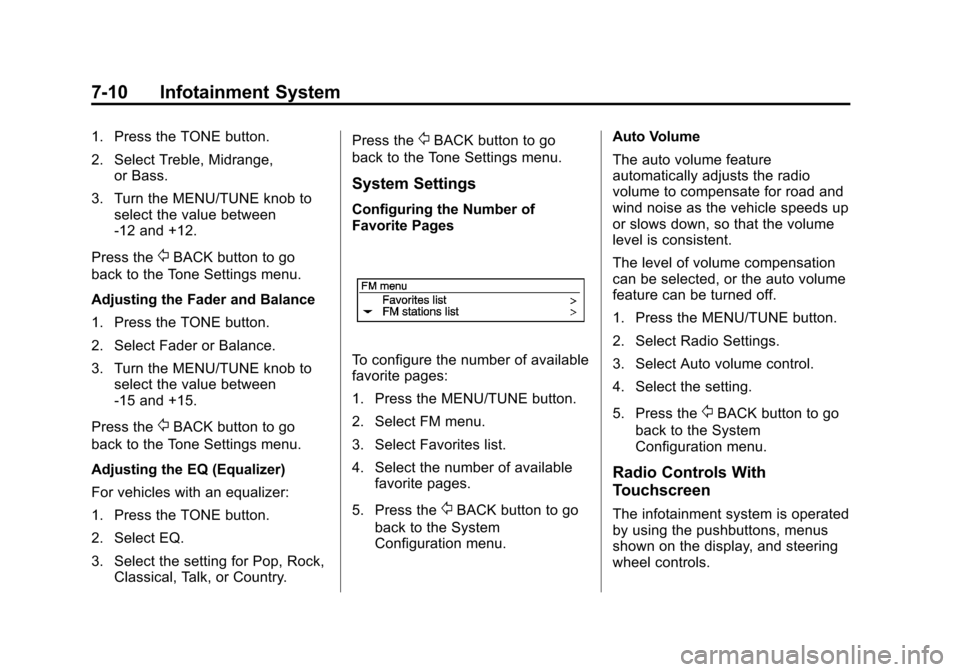
Configuring the Number of
Favorite Pages
To configure the number of available
favorite pages:
1. Press the MENU/TUNE button.
2. Select FM menu.
3. Select Favorites list.
4. Select the number of available favorite pages.
5. Press the
/BACK button to go
back to the System
Configuration menu. Auto Volume
The auto volume feature
automatically adjusts the radio
volume to compensate for road and
wind noise as the vehicle speeds up
or slows down, so that the volume
level is consistent.
The level of volume compensation
can be selected, or the auto volume
feature can be turned off.
1. Press the MENU/TUNE button.
2. Select Radio Settings.
3. Select Auto volume control.
4. Select the setting.
5. Press the
/BACK button to go
back to the System
Configuration menu.
Radio Controls With
Touchscreen
The infotainment system is operated
by using the pushbuttons, menus
shown on the display, and steering
wheel controls.
Page 144 of 382
Black plate (12,1)Chevrolet Sonic Owner Manual - 2013 - 2nd PrintReady - 10/11/12
7-12 Infotainment System
Radio
AM-FM Radio
Radio Controls Without
Touchscreen
The buttons used to control the
radio are:
P/VOL:Press to turn the radio on
and off.
RADIO/BAND: Press to choose
between AM, FM, and SiriusXM
®,
if equipped.
MENU/TUNE Knob: Turn to
navigate the available menus. Turn
to search for stations.
INFO: Press to display additional
information that may be available for
the current song.
SEEK
¨: Press to search for the
next station.
©SEEK: Press to search for the
previous station. FAV 1-2-3:
Press to open the
favorites list and select the
favorites page.
1−6: Press to select preset
stations.
RDS (Radio Data System)
The radio may have RDS. The RDS
feature is available for use only on
FM stations that broadcast RDS
information. This feature only works
when the information from the radio
station is available. In rare cases, a
radio station could broadcast
incorrect information that causes the
radio features to work improperly.
If this happens, contact the radio
station.
While the radio is tuned to an
FM-RDS station, the station name
or call letters display.
Radio Menus
Radio menus are available for AM
and FM.
Turn the MENU/TUNE knob to open
the main radio menu for that band.
Selecting a Band
Press the RADIO/BAND button to
choose AM, FM, or SiriusXM,
if equipped. The last station that
was playing starts playing again.
Selecting a Station
Seek Tuning
If the radio station is not known:
Briefly press SEEK
¨or©SEEK to
automatically search for the next
available station. If a station is not
found, the radio switches to a more
sensitive search level. If a station
still is not found, the frequency that
was last active begins to play.
If the radio station is known:
Press and hold SEEK
¨or©SEEK
until the station on the display is
reached, then release the button.
Favorites List
1. Turn the MENU/TUNE knob.
2. Select Favorites List.
3. Select the station.
Page 145 of 382
Black plate (13,1)Chevrolet Sonic Owner Manual - 2013 - 2nd PrintReady - 10/11/12
Infotainment System 7-13
Station Lists
1. Turn the MENU/TUNE knob.
2. Select AM or FM Station List. Allreceivable stations in the current
reception area are displayed. If a
station list has not been created,
an automatic station search
is done.
3. The first station in the list will play.
Category Lists
Most stations that broadcast an
RDS program type code specify the
type of programming transmitted.
Some stations change the program
type code depending on the
content. The system stores the RDS
stations sorted by program type in
the FM category list.
To search for a programming type
determined by station:
1. Turn the MENU/TUNE knob.
2. Select FM category list. A list of all available programming types
displays. 3. Select the programming type.
A list of stations that transmit
programming of the selected
type displays.
4. Select the station. The category lists are updated
when the station lists are
updated.
Updating Station and Category
Lists
If stations stored in the station list
can no longer be received:
1. Turn the MENU/TUNE knob.
2. Select Update AM or FM Station List, if the stations stored in the
station list are no longer
received. A station search will be
completed and the first station in
the updated list will play.
To cancel the station search, press
the MENU/TUNE button.Storing a Station as a Favorite
Stations from all bands can be
stored in any order in the favorite
pages.
Up to six stations can be stored in
each favorite page and the number
of available favorite pages can
be set.
Storing Stations
To store the station to a position in
the list, press the corresponding
button 1 to 6 until a beep is heard.
Retrieving Stations
Press the FAV 1-2-3 button to open
a favorite page or to switch to
another favorite page. Briefly press
one of the 1 to 6 buttons to retrieve
the station.
Radio Controls With
Touchscreen
Audio Source Menu
zVOLy(Volume): Press to
increase or decrease the volume.
Page 148 of 382
Black plate (16,1)Chevrolet Sonic Owner Manual - 2013 - 2nd PrintReady - 10/11/12
7-16 Infotainment System
Satellite Radio
SiriusXM®Satelite Radio
Service
SiriusXM is a satellite radio service
based in the 48 contiguous United
States and 10 Canadian provinces.
SiriusXM Satellite Radio has a wide
variety of programming and
commercial-free music, coast to
coast, and in digital-quality sound.
A service fee is required to receive
the SiriusXM service. For more
information, contact SiriusXM at
www.siriusxm.com or
1-866-635-2349 (U.S.), and
www.xmradio.ca or 1-877-209-0079
(Canada).
Finding a Channel
RADIO/BAND: Press to choose
XM. The display will show the
selection.
SEEK
¨: Press to seek the next
XM channel.
©SEEK: Press to seek the
previous XM channel. MENU/TUNE:
Turn to go to the
next XM channel.
Storing an SiriusXM Channel
Drivers are encouraged to set up
XM channel favorites while the
vehicle is not moving. Tune to
favorite stations using the
pushbuttons, favorites button, and
steering wheel controls. See
Defensive Driving on page 9‑2.
A maximum of 36 stations can be
programmed as favorites using the
six pushbuttons positioned below
the radio station frequency labels
and by using the radio favorites
page button (FAV 1-2-3 button).
Press the FAV 1-2-3 button to go
through up to six pages of favorites,
each having six favorite stations
available per page. Each page of
favorites can contain any
combination of AM, FM, or XM
channels. To store an XM channel
as a favorite:
1. Tune in the desired channel. 2. Press and release the FAV 1-2-3
button to display the page where
the channel is to be stored.
3. Press and hold one of the six numbered pushbuttons until a
beep sounds. When the
pushbutton is pressed and
released, the channel that was
set will return.
4. Repeat Steps 1−3 for each XM channel to be stored as a
favorite.
To set up the number of favorites
pages:
1. Press and hold FAV 1-2-3 until the radio setup menu displays.
2. Select the desired number of favorites pages by pressing the
pushbutton located below the
displayed page numbers.
3. Press FAV 1-2-3 to return to the original main radio screen
showing the radio frequency
tabs and to begin the process of
Page 156 of 382
Black plate (24,1)Chevrolet Sonic Owner Manual - 2013 - 2nd PrintReady - 10/11/12
7-24 Infotainment System
The iPod/iPhone charges while it is
connected to the vehicle if the
vehicle is in the ACC/ACCESSORY
or ON/RUN position. When the
vehicle is turned off, the iPod/
iPhone automatically powers off and
will not charge or draw power from
the vehicle's battery.
For more information on USB
usage, see“Audio System” in
Pictures and Movies (Audio System)
on page 7‑50 orPictures and
Movies (Picture System) on
page 7‑55 orPictures and Movies
(Movie System) on page 7‑56.
Auxiliary Devices
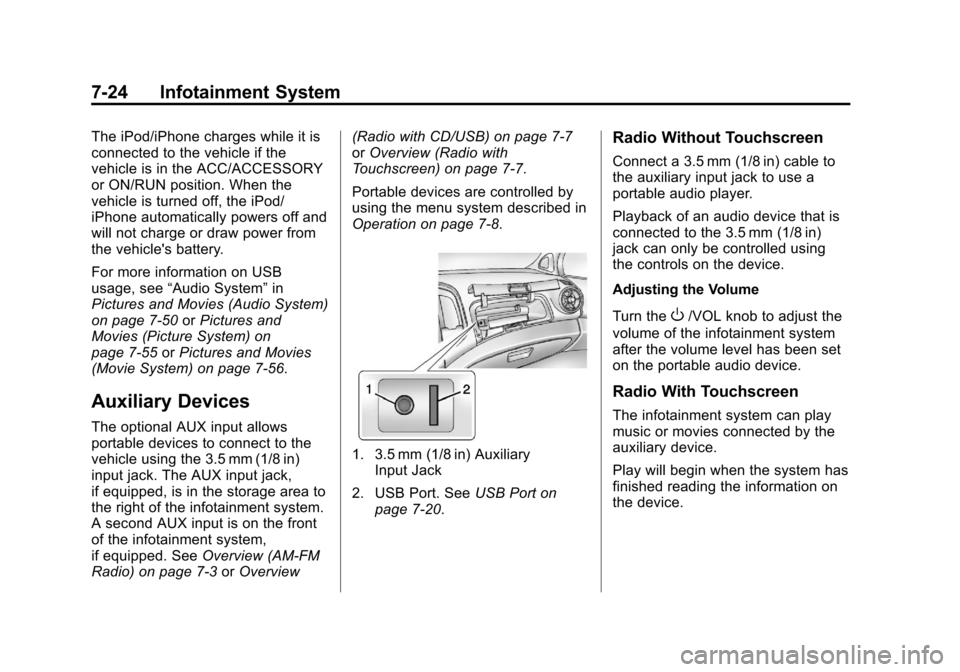
The optional AUX input allows
portable devices to connect to the
vehicle using the 3.5 mm (1/8 in)
input jack. The AUX input jack,
if equipped, is in the storage area to
the right of the infotainment system.
A second AUX input is on the front
of the infotainment system,
if equipped. See Overview (AM-FM
Radio) on page 7‑3 orOverview (Radio with CD/USB) on page 7‑7
or
Overview (Radio with
Touchscreen) on page 7‑7.
Portable devices are controlled by
using the menu system described in
Operation on page 7‑8.
1. 3.5 mm (1/8 in) Auxiliary Input Jack
2. USB Port. See USB Port on
page 7‑20.
Radio Without Touchscreen
Connect a 3.5 mm (1/8 in) cable to
the auxiliary input jack to use a
portable audio player.
Playback of an audio device that is
connected to the 3.5 mm (1/8 in)
jack can only be controlled using
the controls on the device.
Adjusting the Volume
Turn the
O/VOL knob to adjust the
volume of the infotainment system
after the volume level has been set
on the portable audio device.
Radio With Touchscreen
The infotainment system can play
music or movies connected by the
auxiliary device.
Play will begin when the system has
finished reading the information on
the device.