radio controls CHEVROLET SONIC 2013 2.G Owners Manual
[x] Cancel search | Manufacturer: CHEVROLET, Model Year: 2013, Model line: SONIC, Model: CHEVROLET SONIC 2013 2.GPages: 382, PDF Size: 6.71 MB
Page 1 of 382

Black plate (1,1)Chevrolet Sonic Owner Manual - 2013 - 2nd PrintReady - 10/11/12
2013 Chevrolet Sonic Owner ManualM
In Brief. . . . . . . . . . . . . . . . . . . . . . . . 1-1
Instrument Panel . . . . . . . . . . . . . . 1-2
Initial Drive Information . . . . . . . . 1-4
Vehicle Features . . . . . . . . . . . . . 1-14
Performance and Maintenance . . . . . . . . . . . . . . . . 1-18
Keys, Doors, and Windows . . . . . . . . . . . . . . . . . . . . 2-1
Keys and Locks . . . . . . . . . . . . . . . 2-1
Doors . . . . . . . . . . . . . . . . . . . . . . . . . . 2-8
Vehicle Security . . . . . . . . . . . . . . 2-10
Exterior Mirrors . . . . . . . . . . . . . . . 2-12
Interior Mirrors . . . . . . . . . . . . . . . . 2-15
Windows . . . . . . . . . . . . . . . . . . . . . 2-15
Roof . . . . . . . . . . . . . . . . . . . . . . . . . . 2-17
Seats and Restraints . . . . . . . . . 3-1
Head Restraints . . . . . . . . . . . . . . . 3-2
Front Seats . . . . . . . . . . . . . . . . . . . . 3-3
Rear Seats . . . . . . . . . . . . . . . . . . . . 3-7
Safety Belts . . . . . . . . . . . . . . . . . . . . 3-8
Airbag System . . . . . . . . . . . . . . . . 3-17
Child Restraints . . . . . . . . . . . . . . 3-30 Storage
. . . . . . . . . . . . . . . . . . . . . . . 4-1
Storage Compartments . . . . . . . . 4-1
Luggage/Load Locations . . . . . . . 4-1
Additional Storage Features . . . 4-2
Instruments and Controls . . . . 5-1
Controls . . . . . . . . . . . . . . . . . . . . . . . 5-2
Warning Lights, Gauges, and
Indicators . . . . . . . . . . . . . . . . . . . . 5-7
Information Displays . . . . . . . . . . 5-22
Vehicle Messages . . . . . . . . . . . . 5-25
Vehicle Personalization . . . . . . . 5-26
Lighting . . . . . . . . . . . . . . . . . . . . . . . 6-1
Exterior Lighting . . . . . . . . . . . . . . . 6-1
Interior Lighting . . . . . . . . . . . . . . . . 6-5
Lighting Features . . . . . . . . . . . . . . 6-6
Infotainment System . . . . . . . . . 7-1
Introduction . . . . . . . . . . . . . . . . . . . . 7-1
Radio . . . . . . . . . . . . . . . . . . . . . . . . . 7-12
Audio Players . . . . . . . . . . . . . . . . 7-18
Phone . . . . . . . . . . . . . . . . . . . . . . . . 7-26 Downloadable Applications . . . 7-45
Bluetooth Phone/Devices . . . . . 7-50
Trademarks and License
Agreements . . . . . . . . . . . . . . . . . 7-58
Climate Controls . . . . . . . . . . . . . 8-1
Climate Control Systems . . . . . . 8-1
Air Vents . . . . . . . . . . . . . . . . . . . . . . . 8-3
Maintenance . . . . . . . . . . . . . . . . . . . 8-4
Driving and Operating . . . . . . . . 9-1
Driving Information . . . . . . . . . . . . . 9-2
Starting and Operating . . . . . . . 9-13
Engine Exhaust . . . . . . . . . . . . . . 9-20
Automatic Transmission . . . . . . 9-21
Manual Transmission . . . . . . . . . 9-24
Brakes . . . . . . . . . . . . . . . . . . . . . . . 9-25
Ride Control Systems . . . . . . . . 9-28
Cruise Control . . . . . . . . . . . . . . . . 9-31
Fuel . . . . . . . . . . . . . . . . . . . . . . . . . . 9-33
Towing . . . . . . . . . . . . . . . . . . . . . . . 9-37
Conversions and Add-Ons . . . 9-38
Page 7 of 382
Black plate (1,1)Chevrolet Sonic Owner Manual - 2013 - 2nd PrintReady - 10/18/12
In Brief 1-1
In Brief
Instrument Panel
Instrument Panel . . . . . . . . . . . . . . 1-2
Initial Drive Information
Initial Drive Information . . . . . . . . 1-4
Starting the Engine . . . . . . . . . . . 1-4
Remote Keyless Entry (RKE)System . . . . . . . . . . . . . . . . . . . . . . 1-4
Remote Vehicle Start . . . . . . . . . 1-4
Door Locks . . . . . . . . . . . . . . . . . . . 1-5
Liftgate . . . . . . . . . . . . . . . . . . . . . . . . 1-6
Trunk Release . . . . . . . . . . . . . . . . 1-6
Windows . . . . . . . . . . . . . . . . . . . . . . 1-6
Seat Adjustment . . . . . . . . . . . . . . 1-7
Second Row Seats . . . . . . . . . . . 1-8
Head Restraint Adjustment . . . . 1-8
Safety Belts . . . . . . . . . . . . . . . . . . . 1-8
Passenger Sensing System . . . 1-9
Mirror Adjustment . . . . . . . . . . . . . 1-9
Steering Wheel Adjustment . . . . . . . . . . . . . . . . . 1-10
Interior Lighting . . . . . . . . . . . . . . 1-10
Exterior Lighting . . . . . . . . . . . . . 1-11
Windshield Wiper/Washer . . . . 1-11
Climate Controls . . . . . . . . . . . . . 1-12
Transmission . . . . . . . . . . . . . . . . 1-13
Vehicle Features
Radio(s) . . . . . . . . . . . . . . . . . . . . . 1-14
Satellite Radio . . . . . . . . . . . . . . . 1-15
Portable Audio Devices . . . . . . 1-15
Bluetooth
®. . . . . . . . . . . . . . . . . . . 1-15
Steering Wheel Controls . . . . . 1-16
Cruise Control . . . . . . . . . . . . . . . 1-16
Driver Information
Center (DIC) . . . . . . . . . . . . . . . 1-17
Power Outlets . . . . . . . . . . . . . . . 1-17
Sunroof . . . . . . . . . . . . . . . . . . . . . . 1-17
Performance and Maintenance
Traction Control System (TCS) . . . . . . . . . . . . . . 1-18
StabiliTrak
®System . . . . . . . . . 1-18
Tire Pressure Monitor . . . . . . . . 1-18
Tire Sealant and Compressor Kit . . . . . . . . . . . . . 1-19
Engine Oil Life System . . . . . . 1-19
Driving for Better Fuel Economy . . . . . . . . . . . . . . . . . . . 1-19
Roadside Assistance Program . . . . . . . . . . . . . . . . . . . . 1-20
OnStar
®. . . . . . . . . . . . . . . . . . . . . 1-20
Page 20 of 382
Black plate (14,1)Chevrolet Sonic Owner Manual - 2013 - 2nd PrintReady - 10/18/12
1-14 In Brief
Vehicle Features
Radio(s)
Radio Controls Without
Touchscreen
O/VOL:Press to turn the system
on or off.
Turn to increase or decrease the
volume.
When the system is on, press and
release to mute the system. Press
and release again to turn the sound
back on.
RADIO/BAND: Press to choose FM,
AM, or SiriusXM
®(if equipped).
SEEK
¨:
.Radio: Seeks the next station.
.CD: Select the next track or fast
forwards within a track.
©SEEK :
.Radio: Seeks the previous
station.
.CD: Select the previous track or
rewinds within a track.
MENU/TUNE: Turn to navigate the
available menus. Turn to search for
stations.
AUX or CD/AUX: Press to play a
CD when listening to the radio.
For more information about these
and other radio features, see
Operation on page 7‑8.
Storing a Favorite Station
Stations from all bands can be
stored in any order in the favorite
pages.
Up to six stations can be stored in
each favorite page and the number
of available favorite pages can
be set.
Storing Stations
To store the station to a position in
the list, press the corresponding
button 1 to 6 until a beep is heard. Retrieving Stations
Press the FAV 1-2-3 button to open
a favorite page or to switch to
another favorite page. Briefly press
one of the 1 to 6 buttons to retrieve
the station.
See
“Storing a Favorite Station”
under AM-FM Radio on page 7‑12.
Radio Controls With
Touchscreen
Audio Source Menu
zVOLy(Volume): Press to
increase or decrease the volume.
O(Power): Press and hold to turn
the system on and off.
D(Home Page): Press to enter
the Home Page.
Storing a Favorite Station
Stations from all bands can be
stored in any order in the favorite
pages.
Up to five stations can be stored in
each of the seven favorites pages.
Page 21 of 382
Black plate (15,1)Chevrolet Sonic Owner Manual - 2013 - 2nd PrintReady - 10/18/12
In Brief 1-15
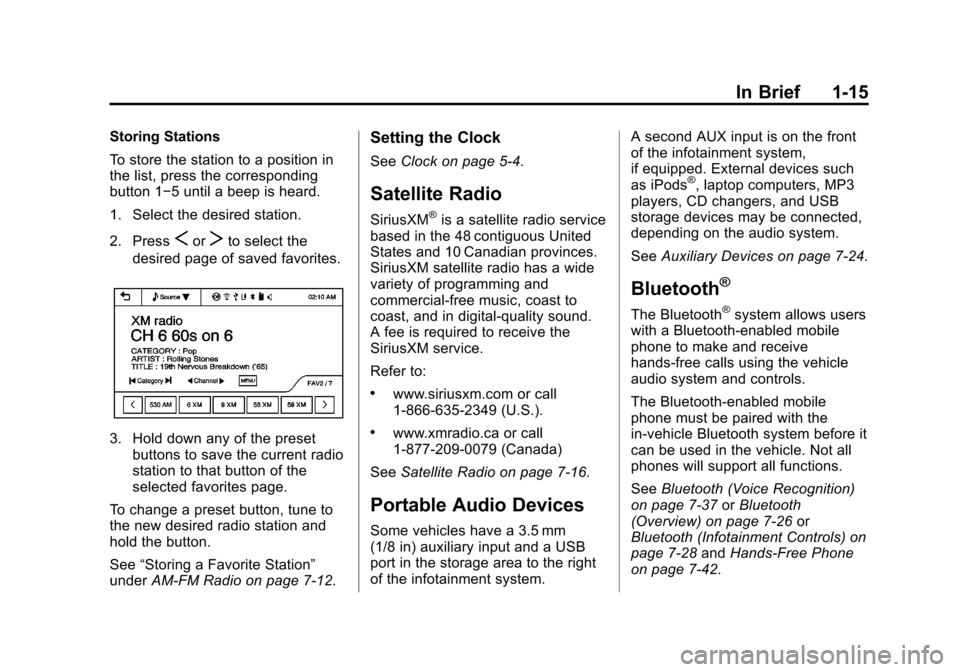
Storing Stations
To store the station to a position in
the list, press the corresponding
button 1−5 until a beep is heard.
1. Select the desired station.
2. Press
SorTto select the
desired page of saved favorites.
3. Hold down any of the preset buttons to save the current radio
station to that button of the
selected favorites page.
To change a preset button, tune to
the new desired radio station and
hold the button.
See “Storing a Favorite Station”
under AM-FM Radio on page 7‑12.
Setting the Clock
SeeClock on page 5‑4.
Satellite Radio
SiriusXM®is a satellite radio service
based in the 48 contiguous United
States and 10 Canadian provinces.
SiriusXM satellite radio has a wide
variety of programming and
commercial-free music, coast to
coast, and in digital-quality sound.
A fee is required to receive the
SiriusXM service.
Refer to:
.www.siriusxm.com or call
1-866-635-2349 (U.S.).
.www.xmradio.ca or call
1-877-209-0079 (Canada)
See Satellite Radio on page 7‑16.
Portable Audio Devices
Some vehicles have a 3.5 mm
(1/8 in) auxiliary input and a USB
port in the storage area to the right
of the infotainment system. A second AUX input is on the front
of the infotainment system,
if equipped. External devices such
as iPods
®, laptop computers, MP3
players, CD changers, and USB
storage devices may be connected,
depending on the audio system.
See Auxiliary Devices on page 7‑24.
Bluetooth®
The Bluetooth®system allows users
with a Bluetooth-enabled mobile
phone to make and receive
hands-free calls using the vehicle
audio system and controls.
The Bluetooth-enabled mobile
phone must be paired with the
in-vehicle Bluetooth system before it
can be used in the vehicle. Not all
phones will support all functions.
See Bluetooth (Voice Recognition)
on page 7‑37 orBluetooth
(Overview) on page 7‑26 or
Bluetooth (Infotainment Controls) on
page 7‑28 andHands-Free Phone
on page 7‑42.
Page 22 of 382
Black plate (16,1)Chevrolet Sonic Owner Manual - 2013 - 2nd PrintReady - 10/18/12
1-16 In Brief
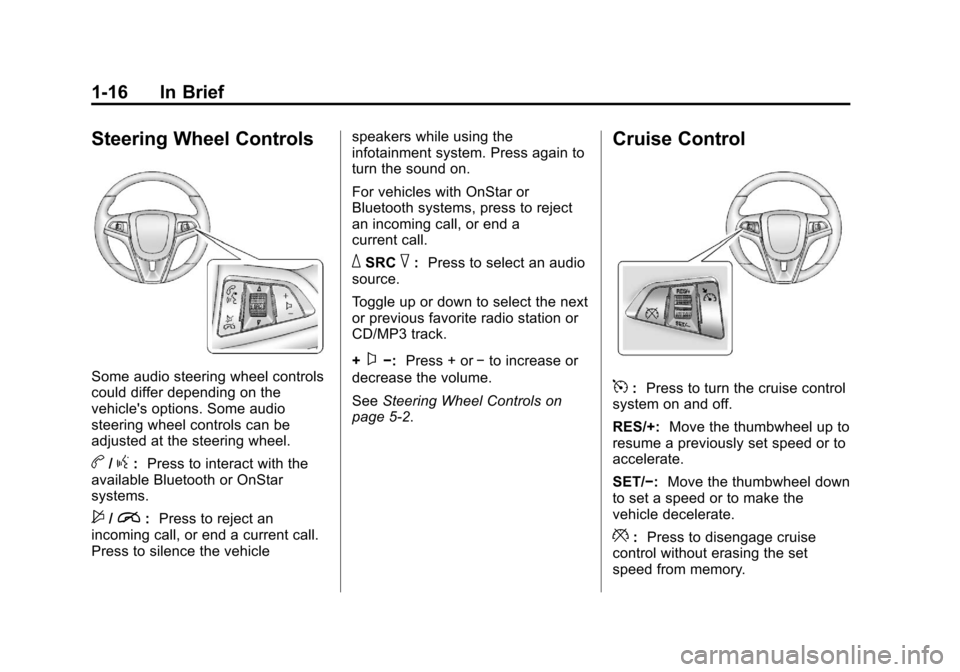
Steering Wheel Controls
Some audio steering wheel controls
could differ depending on the
vehicle's options. Some audio
steering wheel controls can be
adjusted at the steering wheel.
b/g:Press to interact with the
available Bluetooth or OnStar
systems.
$/i: Press to reject an
incoming call, or end a current call.
Press to silence the vehicle speakers while using the
infotainment system. Press again to
turn the sound on.
For vehicles with OnStar or
Bluetooth systems, press to reject
an incoming call, or end a
current call.
_SRC^:
Press to select an audio
source.
Toggle up or down to select the next
or previous favorite radio station or
CD/MP3 track.
+
x−: Press + or −to increase or
decrease the volume.
See Steering Wheel Controls on
page 5‑2.
Cruise Control
5: Press to turn the cruise control
system on and off.
RES/+: Move the thumbwheel up to
resume a previously set speed or to
accelerate.
SET/−: Move the thumbwheel down
to set a speed or to make the
vehicle decelerate.
*: Press to disengage cruise
control without erasing the set
speed from memory.
Page 96 of 382
Black plate (2,1)Chevrolet Sonic Owner Manual - 2013 - 2nd PrintReady - 10/11/12
5-2 Instruments and Controls
Controls
Steering Wheel
Adjustment
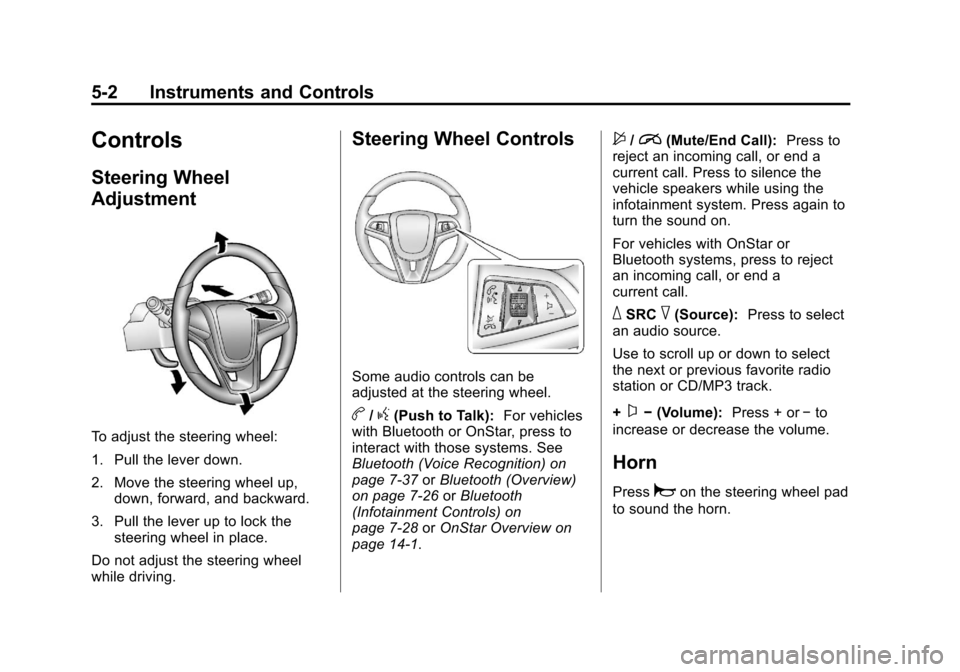
To adjust the steering wheel:
1. Pull the lever down.
2. Move the steering wheel up,down, forward, and backward.
3. Pull the lever up to lock the steering wheel in place.
Do not adjust the steering wheel
while driving.
Steering Wheel Controls
Some audio controls can be
adjusted at the steering wheel.
b/g(Push to Talk): For vehicles
with Bluetooth or OnStar, press to
interact with those systems. See
Bluetooth (Voice Recognition) on
page 7‑37 orBluetooth (Overview)
on page 7‑26 orBluetooth
(Infotainment Controls) on
page 7‑28 orOnStar Overview on
page 14‑1.
$/i(Mute/End Call): Press to
reject an incoming call, or end a
current call. Press to silence the
vehicle speakers while using the
infotainment system. Press again to
turn the sound on.
For vehicles with OnStar or
Bluetooth systems, press to reject
an incoming call, or end a
current call.
_SRC^(Source): Press to select
an audio source.
Use to scroll up or down to select
the next or previous favorite radio
station or CD/MP3 track.
+
x− (Volume): Press + or−to
increase or decrease the volume.
Horn
Pressaon the steering wheel pad
to sound the horn.
Page 98 of 382
Black plate (4,1)Chevrolet Sonic Owner Manual - 2013 - 2nd PrintReady - 10/11/12
5-4 Instruments and Controls
Rear Window Wiper/
Washer
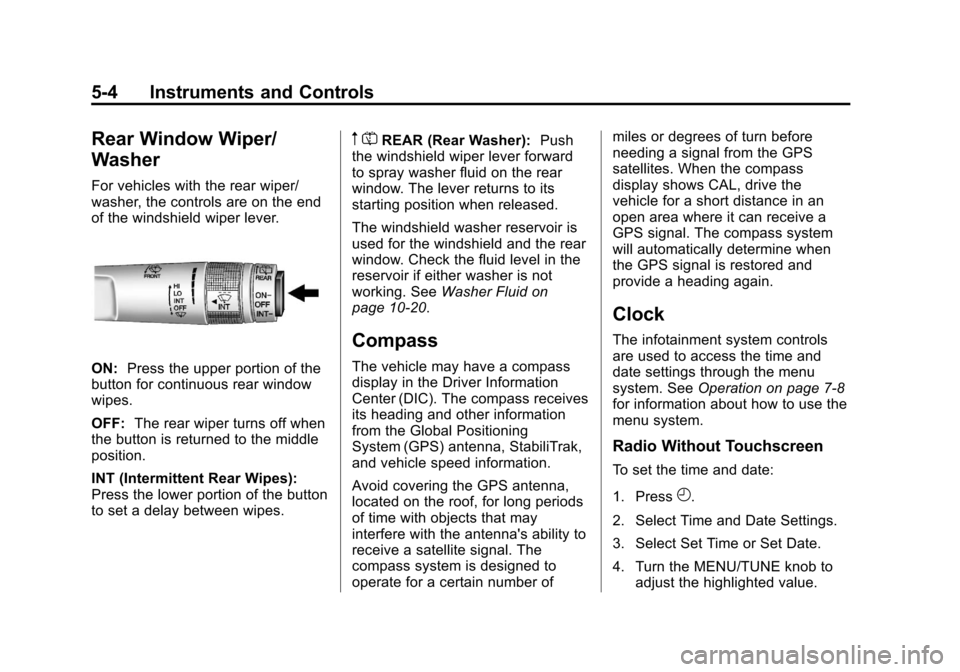
For vehicles with the rear wiper/
washer, the controls are on the end
of the windshield wiper lever.
ON:Press the upper portion of the
button for continuous rear window
wipes.
OFF: The rear wiper turns off when
the button is returned to the middle
position.
INT (Intermittent Rear Wipes):
Press the lower portion of the button
to set a delay between wipes.
m =REAR (Rear Washer): Push
the windshield wiper lever forward
to spray washer fluid on the rear
window. The lever returns to its
starting position when released.
The windshield washer reservoir is
used for the windshield and the rear
window. Check the fluid level in the
reservoir if either washer is not
working. See Washer Fluid on
page 10‑20.
Compass
The vehicle may have a compass
display in the Driver Information
Center (DIC). The compass receives
its heading and other information
from the Global Positioning
System (GPS) antenna, StabiliTrak,
and vehicle speed information.
Avoid covering the GPS antenna,
located on the roof, for long periods
of time with objects that may
interfere with the antenna's ability to
receive a satellite signal. The
compass system is designed to
operate for a certain number of miles or degrees of turn before
needing a signal from the GPS
satellites. When the compass
display shows CAL, drive the
vehicle for a short distance in an
open area where it can receive a
GPS signal. The compass system
will automatically determine when
the GPS signal is restored and
provide a heading again.
Clock
The infotainment system controls
are used to access the time and
date settings through the menu
system. See
Operation on page 7‑8
for information about how to use the
menu system.
Radio Without Touchscreen
To set the time and date:
1. Press
H.
2. Select Time and Date Settings.
3. Select Set Time or Set Date.
4. Turn the MENU/TUNE knob to adjust the highlighted value.
Page 99 of 382
Black plate (5,1)Chevrolet Sonic Owner Manual - 2013 - 2nd PrintReady - 10/11/12
Instruments and Controls 5-5
5. Press the MENU/TUNE knob toselect the next value.
6. To save the time or date and return to the Time and Date
Settings menu, press the
/
BACK button at any time or
press the MENU/TUNE knob
after adjusting the minutes
or year.
To set the 12/24 hour format:
1. Press
H.
2. Select Time and Date Settings.
3. Highlight Set Time Format.
4. Press the MENU/TUNE knob to select the 12 hour or 24 hour
display format.
To set the month and day format:
1. Press
H.
2. Select Time and Date Settings.
3. Highlight Set Date Format. 4. Press the MENU/TUNE knob to
select MM/DD/YYYY (month/
day/year), or DD/MM/YYYY
(day/month/year), or YYYY/MM/
DD (year/month/day).
Radio With Touchscreen
The infotainment system controls
are used to access the time and
date settings through the menu
system. See Operation on page 7‑8
for information about how to use the
menu system.
Setting the 12/24 Hour Format
1. PressD, and then press
settings.
2. Press time and date settings.
3. Select 12/24 HR Format.
4. Press
4.
Setting the Month and Day
Format
1. PressD, and then press
settings.
2. Press time and date settings. 3. Press
SorTto set the date
display to DD/MM/YYYY (day/
month/year), MM/DD/YYYY
(month/day/year), or YYYY/MM/
DD (year/month/day) display
format.
4. Press
4.
Setting the Time and Date
1. PressD, and then press
settings.
2. Press time and date settings, and then set time and date.
3. Press
yorzto adjust the
value.
4. Press
4.
Automatic Clock Sync
1. PressD, and then press
settings.
2. Press time and date settings, and then automatic clock sync.
Page 106 of 382
Black plate (12,1)Chevrolet Sonic Owner Manual - 2013 - 2nd PrintReady - 10/11/12
5-12 Instruments and Controls
If the word ON or the on symbol is
lit on the passenger airbag status
indicator, it means that the front
outboard passenger frontal airbag
and knee airbag are allowed to
inflate.
If the word OFF or the off symbol is
lit on the passenger airbag status
indicator, it means that the
passenger sensing system has
turned off the front outboard
passenger frontal airbag and knee
airbag.
If, after several seconds, both status
indicator lights remain on, or if there
are no lights at all, there may be a
problem with the lights or the
passenger sensing system. See
your dealer for service.
{WARNING
If the airbag readiness light ever
comes on and stays on, it means
that something may be wrong
with the airbag system. To help(Continued)
WARNING (Continued)
avoid injury to yourself or others,
have the vehicle serviced right
away. SeeAirbag Readiness
Light on page 5‑11 for more
information, including important
safety information.
Charging System Light
This light will come on briefly when
the ignition is turned on, and the
engine is not running, as a check to
show it is working.
It should go out when the engine is
started. If it stays on, or comes on
while driving, there may be a
problem with the electrical charging
system. Have it checked by your dealer. Driving while this light is on
could drain the battery. If a short
distance must be driven with the
light on, turn off all accessories,
such as the radio and air
conditioner, to help reduce the drain
on the battery.
Malfunction
Indicator Lamp
A computer system called OBD II
(On-Board Diagnostics-Second
Generation) monitors the operation
of the vehicle to ensure emissions
are at acceptable levels, helping to
maintain a clean environment. The
malfunction indicator lamp comes
on when the vehicle is placed in
ON/RUN, as a check to show it is
working. If it does not, have the
vehicle serviced by your dealer. See
Ignition Positions on page 9‑14
for
more information.
Page 120 of 382
Black plate (26,1)Chevrolet Sonic Owner Manual - 2013 - 2nd PrintReady - 10/11/12
5-26 Instruments and Controls
Vehicle
Personalization
Personalization Menu (Radio
Without Touchscreen)
The audio system controls are used
to access the personalization
menus for customizing vehicle
features.
CONFIG (Configuration):Press to
access the Configuration
Settings menu.
MENU/TUNE: Turn to scroll
through the menus. Press to enter
the menus and select the menu
items.
/BACK: Press to exit or move
backward in a menu.
Entering the Personalization
Menus
1. Press CONFIG to access the Configuration Settings menu.
2. Turn the MENU/TUNE knob to highlight Vehicle Settings. 3. Press MENU/TUNE to select the
Vehicle Settings menu.
The following list of menu items may
be available:
.Comfort and Convenience
.Climate and Air Quality
.Language
.Lighting
.Power Door Locks
.Remote Lock, Unlock, Start
.Return to Factory Settings
Turn the MENU/TUNE knob to
highlight the menu. Press MENU/
TUNE to select it. Each of the
menus is detailed in the following
information.
Comfort and Convenience
Select the Comfort and
Convenience menu and the
following will be displayed:
.Chime Volume
.Auto Wipe in Reverse Gear Chime Volume
This allows selection of the chime
volume level.
Press MENU/TUNE when Chime
Volume is highlighted. Turn the
MENU/TUNE knob to select Normal
or High. Press MENU/TUNE to
confirm and go back to the
last menu.
Auto Wipe in Reverse Gear
When on and the vehicle on, this
feature will turn the rear wipers on
when the vehicle is placed in
R (Reverse) when the front wipers
are on.
Press MENU/TUNE when Auto
Wipe in Reverse Gear is
highlighted. Turn the MENU/TUNE
knob to select On or Off. Press
MENU/TUNE to confirm and go
back to the last menu.
Language
Select the Language menu and the
following will be displayed:
.English