brake CHEVROLET SONIC 2014 2.G Service Manual
[x] Cancel search | Manufacturer: CHEVROLET, Model Year: 2014, Model line: SONIC, Model: CHEVROLET SONIC 2014 2.GPages: 400, PDF Size: 5.57 MB
Page 273 of 400
Black plate (23,1)Chevrolet Sonic Owner Manual (GMNA-Localizing-U.S./Canada-6081473) -
2014 - 2nd Edition - 8/19/13
Vehicle Care 10-23
brakes might need adjustment.
Adjust them by backing up and
firmly applying the brakes a few
times.
Replacing Brake System Parts
The braking system on a vehicle is
complex. Its many parts have to be
of top quality and work well together
if the vehicle is to have really good
braking. The vehicle was designed
and tested with top-quality brake
parts. When parts of the braking
system are replaced, be sure to get
new, approved replacement parts.
If this is not done, the brakes might
not work properly. For example,
installing disc brake pads that are
wrong for the vehicle, can change
the balance between the front and
rear brakes—for the worse. The
braking performance expected can
change in many other ways if the
wrong replacement brake parts are
installed.
Brake Fluid
The brake/clutch master cylinder
reservoir is filled with DOT 3 brake
fluid as indicated on the reservoir
cap. See Engine Compartment
Overview on page 10-6 for the
location of the reservoir.
There are only two reasons why the
fluid level in the reservoir might
go down:
.The fluid level goes down
because of normal brake lining
wear. When new linings are
installed, the fluid level goes
back up.
.A fluid leak in the brake/clutch
hydraulic system can also cause
a low fluid level. Have the brake/
clutch hydraulic system fixed, since a leak means that sooner
or later the brakes and/or clutch
will not work well.
Do not top off the brake/clutch fluid.
Adding fluid does not correct a leak.
If fluid is added when the linings are
worn, there will be too much fluid
when new brake linings are
installed. Add or remove brake fluid,
as necessary, only when work is
done on the brake/clutch hydraulic
system.
{Warning
If too much brake fluid is added, it
can spill on the engine and burn,
if the engine is hot enough. You
or others could be burned, and
the vehicle could be damaged.
Add brake fluid only when work is
done on the brake/clutch
hydraulic system.
Page 274 of 400
Black plate (24,1)Chevrolet Sonic Owner Manual (GMNA-Localizing-U.S./Canada-6081473) -
2014 - 2nd Edition - 8/19/13
10-24 Vehicle Care
When the brake/clutch fluid falls to a
low level, the brake warning light
comes on. SeeBrake System
Warning Light on page 5-15.
What to Add
Use only new DOT 3 brake fluid
from a sealed container. See
Recommended Fluids and
Lubricants on page 11-12.
Always clean the brake/clutch fluid
reservoir cap and the area around
the cap before removing it. This
helps keep dirt from entering the
reservoir.
{Warning
With the wrong kind of fluid in the
brake/clutch hydraulic system, the
brakes might not work well. This
could cause a crash. Always use
the proper brake/clutch fluid.
{Caution
.Using the wrong fluid can
badly damage brake/clutch
hydraulic system parts. For
example, just a few drops of
mineral-based oil, such as
engine oil, in the brake
hydraulic system can damage
brake hydraulic system parts
so badly that they will have to
be replaced. Do not let
someone put in the wrong
kind of fluid.
.If brake fluid is spilled on the
vehicle's painted surfaces,
the paint finish can be
damaged. Be careful not to
spill brake fluid on the
vehicle. If you do, wash it off
immediately.
Battery
Refer to the replacement number
shown on the original battery label
when a new battery is needed. See
Engine Compartment Overview on
page 10-6 for battery location.
{Warning
Battery posts, terminals, and
related accessories contain lead
and lead compounds, chemicals
known to the State of California to
cause cancer and reproductive
harm. Wash hands after handling.
Vehicle Storage
{Warning
Batteries have acid that can burn
you and gas that can explode.
You can be badly hurt if you are
not careful. See Jump Starting on
(Continued)
Page 275 of 400
Black plate (25,1)Chevrolet Sonic Owner Manual (GMNA-Localizing-U.S./Canada-6081473) -
2014 - 2nd Edition - 8/19/13
Vehicle Care 10-25
Warning (Continued)
page 10-75for tips on working
around a battery without
getting hurt.
Infrequent Usage: Remove the
black, negative (−) cable from the
battery to keep the battery from
running down.
Extended Storage: Remove the
black, negative (−) cable from the
battery or use a battery trickle
charger.
Starter Switch Check
{Warning
When you are doing this
inspection, the vehicle could
move suddenly. If the vehicle
moves, you or others could be
injured. 1. Before starting this check, be
sure there is enough room
around the vehicle.
2. Apply both the parking brake and the regular brake.
Do not use the accelerator
pedal, and be ready to turn off
the engine immediately if it
starts.
3. For automatic transmission vehicles, try to start the engine
in each gear. The vehicle should
start only in P (Park) or
N (Neutral). If the vehicle starts
in any other position, contact
your dealer for service.
For manual transmission
vehicles, put the shift lever in
Neutral, push the clutch pedal
down halfway, and try to start
the engine. The vehicle should
start only when the clutch pedal
is pushed down all the way to
the floor. If the vehicle starts
when the clutch pedal is not
pushed all the way down,
contact your dealer for service.
Automatic Transmission
Shift Lock Control
Function Check
{Warning
When you are doing this
inspection, the vehicle could
move suddenly. If the vehicle
moves, you or others could be
injured.
1. Before starting this check, be sure there is enough room
around the vehicle. It should be
parked on a level surface.
2. Apply the parking brake. Be ready to apply the regular brake
immediately if the vehicle begins
to move.
3. With the engine off, turn the ignition on, but do not start the
engine. Without applying the
regular brake, try to move the
shift lever out of P (Park) with
Page 276 of 400
Black plate (26,1)Chevrolet Sonic Owner Manual (GMNA-Localizing-U.S./Canada-6081473) -
2014 - 2nd Edition - 8/19/13
10-26 Vehicle Care
normal effort. If the shift lever
moves out of P (Park), contact
your dealer for service.
Ignition Transmission
Lock Check
While parked, and with the parking
brake set, try to turn the ignition to
LOCK/OFF in each shift lever
position.
.For automatic transmission
vehicles, the ignition should turn
to LOCK/OFF only when the
shift lever is in P (Park).
.For manual transmission
vehicles, the ignition should turn
to LOCK/OFF only when the
shift lever is in neutral.
On all vehicles, the ignition key
should come out only in LOCK/OFF.
Contact your dealer if service is
required.
Park Brake and P (Park)
Mechanism Check
{Warning
When you are doing this check,
the vehicle could begin to move.
You or others could be injured
and property could be damaged.
Make sure there is room in front
of the vehicle in case it begins to
roll. Be ready to apply the regular
brake at once should the vehicle
begin to move.
Park on a fairly steep hill, with the
vehicle facing downhill. Keeping
your foot on the regular brake, set
the parking brake.
.To check the parking brake's
holding ability: With the engine
running and the transmission in
N (Neutral), slowly remove foot
pressure from the regular brake
pedal. Do this until the vehicle is
held by the parking brake only.
.To check the P (Park)
mechanism's holding ability:
With the engine running, shift to
P (Park). Then release the
parking brake followed by the
regular brake.
Contact your dealer if service is
required.
Wiper Blade Replacement
Front Wiper Blade
Replacement
Windshield wiper blades should be
inspected for wear or cracking. See
the Maintenance Schedule on
page 11-2 for more information.
Replacement blades come in
different types and are removed in
different ways. For proper
windshield wiper blade length and
type, see Maintenance
Replacement Parts on page 11-14.
Page 284 of 400
Black plate (34,1)Chevrolet Sonic Owner Manual (GMNA-Localizing-U.S./Canada-6081473) -
2014 - 2nd Edition - 8/19/13
10-34 Vehicle Care
{Caution
Spilling liquid on any electrical
component on the vehicle may
damage it. Always keep the
covers on any electrical
component.
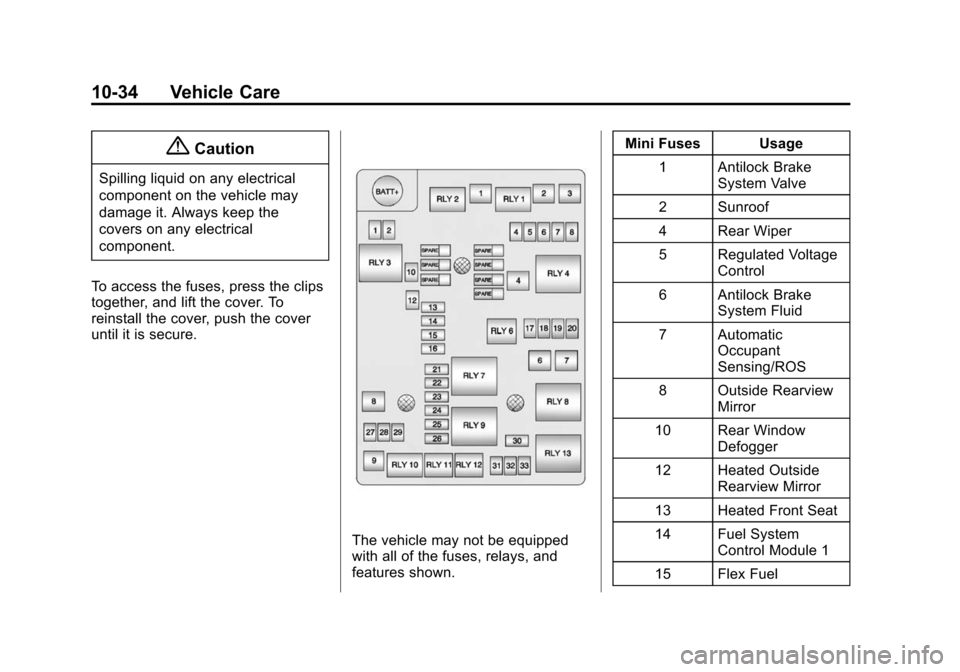
To access the fuses, press the clips
together, and lift the cover. To
reinstall the cover, push the cover
until it is secure.
The vehicle may not be equipped
with all of the fuses, relays, and
features shown. Mini Fuses Usage
1 Antilock Brake System Valve
2 Sunroof
4 Rear Wiper
5 Regulated Voltage Control
6 Antilock Brake System Fluid
7 Automatic Occupant
Sensing/ROS
8 Outside Rearview Mirror
10 Rear Window Defogger
12 Heated Outside Rearview Mirror
13 Heated Front Seat
14 Fuel System Control Module 1
15 Flex Fuel
Page 285 of 400
Black plate (35,1)Chevrolet Sonic Owner Manual (GMNA-Localizing-U.S./Canada-6081473) -
2014 - 2nd Edition - 8/19/13
Vehicle Care 10-35
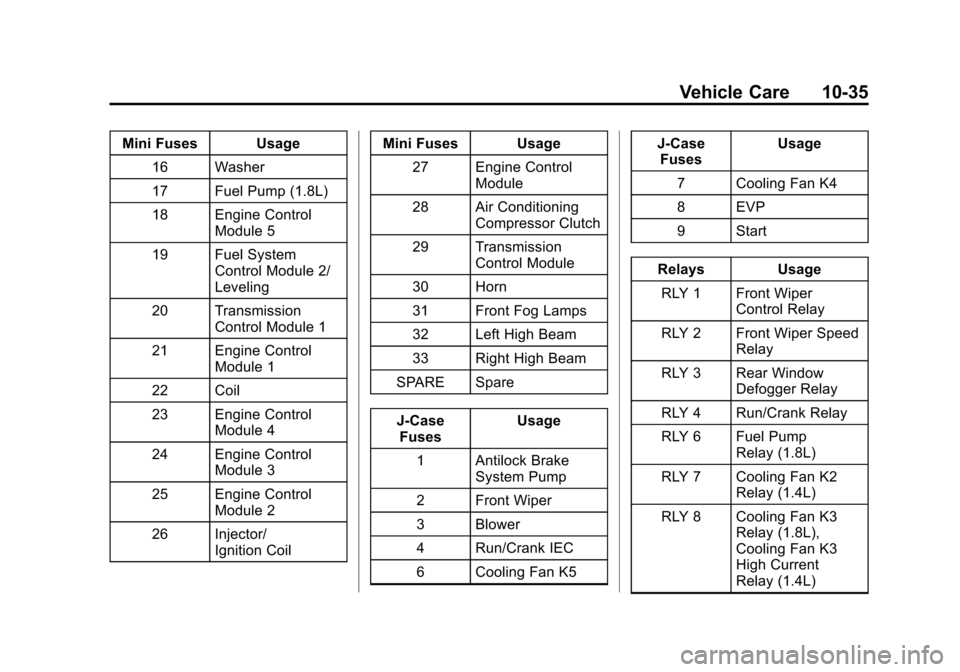
Mini Fuses Usage16 Washer
17 Fuel Pump (1.8L)
18 Engine Control Module 5
19 Fuel System Control Module 2/
Leveling
20 Transmission Control Module 1
21 Engine Control Module 1
22 Coil
23 Engine Control Module 4
24 Engine Control Module 3
25 Engine Control Module 2
26 Injector/ Ignition Coil Mini Fuses Usage
27 Engine Control Module
28 Air Conditioning Compressor Clutch
29 Transmission Control Module
30 Horn
31 Front Fog Lamps
32 Left High Beam
33 Right High Beam
SPARE Spare
J-Case Fuses Usage
1 Antilock Brake System Pump
2 Front Wiper
3 Blower
4 Run/Crank IEC
6 Cooling Fan K5 J-Case
Fuses Usage
7 Cooling Fan K4
8 EVP
9 Start
Relays Usage
RLY 1 Front Wiper Control Relay
RLY 2 Front Wiper Speed Relay
RLY 3 Rear Window Defogger Relay
RLY 4 Run/Crank Relay
RLY 6 Fuel Pump Relay (1.8L)
RLY 7 Cooling Fan K2 Relay (1.4L)
RLY 8 Cooling Fan K3 Relay (1.8L),
Cooling Fan K3
High Current
Relay (1.4L)
Page 286 of 400
Black plate (36,1)Chevrolet Sonic Owner Manual (GMNA-Localizing-U.S./Canada-6081473) -
2014 - 2nd Edition - 8/19/13
10-36 Vehicle Care
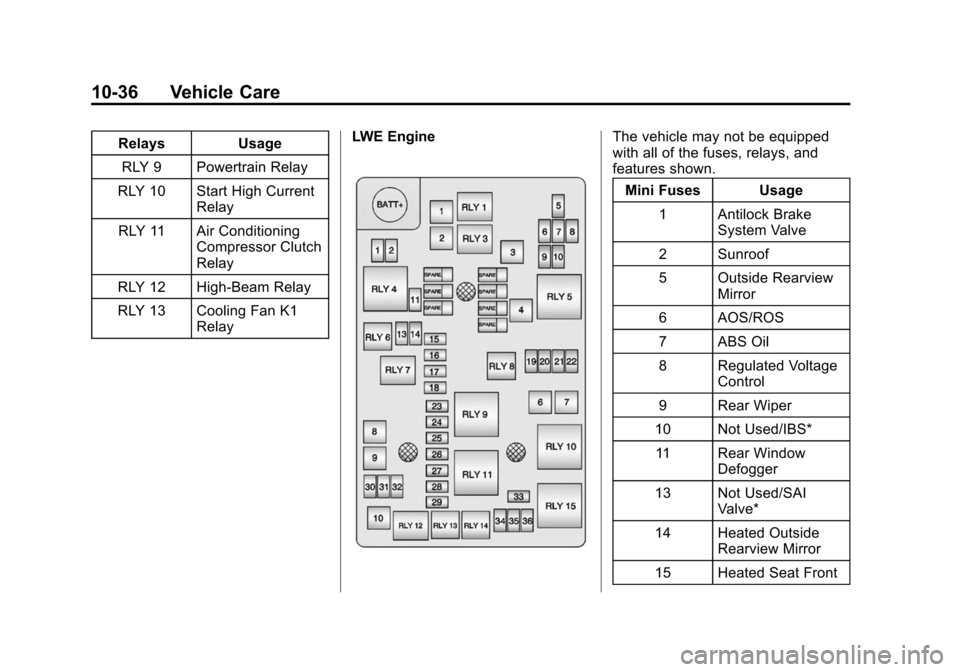
RelaysUsage
RLY 9 Powertrain Relay
RLY 10 Start High Current Relay
RLY 11 Air Conditioning Compressor Clutch
Relay
RLY 12 High-Beam Relay
RLY 13 Cooling Fan K1 Relay LWE EngineThe vehicle may not be equipped
with all of the fuses, relays, and
features shown.
Mini Fuses Usage
1 Antilock Brake System Valve
2 Sunroof
5 Outside Rearview Mirror
6 AOS/ROS
7 ABS Oil
8 Regulated Voltage Control
9 Rear Wiper
10 Not Used/IBS* 11 Rear Window Defogger
13 Not Used/SAI Valve*
14 Heated Outside Rearview Mirror
15 Heated Seat Front
Page 287 of 400
Black plate (37,1)Chevrolet Sonic Owner Manual (GMNA-Localizing-U.S./Canada-6081473) -
2014 - 2nd Edition - 8/19/13
Vehicle Care 10-37
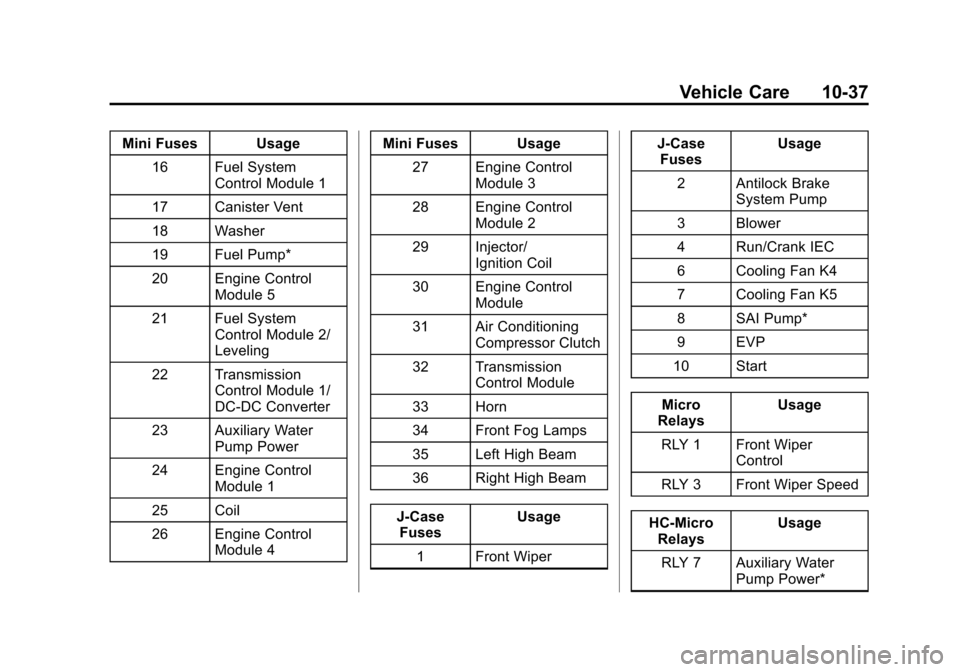
Mini Fuses Usage16 Fuel System Control Module 1
17 Canister Vent
18 Washer
19 Fuel Pump*
20 Engine Control Module 5
21 Fuel System Control Module 2/
Leveling
22 Transmission Control Module 1/
DC-DC Converter
23 Auxiliary Water Pump Power
24 Engine Control Module 1
25 Coil
26 Engine Control Module 4 Mini Fuses Usage
27 Engine Control Module 3
28 Engine Control Module 2
29 Injector/ Ignition Coil
30 Engine Control Module
31 Air Conditioning Compressor Clutch
32 Transmission Control Module
33 Horn
34 Front Fog Lamps
35 Left High Beam
36 Right High Beam
J-Case Fuses Usage
1 Front Wiper J-Case
Fuses Usage
2 Antilock Brake System Pump
3 Blower
4 Run/Crank IEC
6 Cooling Fan K4
7 Cooling Fan K5
8 SAI Pump*
9 EVP
10 Start
Micro
Relays Usage
RLY 1 Front Wiper Control
RLY 3 Front Wiper Speed
HC-Micro Relays Usage
RLY 7 Auxiliary Water Pump Power*
Page 302 of 400
Black plate (52,1)Chevrolet Sonic Owner Manual (GMNA-Localizing-U.S./Canada-6081473) -
2014 - 2nd Edition - 8/19/13
10-52 Vehicle Care
If the TPMS is not functioning
properly, it cannot detect or signal a
low tire condition. See your dealer
for service if the TPMS malfunction
light comes on and stays on.
TPMS Sensor Matching
Process
Each TPMS sensor has a unique
identification code. The identification
code needs to be matched to a new
tire/wheel position after rotating the
tires or replacing one or more of the
TPMS sensors. The TPMS sensor
matching process should also be
performed after replacing a spare
tire with a road tire containing the
TPMS sensor. The malfunction light
should go off at the next ignition
cycle. The sensors are matched to
the tire/wheel positions, using a
TPMS relearn tool, in the following
order: driver side front tire,
passenger side front tire, passenger
side rear tire, and driver side rear.
See your dealer for service or to
purchase a relearn tool.There are two minutes to match the
first tire/wheel position, and
five minutes overall to match all four
tire/wheel positions. If it takes
longer, the matching process stops
and must be restarted.
The TPMS sensor matching
process is:
1. Set the parking brake.
2. Turn the ignition to ON/RUN with
the engine off.
3. Press the MENU button to display the menu items in the
Driver Information Center (DIC).
4. Use the thumbwheel to scroll to the Tire Learn menu item
screen.
5. Press and hold the SET/CLR button to begin the sensor
matching process.
6. The horn sounds twice to signal the receiver is in relearn mode
and the TIRE LEARN message
displays on the DIC screen. 7. Start with the driver side
front tire.
8. Place the relearn tool against the tire sidewall, near the valve
stem. Then press the button to
activate the TPMS sensor.
A horn chirp confirms that the
sensor identification code has
been matched to this tire and
wheel position.
9. Proceed to the passenger side front tire, and repeat the
procedure in Step 8.
10. Proceed to the passenger side rear tire, and repeat the
procedure in Step 8.
11. Proceed to the driver side rear tire, and repeat the procedure
in Step 8. The horn sounds two
times to indicate the sensor
identification code has been
matched to the driver side rear
tire, and the TPMS sensor
matching process is no longer
active. The TIRE LEARN
message on the DIC display
screen goes off.
Page 305 of 400
Black plate (55,1)Chevrolet Sonic Owner Manual (GMNA-Localizing-U.S./Canada-6081473) -
2014 - 2nd Edition - 8/19/13
Vehicle Care 10-55
equipped, be replaced after six
years, regardless of tread wear. The
tire manufacturer date is the last
four digits of the DOT Tire
Identification Number (TIN) which is
molded into one side of the tire
sidewall. The first two digits
represent the week (01–52) and the
last two digits, the year. For
example, the third week of the year
2010 would have a four-digit DOT
date of 0310.
Vehicle Storage
Tires age when stored normally
mounted on a parked vehicle. Park
a vehicle that will be stored for at
least a month in a cool, dry, clean
area away from direct sunlight to
slow aging. This area should be free
of grease, gasoline, or other
substances that can deteriorate
rubber.
Parking for an extended period can
cause flat spots on the tires that
may result in vibrations while
driving. When storing a vehicle forat least a month, remove the tires or
raise the vehicle to reduce the
weight from the tires.
Buying New Tires
GM has developed and matched
specific tires for the vehicle. The
original equipment tires installed
were designed to meet General
Motors Tire Performance Criteria
Specification (TPC Spec)
system rating. When
replacement tires are needed,
GM strongly recommends
buying tires with the same TPC
Spec rating.
GM's exclusive TPC Spec
system considers over a dozen
critical specifications that impact
the overall performance of the
vehicle, including brake system
performance, ride and handling,
traction control, and tire
pressure monitoring
performance. GM's TPC Spec
number is molded onto the tire's
sidewall near the tire size. If the
tires have an all-season tread
design, the TPC Spec number
will be followed by MS for mud
and snow. See
Tire Sidewall
Labeling on page 10-42.
GM recommends replacing worn
tires in complete sets of four.
Uniform tread depth on all tires
will help to maintain the
performance of the vehicle.
Braking and handling
performance may be adversely
affected if all the tires are not
replaced at the same time.
If proper rotation and
maintenance have been done,
all four tires should wear out at
about the same time. See Tire
Rotation on page 10-53.
However, if it is necessary to
replace only one axle set of
worn tires, place the new tires
on the rear axle.