lock CHEVROLET SONIC 2016 2.G Manual Online
[x] Cancel search | Manufacturer: CHEVROLET, Model Year: 2016, Model line: SONIC, Model: CHEVROLET SONIC 2016 2.GPages: 353, PDF Size: 7.74 MB
Page 225 of 353
Chevrolet Sonic Owner Manual (GMNA-Localizing-U.S/Canada-9085902) -
2016 - CRC - 5/27/15
224 Vehicle Care
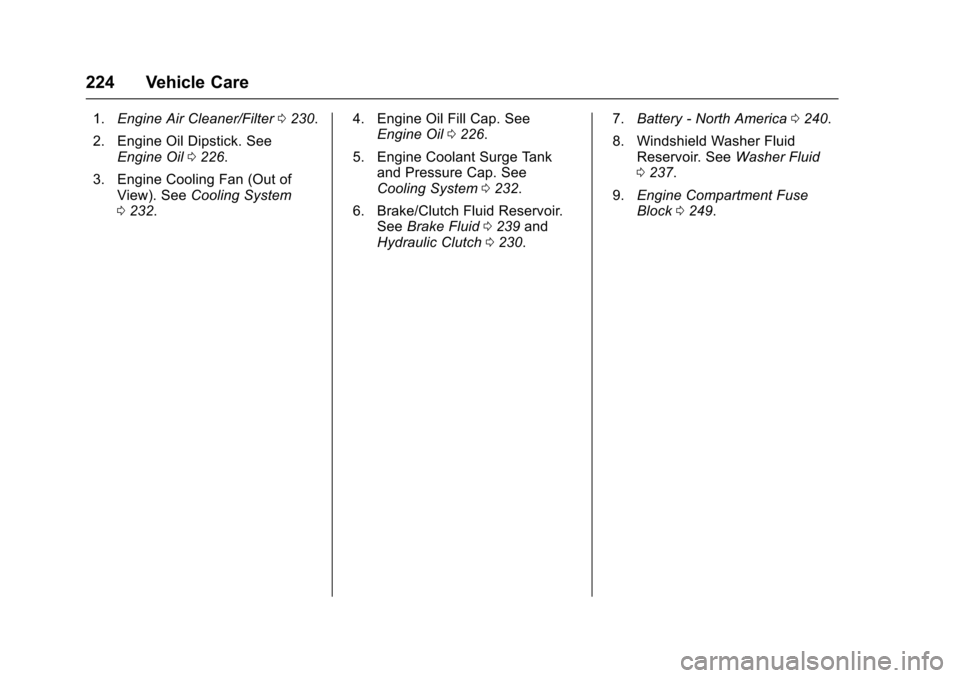
1.Engine Air Cleaner/Filter 0230.
2. Engine Oil Dipstick. See Engine Oil 0226.
3. Engine Cooling Fan (Out of View). See Cooling System
0 232. 4. Engine Oil Fill Cap. See
Engine Oil 0226.
5. Engine Coolant Surge Tank and Pressure Cap. See
Cooling System 0232.
6. Brake/Clutch Fluid Reservoir. See Brake Fluid 0239 and
Hydraulic Clutch 0230. 7.
Battery - North America 0240.
8. Windshield Washer Fluid Reservoir. See Washer Fluid
0 237.
9. Engine Compartment Fuse
Block 0249.
Page 227 of 353
Chevrolet Sonic Owner Manual (GMNA-Localizing-U.S/Canada-9085902) -
2016 - CRC - 5/27/15
226 Vehicle Care
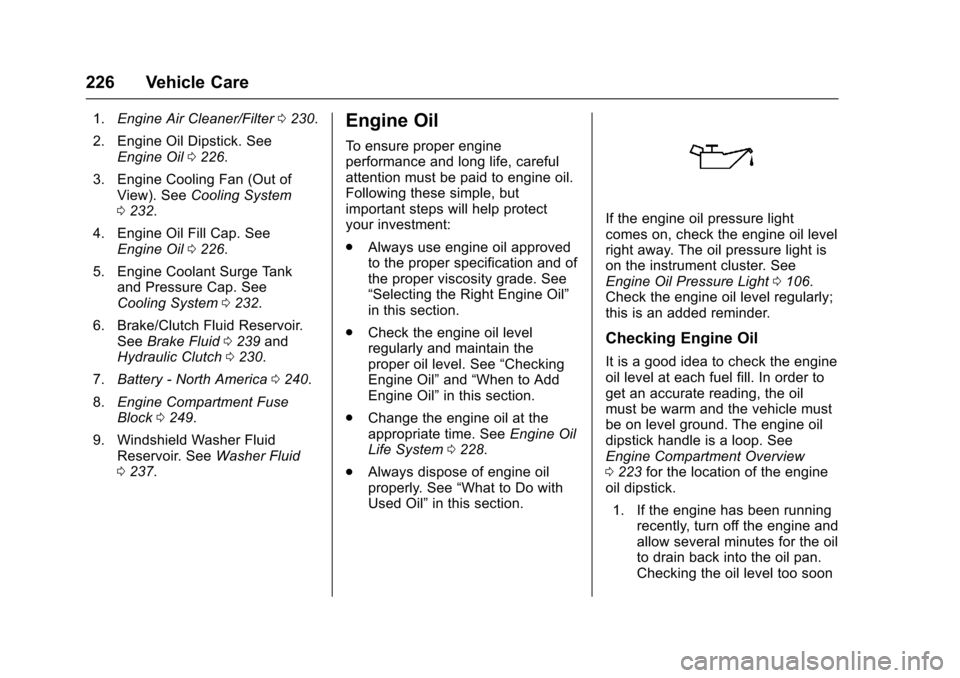
1.Engine Air Cleaner/Filter 0230.
2. Engine Oil Dipstick. See Engine Oil 0226.
3. Engine Cooling Fan (Out of View). See Cooling System
0 232.
4. Engine Oil Fill Cap. See Engine Oil 0226.
5. Engine Coolant Surge Tank and Pressure Cap. See
Cooling System 0232.
6. Brake/Clutch Fluid Reservoir. See Brake Fluid 0239 and
Hydraulic Clutch 0230.
7. Battery - North America 0240.
8. Engine Compartment Fuse
Block 0249.
9. Windshield Washer Fluid Reservoir. See Washer Fluid
0 237.Engine Oil
To ensure proper engine
performance and long life, careful
attention must be paid to engine oil.
Following these simple, but
important steps will help protect
your investment:
.
Always use engine oil approved
to the proper specification and of
the proper viscosity grade. See
“Selecting the Right Engine Oil”
in this section.
. Check the engine oil level
regularly and maintain the
proper oil level. See “Checking
Engine Oil” and“When to Add
Engine Oil” in this section.
. Change the engine oil at the
appropriate time. See Engine Oil
Life System 0228.
. Always dispose of engine oil
properly. See “What to Do with
Used Oil” in this section.
If the engine oil pressure light
comes on, check the engine oil level
right away. The oil pressure light is
on the instrument cluster. See
Engine Oil Pressure Light 0106.
Check the engine oil level regularly;
this is an added reminder.
Checking Engine Oil
It is a good idea to check the engine
oil level at each fuel fill. In order to
get an accurate reading, the oil
must be warm and the vehicle must
be on level ground. The engine oil
dipstick handle is a loop. See
Engine Compartment Overview
0 223 for the location of the engine
oil dipstick.
1. If the engine has been running recently, turn off the engine and
allow several minutes for the oil
to drain back into the oil pan.
Checking the oil level too soon
Page 236 of 353
Chevrolet Sonic Owner Manual (GMNA-Localizing-U.S/Canada-9085902) -
2016 - CRC - 5/27/15
Vehicle Care 235
Caution
In cold weather, water can freeze
and crack the engine, radiator,
heater core, and other parts. Use
the recommended coolant and
the proper coolant mixture.
{Warning
You can be burned if you spill
coolant on hot engine parts.
Coolant contains ethylene glycol
and it will burn if the engine parts
are hot enough. Do not spill
coolant on a hot engine.
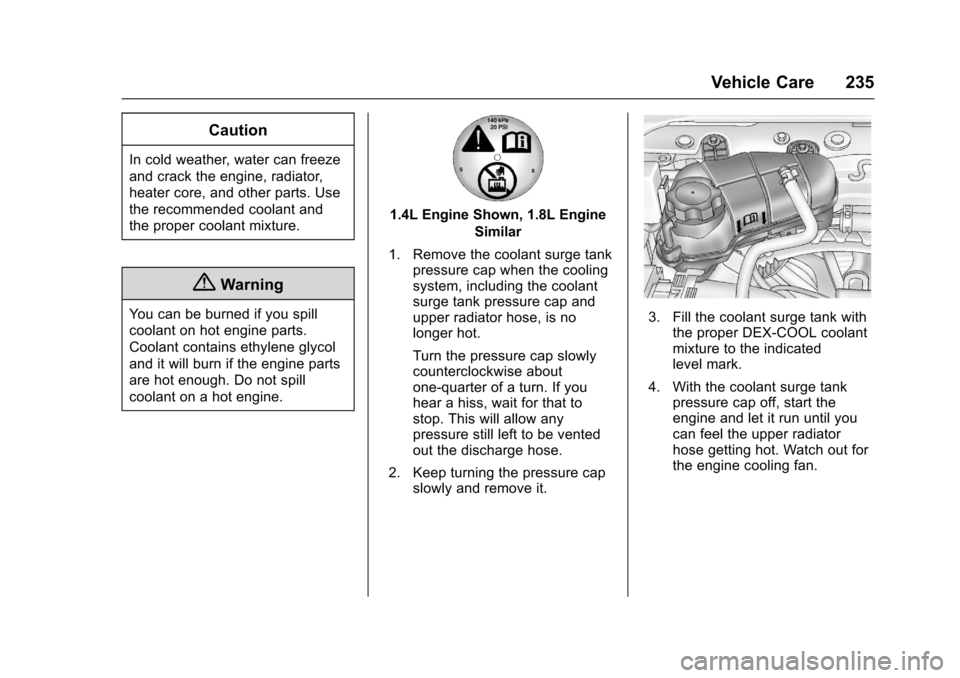
1.4L Engine Shown, 1.8L EngineSimilar
1. Remove the coolant surge tank pressure cap when the cooling
system, including the coolant
surge tank pressure cap and
upper radiator hose, is no
longer hot.
Turn the pressure cap slowly
counterclockwise about
one-quarter of a turn. If you
hear a hiss, wait for that to
stop. This will allow any
pressure still left to be vented
out the discharge hose.
2. Keep turning the pressure cap slowly and remove it.
3. Fill the coolant surge tank withthe proper DEX-COOL coolant
mixture to the indicated
level mark.
4. With the coolant surge tank pressure cap off, start the
engine and let it run until you
can feel the upper radiator
hose getting hot. Watch out for
the engine cooling fan.
Page 242 of 353
Chevrolet Sonic Owner Manual (GMNA-Localizing-U.S/Canada-9085902) -
2016 - CRC - 5/27/15
Vehicle Care 241
For manual transmission
vehicles, put the shift lever in
Neutral, push the clutch pedal
down halfway, and try to start
the engine. The vehicle should
start only when the clutch
pedal is pushed down all the
way to the floor. If the vehicle
starts when the clutch pedal is
not pushed all the way down,
contact your dealer for service.
Automatic Transmission
Shift Lock Control
Function Check
{Warning
When you are doing this
inspection, the vehicle could
move suddenly. If the vehicle
moves, you or others could be
injured.
1. Before starting this check, be sure there is enough room
around the vehicle. It should be
parked on a level surface. 2. Apply the parking brake. Be
ready to apply the regular
brake immediately if the vehicle
begins to move.
3. With the engine off, turn the ignition on, but do not start the
engine. Without applying the
regular brake, try to move the
shift lever out of P (Park) with
normal effort. If the shift lever
moves out of P (Park), contact
your dealer for service.
Ignition Transmission
Lock Check
While parked, and with the parking
brake set, try to turn the ignition to
LOCK/OFF in each shift lever
position.
.For automatic transmission
vehicles, the ignition should turn
to LOCK/OFF only when the
shift lever is in P (Park).
. For manual transmission
vehicles, the ignition should turn
to LOCK/OFF only when the
shift lever is in neutral. On all vehicles, the ignition key
should come out only in LOCK/OFF.
Contact your dealer if service is
required.
Park Brake and P (Park)
Mechanism Check
{Warning
When you are doing this check,
the vehicle could begin to move.
You or others could be injured
and property could be damaged.
Make sure there is room in front
of the vehicle in case it begins to
roll. Be ready to apply the regular
brake at once should the vehicle
begin to move.
Park on a fairly steep hill, with the
vehicle facing downhill. Keeping
your foot on the regular brake, set
the parking brake.
. To check the parking brake's
holding ability: With the engine
running and the transmission in
N (Neutral), slowly remove foot
Page 243 of 353
Chevrolet Sonic Owner Manual (GMNA-Localizing-U.S/Canada-9085902) -
2016 - CRC - 5/27/15
242 Vehicle Care
pressure from the regular brake
pedal. Do this until the vehicle is
held by the parking brake only.
. To check the P (Park)
mechanism's holding ability:
With the engine running, shift to
P (Park). Then release the
parking brake followed by the
regular brake.
Contact your dealer if service is
required.
Wiper Blade Replacement
Front Wiper Blade
Replacement
Windshield wiper blades should be
inspected for wear or cracking. See
the Maintenance Schedule 0302 for
more information.
Replacement blades come in
different types and are removed in
different ways. For proper
windshield wiper blade length and
type, see Maintenance
Replacement Parts 0312.
Caution
Allowing the wiper arm to touch
the windshield when no wiper
blade is installed could damage
the windshield. Any damage that
occurs would not be covered by
the vehicle warranty. Do not allow
the wiper arm to touch the
windshield.
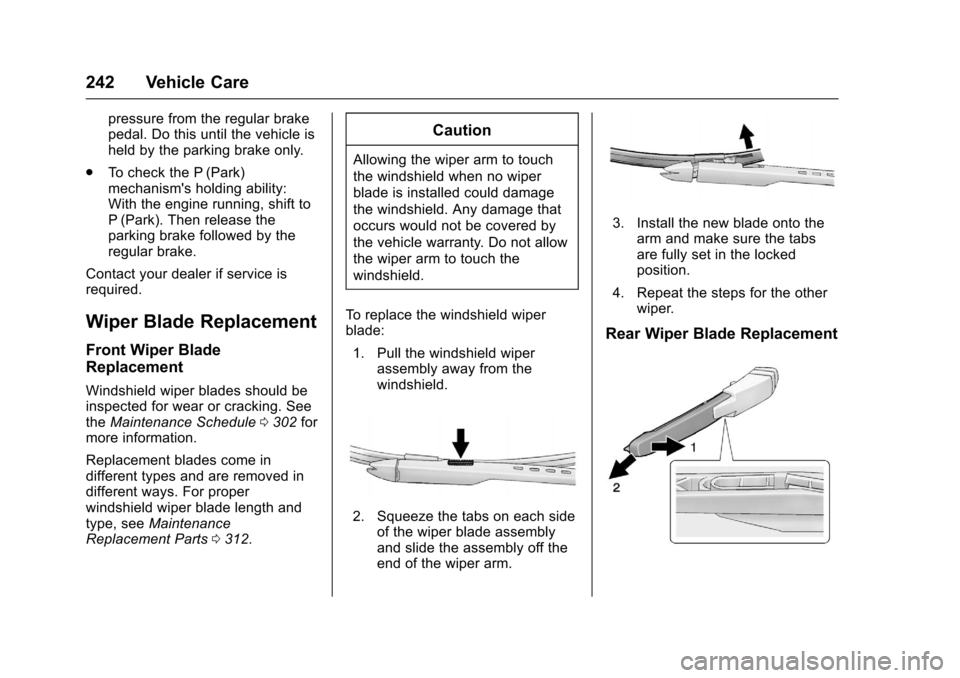
To replace the windshield wiper
blade: 1. Pull the windshield wiper assembly away from the
windshield.
2. Squeeze the tabs on each sideof the wiper blade assembly
and slide the assembly off the
end of the wiper arm.
3. Install the new blade onto the
arm and make sure the tabs
are fully set in the locked
position.
4. Repeat the steps for the other wiper.
Rear Wiper Blade Replacement
Page 245 of 353
Chevrolet Sonic Owner Manual (GMNA-Localizing-U.S/Canada-9085902) -
2016 - CRC - 5/27/15
244 Vehicle Care
Headlamps, Front Turn
Signal and Parking
Lamps
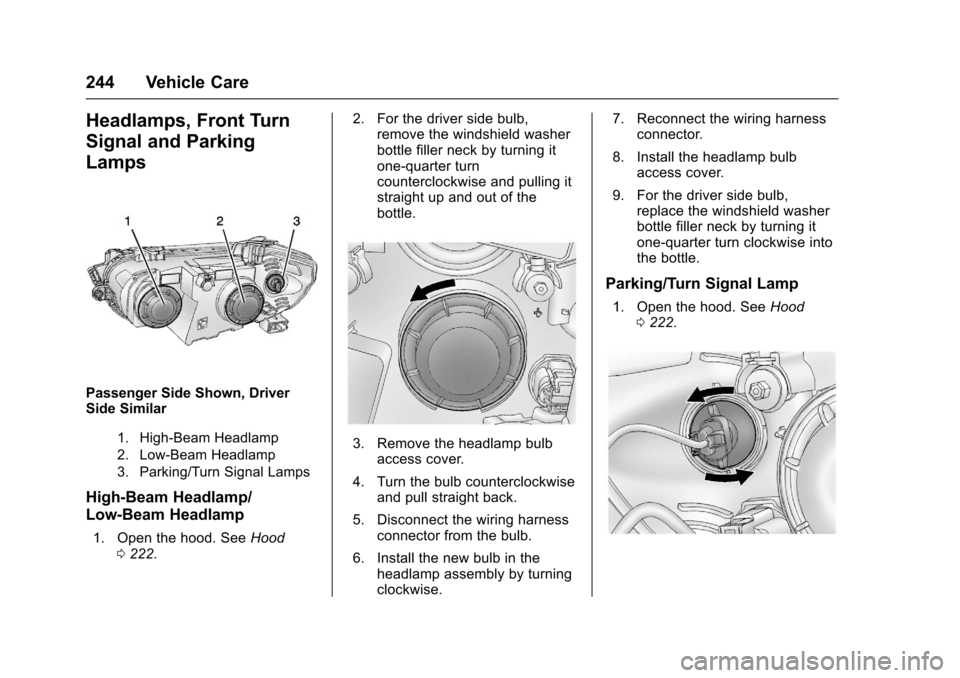
Passenger Side Shown, Driver
Side Similar
1. High-Beam Headlamp
2. Low-Beam Headlamp
3. Parking/Turn Signal Lamps
High-Beam Headlamp/
Low-Beam Headlamp
1. Open the hood. SeeHood
0 222. 2. For the driver side bulb,
remove the windshield washer
bottle filler neck by turning it
one-quarter turn
counterclockwise and pulling it
straight up and out of the
bottle.
3. Remove the headlamp bulb
access cover.
4. Turn the bulb counterclockwise and pull straight back.
5. Disconnect the wiring harness connector from the bulb.
6. Install the new bulb in the headlamp assembly by turning
clockwise. 7. Reconnect the wiring harness
connector.
8. Install the headlamp bulb access cover.
9. For the driver side bulb, replace the windshield washer
bottle filler neck by turning it
one-quarter turn clockwise into
the bottle.
Parking/Turn Signal Lamp
1. Open the hood. See Hood
0 222.
Page 246 of 353
Chevrolet Sonic Owner Manual (GMNA-Localizing-U.S/Canada-9085902) -
2016 - CRC - 5/27/15
Vehicle Care 245
2. Remove the parking/turn signallamp bulb socket from the
headlamp assembly by turning
counterclockwise.
3. Remove the bulb from the bulb socket by pulling it straight out.
4. Install the new bulb in the bulb socket.
5. Install the bulb socket into the headlamp assembly by turning
clockwise.
Fog Lamps (LS, LT,
and LTZ)
To replace the front fog lamp bulb:
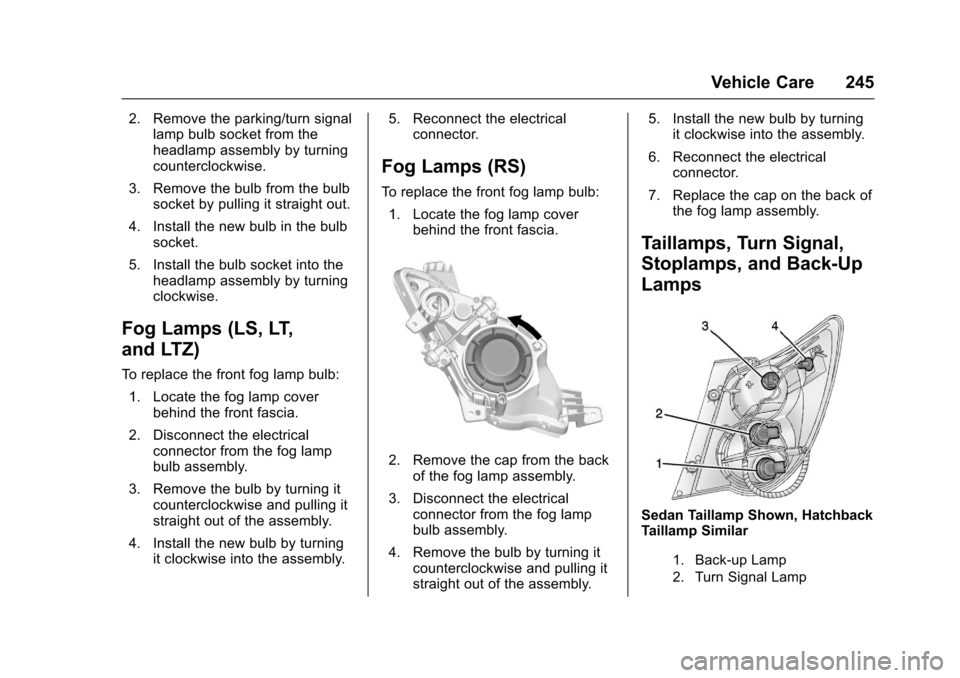
1. Locate the fog lamp cover behind the front fascia.
2. Disconnect the electrical connector from the fog lamp
bulb assembly.
3. Remove the bulb by turning it counterclockwise and pulling it
straight out of the assembly.
4. Install the new bulb by turning it clockwise into the assembly. 5. Reconnect the electrical
connector.
Fog Lamps (RS)
To replace the front fog lamp bulb:
1. Locate the fog lamp cover behind the front fascia.
2. Remove the cap from the backof the fog lamp assembly.
3. Disconnect the electrical connector from the fog lamp
bulb assembly.
4. Remove the bulb by turning it counterclockwise and pulling it
straight out of the assembly. 5. Install the new bulb by turning
it clockwise into the assembly.
6. Reconnect the electrical connector.
7. Replace the cap on the back of the fog lamp assembly.
Taillamps, Turn Signal,
Stoplamps, and Back-Up
Lamps
Sedan Taillamp Shown, Hatchback
Taillamp Similar
1. Back-up Lamp
2. Turn Signal Lamp
Page 247 of 353
Chevrolet Sonic Owner Manual (GMNA-Localizing-U.S/Canada-9085902) -
2016 - CRC - 5/27/15
246 Vehicle Care
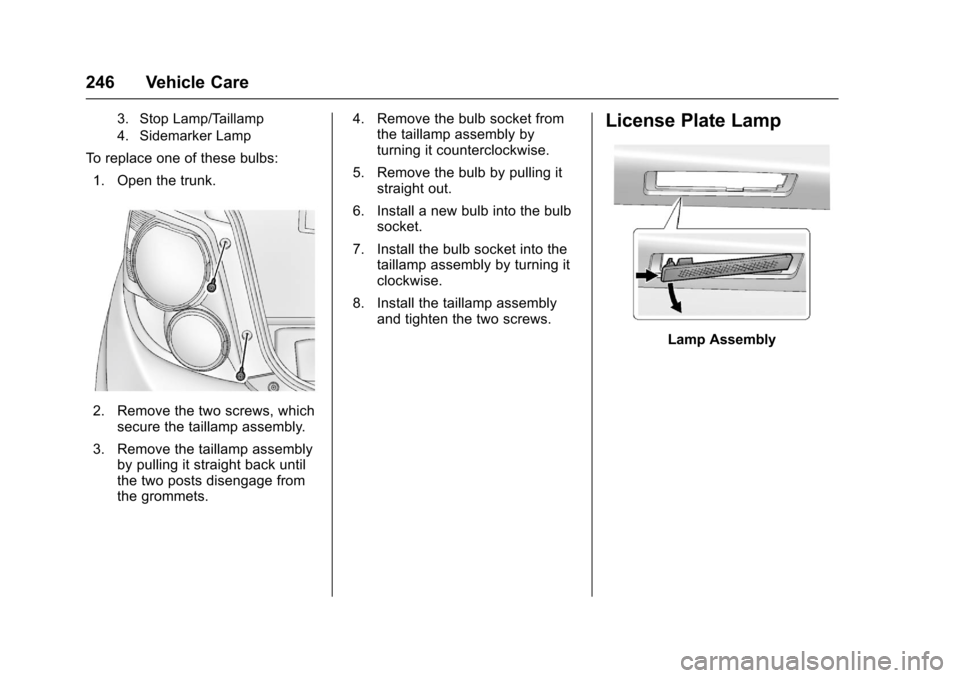
3. Stop Lamp/Taillamp
4. Sidemarker Lamp
To replace one of these bulbs:1. Open the trunk.
2. Remove the two screws, which secure the taillamp assembly.
3. Remove the taillamp assembly by pulling it straight back until
the two posts disengage from
the grommets. 4. Remove the bulb socket from
the taillamp assembly by
turning it counterclockwise.
5. Remove the bulb by pulling it straight out.
6. Install a new bulb into the bulb socket.
7. Install the bulb socket into the taillamp assembly by turning it
clockwise.
8. Install the taillamp assembly and tighten the two screws.
License Plate Lamp
Lamp Assembly
Page 248 of 353
Chevrolet Sonic Owner Manual (GMNA-Localizing-U.S/Canada-9085902) -
2016 - CRC - 5/27/15
Vehicle Care 247
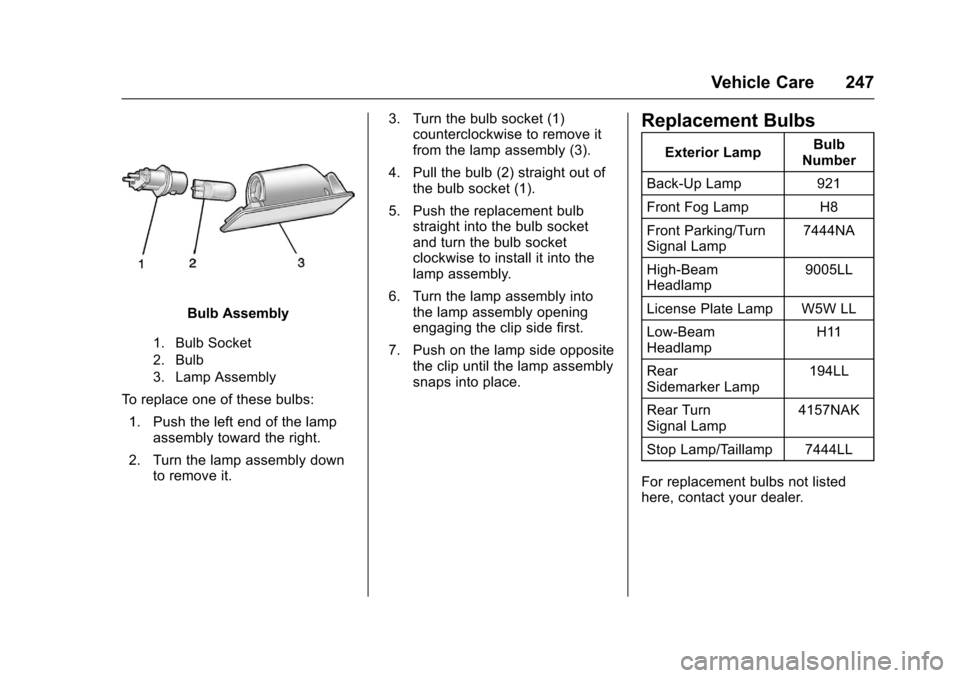
Bulb Assembly
1. Bulb Socket
2. Bulb
3. Lamp Assembly
To replace one of these bulbs:1. Push the left end of the lamp assembly toward the right.
2. Turn the lamp assembly down to remove it. 3. Turn the bulb socket (1)
counterclockwise to remove it
from the lamp assembly (3).
4. Pull the bulb (2) straight out of the bulb socket (1).
5. Push the replacement bulb straight into the bulb socket
and turn the bulb socket
clockwise to install it into the
lamp assembly.
6. Turn the lamp assembly into the lamp assembly opening
engaging the clip side first.
7. Push on the lamp side opposite the clip until the lamp assembly
snaps into place.
Replacement Bulbs
Exterior Lamp Bulb
Number
Back-Up Lamp 921
Front Fog Lamp H8
Front Parking/Turn
Signal Lamp 7444NA
High-Beam
Headlamp 9005LL
License Plate Lamp W5W LL
Low-Beam
Headlamp H11
Rear
Sidemarker Lamp 194LL
Rear Turn
Signal Lamp 4157NAK
Stop Lamp/Taillamp 7444LL
For replacement bulbs not listed
here, contact your dealer.
Page 250 of 353
Chevrolet Sonic Owner Manual (GMNA-Localizing-U.S/Canada-9085902) -
2016 - CRC - 5/27/15
Vehicle Care 249
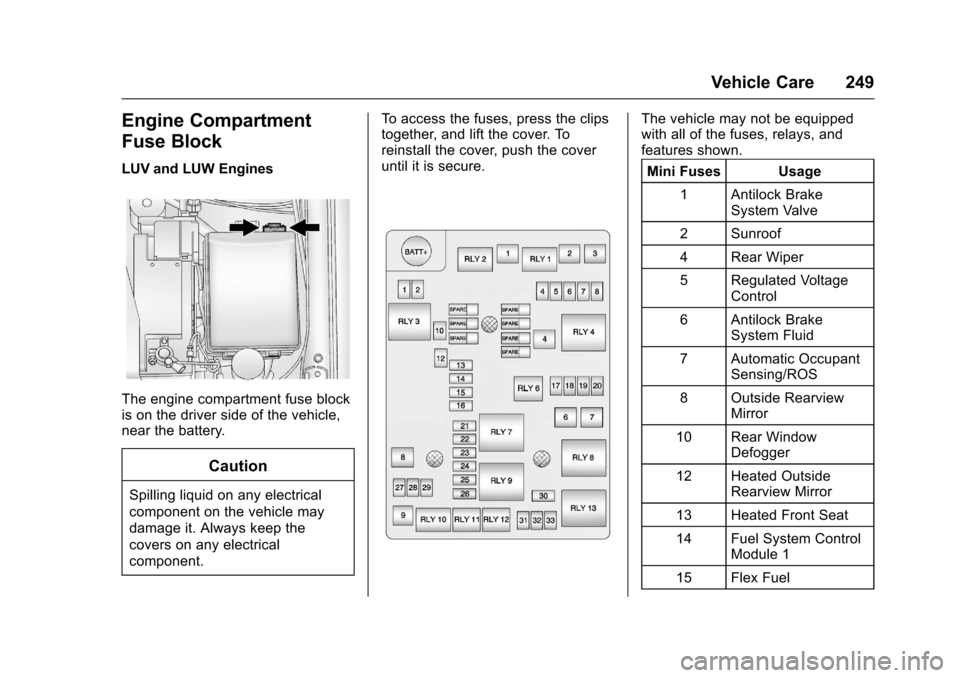
Engine Compartment
Fuse Block
LUV and LUW Engines
The engine compartment fuse block
is on the driver side of the vehicle,
near the battery.
Caution
Spilling liquid on any electrical
component on the vehicle may
damage it. Always keep the
covers on any electrical
component.To access the fuses, press the clips
together, and lift the cover. To
reinstall the cover, push the cover
until it is secure.
The vehicle may not be equipped
with all of the fuses, relays, and
features shown.
Mini Fuses Usage
1 Antilock Brake System Valve
2 Sunroof
4 Rear Wiper
5 Regulated Voltage Control
6 Antilock Brake System Fluid
7 Automatic Occupant Sensing/ROS
8 Outside Rearview Mirror
10 Rear Window Defogger
12 Heated Outside Rearview Mirror
13 Heated Front Seat
14 Fuel System Control Module 1
15 Flex Fuel