ignition CHEVROLET SONIC 2016 2.G Owners Manual
[x] Cancel search | Manufacturer: CHEVROLET, Model Year: 2016, Model line: SONIC, Model: CHEVROLET SONIC 2016 2.GPages: 353, PDF Size: 7.74 MB
Page 8 of 353
Chevrolet Sonic Owner Manual (GMNA-Localizing-U.S/Canada-9085902) -
2016 - CRC - 5/27/15
In Brief 7
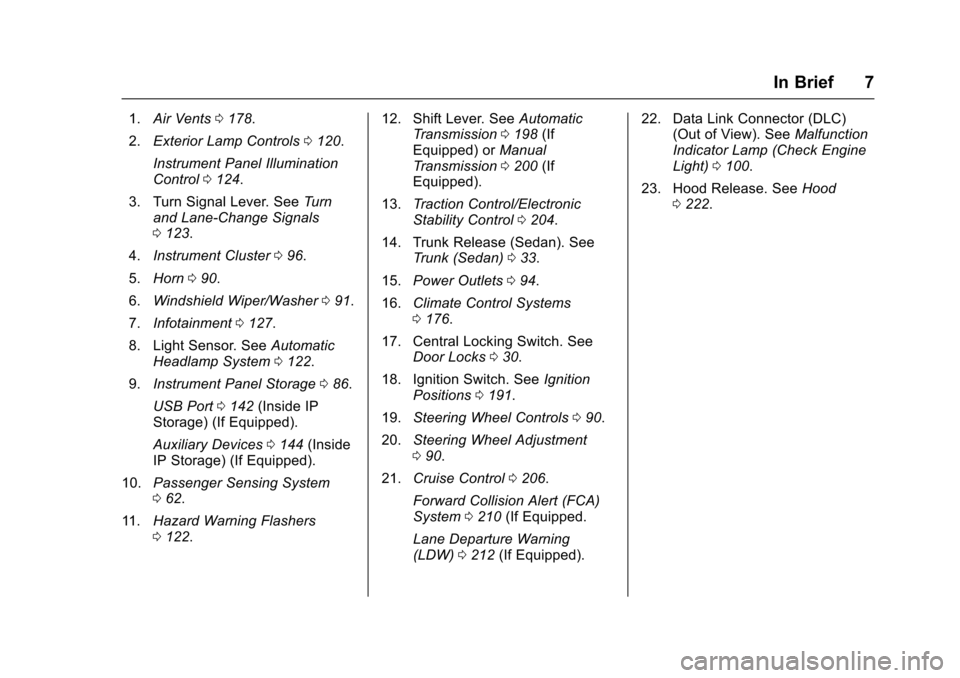
1.Air Vents 0178.
2. Exterior Lamp Controls 0120.
Instrument Panel Illumination
Control 0124.
3. Turn Signal Lever. See Turn
and Lane-Change Signals
0 123.
4. Instrument Cluster 096.
5. Horn 090.
6. Windshield Wiper/Washer 091.
7. Infotainment 0127.
8. Light Sensor. See Automatic
Headlamp System 0122.
9. Instrument Panel Storage 086.
USB Port 0142 (Inside IP
Storage) (If Equipped).
Auxiliary Devices 0144 (Inside
IP Storage) (If Equipped).
10. Passenger Sensing System
062.
11. Hazard Warning Flashers
0122. 12. Shift Lever. See
Automatic
Transmission 0198 (If
Equipped) or Manual
Transmission 0200 (If
Equipped).
13. Traction Control/Electronic
Stability Control 0204.
14. Trunk Release (Sedan). See Trunk (Sedan) 033.
15. Power Outlets 094.
16. Climate Control Systems
0176.
17. Central Locking Switch. See Door Locks 030.
18. Ignition Switch. See Ignition
Positions 0191.
19. Steering Wheel Controls 090.
20. Steering Wheel Adjustment
090.
21. Cruise Control 0206.
Forward Collision Alert (FCA)
System 0210 (If Equipped.
Lane Departure Warning
(LDW) 0212 (If Equipped). 22. Data Link Connector (DLC)
(Out of View). See Malfunction
Indicator Lamp (Check Engine
Light) 0100.
23. Hood Release. See Hood
0 222.
Page 9 of 353
Chevrolet Sonic Owner Manual (GMNA-Localizing-U.S/Canada-9085902) -
2016 - CRC - 5/27/15
8 In Brief
Initial Drive
Information
This section provides a brief
overview about some of the
important features that may or may
not be on your specific vehicle.
For more detailed information, refer
to each of the features which can be
found later in this owner manual.
Remote Keyless Entry
(RKE) System
The RKE transmitter may work up to
60 m (195 ft) away from the vehicle.
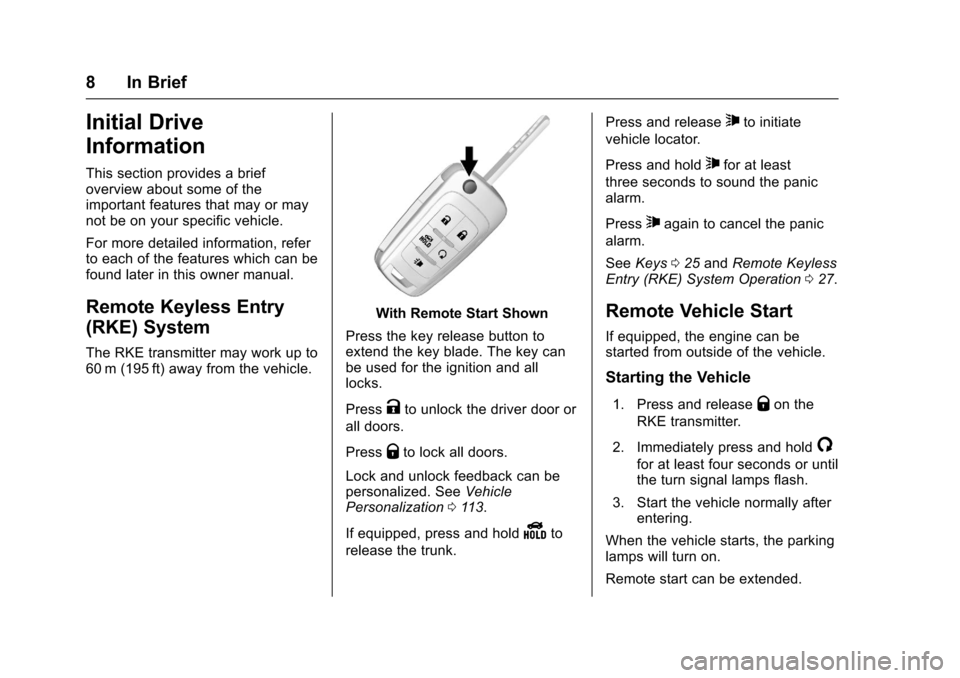
With Remote Start Shown
Press the key release button to
extend the key blade. The key can
be used for the ignition and all
locks.
Press
Kto unlock the driver door or
all doors.
Press
Qto lock all doors.
Lock and unlock feedback can be
personalized. See Vehicle
Personalization 0113.
If equipped, press and hold
Yto
release the trunk. Press and release
7to initiate
vehicle locator.
Press and hold
7for at least
three seconds to sound the panic
alarm.
Press
7again to cancel the panic
alarm.
See Keys 025 and Remote Keyless
Entry (RKE) System Operation 027.
Remote Vehicle Start
If equipped, the engine can be
started from outside of the vehicle.
Starting the Vehicle
1. Press and releaseQon the
RKE transmitter.
2. Immediately press and hold
/
for at least four seconds or until
the turn signal lamps flash.
3. Start the vehicle normally after entering.
When the vehicle starts, the parking
lamps will turn on.
Remote start can be extended.
Page 16 of 353
Chevrolet Sonic Owner Manual (GMNA-Localizing-U.S/Canada-9085902) -
2016 - CRC - 5/27/15
In Brief 15
;:Turns on the parking lamps
including all lamps except the
headlamps.
5: Turns the headlamps on
together with the parking lamps and
instrument panel lights. A warning
chime sounds if the driver door is
opened when the ignition switch is
off and the headlamps are on.
#: For vehicles with fog lamps,
press to turn the lamps on or off.
See:
. Exterior Lamp Controls 0120
. Daytime Running Lamps (DRL)
0121
. Fog Lamps 0123
Windshield Wiper/Washer
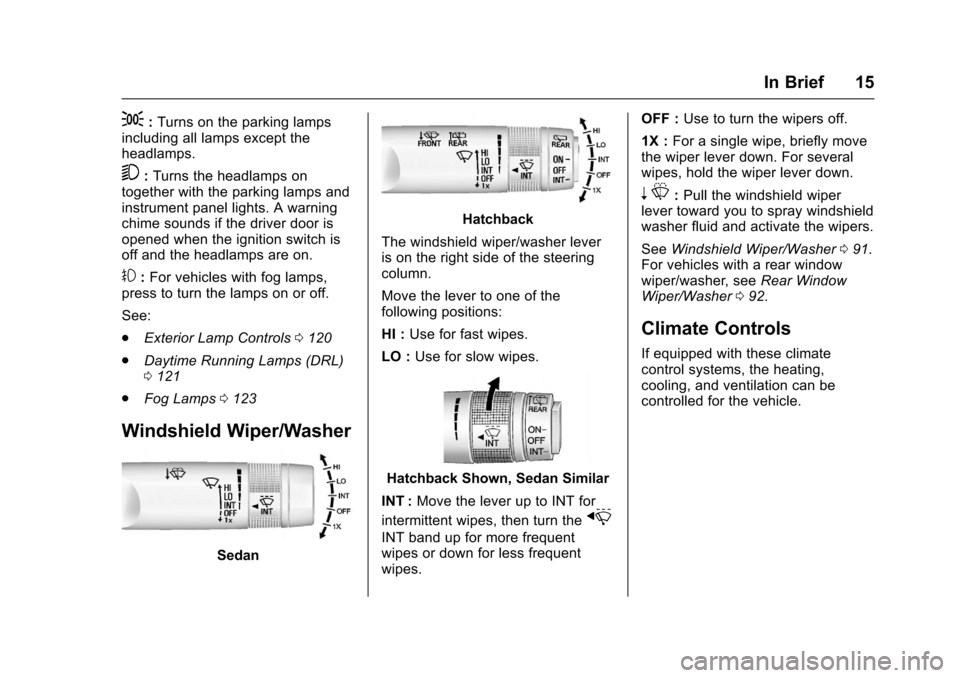
Sedan
Hatchback
The windshield wiper/washer lever
is on the right side of the steering
column.
Move the lever to one of the
following positions:
HI : Use for fast wipes.
LO : Use for slow wipes.
Hatchback Shown, Sedan Similar
INT : Move the lever up to INT for
intermittent wipes, then turn the
x
INT band up for more frequent
wipes or down for less frequent
wipes. OFF :
Use to turn the wipers off.
1X : For a single wipe, briefly move
the wiper lever down. For several
wipes, hold the wiper lever down.
n L: Pull the windshield wiper
lever toward you to spray windshield
washer fluid and activate the wipers.
See Windshield Wiper/Washer 091.
For vehicles with a rear window
wiper/washer, see Rear Window
Wiper/Washer 092.
Climate Controls
If equipped with these climate
control systems, the heating,
cooling, and ventilation can be
controlled for the vehicle.
Page 18 of 353
Chevrolet Sonic Owner Manual (GMNA-Localizing-U.S/Canada-9085902) -
2016 - CRC - 5/27/15
In Brief 17
Manual Transmission
Up-Shift Light
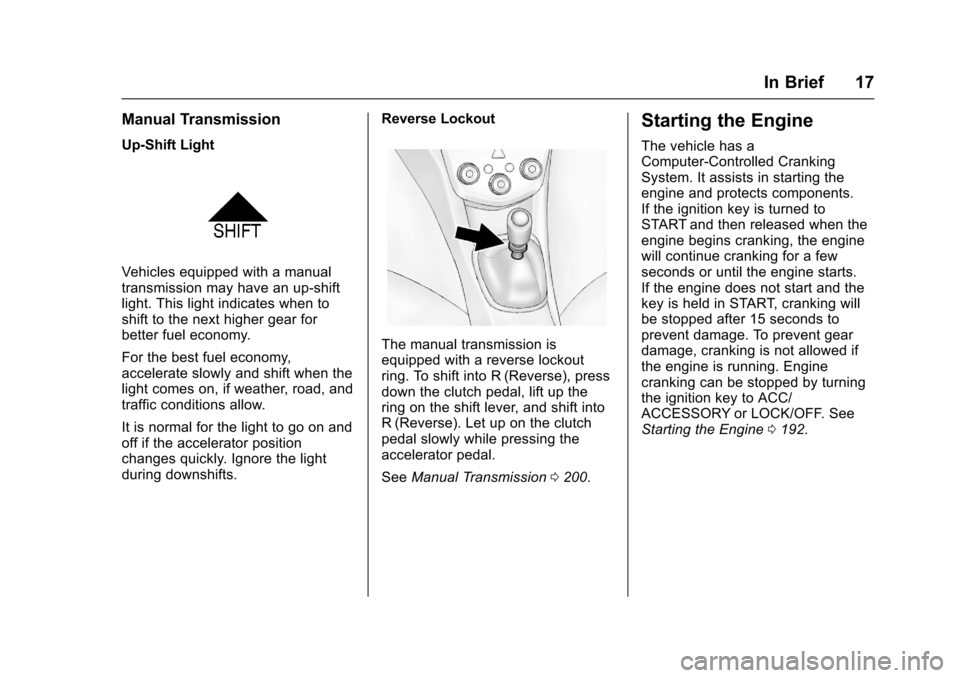
Vehicles equipped with a manual
transmission may have an up-shift
light. This light indicates when to
shift to the next higher gear for
better fuel economy.
For the best fuel economy,
accelerate slowly and shift when the
light comes on, if weather, road, and
traffic conditions allow.
It is normal for the light to go on and
off if the accelerator position
changes quickly. Ignore the light
during downshifts.Reverse Lockout
The manual transmission is
equipped with a reverse lockout
ring. To shift into R (Reverse), press
down the clutch pedal, lift up the
ring on the shift lever, and shift into
R (Reverse). Let up on the clutch
pedal slowly while pressing the
accelerator pedal.
See
Manual Transmission 0200.
Starting the Engine
The vehicle has a
Computer-Controlled Cranking
System. It assists in starting the
engine and protects components.
If the ignition key is turned to
START and then released when the
engine begins cranking, the engine
will continue cranking for a few
seconds or until the engine starts.
If the engine does not start and the
key is held in START, cranking will
be stopped after 15 seconds to
prevent damage. To prevent gear
damage, cranking is not allowed if
the engine is running. Engine
cranking can be stopped by turning
the ignition key to ACC/
ACCESSORY or LOCK/OFF. See
Starting the Engine 0192.
Page 23 of 353
Chevrolet Sonic Owner Manual (GMNA-Localizing-U.S/Canada-9085902) -
2016 - CRC - 5/27/15
22 In Brief
Power Outlets
The accessory power outlets can be
used to plug in electrical equipment,
such as a cell phone or MP3 player.
The vehicle has an accessory
power outlet in front of the
cupholders on the center floor
console.
SeePower Outlets 094.
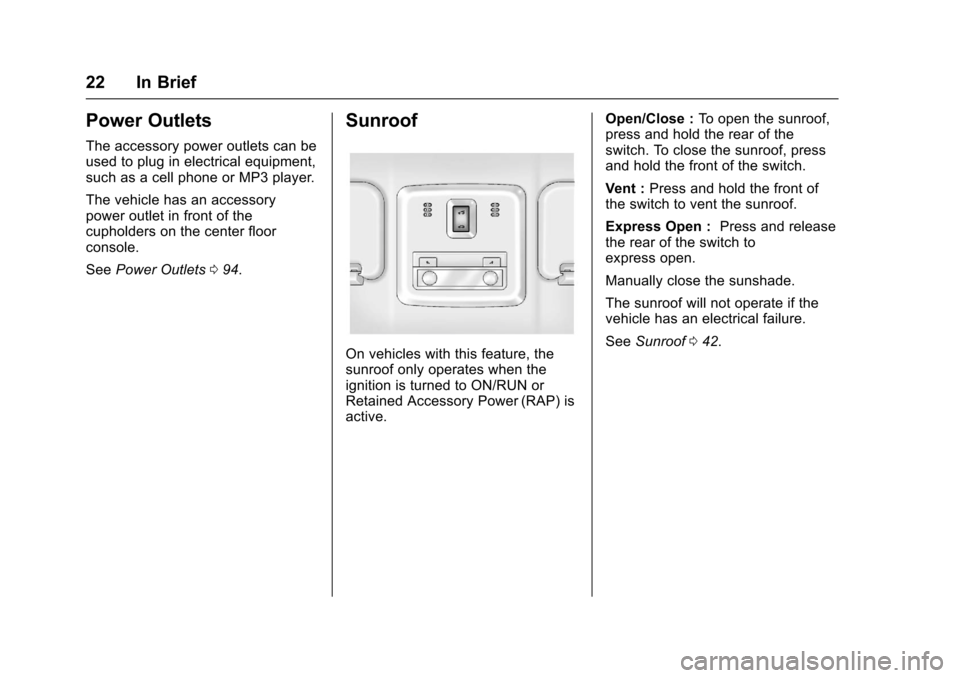
Sunroof
On vehicles with this feature, the
sunroof only operates when the
ignition is turned to ON/RUN or
Retained Accessory Power (RAP) is
active. Open/Close :
To open the sunroof,
press and hold the rear of the
switch. To close the sunroof, press
and hold the front of the switch.
Vent : Press and hold the front of
the switch to vent the sunroof.
Express Open : Press and release
the rear of the switch to
express open.
Manually close the sunshade.
The sunroof will not operate if the
vehicle has an electrical failure.
See Sunroof 042.
Page 27 of 353
Chevrolet Sonic Owner Manual (GMNA-Localizing-U.S/Canada-9085902) -
2016 - CRC - 5/27/15
26 Keys, Doors, and Windows
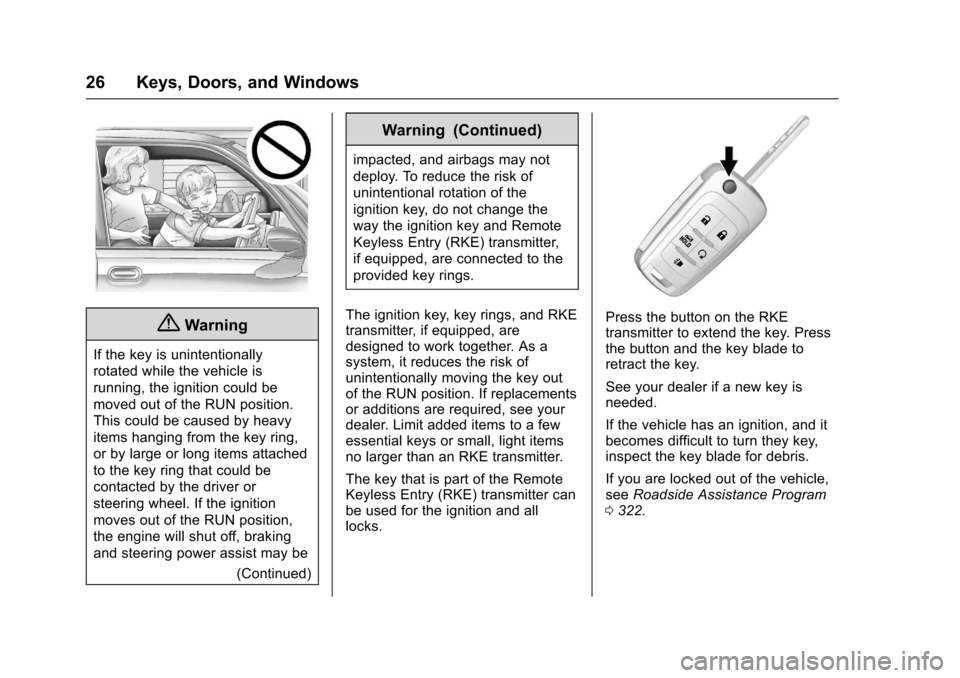
{Warning
If the key is unintentionally
rotated while the vehicle is
running, the ignition could be
moved out of the RUN position.
This could be caused by heavy
items hanging from the key ring,
or by large or long items attached
to the key ring that could be
contacted by the driver or
steering wheel. If the ignition
moves out of the RUN position,
the engine will shut off, braking
and steering power assist may be(Continued)
Warning (Continued)
impacted, and airbags may not
deploy. To reduce the risk of
unintentional rotation of the
ignition key, do not change the
way the ignition key and Remote
Keyless Entry (RKE) transmitter,
if equipped, are connected to the
provided key rings.
The ignition key, key rings, and RKE
transmitter, if equipped, are
designed to work together. As a
system, it reduces the risk of
unintentionally moving the key out
of the RUN position. If replacements
or additions are required, see your
dealer. Limit added items to a few
essential keys or small, light items
no larger than an RKE transmitter.
The key that is part of the Remote
Keyless Entry (RKE) transmitter can
be used for the ignition and all
locks.
Press the button on the RKE
transmitter to extend the key. Press
the button and the key blade to
retract the key.
See your dealer if a new key is
needed.
If the vehicle has an ignition, and it
becomes difficult to turn they key,
inspect the key blade for debris.
If you are locked out of the vehicle,
see Roadside Assistance Program
0 322.
Page 29 of 353
Chevrolet Sonic Owner Manual (GMNA-Localizing-U.S/Canada-9085902) -
2016 - CRC - 5/27/15
28 Keys, Doors, and Windows
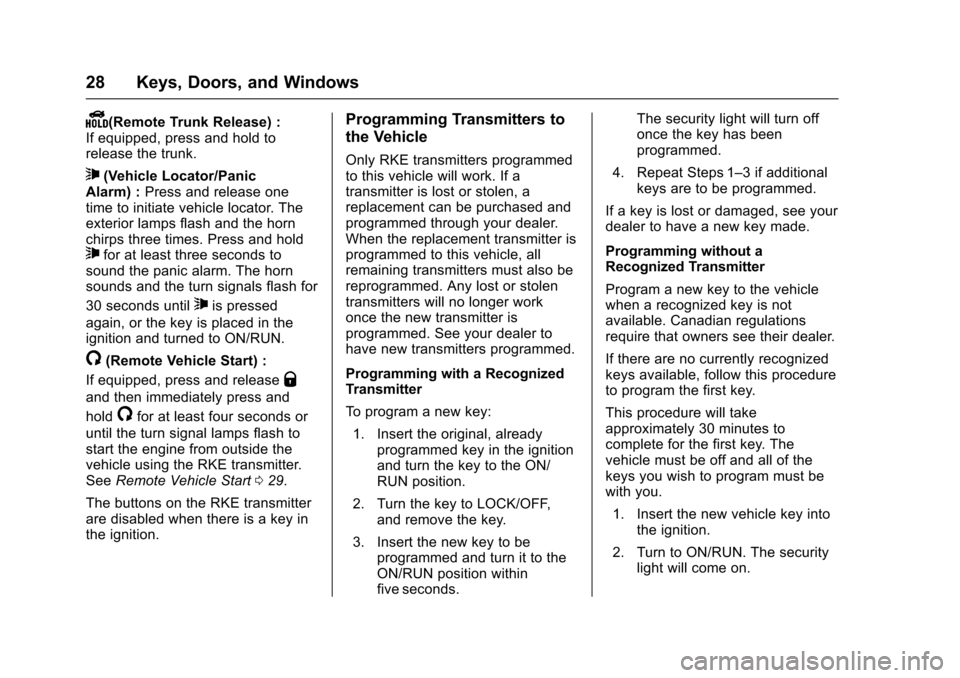
Y(Remote Trunk Release) :
If equipped, press and hold to
release the trunk.
7(Vehicle Locator/Panic
Alarm) : Press and release one
time to initiate vehicle locator. The
exterior lamps flash and the horn
chirps three times. Press and hold
7for at least three seconds to
sound the panic alarm. The horn
sounds and the turn signals flash for
30 seconds until
7is pressed
again, or the key is placed in the
ignition and turned to ON/RUN.
/(Remote Vehicle Start) :
If equipped, press and release
Q
and then immediately press and
hold
/for at least four seconds or
until the turn signal lamps flash to
start the engine from outside the
vehicle using the RKE transmitter.
See Remote Vehicle Start 029.
The buttons on the RKE transmitter
are disabled when there is a key in
the ignition.
Programming Transmitters to
the Vehicle
Only RKE transmitters programmed
to this vehicle will work. If a
transmitter is lost or stolen, a
replacement can be purchased and
programmed through your dealer.
When the replacement transmitter is
programmed to this vehicle, all
remaining transmitters must also be
reprogrammed. Any lost or stolen
transmitters will no longer work
once the new transmitter is
programmed. See your dealer to
have new transmitters programmed.
Programming with a Recognized
Transmitter
To program a new key: 1. Insert the original, already programmed key in the ignition
and turn the key to the ON/
RUN position.
2. Turn the key to LOCK/OFF, and remove the key.
3. Insert the new key to be programmed and turn it to the
ON/RUN position within
five seconds. The security light will turn off
once the key has been
programmed.
4. Repeat Steps 1–3 if additional keys are to be programmed.
If a key is lost or damaged, see your
dealer to have a new key made.
Programming without a
Recognized Transmitter
Program a new key to the vehicle
when a recognized key is not
available. Canadian regulations
require that owners see their dealer.
If there are no currently recognized
keys available, follow this procedure
to program the first key.
This procedure will take
approximately 30 minutes to
complete for the first key. The
vehicle must be off and all of the
keys you wish to program must be
with you.
1. Insert the new vehicle key into the ignition.
2. Turn to ON/RUN. The security light will come on.
Page 30 of 353
Chevrolet Sonic Owner Manual (GMNA-Localizing-U.S/Canada-9085902) -
2016 - CRC - 5/27/15
Keys, Doors, and Windows 29
3. Wait 10 minutes until thesecurity light turns off.
4. Turn the ignition to LOCK/OFF.
5. Repeat Steps 2–4 two more times. After the third time, turn
to ON/RUN; the key is learned
and all previously known keys
will no longer work with the
vehicle.
Remaining keys can be learned by
following the procedure in
“Programming with a Recognized
Transmitter.”
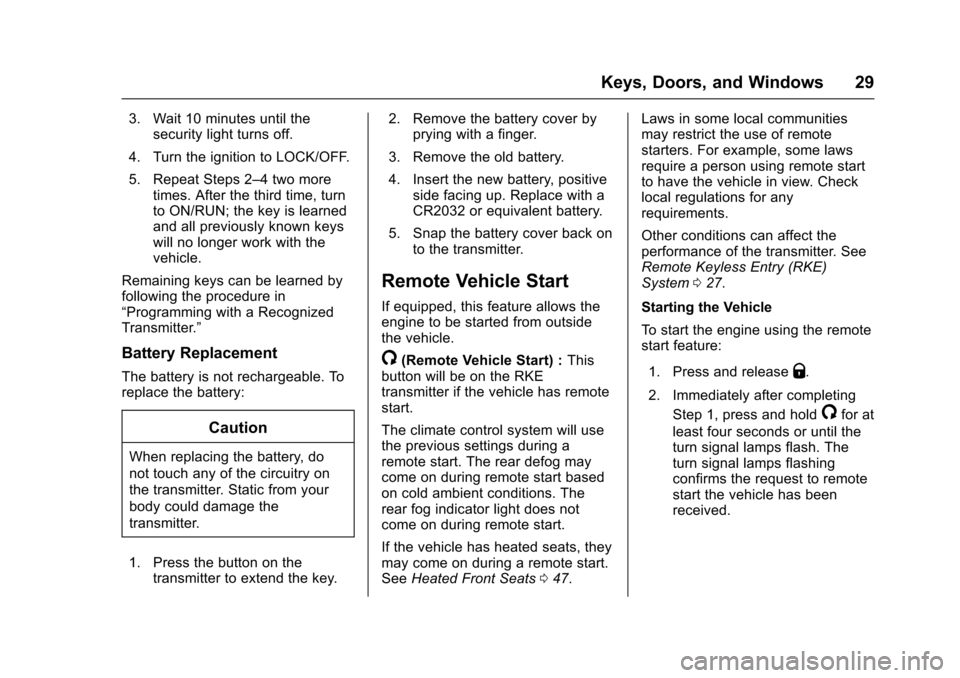
Battery Replacement
The battery is not rechargeable. To
replace the battery:
Caution
When replacing the battery, do
not touch any of the circuitry on
the transmitter. Static from your
body could damage the
transmitter.
1. Press the button on the transmitter to extend the key. 2. Remove the battery cover by
prying with a finger.
3. Remove the old battery.
4. Insert the new battery, positive side facing up. Replace with a
CR2032 or equivalent battery.
5. Snap the battery cover back on to the transmitter.
Remote Vehicle Start
If equipped, this feature allows the
engine to be started from outside
the vehicle.
/(Remote Vehicle Start) : This
button will be on the RKE
transmitter if the vehicle has remote
start.
The climate control system will use
the previous settings during a
remote start. The rear defog may
come on during remote start based
on cold ambient conditions. The
rear fog indicator light does not
come on during remote start.
If the vehicle has heated seats, they
may come on during a remote start.
See Heated Front Seats 047. Laws in some local communities
may restrict the use of remote
starters. For example, some laws
require a person using remote start
to have the vehicle in view. Check
local regulations for any
requirements.
Other conditions can affect the
performance of the transmitter. See
Remote Keyless Entry (RKE)
System
027.
Starting the Vehicle
To start the engine using the remote
start feature:
1. Press and releaseQ.
2. Immediately after completing Step 1, press and hold
/for at
least four seconds or until the
turn signal lamps flash. The
turn signal lamps flashing
confirms the request to remote
start the vehicle has been
received.
Page 31 of 353
Chevrolet Sonic Owner Manual (GMNA-Localizing-U.S/Canada-9085902) -
2016 - CRC - 5/27/15
30 Keys, Doors, and Windows
When the engine starts, the parking
lamps will turn on and remain on as
long as the engine is running. The
doors will be locked and the climate
control system may come on.
The engine will continue to run for
10 minutes. After 30 seconds,
repeat the steps if a 10-minute
extension is desired. Remote start
can be extended only once.
Insert the key and turn it to ON/RUN
before driving.
Extending Engine Run Time
The engine run time can also be
extended by another 10 minutes,
if during the first 10 minutes
Steps 1–2 are repeated while the
engine is still running. An extension
can be requested, 30 seconds after
starting. This provides a total of
20 minutes.
When the remote start is extended,
the second 10-minute period is
added on to the first 10 minutes for
a total of 20 minutes.
A maximum of two remote starts,
or a single start with an extension,
are allowed between ignition cycles.After this, the vehicle's ignition
switch must be turned to ON/RUN
and then back to LOCK/OFF using
the key, before the remote start
procedure can be used again.
Canceling a Remote Start
To cancel a remote start, do one of
the following:
.
Press and hold
/until the
parking lamps turn off.
. Turn on the hazard warning
flashers.
. Turn the vehicle on and then off.
Conditions in Which Remote Start
Will Not Work
The remote vehicle start feature will
not operate if:
. The key is in the ignition.
. The hood is not closed.
. The hazard warning flashers
are on.
. The malfunction indicator lamp
is on.
. The engine coolant temperature
is too high. .
The oil pressure is low.
. Two remote vehicle starts, or a
single remote start with an
extension, have already
been used.
. The vehicle is not in P (Park).
Door Locks
{Warning
Unlocked doors can be
dangerous.
. Passengers, especially
children, can easily open
the doors and fall out of a
moving vehicle. When a
door is locked, the handle
will not open it. The chance
of being thrown out of the
vehicle in a crash is
increased if the doors are
not locked. So, all
passengers should wear
safety belts properly and the
(Continued)
Page 33 of 353
Chevrolet Sonic Owner Manual (GMNA-Localizing-U.S/Canada-9085902) -
2016 - CRC - 5/27/15
32 Keys, Doors, and Windows
If a door is reopened before
five seconds have elapsed, the five
second timer will reset once all the
doors are closed again. Press
Qon
the door lock switch again, or press
Qon the RKE transmitter, to
override this feature and lock the
doors immediately.
Delayed locking can be
programmed through the Driver
Information Center (DIC). See
Vehicle Personalization 0113.
Automatic Door Locks
The vehicle is programmed so that
when the doors are closed, the
ignition is on, and the shift lever is
moved out of P (Park) for automatic
transmissions, or when the vehicle
speed is above 13 km/h (8 mph) for
manual transmissions, the doors
and the trunk/liftgate will lock.
To unlock the doors and the trunk/
liftgate press
Kon the center stack
or the driver door switch.
If equipped with an automatic
transmission the vehicle must be in
P (Park). If equipped with a manual
transmission the vehicle must be in
Neutral with the parking brake set.
This feature can be programmed.
See
Vehicle Personalization 0113.
Lockout Protection
If the driver side power door lock
switch is pressed when the driver
door is open and the key is in the
ignition, all of the doors will lock and
then the driver door will unlock.
Lockout Protection can be manually
overridden with the driver door open
by pressing and holding
Qon the
power door lock switch.
If Unlocked Door Anti Lockout is
turned on and: the vehicle is off, the
driver door is open, and door
locking is requested using a door
lock switch or the RKE transmitter,
all the doors will lock and only the
driver door will unlock. The
Unlocked Door Anti Lockout feature
can be turned on or off using the
vehicle personalization menus. See
Vehicle Personalization 0113.
Safety Locks
The rear door safety locks prevent
passengers from opening the rear
doors from inside the vehicle.
Manual Safety Locks
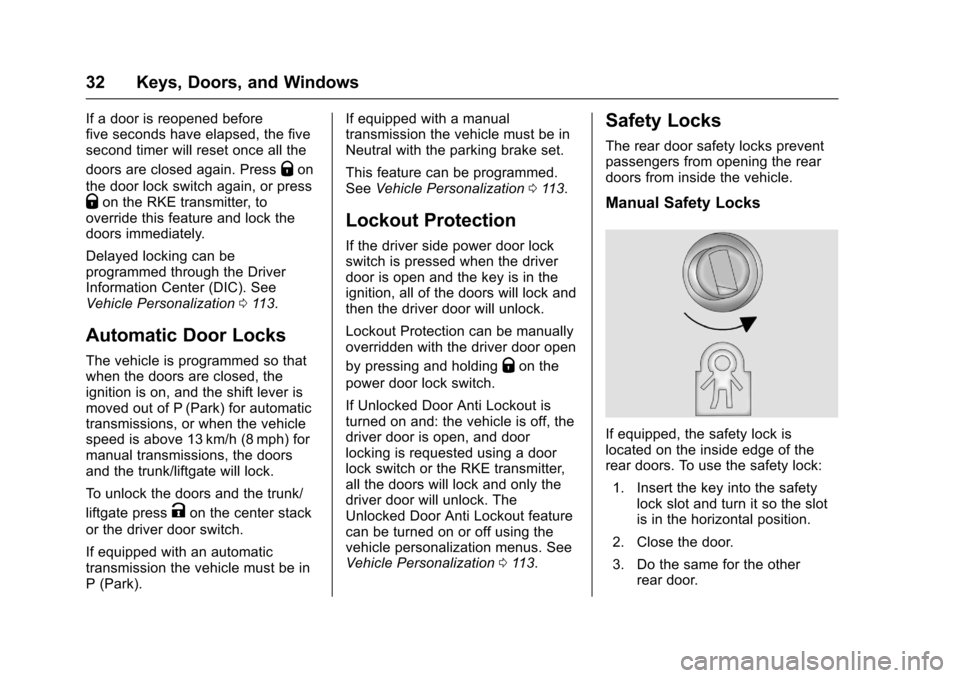
If equipped, the safety lock is
located on the inside edge of the
rear doors. To use the safety lock:
1. Insert the key into the safety lock slot and turn it so the slot
is in the horizontal position.
2. Close the door.
3. Do the same for the other rear door.