instrument panel CHEVROLET SONIC 2016 2.G Owners Manual
[x] Cancel search | Manufacturer: CHEVROLET, Model Year: 2016, Model line: SONIC, Model: CHEVROLET SONIC 2016 2.GPages: 353, PDF Size: 7.74 MB
Page 6 of 353
Chevrolet Sonic Owner Manual (GMNA-Localizing-U.S/Canada-9085902) -
2016 - CRC - 5/27/15
In Brief 5
In Brief
Instrument Panel
Instrument Panel . . . . . . . . . . . . . . . . 6
Initial Drive Information
Initial Drive Information . . . . . . . . . . 8
Remote Keyless Entry (RKE)System . . . . . . . . . . . . . . . . . . . . . . . . 8
Remote Vehicle Start . . . . . . . . . . . 8
Door Locks . . . . . . . . . . . . . . . . . . . . . 9
Liftgate . . . . . . . . . . . . . . . . . . . . . . . . . . 9
Trunk Release . . . . . . . . . . . . . . . . . . 9
Windows . . . . . . . . . . . . . . . . . . . . . . . 10
Seat Adjustment . . . . . . . . . . . . . . . 11
Second Row Seats . . . . . . . . . . . . 12
Head Restraint Adjustment . . . . 12
Safety Belts . . . . . . . . . . . . . . . . . . . . 12
Passenger Sensing System . . . 12
Mirror Adjustment . . . . . . . . . . . . . . 13
Steering Wheel Adjustment . . . . 13
Interior Lighting . . . . . . . . . . . . . . . . 14
Exterior Lighting . . . . . . . . . . . . . . . 14
Windshield Wiper/Washer . . . . . . 15
Climate Controls . . . . . . . . . . . . . . . 15
Transmission . . . . . . . . . . . . . . . . . . 16
Starting the Engine . . . . . . . . . . . . 17
Vehicle Features
Radio(s) . . . . . . . . . . . . . . . . . . . . . . . 18
Satellite Radio . . . . . . . . . . . . . . . . . 19
Portable Audio Devices . . . . . . . . 19
Bluetooth
®. . . . . . . . . . . . . . . . . . . . . 19
Steering Wheel Controls . . . . . . . 20
Cruise Control . . . . . . . . . . . . . . . . . 20
Driver Information
Center (DIC) . . . . . . . . . . . . . . . . . 21
Forward Collision Alert (FCA) System . . . . . . . . . . . . . . . . . . . . . . . 21
Lane Departure Warning (LDW) . . . . . . . . . . . . . . . 21
Rear Vision Camera (RVC) . . . . 21
Power Outlets . . . . . . . . . . . . . . . . . 22
Sunroof . . . . . . . . . . . . . . . . . . . . . . . . 22
Performance and Maintenance
Traction Control/Electronic Stability Control . . . . . . . . . . . . . . 23
Tire Pressure Monitor . . . . . . . . . . 23
Engine Oil Life System . . . . . . . . 23
Driving for Better Fuel Economy . . . . . . . . . . . . . . . . . . . . . 24
Roadside Assistance Program . . . . . . . . . . . . . . . . . . . . . . 24
Page 7 of 353
Chevrolet Sonic Owner Manual (GMNA-Localizing-U.S/Canada-9085902) -
2016 - CRC - 5/27/15
6 In Brief
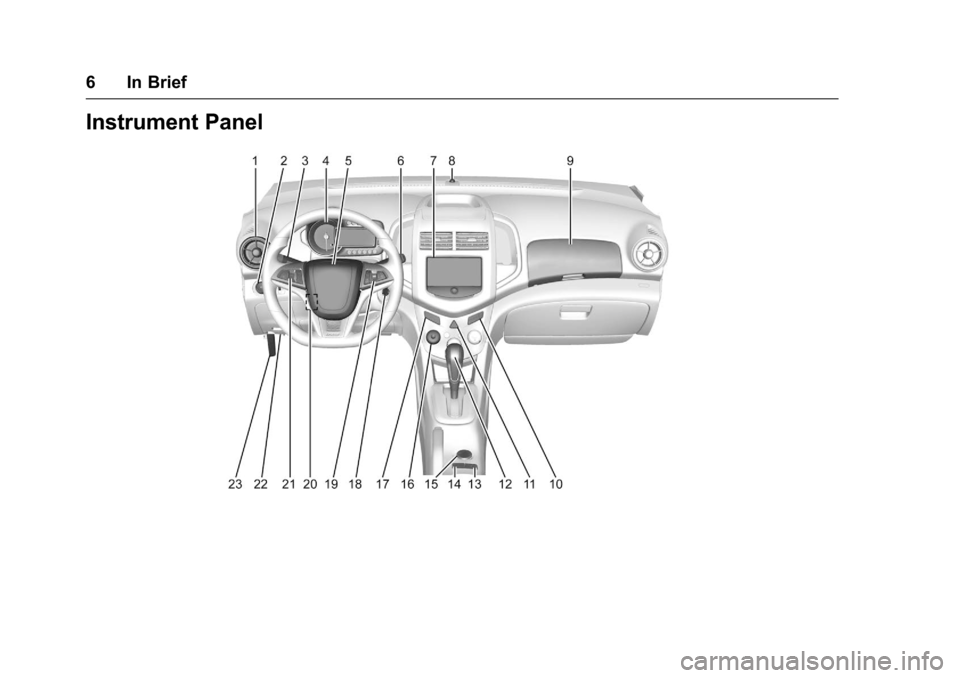
Instrument Panel
Page 8 of 353
Chevrolet Sonic Owner Manual (GMNA-Localizing-U.S/Canada-9085902) -
2016 - CRC - 5/27/15
In Brief 7
1.Air Vents 0178.
2. Exterior Lamp Controls 0120.
Instrument Panel Illumination
Control 0124.
3. Turn Signal Lever. See Turn
and Lane-Change Signals
0 123.
4. Instrument Cluster 096.
5. Horn 090.
6. Windshield Wiper/Washer 091.
7. Infotainment 0127.
8. Light Sensor. See Automatic
Headlamp System 0122.
9. Instrument Panel Storage 086.
USB Port 0142 (Inside IP
Storage) (If Equipped).
Auxiliary Devices 0144 (Inside
IP Storage) (If Equipped).
10. Passenger Sensing System
062.
11. Hazard Warning Flashers
0122. 12. Shift Lever. See
Automatic
Transmission 0198 (If
Equipped) or Manual
Transmission 0200 (If
Equipped).
13. Traction Control/Electronic
Stability Control 0204.
14. Trunk Release (Sedan). See Trunk (Sedan) 033.
15. Power Outlets 094.
16. Climate Control Systems
0176.
17. Central Locking Switch. See Door Locks 030.
18. Ignition Switch. See Ignition
Positions 0191.
19. Steering Wheel Controls 090.
20. Steering Wheel Adjustment
090.
21. Cruise Control 0206.
Forward Collision Alert (FCA)
System 0210 (If Equipped.
Lane Departure Warning
(LDW) 0212 (If Equipped). 22. Data Link Connector (DLC)
(Out of View). See Malfunction
Indicator Lamp (Check Engine
Light) 0100.
23. Hood Release. See Hood
0 222.
Page 14 of 353
Chevrolet Sonic Owner Manual (GMNA-Localizing-U.S/Canada-9085902) -
2016 - CRC - 5/27/15
In Brief 13
The passenger airbag status
indicator will be visible on the
instrument panel when the vehicle is
started. SeePassenger Airbag
Status Indicator 099.
Mirror Adjustment
Exterior Mirrors
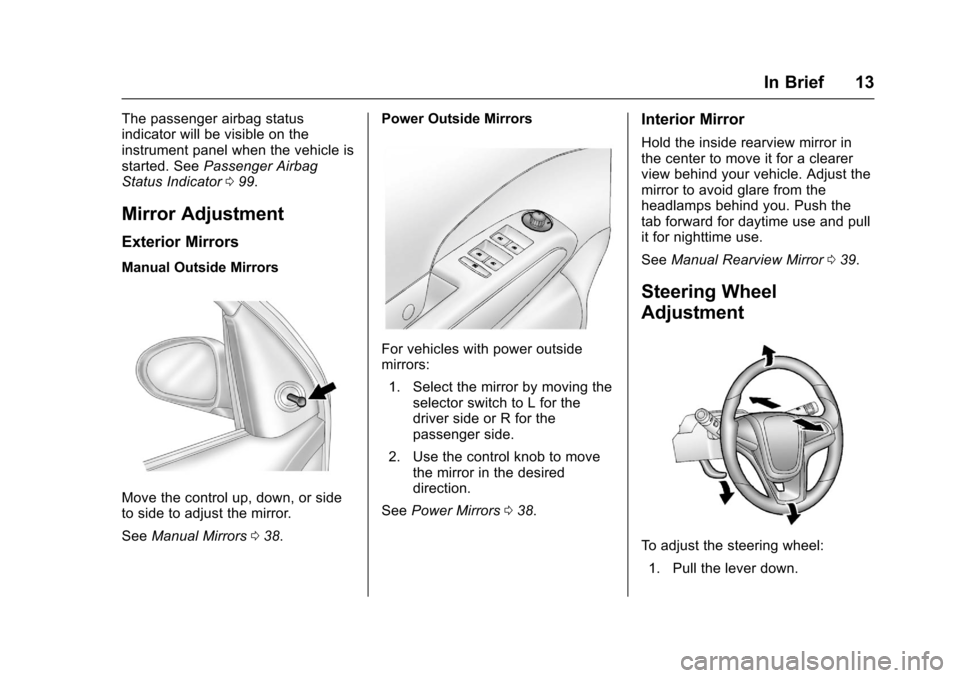
Manual Outside Mirrors
Move the control up, down, or side
to side to adjust the mirror.
See Manual Mirrors 038. Power Outside Mirrors
For vehicles with power outside
mirrors:
1. Select the mirror by moving the selector switch to L for the
driver side or R for the
passenger side.
2. Use the control knob to move the mirror in the desired
direction.
See Power Mirrors 038.
Interior Mirror
Hold the inside rearview mirror in
the center to move it for a clearer
view behind your vehicle. Adjust the
mirror to avoid glare from the
headlamps behind you. Push the
tab forward for daytime use and pull
it for nighttime use.
See Manual Rearview Mirror 039.
Steering Wheel
Adjustment
To adjust the steering wheel:
1. Pull the lever down.
Page 15 of 353
Chevrolet Sonic Owner Manual (GMNA-Localizing-U.S/Canada-9085902) -
2016 - CRC - 5/27/15
14 In Brief
2. Move the steering wheel up,down, forward, and backward.
3. Pull the lever up to lock the steering wheel in place.
Do not adjust the steering wheel
while driving.
Interior Lighting
Dome Lamps
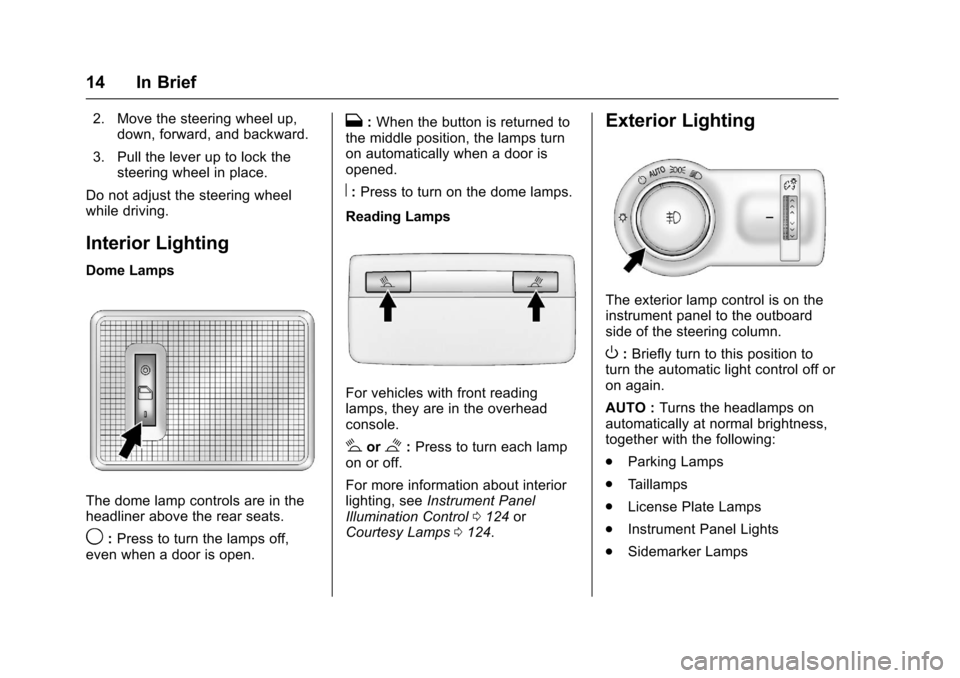
The dome lamp controls are in the
headliner above the rear seats.
9: Press to turn the lamps off,
even when a door is open.
H: When the button is returned to
the middle position, the lamps turn
on automatically when a door is
opened.
R: Press to turn on the dome lamps.
Reading Lamps
For vehicles with front reading
lamps, they are in the overhead
console.
#or$: Press to turn each lamp
on or off.
For more information about interior
lighting, see Instrument Panel
Illumination Control 0124 or
Courtesy Lamps 0124.
Exterior Lighting
The exterior lamp control is on the
instrument panel to the outboard
side of the steering column.
O:Briefly turn to this position to
turn the automatic light control off or
on again.
AUTO : Turns the headlamps on
automatically at normal brightness,
together with the following:
. Parking Lamps
. Taillamps
. License Plate Lamps
. Instrument Panel Lights
. Sidemarker Lamps
Page 16 of 353
Chevrolet Sonic Owner Manual (GMNA-Localizing-U.S/Canada-9085902) -
2016 - CRC - 5/27/15
In Brief 15
;:Turns on the parking lamps
including all lamps except the
headlamps.
5: Turns the headlamps on
together with the parking lamps and
instrument panel lights. A warning
chime sounds if the driver door is
opened when the ignition switch is
off and the headlamps are on.
#: For vehicles with fog lamps,
press to turn the lamps on or off.
See:
. Exterior Lamp Controls 0120
. Daytime Running Lamps (DRL)
0121
. Fog Lamps 0123
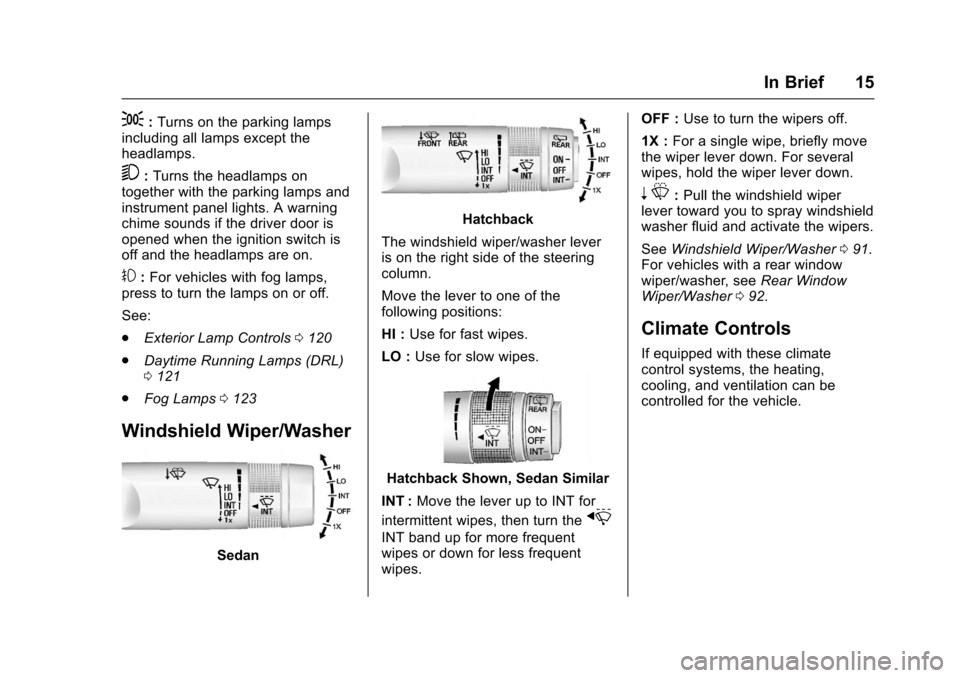
Windshield Wiper/Washer
Sedan
Hatchback
The windshield wiper/washer lever
is on the right side of the steering
column.
Move the lever to one of the
following positions:
HI : Use for fast wipes.
LO : Use for slow wipes.
Hatchback Shown, Sedan Similar
INT : Move the lever up to INT for
intermittent wipes, then turn the
x
INT band up for more frequent
wipes or down for less frequent
wipes. OFF :
Use to turn the wipers off.
1X : For a single wipe, briefly move
the wiper lever down. For several
wipes, hold the wiper lever down.
n L: Pull the windshield wiper
lever toward you to spray windshield
washer fluid and activate the wipers.
See Windshield Wiper/Washer 091.
For vehicles with a rear window
wiper/washer, see Rear Window
Wiper/Washer 092.
Climate Controls
If equipped with these climate
control systems, the heating,
cooling, and ventilation can be
controlled for the vehicle.
Page 34 of 353
Chevrolet Sonic Owner Manual (GMNA-Localizing-U.S/Canada-9085902) -
2016 - CRC - 5/27/15
Keys, Doors, and Windows 33
To open a rear door when the safety
lock is on:1. Unlock the door by activating the inside handle, by using the
power door lock switch, or by
using the Remote Keyless
Entry (RKE) transmitter.
2. Open the door from the outside.
To cancel the safety lock: 1. Unlock the door and open it from the outside.
2. Insert the key into the safety lock slot and turn it so the slot
is in the vertical position. Do
the same for the other door.Doors
Trunk (Sedan)
{Warning
Exhaust gases can enter the
vehicle if it is driven with the
liftgate, hatch/trunk open, or with
any objects that pass through the
seal between the body and the
hatch/trunk or liftgate. Engine
exhaust contains carbon
monoxide (CO) which cannot be
seen or smelled. It can cause
unconsciousness and even death.
If the vehicle must be driven with
the liftgate or hatch/trunk open:
. Close all of the windows.
. Fully open the air outlets on
or under the instrument
panel.
. Adjust the climate control
system to a setting that
brings in only outside air
and set the fan speed to the
(Continued)
Warning (Continued)
highest setting. See
“Climate Control Systems”
in the Index.
. If the vehicle is equipped
with a power liftgate, disable
the power liftgate function.
For more information about
carbon monoxide, see Engine
Exhaust 0197.
To lock or unlock the trunk from the
inside, press
QorKon the central
locking switch or the driver door lock
switch.
Page 36 of 353
Chevrolet Sonic Owner Manual (GMNA-Localizing-U.S/Canada-9085902) -
2016 - CRC - 5/27/15
Keys, Doors, and Windows 35
Liftgate (Hatchback)
{Warning
Exhaust gases can enter the
vehicle if it is driven with the
liftgate, hatch/trunk open, or with
any objects that pass through the
seal between the body and the
hatch/trunk or liftgate. Engine
exhaust contains carbon
monoxide (CO) which cannot be
seen or smelled. It can cause
unconsciousness and even death.
If the vehicle must be driven with
the liftgate or hatch/trunk open:. Close all of the windows.
. Fully open the air outlets on
or under the instrument
panel.
. Adjust the climate control
system to a setting that
brings in only outside air
and set the fan speed to the
(Continued)
Warning (Continued)
highest setting. See
“Climate Control Systems”
in the Index.
. If the vehicle is equipped
with a power liftgate, disable
the power liftgate function.
For more information about
carbon monoxide, see Engine
Exhaust 0197.
To lock or unlock the liftgate from
the inside, press
QorKon the
central locking switch or on the
driver door.
The vehicle must be in P (Park) for
automatic transmissions. For
manual transmissions the parking
brake must be engaged.
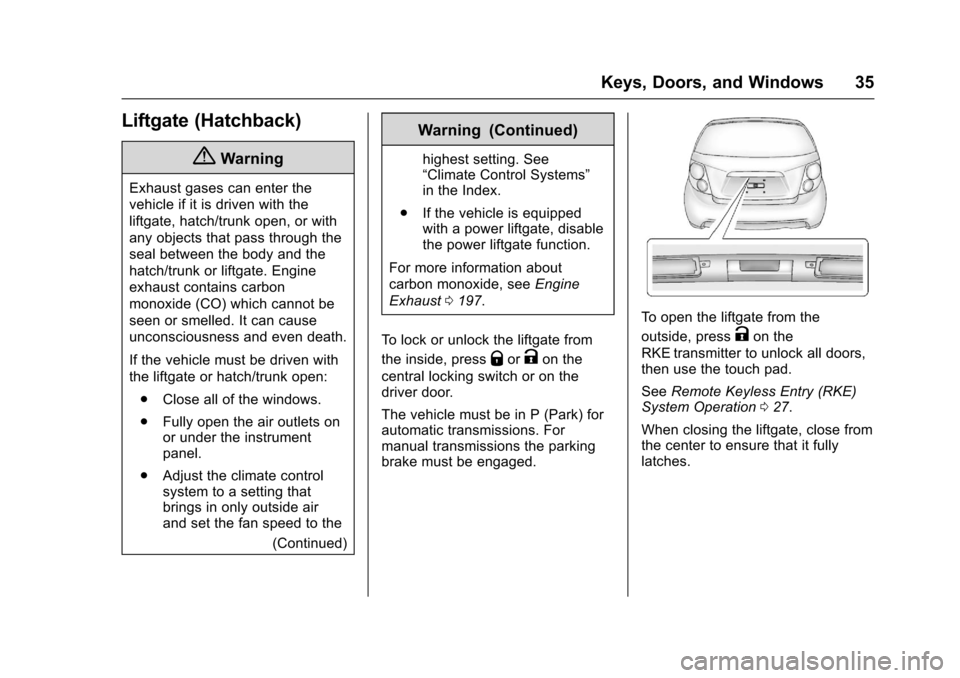
To open the liftgate from the
outside, press
Kon the
RKE transmitter to unlock all doors,
then use the touch pad.
See Remote Keyless Entry (RKE)
System Operation 027.
When closing the liftgate, close from
the center to ensure that it fully
latches.
Page 37 of 353
Chevrolet Sonic Owner Manual (GMNA-Localizing-U.S/Canada-9085902) -
2016 - CRC - 5/27/15
36 Keys, Doors, and Windows
Vehicle Security
This vehicle has theft-deterrent
features; however, they do not make
the vehicle impossible to steal.
Vehicle Alarm System
This vehicle has an anti-theft alarm
system.
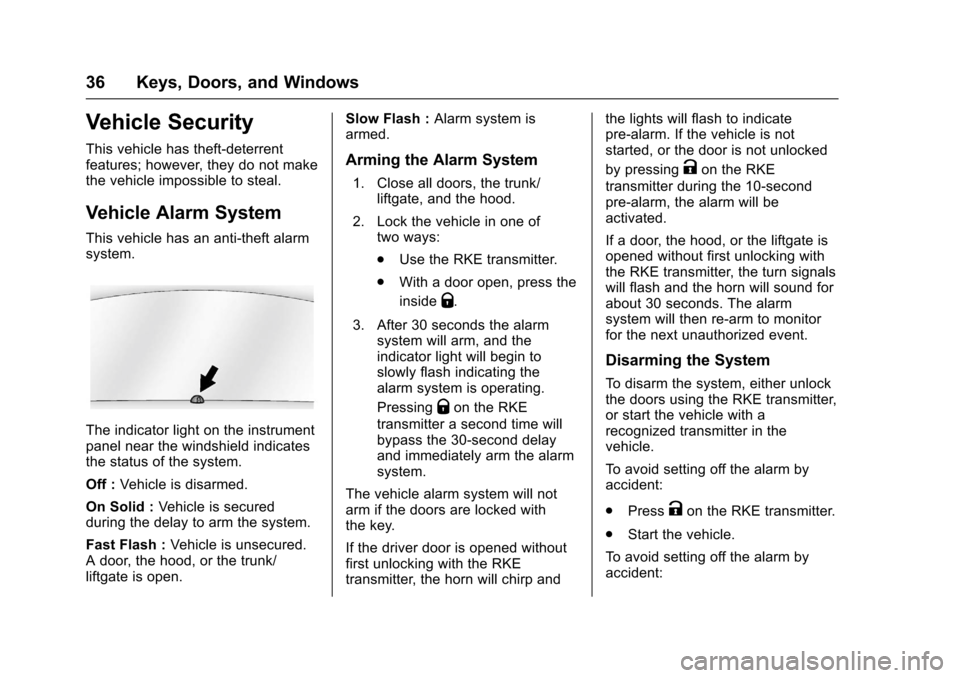
The indicator light on the instrument
panel near the windshield indicates
the status of the system.
Off :Vehicle is disarmed.
On Solid : Vehicle is secured
during the delay to arm the system.
Fast Flash : Vehicle is unsecured.
A door, the hood, or the trunk/
liftgate is open. Slow Flash :
Alarm system is
armed.
Arming the Alarm System
1. Close all doors, the trunk/
liftgate, and the hood.
2. Lock the vehicle in one of two ways:
.Use the RKE transmitter.
. With a door open, press the
inside
Q.
3. After 30 seconds the alarm system will arm, and the
indicator light will begin to
slowly flash indicating the
alarm system is operating.
Pressing
Qon the RKE
transmitter a second time will
bypass the 30-second delay
and immediately arm the alarm
system.
The vehicle alarm system will not
arm if the doors are locked with
the key.
If the driver door is opened without
first unlocking with the RKE
transmitter, the horn will chirp and the lights will flash to indicate
pre-alarm. If the vehicle is not
started, or the door is not unlocked
by pressing
Kon the RKE
transmitter during the 10-second
pre-alarm, the alarm will be
activated.
If a door, the hood, or the liftgate is
opened without first unlocking with
the RKE transmitter, the turn signals
will flash and the horn will sound for
about 30 seconds. The alarm
system will then re-arm to monitor
for the next unauthorized event.
Disarming the System
To disarm the system, either unlock
the doors using the RKE transmitter,
or start the vehicle with a
recognized transmitter in the
vehicle.
To avoid setting off the alarm by
accident:
. Press
Kon the RKE transmitter.
. Start the vehicle.
To avoid setting off the alarm by
accident:
Page 51 of 353
Chevrolet Sonic Owner Manual (GMNA-Localizing-U.S/Canada-9085902) -
2016 - CRC - 5/27/15
50 Seats and Restraints
Safety Belts
This section of the manual
describes how to use safety belts
properly. It also describes some
things not to do with safety belts.
{Warning
Do not let anyone ride where a
safety belt cannot be worn
properly. In a crash, if you or your
passenger(s) are not wearing
safety belts, injuries can be much
worse than if you are wearing
safety belts. You can be seriously
injured or killed by hitting things
inside the vehicle harder or by
being ejected from the vehicle. In
addition, anyone who is not
buckled up can strike other
passengers in the vehicle.
It is extremely dangerous to ride
in a cargo area, inside or outside
of a vehicle. In a collision,
passengers riding in these areas
are more likely to be seriously
injured or killed. Do not allow(Continued)
Warning (Continued)
passengers to ride in any area of
the vehicle that is not equipped
with seats and safety belts.
Always wear a safety belt, and
check that all passenger(s) are
restrained properly too.
This vehicle has indicators as a
reminder to buckle the safety belts.
See Safety Belt Reminders 098.
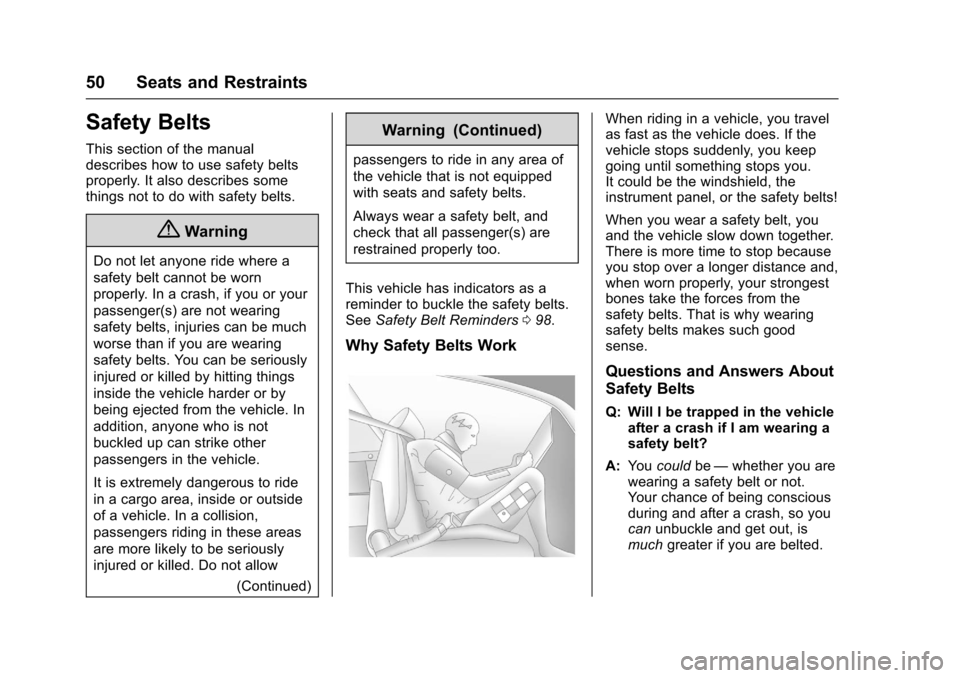
Why Safety Belts Work
When riding in a vehicle, you travel
as fast as the vehicle does. If the
vehicle stops suddenly, you keep
going until something stops you.
It could be the windshield, the
instrument panel, or the safety belts!
When you wear a safety belt, you
and the vehicle slow down together.
There is more time to stop because
you stop over a longer distance and,
when worn properly, your strongest
bones take the forces from the
safety belts. That is why wearing
safety belts makes such good
sense.
Questions and Answers About
Safety Belts
Q: Will I be trapped in the vehicle
after a crash if I am wearing a
safety belt?
A: You could be—whether you are
wearing a safety belt or not.
Your chance of being conscious
during and after a crash, so you
can unbuckle and get out, is
much greater if you are belted.