clock CHEVROLET SONIC 2017 2.G User Guide
[x] Cancel search | Manufacturer: CHEVROLET, Model Year: 2017, Model line: SONIC, Model: CHEVROLET SONIC 2017 2.GPages: 342, PDF Size: 7.2 MB
Page 230 of 342
Chevrolet Sonic Owner Manual (GMNA-Localizing-U.S./Canada-10122660) -2017 - crc - 5/13/16
Vehicle Care 229
Caution
In cold weather, water can freeze
and crack the engine, radiator,
heater core, and other parts. Use
the recommended coolant and
the proper coolant mixture.
{Warning
Yo u c a n b e b u r n e d i f y o u s p i l l
coolant on hot engine parts.
Coolant contains ethylene glycol
and it will burn if the engine parts
are hot enough. Do not spill
coolant on a hot engine.
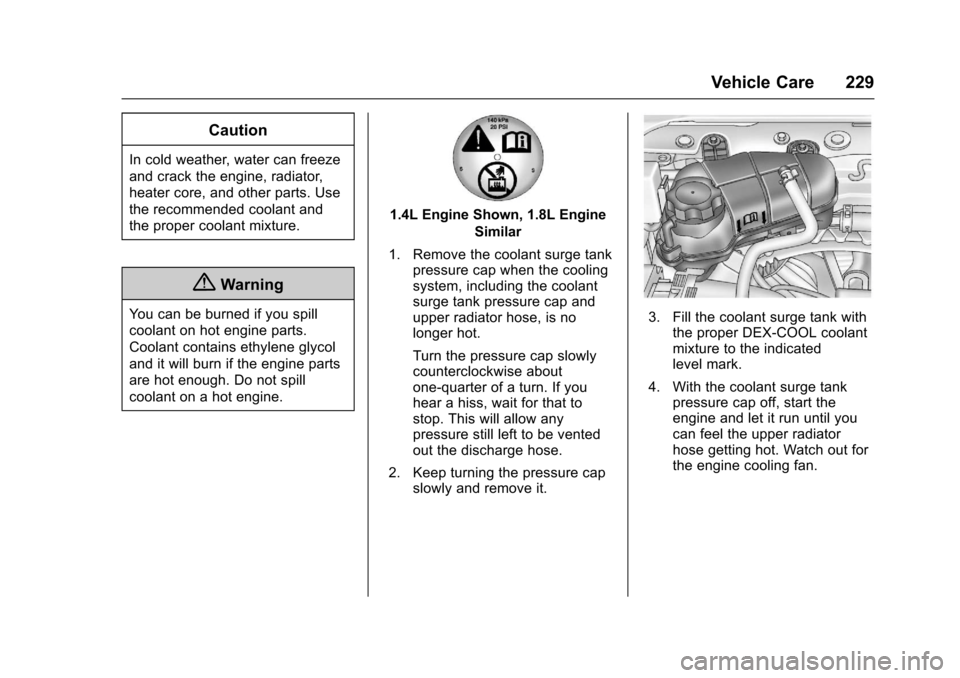
1.4L Engine Shown, 1.8L Engine
Similar
1. Remove the coolant surge tankpressure cap when the coolingsystem, including the coolantsurge tank pressure cap andupper radiator hose, is nolonger hot.
Turn the pressure cap slowlycounterclockwise aboutone-quarter of a turn. If youhear a hiss, wait for that tostop. This will allow anypressure still left to be ventedout the discharge hose.
2. Keep turning the pressure capslowly and remove it.
3. Fill the coolant surge tank withthe proper DEX-COOL coolantmixture to the indicatedlevel mark.
4. With the coolant surge tankpressure cap off, start theengine and let it run until youcan feel the upper radiatorhose getting hot. Watch out forthe engine cooling fan.
Page 239 of 342
Chevrolet Sonic Owner Manual (GMNA-Localizing-U.S./Canada-10122660) -2017 - crc - 5/13/16
238 Vehicle Care
Bulb Replacement
For the proper type of replacementbulbs, seeReplacementBulbs0241.
For any bulb-changing procedurenot listed in this section, contactyour dealer.
Halogen Bulbs
{Warning
Halogen bulbs have pressurized
gas inside and can burst if you
drop or scratch the bulb. You or
others could be injured. Be sure
to read and follow the instructions
on the bulb package.
Headlamps and Front
Turn Signal
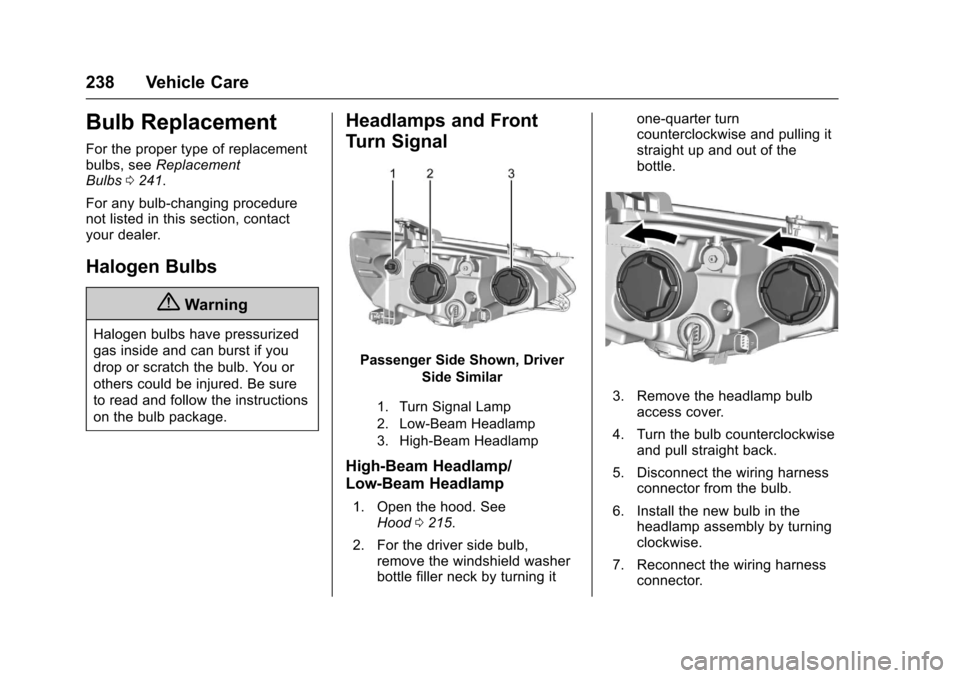
Passenger Side Shown, Driver
Side Similar
1. Turn Signal Lamp
2. Low-Beam Headlamp
3. High-Beam Headlamp
High-Beam Headlamp/
Low-Beam Headlamp
1. Open the hood. SeeHood0215.
2. For the driver side bulb,remove the windshield washerbottle filler neck by turning it
one-quarter turncounterclockwise and pulling itstraight up and out of thebottle.
3. Remove the headlamp bulbaccess cover.
4. Turn the bulb counterclockwiseand pull straight back.
5. Disconnect the wiring harnessconnector from the bulb.
6. Install the new bulb in theheadlamp assembly by turningclockwise.
7. Reconnect the wiring harnessconnector.
Page 240 of 342
Chevrolet Sonic Owner Manual (GMNA-Localizing-U.S./Canada-10122660) -2017 - crc - 5/13/16
Vehicle Care 239
8. Install the headlamp bulbaccess cover.
9. For the driver side bulb,replace the windshield washerbottle filler neck by turning itone-quarter turn clockwise intothe bottle.
Turn Signal Lamp
1. Open the hood. SeeHood0215.
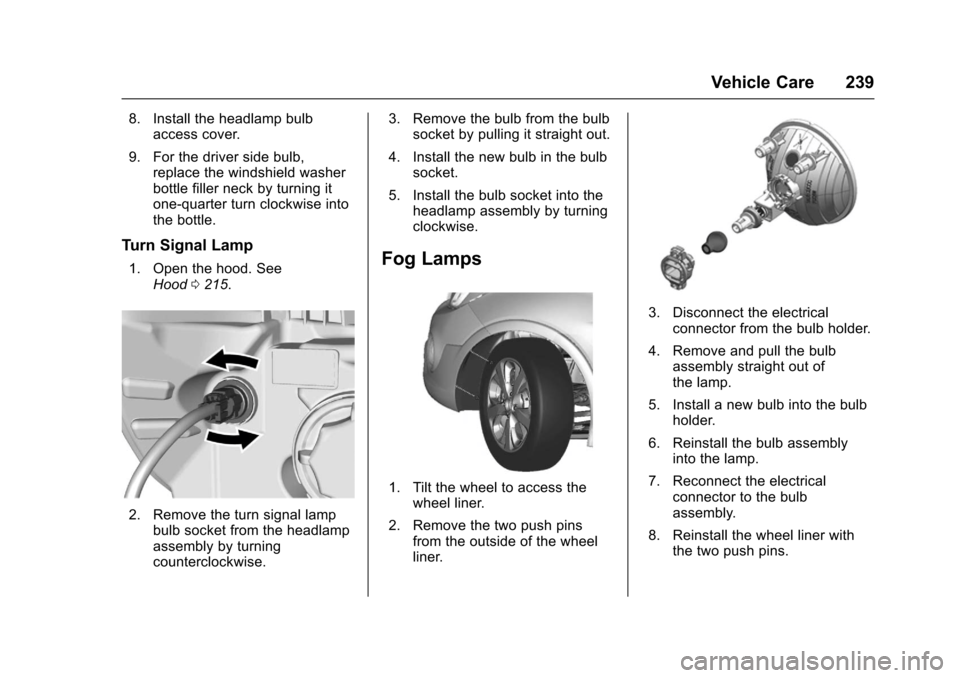
2. Remove the turn signal lampbulb socket from the headlampassembly by turningcounterclockwise.
3. Remove the bulb from the bulbsocket by pulling it straight out.
4. Install the new bulb in the bulbsocket.
5. Install the bulb socket into theheadlamp assembly by turningclockwise.
Fog Lamps
1. Tilt the wheel to access thewheel liner.
2. Remove the two push pinsfrom the outside of the wheelliner.
3. Disconnect the electricalconnector from the bulb holder.
4. Remove and pull the bulbassembly straight out ofthe lamp.
5. Install a new bulb into the bulbholder.
6. Reinstall the bulb assemblyinto the lamp.
7. Reconnect the electricalconnector to the bulbassembly.
8. Reinstall the wheel liner withthe two push pins.
Page 241 of 342
Chevrolet Sonic Owner Manual (GMNA-Localizing-U.S./Canada-10122660) -2017 - crc - 5/13/16
240 Vehicle Care
Taillamps, Turn Signal,
Stoplamps, and Back-Up
Lamps
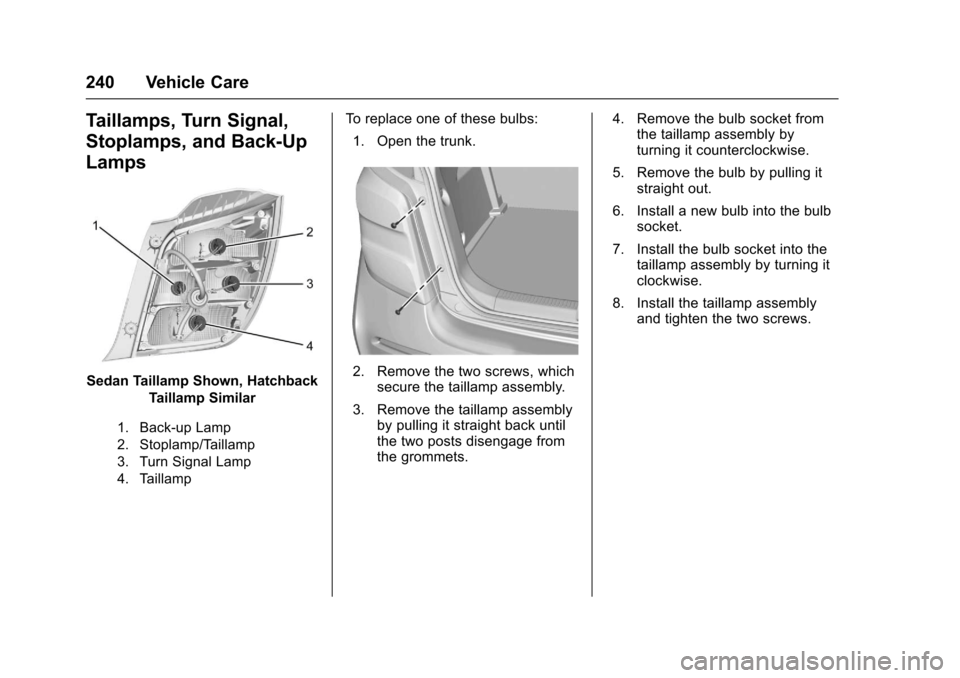
Sedan Taillamp Shown, Hatchback
Taillamp Similar
1. Back-up Lamp
2. Stoplamp/Taillamp
3. Turn Signal Lamp
4. Taillamp
To r e p l a c e o n e o f t h e s e b u l b s :
1. Open the trunk.
2. Remove the two screws, whichsecure the taillamp assembly.
3. Remove the taillamp assemblyby pulling it straight back untilthe two posts disengage fromthe grommets.
4. Remove the bulb socket fromthe taillamp assembly byturning it counterclockwise.
5. Remove the bulb by pulling itstraight out.
6. Install a new bulb into the bulbsocket.
7. Install the bulb socket into thetaillamp assembly by turning itclockwise.
8. Install the taillamp assemblyand tighten the two screws.
Page 242 of 342
Chevrolet Sonic Owner Manual (GMNA-Localizing-U.S./Canada-10122660) -2017 - crc - 5/13/16
Vehicle Care 241
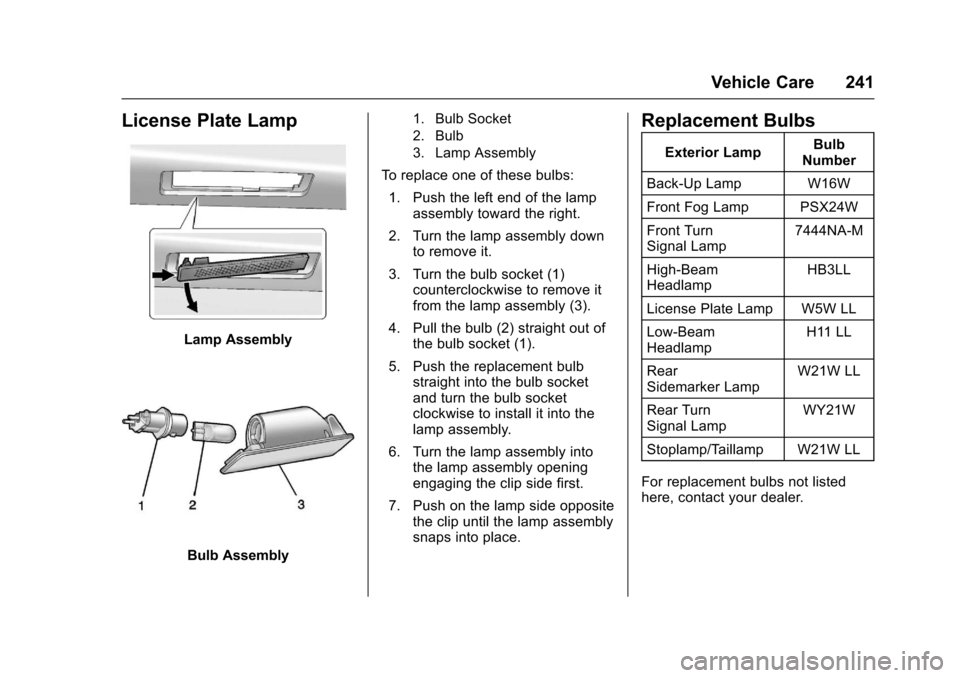
License Plate Lamp
Lamp Assembly
Bulb Assembly
1. Bulb Socket
2. Bulb
3. Lamp Assembly
To r e p l a c e o n e o f t h e s e b u l b s :
1. Push the left end of the lampassembly toward the right.
2. Turn the lamp assembly downto remove it.
3. Turn the bulb socket (1)counterclockwise to remove itfrom the lamp assembly (3).
4. Pull the bulb (2) straight out ofthe bulb socket (1).
5. Push the replacement bulbstraight into the bulb socketand turn the bulb socketclockwise to install it into thelamp assembly.
6. Turn the lamp assembly intothe lamp assembly openingengaging the clip side first.
7. Push on the lamp side oppositethe clip until the lamp assemblysnaps into place.
Replacement Bulbs
Exterior LampBulbNumber
Back-Up Lamp W16W
Front Fog Lamp PSX24W
Front TurnSignal Lamp7444NA-M
High-BeamHeadlampHB3LL
License Plate Lamp W5W LL
Low-BeamHeadlampH11 LL
RearSidemarker LampW21W LL
Rear TurnSignal LampWY21W
Stoplamp/Taillamp W21W LL
For replacement bulbs not listedhere, contact your dealer.
Page 249 of 342
Chevrolet Sonic Owner Manual (GMNA-Localizing-U.S./Canada-10122660) -2017 - crc - 5/19/16
248 Vehicle Care
FusesUsage
IPC/AOS Instrument panelcluster/Automaticoccupant sensingdisplay
SPARE–
RUN RELAY Run relay
L/GATERELAYLiftgate relay
IRAP RELAY IRAP Relay
TRAILER2 Trailer hitch 2
CLOCK-SPRINGClock spring
HVAC2 HVAC 2
HTDSTR WHLHeated steeringwheel
SPARE–
S/ROOF SW Sunroof switch
CIGAR APO Cigar auxiliarypower outlet
FusesUsage
ESCL Electric steeringcolumn lock
RAP/ACCYRELAYRetainedaccessory power/Accessory Relay
PWR WNDWFRONTFront powerwindows
IRAP ACCY IRAP accessory
BATTCON-NECTOR
Battery connector
Wheels and Tires
Tires
Every new GM vehicle has
high-quality tires made by a
leading tire manufacturer. See
the warranty manual for
information regarding the tire
warranty and where to get
service. For additional
information refer to the tire
manufacturer.
{Warning
.Poorly maintained and
improperly used tires are
dangerous.
.Overloading the tires can
cause overheating as a
result of too much
flexing. There could be a
blowout and a serious
crash. SeeVehicle Load
Limits0178.
(Continued)
Page 270 of 342
Chevrolet Sonic Owner Manual (GMNA-Localizing-U.S./Canada-10122660) -2017 - crc - 5/13/16
Vehicle Care 269
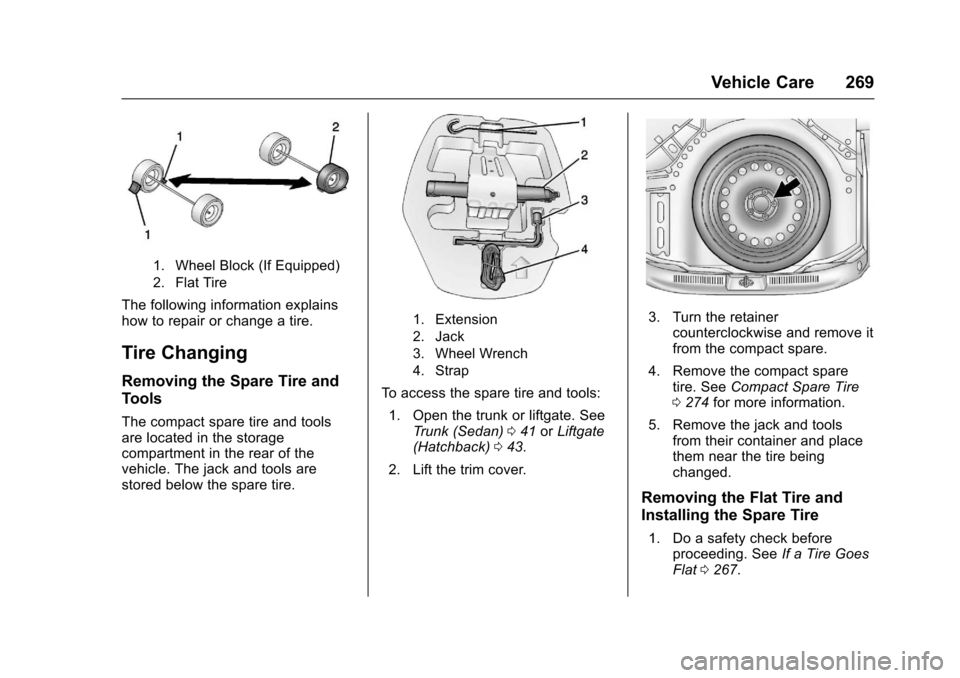
1. Wheel Block (If Equipped)
2. Flat Tire
The following information explainshow to repair or change a tire.
Tire Changing
Removing the Spare Tire and
Tools
The compact spare tire and toolsare located in the storagecompartment in the rear of thevehicle. The jack and tools arestored below the spare tire.
1. Extension
2. Jack
3. Wheel Wrench
4. Strap
To a c c e s s t h e s p a r e t i r e a n d t o o l s :
1. Open the trunk or liftgate. SeeTr u n k ( S e d a n )041orLiftgate(Hatchback)043.
2. Lift the trim cover.
3. Turn the retainercounterclockwise and remove itfrom the compact spare.
4. Remove the compact sparetire. SeeCompact Spare Tire0274for more information.
5. Remove the jack and toolsfrom their container and placethem near the tire beingchanged.
Removing the Flat Tire and
Installing the Spare Tire
1. Do a safety check beforeproceeding. SeeIf a Tire GoesFlat0267.
Page 271 of 342
Chevrolet Sonic Owner Manual (GMNA-Localizing-U.S./Canada-10122660) -2017 - crc - 5/13/16
270 Vehicle Care
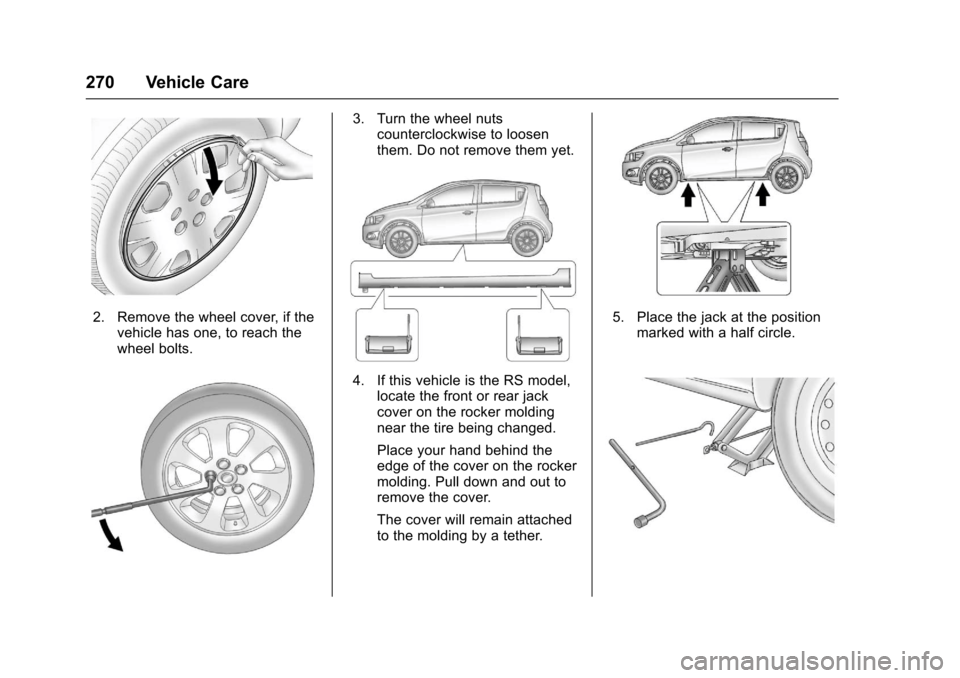
2. Remove the wheel cover, if thevehicle has one, to reach thewheel bolts.
3. Turn the wheel nutscounterclockwise to loosenthem. Do not remove them yet.
4. If this vehicle is the RS model,locate the front or rear jackcover on the rocker moldingnear the tire being changed.
Place your hand behind theedge of the cover on the rockermolding. Pull down and out toremove the cover.
The cover will remain attachedto the molding by a tether.
5. Place the jack at the positionmarked with a half circle.
Page 272 of 342
Chevrolet Sonic Owner Manual (GMNA-Localizing-U.S./Canada-10122660) -2017 - crc - 5/13/16
Vehicle Care 271
6. Insert the jack handle into thejack and the wheel wrenchonto the end of the jack handle.
7. Turn the wheel wrenchclockwise until the lift head isfirmly contacting the properlifting point nearest the flat tire.
{Warning
Getting under a vehicle when it is
lifted on a jack is dangerous.
If the vehicle slips off the jack,
you could be badly injured or
killed. Never get under a vehicle
when it is supported only by
ajack.
{Warning
Raising the vehicle with the jack
improperly positioned can
damage the vehicle and even
make the vehicle fall. To help
avoid personal injury and vehicle
(Continued)
Warning (Continued)
damage, be sure to fit the jack lift
head into the proper location
before raising the vehicle.
8. Turn the wheel wrenchclockwise to raise the vehicle.Raise the vehicle far enoughoff the ground so there isenough room for the compactspare tire to fit underneath thewheel well.
9. Turn the wheel nutscounterclockwise toremove them.
10. Remove the flat tire.
{Warning
Rust or dirt on a wheel, or on the
parts to which it is fastened, can
make wheel nuts become loose
after time. The wheel could come
off and cause an accident. When
changing a wheel, remove any
(Continued)
Warning (Continued)
rust or dirt from places where the
wheel attaches to the vehicle. In
an emergency, a cloth or a paper
towel can be used; however, use
ascraperorwirebrushlaterto
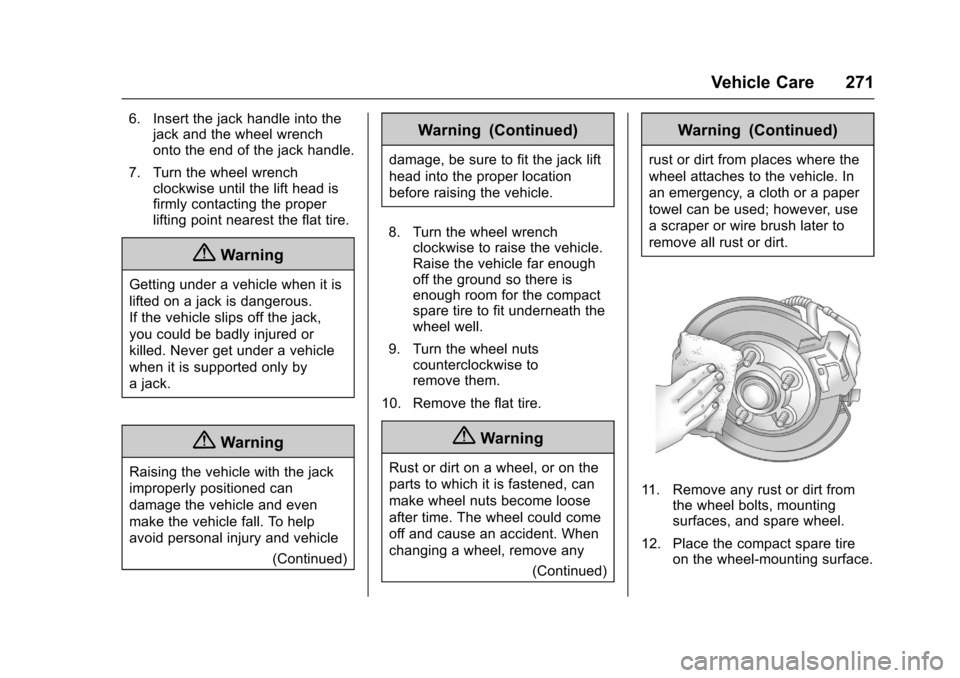
remove all rust or dirt.
11 . R e m o v e a n y r u s t o r d i r t f r o mthe wheel bolts, mountingsurfaces, and spare wheel.
12. Place the compact spare tireon the wheel-mounting surface.
Page 273 of 342
Chevrolet Sonic Owner Manual (GMNA-Localizing-U.S./Canada-10122660) -2017 - crc - 5/13/16
272 Vehicle Care
{Warning
Never use oil or grease on bolts
or nuts because the nuts might
come loose. The vehicle's wheel
could fall off, causing a crash.
13. Reinstall the wheel nuts.Tighten each nut by hand untilthe wheel is held againstthe hub.
14. Lower the vehicle by turningthe wheel wrenchcounterclockwise. Lower thejack completely.
{Warning
Wheel nuts that are improperly or
incorrectly tightened can cause
the wheels to become loose or
come off. The wheel nuts should
be tightened with a torque wrench
to the proper torque specification
after replacing. Follow the torque
specification supplied by the
aftermarket manufacturer when
(Continued)
Warning (Continued)
using accessory locking wheel
nuts. SeeCapacities and
Specifications0304for original
equipment wheel nut torque
specifications.
Caution
Improperly tightened wheel nuts
can lead to brake pulsation and
rotor damage. To avoid expensive
brake repairs, evenly tighten the
wheel nuts in the proper
sequence and to the proper
torque specification. See
Capacities and Specifications
0304for the wheel nut torque
specification.
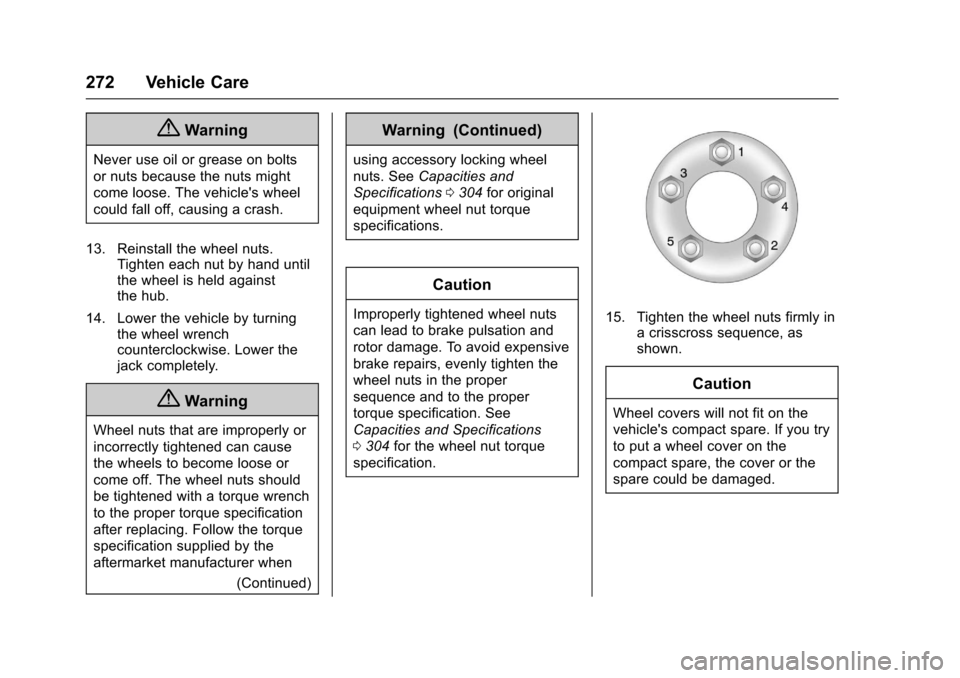
15. Tighten the wheel nuts firmly inacrisscrosssequence,asshown.
Caution
Wheel covers will not fit on the
vehicle's compact spare. If you try
to put a wheel cover on the
compact spare, the cover or the
spare could be damaged.