maintenance CHEVROLET SONIC 2017 2.G User Guide
[x] Cancel search | Manufacturer: CHEVROLET, Model Year: 2017, Model line: SONIC, Model: CHEVROLET SONIC 2017 2.GPages: 342, PDF Size: 7.2 MB
Page 126 of 342
Chevrolet Sonic Owner Manual (GMNA-Localizing-U.S./Canada-10122660) -2017 - crc - 5/13/16
Instruments and Controls 125
briefly while Timer is displayed. Toreset the timer to zero, press andhold SET/CLR.
Navigation
This display is used for theTurn-by-Turn navigation,if equipped.
Vehicle Information Menu
Items (Uplevel DIC)
Press MENU on the turn signallever until Vehicle Information menu
is displayed. Usew/xto scroll
through the following possible menuitems:
.Display Units
.Tire Pressure
.Remaining Oil Life
Display Units
Movew/xto switch between
metric or US when the Unit displayis active. Press SET/CLR to confirmthe setting. This will change thedisplays on the cluster and DIC toeither metric or English (US)measurements.
Tire Pressure
The display will show a vehicle withthe approximate pressures of allfour tires. Tire pressure is displayedin either kilopascal (kPa) or poundsper square inch (psi). SeeTirePressure Monitor System0257andTire Pressure MonitorOperation0258.
Remaining Oil Life
This menu is not available while thevehicle is moving. This displayshows an estimate of the oil'sremaining useful life. If REMAININGOIL LIFE 99 % is displayed, thatmeans 99% of the current oil liferemains.
When the remaining oil life is low,the CHANGE ENGINE OIL SOONmessage will appear on the display.The oil should changed as soon aspossible. SeeEngine Oil0220.Inaddition to the engine oil life systemmonitoring the oil life, additionalmaintenance is recommended in theMaintenance Schedule. SeeMaintenance Schedule0290.
Remember, the Oil Life display mustbe reset after each oil change. It willnot reset itself. Also, be careful notto reset the Oil Life displayaccidentally at any time other thanwhen the oil has just been changed.It cannot be reset accurately untilthe next oil change. To reset theengine oil life system, press SET/CLR while the Oil Life display isactive. SeeEngine Oil LifeSystem0222.
Page 128 of 342
Chevrolet Sonic Owner Manual (GMNA-Localizing-U.S./Canada-10122660) -2017 - crc - 5/13/16
Instruments and Controls 127
Messages that require immediateaction cannot be cleared until thataction is performed. Clearingmessages does not correct theproblem.
Engine Oil Messages
:% CHANGE
This message displays when theengine oil needs to be changed.When changing the engine oil, besure to reset the Oil Life System.SeeEngine Oil Life System0222,Engine Oil0220,andMaintenanceSchedule0290.
Tire Messages
LF XX, RF XX, LR XX,
or RR XX
Amessagedisplayswhenthetirepressure is low. It shows thelocation of the low tire and theapproximate pressure of the low tire.
If a tire pressure message appears,stop as soon as you can. Inflate thetires by adding air until the tirepressure is equal to the valuesshown on the Tire and LoadingInformation label. SeeTires0248,Vehicle Load Limits0178,andTirePressure0256.
Vehicle
Personalization
Use the audio system controls toaccess the personalization menusfor customizing vehicle features.
The following are all possiblepersonalization features. Dependingon the vehicle, some may not beavailable.
Radio Audio System Controls
1. Touch the desired feature todisplay a list of availableoptions.
2. Touch to select the desiredfeature setting.
3. PressoBACK on the
faceplate or touch0to return
to the previous menu or exit.
Turn the vehicle to ON/RUN toaccess the Settings menu, thenselect SETTINGS from the HomePage on the infotainment systemdisplay.
Page 167 of 342
Chevrolet Sonic Owner Manual (GMNA-Localizing-U.S./Canada-10122660) -2017 - crc - 5/13/16
166 Climate Controls
Climate Controls
Climate Control Systems
Climate Control Systems . . . . . 166
Air Vents
Air Vents . . . . . . . . . . . . . . . . . . . . . 168
Maintenance
Air Intake . . . . . . . . . . . . . . . . . . . . . 169Passenger Compartment AirFilter . . . . . . . . . . . . . . . . . . . . . . . . 169Service . . . . . . . . . . . . . . . . . . . . . . . 169
Climate Control
Systems
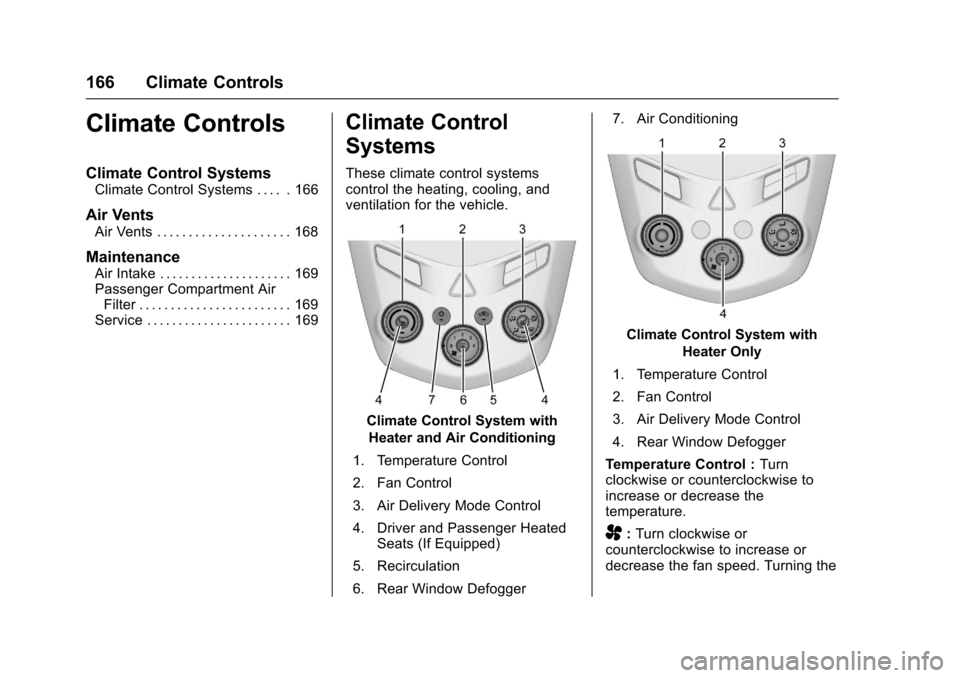
These climate control systemscontrol the heating, cooling, andventilation for the vehicle.
Climate Control System with
Heater and Air Conditioning
1. Temperature Control
2. Fan Control
3. Air Delivery Mode Control
4. Driver and Passenger HeatedSeats (If Equipped)
5. Recirculation
6. Rear Window Defogger
7. Air Conditioning
Climate Control System with
Heater Only
1. Temperature Control
2. Fan Control
3. Air Delivery Mode Control
4. Rear Window Defogger
Te m p e r a t u r e C o n t r o l :Turnclockwise or counterclockwise toincrease or decrease thetemperature.
A:Turn clockwise orcounterclockwise to increase ordecrease the fan speed. Turning the
Page 170 of 342
Chevrolet Sonic Owner Manual (GMNA-Localizing-U.S./Canada-10122660) -2017 - crc - 5/13/16
Climate Controls 169
Maintenance
Air Intake
Clear away any ice, snow, or leavesfrom the air intake at the base of thewindshield that can block the flow ofair into the vehicle.
Passenger Compartment
Air Filter
The filter removes dust, pollen, andother airborne irritants from outsideair that is pulled into the vehicle.
The filter should be replaced as partof routine scheduled maintenance.SeeMaintenance Schedule0290.To f i n d o u t w h a t t y p e o f f i l t e r t o u s e ,seeMaintenance ReplacementParts0301.
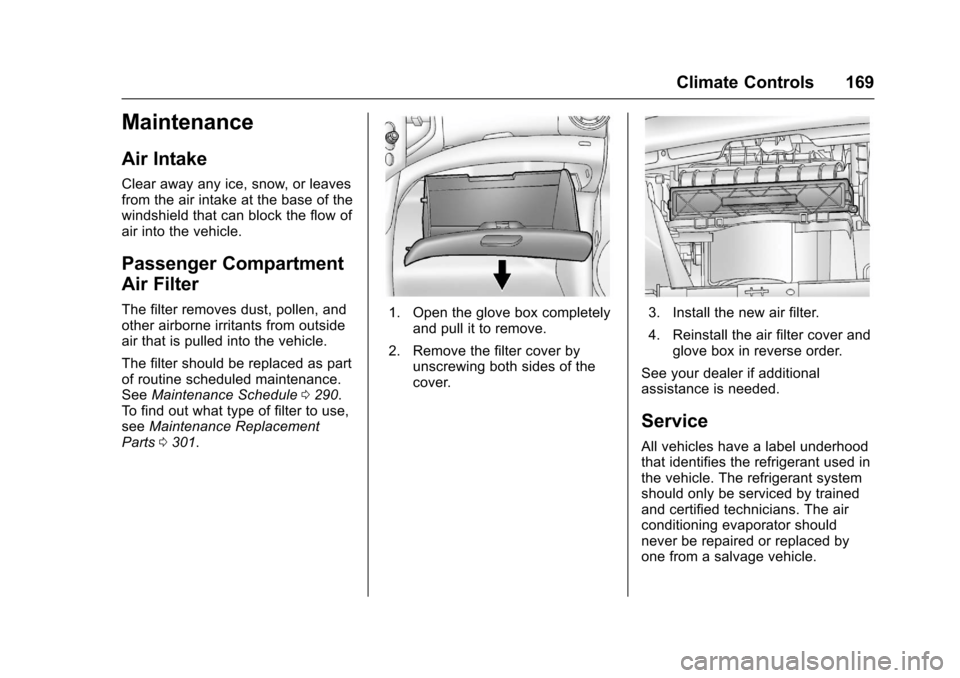
1. Open the glove box completelyand pull it to remove.
2. Remove the filter cover byunscrewing both sides of thecover.
3. Install the new air filter.
4. Reinstall the air filter cover andglove box in reverse order.
See your dealer if additionalassistance is needed.
Service
All vehicles have a label underhoodthat identifies the refrigerant used inthe vehicle. The refrigerant systemshould only be serviced by trainedand certified technicians. The airconditioning evaporator shouldnever be repaired or replaced byone from a salvage vehicle.
Page 174 of 342
Chevrolet Sonic Owner Manual (GMNA-Localizing-U.S./Canada-10122660) -2017 - crc - 5/13/16
Driving and Operating 173
{Warning
Drinking and then driving is very
dangerous. Your reflexes,
perceptions, attentiveness, and
judgment can be affected by even
asmallamountofalcohol.You
can have a serious—or even
fatal—collision if you drive after
drinking.
Do not drink and drive or ride with
adriverwhohasbeendrinking.
Ride home in a cab; or if you are
with a group, designate a driver
who will not drink.
Control of a Vehicle
Braking, steering, and acceleratingare important factors in helping tocontrol a vehicle while driving.
Braking
Braking action involves perceptiontime and reaction time. Deciding topush the brake pedal is perceptiontime. Actually doing it isreaction time.
Average driver reaction time isabout three-quarters of a second. Inthat time, a vehicle moving at100 km/h (60 mph) travels 20 m(66 ft), which could be a lot ofdistance in an emergency.
Helpful braking tips to keep in mindinclude:
.Keep enough distance betweenyou and the vehicle in frontof you.
.Avoid needless heavy braking.
.Keep pace with traffic.
If the engine ever stops while thevehicle is being driven, brakenormally but do not pump thebrakes. Doing so could make thepedal harder to push down. If theengine stops, there will be somepower brake assist but it will beused when the brake is applied.Once the power assist is used up, itcan take longer to stop and thebrake pedal will be harder to push.
Steering
Electric Power Steering
The vehicle has electric powersteering. It does not have powersteering fluid. Regular maintenanceis not required.
If power steering assist is lost dueto a system malfunction, the vehiclecan be steered, but may requireincreased effort. See your dealer ifthere is a problem.
If the steering wheel is turned until itreaches the end of its travel and isheld against that position for anextended period of time, powersteering assist may be reduced.
If the steering assist is used for anextended period of time, powerassist may be reduced.
Normal use of the power steeringassist should return when thesystem cools down.
See your dealer if there is aproblem.
Page 212 of 342
Chevrolet Sonic Owner Manual (GMNA-Localizing-U.S./Canada-10122660) -2017 - crc - 5/13/16
Driving and Operating 211
Trailer Towing
General Towing
Information
The vehicle is neither designed norintended to tow a trailer.
Conversions and
Add-Ons
Add-On Electrical
Equipment
{Warning
The Data Link Connector (DLC) is
used for vehicle service and
Emission Inspection/Maintenance
testing. SeeMalfunction Indicator
Lamp (Check Engine Light)011 2.
AdeviceconnectedtotheDLC—
such as an aftermarket fleet or
driver-behavior tracking device—
may interfere with vehicle
systems. This could affect vehicle
operation and cause a crash.
Such devices may also access
information stored in the vehicle’s
systems.
Caution
Some electrical equipment can
damage the vehicle or cause
components to not work and
would not be covered by the
vehicle warranty. Always check
with your dealer before adding
electrical equipment.
Add-on equipment can drain thevehicle's 12-volt battery, even if thevehicle is not operating.
The vehicle has an airbag system.Before attempting to add anythingelectrical to the vehicle, seeServicing the Airbag-EquippedVehicle075andAdding Equipmentto the Airbag-EquippedVehicle075.
Page 216 of 342
Chevrolet Sonic Owner Manual (GMNA-Localizing-U.S./Canada-10122660) -2017 - crc - 5/13/16
Vehicle Care 215
Keep a record with all parts receiptsand list the mileage and the date ofany service work performed. SeeMaintenance Records0302.
Caution
Even small amounts of
contamination can cause damage
to vehicle systems. Do not allow
contaminants to contact the fluids,
reservoir caps, or dipsticks.
Hood
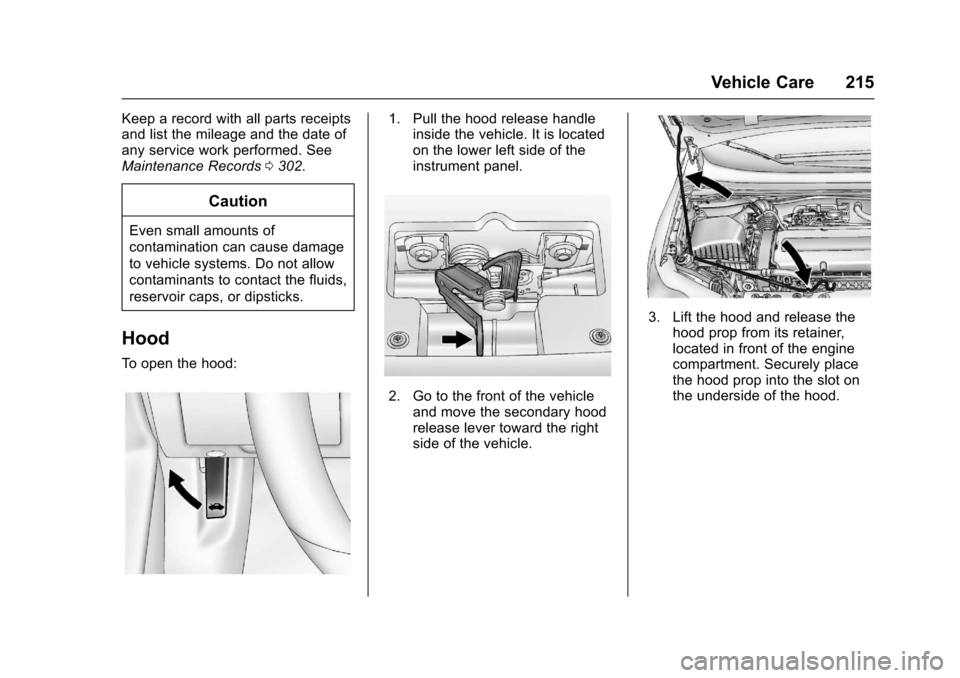
To o p e n t h e h o o d :
1. Pull the hood release handleinside the vehicle. It is locatedon the lower left side of theinstrument panel.
2. Go to the front of the vehicleand move the secondary hoodrelease lever toward the rightside of the vehicle.
3. Lift the hood and release thehood prop from its retainer,located in front of the enginecompartment. Securely placethe hood prop into the slot onthe underside of the hood.
Page 225 of 342
Chevrolet Sonic Owner Manual (GMNA-Localizing-U.S./Canada-10122660) -2017 - crc - 5/13/16
224 Vehicle Care
Change the fluid at the intervalslisted inMaintenance Schedule0290,andbesuretousethefluidlisted inRecommended Fluids andLubricants0300.
Manual Transmission
Fluid
It is not necessary to check themanual transmission fluid level.Atransmissionfluidleakistheonlyreason for fluid loss. If a leakoccurs, take the vehicle to yourdealer and have it repaired as soonas possible. SeeRecommendedFluids and Lubricants0300for theproper fluid to use.
Hydraulic Clutch
For vehicles with a manualtransmission, it is not necessary toregularly check brake/clutch fluidunless there is a leak suspected.Adding fluid will not correct a leak.Afluidlossinthissystemcouldindicate a problem. Have thesystem inspected and repaired.
When to Check and What
to Use
The common hydraulic clutch andbrake master cylinder fluid reservoiris filled with DOT 3 brake fluid asindicated on the reservoir cap. SeeEngine Compartment Overview0217for reservoir location.
How to Check and Add Fluid
Visually check the brake/clutch fluidreservoir to make sure the fluid levelis at the MIN (minimum) line on theside of the reservoir. The brake/hydraulic clutch fluid system shouldbe closed and sealed.
Do not remove the cap to check thefluid level or to top⇣off the fluid level.Remove the cap only whennecessary to add the proper fluiduntil the level reaches the MIN line.
Engine Air Cleaner/Filter
The engine air cleaner/filter islocated in the engine compartmenton the passenger side of thevehicle. SeeEngine CompartmentOverview0217for more informationon location.
When to Inspect the Engine Air
Cleaner/Filter
For intervals on changing andinspecting the engine air cleaner/filter, seeMaintenanceSchedule0290.
How to Inspect the Engine Air
Cleaner/Filter
Do not start the engine or have theengine running with the engine aircleaner/filter housing open. Beforeremoving the engine air cleaner/filter, make sure that the engine aircleaner/filter housing and nearbycomponents are free of dirt anddebris. Remove the engine aircleaner/filter. Lightly tap and shakethe engine air cleaner/filter (awayfrom the vehicle), to release loosedust and dirt. Inspect the engine aircleaner/filter for damage, andreplace if damaged. Do not cleanthe engine air cleaner/filter orcomponents with water orcompressed air.
Page 234 of 342
Chevrolet Sonic Owner Manual (GMNA-Localizing-U.S./Canada-10122660) -2017 - crc - 5/13/16
Vehicle Care 233
Brake Fluid
The brake/clutch master cylinderreservoir is filled with GM approvedDOT 3 brake fluid as indicated onthe reservoir cap. SeeEngineCompartment Overview0217forthe location of the reservoir.
Checking Brake Fluid
Place the vehicle in P (Park) orNeutral with the parking brakeapplied if equipped with a manualtransmission. On a level surface,the brake fluid level should bebetween the minimum andmaximum marks on the brake fluidreservoir.
There are only two reasons why thebrake fluid level in the reservoir maygo down:
.Normal brake lining wear. Whennew linings are installed, thefluid level goes back up.
.Afluidleakinthebrake/clutchhydraulic system. Have thebrake/clutch hydraulic systemfixed. With a leak, the brakes willnot work well.
Always clean the brake fluidreservoir cap and the area aroundthe cap before removing it.
Do not top off the brake/clutch fluid.Adding fluid does not correct a leak.If fluid is added when the linings areworn, there will be too much fluidwhen new brake linings areinstalled. Add or remove fluid, asnecessary, only when work is doneon the brake/clutch hydraulicsystem.
{Warning
If too much brake fluid is added, it
can spill on the engine and burn,
if the engine is hot enough. You
or others could be burned, and
(Continued)
Warning (Continued)
the vehicle could be damaged.
Add brake fluid only when work is
done on the brake/clutch
hydraulic system.
When the brake/clutch fluid falls to alow level, the brake warning lightcomes on. SeeBrake SystemWarning Light011 4.
Brake fluid absorbs water over timewhich degrades the effectiveness ofthe brake fluid. Replace brake fluidat the specified intervals to preventincreased stopping distance. SeeMaintenance Schedule0290.
What to Add
Use only GM approved DOT 3brake fluid from a clean, sealedcontainer. SeeRecommendedFluids and Lubricants0300.
Page 235 of 342
Chevrolet Sonic Owner Manual (GMNA-Localizing-U.S./Canada-10122660) -2017 - crc - 5/13/16
234 Vehicle Care
{Warning
The wrong or contaminated brake
fluid could result in damage to the
brake system. This could result in
the loss of braking leading to a
possible injury. Always use the
proper GM approved brake fluid.
Caution
If brake fluid is spilled on the
vehicle's painted surfaces, the
paint finish can be damaged.
Immediately wash off any painted
surface.
Battery - North America
The original equipment battery ismaintenance free. Do not removethe cap and do not add fluid.
Refer to the replacement numbershown on the original battery labelwhen a new battery is needed. SeeEngine Compartment Overview0217for battery location.
{Warning
WA R N I N G :Battery posts,
terminals, and related
accessories contain lead and lead
compounds, chemicals known to
the State of California to cause
cancer and birth defects or other
reproductive harm. Batteries also
contain other chemicals known to
the State of California to cause
cancer.WASH HANDS AFTER
HANDLING.
SeeCalifornia Proposition
65 Warning0213.
Vehicle Storage
{Warning
Batteries have acid that can burn
you and gas that can explode.
Yo u c a n b e b a d l y h u r t i f y o u a r e
not careful. SeeJump Starting -
North America0275for tips on
working around a battery without
getting hurt.
Infrequent Usage: Remove theblack, negative (✓)cablefromthebattery to keep the battery fromrunning down.
Extended Storage: Remove theblack, negative (✓)cablefromthebattery or use a battery tricklecharger.
Starter Switch Check
{Warning
When you are doing this
inspection, the vehicle could
move suddenly. If the vehicle
moves, you or others could be
injured.
1. Before starting this check, besure there is enough roomaround the vehicle.
2. Apply both the parking brakeand the regular brake.
Do not use the acceleratorpedal, and be ready to turn offthe engine immediately if itstarts.