trunk CHEVROLET SONIC 2017 2.G Owners Manual
[x] Cancel search | Manufacturer: CHEVROLET, Model Year: 2017, Model line: SONIC, Model: CHEVROLET SONIC 2017 2.GPages: 342, PDF Size: 7.2 MB
Page 6 of 342
Chevrolet Sonic Owner Manual (GMNA-Localizing-U.S./Canada-10122660) -2017 - crc - 5/13/16
In Brief 5
In Brief
Instrument Panel
Instrument Panel . . . . . . . . . . . . . . . . 6
Initial Drive Information
Initial Drive Information . . . . . . . . . . 8Remote Keyless Entry (RKE)System . . . . . . . . . . . . . . . . . . . . . . . . 8Remote Vehicle Start . . . . . . . . . . . 9Door Locks . . . . . . . . . . . . . . . . . . . . . 9Liftgate (Hatchback) . . . . . . . . . . . 10Trunk Release (Sedan) . . . . . . . . 10Windows . . . . . . . . . . . . . . . . . . . . . . . 11Seat Adjustment . . . . . . . . . . . . . . . 11Second Row Seats . . . . . . . . . . . . 13Head Restraint Adjustment . . . . 13Safety Belts . . . . . . . . . . . . . . . . . . . . 13Passenger Sensing System . . . 13Mirror Adjustment . . . . . . . . . . . . . . 14Steering Wheel Adjustment . . . . 14Interior Lighting . . . . . . . . . . . . . . . . 15Exterior Lighting . . . . . . . . . . . . . . . 15Windshield Wiper/Washer . . . . . . 16Climate Controls . . . . . . . . . . . . . . . 16Transmission . . . . . . . . . . . . . . . . . . 17
Vehicle Features
Infotainment System . . . . . . . . . . . 18Radio(s) . . . . . . . . . . . . . . . . . . . . . . . 19
Satellite Radio . . . . . . . . . . . . . . . . . 19Portable Audio Devices . . . . . . . . 20Bluetooth®..................... 20Steering Wheel Controls . . . . . . . 20Cruise Control . . . . . . . . . . . . . . . . . 21Driver InformationCenter (DIC) . . . . . . . . . . . . . . . . . 21Forward Collision Alert (FCA)System . . . . . . . . . . . . . . . . . . . . . . . 21Lane DepartureWarning (LDW) . . . . . . . . . . . . . . . 21Rear Vision Camera (RVC) . . . . 22Power Outlets . . . . . . . . . . . . . . . . . 22Sunroof . . . . . . . . . . . . . . . . . . . . . . . . 22
Performance and Maintenance
Traction Control/ElectronicStability Control . . . . . . . . . . . . . . 23Tire Pressure Monitor . . . . . . . . . . 23Fuel . . . . . . . . . . . . . . . . . . . . . . . . . . . 23E85 or FlexFuel . . . . . . . . . . . . . . . . 24Engine Oil Life System . . . . . . . . 24Driving for Better FuelEconomy . . . . . . . . . . . . . . . . . . . . . 24Roadside AssistanceProgram . . . . . . . . . . . . . . . . . . . . . . 25
Page 8 of 342

Chevrolet Sonic Owner Manual (GMNA-Localizing-U.S./Canada-10122660) -2017 - crc - 5/13/16
In Brief 7
1.Air Vents0168.
2.Exterior Lamp Controls0134.
Instrument Panel IlluminationControl0137.
3. Turn Signal Lever. SeeTu r nand Lane-ChangeSignals0136.
4.Instrument Cluster0107.
5.Windshield Wiper/Washer0102.
6. Card Holder.
7.Infotainment0141.
8. Light Sensor. SeeAutomaticHeadlamp System0135.
9.Instrument Panel Storage097.
10.Passenger SensingSystem071.
11 .Hazard WarningFlashers0136.
12.USB Port0149(If Equipped).
Auxiliary Devices0155(IfEquipped).
13. Shift Lever. SeeAutomaticTr a n s m i s s i o n0191(IfEquipped) orManualTr a n s m i s s i o n0193(IfEquipped).
14. Trunk Release (Sedan). SeeTr u n k ( S e d a n )041.
Lane Departure Warning(LDW)0206(If Equipped).
Tr a c t i o n C o n t r o l / E l e c t r o n i cStability Control0197.
15.Power Outlets0105.
16.Climate ControlSystems0166.
17. Central Locking Switch. SeeDoor Locks038.
18. Ignition Switch. SeeIgnitionPositions (Key Access)0182orIgnition Positions (KeylessAccess)0183.
19.Steering Wheel Controls0101.
20.Horn0102.
21.Steering WheelAdjustment0101.
22.Cruise Control0199.
Forward Collision Alert (FCA)System0204(If Equipped.
Heated Steering Wheel0102(If Equipped).
23. Data Link Connector (DLC)(Out of View). SeeMalfunctionIndicator Lamp (Check EngineLight)011 2.
24. Hood Release. SeeHood0215.
Page 9 of 342
Chevrolet Sonic Owner Manual (GMNA-Localizing-U.S./Canada-10122660) -2017 - crc - 5/13/16
8 In Brief
Initial Drive
Information
This section provides a briefoverview about some of theimportant features that may or maynot be on your specific vehicle.
For more detailed information, referto each of the features which can befound later in this owner manual.
Remote Keyless Entry
(RKE) System
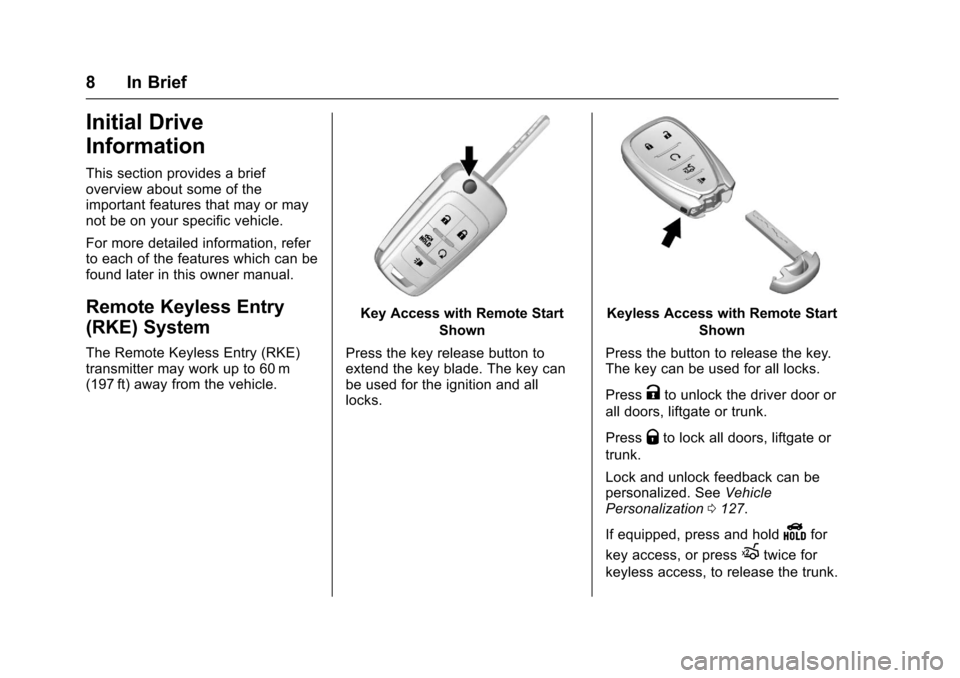
The Remote Keyless Entry (RKE)transmitter may work up to 60 m(197 ft) away from the vehicle.
Key Access with Remote Start
Shown
Press the key release button toextend the key blade. The key canbe used for the ignition and alllocks.
Keyless Access with Remote Start
Shown
Press the button to release the key.The key can be used for all locks.
PressKto unlock the driver door or
all doors, liftgate or trunk.
PressQto lock all doors, liftgate or
trunk.
Lock and unlock feedback can bepersonalized. SeeVehiclePersonalization0127.
If equipped, press and holdYfor
key access, or pressXtwice for
keyless access, to release the trunk.
Page 11 of 342
Chevrolet Sonic Owner Manual (GMNA-Localizing-U.S./Canada-10122660) -2017 - crc - 5/13/16
10 In Brief
Keyless Access
The RKE transmitter must be within1m (3ft) of the door being opened.
Press the button on the door handleto open. See Keyless AccessOperation underRemote KeylessEntry (RKE) System Operation(Keyless Access)031orRemoteKeyless Entry (RKE) SystemOperation (Key Access)029.
Liftgate (Hatchback)
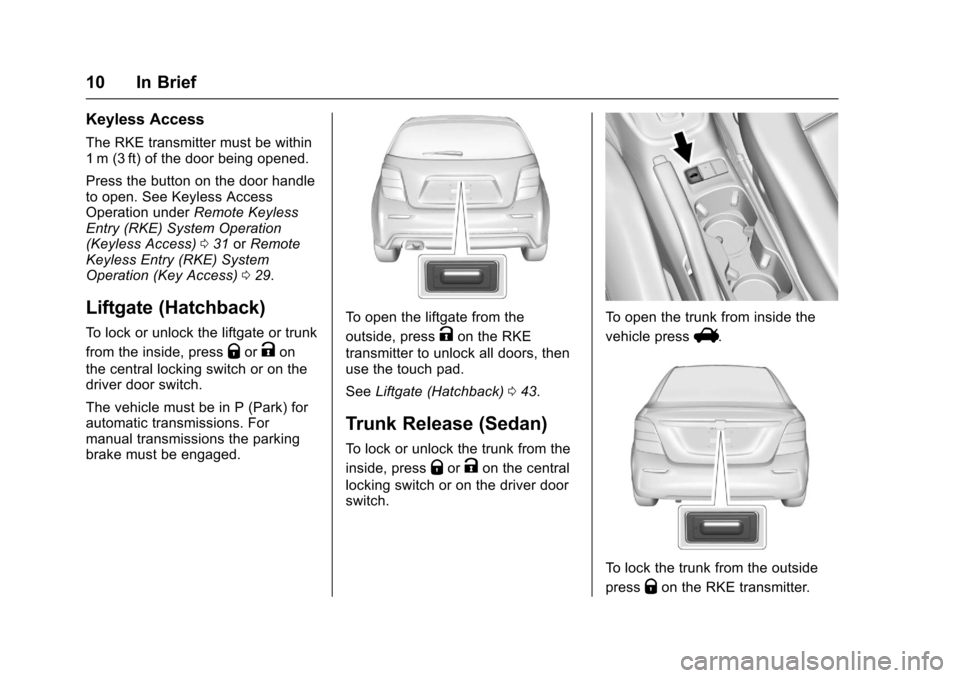
To l o c k o r u n l o c k t h e l i f t g a t e o r t r u n k
from the inside, pressQorKon
the central locking switch or on thedriver door switch.
The vehicle must be in P (Park) forautomatic transmissions. Formanual transmissions the parkingbrake must be engaged.
To o p e n t h e l i f t g a t e f r o m t h e
outside, pressKon the RKE
transmitter to unlock all doors, thenuse the touch pad.
SeeLiftgate (Hatchback)043.
Trunk Release (Sedan)
To l o c k o r u n l o c k t h e t r u n k f r o m t h e
inside, pressQorKon the central
locking switch or on the driver doorswitch.
To o p e n t h e t r u n k f r o m i n s i d e t h e
vehicle pressV.
To l o c k t h e t r u n k f r o m t h e o u t s i d e
pressQon the RKE transmitter.
Page 27 of 342
Chevrolet Sonic Owner Manual (GMNA-Localizing-U.S./Canada-10122660) -2017 - crc - 5/13/16
26 Keys, Doors, and Windows
Keys, Doors, and
Windows
Keys and Locks
Keys . . . . . . . . . . . . . . . . . . . . . . . . . . . 26Remote Keyless Entry (RKE)System . . . . . . . . . . . . . . . . . . . . . . . 28Remote Keyless Entry (RKE)System Operation (KeyAccess) . . . . . . . . . . . . . . . . . . . . . . 29Remote Keyless Entry (RKE)System Operation (KeylessAccess) . . . . . . . . . . . . . . . . . . . . . . 31Remote Vehicle Start . . . . . . . . . . 37Door Locks . . . . . . . . . . . . . . . . . . . . 38Delayed Locking . . . . . . . . . . . . . . . 39Automatic Door Locks . . . . . . . . . 40Lockout Protection . . . . . . . . . . . . . 40Safety Locks . . . . . . . . . . . . . . . . . . . 40
Doors
Trunk (Sedan) . . . . . . . . . . . . . . . . . 41Liftgate (Hatchback) . . . . . . . . . . . 43
Vehicle Security
Vehicle Security . . . . . . . . . . . . . . . . 44Vehicle Alarm System . . . . . . . . . 44Immobilizer . . . . . . . . . . . . . . . . . . . . 45Immobilizer Operation . . . . . . . . . 45
Exterior Mirrors
Convex Mirrors . . . . . . . . . . . . . . . . 46Manual Mirrors . . . . . . . . . . . . . . . . . 46Power Mirrors . . . . . . . . . . . . . . . . . . 46Folding Mirrors . . . . . . . . . . . . . . . . . 47Heated Mirrors . . . . . . . . . . . . . . . . . 47
Interior Mirrors
Manual Rearview Mirror . . . . . . . . 47
Windows
Windows . . . . . . . . . . . . . . . . . . . . . . . 47Manual Windows . . . . . . . . . . . . . . 48Power Windows . . . . . . . . . . . . . . . 48Sun Visors . . . . . . . . . . . . . . . . . . . . . 49
Roof
Sunroof . . . . . . . . . . . . . . . . . . . . . . . . 50
Keys and Locks
Keys
{Warning
Leaving children in a vehicle with
an ignition key or Remote
Keyless Entry (RKE) transmitter is
dangerous and children or others
could be seriously injured or
killed. They could operate the
power window or other controls or
make the vehicle move. The
windows will function with the key
in the ignition or with the RKE
transmitter in the vehicle, and
children or others could be caught
in the path of a closing window.
Do not leave children in a vehicle
with the ignition key or an RKE
transmitter.
Page 30 of 342
Chevrolet Sonic Owner Manual (GMNA-Localizing-U.S./Canada-10122660) -2017 - crc - 5/13/16
Keys, Doors, and Windows 29
Remote Keyless Entry
(RKE) System Operation
(Key Access)
The RKE transmitter may work up to60 m (197 ft) away from the vehicle.
Other conditions can affect theperformance of the transmitter. SeeRemote Keyless Entry (RKE)System028.
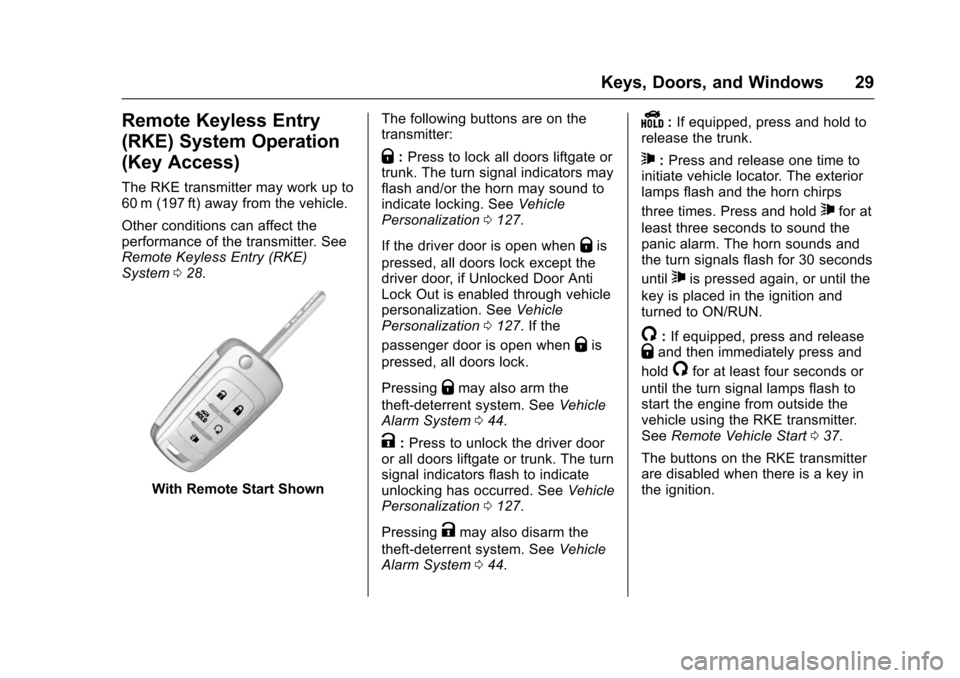
With Remote Start Shown
The following buttons are on thetransmitter:
Q:Press to lock all doors liftgate ortrunk. The turn signal indicators mayflash and/or the horn may sound toindicate locking. SeeVehiclePersonalization0127.
If the driver door is open whenQis
pressed, all doors lock except thedriver door, if Unlocked Door AntiLock Out is enabled through vehiclepersonalization. SeeVehiclePersonalization0127.Ifthe
passenger door is open whenQis
pressed, all doors lock.
PressingQmay also arm the
theft-deterrent system. SeeVehicleAlarm System044.
K:Press to unlock the driver dooror all doors liftgate or trunk. The turnsignal indicators flash to indicateunlocking has occurred. SeeVehiclePersonalization0127.
PressingKmay also disarm the
theft-deterrent system. SeeVehicleAlarm System044.
Y:If equipped, press and hold torelease the trunk.
7:Press and release one time toinitiate vehicle locator. The exteriorlamps flash and the horn chirps
three times. Press and hold7for at
least three seconds to sound thepanic alarm. The horn sounds andthe turn signals flash for 30 seconds
until7is pressed again, or until the
key is placed in the ignition andturned to ON/RUN.
/:If equipped, press and releaseQand then immediately press and
hold/for at least four seconds or
until the turn signal lamps flash tostart the engine from outside thevehicle using the RKE transmitter.SeeRemote Vehicle Start037.
The buttons on the RKE transmitterare disabled when there is a key inthe ignition.
Page 32 of 342
Chevrolet Sonic Owner Manual (GMNA-Localizing-U.S./Canada-10122660) -2017 - crc - 5/13/16
Keys, Doors, and Windows 31
Battery Replacement
The battery is not rechargeable. Toreplace the battery:
Caution
When replacing the battery, do
not touch any of the circuitry on
the transmitter. Static from your
body could damage the
transmitter.
1. Press the button on thetransmitter to extend the key.
2. Remove the battery cover byprying with a finger.
3. Remove the old battery.
4. Insert the new battery, positiveside facing up. Replace with aCR2032 or equivalent battery.
5. Snap the battery cover back onto the transmitter.
Remote Keyless Entry
(RKE) System Operation
(Keyless Access)
The Keyless Access system allowsfor vehicle entry when thetransmitter is within range. See“Keyless Access Operation”following.
The transmitter functions may workup to 60 m (197 ft) away from thevehicle.
Other conditions can impact theperformance of the transmitter.
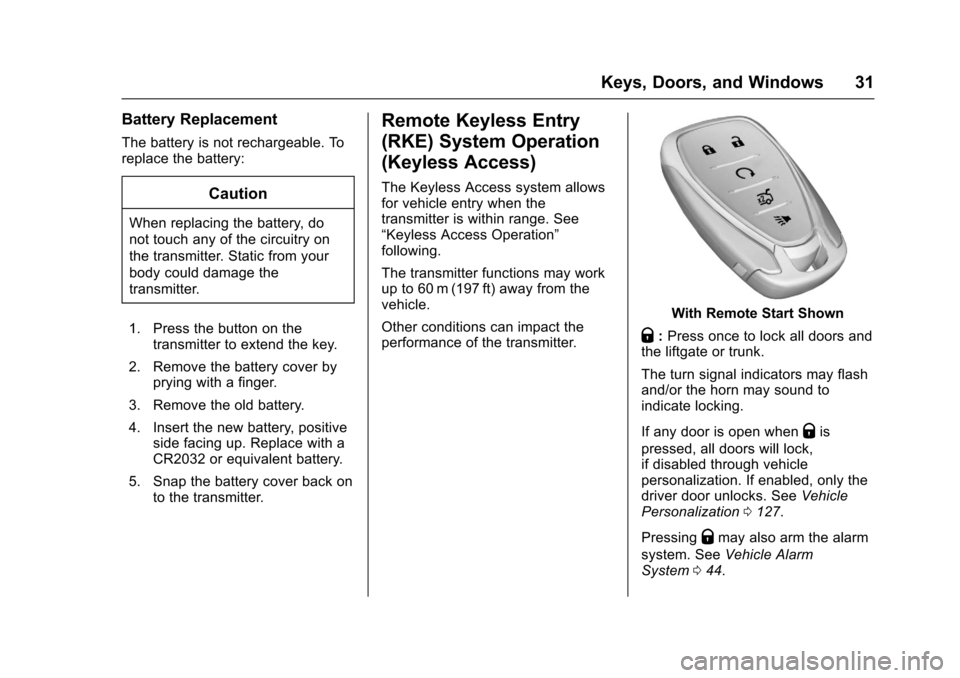
With Remote Start Shown
Q:Press once to lock all doors andthe liftgate or trunk.
The turn signal indicators may flashand/or the horn may sound toindicate locking.
If any door is open whenQis
pressed, all doors will lock,if disabled through vehiclepersonalization. If enabled, only thedriver door unlocks. SeeVehiclePersonalization0127.
PressingQmay also arm the alarm
system. SeeVehicle AlarmSystem044.
Page 33 of 342
Chevrolet Sonic Owner Manual (GMNA-Localizing-U.S./Canada-10122660) -2017 - crc - 5/13/16
32 Keys, Doors, and Windows
K:Press to unlock the driver doorand the liftgate or trunk. Press againto unlock all doors.
The turn signal indicators may flashto indicate unlocking has occurred.SeeVehicle Personalization0127.
PressingKwill disarm the alarm
system. SeeVehicle AlarmSystem044.
X:If equipped, press twice torelease the trunk.
7:Press and release one time toinitiate vehicle locator. The exteriorlamps flash and the horn chirpsthree times.
Press and hold7for at least
three seconds to sound the panicalarm. The horn sounds and theturn signals flash for about
30 seconds until7is pressed again
or ignition is turned to ON/RUN.
/:If equipped, pressQand then
immediately press and hold/for at
least four seconds or until the turnsignal lamps flash to start the
engine from outside the vehicleusing the RKE transmitter. SeeRemote Vehicle Start037.
Keyless Access Operation
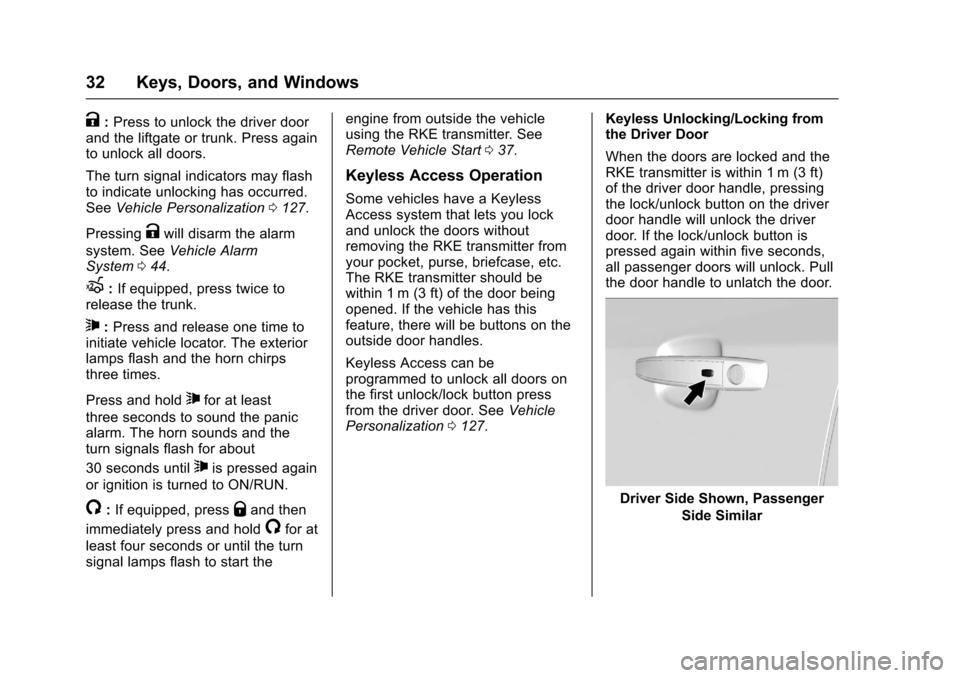
Some vehicles have a KeylessAccess system that lets you lockand unlock the doors withoutremoving the RKE transmitter fromyour pocket, purse, briefcase, etc.The RKE transmitter should bewithin 1 m (3 ft) of the door beingopened. If the vehicle has thisfeature, there will be buttons on theoutside door handles.
Keyless Access can beprogrammed to unlock all doors onthe first unlock/lock button pressfrom the driver door. SeeVehiclePersonalization0127.
Keyless Unlocking/Locking fromthe Driver Door
When the doors are locked and theRKE transmitter is within 1 m (3 ft)of the driver door handle, pressingthe lock/unlock button on the driverdoor handle will unlock the driverdoor. If the lock/unlock button ispressed again within five seconds,all passenger doors will unlock. Pullthe door handle to unlatch the door.
Driver Side Shown, Passenger
Side Similar
Page 34 of 342
Chevrolet Sonic Owner Manual (GMNA-Localizing-U.S./Canada-10122660) -2017 - crc - 5/13/16
Keys, Doors, and Windows 33
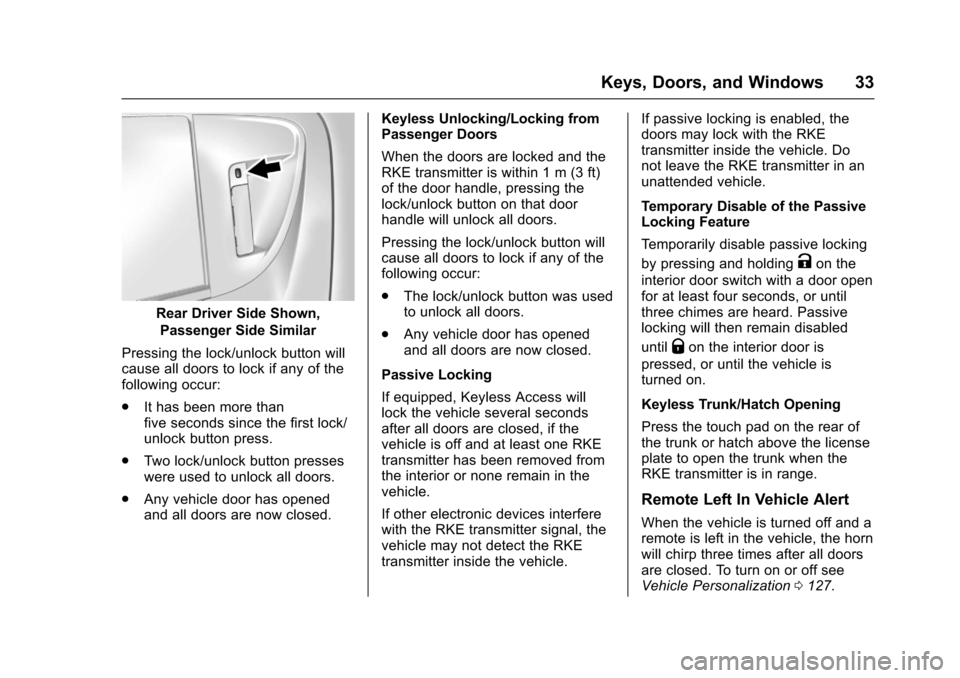
Rear Driver Side Shown,
Passenger Side Similar
Pressing the lock/unlock button willcause all doors to lock if any of thefollowing occur:
.It has been more thanfive seconds since the first lock/unlock button press.
.Tw o l o c k / u n l o c k b u t t o n p r e s s e swere used to unlock all doors.
.Any vehicle door has openedand all doors are now closed.
Keyless Unlocking/Locking fromPassenger Doors
When the doors are locked and theRKE transmitter is within 1 m (3 ft)of the door handle, pressing thelock/unlock button on that doorhandle will unlock all doors.
Pressing the lock/unlock button willcause all doors to lock if any of thefollowing occur:
.The lock/unlock button was usedto unlock all doors.
.Any vehicle door has openedand all doors are now closed.
Passive Locking
If equipped, Keyless Access willlock the vehicle several secondsafter all doors are closed, if thevehicle is off and at least one RKEtransmitter has been removed fromthe interior or none remain in thevehicle.
If other electronic devices interferewith the RKE transmitter signal, thevehicle may not detect the RKEtransmitter inside the vehicle.
If passive locking is enabled, thedoors may lock with the RKEtransmitter inside the vehicle. Donot leave the RKE transmitter in anunattended vehicle.
Temporary Disable of the PassiveLocking Feature
Te m p o r a r i l y d i s a b l e p a s s i v e l o c k i n g
by pressing and holdingKon the
interior door switch with a door openfor at least four seconds, or untilthree chimes are heard. Passivelocking will then remain disabled
untilQon the interior door is
pressed, or until the vehicle isturned on.
Keyless Trunk/Hatch Opening
Press the touch pad on the rear ofthe trunk or hatch above the licenseplate to open the trunk when theRKE transmitter is in range.
Remote Left In Vehicle Alert
When the vehicle is turned off and aremote is left in the vehicle, the hornwill chirp three times after all doorsare closed. To turn on or off seeVehicle Personalization0127.
Page 40 of 342
Chevrolet Sonic Owner Manual (GMNA-Localizing-U.S./Canada-10122660) -2017 - crc - 5/13/16
Keys, Doors, and Windows 39
.PressQorKon the Remote
Keyless Entry (RKE) transmitter.SeeRemote Keyless Entry(RKE) System Operation(Keyless Access)031orRemote Keyless Entry (RKE)System Operation (KeyAccess)029.
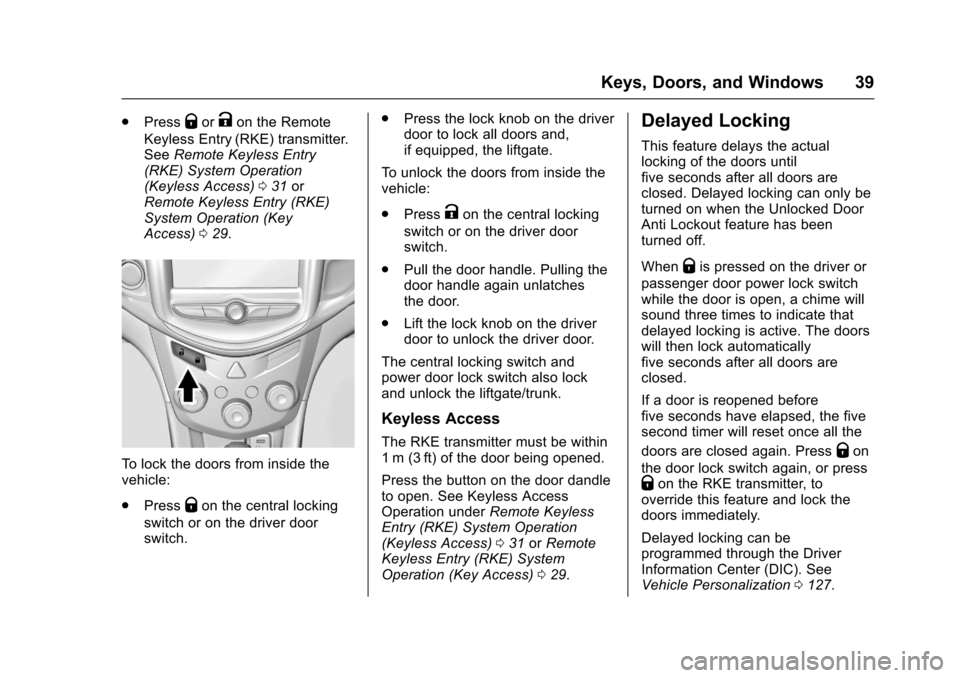
To l o c k t h e d o o r s f r o m i n s i d e t h evehicle:
.PressQon the central locking
switch or on the driver doorswitch.
.Press the lock knob on the driverdoor to lock all doors and,if equipped, the liftgate.
To u n l o c k t h e d o o r s f r o m i n s i d e t h evehicle:
.PressKon the central locking
switch or on the driver doorswitch.
.Pull the door handle. Pulling thedoor handle again unlatchesthe door.
.Lift the lock knob on the driverdoor to unlock the driver door.
The central locking switch andpower door lock switch also lockand unlock the liftgate/trunk.
Keyless Access
The RKE transmitter must be within1m (3ft) of the door being opened.
Press the button on the door dandleto open. See Keyless AccessOperation underRemote KeylessEntry (RKE) System Operation(Keyless Access)031orRemoteKeyless Entry (RKE) SystemOperation (Key Access)029.
Delayed Locking
This feature delays the actuallocking of the doors untilfive seconds after all doors areclosed. Delayed locking can only beturned on when the Unlocked DoorAnti Lockout feature has beenturned off.
WhenQis pressed on the driver or
passenger door power lock switchwhile the door is open, a chime willsound three times to indicate thatdelayed locking is active. The doorswill then lock automaticallyfive seconds after all doors areclosed.
If a door is reopened beforefive seconds have elapsed, the fivesecond timer will reset once all the
doors are closed again. PressQon
the door lock switch again, or pressQon the RKE transmitter, tooverride this feature and lock thedoors immediately.
Delayed locking can beprogrammed through the DriverInformation Center (DIC). SeeVehicle Personalization0127.