lock CHEVROLET SONIC 2017 2.G Service Manual
[x] Cancel search | Manufacturer: CHEVROLET, Model Year: 2017, Model line: SONIC, Model: CHEVROLET SONIC 2017 2.GPages: 342, PDF Size: 7.2 MB
Page 72 of 342
Chevrolet Sonic Owner Manual (GMNA-Localizing-U.S./Canada-10122660) -2017 - crc - 5/13/16
Seats and Restraints 71
The feature may also activate,without airbag inflation, after anevent that exceeds a predeterminedthreshold. You can lock the doors,turn off the interior lamps, and turnoff the hazard warning flashers byusing the controls for thosefeatures.
{Warning
Acrashsevereenoughtoinflate
the airbags may have also
damaged important functions in
the vehicle, such as the fuel
system, brake and steering
systems, etc. Even if the vehicle
appears to be drivable after a
moderate crash, there may be
concealed damage that could
make it difficult to safely operate
the vehicle.
Use caution if you should attempt
to restart the engine after a crash
has occurred.
In many crashes severe enough toinflate the airbag, windshields arebroken by vehicle deformation.
Additional windshield breakage mayalso occur from the front outboardpassenger airbag.
.Airbags are designed to inflateonly once. After an airbaginflates, you will need some newparts for the airbag system.If you do not get them, theairbag system will not be thereto help protect you in anothercrash. A new system will includeairbag modules and possiblyother parts. The service manualfor the vehicle covers the needto replace other parts.
.The vehicle has a crash sensingand diagnostic module whichrecords information after acrash. SeeVehicle DataRecording and Privacy0318andEvent DataRecorders0319.
.Let only qualified technicianswork on the airbag systems.Improper service can mean thatan airbag system will not workproperly. See your dealer forservice.
Passenger Sensing
System
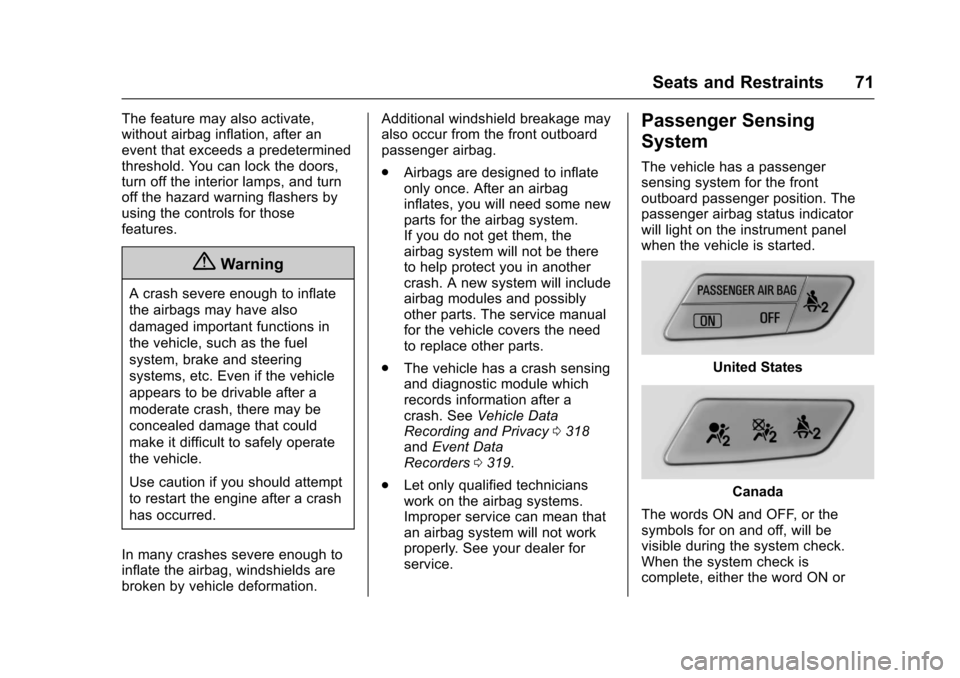
The vehicle has a passengersensing system for the frontoutboard passenger position. Thepassenger airbag status indicatorwill light on the instrument panelwhen the vehicle is started.
United States
Canada
The words ON and OFF, or thesymbols for on and off, will bevisible during the system check.When the system check iscomplete, either the word ON or
Page 80 of 342
Chevrolet Sonic Owner Manual (GMNA-Localizing-U.S./Canada-10122660) -2017 - crc - 5/13/16
Seats and Restraints 79
Infants and Young
Children
Everyone in a vehicle needsprotection! This includes infants andall other children. Neither thedistance traveled nor the age andsize of the traveler changes theneed, for everyone, to use safetyrestraints. In fact, the law in everystate in the United States and inevery Canadian province sayschildren up to some age must berestrained while in a vehicle.
{Warning
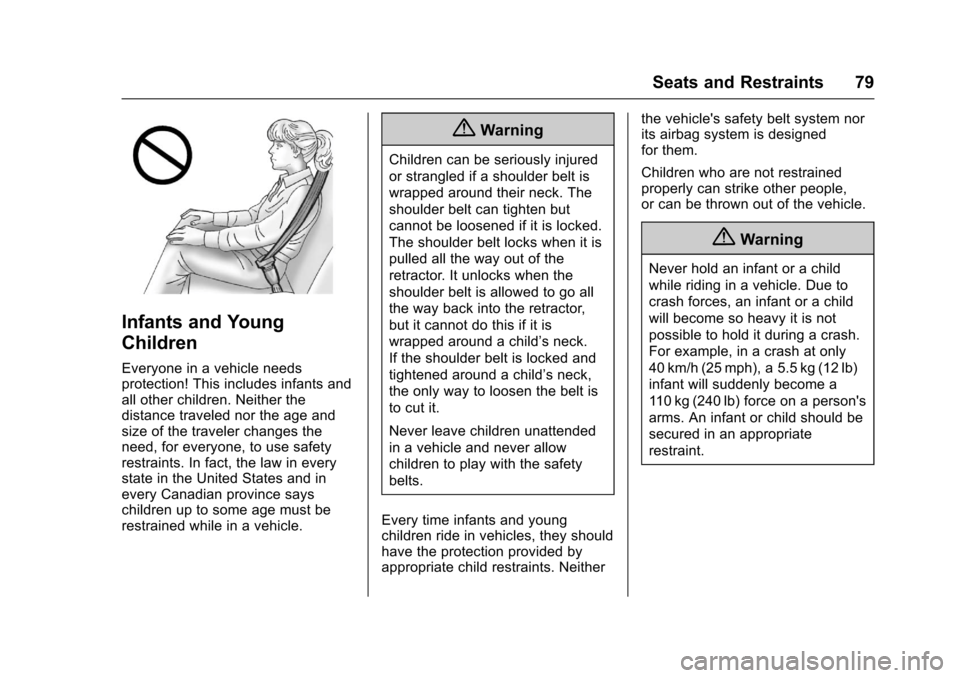
Children can be seriously injured
or strangled if a shoulder belt is
wrapped around their neck. The
shoulder belt can tighten but
cannot be loosened if it is locked.
The shoulder belt locks when it is
pulled all the way out of the
retractor. It unlocks when the
shoulder belt is allowed to go all
the way back into the retractor,
but it cannot do this if it is
wrapped around a child’sneck.
If the shoulder belt is locked and
tightened around a child’sneck,
the only way to loosen the belt is
to cut it.
Never leave children unattended
in a vehicle and never allow
children to play with the safety
belts.
Every time infants and youngchildren ride in vehicles, they shouldhave the protection provided byappropriate child restraints. Neither
the vehicle's safety belt system norits airbag system is designedfor them.
Children who are not restrainedproperly can strike other people,or can be thrown out of the vehicle.
{Warning
Never hold an infant or a child
while riding in a vehicle. Due to
crash forces, an infant or a child
will become so heavy it is not
possible to hold it during a crash.
For example, in a crash at only
40 km/h (25 mph), a 5.5 kg (12 lb)
infant will suddenly become a
11 0 k g ( 2 4 0 l b ) f o r c e o n a p e r s o n ' s
arms. An infant or child should be
secured in an appropriate
restraint.
Page 88 of 342
Chevrolet Sonic Owner Manual (GMNA-Localizing-U.S./Canada-10122660) -2017 - crc - 5/13/16
Seats and Restraints 87
the instructions that come with thechild restraint say that the top tethermust be attached.
According to accident statistics,children and infants are safer whenproperly restrained in a childrestraint system or infant restraintsystem secured in a rear seatingposition. SeeWhere to Put theRestraint083for additionalinformation.
Securing a Child Restraint
Designed for the LATCH
System
{Warning
If a LATCH-type child restraint is
not attached to anchors, the child
restraint will not be able to protect
the child correctly. In a crash, the
child could be seriously injured or
killed. Install a LATCH-type child
restraint properly using the
anchors, or use the vehicle's
safety belts to secure the
restraint, following the instructions
(Continued)
Warning (Continued)
that came with the child restraint
and the instructions in this
manual.
{Warning
To r e d u c e t h e r i s k o f s e r i o u s o r
fatal injuries during a crash, do
not attach more than one child
restraint to a single anchor.
Attaching more than one child
restraint to a single anchor could
cause the anchor or attachment
to come loose or even break
during a crash. A child or others
could be injured.
{Warning
Children can be seriously injured
or strangled if a shoulder belt is
wrapped around their neck. The
(Continued)
Warning (Continued)
shoulder belt can tighten but
cannot be loosened if it is locked.
The shoulder belt locks when it is
pulled all the way out of the
retractor. It unlocks when the
shoulder belt is allowed to go all
the way back into the retractor,
but it cannot do this if it is
wrapped around a child’sneck.
If the shoulder belt is locked and
tightened around a child’sneck,
the only way to loosen the belt is
to cut it.
Buckle any unused safety belts
behind the child restraint so
children cannot reach them. Pull
the shoulder belt all the way out
of the retractor to set the lock,
and tighten the belt behind the
child restraint after the child
restraint has been installed.
Page 92 of 342
Chevrolet Sonic Owner Manual (GMNA-Localizing-U.S./Canada-10122660) -2017 - crc - 5/13/16
Seats and Restraints 91
1. Insert the head restraint postsinto the holes in the top of theseatback. The notches on theposts must face the driver sideof the vehicle.
2. Push the head restraint down.
If necessary, press the heightadjustment release button tofurther lower the head restraint.See Rear Seats.
3. Try to move the head restraintto make sure that it is locked inplace.
Replacing LATCH System
Parts After a Crash
{Warning
AcrashcandamagetheLATCH
system in the vehicle. A damaged
LATCH system may not properly
secure the child restraint,
resulting in serious injury or even
death in a crash. To help make
sure the LATCH system is
working properly after a crash,
(Continued)
Warning (Continued)
see your dealer to have the
system inspected and any
necessary replacements made as
soon as possible.
If the vehicle has the LATCH systemand it was being used during acrash, new LATCH system partsmay be needed.
New parts and repairs may benecessary even if the LATCHsystem was not being used at thetime of the crash.
Securing Child Restraints
(With the Safety Belt in
the Rear Seat)
When securing a child restraint in arear seating position, study theinstructions that came with the childrestraint to make sure it iscompatible with this vehicle.
If the child restraint has the LATCHsystem, seeLower Anchors andTe t h e r s f o r C h i l d r e n ( L AT C H
System)084for how and where toinstall the child restraint usingLATCH. If a child restraint is securedin the vehicle using a safety beltand it uses a top tether, seeLowerAnchors and Tethers for Children(LATCH System)084for top tetheranchor locations.
Do not secure a child seat in aposition without a top tether anchorif a national or local law requiresthat the top tether be anchored, or ifthe instructions that come with thechild restraint say that the top strapmust be anchored.
If the child restraint or vehicle seatposition does not have the LATCHsystem, you will be using the safetybelt to secure the child restraint.Be sure to follow the instructionsthat came with the child restraint.
If more than one child restraintneeds to be installed in the rearseat, be sure to readWhere to Putthe Restraint083.
1. Put the child restraint onthe seat.
Page 93 of 342
Chevrolet Sonic Owner Manual (GMNA-Localizing-U.S./Canada-10122660) -2017 - crc - 5/13/16
92 Seats and Restraints
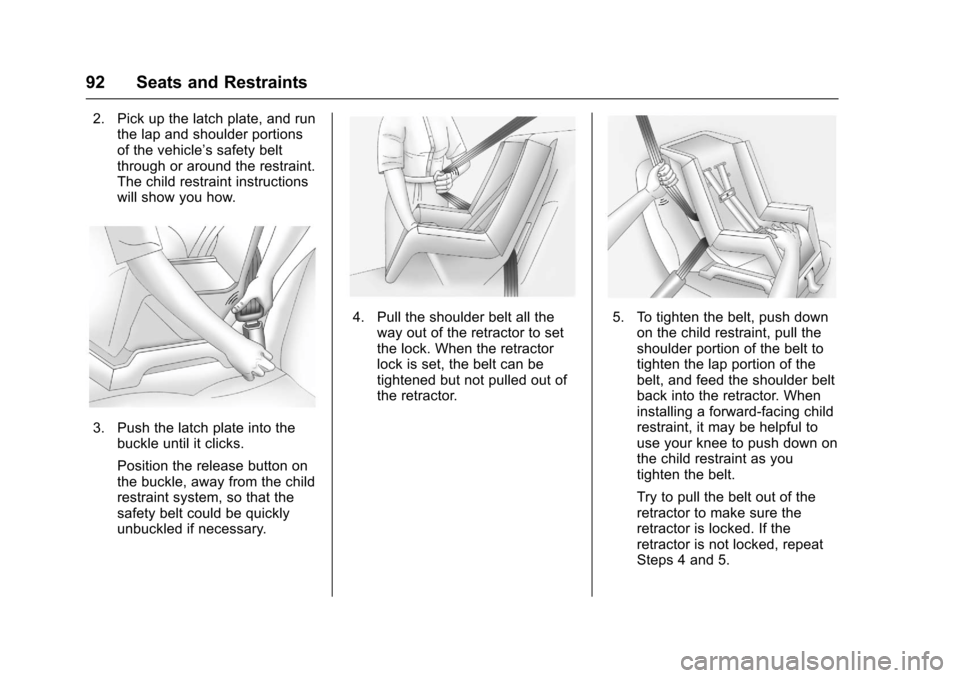
2. Pick up the latch plate, and runthe lap and shoulder portionsof the vehicle’ssafetybeltthrough or around the restraint.The child restraint instructionswill show you how.
3. Push the latch plate into thebuckle until it clicks.
Position the release button onthe buckle, away from the childrestraint system, so that thesafety belt could be quicklyunbuckled if necessary.
4. Pull the shoulder belt all theway out of the retractor to setthe lock. When the retractorlock is set, the belt can betightened but not pulled out ofthe retractor.
5. To tighten the belt, push downon the child restraint, pull theshoulder portion of the belt totighten the lap portion of thebelt, and feed the shoulder beltback into the retractor. Wheninstalling a forward-facing childrestraint, it may be helpful touse your knee to push down onthe child restraint as youtighten the belt.
Try to pull the belt out of theretractor to make sure theretractor is locked. If theretractor is not locked, repeatSteps 4 and 5.
Page 96 of 342
Chevrolet Sonic Owner Manual (GMNA-Localizing-U.S./Canada-10122660) -2017 - crc - 5/13/16
Seats and Restraints 95
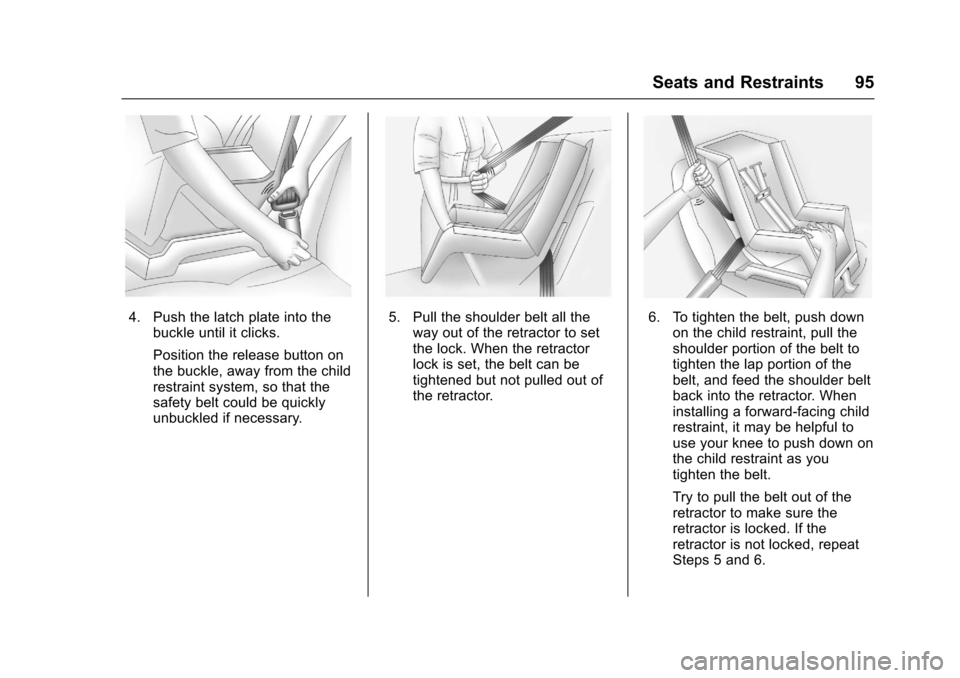
4. Push the latch plate into thebuckle until it clicks.
Position the release button onthe buckle, away from the childrestraint system, so that thesafety belt could be quicklyunbuckled if necessary.
5. Pull the shoulder belt all theway out of the retractor to setthe lock. When the retractorlock is set, the belt can betightened but not pulled out ofthe retractor.
6. To tighten the belt, push downon the child restraint, pull theshoulder portion of the belt totighten the lap portion of thebelt, and feed the shoulder beltback into the retractor. Wheninstalling a forward-facing childrestraint, it may be helpful touse your knee to push down onthe child restraint as youtighten the belt.
Try to pull the belt out of theretractor to make sure theretractor is locked. If theretractor is not locked, repeatSteps 5 and 6.
Page 101 of 342
Chevrolet Sonic Owner Manual (GMNA-Localizing-U.S./Canada-10122660) -2017 - crc - 5/13/16
100 Instruments and Controls
Instruments and
Controls
Controls
Steering Wheel Adjustment . . . 101Steering Wheel Controls . . . . . . 101Heated Steering Wheel . . . . . . . 102Horn . . . . . . . . . . . . . . . . . . . . . . . . . . 102Windshield Wiper/Washer . . . . 102Rear Window Wiper/Washer . . . . . . . . . . . . . . . . . . . . . 103Compass . . . . . . . . . . . . . . . . . . . . . 104Clock . . . . . . . . . . . . . . . . . . . . . . . . . 104Power Outlets . . . . . . . . . . . . . . . . 105
Warning Lights, Gauges, and
Indicators
Warning Lights, Gauges, andIndicators . . . . . . . . . . . . . . . . . . . 106Instrument Cluster . . . . . . . . . . . . 107Speedometer . . . . . . . . . . . . . . . . . 109Odometer . . . . . . . . . . . . . . . . . . . . . 109Trip Odometer . . . . . . . . . . . . . . . . 109Ta c h o m e t e r . . . . . . . . . . . . . . . . . . . 1 0 9Fuel Gauge . . . . . . . . . . . . . . . . . . . 109Safety Belt Reminders . . . . . . . . 110Airbag Readiness Light . . . . . . . 110Passenger Airbag StatusIndicator . . . . . . . . . . . . . . . . . . . . . 111
Charging System Light . . . . . . . 112Malfunction Indicator Lamp(Check Engine Light) . . . . . . . . 112Service Vehicle Soon Light . . . 114Owner Manual Indicator . . . . . . 114Brake System WarningLight . . . . . . . . . . . . . . . . . . . . . . . . 114Antilock Brake System (ABS)Warning Light . . . . . . . . . . . . . . . 115Operate Pedal Light . . . . . . . . . . 115Up-Shift Light . . . . . . . . . . . . . . . . . 115Power Steering WarningLight . . . . . . . . . . . . . . . . . . . . . . . . 115Lane Departure Warning(LDW) Light . . . . . . . . . . . . . . . . . 116Forward Collision Alert (FCA)Warning Light . . . . . . . . . . . . . . . 116Vehicle Ahead Indicator . . . . . . . 116Ultrasonic Parking SensorLight . . . . . . . . . . . . . . . . . . . . . . . . 116Traction Off Light . . . . . . . . . . . . . 117StabiliTrak®OFF Light . . . . . . . . 117Traction Control System (TCS)/StabiliTrak®Light . . . . . . . . . . . . 117Engine Coolant TemperatureWarning Light . . . . . . . . . . . . . . . 118Tire Pressure Light . . . . . . . . . . . 118Engine Oil Pressure Light . . . . . 118Low Fuel Warning Light . . . . . . . 119Immobilizer Light . . . . . . . . . . . . . 119
Reduced Engine PowerLight . . . . . . . . . . . . . . . . . . . . . . . . 120High-Beam On Light . . . . . . . . . . 120Front Fog Lamp Light . . . . . . . . . 120Lamps On Reminder . . . . . . . . . 120Cruise Control Light . . . . . . . . . . 120Door Ajar Light . . . . . . . . . . . . . . . 121Trunk Ajar Light . . . . . . . . . . . . . . 121
Information Displays
Driver InformationCenter (DIC) . . . . . . . . . . . . . . . . 121
Vehicle Messages
Vehicle Messages . . . . . . . . . . . . 126Engine Oil Messages . . . . . . . . . 127Tire Messages . . . . . . . . . . . . . . . . 127
Vehicle Personalization
Vehicle Personalization . . . . . . . 127
Page 102 of 342
Chevrolet Sonic Owner Manual (GMNA-Localizing-U.S./Canada-10122660) -2017 - crc - 5/13/16
Instruments and Controls 101
Controls
Steering Wheel
Adjustment
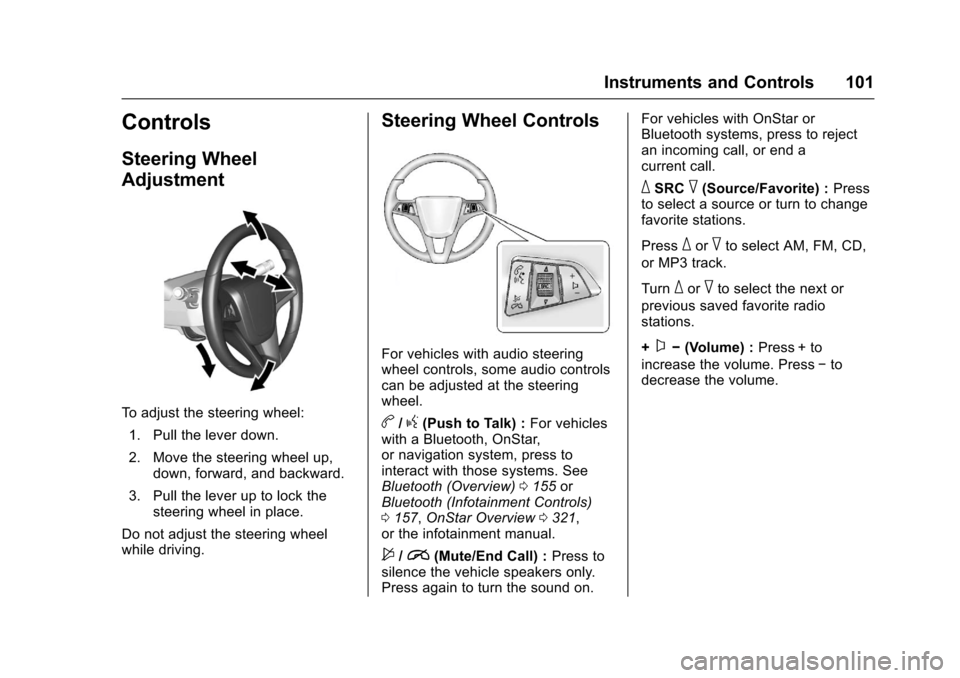
To a d j u s t t h e s t e e r i n g w h e e l :
1. Pull the lever down.
2. Move the steering wheel up,down, forward, and backward.
3. Pull the lever up to lock thesteering wheel in place.
Do not adjust the steering wheelwhile driving.
Steering Wheel Controls
For vehicles with audio steeringwheel controls, some audio controlscan be adjusted at the steeringwheel.
b/g(Push to Talk) :For vehicleswith a Bluetooth, OnStar,or navigation system, press tointeract with those systems. SeeBluetooth (Overview)0155orBluetooth (Infotainment Controls)0157,OnStar Overview0321,or the infotainment manual.
$/i(Mute/End Call) :Press tosilence the vehicle speakers only.Press again to turn the sound on.
For vehicles with OnStar orBluetooth systems, press to rejectan incoming call, or end acurrent call.
_SRC^(Source/Favorite) :Pressto select a source or turn to changefavorite stations.
Press_or^to select AM, FM, CD,
or MP3 track.
Turn_or^to select the next or
previous saved favorite radiostations.
+x✓(Volume) :Press + to
increase the volume. Press✓todecrease the volume.
Page 104 of 342
Chevrolet Sonic Owner Manual (GMNA-Localizing-U.S./Canada-10122660) -2017 - crc - 5/13/16
Instruments and Controls 103
If the ignition is put in OFF while thewipers are performing wipes due towindshield washing, the wiperscontinue to run until they reach thebase of the windshield.
nL:Pull the windshield wiperlever toward you to spray windshieldwasher fluid and activate the wipers.The wipers will continue until thelever is released or the maximumwash time is reached. When thewindshield wiper lever is released,additional wipes may occurdepending on how long thewindshield washer had beenactivated. SeeWasher Fluid0231for information on filling thewindshield washer fluid reservoir.
{Warning
In freezing weather, do not use
the washer until the windshield is
warmed. Otherwise the washer
fluid can form ice on the
windshield, blocking your vision.
Clear snow and ice from the wiperblades before using them. If frozento the windshield, carefully loosen orthaw them. Damaged wiper bladesshould be replaced. SeeWiperBlade Replacement0236.
Heavy snow or ice can overload thewiper motor. A circuit breaker willstop the motor until it cools down.
Rear Window Wiper/
Washer
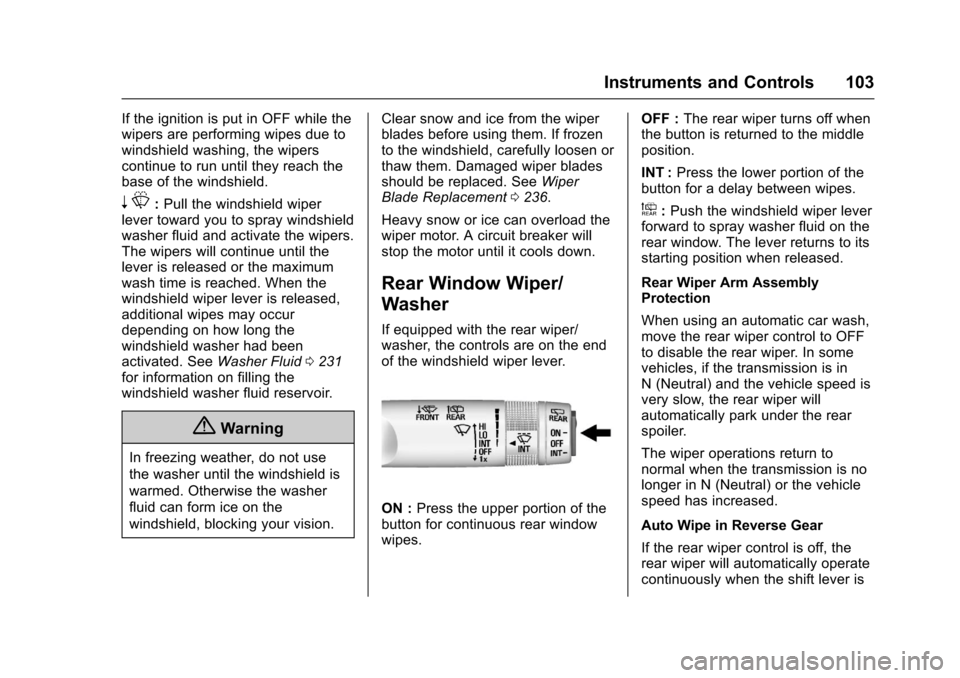
If equipped with the rear wiper/washer, the controls are on the endof the windshield wiper lever.
ON :Press the upper portion of thebutton for continuous rear windowwipes.
OFF :The rear wiper turns off whenthe button is returned to the middleposition.
INT :Press the lower portion of thebutton for a delay between wipes.
a:Push the windshield wiper leverforward to spray washer fluid on therear window. The lever returns to itsstarting position when released.
Rear Wiper Arm AssemblyProtection
When using an automatic car wash,move the rear wiper control to OFFto disable the rear wiper. In somevehicles, if the transmission is inN(Neutral)andthevehiclespeedisvery slow, the rear wiper willautomatically park under the rearspoiler.
The wiper operations return tonormal when the transmission is nolonger in N (Neutral) or the vehiclespeed has increased.
Auto Wipe in Reverse Gear
If the rear wiper control is off, therear wiper will automatically operatecontinuously when the shift lever is
Page 105 of 342
Chevrolet Sonic Owner Manual (GMNA-Localizing-U.S./Canada-10122660) -2017 - crc - 5/13/16
104 Instruments and Controls
in R (Reverse), and the frontwindshield wiper is performing lowor high speed wipes. If the rearwiper control is off, the shift lever isin R (Reverse), and the frontwindshield wiper is performinginterval wipes, then the rear wiperautomatically performs intervalwipes.
This feature can be changed. SeeVehicle Personalization0127.
The windshield washer reservoir isused for the windshield and the rearwindow. Check the fluid level in thereservoir if either washer is notworking. SeeWasher Fluid0231.
Compass
The vehicle may have a compassdisplay in the Driver InformationCenter (DIC). The compass receivesits heading and other informationfrom the Global PositioningSystem (GPS) antenna, StabiliTrak,and vehicle speed information.
Avoid covering the GPS antenna,located on the roof, for long periodsof time with objects that mayinterfere with the antenna's ability to
receive a satellite signal. Thecompass system is designed tooperate for a certain number ofmiles or degrees of turn beforeneeding a signal from the GPSsatellites. When the compassdisplay shows CAL, drive thevehicle for a short distance in anopen area where it can receive aGPS signal. The compass systemwill automatically determine whenthe GPS signal is restored andprovide a heading again.
Clock
The infotainment system controlsare used to access the time anddate settings through the menusystem. SeeOperation0144onhow to use the menu system.
Setting the Time and Date
When Auto Set is enabled the timecannot be manually set.
1. Press{,thentouch
SETTINGS.
2. Touch Time and Date, then SetTime or Set Date.
3. Touch + or✓to adjust thevalue.
4. TouchRorQto adjust AM or
PM for 12 hour format.
5. Touch0.
Using Auto Set
Auto Set requires an OnStarsubscription.
1. Press{,thentouch
SETTINGS.
2. Touch Time and Date, thenAuto Set.
3. Select from the availableselections.
4. Touch0.
Setting the 12/24 Hour Format
1. Press{,thentouch
SETTINGS.
2. Touch Time and Date, then SetTime Format.
3. Select 12h or 24h format.
4. Touch0.