trunk CHEVROLET SONIC 2017 2.G User Guide
[x] Cancel search | Manufacturer: CHEVROLET, Model Year: 2017, Model line: SONIC, Model: CHEVROLET SONIC 2017 2.GPages: 342, PDF Size: 7.2 MB
Page 41 of 342
Chevrolet Sonic Owner Manual (GMNA-Localizing-U.S./Canada-10122660) -2017 - crc - 5/13/16
40 Keys, Doors, and Windows
Automatic Door Locks
The vehicle is programmed so thatwhen the doors are closed, theignition is on, and the shift lever ismoved out of P (Park) for automatictransmissions, or when the vehiclespeed is above 13 km/h (8 mph) formanual transmissions, the doorsand the trunk/liftgate will lock.
To u n l o c k t h e d o o r s a n d t h e t r u n k /liftgate:
.PressKon the center stack or
the driver door switch.
.If equipped with an automatictransmission the vehicle must bein P (Park).
.If equipped with a manualtransmission the vehicle must bein Neutral with the parkingbrake set.
This feature can be programmed.SeeVehicle Personalization0127.
Lockout Protection
If the driver side power door lockswitch is pressed when the driverdoor is open and the key is in theignition, all of the doors will lock andthen the driver door will unlock.
Lockout Protection can be manuallyoverridden with the driver door open
by pressing and holdingQon the
power door lock switch.
If Unlocked Door Anti Lockout isturned on and the vehicle is off, thedriver door is open, and doorlocking is requested using a doorlock switch or the RKE transmitter,then all the doors will lock and onlythe driver door will unlock. TheUnlocked Door Anti Lockout featurecan be turned on or off throughvehicle personalization. SeeVehiclePersonalization0127.
Safety Locks
The rear door safety locks preventpassengers from opening the reardoors from inside the vehicle.
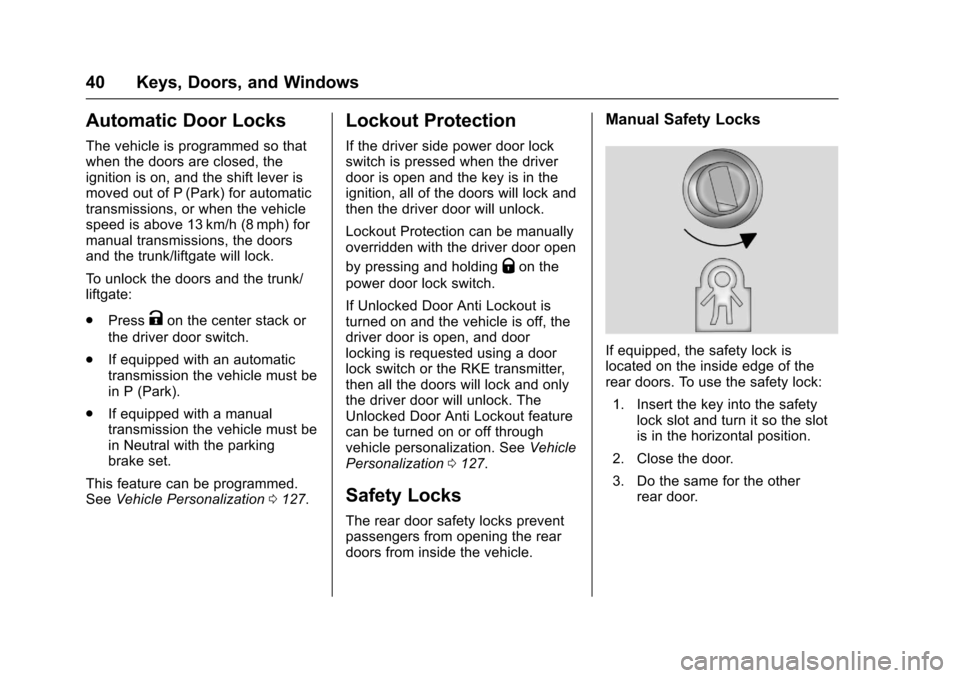
Manual Safety Locks
If equipped, the safety lock islocated on the inside edge of therear doors. To use the safety lock:
1. Insert the key into the safetylock slot and turn it so the slotis in the horizontal position.
2. Close the door.
3. Do the same for the otherrear door.
Page 42 of 342
Chevrolet Sonic Owner Manual (GMNA-Localizing-U.S./Canada-10122660) -2017 - crc - 5/13/16
Keys, Doors, and Windows 41
To o p e n a r e a r d o o r w h e n t h e s a f e t ylock is on:
1. Unlock the door by activatingthe inside handle, by using thepower door lock switch, or byusing the Remote KeylessEntry (RKE) transmitter.
2. Open the door from theoutside.
To c a n c e l t h e s a f e t y l o c k :
1. Unlock the door and open itfrom the outside.
2. Insert the key into the safetylock slot and turn it so the slotis in the vertical position. Dothe same for the other door.
Doors
Trunk (Sedan)
{Warning
Exhaust gases can enter the
vehicle if it is driven with the
liftgate, hatch/trunk open, or with
any objects that pass through the
seal between the body and the
hatch/trunk or liftgate. Engine
exhaust contains carbon
monoxide (CO) which cannot be
seen or smelled. It can cause
unconsciousness and even death.
If the vehicle must be driven with
the liftgate or hatch/trunk open:
.Close all of the windows.
.Fully open the air outlets onor under the instrumentpanel.
.Adjust the climate controlsystem to a setting thatbrings in only outside airand set the fan speed to the
(Continued)
Warning (Continued)
highest setting. See“Climate Control Systems”in the Index.
.If the vehicle is equippedwith a power liftgate, disablethe power liftgate function.
For more information about
carbon monoxide, seeEngine
Exhaust0190.
To l o c k o r u n l o c k t h e t r u n k f r o m t h e
inside, pressQorKon the central
locking switch or on the driver doorlock switch.
Page 43 of 342
Chevrolet Sonic Owner Manual (GMNA-Localizing-U.S./Canada-10122660) -2017 - crc - 5/20/16
42 Keys, Doors, and Windows
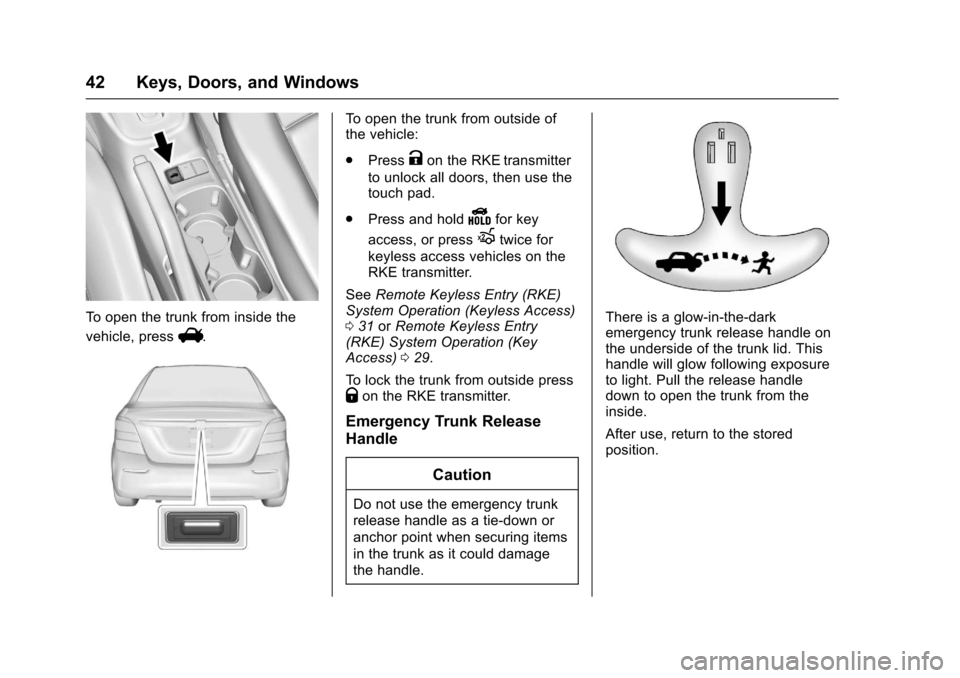
To o p e n t h e t r u n k f r o m i n s i d e t h e
vehicle, pressV.
To o p e n t h e t r u n k f r o m o u t s i d e o fthe vehicle:
.PressKon the RKE transmitter
to unlock all doors, then use thetouch pad.
.Press and holdYfor key
access, or pressXtwice for
keyless access vehicles on theRKE transmitter.
SeeRemote Keyless Entry (RKE)System Operation (Keyless Access)031orRemote Keyless Entry(RKE) System Operation (KeyAccess)029.
To l o c k t h e t r u n k f r o m o u t s i d e p r e s sQon the RKE transmitter.
Emergency Trunk Release
Handle
Caution
Do not use the emergency trunk
release handle as a tie-down or
anchor point when securing items
in the trunk as it could damage
the handle.
There is a glow-in-the-darkemergency trunk release handle onthe underside of the trunk lid. Thishandle will glow following exposureto light. Pull the release handledown to open the trunk from theinside.
After use, return to the storedposition.
Page 44 of 342
Chevrolet Sonic Owner Manual (GMNA-Localizing-U.S./Canada-10122660) -2017 - crc - 5/13/16
Keys, Doors, and Windows 43
Liftgate (Hatchback)
{Warning
Exhaust gases can enter the
vehicle if it is driven with the
liftgate, hatch/trunk open, or with
any objects that pass through the
seal between the body and the
hatch/trunk or liftgate. Engine
exhaust contains carbon
monoxide (CO) which cannot be
seen or smelled. It can cause
unconsciousness and even death.
If the vehicle must be driven with
the liftgate or hatch/trunk open:
.Close all of the windows.
.Fully open the air outlets onor under the instrumentpanel.
.Adjust the climate controlsystem to a setting thatbrings in only outside airand set the fan speed to the
(Continued)
Warning (Continued)
highest setting. See“Climate Control Systems”in the Index.
.If the vehicle is equippedwith a power liftgate, disablethe power liftgate function.
For more information about
carbon monoxide, seeEngine
Exhaust0190.
To l o c k o r u n l o c k t h e l i f t g a t e f r o m
the inside, pressQorKon the
central locking switch or on thedriver door switch.
The vehicle must be in P (Park) forautomatic transmissions. Formanual transmissions the parkingbrake must be engaged.
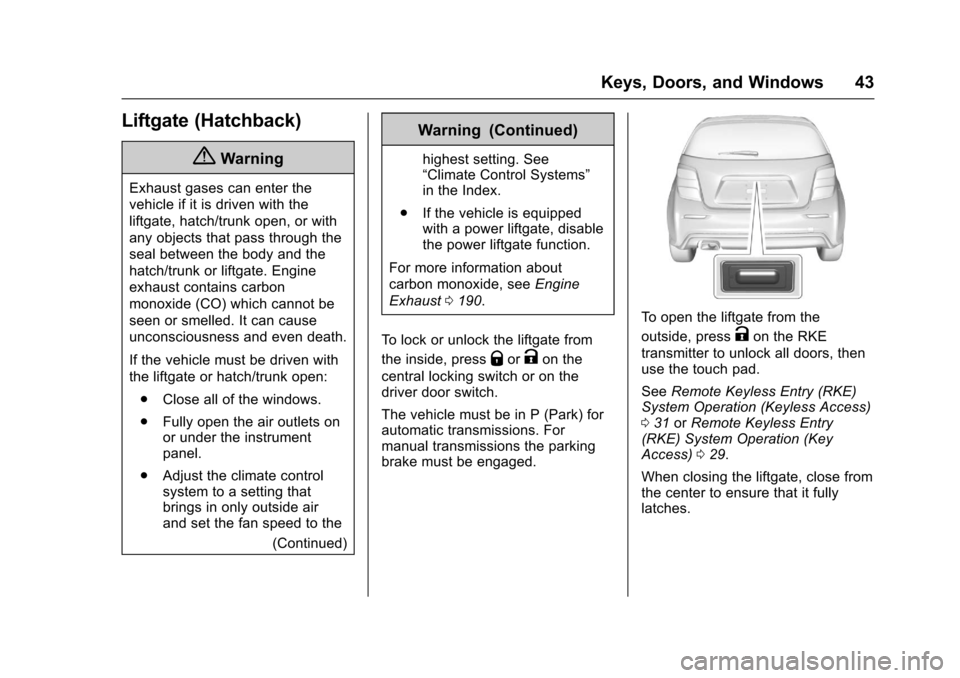
To o p e n t h e l i f t g a t e f r o m t h e
outside, pressKon the RKE
transmitter to unlock all doors, thenuse the touch pad.
SeeRemote Keyless Entry (RKE)System Operation (Keyless Access)031orRemote Keyless Entry(RKE) System Operation (KeyAccess)029.
When closing the liftgate, close fromthe center to ensure that it fullylatches.
Page 45 of 342
Chevrolet Sonic Owner Manual (GMNA-Localizing-U.S./Canada-10122660) -2017 - crc - 5/13/16
44 Keys, Doors, and Windows
Vehicle Security
This vehicle has theft-deterrentfeatures; however, they do not makethe vehicle impossible to steal.
Vehicle Alarm System
This vehicle has an anti-theft alarmsystem.
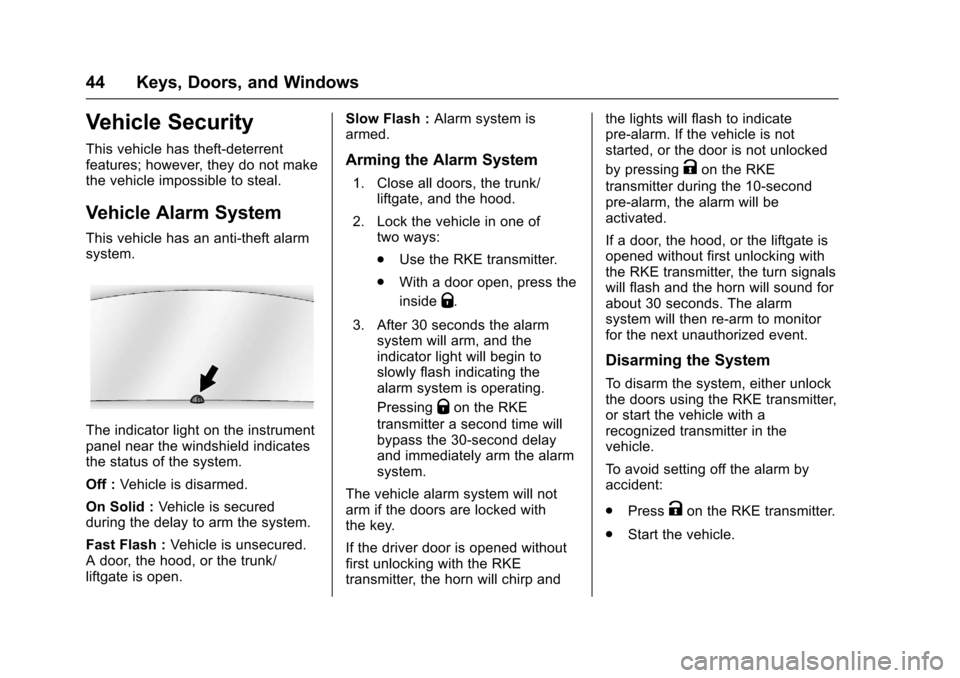
The indicator light on the instrumentpanel near the windshield indicatesthe status of the system.
Off :Vehicle is disarmed.
On Solid :Ve h i c l e i s s e c u r e dduring the delay to arm the system.
Fast Flash :Vehicle is unsecured.Adoor,thehood,orthetrunk/liftgate is open.
Slow Flash :Alarm system isarmed.
Arming the Alarm System
1. Close all doors, the trunk/liftgate, and the hood.
2. Lock the vehicle in one oftwo ways:
.Use the RKE transmitter.
.With a door open, press the
insideQ.
3. After 30 seconds the alarmsystem will arm, and theindicator light will begin toslowly flash indicating thealarm system is operating.
PressingQon the RKE
transmitter a second time willbypass the 30-second delayand immediately arm the alarmsystem.
The vehicle alarm system will notarm if the doors are locked withthe key.
If the driver door is opened withoutfirst unlocking with the RKEtransmitter, the horn will chirp and
the lights will flash to indicatepre-alarm. If the vehicle is notstarted, or the door is not unlocked
by pressingKon the RKE
transmitter during the 10-secondpre-alarm, the alarm will beactivated.
If a door, the hood, or the liftgate isopened without first unlocking withthe RKE transmitter, the turn signalswill flash and the horn will sound forabout 30 seconds. The alarmsystem will then re-arm to monitorfor the next unauthorized event.
Disarming the System
To d i s a r m t h e s y s t e m , e i t h e r u n l o c kthe doors using the RKE transmitter,or start the vehicle with arecognized transmitter in thevehicle.
To a v o i d s e t t i n g o f f t h e a l a r m b yaccident:
.PressKon the RKE transmitter.
.Start the vehicle.
Page 101 of 342
Chevrolet Sonic Owner Manual (GMNA-Localizing-U.S./Canada-10122660) -2017 - crc - 5/13/16
100 Instruments and Controls
Instruments and
Controls
Controls
Steering Wheel Adjustment . . . 101Steering Wheel Controls . . . . . . 101Heated Steering Wheel . . . . . . . 102Horn . . . . . . . . . . . . . . . . . . . . . . . . . . 102Windshield Wiper/Washer . . . . 102Rear Window Wiper/Washer . . . . . . . . . . . . . . . . . . . . . 103Compass . . . . . . . . . . . . . . . . . . . . . 104Clock . . . . . . . . . . . . . . . . . . . . . . . . . 104Power Outlets . . . . . . . . . . . . . . . . 105
Warning Lights, Gauges, and
Indicators
Warning Lights, Gauges, andIndicators . . . . . . . . . . . . . . . . . . . 106Instrument Cluster . . . . . . . . . . . . 107Speedometer . . . . . . . . . . . . . . . . . 109Odometer . . . . . . . . . . . . . . . . . . . . . 109Trip Odometer . . . . . . . . . . . . . . . . 109Ta c h o m e t e r . . . . . . . . . . . . . . . . . . . 1 0 9Fuel Gauge . . . . . . . . . . . . . . . . . . . 109Safety Belt Reminders . . . . . . . . 110Airbag Readiness Light . . . . . . . 110Passenger Airbag StatusIndicator . . . . . . . . . . . . . . . . . . . . . 111
Charging System Light . . . . . . . 112Malfunction Indicator Lamp(Check Engine Light) . . . . . . . . 112Service Vehicle Soon Light . . . 114Owner Manual Indicator . . . . . . 114Brake System WarningLight . . . . . . . . . . . . . . . . . . . . . . . . 114Antilock Brake System (ABS)Warning Light . . . . . . . . . . . . . . . 115Operate Pedal Light . . . . . . . . . . 115Up-Shift Light . . . . . . . . . . . . . . . . . 115Power Steering WarningLight . . . . . . . . . . . . . . . . . . . . . . . . 115Lane Departure Warning(LDW) Light . . . . . . . . . . . . . . . . . 116Forward Collision Alert (FCA)Warning Light . . . . . . . . . . . . . . . 116Vehicle Ahead Indicator . . . . . . . 116Ultrasonic Parking SensorLight . . . . . . . . . . . . . . . . . . . . . . . . 116Traction Off Light . . . . . . . . . . . . . 117StabiliTrak®OFF Light . . . . . . . . 117Traction Control System (TCS)/StabiliTrak®Light . . . . . . . . . . . . 117Engine Coolant TemperatureWarning Light . . . . . . . . . . . . . . . 118Tire Pressure Light . . . . . . . . . . . 118Engine Oil Pressure Light . . . . . 118Low Fuel Warning Light . . . . . . . 119Immobilizer Light . . . . . . . . . . . . . 119
Reduced Engine PowerLight . . . . . . . . . . . . . . . . . . . . . . . . 120High-Beam On Light . . . . . . . . . . 120Front Fog Lamp Light . . . . . . . . . 120Lamps On Reminder . . . . . . . . . 120Cruise Control Light . . . . . . . . . . 120Door Ajar Light . . . . . . . . . . . . . . . 121Trunk Ajar Light . . . . . . . . . . . . . . 121
Information Displays
Driver InformationCenter (DIC) . . . . . . . . . . . . . . . . 121
Vehicle Messages
Vehicle Messages . . . . . . . . . . . . 126Engine Oil Messages . . . . . . . . . 127Tire Messages . . . . . . . . . . . . . . . . 127
Vehicle Personalization
Vehicle Personalization . . . . . . . 127
Page 122 of 342
Chevrolet Sonic Owner Manual (GMNA-Localizing-U.S./Canada-10122660) -2017 - crc - 5/13/16
Instruments and Controls 121
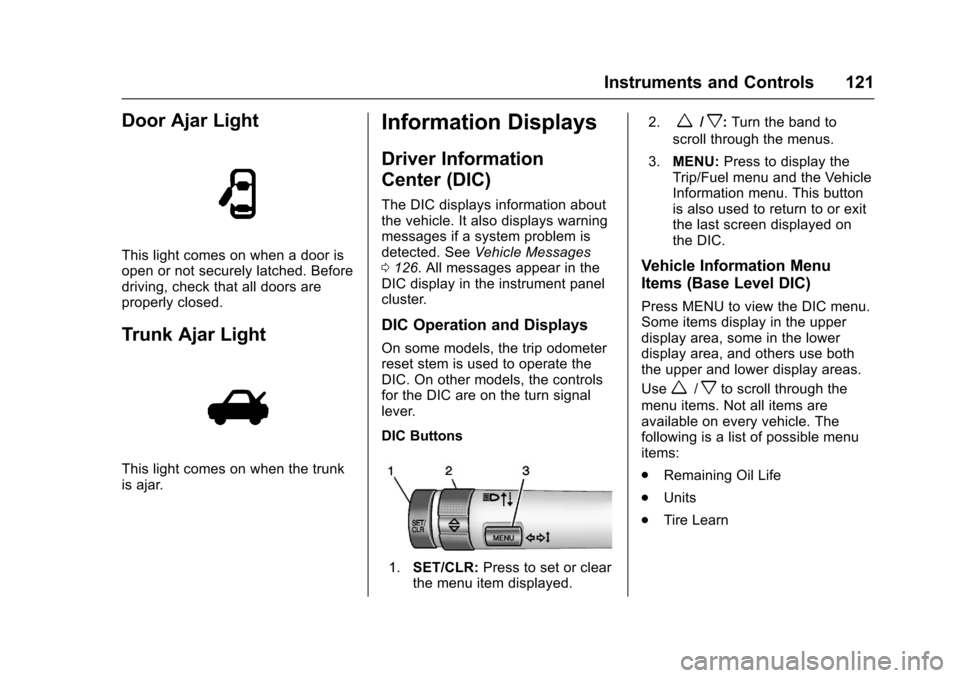
Door Ajar Light
This light comes on when a door isopen or not securely latched. Beforedriving, check that all doors areproperly closed.
Trunk Ajar Light
This light comes on when the trunkis ajar.
Information Displays
Driver Information
Center (DIC)
The DIC displays information aboutthe vehicle. It also displays warningmessages if a system problem isdetected. SeeVehicle Messages0126.AllmessagesappearintheDIC display in the instrument panelcluster.
DIC Operation and Displays
On some models, the trip odometerreset stem is used to operate theDIC. On other models, the controlsfor the DIC are on the turn signallever.
DIC Buttons
1.SET/CLR:Press to set or clearthe menu item displayed.
2.w/x:Turn the band to
scroll through the menus.
3.MENU:Press to display theTrip/Fuel menu and the VehicleInformation menu. This buttonis also used to return to or exitthe last screen displayed onthe DIC.
Vehicle Information Menu
Items (Base Level DIC)
Press MENU to view the DIC menu.Some items display in the upperdisplay area, some in the lowerdisplay area, and others use boththe upper and lower display areas.
Usew/xto scroll through the
menu items. Not all items areavailable on every vehicle. Thefollowing is a list of possible menuitems:
.Remaining Oil Life
.Units
.Tire Learn
Page 205 of 342
Chevrolet Sonic Owner Manual (GMNA-Localizing-U.S./Canada-10122660) -2017 - crc - 5/13/16
204 Driving and Operating
Turning the System On and Off
The RPA system can be turned onand off using the infotainmentsystem controls. SeeVehiclePersonalization0127.
When the system is off, PARKASSIST OFF displays on the DriverInformation Center (DIC). Themessage disappears after a shortperiod of time.
RPA defaults to the on setting eachtime the vehicle is started.
Turn off RPA when towing a trailer.
When the System Does Not
Seem to Work Properly
The following messages may bedisplayed on the DIC:
SERVICE PARKING ASSIST :Ifthis message occurs, check thefollowing conditions:
.The sensors are not clean. Keepthe vehicle's rear bumper free ofmud, dirt, snow, ice, and slush.For cleaning instructions, seeExterior Care0280.
.The park assist sensors arecovered by frost or ice. Frost orice can form around and behindthe sensors and may not alwaysbe seen; this can occur afterwashing the vehicle in coldweather. The message may notclear until the frost or ice hasmelted.
If the above conditions do not exist,take the vehicle to your dealer torepair the system.
PA R K A S S I S T O F F :If the RPAsystem does not activate due to atemporary condition, the messagedisplays on the DIC. This can occurunder the following conditions:
.The driver has disabled thesystem.
.An object was hanging out of thetrunk during the last drive cycle.Once the object is removed,RPA will return to normaloperation.
.The bumper is damaged. Takethe vehicle to your dealer torepair the system.
.Other conditions, such asvibrations from a jackhammer orthe compression of air brakes onaverylargetruck,areaffectingsystem performance.
Forward Collision Alert
(FCA) System
If equipped, the FCA system mayhelp to avoid or reduce the harmcaused by front-end crashes. Whenapproaching a vehicle ahead tooquickly, FCA provides a red flashingalert on the windshield and rapidlybeeps.
FCA detects vehicles within adistance of approximately 60 m(197 ft) and operates at speedsabove 40 km/h (25 mph).
{Warning
FCA is a warning system and
does not apply the brakes. When
approaching a slower-moving or
stopped vehicle ahead too rapidly,
or when following a vehicle too
(Continued)
Page 211 of 342
Chevrolet Sonic Owner Manual (GMNA-Localizing-U.S./Canada-10122660) -2017 - crc - 5/13/16
210 Driving and Operating
When replacing the fuel cap, turn itclockwise until it clicks. Make surethe cap is fully installed. Thediagnostic system can determine ifthe fuel cap has been left off orimproperly installed. This wouldallow fuel to evaporate into theatmosphere. SeeMalfunctionIndicator Lamp (Check EngineLight)011 2.
{Warning
If a fire starts while you are
refueling, do not remove the
nozzle. Shut off the flow of fuel by
shutting off the pump or by
notifying the station attendant.
Leave the area immediately.
Caution
If a new fuel cap is needed, be
sure to get the right type of cap
from your dealer. The wrong type
of fuel cap may not fit properly,
may cause the malfunction
(Continued)
Caution (Continued)
indicator lamp to light, and could
damage the fuel tank and
emissions system. See
Malfunction Indicator Lamp
(Check Engine Light)011 2.
Filling a Portable Fuel
Container
{Warning
Filling a portable fuel container
while it is in the vehicle can cause
fuel vapors that can ignite either
by static electricity or other
means. You or others could be
badly burned and the vehicle
could be damaged. Always:
.Use approved fuelcontainers.
.Remove the container fromthe vehicle, trunk, or pickupbed before filling.
(Continued)
Warning (Continued)
.Place the container on theground.
.Place the nozzle inside thefill opening of the containerbefore dispensing fuel, andkeep it in contact with the fillopening until filling iscomplete.
.Fill the container no morethan 95% full to allow forexpansion.
.Do not smoke, lightmatches, or use lighterswhile pumping fuel.
.Avoid using cell phones orother electronic devices.
Page 241 of 342
Chevrolet Sonic Owner Manual (GMNA-Localizing-U.S./Canada-10122660) -2017 - crc - 5/13/16
240 Vehicle Care
Taillamps, Turn Signal,
Stoplamps, and Back-Up
Lamps
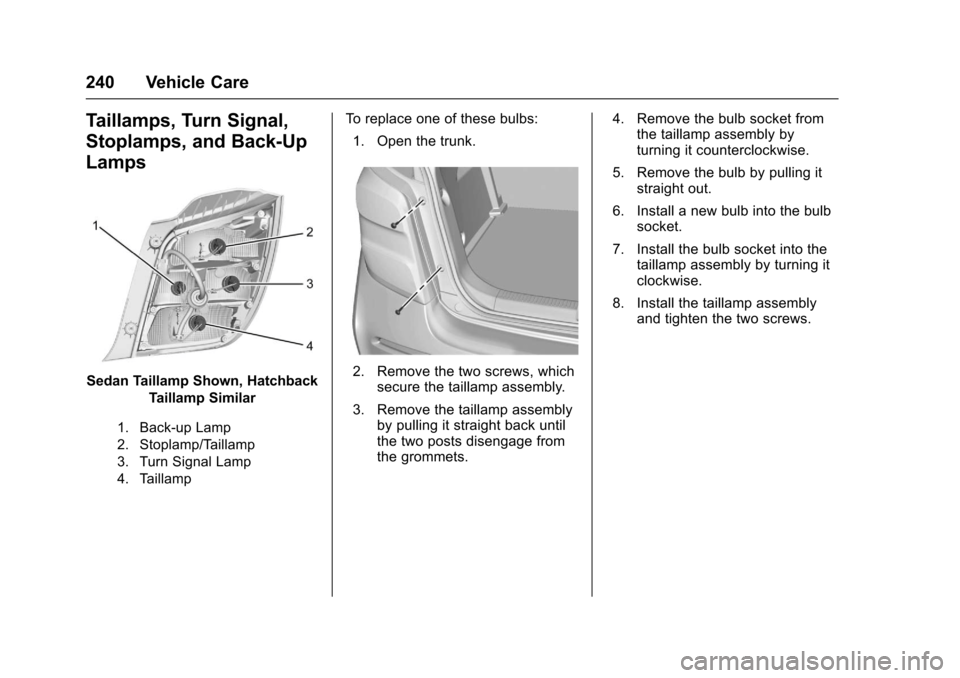
Sedan Taillamp Shown, Hatchback
Taillamp Similar
1. Back-up Lamp
2. Stoplamp/Taillamp
3. Turn Signal Lamp
4. Taillamp
To r e p l a c e o n e o f t h e s e b u l b s :
1. Open the trunk.
2. Remove the two screws, whichsecure the taillamp assembly.
3. Remove the taillamp assemblyby pulling it straight back untilthe two posts disengage fromthe grommets.
4. Remove the bulb socket fromthe taillamp assembly byturning it counterclockwise.
5. Remove the bulb by pulling itstraight out.
6. Install a new bulb into the bulbsocket.
7. Install the bulb socket into thetaillamp assembly by turning itclockwise.
8. Install the taillamp assemblyand tighten the two screws.