door lock CHEVROLET SPARK 2013 3.G User Guide
[x] Cancel search | Manufacturer: CHEVROLET, Model Year: 2013, Model line: SPARK, Model: CHEVROLET SPARK 2013 3.GPages: 350, PDF Size: 5.89 MB
Page 29 of 350
Black plate (7,1)Chevrolet Spark Owner Manual - 2013 - crc - 9/11/12
Keys, Doors, and Windows 2-7
Doors
Liftgate
{WARNING
Exhaust gases can enter the
vehicle if it is driven with the
liftgate, trunk/hatch open, or with
any objects that pass through the
seal between the body and the
trunk/hatch or liftgate. Engine
exhaust contains carbon
monoxide (CO) which cannot be
seen or smelled. It can cause
unconsciousness and even death.
If the vehicle must be driven with
the liftgate or trunk/hatch open:
.Close all of the windows.
.Fully open the air outlets on
or under the instrument
panel.(Continued)
WARNING (Continued)
.Adjust the climate control
system to a setting that
brings in only outside air and
set the fan speed to the
highest setting. See “Climate
Control Systems” in the
Index.
.If the vehicle is equipped with
a power liftgate, disable the
power liftgate function.
For more information about
carbon monoxide, see Engine
Exhaust on page 9‑20.
Notice: To avoid damage to the
liftgate or liftgate glass, make
sure the area above and behind
the liftgate is clear before
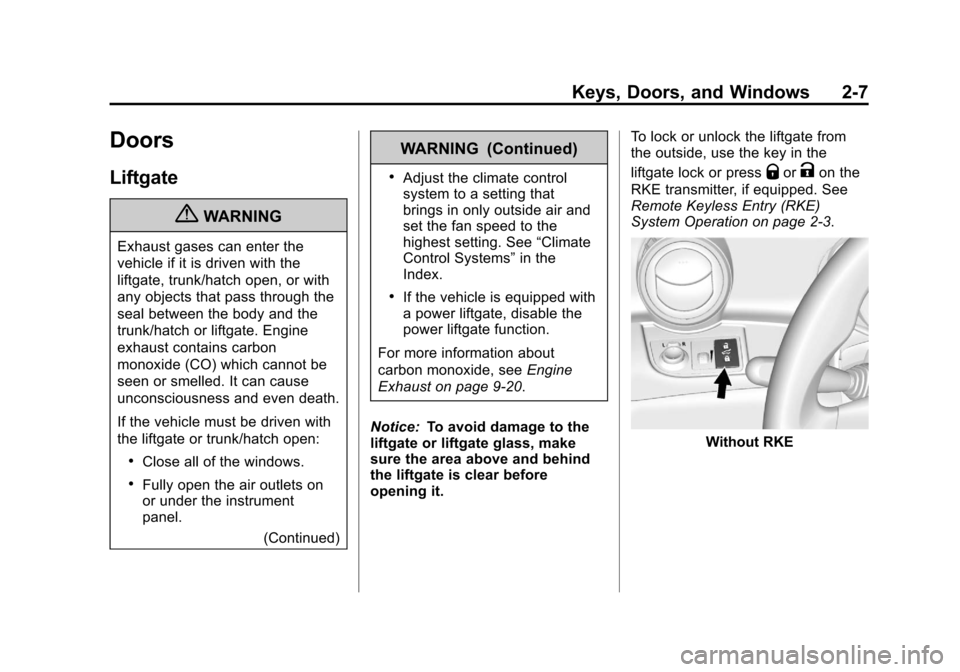
opening it. To lock or unlock the liftgate from
the outside, use the key in the
liftgate lock or press
QorKon the
RKE transmitter, if equipped. See
Remote Keyless Entry (RKE)
System Operation on page 2‑3.
Without RKE
Page 30 of 350
Black plate (8,1)Chevrolet Spark Owner Manual - 2013 - crc - 9/11/12
2-8 Keys, Doors, and Windows
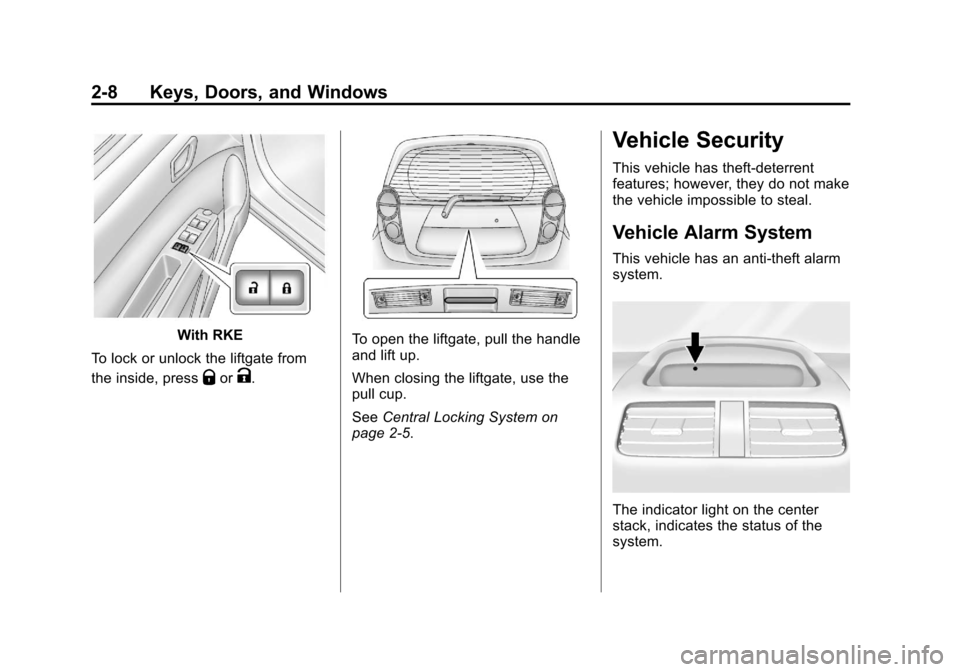
With RKE
To lock or unlock the liftgate from
the inside, press
QorK.
To open the liftgate, pull the handle
and lift up.
When closing the liftgate, use the
pull cup.
See Central Locking System on
page 2‑5.
Vehicle Security
This vehicle has theft-deterrent
features; however, they do not make
the vehicle impossible to steal.
Vehicle Alarm System
This vehicle has an anti-theft alarm
system.
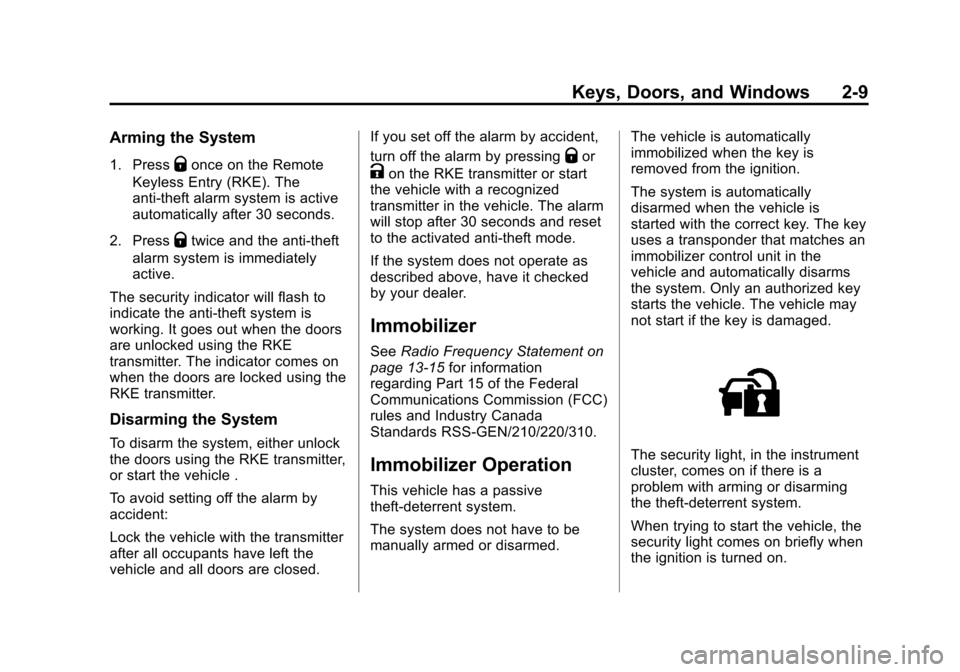
The indicator light on the center
stack, indicates the status of the
system.
Page 31 of 350
Black plate (9,1)Chevrolet Spark Owner Manual - 2013 - crc - 9/11/12
Keys, Doors, and Windows 2-9
Arming the System
1. PressQonce on the Remote
Keyless Entry (RKE). The
anti-theft alarm system is active
automatically after 30 seconds.
2. Press
Qtwice and the anti-theft
alarm system is immediately
active.
The security indicator will flash to
indicate the anti-theft system is
working. It goes out when the doors
are unlocked using the RKE
transmitter. The indicator comes on
when the doors are locked using the
RKE transmitter.
Disarming the System
To disarm the system, either unlock
the doors using the RKE transmitter,
or start the vehicle .
To avoid setting off the alarm by
accident:
Lock the vehicle with the transmitter
after all occupants have left the
vehicle and all doors are closed. If you set off the alarm by accident,
turn off the alarm by pressing
Qor
Kon the RKE transmitter or start
the vehicle with a recognized
transmitter in the vehicle. The alarm
will stop after 30 seconds and reset
to the activated anti-theft mode.
If the system does not operate as
described above, have it checked
by your dealer.
Immobilizer
See Radio Frequency Statement on
page 13‑15 for information
regarding Part 15 of the Federal
Communications Commission (FCC)
rules and Industry Canada
Standards RSS-GEN/210/220/310.
Immobilizer Operation
This vehicle has a passive
theft-deterrent system.
The system does not have to be
manually armed or disarmed. The vehicle is automatically
immobilized when the key is
removed from the ignition.
The system is automatically
disarmed when the vehicle is
started with the correct key. The key
uses a transponder that matches an
immobilizer control unit in the
vehicle and automatically disarms
the system. Only an authorized key
starts the vehicle. The vehicle may
not start if the key is damaged.
The security light, in the instrument
cluster, comes on if there is a
problem with arming or disarming
the theft-deterrent system.
When trying to start the vehicle, the
security light comes on briefly when
the ignition is turned on.
Page 34 of 350
Black plate (12,1)Chevrolet Spark Owner Manual - 2013 - crc - 9/11/12
2-12 Keys, Doors, and Windows
Windows
{WARNING
Never leave a child, a helpless
adult, or a pet alone in a vehicle,
especially with the windows
closed in warm or hot weather.
They can be overcome by the
extreme heat and suffer
permanent injuries or even death
from heat stroke.
The vehicle aerodynamics are
designed to improve fuel economy
performance. This may result in a
pulsing sound when either rear
window is down and the front
windows are up. To reduce the
sound, open a front window.
Power Windows
{WARNING
Children could be seriously
injured or killed if caught in the
path of a closing window. Never
leave keys in a vehicle with
children. When there are children
in the rear seat, use the window
lockout button to prevent
operation of the windows. See
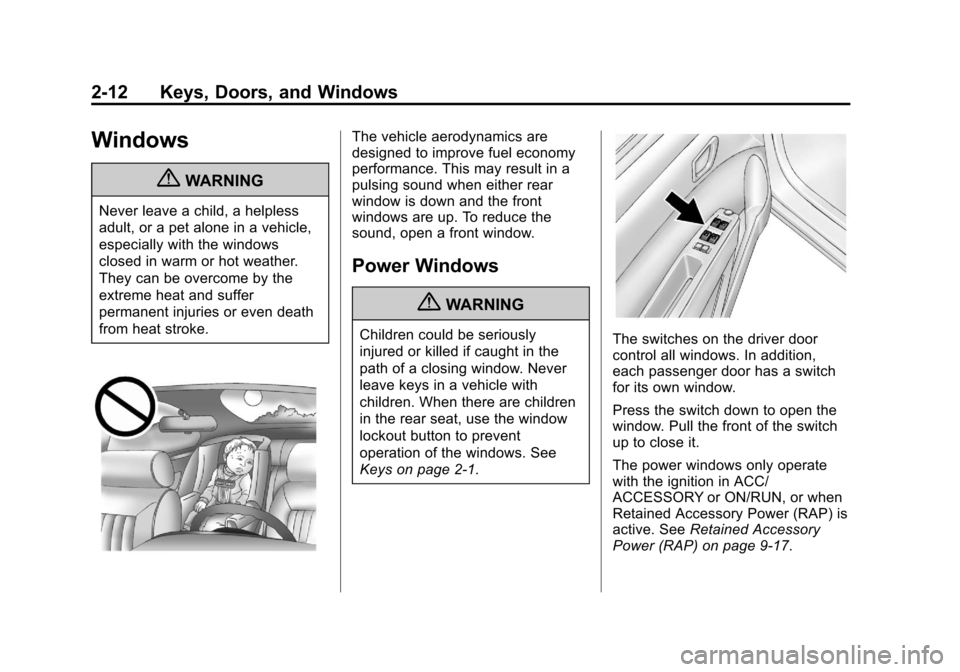
Keys on page 2‑1.The switches on the driver door
control all windows. In addition,
each passenger door has a switch
for its own window.
Press the switch down to open the
window. Pull the front of the switch
up to close it.
The power windows only operate
with the ignition in ACC/
ACCESSORY or ON/RUN, or when
Retained Accessory Power (RAP) is
active. SeeRetained Accessory
Power (RAP) on page 9‑17.
Page 35 of 350
Black plate (13,1)Chevrolet Spark Owner Manual - 2013 - crc - 9/11/12
Keys, Doors, and Windows 2-13
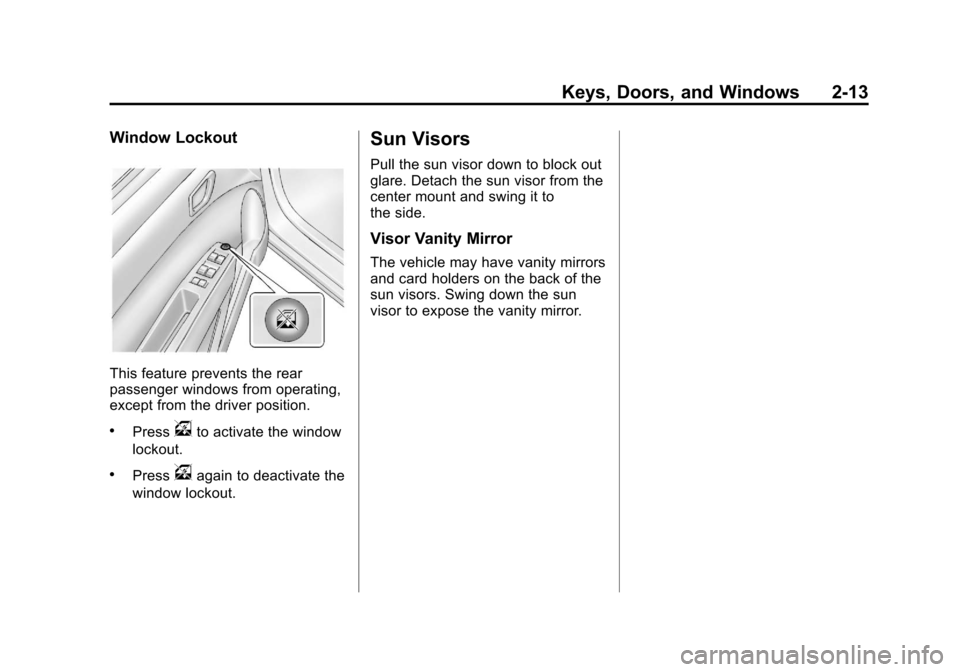
Window Lockout
This feature prevents the rear
passenger windows from operating,
except from the driver position.
.Pressvto activate the window
lockout.
.Pressvagain to deactivate the
window lockout.
Sun Visors
Pull the sun visor down to block out
glare. Detach the sun visor from the
center mount and swing it to
the side.
Visor Vanity Mirror
The vehicle may have vanity mirrors
and card holders on the back of the
sun visors. Swing down the sun
visor to expose the vanity mirror.
Page 56 of 350
Black plate (20,1)Chevrolet Spark Owner Manual - 2013 - crc - 9/11/12
3-20 Seats and Restraints
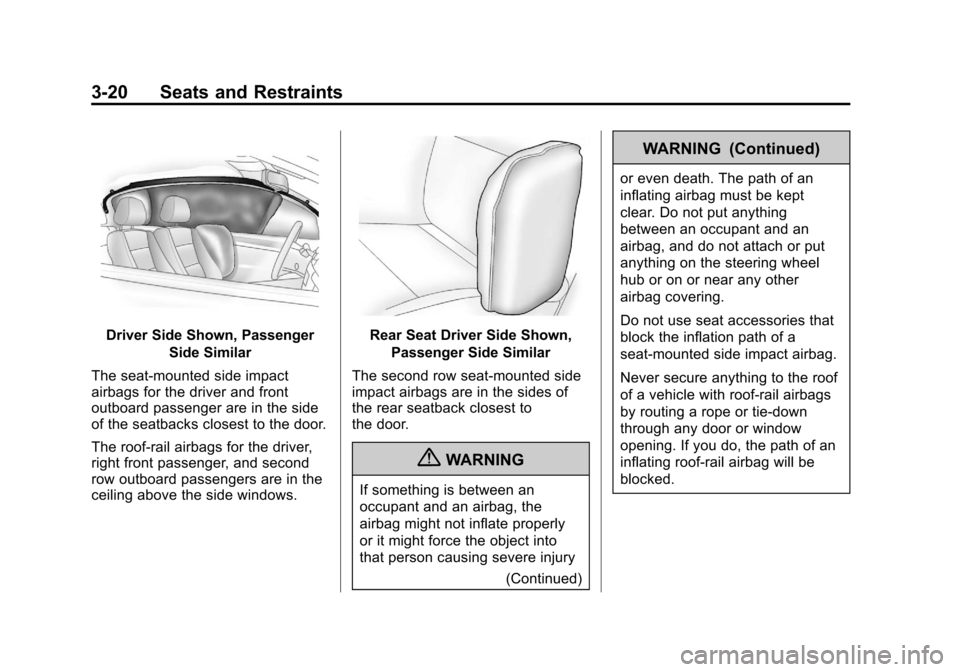
Driver Side Shown, PassengerSide Similar
The seat-mounted side impact
airbags for the driver and front
outboard passenger are in the side
of the seatbacks closest to the door.
The roof-rail airbags for the driver,
right front passenger, and second
row outboard passengers are in the
ceiling above the side windows.Rear Seat Driver Side Shown, Passenger Side Similar
The second row seat-mounted side
impact airbags are in the sides of
the rear seatback closest to
the door.
{WARNING
If something is between an
occupant and an airbag, the
airbag might not inflate properly
or it might force the object into
that person causing severe injury (Continued)
WARNING (Continued)
or even death. The path of an
inflating airbag must be kept
clear. Do not put anything
between an occupant and an
airbag, and do not attach or put
anything on the steering wheel
hub or on or near any other
airbag covering.
Do not use seat accessories that
block the inflation path of a
seat-mounted side impact airbag.
Never secure anything to the roof
of a vehicle with roof-rail airbags
by routing a rope or tie‐down
through any door or window
opening. If you do, the path of an
inflating roof-rail airbag will be
blocked.
Page 59 of 350
Black plate (23,1)Chevrolet Spark Owner Manual - 2013 - crc - 9/11/12
Seats and Restraints 3-23
the windshield or being able to steer
the vehicle, nor does it prevent
people from leaving the vehicle.
{WARNING
When an airbag inflates, there
may be dust in the air. This dust
could cause breathing problems
for people with a history of
asthma or other breathing trouble.
To avoid this, everyone in the
vehicle should get out as soon as
it is safe to do so. If you have
breathing problems but cannot
get out of the vehicle after an
airbag inflates, then get fresh air
by opening a window or a door.
If you experience breathing
problems following an airbag
deployment, you should seek
medical attention.
The vehicle has a feature that may
automatically unlock the doors, turn
on the interior lamps, turn on the
hazard warning flashers, and shut off the fuel system after the airbags
inflate. You can lock the doors, turn
off the interior lamps, and turn off
the hazard warning flashers by
using the controls for those
features.
{WARNING
A crash severe enough to inflate
the airbags may have also
damaged important functions in
the vehicle, such as the fuel
system, brake and steering
systems, etc. Even if the vehicle
appears to be drivable after a
moderate crash, there may be
concealed damage that could
make it difficult to safely operate
the vehicle.
Use caution if you should attempt
to restart the engine after a crash
has occurred.
In many crashes severe enough to
inflate the airbag, windshields are
broken by vehicle deformation. Additional windshield breakage may
also occur from the front outboard
passenger airbag.
.Airbags are designed to inflate
only once. After an airbag
inflates, you will need some new
parts for the airbag system.
If you do not get them, the
airbag system will not be there
to help protect you in another
crash. A new system will include
airbag modules and possibly
other parts. The service manual
for the vehicle covers the need
to replace other parts.
.The vehicle has a crash sensing
and diagnostic module which
records information after a
crash. See
Vehicle Data
Recording and Privacy on
page 13‑13 andEvent Data
Recorders on page 13‑14.
Page 91 of 350
Black plate (1,1)Chevrolet Spark Owner Manual - 2013 - crc - 9/11/12
Instruments and Controls 5-1
Instruments and
Controls
Controls
Steering Wheel Adjustment . . . 5-2
Steering Wheel Controls . . . . . . 5-2
Horn . . . . . . . . . . . . . . . . . . . . . . . . . . 5-2
Windshield Wiper/Washer . . . . . 5-2
Rear Window Wiper/Washer . . . . . . . . . . . . . . . . . . . . . . 5-3
Clock . . . . . . . . . . . . . . . . . . . . . . . . . 5-4
Power Outlets . . . . . . . . . . . . . . . . . 5-5
Warning Lights, Gauges, and
Indicators
Warning Lights, Gauges, and Indicators . . . . . . . . . . . . . . . . . . . . 5-6
Instrument Cluster . . . . . . . . . . . . 5-7
Speedometer . . . . . . . . . . . . . . . . . 5-8
Odometer . . . . . . . . . . . . . . . . . . . . . 5-8
Trip Odometer . . . . . . . . . . . . . . . . . 5-8
Tachometer . . . . . . . . . . . . . . . . . . . 5-8
Fuel Gauge . . . . . . . . . . . . . . . . . . . 5-8 Safety Belt Reminders . . . . . . . . 5-9
Airbag Readiness Light . . . . . . . 5-9
Passenger Airbag Status
Indicator . . . . . . . . . . . . . . . . . . . . 5-10
Charging System Light . . . . . . . 5-11
Malfunction
Indicator Lamp . . . . . . . . . . . . . 5-11
Service Vehicle Soon Light . . . . . . . . . . . . . . . . . . . . . . . 5-14
Owner Manual Indicator . . . . . 5-14
Brake System Warning Light . . . . . . . . . . . . . . . . . . . . . . . 5-14
Antilock Brake System (ABS) Warning Light . . . . . . . . . . . . . . 5-15
Up-Shift Light . . . . . . . . . . . . . . . . 5-15
Power Steering Warning Light . . . . . . . . . . . . . . . . . . . . . . . 5-15
Traction Off Light . . . . . . . . . . . . 5-16
StabiliTrak®OFF Light . . . . . . . 5-16
Traction Control System (TCS)/StabiliTrak
®Light . . . . 5-16
Engine Coolant Temperature Warning Light . . . . . . . . . . . . . . 5-17
Tire Pressure Light . . . . . . . . . . 5-17 Engine Oil Pressure Light . . . . 5-18
Low Fuel Warning Light . . . . . . 5-18
Immobilizer Light . . . . . . . . . . . . 5-18
Reduced Engine Power
Light . . . . . . . . . . . . . . . . . . . . . . . 5-19
High-Beam On Light . . . . . . . . . 5-19
Daytime Running Lamps (DRL) Indicator Light . . . . . . . 5-19
Front Fog Lamp Light . . . . . . . . 5-20
Lamps On Reminder . . . . . . . . . 5-20
Cruise Control Light . . . . . . . . . 5-20
Door Ajar Light . . . . . . . . . . . . . . 5-20
Information Displays
Driver Information Center (DIC) . . . . . . . . . . . . . . . 5-21
Vehicle Messages
Vehicle Messages . . . . . . . . . . . 5-24
Vehicle Personalization
Vehicle Personalization . . . . . . 5-25
Page 117 of 350
Black plate (27,1)Chevrolet Spark Owner Manual - 2013 - crc - 9/11/12
Instruments and Controls 5-27
wind noise as the vehicle speeds up
or slows down, so that the volume
level is consistent.
1. Turn the MENU/TUNE knob tothe desired value.
2. Press the MENU/TUNE knob to select the value.
Maximum Startup Volume
Select to manually set the startup
volume of the radio.
1. Turn the MENU/TUNE knob to increase or decrease the value.
2. To save press the MENU/TUNE or
/BACK button.
Radio Favorites
Select to manually set the number
of favorite pages.
1. Turn the MENU/TUNE knob to select 1-6.
2. Press the MENU/TUNE knob to select the value.
Vehicle Settings
Select the Radio Settings menu and
the following may be displayed:
.Comfort and Convenience
.Lighting
.Power Door Locks
.Lock, Unlock, Settings
.Vehicle Factory Settings
Comfort and Convenience
Select the Comfort and
Convenience menu and the
following may be displayed:
.Chime Volume
.Auto Wipe in Reverse Gear
Chime Volume
Select to set the chime volume level
to Normal or High.
1. Turn the MENU/TUNE knob to select Chime Volume.
2. Press the MENU/TUNE knob to select. 3. Turn the MENU/TUNE knob to
the desired level.
4. Press the MENU/TUNE knob to select the level.
Auto Wipe in Reverse Gear
Select to set the Auto Wipe in
Reverse Gear feature on or off.
When on, and the front wipers are
on, the rear window wiper will turn
on automatically when the vehicle is
shifted into R (Reverse).
1. Turn the MENU/TUNE knob to select Auto Wipe in
Reverse Gear.
2. Press the MENU/TUNE knob to turn On or Off.
Lighting
Select the Lighting menu and the
following may be displayed:
.Exit Lighting
Exit Lighting
Select to set how long the exterior
lamps stay on when leaving the
vehicle and it is dark outside.
Page 118 of 350
Black plate (28,1)Chevrolet Spark Owner Manual - 2013 - crc - 9/11/12
5-28 Instruments and Controls
1. Turn the MENU/TUNE knob tothe desired time.
2. Press the MENU/TUNE knob to select.
Power Door Locks
Select Power Door Locks and the
following may be displayed:
.Auto Door Unlock
.Unlocked Door Anti Lock Out
.Delayed Door Lock
Auto Door Unlock
Select to set which of the doors will
automatically unlock when the
vehicle is shifted into P (Park),
select All Doors, Driver Door, or Off.
1. Turn the MENU/TUNE knob to the desired selection.
2. Press the MENU/TUNE knob to select.
Unlocked Door Anti Lock Out
When on, this feature will keep the
driver door from locking when the
door is open. If Off is selected, the Delayed Door Lock menu will be
available and the door will lock as
programmed through this menu.
1. Turn the MENU/TUNE knob to
On or Off.
2. Press the MENU/TUNE knob to select.
Delayed Door Lock
When on, this feature will delay the
locking of the doors after the last
door is closed.
1. Turn the MENU/TUNE knob to On or Off.
2. Press the MENU/TUNE knob to select.
Lock, Unlock, Settings
Select Power Door Locks and the
following may be displayed:
.Remote Unlock Light Feedback
.Remote Lock Light and Horn
Feedback
.Remote Door Unlock Remote Unlock Light Feedback
When on, the exterior lamps will
flash when unlocking the vehicle
with the Remote Keyless Entry
(RKE) transmitter, select Flash
Lights or Lights Off.
1. Turn the MENU/TUNE knob to
the desired selection.
2. Press the MENU/TUNE knob to select.
Remote Lock Light and Horn
Feedback
Select to set which type of feedback
is given when pressing
Qon the
RKE transmitter, select Lights and
Horn, Lights only, Horn Only, or Off.
1. Turn the MENU/TUNE knob to the desired selection.
2. Press the MENU/TUNE knob to select.