Electrical CHEVROLET SPARK 2017 4.G Owner's Manual
[x] Cancel search | Manufacturer: CHEVROLET, Model Year: 2017, Model line: SPARK, Model: CHEVROLET SPARK 2017 4.GPages: 331, PDF Size: 5.56 MB
Page 237 of 331
Chevrolet Spark Owner Manual (GMNA-Localizing-U.S./Canada-9956101) -
2017 - crc - 4/25/16
236 Vehicle Care
Engine Compartment
Fuse Block
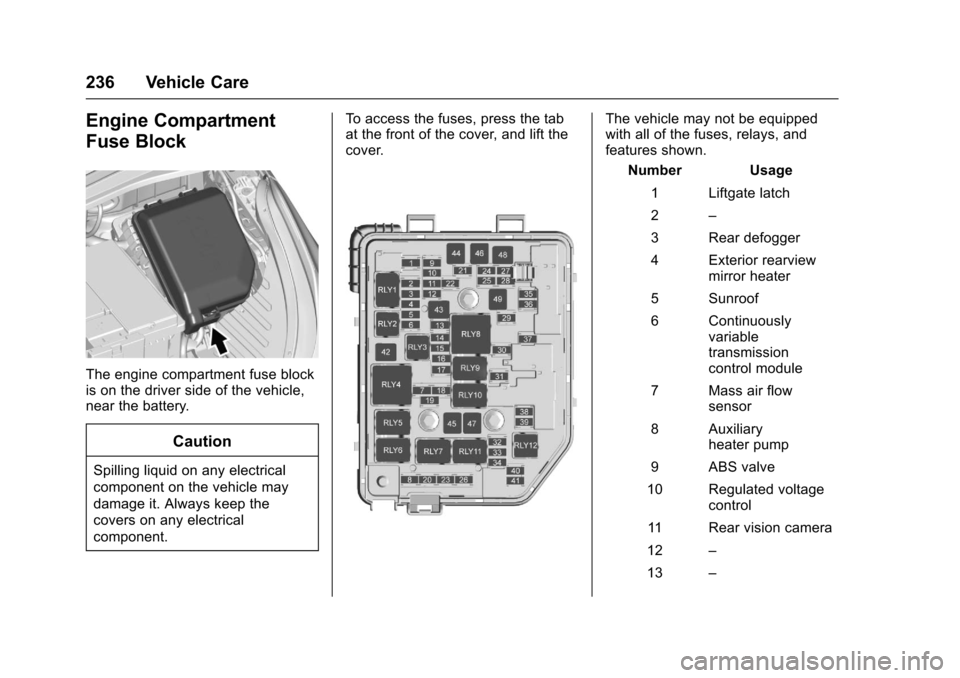
The engine compartment fuse block
is on the driver side of the vehicle,
near the battery.
Caution
Spilling liquid on any electrical
component on the vehicle may
damage it. Always keep the
covers on any electrical
component.To access the fuses, press the tab
at the front of the cover, and lift the
cover.
The vehicle may not be equipped
with all of the fuses, relays, and
features shown.
Number Usage
1 Liftgate latch
2 –
3 Rear defogger
4 Exterior rearview mirror heater
5 Sunroof
6 Continuously variable
transmission
control module
7 Mass air flow sensor
8 Auxiliary heater pump
9 ABS valve
10 Regulated voltage control
11 Rear vision camera
12 –
13 –
Page 238 of 331

Chevrolet Spark Owner Manual (GMNA-Localizing-U.S./Canada-9956101) -
2017 - crc - 4/25/16
Vehicle Care 237
Number Usage14 Engine control module/
Transmission
control module
15 Fuel injection control module/
Starter motor
16 Fuel pump motor
17 Engine control module 1
18 Engine control module 2
19 Injector/Ignition
20 A/C system
21 Intelligent battery sensor
22 Electric steering column lock
23 Cooling fan –low
24 –
25 Exterior rearview mirror motor control Number Usage
26 Engine control module/
Transmission
control module
battery
27 Canister vent solenoid
28 Brake pedal switch
29 Automatic occupant sensing
30 Headlamp leveling motor
31 Horn
32 Front fog lamps
33 Left high-beam headlamp
34 Right high-beam headlamp
35 –
36 Rear wiper
37 Left cornering lamp
38 Washer motor Number Usage
39 Right cornering lamp
40 –
41 –
42 Starter 2
43 In-panel bussed electrical center
44 Automated manual transmission
45 Starter 1
46 ABS pump
47 Cooling fan –high
48 Front wiper motor
49 Accessory/ Retained
accessory power
RLY1 Rear defogger
RLY2 Transmission control module
RLY3 Fuel pump motor
RLY4 Starter 2
RLY5 A/C system
Page 269 of 331
Chevrolet Spark Owner Manual (GMNA-Localizing-U.S./Canada-9956101) -
2017 - crc - 4/25/16
268 Vehicle Care
10. Try to start the vehicle that hadthe dead battery. If it will not
start after a few tries, it
probably needs service.
Caution
If the jumper cables are
connected or removed in the
wrong order, electrical shorting
may occur and damage the
vehicle. The repairs would not be
covered by the vehicle warranty.
Always connect and remove the
jumper cables in the correct order,
making sure that the cables do
not touch each other or other
metal.
Jumper Cable Removal
Reverse the sequence exactly when
removing the jumper cables.
After starting the disabled vehicle
and removing the jumper cables,
allow it to idle for several minutes.
Towing the Vehicle
Caution
Incorrectly towing a disabled
vehicle may cause damage. The
damage would not be covered by
the vehicle warranty.
Do not lash or hook to
suspension components. Use the
proper straps around the tires to
secure the vehicle.
Use only a flatbed tow truck for
towing a disabled vehicle. Never
use a sling type lift or damage will
occur. Use ramps to help reduce
approach angles if necessary.
A towed vehicle should have its
drive wheels off the ground.
Consult a professional towing
service if the disabled vehicle must
be towed.
Caution
Improper use of the tow eye can
cause vehicle damage. Use
caution and low speeds to
prevent damage to the vehicle.
If the vehicle is equipped with tow
eye, only use the tow eye to pull the
vehicle onto a flatbed car carrier
from a flat road surface. Do not use
the tow eye to pull the vehicle from
snow, mud or sand.
Recreational Vehicle
Towing
Recreational vehicle towing refers to
towing the vehicle behind another
vehicle, such as behind a motor
home. The two most common types
of recreational vehicle towing are
known as dinghy towing and dolly
towing. Dinghy towing is towing the
vehicle with all four wheels on the
ground. Dolly towing is towing the
vehicle with two wheels on the
ground and two wheels up on a
device known as a dolly.
Page 288 of 331
Chevrolet Spark Owner Manual (GMNA-Localizing-U.S./Canada-9956101) -
2017 - crc - 4/25/16
Service and Maintenance 287
Additional
Maintenance and Care
Your vehicle is an important
investment and caring for it properly
may help to avoid future costly
repairs. To maintain vehicle
performance, additional
maintenance services may be
required.
It is recommended that your dealer
perform these services—their
trained dealer technicians know
your vehicle best. Your dealer can
also perform a thorough
assessment with a multi-point
inspection to recommend when your
vehicle may need attention.
The following list is intended to
explain the services and conditions
to look for that may indicate
services are required. Battery
The 12-volt battery supplies power
to start the engine and operate any
additional electrical accessories.
.
To avoid break-down or failure to
start the vehicle, maintain a
battery with full cranking power.
. Trained dealer technicians have
the diagnostic equipment to test
the battery and ensure that the
connections and cables are
corrosion-free.
Belts
. Belts may need replacing if they
squeak or show signs of
cracking or splitting.
. Trained dealer technicians have
access to tools and equipment
to inspect the belts and
recommend adjustment or
replacement when necessary. Brakes
Brakes stop the vehicle and are
crucial to safe driving.
.
Signs of brake wear may include
chirping, grinding, or squealing
noises, or difficulty stopping.
. Trained dealer technicians have
access to tools and equipment
to inspect the brakes and
recommend quality parts
engineered for the vehicle.
Fluids
Proper fluid levels and approved
fluids protect the vehicle’s systems
and components. See
Recommended Fluids and
Lubricants 0290 for GM approved
fluids.
. Engine oil and windshield
washer fluid levels should be
checked at every fuel fill.
. Instrument cluster lights may
come on to indicate that fluids
may be low and need to be
filled.
Page 306 of 331
Chevrolet Spark Owner Manual (GMNA-Localizing-U.S./Canada-9956101) -
2017 - crc - 4/25/16
Customer Information 305
.Vehicle license plate number.
. Vehicle make, model, and
model year.
. Vehicle Identification
Number (VIN).
. Insurance company and policy
number.
. General description of the
damage to the other vehicle.
Choose a reputable repair facility
that uses quality replacement parts.
See “Collision Parts” earlier in this
section.
If the airbag has inflated, see What
Will You See after an Airbag
Inflates? 063.
Managing the Vehicle Damage
Repair Process
In the event that the vehicle requires
damage repairs, GM recommends
that you take an active role in its
repair. If you have a pre-determined
repair facility of choice, take the
vehicle there, or have it towed there.
Specify to the facility that any
required replacement collision parts
be original equipment parts, either new Genuine GM parts or recycled
original GM parts. Remember,
recycled parts will not be covered by
the GM vehicle warranty.
Insurance pays the bill for the repair,
but you must live with the repair.
Depending on your policy limits,
your insurance company may
initially value the repair using
aftermarket parts. Discuss this with
the repair professional, and insist on
Genuine GM parts. Remember,
if the vehicle is leased, you may be
obligated to have the vehicle
repaired with Genuine GM parts,
even if your insurance coverage
does not pay the full cost.
If another party's insurance
company is paying for the repairs,
you are not obligated to accept a
repair valuation based on that
insurance company's collision policy
repair limits, as you have no
contractual limits with that company.
In such cases, you can have control
of the repair and parts choices as
long as the cost stays within
reasonable limits.
Service Publications
Ordering Information
Service Manuals
Service Manuals have the diagnosis
and repair information on the
engines, transmission, axle,
suspension, brakes, electrical,
steering, body, etc.
Service Bulletins
Service Bulletins give additional
technical service information
needed to knowledgeably service
General Motors cars and trucks.
Each bulletin contains instructions
to assist in the diagnosis and
service of the vehicle.
Owner Information
Owner publications are written
specifically for owners and intended
to provide basic operational
information about the vehicle. The
Owner Manual includes the
Maintenance Schedule for all
models.
Page 311 of 331
Chevrolet Spark Owner Manual (GMNA-Localizing-U.S./Canada-9956101) -
2017 - crc - 4/25/16
310 OnStar
OnStar
OnStar Overview
OnStar Overview . . . . . . . . . . . . . 310
OnStar Services
Emergency . . . . . . . . . . . . . . . . . . . 311
Security . . . . . . . . . . . . . . . . . . . . . . . 311
Navigation . . . . . . . . . . . . . . . . . . . . 312
Connections . . . . . . . . . . . . . . . . . . 312
Diagnostics . . . . . . . . . . . . . . . . . . . 314
OnStar Additional Information
OnStar AdditionalInformation . . . . . . . . . . . . . . . . . . 315
OnStar Overview
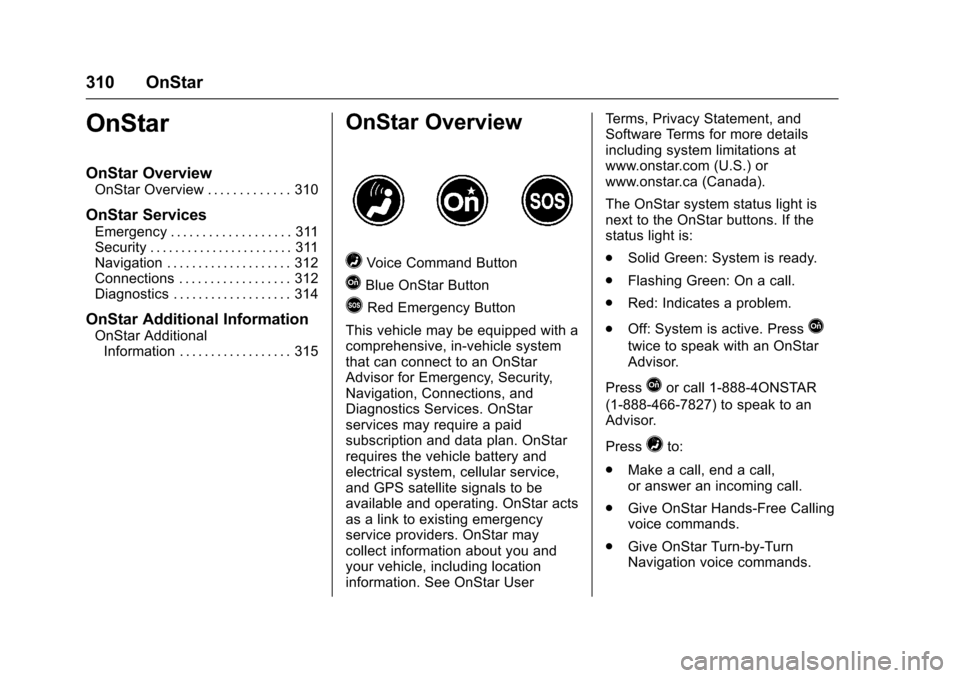
=Voice Command Button
QBlue OnStar Button
>Red Emergency Button
This vehicle may be equipped with a
comprehensive, in-vehicle system
that can connect to an OnStar
Advisor for Emergency, Security,
Navigation, Connections, and
Diagnostics Services. OnStar
services may require a paid
subscription and data plan. OnStar
requires the vehicle battery and
electrical system, cellular service,
and GPS satellite signals to be
available and operating. OnStar acts
as a link to existing emergency
service providers. OnStar may
collect information about you and
your vehicle, including location
information. See OnStar User Terms, Privacy Statement, and
Software Terms for more details
including system limitations at
www.onstar.com (U.S.) or
www.onstar.ca (Canada).
The OnStar system status light is
next to the OnStar buttons. If the
status light is:
.
Solid Green: System is ready.
. Flashing Green: On a call.
. Red: Indicates a problem.
. Off: System is active. Press
Q
twice to speak with an OnStar
Advisor.
Press
Qor call 1-888-4ONSTAR
(1-888-466-7827) to speak to an
Advisor.
Press
=to:
. Make a call, end a call,
or answer an incoming call.
. Give OnStar Hands-Free Calling
voice commands.
. Give OnStar Turn-by-Turn
Navigation voice commands.
Page 316 of 331

Chevrolet Spark Owner Manual (GMNA-Localizing-U.S./Canada-9956101) -
2017 - crc - 4/25/16
OnStar 315
OnStar Additional
Information
In-Vehicle Audio Messages
Audio messages may play important
information at the following times:
.Prior to vehicle purchase. Press
Qto set up an account.
. With the OnStar Basic Plan,
every 60 days.
. After change in ownership and
at 90 days.
Transferring Service
PressQto request account transfer
eligibility information. The Advisor
can cancel or change account
information.
Selling/Transferring the
Vehicle
Call 1-888-4ONSTAR
(1-888-466-7827) immediately to
terminate your OnStar services if
the vehicle is disposed of, sold,
transferred, or if the lease ends.
Reactivation for Subsequent
Owners
PressQand follow the prompts to
speak to an Advisor as soon as
possible. The Advisor will update
vehicle records and explain OnStar
service options.
How OnStar Service Works
Automatic Crash Response,
Emergency Services, Crisis Assist,
Stolen Vehicle Assistance,
Advanced Vehicle Diagnostics,
Remote Services, Roadside
Assistance, Turn-by-Turn
Navigation, and Hands-Free Calling
are available on most vehicles. Not
all OnStar services are available
everywhere or on all vehicles. For
more information, a full description
of OnStar services, system
limitations, and OnStar User Terms,
Privacy Statement, and Software
Terms:
. Call 1-888-4ONSTAR
(1-888-466-7827).
. See www.onstar.com (U.S.).
. See www.onstar.ca (Canada). .
Call TTY 1-877-248-2080.
. Press
Qto speak with an
Advisor.
OnStar services cannot work unless
the vehicle is in a place where
OnStar has an agreement with a
wireless service provider for service
in that area. The wireless service
provider must also have coverage,
network capacity, reception, and
technology compatible with OnStar
services. Service involving location
information about the vehicle cannot
work unless GPS signals are
available, unobstructed, and
compatible with the OnStar
hardware. OnStar services may not
work if the OnStar equipment is not
properly installed or it has not been
properly maintained. If equipment or
software is added, connected,
or modified, OnStar services may
not work. Other problems beyond
the control of OnStar —such as
hills, tall buildings, tunnels, weather,
electrical system design and
architecture of the vehicle, damage
Page 318 of 331
Chevrolet Spark Owner Manual (GMNA-Localizing-U.S./Canada-9956101) -
2017 - crc - 4/25/16
OnStar 317
A temporary loss of GPS can cause
loss of the ability to send a
Turn-by-Turn Navigation route. The
Advisor may give a verbal route or
may ask for a call back after the
vehicle is driven into an open area.
Cellular and GPS Antennas
Cellular reception is required for
OnStar to send remote signals to
the vehicle. Do not place items over
or near the antenna to prevent
blocking cellular and GPS signal
reception.
Unable to Connect to OnStar
Message
If there is limited cellular coverage
or the cellular network has reached
maximum capacity, this message
may come on. Press
Qto try the
call again or try again after driving a
few miles into another cellular area.
Vehicle and Power Issues
OnStar services require a vehicle
electrical system, wireless service,
and GPS satellite technologies to be
available and operating for features to function properly. These systems
may not operate if the battery is
discharged or disconnected.
Add-on Electrical Equipment
The OnStar system is integrated
into the electrical architecture of the
vehicle. Do not add any electrical
equipment. See
Add-On Electrical
Equipment 0205. Added electrical
equipment may interfere with the
operation of the OnStar system and
cause it to not operate.
Vehicle Software Updates
OnStar or GM may remotely deliver
software updates or changes to the
vehicle without further notice or
consent. These updates or changes
may enhance or maintain safety,
security, or the operation of the
vehicle or the vehicle systems.
Software updates or changes may
affect or erase data or settings that
are stored in the vehicle, such as
OnStar Hands-Free Calling name
tags, saved navigation destinations,
or pre-set radio stations. Neither
OnStar nor GM is responsible for
any affected or erased data or settings. These updates or changes
may also collect personal
information. Such collection is
described in the OnStar privacy
statement or separately disclosed at
the time of installation. These
updates or changes may also cause
a system to automatically
communicate with GM servers to
collect information about vehicle
system status, identify whether
updates or changes are available,
or deliver updates or changes. An
active OnStar agreement constitutes
consent to these software updates
or changes and agreement that
either OnStar or GM may remotely
deliver them to the vehicle.
Privacy
The complete OnStar Privacy
Statement may be found at
www.onstar.com (U.S.),
or www.onstar.ca (Canada). We
recommend that you review it. If you
have any questions, call
1-888-4ONSTAR (1-888-466-7827)
or press
Qto speak with an
Advisor. Users of wireless
communications are cautioned that
Page 321 of 331

Chevrolet Spark Owner Manual (GMNA-Localizing-U.S./Canada-9956101) -
2017 - crc - 4/25/16
320 Index
IndexA
Accessories andModifications . . . . . . . . . . . . . . . . . . 208
Accessory Power . . . . . . . . . . . . . . . 182
Add-On Electrical Equipment . . . 205
Additional Information OnStar
®. . . . . . . . . . . . . . . . . . . . . . 315
Additional Maintenance and Care . . . . . . . . . . . . . . . . . . . . . . 287
Agreements
Trademarks and License . . . . . 158
Air Cleaner/Filter, Engine . . . . . . . 218
Air Conditioning Regular Operation . . . . . . . . . . . . . . . . . . . . . 164
Air Filter, Passenger Compartment . . . . . . . . . . . . . . . . . 163
Air Intake . . . . . . . . . . . . . . . . . . . . . . . 163
Air Vents . . . . . . . . . . . . . . . . . . . . . . . 162
Airbag System Check . . . . . . . . . . . . . . . . . . . . . . . . . . 70
How Does an AirbagRestrain? . . . . . . . . . . . . . . . . . . . . . 63
Passenger Sensing System . . . . 65
What Makes an Airbag Inflate? . . . . . . . . . . . . . . . . . . . . . . . . 63
What Will You See after an Airbag Inflates? . . . . . . . . . . . . . . . 63 Airbag System (cont'd)
When Should an Airbag
Inflate? . . . . . . . . . . . . . . . . . . . . . . . . 62
Where Are the Airbags? . . . . . . . . 60
Airbags Adding Equipment to theVehicle . . . . . . . . . . . . . . . . . . . . . . . . 69
Passenger Status Indicator . . . 102
Readiness Light . . . . . . . . . . . . . . 101
Servicing Airbag-Equipped Vehicles . . . . . . . . . . . . . . . . . . . . . . . 69
System Check . . . . . . . . . . . . . . . . . . 59
Alarm Vehicle Security . . . . . . . . . . . . . . . . 37
All-Season Tires . . . . . . . . . . . . . . . . 241
AM-FM Radio . . . . . . . . . . . . . . . . . . . 139
Antenna Multi-band . . . . . . . . . . . . . . . . . . . . 142
Antilock Brake System (ABS) . . . 189 Warning Light . . . . . . . . . . . . . . . . . 106
Appearance Care Exterior . . . . . . . . . . . . . . . . . . . . . . . 271
Interior . . . . . . . . . . . . . . . . . . . . . . . . 276
Apple CarPlay and Android Auto . . . . . . . . . . . . . . . . . . 155
Armrest Front Seat . . . . . . . . . . . . . . . . . . . . . . 50
Page 324 of 331

Chevrolet Spark Owner Manual (GMNA-Localizing-U.S./Canada-9956101) -
2017 - crc - 4/25/16
Index 323
Driving (cont'd)For Better Fuel Economy . . . . . . . 21
Hill and Mountain Roads . . . . . . 170
If the Vehicle is Stuck . . . . . . . . . 172
Loss of Control . . . . . . . . . . . . . . . 168
Off-Road Recovery . . . . . . . . . . . 168
Vehicle Load Limits . . . . . . . . . . . 172
Wet Roads . . . . . . . . . . . . . . . . . . . 169
Winter . . . . . . . . . . . . . . . . . . . . . . . . 170
E
Electrical Equipment,
Add-On . . . . . . . . . . . . . . . . . . . . . . . 205
Electrical System
Engine Compartment FuseBlock . . . . . . . . . . . . . . . . . . . . . . . . 236
Fuses and Circuit Breakers . . . 235
Instrument Panel Fuse Block . . . . . . . . . . . . . . . . . . . . . . . . 238
Overload . . . . . . . . . . . . . . . . . . . . . 235
Emergency OnStar
®. . . . . . . . . . . . . . . . . . . . . . .311
Engine Air Cleaner/Filter . . . . . . . . . . . . . 218
Check and Service Engine
Soon Light . . . . . . . . . . . . . . . . . . 103
Compartment Overview . . . . . . . 212
Coolant . . . . . . . . . . . . . . . . . . . . . . . 219 Engine (cont'd)
Coolant Temperature
Warning Light . . . . . . . . . . . . . . . 108
Cooling System . . . . . . . . . . . . . . . 219
Cooling System Messages . . . .119
Drive Belt Routing . . . . . . . . . . . . 295
Exhaust . . . . . . . . . . . . . . . . . . . . . . 184
Heater . . . . . . . . . . . . . . . . . . . . . . . . 181
Oil Life System . . . . . . . . . . . . . . . 215
Oil Messages . . . . . . . . . . . . . . . . . .119
Oil Pressure Light . . . . . . . . . . . . 109
Overheating . . . . . . . . . . . . . . . . . . 223
Power Messages . . . . . . . . . . . . . 120
Reduced Power Light . . . . . . . . . .110
Running While Parked . . . . . . . . 185
Starting . . . . . . . . . . . . . . . . . . . . . . . 179
Entry Lighting . . . . . . . . . . . . . . . . . . . 134
Event Data Recorders . . . . . . . . . . 308
Exit Lighting . . . . . . . . . . . . . . . . . . . . 134
Extender, Safety Belt . . . . . . . . . . . . 57
Exterior Lamp Controls . . . . . . . . . 129
Exterior Lamps Off Reminder . . . 129
F
Filter, Engine Air Cleaner . . . . . . . . . . . 218
Flash-to-Pass . . . . . . . . . . . . . . . . . . . 130
Flashers, Hazard Warning . . . . . . 131
Flat Tire . . . . . . . . . . . . . . . . . . . . . . . . 259 Flat Tire (cont'd)
Changing . . . . . . . . . . . . . . . . . . . . . 260
Floor Mats . . . . . . . . . . . . . . . . . . . . . . 279
Fluid Automatic Transmission . . . . . . 217
Brakes . . . . . . . . . . . . . . . . . . . . . . . . 225
Washer . . . . . . . . . . . . . . . . . . . . . . . 224
Fog Lamps . . . . . . . . . . . . . . . . . . . . . 132 Bulb Replacement . . . . . . . . . . . . 232
Folding Mirrors . . . . . . . . . . . . . . . . . . 41
Forward Collision Alert (FCA) System . . . . . . . . . . . . . . . . . 198
Frequency Statement Radio . . . . . . . . . . . . . . . . . . . . . . . . . 306
Front Fog Lamp Light . . . . . . . . . . . . . . . . . . . . . . . . . . . 111
Front Seat Armrest . . . . . . . . . . . . . . 50
Front Seats Adjustment . . . . . . . . . . . . . . . . . . . . . 48
Heated . . . . . . . . . . . . . . . . . . . . . . . . . 50
Fuel . . . . . . . . . . . . . . . . . . . . . . . . . . . . 201 Additives . . . . . . . . . . . . . . . . . . . . . 202
Economy Driving . . . . . . . . . . . . . . . 21
Filling a Portable FuelContainer . . . . . . . . . . . . . . . . . . . 204
Filling the Tank . . . . . . . . . . . . . . . 203
Foreign Countries . . . . . . . . . . . . 202
Gauge . . . . . . . . . . . . . . . . . . . . . . . . 100