instrument panel CHEVROLET SPARK 2018 Owner's Guide
[x] Cancel search | Manufacturer: CHEVROLET, Model Year: 2018, Model line: SPARK, Model: CHEVROLET SPARK 2018Pages: 338, PDF Size: 5.66 MB
Page 172 of 338

Chevrolet Spark Owner Manual (GMNA-Localizing-U.S./Canada-11348464) -
2018 - crc - 9/19/17
Driving and Operating 171
.The Antilock Brake System
(ABS) improves vehicle stability
during hard stops, but the
brakes should be applied sooner
than when on dry pavement.
See Antilock Brake System
(ABS) 0190.
. Allow greater following distance
and watch for slippery spots. Icy
patches can occur on otherwise
clear roads in shaded areas.
The surface of a curve or an
overpass can remain icy when
the surrounding roads are clear.
Avoid sudden steering
maneuvers and braking while
on ice.
. Turn off cruise control.
Blizzard Conditions
Stop the vehicle in a safe place and
signal for help. Stay with the vehicle
unless there is help nearby.
If possible, use Roadside
Assistance. See Roadside
Assistance Program 0304. To get
help and keep everyone in the
vehicle safe: .
Turn on the hazard warning
flashers.
. Tie a red cloth to an outside
mirror.
{Warning
Snow can trap engine exhaust
under the vehicle. This may
cause exhaust gases to get
inside. Engine exhaust contains
carbon monoxide (CO), which
cannot be seen or smelled. It can
cause unconsciousness and even
death.
If the vehicle is stuck in snow:
. Clear snow from the base of
the vehicle, especially any
blocking the exhaust pipe.
. Open a window about 5 cm
(2 in) on the vehicle side
that is away from the wind,
to bring in fresh air.
. Fully open the air outlets on
or under the instrument
panel.
(Continued)
Warning (Continued)
.Adjust the climate control
system to circulate the air
inside the vehicle and set
the fan speed to the highest
setting. See “Climate
Control Systems.”
For more information about CO,
see Engine Exhaust 0185.
To save fuel, run the engine for
short periods to warm the vehicle
and then shut the engine off and
partially close the window. Moving
about to keep warm also helps.
If it takes time for help to arrive,
when running the engine, push the
accelerator pedal slightly so the
engine runs faster than the idle
speed. This keeps the battery
charged to restart the vehicle and to
signal for help with the headlamps.
Do this as little as possible, to
save fuel.
Page 195 of 338

Chevrolet Spark Owner Manual (GMNA-Localizing-U.S./Canada-11348464) -
2018 - crc - 9/19/17
194 Driving and Operating
2. Turn the engine off and wait15 seconds.
3. Start the engine.
Drive the vehicle. If
dcomes on
and stays on, the vehicle may need
more time to diagnose the problem.
If the condition persists, see your
dealer.
Turning the Systems Off
and On
The button for TCS and StabiliTrak
is on the lower instrument panel to
the left of the steering wheel.
Caution
Do not repeatedly brake or
accelerate heavily when TCS is
off. The vehicle driveline could be
damaged.
To turn off only TCS, press and
release
g. The Traction Off lighti
displays in the instrument cluster.
The appropriate DIC message
displays.
To turn TCS on again, press and
release
g. The Traction Off lighti
displayed in the instrument cluster
will turn off. The appropriate DIC
message displays.
If TCS is limiting wheel spin when
g
is pressed, the system will not turn
off until the wheels stop spinning.
To turn off both TCS and StabiliTrak,
press and hold
guntil the Traction
Off light
iand StabiliTrak Off light
gcome on and stay on in the
instrument cluster. The appropriate
DIC message displays. To turn TCS and StabiliTrak on
again, press and release
g. The
Traction Off light
iand StabiliTrak
Off light
gin the instrument cluster
turn off. The appropriate DIC
message displays.
Adding accessories can affect the
vehicle performance. See
Accessories and Modifications
0 211.
Page 204 of 338

Chevrolet Spark Owner Manual (GMNA-Localizing-U.S./Canada-11348464) -
2018 - crc - 9/19/17
Driving and Operating 203
Warning (Continued)
camera sensors clean and in
good repair. Do not use LDW in
bad weather conditions.
How the System Works
The LDW camera sensor is on the
windshield ahead of the rearview
mirror.
To turn LDW on and off, press
@on
the instrument panel to the left of
the steering wheel. The control
indicator will light when LDW is on.
When LDW is on,@is green if
LDW is available to warn of a lane
departure. If the vehicle crosses a
detected lane marking without using
the turn signal in that direction,
@
changes to amber and flashes. Additionally, there will be three
beeps on the right or left, depending
on the lane departure direction.
When the System Does Not
Seem To Work Properly
The system may not detect lanes as
well when there are:
.
Close vehicles ahead.
. Sudden lighting changes, such
as when driving through tunnels.
. Banked roads.
If the LDW system is not functioning
properly when lane markings are
clearly visible, cleaning the
windshield may help.
LDW alerts may occur due to tar
marks, shadows, cracks in the road,
temporary or construction lane
markings, or other road
imperfections. This is normal system
operation; the vehicle does not need
service. Turn LDW off if these
conditions continue.
Fuel
GM recommends the use of TOP
TIER detergent gasoline to keep the
engine cleaner and reduce engine
deposits. See www.toptiergas.com
for a list of TOP TIER detergent
gasoline marketers and applicable
countries.
Do not use any fuel labeled E85 or
FlexFuel. Do not use gasoline with
ethanol levels greater than 15% by
volume.
Use regular unleaded gasoline
meeting ASTM specification D4814
with a posted octane rating of 87 or
Page 210 of 338

Chevrolet Spark Owner Manual (GMNA-Localizing-U.S./Canada-11348464) -
2018 - crc - 9/19/17
Vehicle Care 209
Vehicle Care
General Information
General Information . . . . . . . . . . 210
California Proposition65 Warning . . . . . . . . . . . . . . . . . 210
California Perchlorate Materials Requirements . . . . . . . . . . . . . . . 211
Accessories and Modifications . . . . . . . . . . . . . . . . 211
Vehicle Checks
Doing Your OwnService Work . . . . . . . . . . . . . . . . 211
Hood . . . . . . . . . . . . . . . . . . . . . . . . . 212
Engine Compartment Overview . . . . . . . . . . . . . . . . . . . . 214
Engine Oil . . . . . . . . . . . . . . . . . . . . 215
Engine Oil Life System . . . . . . . 217
Automatic Transmission Fluid . . . . . . . . . . . . . . . . . . . . . . . . 218
Manual Transmission Fluid . . . 219
Hydraulic Clutch . . . . . . . . . . . . . . 219
Engine Air Cleaner/Filter . . . . . . 219
Cooling System . . . . . . . . . . . . . . 220
Engine Overheating . . . . . . . . . . 224
Washer Fluid . . . . . . . . . . . . . . . . . 225
Brakes . . . . . . . . . . . . . . . . . . . . . . . 226
Brake Fluid . . . . . . . . . . . . . . . . . . . 226 Battery - North America . . . . . . 228
Starter Switch Check . . . . . . . . . 228
Automatic Transmission Shift
Lock Control Function
Check . . . . . . . . . . . . . . . . . . . . . . . 229
Ignition Transmission Lock Check . . . . . . . . . . . . . . . . . . . . . . . 229
Park Brake and P (Park) Mechanism Check . . . . . . . . . . 229
Wiper Blade Replacement . . . . 230
Windshield Replacement . . . . . 231
Gas Strut(s) . . . . . . . . . . . . . . . . . . 231Headlamp Aiming
Headlamp Aiming . . . . . . . . . . . . 232
Bulb Replacement
Bulb Replacement . . . . . . . . . . . . 233
Halogen Bulbs . . . . . . . . . . . . . . . . 233
Headlamps, Front Turn Signal, Sidemarker, and Parking
Lamps . . . . . . . . . . . . . . . . . . . . . . 233
Taillamps, Turn Signal, Stoplamps, and Back-Up
Lamps . . . . . . . . . . . . . . . . . . . . . . 235
License Plate Lamp . . . . . . . . . . 235
Electrical System
Electrical System Overload . . . 236
Fuses and Circuit Breakers . . . 237 Engine Compartment Fuse
Block . . . . . . . . . . . . . . . . . . . . . . . . 237
Instrument Panel Fuse Block . . . . . . . . . . . . . . . . . . . . . . . . 239
Wheels and Tires
Tires . . . . . . . . . . . . . . . . . . . . . . . . . . 242
All-Season Tires . . . . . . . . . . . . . . 242
Winter Tires . . . . . . . . . . . . . . . . . . 243
Tire Sidewall Labeling . . . . . . . . 243
Tire Designations . . . . . . . . . . . . . 245
Tire Terminology andDefinitions . . . . . . . . . . . . . . . . . . 246
Tire Pressure . . . . . . . . . . . . . . . . . 249
Tire Pressure Monitor System . . . . . . . . . . . . . . . . . . . . . . 250
Tire Pressure Monitor
Operation . . . . . . . . . . . . . . . . . . . 251
Tire Inspection . . . . . . . . . . . . . . . . 254
Tire Rotation . . . . . . . . . . . . . . . . . 254
When It Is Time for New Tires . . . . . . . . . . . . . . . . . . . . . . . . 255
Buying New Tires . . . . . . . . . . . . . 256
Different Size Tires and Wheels . . . . . . . . . . . . . . . . . . . . . . 257
Wheel Covers . . . . . . . . . . . . . . . . 258
Uniform Tire Quality Grading . . . . . . . . . . . . . . . . . . . . . 258
Wheel Alignment and Tire Balance . . . . . . . . . . . . . . . . . . . . . 259
Wheel Replacement . . . . . . . . . . 260
Page 213 of 338
Chevrolet Spark Owner Manual (GMNA-Localizing-U.S./Canada-11348464) -
2018 - crc - 9/19/17
212 Vehicle Care
Keep a record with all parts receipts
and list the mileage and the date of
any service work performed. See
Maintenance Records0296.
Caution
Even small amounts of
contamination can cause damage
to vehicle systems. Do not allow
contaminants to contact the fluids,
reservoir caps, or dipsticks.
Hood
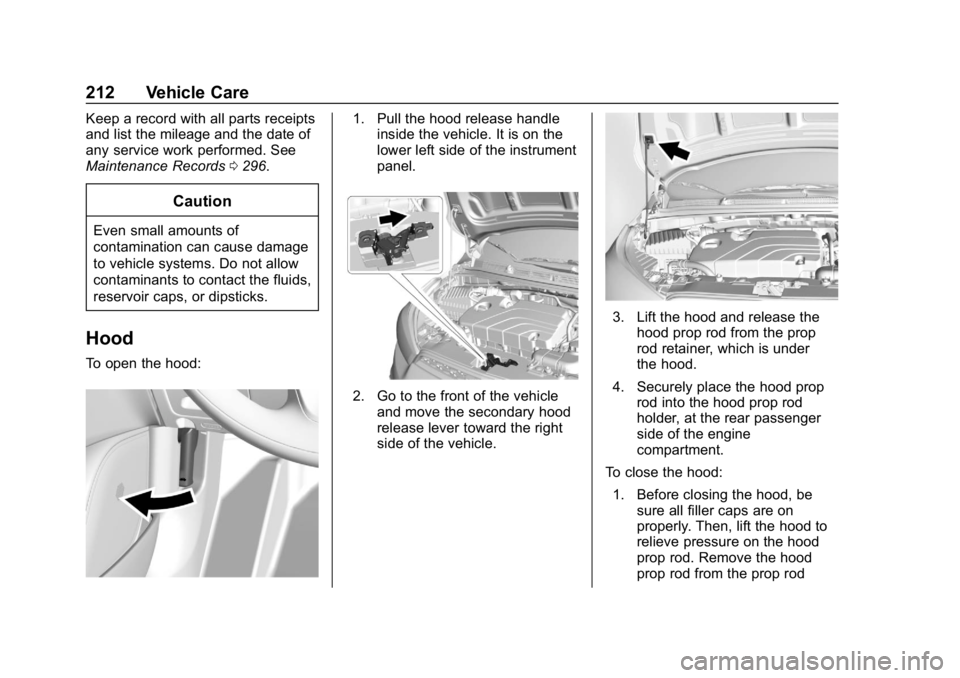
To open the hood:
1. Pull the hood release handle
inside the vehicle. It is on the
lower left side of the instrument
panel.
2. Go to the front of the vehicle
and move the secondary hood
release lever toward the right
side of the vehicle.
3. Lift the hood and release thehood prop rod from the prop
rod retainer, which is under
the hood.
4. Securely place the hood prop rod into the hood prop rod
holder, at the rear passenger
side of the engine
compartment.
To close the hood:
1. Before closing the hood, be sure all filler caps are on
properly. Then, lift the hood to
relieve pressure on the hood
prop rod. Remove the hood
prop rod from the prop rod
Page 240 of 338

Chevrolet Spark Owner Manual (GMNA-Localizing-U.S./Canada-11348464) -
2018 - crc - 9/19/17
Vehicle Care 239
Number Usage26 Engine control module/
Transmission
control module
battery
27 Canister vent solenoid
28 Brake pedal switch
29 Automatic occupant sensing
30 Headlamp leveling motor
31 Horn
32 Front fog lamps
33 Left high-beam headlamp
34 Right high-beam headlamp
35 –
36 Rear wiper
37 Left cornering lamp
38 Washer motor Number Usage
39 Right cornering lamp
40 –
41 –
42 Starter 2
43 In-panel bussed electrical center
44 Automated manual transmission
45 Starter 1
46 ABS pump
47 Cooling fan –high
48 Front wiper motor
49 Accessory/ Retained
accessory power
RLY1 Rear defogger
RLY2 Transmission control module
RLY3 Fuel pump motor
RLY4 Starter 2
RLY5 A/C system Number Usage
RLY6 Auxiliary heater pump
RLY7 Cooling fan –low
RLY8 Run/Crank
RLY9 WR/TRN
RLY10 Starter 1 RLY11 Cooling fan –high
RLY12 Front fog lamps
Instrument Panel Fuse
Block
Page 241 of 338

Chevrolet Spark Owner Manual (GMNA-Localizing-U.S./Canada-11348464) -
2018 - crc - 9/19/17
240 Vehicle Care
The instrument panel fuse block is
on the underside of the driver side
instrument panel.The vehicle may not be equipped
with all of the fuses, relays, and
features shown.Number Usage
ONSTAR OnStar HVAC
CNTR/ECC HVAC control
module/ECC
IPC Instrument cluster
TCM Transmission control module
RDO Radio
BCM1
(AT S&S) Body control
module 1 (CVT stop
and start)
SBSA/RPA SBSA/Rear parking assist
DLC Data link connector
ESCL Electric steering column lock
SDM Sensing and diagnostic module
TRANSD DC-DC converter – – Number Usage
ETCS Electronic toll collection system
LPM Linear power module
PEPS Passive entry/ Passive start
DLIS (Non AT S&S) Discrete logic
ignition switch
(non-CVT stop and
start)
FCA Forward collision alert
IPC Instrument cluster
RLAD Reflected LED alert display
HLLD SW Headlamp leveling switch
FRT
PWR WNDW Front power
window
REAR
PWR WNDW Rear power
window
– –
Page 282 of 338
Chevrolet Spark Owner Manual (GMNA-Localizing-U.S./Canada-11348464) -
2018 - crc - 9/19/17
Vehicle Care 281
Cleaning High Gloss Surfaces
and Vehicle Information and
Radio Displays
Use a microfiber cloth on high gloss
surfaces or vehicle displays. First,
use a soft bristle brush to remove
dirt that can scratch the surface.
Then gently clean by rubbing with a
microfiber cloth. Never use window
cleaners or solvents. Periodically
hand wash the microfiber cloth
separately, using mild soap. Do not
use bleach or fabric softener. Rinse
thoroughly and air dry before
next use.
Caution
Do not attach a device with a
suction cup to the display. This
may cause damage and would
not be covered by the vehicle
warranty.
Instrument Panel, Leather,
Vinyl, Other Plastic Surfaces,
Low Gloss Paint Surfaces, and
Natural Open Pore Wood
Surfaces
Use a soft microfiber cloth
dampened with water to remove
dust and loose dirt. For a more
thorough cleaning, use a soft
microfiber cloth dampened with a
mild soap solution.
Caution
Soaking or saturating leather,
especially perforated leather, as
well as other interior surfaces,
may cause permanent damage.
Wipe excess moisture from these
surfaces after cleaning and allow
them to dry naturally. Never use
heat, steam, or spot removers. Do
not use cleaners that contain
silicone or wax-based products.
Cleaners containing these
solvents can permanently change(Continued)
Caution (Continued)
the appearance and feel of
leather or soft trim, and are not
recommended.
Do not use cleaners that increase
gloss, especially on the instrument
panel. Reflected glare can decrease
visibility through the windshield
under certain conditions.
Caution
Use of air fresheners may cause
permanent damage to plastics
and painted surfaces. If an air
freshener comes in contact with
any plastic or painted surface in
the vehicle, blot immediately and
clean with a soft cloth dampened
with a mild soap solution.
Damage caused by air fresheners
would not be covered by the
vehicle warranty.
Page 298 of 338

Chevrolet Spark Owner Manual (GMNA-Localizing-U.S./Canada-11348464) -
2018 - crc - 9/19/17
Technical Data 297
Technical Data
Vehicle Identification
Vehicle IdentificationNumber (VIN) . . . . . . . . . . . . . . . 297
Service Parts Identification Label . . . . . . . . . . . . . . . . . . . . . . . . 297
Vehicle Data
Capacities andSpecifications . . . . . . . . . . . . . . . 298
Engine Drive Belt Routing . . . . 299
Vehicle Identification
Vehicle Identification
Number (VIN)
This legal identifier is in the front
corner of the instrument panel, on
the driver side of the vehicle. It can
be seen through the windshield from
outside. The Vehicle Identification
Number (VIN) also appears on the
Vehicle Certification and Service
Parts labels and certificates of title
and registration.
Engine Identification
The eighth character in the VIN is
the engine code. This code
identifies the vehicle's engine,
specifications, and replacement parts. See
“Engine Specifications”
under Capacities and Specifications
0 298 for the vehicle's engine code.
Service Parts
Identification Label
There may be a label on the inside
of the glove box that contains the
following information:
.
Vehicle Identification
Number (VIN)
. Model designation
. Paint information
. Production options and special
equipment
If there is no label, there is a
barcode on the certification label on
the center (B) pillar to scan for this
same information.
Page 302 of 338

Chevrolet Spark Owner Manual (GMNA-Localizing-U.S./Canada-11348464) -
2018 - crc - 9/19/17
Customer Information 301
resolved by your dealership without
further help, in the U.S., call the
Chevrolet Customer Assistance
Center at 1-800-222-1020. In
Canada, call General Motors of
Canada Customer Care Centre at
1-800-263-3777 (English),
or 1-800-263-7854 (French).
We encourage you to call the
toll-free number in order to give your
inquiry prompt attention. Have the
following information available to
give the Customer Assistance
representative:
.Vehicle Identification
Number (VIN). This is available
from the vehicle registration or
title, or the plate at the top left of
the instrument panel and visible
through the windshield.
. Dealership name and location.
. Vehicle delivery date and
present mileage.
When contacting Chevrolet,
remember that your concern will
likely be resolved at a dealer's
facility. That is why we suggest
following Step One first. STEP THREE
—U.S. Owners :
Both General Motors and your
dealer are committed to making
sure you are completely satisfied
with your new vehicle. However,
if you continue to remain unsatisfied
after following the procedure
outlined in Steps One and Two, you
can file with the Better Business
Bureau (BBB) Auto Line Program to
enforce your rights.
The BBB Auto Line Program is an
out-of-court program administered
by the Council of Better Business
Bureaus to settle automotive
disputes regarding vehicle repairs or
the interpretation of the New Vehicle
Limited Warranty. Although you may
be required to resort to this informal
dispute resolution program prior to
filing a court action, use of the
program is free of charge and your
case will generally be heard within
40 days. If you do not agree with the
decision given in your case, you
may reject it and proceed with any
other venue for relief available
to you. You may contact the BBB Auto Line
Program using the toll-free
telephone number or write them at
the following address:
BBB Auto Line Program
Council of Better Business Bureaus,
Inc.
3033 Wilson Boulevard
Suite 600
Arlington, VA 22201
Telephone: 1-800-955-5100
http://www.bbb.org/council/
programs-services/
dispute-handling-and-resolution/
bbb-auto-line
This program is available in all
50 states and the District of
Columbia. Eligibility is limited by
vehicle age, mileage, and other
factors. General Motors reserves
the right to change eligibility
limitations and/or discontinue its
participation in this program.
STEP THREE
—Canadian
Owners : In the event that you do
not feel your concerns have been
addressed after following the
procedure outlined in Steps One