instrument panel CHEVROLET SS 2014 User Guide
[x] Cancel search | Manufacturer: CHEVROLET, Model Year: 2014, Model line: SS, Model: CHEVROLET SS 2014Pages: 422, PDF Size: 6.18 MB
Page 62 of 422
Black plate (18,1)Chevrolet SS Sedan Owner Manual (GMNA-Localizing-U.S.-6014851) - 2014 -
1st Edition - 8/22/13
3-18 Seats and Restraints
Knee airbags are designed to inflate
in moderate to severe frontal
impacts. Knee airbags are not
designed to inflate during vehicle
rollovers, in rear impacts, or in many
side impacts.
Seat-mounted side impact airbags
are designed to inflate in moderate
to severe side crashes, depending
on the location of the impact.
Seat-mounted side impact airbags
are not designed to inflate in frontal
impacts, near-frontal impacts,
rollovers, or rear impacts.
A seat-mounted side impact airbag
is designed to inflate on the side of
the vehicle that is struck.
Roof-rail airbags are designed to
inflate in moderate to severe side
crashes, depending on the location
of the impact. In addition, these
roof-rail airbags are designed to
inflate during a rollover or in a
severe frontal impact. Roof-rail
airbags are not designed to inflate in
rear impacts. Both roof-rail airbags
will inflate when either side of the
vehicle is struck or if the sensingsystem predicts that the vehicle is
about to roll over on its side, or in a
severe frontal impact.
In any particular crash, no one can
say whether an airbag should have
inflated simply because of the
vehicle damage or repair costs.
What Makes an Airbag
Inflate?
In a deployment event, the sensing
system sends an electrical signal
triggering a release of gas from the
inflator. Gas from the inflator fills the
airbag causing the bag to break out
of the cover. The inflator, the airbag,
and related hardware are all part of
the airbag module.
For airbag locations, see
Where Are
the Airbags? on page 3-15.
How Does an Airbag
Restrain?
In moderate to severe frontal or
near frontal collisions, even belted
occupants can contact the steering wheel or the instrument panel. In
moderate to severe side collisions,
even belted occupants can contact
the inside of the vehicle.
Airbags supplement the protection
provided by safety belts by
distributing the force of the impact
more evenly over the
occupant's body.
Rollover capable roof-rail airbags
are designed to help contain the
head and chest of occupants in the
outboard seating positions in the
first and second rows. The rollover
capable roof-rail airbags are
designed to help reduce the risk of
full or partial ejection in rollover
events, although no system can
prevent all such ejections.
But airbags would not help in many
types of collisions, primarily
because the occupant's motion is
not toward those airbags. See
When
Should an Airbag Inflate? on
page 3-17.
ProCarManuals.com
Page 69 of 422
Black plate (25,1)Chevrolet SS Sedan Owner Manual (GMNA-Localizing-U.S.-6014851) - 2014 -
1st Edition - 8/22/13
Seats and Restraints 3-25
Warning (Continued)
proper service procedures, and
make sure the person performing
work for you is qualified to do so.
Adding Equipment to the
Airbag-Equipped Vehicle
Adding accessories that change the
vehicle's frame, bumper system,
height, front end or side sheet
metal, may keep the airbag system
from working properly. The
operation of the airbag system can
also be affected by changing or
moving any parts of the front seats,
safety belts, the airbag sensing and
diagnostic module, steering wheel,
instrument panel, any airbag
module, ceiling or pillar garnish trim,
the inside rearview mirror, front
sensors, side impact sensors,
or airbag wiring.Your dealer and the service manual
have information about the location
of the airbag sensors, sensing and
diagnostic module, and airbag
wiring.
In addition, the vehicle has a
passenger sensing system for the
front outboard passenger seat. The
passenger sensing system may not
operate properly if the original seat
trim is replaced with non-GM
covers, upholstery or trim, or with
GM covers, upholstery or trim
designed for a different vehicle. Any
object, such as an aftermarket seat
heater or a comfort enhancing pad
or device, installed under or on top
of the seat fabric, could also
interfere with the operation of the
passenger sensing system. This
could either prevent proper
deployment of the passenger
airbag(s) or prevent the passenger
sensing system from properly
turning off the passenger airbag(s).
See
Passenger Sensing System on
page 3-20. If the vehicle has rollover roof-rail
airbags, see
Different Size Tires
and Wheels on page 10-50 for
additional important information.
If you have to modify your vehicle
because you have a disability and
have questions about whether the
modifications will affect the vehicle's
airbag system, or if you have
questions about whether the airbag
system will be affected if the vehicle
is modified for any other reason, call
Customer Assistance. See
Customer Assistance Offices on
page 13-3.
Airbag System Check
The airbag system does not need
regularly scheduled maintenance or
replacement. Make sure the airbag
readiness light is working. See
Airbag Readiness Light on
page 5-10.
ProCarManuals.com
Page 106 of 422

Black plate (14,1)Chevrolet SS Sedan Owner Manual (GMNA-Localizing-U.S.-6014851) - 2014 -
1st Edition - 8/22/13
5-14 Instruments and Controls
emission system test equipment will
likely connect to the vehicle's Data
Link Connector (DLC).
The DLC is under the instrument
panel to the left of the steering
wheel. See your dealer if assistance
is needed.
The vehicle may not pass
inspection if:
.The malfunction indicator lamp is
on with the engine running, or if
the vehicle is placed in Service
Only Mode and the malfunction
indicator lamp does not come
on. See your dealer for
assistance in verifying proper
operation of the malfunction
indicator lamp.
.The OBD II (On-Board
Diagnostics) system determines
that critical emission control
systems have not been
completely diagnosed. The
vehicle would be considered not
ready for inspection. This can
happen if the 12-volt battery has
recently been replaced or run
down. The diagnostic system is
designed to evaluate critical
emission control systems during
normal driving. This can take
several days of routine driving.
If this has been done and the
vehicle still does not pass the
inspection for lack of OBD II
system readiness, your dealer
can prepare the vehicle for
inspection.Service Vehicle Soon
Light
For vehicles with this light, it comes
on if a condition exists that may
require the vehicle to be taken in for
service.
If the light comes on, take the
vehicle to your dealer for service as
soon as possible.
Brake System Warning
Light
The vehicle brake system consists
of two hydraulic circuits. If one
circuit is not working, the remaining
circuit can still work to stop the
vehicle. For normal braking
performance, both circuits need to
be working.
ProCarManuals.com
Page 115 of 422
Black plate (23,1)Chevrolet SS Sedan Owner Manual (GMNA-Localizing-U.S.-6014851) - 2014 -
1st Edition - 8/22/13
Instruments and Controls 5-23
on page 5-11. If there is a problem
with the battery charging system,
the DIC will display a message.
Speed Warning
This display is used to set the
vehicle speed at which the speed
warning chime sounds and the alert
is displayed. The speed can be set
by pressing SET/CLR while the
speed warning display is showing.
Tire Pressure Monitoring
This display will show a vehicle with
the approximate pressures of all
four tires. Tire pressure is displayed
in either kilopascal (kPa) or pounds
per square inch (psi). SeeTire
Pressure Monitor Operation on
page 10-43.
Remaining Oil Life
This display shows an estimate of
the oil's remaining useful life. If 99%
is displayed, that means 99% of the
current oil life remains.
When the remaining oil life is low,
the CHANGE ENGINE OIL SOON
message will appear on the display. See
Engine Oil Messages on
page 5-28. The oil should be
changed as soon as possible. See
Engine Oil on page 10-6. In addition
to the engine oil life system
monitoring the oil life, additional
maintenance is recommended in the
Maintenance Schedule. See
Maintenance Schedule on
page 11-2.
Remember, the Remaining Oil Life
display must be reset after each oil
change. It will not reset itself. Also,
be careful not to reset the Oil Life
display accidentally at any time
other than when the oil has just
been changed. It cannot be reset
accurately until the next oil change.
To reset the engine oil life system,
press SET/CLR while the Oil Life
display is active. See Engine Oil
Life System on page 10-8.
Units
Move
\to switch between metric
or US when the Units display is
active. Press SET/CLR to confirm
the setting. This will change the displays on the cluster and DIC to
either metric or English (US)
measurements.
Head-Up Display (HUD)
{Warning
If the HUD image is too bright or
too high in your field of view, it
may take you more time to see
things you need to see when it is
dark outside. Be sure to keep the
HUD image dim and placed low in
your field of view.
With HUD, some information
concerning the operation of the
vehicle is projected onto the
windshield. The image is projected
through the HUD lens on top of the
instrument panel. The information
appears as an image focused out
toward the front of the vehicle.
ProCarManuals.com
Page 126 of 422
Black plate (34,1)Chevrolet SS Sedan Owner Manual (GMNA-Localizing-U.S.-6014851) - 2014 -
1st Edition - 8/22/13
5-34 Instruments and Controls
settings where background noise is
typically louder than the sound
system volume.
Select OFF, Low, Medium, or High.
Gracenote Options
Select to improve voice recognition
and media groupings.
Select to enable or disable. SeeCD
Player on page 7-32, USB on
page 7-34, Auxiliary Devices on
page 7-40, and Bluetooth Audio on
page 7-41.
XM Channel Art
When on, the radio will
automatically update the XM screen
and background graphics.
Select On or Off.
Max Startup Volume
Select the maximum volume level at
startup even if a higher volume had
been set when the radio was
turned off. Number of Favorite Pages
Select to set the number of FAV
pages to be displayed.
XM Categories
Select or deselect any category to
be used in XM mode.
Software Version Menu
Select to display information about
the system and software.
Phone Settings
See
“Phone” inConfigure Menu on
page 7-60.
Navigation Settings
See Configure Menu on page 7-60.
Display Settings
Select and the following may
display:
.Home Page Menu
.Rear Camera Options
.Display Off
.Map Settings Home Page Menu
Select to customize the first page of
the Home Page.
Rear Camera Options
Select to adjust the rear camera
options.
Display Off
Select to turn off the display. The
display will return when any button
is pressed or the screen is touched.
Map Settings
Select to enter the submenu to
change Automatic Zoom, enable
Speed Limit display on map, and
change Map Display settings.
.Map Display:
Select to change
the screen background.
To change the overall brightness
setting for the display, use the
vehicle interior lighting
instrument panel illumination
control.
ProCarManuals.com
Page 131 of 422
Black plate (1,1)Chevrolet SS Sedan Owner Manual (GMNA-Localizing-U.S.-6014851) - 2014 -
1st Edition - 8/22/13
Lighting 6-1
Lighting
Exterior Lighting
Exterior Lamp Controls . . . . . . . . 6-1
Headlamp High/Low-BeamChanger . . . . . . . . . . . . . . . . . . . . . 6-1
Flash-to-Pass . . . . . . . . . . . . . . . . . 6-1
Daytime Running Lamps (DRL) . . . . . . . . . . . . . . . . 6-2
Automatic Headlamp System . . . . . . . . . . . . . . . . . . . . . . 6-2
Hazard Warning Flashers . . . . . 6-3
Turn and Lane-Change Signals . . . . . . . . . . . . . . . . . . . . . . 6-3
Fog Lamps . . . . . . . . . . . . . . . . . . . . 6-3
Interior Lighting
Instrument Panel Illumination Control . . . . . . . . . . . . . . . . . . . . . . 6-4
Dome Lamps . . . . . . . . . . . . . . . . . 6-4
Reading Lamps . . . . . . . . . . . . . . . 6-4
Lighting Features
Entry Lighting . . . . . . . . . . . . . . . . . 6-5
Exit Lighting . . . . . . . . . . . . . . . . . . . 6-5
Battery Power Protection . . . . . . 6-5
Exterior Lighting
Exterior Lamp Controls
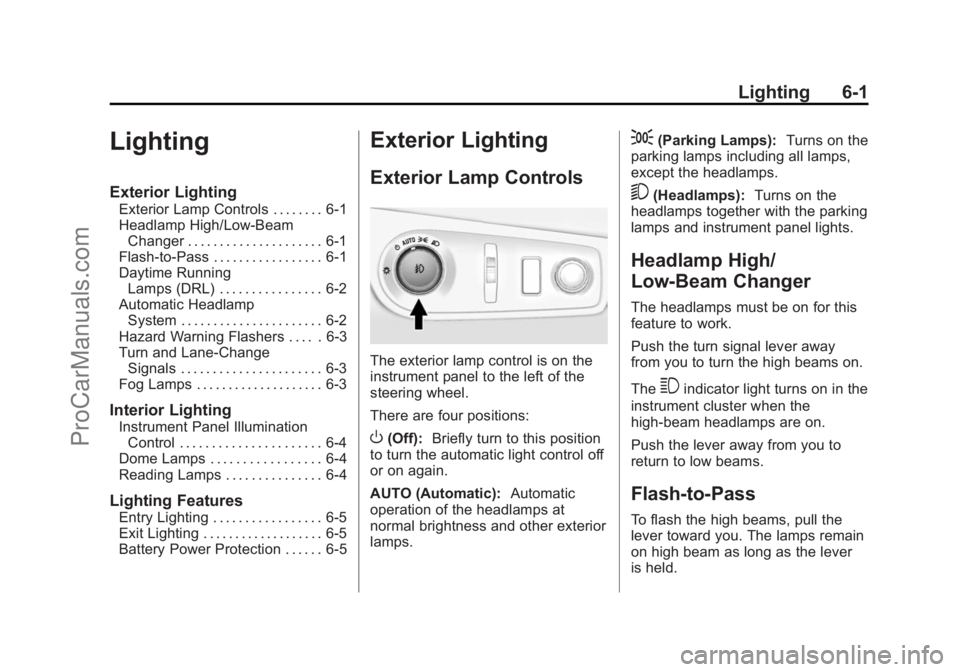
The exterior lamp control is on the
instrument panel to the left of the
steering wheel.
There are four positions:
O(Off): Briefly turn to this position
to turn the automatic light control off
or on again.
AUTO (Automatic): Automatic
operation of the headlamps at
normal brightness and other exterior
lamps.
;(Parking Lamps): Turns on the
parking lamps including all lamps,
except the headlamps.
5(Headlamps): Turns on the
headlamps together with the parking
lamps and instrument panel lights.
Headlamp High/
Low-Beam Changer
The headlamps must be on for this
feature to work.
Push the turn signal lever away
from you to turn the high beams on.
The
3indicator light turns on in the
instrument cluster when the
high-beam headlamps are on.
Push the lever away from you to
return to low beams.
Flash-to-Pass
To flash the high beams, pull the
lever toward you. The lamps remain
on high beam as long as the lever
is held.
ProCarManuals.com
Page 132 of 422
Black plate (2,1)Chevrolet SS Sedan Owner Manual (GMNA-Localizing-U.S.-6014851) - 2014 -
1st Edition - 8/22/13
6-2 Lighting
Daytime Running
Lamps (DRL)
DRL can make it easier for others to
see the front of your vehicle during
the day.
The DRL system makes the
headlamps come on at a reduced
brightness when the following
conditions are met:
.The engine is running.
.The exterior lamp control is
in AUTO.
.Shift lever is out of (P) position.
.The light sensor determines it is
daytime.
When the DRL are on, the taillamps,
instrument panel lights, and other
lamps will not be on.
The headlamps automatically switch
from DRL to the regular headlamps
depending on the darkness of the
surroundings. See “Automatic
Headlamp System” following. To turn off the DRL, turn the exterior
lamp control to
Oand then release.
Automatic Headlamp
System
When it is dark enough outside and
the exterior lamp control is in the
automatic position, the headlamps
and parking lamps will turn on and
off automatically. See
Exterior Lamp
Controls on page 6-1.
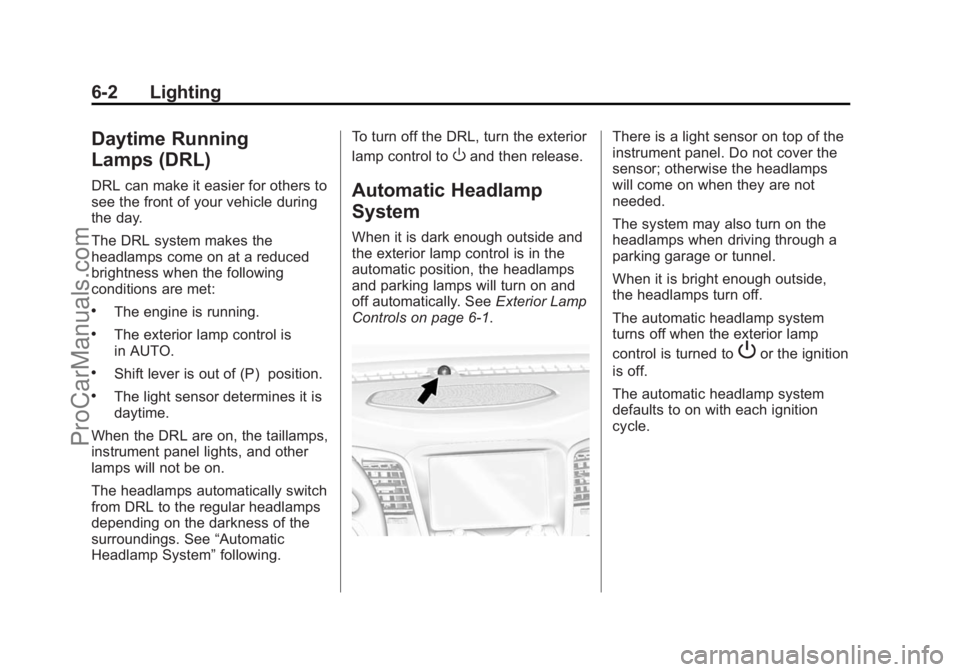
There is a light sensor on top of the
instrument panel. Do not cover the
sensor; otherwise the headlamps
will come on when they are not
needed.
The system may also turn on the
headlamps when driving through a
parking garage or tunnel.
When it is bright enough outside,
the headlamps turn off.
The automatic headlamp system
turns off when the exterior lamp
control is turned to
Por the ignition
is off.
The automatic headlamp system
defaults to on with each ignition
cycle.
ProCarManuals.com
Page 134 of 422
Black plate (4,1)Chevrolet SS Sedan Owner Manual (GMNA-Localizing-U.S.-6014851) - 2014 -
1st Edition - 8/22/13
6-4 Lighting
Interior Lighting
Instrument Panel
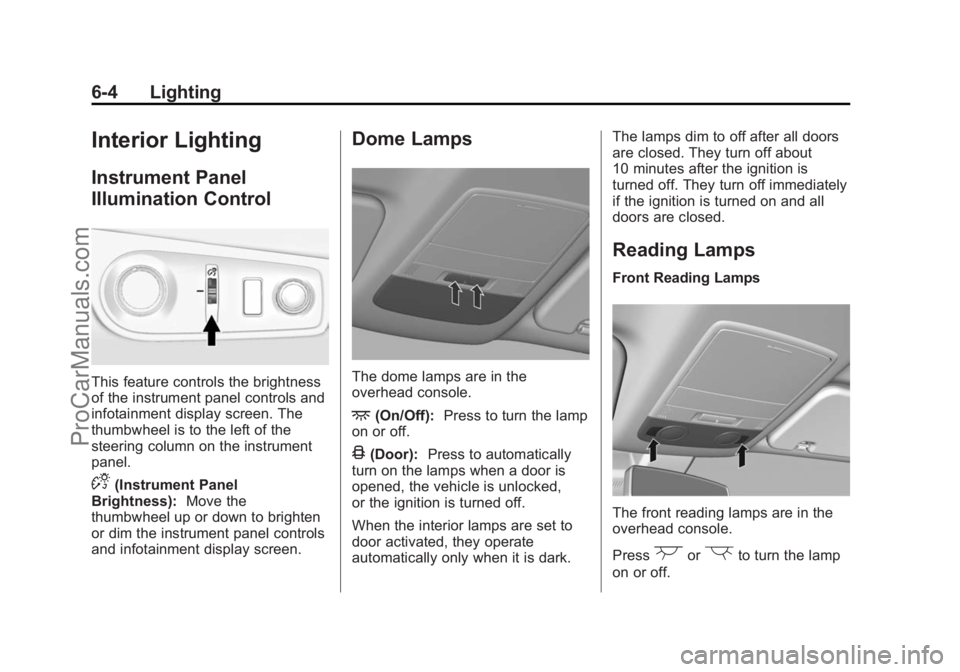
Illumination Control
This feature controls the brightness
of the instrument panel controls and
infotainment display screen. The
thumbwheel is to the left of the
steering column on the instrument
panel.
D(Instrument Panel
Brightness): Move the
thumbwheel up or down to brighten
or dim the instrument panel controls
and infotainment display screen.
Dome Lamps
The dome lamps are in the
overhead console.
+(On/Off): Press to turn the lamp
on or off.
4(Door): Press to automatically
turn on the lamps when a door is
opened, the vehicle is unlocked,
or the ignition is turned off.
When the interior lamps are set to
door activated, they operate
automatically only when it is dark. The lamps dim to off after all doors
are closed. They turn off about
10 minutes after the ignition is
turned off. They turn off immediately
if the ignition is turned on and all
doors are closed.
Reading Lamps
Front Reading Lamps
The front reading lamps are in the
overhead console.
Press
(or)to turn the lamp
on or off.
ProCarManuals.com
Page 202 of 422
Black plate (66,1)Chevrolet SS Sedan Owner Manual (GMNA-Localizing-U.S.-6014851) - 2014 -
1st Edition - 8/22/13
7-66 Infotainment System
Map Settings:Press to enter the
submenu to change Automatic
Zoom, enable Speed Limit display
on map, and change Map Display
settings.
.Map Display: Press to change
the screen background.
‐ The Automatic setting adjusts
the screen background
automatically depending on
the exterior lighting conditions.
‐ The Day setting brightens the
map background.
‐ The Night setting darkens the
map background.
To change the overall brightness
setting for the display, use the
vehicle interior lighting instrument
panel illumination control.
Global Positioning
System (GPS)
The position of the vehicle is
determined by using satellite
signals, various vehicle signals, and
map data.
At times, other interference such as
the satellite condition, road
configuration, condition of the
vehicle, and/or other circumstances
can affect the navigation system's
ability to determine the accurate
position of the vehicle.
The GPS shows the current position
of the vehicle using signals sent by
the GPS Satellites. When the
vehicle is not receiving signals from
the satellites, a symbol appears on
the map screen. See Navigation
Symbols on page 7-46.
This system might not be available
or interference can occur if any of
the following are true:
.Signals are obstructed by tall
buildings, trees, large trucks,
or a tunnel.
.Satellites are being repaired or
improved.
For more information if the GPS is
not functioning properly, see
Problems with Route Guidance on
page 7-67 andIf the System Needs
Service on page 7-68.
Vehicle Positioning
At times, the position of the vehicle
on the map could be inaccurate due
to one or more of the following
reasons:
.The road system has changed.
.The vehicle is driving on slippery
road surfaces such as sand,
gravel, or snow.
.The vehicle is traveling on
winding roads or long straight
roads.
.The vehicle is approaching a tall
building or a large vehicle.
.The surface streets run parallel
to a freeway.
ProCarManuals.com
Page 228 of 422
Black plate (2,1)Chevrolet SS Sedan Owner Manual (GMNA-Localizing-U.S.-6014851) - 2014 -
1st Edition - 8/22/13
8-2 Climate Controls
5. Front Defrost
6. ZONE
7. Passenger Temperature Control
8. Recirculation
9. Fan Control
10. Rear Window Defogger
Automatic Operation
AUTO (Automatic):When this
button is pressed, the system
automatically controls the inside
temperature, the air delivery mode,
the air conditioning compressor, and
the fan speed. When AUTO appears
in the display, the system is in full
automatic operation. If any of the
controls are manually adjusted, the
AUTO indicator turns off in the
display.
1. Press the AUTO button, if the AUTO indicator does not appear
on the display.
2. Adjust the temperature to a comfortable setting.
3. Adjust the air outlets as desired. 4. Let the system stabilize for a few
minutes.
In cold weather, the system starts in
the recirculation mode with the fan
off. As the engine warms up, warm
air is directed to the floor outlets,
before automatically changing to
bi-level mode with a reduced fan
speed.
Do not cover the solar sensor in the
center of the instrument panel, near
the windshield. See “Sensors”later
in this section.
The automatic climate control
system may not work as desired if
one or more of the instrument panel
outlets are closed.
Manual Operation
On/Off: Press9to turn the
system on or off.
9(Fan Control): Turn clockwise
or counterclockwise to increase or
decrease the fan speed. The fan
speed appears on the infotainment
display. Press the AUTO button to return to
automatic operation.
Driver and Passenger
Temperature Controls:
The
temperature can be adjusted
separately for the driver and the
passenger. Turn the temperature
controls clockwise or
counterclockwise to increase or
decrease the temperature.
The temperature setting between
21°C (70°F) and 23°C (74°F) is
recommended.
The temperature settings for each
side are shown in the temperature
control knob displays and the
infotainment display. If the
temperature control is past 30°C
(86°F), the display shows HI
(hottest). Turning it past 16°C
(61°F), shows LO (coolest).
ZONE: Press to synchronize the
driver and passenger temperatures.
Single-Zone Mode: All zones are
set to the same temperature. “Driver
has control” will be displayed on the
ProCarManuals.com