ECU CHEVROLET SS 2014 Service Manual
[x] Cancel search | Manufacturer: CHEVROLET, Model Year: 2014, Model line: SS, Model: CHEVROLET SS 2014Pages: 422, PDF Size: 6.18 MB
Page 343 of 422
Black plate (61,1)Chevrolet SS Sedan Owner Manual (GMNA-Localizing-U.S.-6014851) - 2014 -
1st Edition - 8/22/13
Vehicle Care 10-61
6. Attach the air only hose (4) ontothe tire valve stem and press the
lever down to secure it.
7. Plug the power plug (6) into the accessory power outlet in the
vehicle. Unplug all items from
other accessory power outlets.
See Power Outlets on page 5-4.
If the vehicle has an accessory
power outlet, do not use the
cigarette lighter.
If the vehicle only has a cigarette
lighter, use the cigarette lighter.
Do not pinch the power plug
cord in the door or window.
8. Start the vehicle. The vehicle must be running while using the
air compressor.
9. Switch the on/off switch (1) to the I position.
The compressor will inflate the
tire with air only. 10. Inflate the tire to the
recommended inflation
pressure using the pressure
gauge (2). The recommended
inflation pressure can be found
on the Tire and Loading
Information label. See Tire
Pressure on page 10-41.
The pressure gauge (2) may
read higher than the actual tire
pressure while the compressor
is on. Turn the compressor off
to get an accurate reading. The
compressor may be turned on/
off until the correct pressure is
reached.
11. Switch the on/off switch (1) to the O position.
Be careful while handling the
tire sealant and compressor kit
as it could be warm after
usage.
12. Unplug the power plug (6) and the air only hose (4).
13. Replace the tire valve stem cap. 14. Place the equipment in the
original storage location in the
vehicle.
Removal and Installation of the
Sealant Canister
After repairing a tire, replace the tire
sealant canister.
To remove the sealant canister:
1. Unlock the air only hose (4) from the tire sealant canister (3) by
pulling up on the lever.
2. Pull the air only hose (4) from the tire sealant canister (3).
3. Unwrap the sealant/air hose (5) from the air compressor.
ProCarManuals.com
Page 353 of 422
Black plate (71,1)Chevrolet SS Sedan Owner Manual (GMNA-Localizing-U.S.-6014851) - 2014 -
1st Edition - 8/22/13
Vehicle Care 10-71
6. Connect the other end of the redpositive (+) cable to the
positive (+) terminal of the good
battery.
7. Connect one end of the black negative (–) cable to the
negative (–) terminal of the good
battery.
8. Connect the other end of the black negative (–) cable to the
remote negative (–) post (2).
9. Start the engine in the vehicle with the good battery and run
the engine at idle speed for at
least four minutes.
10. Try to start the vehicle that had the dead battery. If it will not
start after a few tries, it
probably needs service.{Caution
If the jumper cables are
connected or removed in the
wrong order, electrical shorting
may occur and damage the
vehicle. The repairs would not be
covered by the vehicle warranty.
Always connect and remove the
jumper cables in the correct order,
making sure that the cables do
not touch each other or other
metal.
Jumper Cable Removal
Reverse the sequence exactly when
removing the jumper cables
Towing the Vehicle
{Caution
Incorrectly towing a disabled
vehicle may cause damage. The
damage would not be covered by
the vehicle warranty. Do not lash
or hook to the chassis
components —including the front
and rear subframes, suspension
control arms, and links —during
towing and recovery of a disabled
vehicle, or when securing the
vehicle. Use the proper nylon
strap harnesses around the tires
to secure the vehicle.
Have the vehicle towed on a flatbed
car carrier. A wheel lift tow truck
could damage the vehicle.
Consult your dealer or a
professional towing service if the
disabled vehicle must be towed.
ProCarManuals.com
Page 363 of 422
Black plate (81,1)Chevrolet SS Sedan Owner Manual (GMNA-Localizing-U.S.-6014851) - 2014 -
1st Edition - 8/22/13
Vehicle Care 10-81
Floor Mats
{Warning
If a floor mat is the wrong size or
is not properly installed, it can
interfere with the pedals.
Interference with the pedals can
cause unintended acceleration
and/or increased stopping
distance which can cause a crash
and injury. Make sure the floor
mat does not interfere with the
pedals.
Use the following guidelines for
proper floor mat usage (if equipped):
.The original equipment floor
mats were designed for your
vehicle. If the floor mats need
replacing, it is recommended
that GM certified floor mats be
purchased. Non-GM floor mats
may not fit properly and may
interfere with the pedals. Always
check that the floor mats do not
interfere with the pedals.
.Use the floor mat with the
correct side up. Do not turn
it over.
.Do not place anything on top of
the driver side floor mat.
.Use only a single floor mat on
the driver side.
.Do not place one floor mat on
top of another.
Removing and Replacing the
Floor Mats
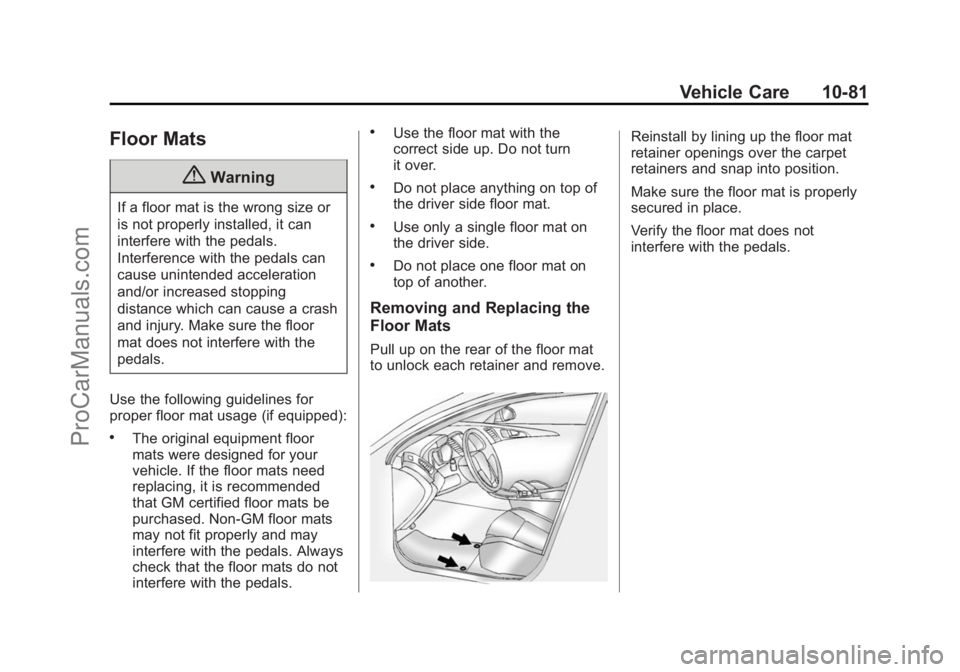
Pull up on the rear of the floor mat
to unlock each retainer and remove.
Reinstall by lining up the floor mat
retainer openings over the carpet
retainers and snap into position.
Make sure the floor mat is properly
secured in place.
Verify the floor mat does not
interfere with the pedals.
ProCarManuals.com
Page 390 of 422
Black plate (6,1)Chevrolet SS Sedan Owner Manual (GMNA-Localizing-U.S.-6014851) - 2014 -
1st Edition - 8/22/13
13-6 Customer Information
.Model, year, color, and license
plate number of the vehicle.
.Odometer reading, Vehicle
Identification Number (VIN), and
delivery date of the vehicle.
.Description of the problem.
Coverage
Services are provided up to 5 years/
160 000 km (100,000 mi), whichever
comes first.
In the U.S., anyone driving the
vehicle is covered. In Canada, a
person driving the vehicle without
permission from the owner is not
covered.
Roadside Assistance is not a part of
the New Vehicle Limited Warranty.
Chevrolet and General Motors of
Canada Limited reserve the right to
make any changes or discontinue
the Roadside Assistance program at
any time without notification.
Chevrolet and General Motors of
Canada Limited reserve the right to
limit services or payment to an
owner or driver if they decide theclaims are made too often, or the
same type of claim is made many
times.
Services Provided
.Emergency Fuel Delivery:
Delivery of enough fuel for the
vehicle to get to the nearest
service station.
.Lock-Out Service:
Service to
unlock the vehicle if you are
locked out. A remote unlock may
be available if you have OnStar.
For security reasons, the driver
must present identification
before this service is given.
.Emergency Tow from a Public
Road or Highway: Tow to the
nearest Chevrolet dealer for
warranty service, or if the vehicle
was in a crash and cannot be
driven. Assistance is also given
when the vehicle is stuck in the
sand, mud, or snow.
.Flat Tire Change: Service to
change a flat tire with the spare
tire. The spare tire, if equipped, must be in good condition and
properly inflated. It is the owner's
responsibility for the repair or
replacement of the tire if it is not
covered by the warranty.
.Battery Jump Start:
Service to
jump start a dead battery.
Services Not Included in
Roadside Assistance
.Impound towing caused by
violation of any laws.
.Legal fines.
.Mounting, dismounting,
or changing of snow tires,
chains, or other traction devices.
.Towing or services for vehicles
driven on a non-public road or
highway.
Services Specific to
Canadian-Purchased Vehicles
.Fuel Delivery: Reimbursement
is approximately $5 Canadian.
Diesel fuel delivery may be
ProCarManuals.com
Page 399 of 422
Black plate (15,1)Chevrolet SS Sedan Owner Manual (GMNA-Localizing-U.S.-6014851) - 2014 -
1st Edition - 8/22/13
Customer Information 13-15
OnStar Terms and Conditions and
Privacy Statement on the OnStar
website.
Infotainment System
Using the navigation system may
result in the storage of destinations,
addresses, telephone numbers, and
other trip information. See the
infotainment manual for information
on stored data and for deletion
instructions.
Radio Frequency
Identification (RFID)
RFID technology is used in some
vehicles for functions such as tire
pressure monitoring and ignition
system security, as well as in
connection with conveniences such
as Remote Keyless Entry (RKE)
transmitters for remote door locking/
unlocking and starting, and
in-vehicle transmitters for garage
door openers. RFID technology in
GM vehicles does not use or recordpersonal information or link with any
other GM system containing
personal information.
Radio Frequency
Statement
This vehicle has systems that
operate on a radio frequency that
comply with Part 15 of the Federal
Communications Commission (FCC)
rules and with Industry Canada
Standards RSS‐GEN/210/220/310.
Operation is subject to the following
two conditions:
1. The device may not cause
harmful interference.
2. The device must accept any interference received, including
interference that may cause
undesired operation of the
device.
Changes or modifications to any of
these systems by other than an
authorized service facility could void
authorization to use this equipment.
ProCarManuals.com
Page 401 of 422
Black plate (1,1)Chevrolet SS Sedan Owner Manual (GMNA-Localizing-U.S.-6014851) - 2014 -
1st Edition - 8/22/13
OnStar 14-1
OnStar
OnStar Overview
OnStar Overview . . . . . . . . . . . . 14-1
OnStar Services
Emergency . . . . . . . . . . . . . . . . . . 14-2
Security . . . . . . . . . . . . . . . . . . . . . . 14-2
Navigation . . . . . . . . . . . . . . . . . . . 14-2
Connections . . . . . . . . . . . . . . . . . 14-3
Diagnostics . . . . . . . . . . . . . . . . . . 14-5
OnStar Additional Information
OnStar AdditionalInformation . . . . . . . . . . . . . . . . . 14-5
OnStar Overview
If equipped, this vehicle has a
comprehensive, in-vehicle system
that can connect to a live Advisor
for Emergency, Security, Navigation,
Connection, and Diagnostic
Services.
The OnStar system status light is
next to the OnStar buttons. If the
status light is:
.Solid Green: System is ready.
.Flashing Green: On a call.
.Red: Indicates a problem.
Press
Qor call 1-888-4-ONSTAR
(1-888-466-7827) to speak to an
Advisor. Press
=to:
.Make a call, end a call,
or answer an incoming call.
.Give OnStar Hands-Free Calling
voice commands.
.Give OnStar Turn-by-Turn
Navigation voice commands.
Requires the available Directions
and Connections service plan.
Press
Qto connect to a live
Advisor to:
.Verify account information or
update contact information.
.Get driving directions. Requires
the available Directions and
Connections service plan.
.Receive On-Demand
Diagnostics for a check of the
vehicle’s key operating systems.
.Receive Roadside Assistance.
ProCarManuals.com
Page 402 of 422
Black plate (2,1)Chevrolet SS Sedan Owner Manual (GMNA-Localizing-U.S.-6014851) - 2014 -
1st Edition - 8/22/13
14-2 OnStar
Press the OnStar Emergency button>to get a priority connection to an
Emergency Advisor available
24/7 to:
.Get help for an emergency.
.Be a Good Samaritan or
respond to an AMBER Alert.
.Get assistance in severe
weather or other crisis and
evacuation routes.
OnStar Services
Emergency
With Automatic Crash Response,
the built-in system can automatically
connect to help in most crashes,
even if help cannot be requested.
Press
>to connect to an
Emergency Advisor. GPS
technology is used to identify the
vehicle location and can provide
critical information to emergency
personnel. The Advisor is also
trained to offer critical assistance in
emergency situations.
Security
OnStar provides services like Stolen
Vehicle Assistance, Remote Ignition
Block, and Roadside Assistance,
if equipped. OnStar can unlock the
vehicle doors remotely, if equipped
with automatic door locks, and can
help police locate the vehicle if it is
stolen.
Navigation
OnStar navigation requires the
Directions and Connections
service plan.
Press
Qto receive directions or
have them sent to the vehicle
navigation screen, if equipped.
Destinations can also be forwarded
to the vehicle from MapQuest.com.
The OnStar mapping database is
continuously updated. For coverage
maps, see www.onstar.com (U.S.)
or www.onstar.ca (Canada).
Turn-by-Turn Navigation
1. PressQto connect to a live
Advisor.
2. Request directions.
3. Directions are downloaded to the vehicle.
4. Follow the voice-guided commands.
ProCarManuals.com
Page 409 of 422
Black plate (9,1)Chevrolet SS Sedan Owner Manual (GMNA-Localizing-U.S.-6014851) - 2014 -
1st Edition - 8/22/13
OnStar 14-9
should be available at
ftp://ftp.info-zip.org/pub/infozip/
license.html indefinitely.
Copyright (c) 1990-2005 Info-ZIP. All
rights reserved.
For the purposes of this copyright
and license,“Info-ZIP”is defined as
the following set of individuals:
Mark Adler, John Bush, Karl Davis,
Harald Denker, Jean-Michel Dubois,
Jean-loup Gailly, Hunter Goatley,
Ed Gordon, Ian Gorman, Chris
Herborth, Dirk Haase, Greg Hartwig,
Robert Heath, Jonathan Hudson,
Paul Kienitz, David Kirschbaum,
Johnny Lee, Onno van der Linden,
Igor Mandrichenko, Steve P. Miller,
Sergio Monesi, Keith Owens,
George Petrov, Greg Roelofs,
Kai Uwe Rommel, Steve Salisbury,
Dave Smith, Steven M. Schweda,
Christian Spieler, Cosmin Truta,
Antoine Verheijen, Paul von Behren,
Rich Wales, Mike White
This software is provided “as is,”
without warranty of any kind,
express or implied. In no event shall Info-ZIP or its contributors be held
liable for any direct, indirect,
incidental, special or consequential
damages arising out of the use of or
inability to use this software.
Permission is granted to anyone to
use this software for any purpose,
including commercial applications,
and to alter it and redistribute it
freely, subject to the following
restrictions:
1. Redistributions of source code
must retain the above copyright
notice, definition, disclaimer, and
this list of conditions.
2. Redistributions in binary form (compiled executables) must
reproduce the above copyright
notice, definition, disclaimer, and
this list of conditions in
documentation and/or other
materials provided with the
distribution. The sole exception
to this condition is redistribution
of a standard UnZipSFX binary
(including SFXWiz) as part of a
self-extracting archive; that is permitted without inclusion of
this license, as long as the
normal SFX banner has not
been removed from the binary or
disabled.
3. Altered versions–including, but not limited to, ports to new
operating systems, existing ports
with new graphical interfaces,
and dynamic, shared, or static
library versions–must be plainly
marked as such and must not be
misrepresented as being the
original source. Such altered
versions also must not be
misrepresented as being
Info-ZIP releases–including, but
not limited to, labeling of the
altered versions with the names
“Info-ZIP” (or any variation
thereof, including, but not limited
to, different capitalizations),
“Pocket UnZip,” “WiZ” or
“MacZip” without the explicit
permission of Info-ZIP. Such
altered versions are further
prohibited from
misrepresentative use of the
ProCarManuals.com
Page 411 of 422
Black plate (1,1)Chevrolet SS Sedan Owner Manual (GMNA-Localizing-U.S.-6014851) - 2014 -
1st Edition - 8/22/13
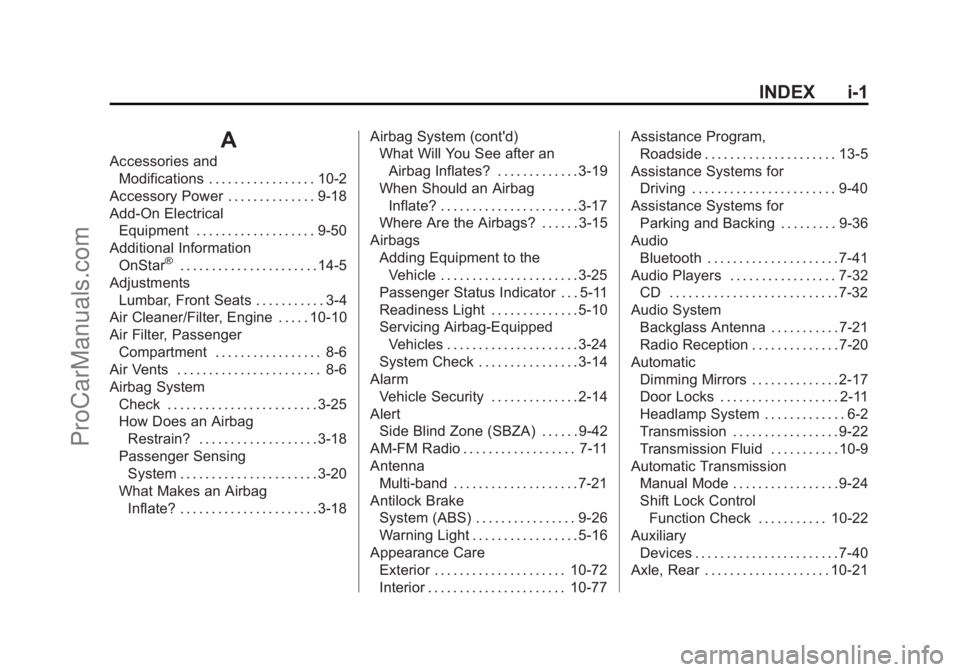
INDEX i-1
A
Accessories andModifications . . . . . . . . . . . . . . . . . 10-2
Accessory Power . . . . . . . . . . . . . . 9-18
Add-On Electrical Equipment . . . . . . . . . . . . . . . . . . . 9-50
Additional Information
OnStar
®. . . . . . . . . . . . . . . . . . . . . . 14-5
Adjustments Lumbar, Front Seats . . . . . . . . . . . 3-4
Air Cleaner/Filter, Engine . . . . . 10-10
Air Filter, Passenger
Compartment . . . . . . . . . . . . . . . . . 8-6
Air Vents . . . . . . . . . . . . . . . . . . . . . . . 8-6
Airbag System Check . . . . . . . . . . . . . . . . . . . . . . . . 3-25
How Does an Airbag
Restrain? . . . . . . . . . . . . . . . . . . . 3-18
Passenger Sensing System . . . . . . . . . . . . . . . . . . . . . . 3-20
What Makes an Airbag Inflate? . . . . . . . . . . . . . . . . . . . . . . 3-18 Airbag System (cont'd)
What Will You See after an
Airbag Inflates? . . . . . . . . . . . . . 3-19
When Should an Airbag
Inflate? . . . . . . . . . . . . . . . . . . . . . . 3-17
Where Are the Airbags? . . . . . . 3-15
Airbags Adding Equipment to theVehicle . . . . . . . . . . . . . . . . . . . . . . 3-25
Passenger Status Indicator . . . 5-11
Readiness Light . . . . . . . . . . . . . . 5-10
Servicing Airbag-Equipped Vehicles . . . . . . . . . . . . . . . . . . . . . 3-24
System Check . . . . . . . . . . . . . . . . 3-14
Alarm Vehicle Security . . . . . . . . . . . . . . 2-14
Alert Side Blind Zone (SBZA) . . . . . . 9-42
AM-FM Radio . . . . . . . . . . . . . . . . . . 7-11
Antenna Multi-band . . . . . . . . . . . . . . . . . . . . 7-21
Antilock Brake System (ABS) . . . . . . . . . . . . . . . . 9-26
Warning Light . . . . . . . . . . . . . . . . . 5-16
Appearance Care Exterior . . . . . . . . . . . . . . . . . . . . . 10-72
Interior . . . . . . . . . . . . . . . . . . . . . . 10-77 Assistance Program,
Roadside . . . . . . . . . . . . . . . . . . . . . 13-5
Assistance Systems for Driving . . . . . . . . . . . . . . . . . . . . . . . 9-40
Assistance Systems for Parking and Backing . . . . . . . . . 9-36
Audio
Bluetooth . . . . . . . . . . . . . . . . . . . . . 7-41
Audio Players . . . . . . . . . . . . . . . . . 7-32 CD . . . . . . . . . . . . . . . . . . . . . . . . . . . 7-32
Audio System
Backglass Antenna . . . . . . . . . . . 7-21
Radio Reception . . . . . . . . . . . . . . 7-20
Automatic Dimming Mirrors . . . . . . . . . . . . . . 2-17
Door Locks . . . . . . . . . . . . . . . . . . . 2-11
Headlamp System . . . . . . . . . . . . . 6-2
Transmission . . . . . . . . . . . . . . . . . 9-22
Transmission Fluid . . . . . . . . . . . 10-9
Automatic Transmission Manual Mode . . . . . . . . . . . . . . . . . 9-24
Shift Lock Control
Function Check . . . . . . . . . . . 10-22
Auxiliary Devices . . . . . . . . . . . . . . . . . . . . . . . 7-40
Axle, Rear . . . . . . . . . . . . . . . . . . . . 10-21
ProCarManuals.com
Page 412 of 422
Black plate (2,1)Chevrolet SS Sedan Owner Manual (GMNA-Localizing-U.S.-6014851) - 2014 -
1st Edition - 8/22/13
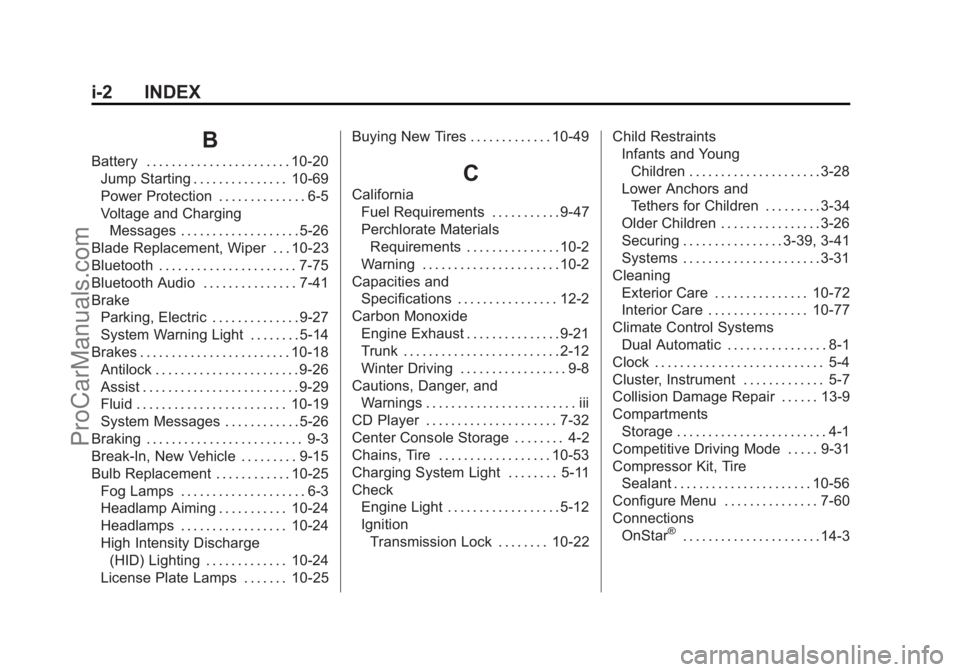
i-2 INDEX
B
Battery . . . . . . . . . . . . . . . . . . . . . . . 10-20Jump Starting . . . . . . . . . . . . . . . 10-69
Power Protection . . . . . . . . . . . . . . 6-5
Voltage and ChargingMessages . . . . . . . . . . . . . . . . . . . 5-26
Blade Replacement, Wiper . . . 10-23
Bluetooth . . . . . . . . . . . . . . . . . . . . . . 7-75
Bluetooth Audio . . . . . . . . . . . . . . . 7-41
Brake Parking, Electric . . . . . . . . . . . . . . 9-27
System Warning Light . . . . . . . . 5-14
Brakes . . . . . . . . . . . . . . . . . . . . . . . . 10-18 Antilock . . . . . . . . . . . . . . . . . . . . . . . 9-26
Assist . . . . . . . . . . . . . . . . . . . . . . . . . 9-29
Fluid . . . . . . . . . . . . . . . . . . . . . . . . 10-19
System Messages . . . . . . . . . . . . 5-26
Braking . . . . . . . . . . . . . . . . . . . . . . . . . 9-3
Break-In, New Vehicle . . . . . . . . . 9-15
Bulb Replacement . . . . . . . . . . . . 10-25 Fog Lamps . . . . . . . . . . . . . . . . . . . . 6-3
Headlamp Aiming . . . . . . . . . . . 10-24
Headlamps . . . . . . . . . . . . . . . . . 10-24
High Intensity Discharge(HID) Lighting . . . . . . . . . . . . . 10-24
License Plate Lamps . . . . . . . 10-25 Buying New Tires . . . . . . . . . . . . . 10-49C
California
Fuel Requirements . . . . . . . . . . . 9-47
Perchlorate MaterialsRequirements . . . . . . . . . . . . . . . 10-2
Warning . . . . . . . . . . . . . . . . . . . . . . 10-2
Capacities and
Specifications . . . . . . . . . . . . . . . . 12-2
Carbon Monoxide Engine Exhaust . . . . . . . . . . . . . . . 9-21
Trunk . . . . . . . . . . . . . . . . . . . . . . . . . 2-12
Winter Driving . . . . . . . . . . . . . . . . . 9-8
Cautions, Danger, and Warnings . . . . . . . . . . . . . . . . . . . . . . . . iii
CD Player . . . . . . . . . . . . . . . . . . . . . 7-32
Center Console Storage . . . . . . . . 4-2
Chains, Tire . . . . . . . . . . . . . . . . . . 10-53
Charging System Light . . . . . . . . 5-11
Check Engine Light . . . . . . . . . . . . . . . . . . 5-12
IgnitionTransmission Lock . . . . . . . . 10-22 Child Restraints
Infants and Young
Children . . . . . . . . . . . . . . . . . . . . . 3-28
Lower Anchors and Tethers for Children . . . . . . . . . 3-34
Older Children . . . . . . . . . . . . . . . . 3-26
Securing . . . . . . . . . . . . . . . . 3-39, 3-41
Systems . . . . . . . . . . . . . . . . . . . . . . 3-31
Cleaning Exterior Care . . . . . . . . . . . . . . . 10-72
Interior Care . . . . . . . . . . . . . . . . 10-77
Climate Control Systems Dual Automatic . . . . . . . . . . . . . . . . 8-1
Clock . . . . . . . . . . . . . . . . . . . . . . . . . . . 5-4
Cluster, Instrument . . . . . . . . . . . . . 5-7
Collision Damage Repair . . . . . . 13-9
Compartments Storage . . . . . . . . . . . . . . . . . . . . . . . . 4-1
Competitive Driving Mode . . . . . 9-31
Compressor Kit, Tire Sealant . . . . . . . . . . . . . . . . . . . . . . 10-56
Configure Menu . . . . . . . . . . . . . . . 7-60
Connections OnStar
®. . . . . . . . . . . . . . . . . . . . . . 14-3
ProCarManuals.com