infotainment CHEVROLET SS 2014 Owners Manual
[x] Cancel search | Manufacturer: CHEVROLET, Model Year: 2014, Model line: SS, Model: CHEVROLET SS 2014Pages: 422, PDF Size: 6.18 MB
Page 1 of 422
Black plate (1,1)Chevrolet SS Sedan Owner Manual (GMNA-Localizing-U.S.-6014851) - 2014 -
1st Edition - 8/22/13
2014 Chevrolet SS Sedan Owner ManualM
In Brief. . . . . . . . . . . . . . . . . . . . . . . . 1-1
Instrument Panel . . . . . . . . . . . . . . 1-2
Initial Drive Information . . . . . . . . 1-4
Vehicle Features . . . . . . . . . . . . . 1-13
Performance and Maintenance . . . . . . . . . . . . . . . . 1-17
Keys, Doors, and Windows . . . . . . . . . . . . . . . . . . . . 2-1
Keys and Locks . . . . . . . . . . . . . . . 2-1
Doors . . . . . . . . . . . . . . . . . . . . . . . . 2-12
Vehicle Security . . . . . . . . . . . . . . 2-14
Exterior Mirrors . . . . . . . . . . . . . . . 2-16
Interior Mirrors . . . . . . . . . . . . . . . . 2-17
Windows . . . . . . . . . . . . . . . . . . . . . 2-18
Roof . . . . . . . . . . . . . . . . . . . . . . . . . . 2-20
Seats and Restraints . . . . . . . . . 3-1
Head Restraints . . . . . . . . . . . . . . . 3-2
Front Seats . . . . . . . . . . . . . . . . . . . . 3-3
Rear Seats . . . . . . . . . . . . . . . . . . . . 3-7
Safety Belts . . . . . . . . . . . . . . . . . . . . 3-8
Airbag System . . . . . . . . . . . . . . . . 3-14
Child Restraints . . . . . . . . . . . . . . 3-26 Storage
. . . . . . . . . . . . . . . . . . . . . . . 4-1
Storage Compartments . . . . . . . . 4-1
Additional Storage Features . . . 4-3
Instruments and Controls . . . . 5-1
Controls . . . . . . . . . . . . . . . . . . . . . . . 5-2
Warning Lights, Gauges, and
Indicators . . . . . . . . . . . . . . . . . . . . 5-6
Information Displays . . . . . . . . . . 5-21
Vehicle Messages . . . . . . . . . . . . 5-26
Vehicle Personalization . . . . . . . 5-33
Lighting . . . . . . . . . . . . . . . . . . . . . . . 6-1
Exterior Lighting . . . . . . . . . . . . . . . 6-1
Interior Lighting . . . . . . . . . . . . . . . . 6-4
Lighting Features . . . . . . . . . . . . . . 6-5
Infotainment System . . . . . . . . . 7-1
Introduction . . . . . . . . . . . . . . . . . . . . 7-2
Radio . . . . . . . . . . . . . . . . . . . . . . . . . 7-11
Audio Players . . . . . . . . . . . . . . . . 7-32
Navigation . . . . . . . . . . . . . . . . . . . . 7-42
Voice Recognition . . . . . . . . . . . . 7-68
Bluetooth Phone/Devices . . . . . 7-75
Trademarks and License
Agreements . . . . . . . . . . . . . . . . . 7-85 Climate Controls
. . . . . . . . . . . . . 8-1
Climate Control Systems . . . . . . 8-1
Air Vents . . . . . . . . . . . . . . . . . . . . . . . 8-6
Maintenance . . . . . . . . . . . . . . . . . . . 8-6
Driving and Operating . . . . . . . . 9-1
Driving Information . . . . . . . . . . . . . 9-2
Starting and Operating . . . . . . . 9-15
Engine Exhaust . . . . . . . . . . . . . . 9-21
Automatic Transmission . . . . . . 9-22
Brakes . . . . . . . . . . . . . . . . . . . . . . . 9-26
Ride Control Systems . . . . . . . . 9-30
Cruise Control . . . . . . . . . . . . . . . . 9-32
Driver Assistance Systems . . . 9-35
Fuel . . . . . . . . . . . . . . . . . . . . . . . . . . 9-46
Trailer Towing . . . . . . . . . . . . . . . . 9-50
Conversions and Add-Ons . . . 9-50
Vehicle Care . . . . . . . . . . . . . . . . . 10-1
General Information . . . . . . . . . . 10-2
Vehicle Checks . . . . . . . . . . . . . . . 10-3
Headlamp Aiming . . . . . . . . . . . 10-24
Bulb Replacement . . . . . . . . . . 10-24
Electrical System . . . . . . . . . . . . 10-26
Wheels and Tires . . . . . . . . . . . 10-34
Jump Starting . . . . . . . . . . . . . . . 10-69
ProCarManuals.com
Page 7 of 422
Black plate (3,1)Chevrolet SS Sedan Owner Manual (GMNA-Localizing-U.S.-6014851) - 2014 -
1st Edition - 8/22/13
In Brief 1-3
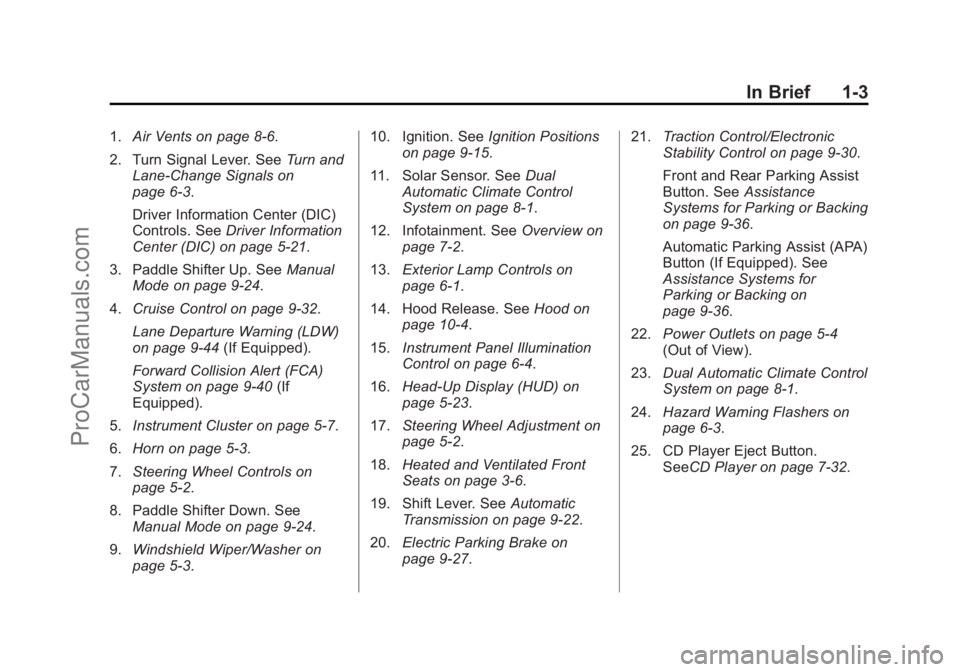
1.Air Vents on page 8-6.
2. Turn Signal Lever. See Turn and
Lane-Change Signals on
page 6-3.
Driver Information Center (DIC)
Controls. See Driver Information
Center (DIC) on page 5-21.
3. Paddle Shifter Up. See Manual
Mode on page 9-24.
4. Cruise Control on page 9-32.
Lane Departure Warning (LDW)
on page 9-44 (If Equipped).
Forward Collision Alert (FCA)
System on page 9-40 (If
Equipped).
5. Instrument Cluster on page 5-7.
6. Horn on page 5-3.
7. Steering Wheel Controls on
page 5-2.
8. Paddle Shifter Down. See Manual Mode on page 9-24.
9. Windshield Wiper/Washer on
page 5-3. 10. Ignition. See
Ignition Positions
on page 9-15.
11. Solar Sensor. See Dual
Automatic Climate Control
System on page 8-1.
12. Infotainment. See Overview on
page 7-2.
13. Exterior Lamp Controls on
page 6-1.
14. Hood Release. See Hood on
page 10-4.
15. Instrument Panel Illumination
Control on page 6-4.
16. Head-Up Display (HUD) on
page 5-23.
17. Steering Wheel Adjustment on
page 5-2.
18. Heated and Ventilated Front
Seats on page 3-6.
19. Shift Lever. See Automatic
Transmission on page 9-22.
20. Electric Parking Brake on
page 9-27. 21.
Traction Control/Electronic
Stability Control on page 9-30.
Front and Rear Parking Assist
Button. See Assistance
Systems for Parking or Backing
on page 9-36.
Automatic Parking Assist (APA)
Button (If Equipped). See
Assistance Systems for
Parking or Backing on
page 9-36.
22. Power Outlets on page 5-4
(Out of View).
23. Dual Automatic Climate Control
System on page 8-1.
24. Hazard Warning Flashers on
page 6-3.
25. CD Player Eject Button. SeeCD Player on page 7-32.
ProCarManuals.com
Page 18 of 422
Black plate (14,1)Chevrolet SS Sedan Owner Manual (GMNA-Localizing-U.S.-6014851) - 2014 -
1st Edition - 8/22/13
1-14 In Brief
$/i:Press to decline an
incoming call, or to end a current
call. Press to silence the vehicle
speakers while using the
infotainment system. Press again to
turn the sound on. Press to cancel
voice recognition.
_SRC^: Press to select an
audio source.
Use the thumbwheel to select the
next or previous favorite radio
station, CD track, MP3 track, USB
track, and Bluetooth Audio track.
Use
_SRC to skip to the next song
or show using Pandora or Stitcher.
See Pandora Internet Radio on
page 7-22 orStitcher Internet Radio
on page 7-27.
+
x−: Press + to increase the
volume. Press −to decrease.
See Steering Wheel Controls on
page 5-2.
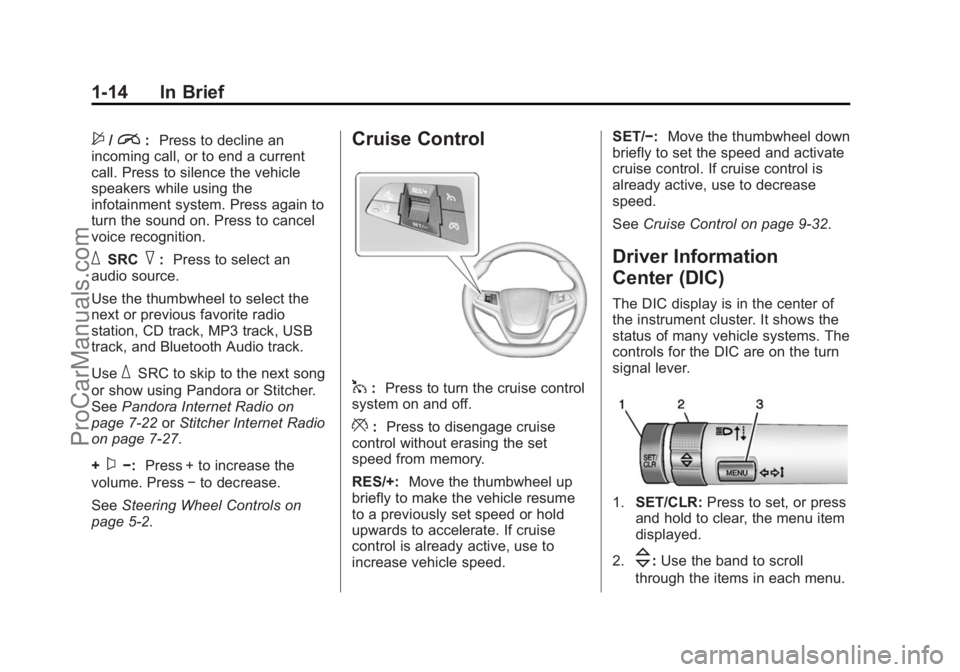
Cruise Control
1: Press to turn the cruise control
system on and off.
*: Press to disengage cruise
control without erasing the set
speed from memory.
RES/+: Move the thumbwheel up
briefly to make the vehicle resume
to a previously set speed or hold
upwards to accelerate. If cruise
control is already active, use to
increase vehicle speed. SET/−:
Move the thumbwheel down
briefly to set the speed and activate
cruise control. If cruise control is
already active, use to decrease
speed.
See Cruise Control on page 9-32.
Driver Information
Center (DIC)
The DIC display is in the center of
the instrument cluster. It shows the
status of many vehicle systems. The
controls for the DIC are on the turn
signal lever.
1.SET/CLR: Press to set, or press
and hold to clear, the menu item
displayed.
2.
\: Use the band to scroll
through the items in each menu.
ProCarManuals.com
Page 95 of 422

Black plate (3,1)Chevrolet SS Sedan Owner Manual (GMNA-Localizing-U.S.-6014851) - 2014 -
1st Edition - 8/22/13
Instruments and Controls 5-3
$/i(Mute/End Call):Press to
decline an incoming call, or to end a
current call. Press to silence the
vehicle speakers while using the
infotainment system. Press again to
turn the sound on. Press to cancel
voice recognition.
_SRC^(Thumbwheel Control):
Press to select an audio source.
Use the thumbwheel to select the
next or previous favorite radio
station, CD track, MP3 track, USB
track, and Bluetooth Audio track.
Use
_SRC to skip to the next song
or show using Pandora or Stitcher.
See Pandora Internet Radio on
page 7-22 orStitcher Internet Radio
on page 7-27.
+
x− (Volume): Press + to
increase the volume. Press −to
decrease.
Horn
Pressaon the steering wheel pad
to sound the horn.
Windshield Wiper/Washer
With the ignition in ACC/
ACCESSORY or ON/RUN/START,
move the windshield wiper lever to
select the wiper speed.
HI: Use for fast wipes.
LO: Use for slow wipes.
INT (Rainsense Wipe Sensitivity
Control): Move the windshield
wiper lever to INT. Turn the
xINT
band on the wiper lever to adjust the
sensitivity.
OFF: Use to turn the wipers off.
8(Mist): For a single wipe, briefly
move the wiper lever down. For
several wipes, hold the wiper
lever down.
Clear snow and ice from the wiper
blades and windshield before using
them. If frozen to the windshield,
carefully loosen or thaw them.
Damaged blades should be
replaced. See Wiper Blade
Replacement on page 10-23.
Heavy snow or ice can overload the
wiper motor.
Rainsense™
With Rainsense, a sensor near the
top center of the windshield detects
the amount of water on the
windshield and controls the
frequency of the windshield wiper.
ProCarManuals.com
Page 134 of 422
Black plate (4,1)Chevrolet SS Sedan Owner Manual (GMNA-Localizing-U.S.-6014851) - 2014 -
1st Edition - 8/22/13
6-4 Lighting
Interior Lighting
Instrument Panel
Illumination Control
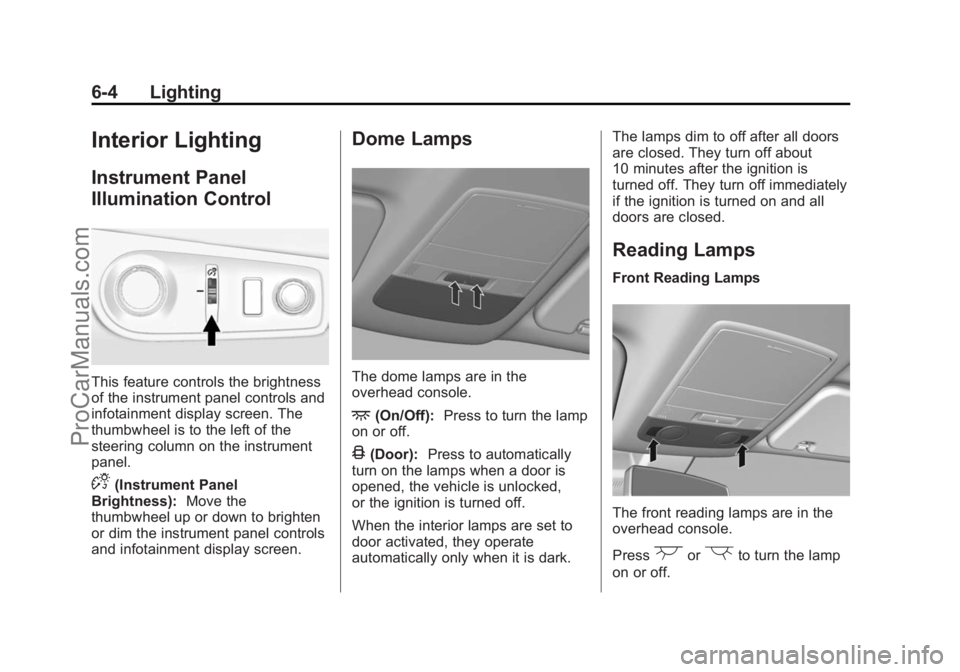
This feature controls the brightness
of the instrument panel controls and
infotainment display screen. The
thumbwheel is to the left of the
steering column on the instrument
panel.
D(Instrument Panel
Brightness): Move the
thumbwheel up or down to brighten
or dim the instrument panel controls
and infotainment display screen.
Dome Lamps
The dome lamps are in the
overhead console.
+(On/Off): Press to turn the lamp
on or off.
4(Door): Press to automatically
turn on the lamps when a door is
opened, the vehicle is unlocked,
or the ignition is turned off.
When the interior lamps are set to
door activated, they operate
automatically only when it is dark. The lamps dim to off after all doors
are closed. They turn off about
10 minutes after the ignition is
turned off. They turn off immediately
if the ignition is turned on and all
doors are closed.
Reading Lamps
Front Reading Lamps
The front reading lamps are in the
overhead console.
Press
(or)to turn the lamp
on or off.
ProCarManuals.com
Page 137 of 422
Black plate (1,1)Chevrolet SS Sedan Owner Manual (GMNA-Localizing-U.S.-6014851) - 2014 -
1st Edition - 8/22/13
Infotainment System 7-1
Infotainment
System
Introduction
Infotainment . . . . . . . . . . . . . . . . . . . 7-2
Overview . . . . . . . . . . . . . . . . . . . . . . 7-2
Using the System . . . . . . . . . . . . . 7-6
Software Updates . . . . . . . . . . . . 7-11
Radio
AM-FM Radio . . . . . . . . . . . . . . . . 7-11
Radio Data System (RDS) . . . 7-14
Satellite Radio . . . . . . . . . . . . . . . 7-15
Radio Reception . . . . . . . . . . . . . 7-20
Backglass Antenna . . . . . . . . . . 7-21
Multi-Band Antenna . . . . . . . . . . 7-21
Quick Info . . . . . . . . . . . . . . . . . . . 7-22Pandora Internet Radio . . . . . . 7-22
Stitcher Internet Radio . . . . . . . 7-27
Pictures . . . . . . . . . . . . . . . . . . . . . . 7-31
Audio Players
CD Player . . . . . . . . . . . . . . . . . . . 7-32
USB . . . . . . . . . . . . . . . . . . . . . . . . . 7-34
Auxiliary Devices . . . . . . . . . . . . 7-40
Bluetooth Audio . . . . . . . . . . . . . . 7-41
Navigation
Using the Navigation
System . . . . . . . . . . . . . . . . . . . . . 7-42
Maps . . . . . . . . . . . . . . . . . . . . . . . . 7-46
Navigation Symbols . . . . . . . . . 7-46
Destination . . . . . . . . . . . . . . . . . . 7-48
OnStar
®Destination
Download . . . . . . . . . . . . . . . . . . 7-59
Configure Menu . . . . . . . . . . . . . 7-60
Global Positioning System (GPS) . . . . . . . . . . . . . . 7-66 Vehicle Positioning . . . . . . . . . . 7-66
Problems with Route
Guidance . . . . . . . . . . . . . . . . . . . 7-67
If the System Needs Service . . . . . . . . . . . . . . . . . . . . . 7-68
Map Data Updates . . . . . . . . . . . 7-68
Database Coverage Explanations . . . . . . . . . . . . . . . 7-68
Voice Recognition
Voice Recognition . . . . . . . . . . . 7-68
Bluetooth Phone/Devices
Bluetooth . . . . . . . . . . . . . . . . . . . . 7-75
Text Messaging . . . . . . . . . . . . . . 7-82
Trademarks and License
Agreements
Trademarks and LicenseAgreements . . . . . . . . . . . . . . . . 7-85
ProCarManuals.com
Page 138 of 422
Black plate (2,1)Chevrolet SS Sedan Owner Manual (GMNA-Localizing-U.S.-6014851) - 2014 -
1st Edition - 8/22/13
7-2 Infotainment System
Introduction
Infotainment
Read the following pages to
become familiar with the
infotainment system features.
{Warning
Taking your eyes off the road for
extended periods could cause a
crash resulting in injury or death
to you or others. Do not give
extended attention to infotainment
tasks while driving.
This system provides access to
many audio and non-audio listings.
To minimize taking your eyes off the
road while driving, do the following
while the vehicle is parked:
.Become familiar with the
operation and controls of the
audio system.
.Set up the tone, speaker
adjustments, and preset radio
stations.
For more information, see Defensive
Driving on page 9-3.
{Caution
Contact your dealer before adding
any equipment.
Adding audio or communication
equipment could interfere with the
operation of the engine, radio,
or other systems, and could
damage them. Follow federal
rules covering mobile radio and
telephone equipment.
The vehicle has Retained
Accessory Power (RAP). With RAP,
the audio system can be played
even after the ignition is turned off.
See Retained Accessory Power
(RAP) on page 9-18 for more
information.
Overview
Read the following pages to
become familiar with the
infotainment system features.
The infotainment system has built-in
features intended to help with this
by disabling some functions when
driving. A grayed out function is not
available when the vehicle is
moving.
All functions are available when the
vehicle is parked. Before driving:
.Become familiar with the
infotainment system operation,
buttons on the faceplate, and
touch-sensitive screen buttons.
.Set up the audio by presetting
favorite stations, setting the
tone, and adjusting the
speakers.
.Set up phone numbers in
advance so they can be called
easily by pressing a single
button or by using a single voice
command for vehicles equipped
with phone capability.
ProCarManuals.com
Page 139 of 422
Black plate (3,1)Chevrolet SS Sedan Owner Manual (GMNA-Localizing-U.S.-6014851) - 2014 -
1st Edition - 8/22/13
Infotainment System 7-3
{Warning
Taking your eyes off the road for
too long or too often while using
the infotainment or navigation
system could cause a crash.
You or others could be injured or
killed. Do not give extended
attention to these tasks while
driving. Limit glances at the
vehicle displays and focus your
attention on driving. Use voice
commands whenever possible.
See Defensive Driving on page 9-3
The vehicle has Retained
Accessory Power (RAP). With RAP,
the audio system can be played
even after the ignition is turned off.
See Retained Accessory Power
(RAP) on page 9-18
Customer Assistance
Assistance is available to help with
Bluetooth pairing, application
downloading and installation, other
mobile device interface, and
operation support of the
infotainment system. Specialists are
available when calling this
Customer Assistance number:
U.S. (855) 4 SUPPORT (478-7767).
ProCarManuals.com
Page 140 of 422
Black plate (4,1)Chevrolet SS Sedan Owner Manual (GMNA-Localizing-U.S.-6014851) - 2014 -
1st Edition - 8/22/13
7-4 Infotainment System
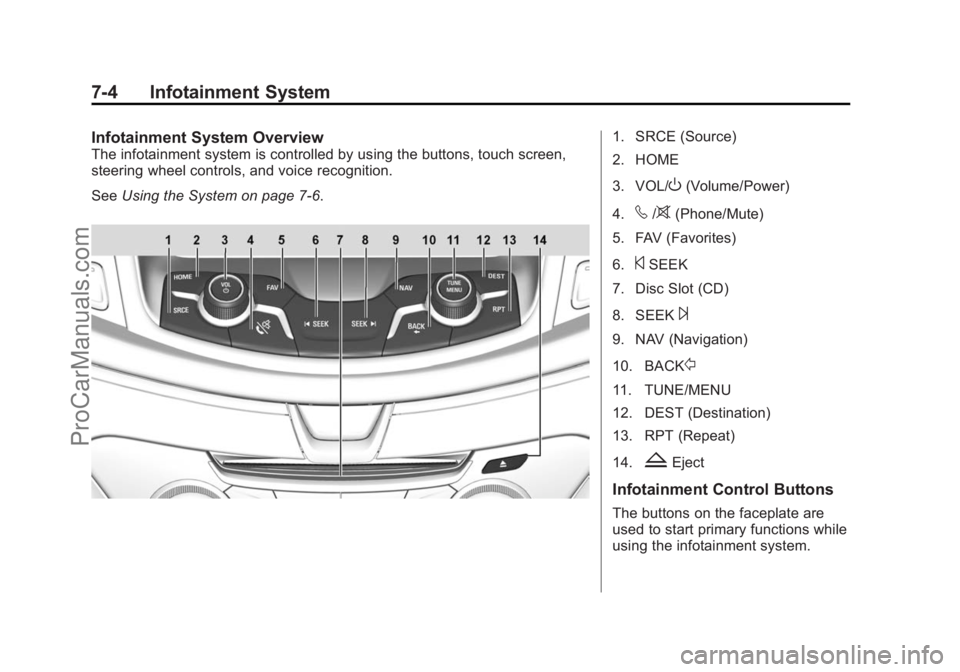
Infotainment System Overview
The infotainment system is controlled by using the buttons, touch screen,
steering wheel controls, and voice recognition.
SeeUsing the System on page 7-6.
1. SRCE (Source)
2. HOME
3. VOL/
O(Volume/Power)
4.
v/>(Phone/Mute)
5. FAV (Favorites)
6.
©SEEK
7. Disc Slot (CD)
8. SEEK
¨
9. NAV (Navigation)
10. BACK
/
11. TUNE/MENU
12. DEST (Destination)
13. RPT (Repeat)
14.
ZEject
Infotainment Control Buttons
The buttons on the faceplate are
used to start primary functions while
using the infotainment system.
ProCarManuals.com
Page 141 of 422
Black plate (5,1)Chevrolet SS Sedan Owner Manual (GMNA-Localizing-U.S.-6014851) - 2014 -
1st Edition - 8/22/13
Infotainment System 7-5
SRCE (Source):Press to change
the audio sources such as AM-FM
Radio, SiriusXM
®(if equipped),
and AUX.
HOME: Press to go to the Home
Page. See “Home Page” in this
section.
VOL/
O(Volume/Power):
.Turn to adjust the volume.
.Press to turn the system on
and off.
v/>(Phone/Mute):
.Press to enter the phone main
screen.
.Press and hold to mute or
unmute the infotainment system.
See Bluetooth on page 7-75.
FAV (Favorites): Press to display
the current favorite page number
above the preset buttons. Keep
pressing to scroll through the
favorites pages. The stored stations
for each list display on the bottom of
the screen. The number of preset
Favorite Pages can be changed by pressing the Config button on the
Home Page, then pressing Radio
Settings, and then pressing Number
of Favorite Pages.
©SEEK:
.USB or Bluetooth Audio: Press
to seek to the beginning of the
current or previous track. If the
track has been playing for less
than five seconds, it seeks the
previous track. If longer than
five seconds, the current track
starts from the beginning.
.USB or Bluetooth Audio: Press
and hold to quickly reverse
through a track. Release the
button to return to playing
speed. See
USB on page 7-34.
.AM, FM, or SiriusXM (if
equipped): Press to seek to the
previous strong station.
¨SEEK:
.USB or Bluetooth Audio: Press
to seek the next track.
.USB or Bluetooth Audio: Press
and hold to fast forward through
a track.
.AM, FM, or SiriusXM (if
equipped): Press to seek to the
next strong station.
NAV (Navigation):
.Press to view the vehicle's
current position on the map
screen.
.Continue pressing to cycle
through the full map and split
screens.
BACK
/: Press to return to the
previous screen in a menu.
TUNE/MENU:
.Turn to manually tune to a radio
station.
.Turn to highlight a feature. Press
to activate the highlighted
feature.
DEST (Destination):
.Press to enter a destination.
ProCarManuals.com