BLIND CHEVROLET SS 2016 Owners Manual
[x] Cancel search | Manufacturer: CHEVROLET, Model Year: 2016, Model line: SS, Model: CHEVROLET SS 2016Pages: 397, PDF Size: 7.17 MB
Page 6 of 397
Chevrolet SS Sedan Owner Manual (GMNA-Localizing-U.S.-9234782) - 2016 -
CRC - 8/24/15
In Brief 5
In Brief
Instrument Panel
Instrument Panel Overview . . . . . . 6
Initial Drive Information
Initial Drive Information . . . . . . . . . . 8
Remote Keyless Entry (RKE)System . . . . . . . . . . . . . . . . . . . . . . . . 8
Remote Vehicle Start . . . . . . . . . . . 8
Door Locks . . . . . . . . . . . . . . . . . . . . . 9
Windows . . . . . . . . . . . . . . . . . . . . . . . 10
Seat Adjustment . . . . . . . . . . . . . . . 10
Memory Features . . . . . . . . . . . . . . 11
Heated and Ventilated Seats . . . 11
Head Restraint Adjustment . . . . 12
Safety Belts . . . . . . . . . . . . . . . . . . . . 12
Passenger Sensing System . . . 12
Mirror Adjustment . . . . . . . . . . . . . . 12
Steering Wheel Adjustment . . . . 13
Interior Lighting . . . . . . . . . . . . . . . . 13
Exterior Lighting . . . . . . . . . . . . . . . 14
Windshield Wiper/Washer . . . . . . 15
Climate Controls . . . . . . . . . . . . . . . 16
Transmission . . . . . . . . . . . . . . . . . . 16
Vehicle Features
Steering Wheel Controls . . . . . . . 17
Cruise Control . . . . . . . . . . . . . . . . . 18 Driver Information
Center (DIC) . . . . . . . . . . . . . . . . . 18
Forward Collision Alert (FCA) System . . . . . . . . . . . . . . . . . . . . . . . 18
Lane Departure
Warning (LDW) . . . . . . . . . . . . . . . 19
Side Blind Zone Alert (SBZA) . . . . . . . . . . . . . . . . . . 19
Rear Vision Camera (RVC) . . . . 19
Rear Cross Traffic Alert (RCTA) System . . . . . . . . . . . . . . . . . . . . . . . 19
Parking Assist . . . . . . . . . . . . . . . . . 19
Automatic Parking Assist (APA) . . . . . . . . . . . . . . . . . . 19
Power Outlets . . . . . . . . . . . . . . . . . 20
Sunroof . . . . . . . . . . . . . . . . . . . . . . . . 20
Performance and Maintenance
Traction Control/Electronic Stability Control . . . . . . . . . . . . . . 21
Tire Pressure Monitor . . . . . . . . . . 21
Engine Oil Life System . . . . . . . . 21
Driving for Better Fuel Economy . . . . . . . . . . . . . . . . . . . . . 22
Battery . . . . . . . . . . . . . . . . . . . . . . . . . 22
Roadside Assistance Program . . . . . . . . . . . . . . . . . . . . . . 22
ProCarManuals.com
Page 20 of 397
Chevrolet SS Sedan Owner Manual (GMNA-Localizing-U.S.-9234782) - 2016 -
CRC - 8/24/15
In Brief 19
Lane Departure
Warning (LDW)
If equipped, LDW may help avoid
unintentional lane departures at
speeds of 56 km/h (35 mph) or
greater. LDW uses a camera sensor
to detect the lane markings. The
LDW light,
@, is green if a lane
marking is detected. If the vehicle
departs the lane without using a turn
signal in that direction, the light will
change to amber and flash. In
addition, beeps will sound.
See Lane Departure Warning (LDW)
0 259
ii.
Side Blind Zone
Alert (SBZA)
If equipped, SBZA will detect
moving vehicles in the next lane
over in the vehicle's side blind zone
area. When this happens, the SBZA
display will light up in the
corresponding outside side mirror
and will flash if the turn signal is on.
See Side Blind Zone Alert (SBZA)
0 257
ii.
Rear Vision
Camera (RVC)
If equipped, RVC displays a view of
the area behind the vehicle on the
center stack display when the
vehicle is shifted into R (Reverse) to
aid with parking and low-speed
backing maneuvers.
See Assistance Systems for Parking
or Backing 0251
ii.
Rear Cross Traffic Alert
(RCTA) System
If equipped, the RCTA system uses
a triangle with an arrow displayed
on the RVC screen to warn of traffic
behind your vehicle that may cross
your vehicle's path while in
R (Reverse). In addition, beeps will
sound.
See Assistance Systems for Parking
or Backing 0251
ii.
Parking Assist
If equipped, Rear Parking
Assist (RPA) uses sensors on the
rear bumper to assist with parking and avoiding objects while in
R (Reverse). It operates at speeds
less than 8 km/h (5 mph). RPA uses
audible beeps to provide distance
and system information.
The vehicle may also be equipped
with Front Parking Assist.
See
Assistance Systems for Parking
or Backing 0251
ii.
Automatic Parking
Assist (APA)
If equipped, the APA system helps
to search for and maneuver the
vehicle into parallel or perpendicular
parking spots using automatic
steering, DIC displays, and beeps.
When the vehicle speed is below
30 km/h (18 mph), press
Oto
enable the system.
See “Automatic Parking Assist
(APA)” underAssistance Systems
for Parking or Backing 0251
ii.
ProCarManuals.com
Page 115 of 397
Chevrolet SS Sedan Owner Manual (GMNA-Localizing-U.S.-9234782) - 2016 -
CRC - 8/24/15
114 Instruments and Controls
This message could be due to the
camera being blocked. Cleaning the
outside of the windshield behind the
rearview mirror may correct the
issue.
PARK ASSIST OFF
This message displays when the
Parking Assist system has been
turned off or when there is a
temporary condition causing the
system to be disabled.
SERVICE FRONT CAMERA
If this message remains on after
continued driving, the vehicle needs
service. Do not use the Lane
Departure Warning (LDW) and
Forward Collision Alert (FCA)
features. Take the vehicle to your
dealer.
SERVICE PARKING ASSIST
This message displays if there is a
problem with the Parking Assist
system. Do not use this system to
help you park. See your dealer for
service.
SERVICE SIDE DETECTION
SYSTEM
If this message remains on after
continued driving, the vehicle needs
service. Side Blind Zone Alert
(SBZA) and Rear Cross Traffic Alert
(RCTA) features will not work. Take
the vehicle to your dealer.
SIDE BLIND ZONE ALERT OFF
This message indicates that the
driver has turned the Side Blind
Zone Alert (SBZA) system off.
SIDE DETECTION SYSTEM
UNAVAILABLE
This message indicates that Side
Blind Zone Alert (SBZA) and Rear
Cross Traffic Alert (RCTA) are
disabled either because the sensor
is blocked and cannot detect
vehicles in the blind zone, or the
vehicle is passing through an open
area, such as the desert, where
there is insufficient data for
operation. This message may also
activate during heavy rain or due to
road spray. The vehicle does notneed service. For cleaning, see
"Washing the Vehicle" under
Exterior Care
0335
ii.
Ride Control System
Messages
SERVICE TRACTION
CONTROL
This message displays when there
is a problem with the Traction
Control System (TCS). See Traction
Control/Electronic Stability Control
0 242
ii.
SERVICE STABILITRAK
This message displays if there is a
problem with the StabiliTrak system.
See Traction Control/Electronic
Stability Control 0242
ii.
Security Messages
THEFT ATTEMPTED
This message displays if the vehicle
detects a tamper condition.
ProCarManuals.com
Page 121 of 397
Chevrolet SS Sedan Owner Manual (GMNA-Localizing-U.S.-9234782) - 2016 -
CRC - 8/24/15
120 Instruments and Controls
Select High, Medium, or Low.
Remote Start Auto Cool Seat
When on and it is hot outside, the
ventilated seats will turn on
automatically.
Select to turn on or off.
Remote Start Auto Heat Seat
When on and it is cold outside, the
heated seats will turn on
automatically.
Select to turn on or off.
Comfort and Convenience
Select and the following may
display:
.Easy Exit Driver Seat
. Auto Memory Recall
. Chime Volume
. Button Chime
. Reverse Tilt Mirror
Easy Exit Driver Seat
This feature moves the seat
rearward allowing the driver more
room to exit the vehicle. See
“Easy Exit Driver Seat” under
Memory Seats 046ii.
Select On or Off.
Auto Memory Recall
When on, this feature will recall the
stored seat positions for the Remote
Keyless Entry (RKE) transmitter
being used. See Memory Seats
0 46
ii.
Select On or Off.
Chime Volume
This allows the selection of the
chime volume level.
Select Normal or High.
Button Chime
Select to turn this feature on or off.
Reverse Tilt Mirror
This allows the reverse tilt mirror to
be set to on or off.
Select On or Off. Collision/Detection Systems
Select and the following may
display, if equipped:
.
Side Blind Zone Alert
. Rear Cross Traffic Alert
Side Blind Zone Alert
This allows the Side Blind Zone
Alert feature to be turned on or off.
See Side Blind Zone Alert (SBZA)
0 257
ii.
Select On or Off.
Rear Cross Traffic Alert
This allows the Rear Cross Traffic
Alert feature to be turned on or off.
See Assistance Systems for Parking
or Backing 0251
ii.
Select On or Off.
Lighting
Select and the following may
display:
. Vehicle Locator Lights
. Exit Lighting
ProCarManuals.com
Page 215 of 397
Chevrolet SS Sedan Owner Manual (GMNA-Localizing-U.S.-9234782) - 2016 -
CRC - 8/24/15
214 Driving and Operating
Driving and
Operating
Driving Information
Distracted Driving . . . . . . . . . . . . 215
Defensive Driving . . . . . . . . . . . . . 215
Drunk Driving . . . . . . . . . . . . . . . . . 215
Control of a Vehicle . . . . . . . . . . . 216
Braking . . . . . . . . . . . . . . . . . . . . . . . 216
Steering . . . . . . . . . . . . . . . . . . . . . . 216
Off-Road Recovery . . . . . . . . . . . 217
Loss of Control . . . . . . . . . . . . . . . 217
Track Events and CompetitiveDriving . . . . . . . . . . . . . . . . . . . . . . 218
Driving on Wet Roads . . . . . . . . 220
Hill and Mountain Roads . . . . . 221
Winter Driving . . . . . . . . . . . . . . . . 222
If the Vehicle Is Stuck . . . . . . . . 223
Vehicle Load Limits . . . . . . . . . . . 223
Starting and Operating
New Vehicle Break-In . . . . . . . . . 227
Ignition Positions . . . . . . . . . . . . . 227
Starting the Engine . . . . . . . . . . . 229
Retained Accessory Power (RAP) . . . . . . . . . . . . . . . . 230
Shifting Into Park (Automatic Transmission) . . . . . . . . . . . . . . . 230
Shifting out of Park . . . . . . . . . . . 231 Parking . . . . . . . . . . . . . . . . . . . . . . . 232
Parking over Things
That Burn . . . . . . . . . . . . . . . . . . . 233
Engine Exhaust
Engine Exhaust . . . . . . . . . . . . . . 233
Running the Vehicle WhileParked . . . . . . . . . . . . . . . . . . . . . . 234
Automatic Transmission
Automatic Transmission . . . . . . 234
Manual Mode . . . . . . . . . . . . . . . . . 236
Manual Transmission
Manual Transmission . . . . . . . . . 238
Brakes
Antilock BrakeSystem (ABS) . . . . . . . . . . . . . . . 239
Electric Parking Brake . . . . . . . . 240
Brake Assist . . . . . . . . . . . . . . . . . . 242
Hill Start Assist (HSA) . . . . . . . . 242
Ride Control Systems
Traction Control/Electronic
Stability Control . . . . . . . . . . . . . 242
Driver Mode Control . . . . . . . . . . 244
Track Driver Mode . . . . . . . . . . . . 246
Limited-Slip Rear Axle . . . . . . . . 248
Cruise Control
Cruise Control . . . . . . . . . . . . . . . . 248
Driver Assistance Systems
Driver Assistance Systems . . . 250
Assistance Systems for Parking or Backing . . . . . . . . . . 251
Assistance Systems for Driving . . . . . . . . . . . . . . . . . . . . . . 255
Forward Collision Alert (FCA) System . . . . . . . . . . . . . . . . . . . . . . 255
Side Blind Zone Alert (SBZA) . . . . . . . . . . . . . . . . 257
Lane Departure Warning (LDW) . . . . . . . . . . . . . 259
Fuel
Fuel . . . . . . . . . . . . . . . . . . . . . . . . . . 261
California FuelRequirements . . . . . . . . . . . . . . . 262
Fuels in Foreign Countries . . . 262
Fuel Additives . . . . . . . . . . . . . . . . 262
Filling the Tank . . . . . . . . . . . . . . . 262
Filling a Portable Fuel
Container . . . . . . . . . . . . . . . . . . . 264
Trailer Towing
Trailer Towing . . . . . . . . . . . . . . . . 264
Conversions and Add-Ons
Add-On ElectricalEquipment . . . . . . . . . . . . . . . . . . 265
ProCarManuals.com
Page 256 of 397
Chevrolet SS Sedan Owner Manual (GMNA-Localizing-U.S.-9234782) - 2016 -
CRC - 8/28/15
Driving and Operating 255
wheel will vibrate briefly as a
reminder to remove hands from the
steering wheel. Check surroundings
and continue braking or accelerating
as needed, and be prepared to stop
to avoid vehicles, pedestrians,
or objects. If the vehicle is in
R (Reverse), but does not steer into
the expected space, this may be
because the system is maneuvering
the vehicle into a previously
detected space. The APA system
does not need service.
A DIC progress arrow displays the
status of the parking maneuver.
Depending on the space size,
additional maneuvers may be
required, and there will be additional
instructions. When changing gears,
allow the automatic steering to
complete before continuing the
parking maneuver. Upon completion
of a successful maneuver, APA will
beep and display a PARKING
COMPLETE message. Place the
vehicle in P (Park) for an automatic
transmission or in N (Neutral) with
the parking brake set for a manual
transmission.APA may automatically disengage if:
.
The steering wheel is used by
the driver.
. If the vehicle exceeds
10 km/h (6 mph).
. There is a failure with the APA
system.
. Electronic stability control or
antilock brakes are activated.
. An important vehicle message is
displayed in the DIC.
APA search is only available when
the vehicle speed is below 30 km/h
(18 mph).
The APA system is constantly
scanning for parking spaces when
the vehicle is moving forward.
A suitable space will be offered
even when the APA button is
pressed after the initial drive-by. The APA system is capable of
parking in subsequent spots after
the first parking space is found.
To cancel APA, press the APA
button again.
When the System Does Not Seem
to Work Properly
The APA system may require a
short period of driving along curves
to calibrate.
Assistance Systems for
Driving
If equipped, when driving the
vehicle in a forward gear, Forward
Collision Alert (FCA), Lane
Departure Warning (LDW), and Side
Blind Zone Alert (SBZA) can help to
avoid a crash or reduce crash
damage.
Forward Collision Alert
(FCA) System
If equipped, the FCA system may
help to avoid or reduce the harm
caused by front-end crashes. When
approaching a vehicle ahead too
ProCarManuals.com
Page 258 of 397
Chevrolet SS Sedan Owner Manual (GMNA-Localizing-U.S.-9234782) - 2016 -
CRC - 8/24/15
Driving and Operating 257
more rapidly which can cause a
brief, mild deceleration. Continue to
apply the brake pedal as needed.
Cruise control may be disengaged
when the Collision Alert occurs.
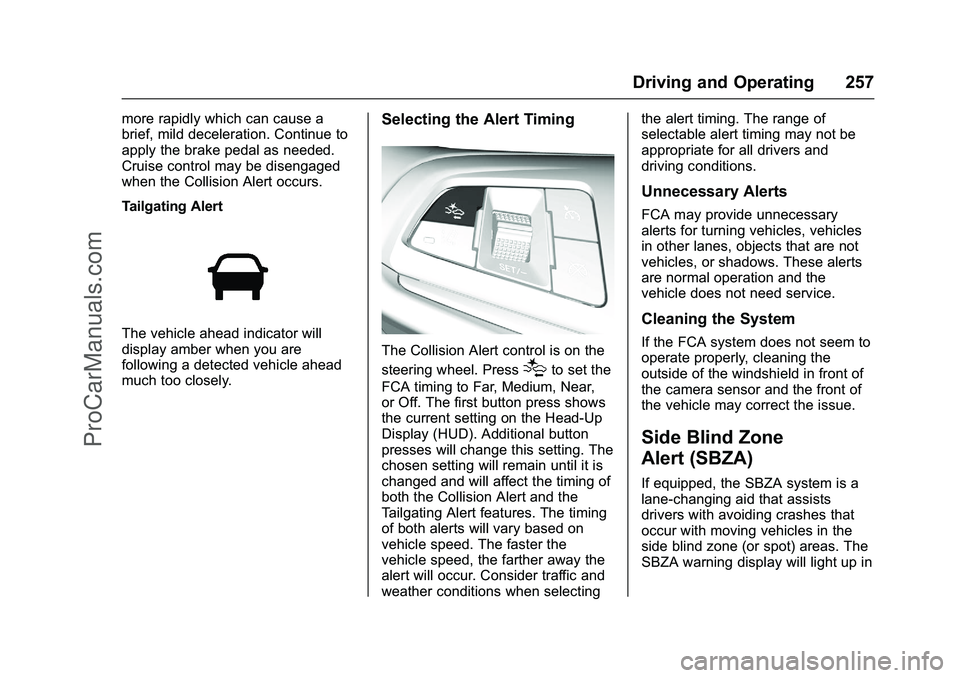
Tailgating Alert
The vehicle ahead indicator will
display amber when you are
following a detected vehicle ahead
much too closely.
Selecting the Alert Timing
The Collision Alert control is on the
steering wheel. Press
[to set the
FCA timing to Far, Medium, Near,
or Off. The first button press shows
the current setting on the Head-Up
Display (HUD). Additional button
presses will change this setting. The
chosen setting will remain until it is
changed and will affect the timing of
both the Collision Alert and the
Tailgating Alert features. The timing
of both alerts will vary based on
vehicle speed. The faster the
vehicle speed, the farther away the
alert will occur. Consider traffic and
weather conditions when selecting the alert timing. The range of
selectable alert timing may not be
appropriate for all drivers and
driving conditions.
Unnecessary Alerts
FCA may provide unnecessary
alerts for turning vehicles, vehicles
in other lanes, objects that are not
vehicles, or shadows. These alerts
are normal operation and the
vehicle does not need service.
Cleaning the System
If the FCA system does not seem to
operate properly, cleaning the
outside of the windshield in front of
the camera sensor and the front of
the vehicle may correct the issue.
Side Blind Zone
Alert (SBZA)
If equipped, the SBZA system is a
lane-changing aid that assists
drivers with avoiding crashes that
occur with moving vehicles in the
side blind zone (or spot) areas. The
SBZA warning display will light up in
ProCarManuals.com
Page 259 of 397
Chevrolet SS Sedan Owner Manual (GMNA-Localizing-U.S.-9234782) - 2016 -
CRC - 8/24/15
258 Driving and Operating
the corresponding outside side
mirror and will flash if the turn signal
is on.
{Warning
SBZA does not alert the driver to
vehicles rapidly approaching
outside of the side blind zones,
pedestrians, bicyclists,
or animals. It may not provide
alerts when changing lanes under
all driving conditions. Failure to
use proper care when changing
lanes may result in injury, death,
or vehicle damage. Before
making a lane change, always
check mirrors, glance over your
shoulder, and use the turn
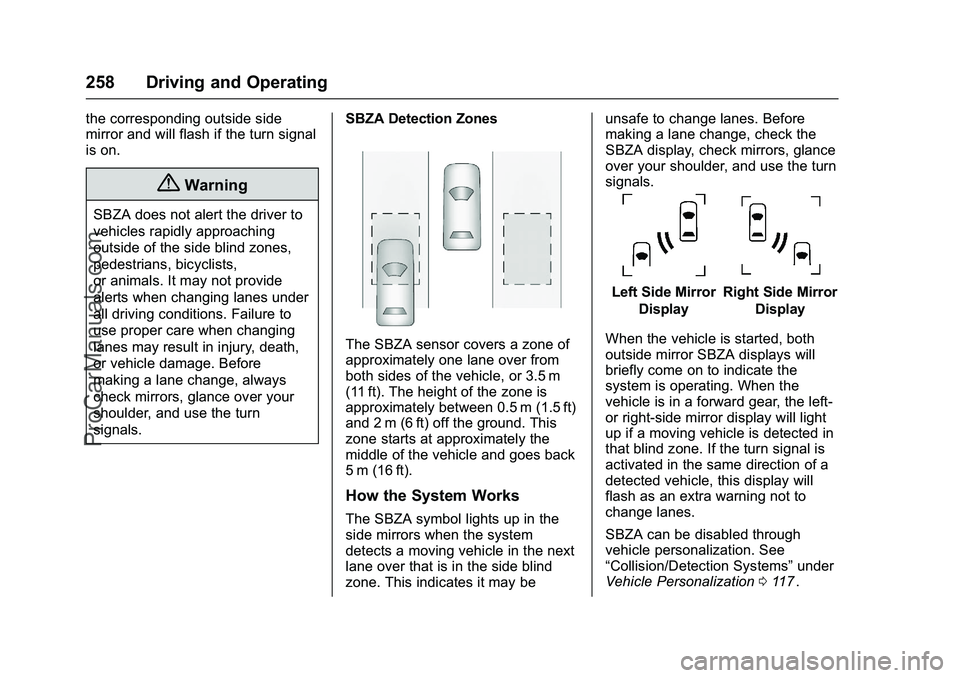
signals.SBZA Detection Zones
The SBZA sensor covers a zone of
approximately one lane over from
both sides of the vehicle, or 3.5 m
(11 ft). The height of the zone is
approximately between 0.5 m (1.5 ft)
and 2 m (6 ft) off the ground. This
zone starts at approximately the
middle of the vehicle and goes back
5 m (16 ft).
How the System Works
The SBZA symbol lights up in the
side mirrors when the system
detects a moving vehicle in the next
lane over that is in the side blind
zone. This indicates it may be unsafe to change lanes. Before
making a lane change, check the
SBZA display, check mirrors, glance
over your shoulder, and use the turn
signals.
Left Side Mirror
DisplayRight Side Mirror Display
When the vehicle is started, both
outside mirror SBZA displays will
briefly come on to indicate the
system is operating. When the
vehicle is in a forward gear, the left-
or right-side mirror display will light
up if a moving vehicle is detected in
that blind zone. If the turn signal is
activated in the same direction of a
detected vehicle, this display will
flash as an extra warning not to
change lanes.
SBZA can be disabled through
vehicle personalization. See
“Collision/Detection Systems” under
Vehicle Personalization 0117
ii.
ProCarManuals.com
Page 260 of 397
Chevrolet SS Sedan Owner Manual (GMNA-Localizing-U.S.-9234782) - 2016 -
CRC - 8/24/15
Driving and Operating 259
If SBZA is disabled by the driver,
the SBZA mirror displays will not
light up.
When the System Does Not
Seem to Work Properly
SBZA displays may not come on
when passing a vehicle quickly or
for a stopped vehicle. SBZA may
alert to objects attached to the
vehicle, such as a bicycle, or object
extending out to either side of the
vehicle. This is normal system
operation; the vehicle does not need
service.
SBZA may not always alert the
driver to vehicles in the side blind
zone, especially in wet conditions.
The system does not need to be
serviced. The system may light up
due to guardrails, signs, trees,
shrubs, and other non-moving
objects. This is normal system
operation; the vehicle does not need
service.
SBZA may not operate when the
SBZA sensors in the left or right
corners of the rear bumper are
covered with mud, dirt, snow, ice,
or slush, or in heavy rainstorms. Forcleaning instructions, see "Washing
the Vehicle" under
Exterior Care
0 335
ii. If the DIC still displays the
system unavailable message after
cleaning both sides of the vehicle
toward the rear corners of the
vehicle, see your dealer.
If the SBZA displays do not light up
when vehicles are in the blind zone
and the system is clean, the system
may need service. Take the vehicle
to your dealer.
When SBZA is disabled for any
reason other than the driver turning
it off, the Side Blind Zone Alert On
option will not be available on the
personalization menu.
Radio Frequency Information
See Radio Frequency Statement
0 371ii.
Lane Departure
Warning (LDW)
If equipped, LDW may help avoid
crashes due to unintentional lane
departures. It may provide an alert if
the vehicle is crossing a detected
lane without using a turn signal in that direction. LDW uses a camera
sensor to detect the lane markings
at speeds of 56 km/h (35 mph) or
greater.
{Warning
The LDW system does not steer
the vehicle. The LDW system
may not:
. Provide enough time to
avoid a crash.
. Detect lane markings under
poor weather or visibility
conditions. This can occur if
the windshield or
headlamps are blocked by
dirt, snow, or ice; if they are
not in proper condition; or if
the sun shines directly into
the camera.
. Detect road edges.
. Detect lanes on winding or
hilly roads.
(Continued)
ProCarManuals.com
Page 299 of 397
Chevrolet SS Sedan Owner Manual (GMNA-Localizing-U.S.-9234782) - 2016 -
CRC - 8/24/15
298 Vehicle Care
FusesUsage
F18 OnStar
F19 Mirror/Window Module
F20 Canister Vent Solenoid
F21 Passive Entry Passive Start-BATT 1
F22 Memory Seat Module
F23 Amplifier
F24 Passenger Front/ Right Rear Window
F25 Electric Parking Brake
F26 Tailgate Module
F27 Camera Ignition
F28 Front Vent Seat Ignition
F29 Trailer Module Ignition
F30 Automatic Parking Assist/Side Blind
Zone Alert
F31 Engine Control Module Fuses
Usage
F32 Auxiliary Gauges
F33 Retained Accessory Power
F34 Battery Voltage Sensing
F35 Tailgate Motor
F36 Rear Accessory Power Outlet
F37 Interior Accessory Power Outlet
F38 Cigar Lighter
F39 Not Used
F40 Trailer Module
Relays Relays Usage
R1 Trunk Release
R2 Accessory
R3 Not Used
R4 Run
R5 Not Used Relays
Usage
R6 Retained Accessory Power
R7 Logistics
R8 Not Used
R9 Not Used
R10 Exhaust Valve R11 Not Used
Relays R1, R2, R3, and R5 are PCB
mounted relays.
ProCarManuals.com