cruise control CHEVROLET SS 2017 1.G User Guide
[x] Cancel search | Manufacturer: CHEVROLET, Model Year: 2017, Model line: SS, Model: CHEVROLET SS 2017 1.GPages: 400, PDF Size: 7.31 MB
Page 224 of 400
Chevrolet SS Sedan Owner Manual (GMNA-Localizing-U.S.-10122752) -2017 - crc - 8/31/16
Driving and Operating 223
Warning (Continued)
happens, you and other vehicle
occupants could drown. Do not
ignore police warnings and be
very cautious about trying to drive
through flowing water.
Hydroplaning
Hydroplaning is dangerous. Watercan build up under the vehicle'stires so they actually ride on thewater. This can happen if the road iswet enough and you are going fastenough. When the vehicle ishydroplaning, it has little or nocontact with the road.
There is no hard and fast rule abouthydroplaning. The best advice is toslow down when the road is wet.
Other Rainy Weather Tips
Besides slowing down, other wetweather driving tips include:
.Allow extra following distance.
.Pass with caution.
.Keep windshield wipingequipment in good shape.
.Keep the windshield washer fluidreservoir filled.
.Have good tires with propertread depth. SeeTires0303.
.Turn off cruise control.
Hill and Mountain Roads
Driving on steep hills or throughmountains is different than drivingon flat or rolling terrain. Tips include:
.Keep the vehicle serviced and ingood shape.
.Check all fluid levels and brakes,tires, cooling system, andtransmission.
.Shift to a lower gear when goingdown steep or long hills.
{Warning
Using the brakes to slow the
vehicle on a long downhill slope
can cause brake overheating, can
(Continued)
Warning (Continued)
reduce brake performance, and
could result in a loss of braking.
Shift the transmission to a lower
gear to let the engine assist the
brakes on a steep downhill slope.
{Warning
Coasting downhill in N (Neutral)
or with the ignition off is
dangerous. This can cause
overheating of the brakes and
loss of steering. Always have the
engine running and the vehicle
in gear.
.Drive at speeds that keep thevehicle in its own lane. Do notswing wide or cross thecenter line.
.Be alert on top of hills;something could be in your lane(e.g., stalled car, accident).
Page 225 of 400
Chevrolet SS Sedan Owner Manual (GMNA-Localizing-U.S.-10122752) -2017 - crc - 8/31/16
224 Driving and Operating
.Pay attention to special roadsigns (e.g., falling rocks area,winding roads, long grades,passing or no-passing zones)and take appropriate action.
Winter Driving
Driving on Snow or Ice
Snow or ice between the tires andthe road creates less traction orgrip, so drive carefully. Wet ice canoccur at about 0 °C (32 °F) whenfreezing rain begins to fall. Avoiddriving on wet ice or in freezing rainuntil roads can be treated.
For Slippery Road Driving:
.Accelerate gently. Acceleratingtoo quickly causes the wheels tospin and makes the surfaceunder the tires slick.
.Turn on Traction Control. SeeTr a c t i o n C o n t r o l / E l e c t r o n i cStability Control0245.
.The Antilock Brake System(ABS) improves vehicle stabilityduring hard stops, but thebrakes should be applied sooner
than when on dry pavement.SeeAntilock Brake System(ABS)0241.
.Allow greater following distanceand watch for slippery spots. Icypatches can occur on otherwiseclear roads in shaded areas.The surface of a curve or anoverpass can remain icy whenthe surrounding roads are clear.Avoid sudden steeringmaneuvers and braking whileon ice.
.Turn off cruise control.
Blizzard Conditions
Stop the vehicle in a safe place andsignal for help. Stay with the vehicleunless there is help nearby.If possible, use RoadsideAssistance. SeeRoadsideAssistance Program0368.Togethelp and keep everyone in thevehicle safe:
.Turn on the hazard warningflashers.
.Tie a red cloth to an outsidemirror.
{Warning
Snow can trap engine exhaust
under the vehicle. This may
cause exhaust gases to get
inside. Engine exhaust contains
carbon monoxide (CO), which
cannot be seen or smelled. It can
cause unconsciousness and even
death.
If the vehicle is stuck in snow:
.Clear snow from the base ofthe vehicle, especially anyblocking the exhaust pipe.
.Open a window about 5 cm(2 in) on the vehicle sidethat is away from the wind,to bring in fresh air.
.Fully open the air outlets onor under the instrumentpanel.
.Adjust the climate controlsystem to circulate the airinside the vehicle and set
(Continued)
Page 246 of 400
Chevrolet SS Sedan Owner Manual (GMNA-Localizing-U.S.-10122752) -2017 - crc - 8/31/16
Driving and Operating 245
Ride Control Systems
Traction Control/
Electronic Stability
Control
System Operation
The vehicle has a Traction ControlSystem (TCS) and StabiliTrak®,anelectronic stability control system.These systems help limit wheel slipand assist the driver in maintainingcontrol, especially on slippery roadconditions.
TCS activates if it senses that anyof the drive wheels are spinning orbeginning to lose traction. When thishappens, TCS applies the brakes tothe spinning wheels and reducesengine power to limit wheel spin.
StabiliTrak activates when thevehicle senses a difference betweenthe intended path and the directionthe vehicle is actually traveling.StabiliTrak selectively appliesbraking pressure to any one of the
vehicle wheel brakes to assist thedriver in keeping the vehicle on theintended path.
If cruise control is being used andtraction control or StabiliTrak beginsto limit wheel spin, cruise control willdisengage. Cruise control may beturned back on when roadconditions allow.
Both systems come onautomatically when the vehicle isstarted and begins to move. Thesystems may be heard or felt whilethey are operating or whileperforming diagnostic checks. Thisis normal and does not mean thereis a problem with the vehicle.
It is recommended to leave bothsystems on for normal drivingconditions, but it may be necessaryto turn TCS off if the vehicle getsstuck in sand, mud, ice, or snow.SeeIf the Vehicle Is Stuck0225and“Turning the Systems Off andOn”later in this section.
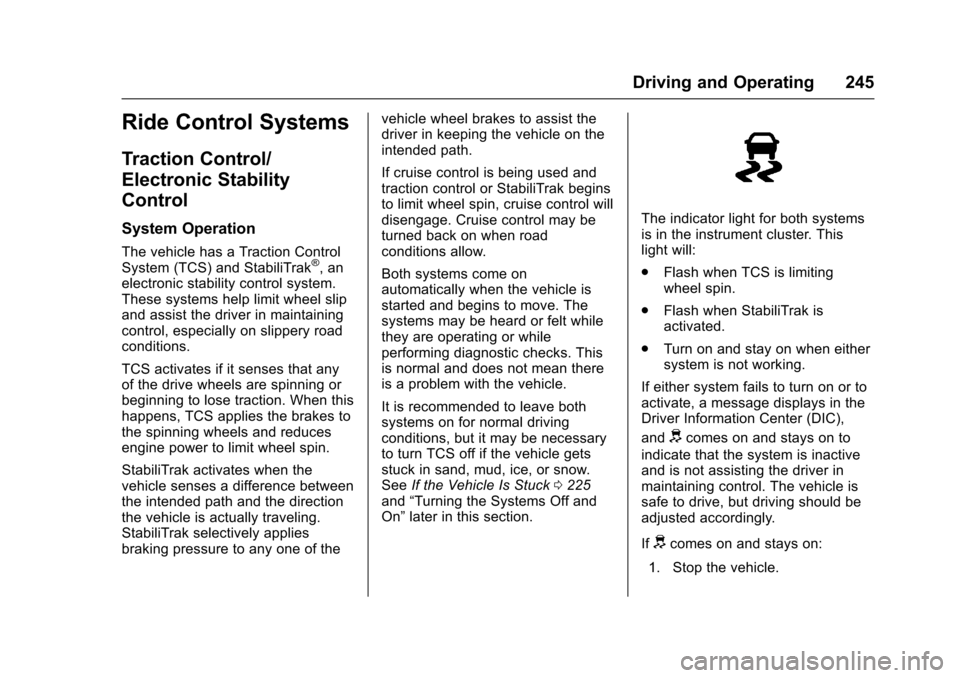
The indicator light for both systemsis in the instrument cluster. Thislight will:
.Flash when TCS is limitingwheel spin.
.Flash when StabiliTrak isactivated.
.Turn on and stay on when eithersystem is not working.
If either system fails to turn on or toactivate, a message displays in theDriver Information Center (DIC),
anddcomes on and stays on to
indicate that the system is inactiveand is not assisting the driver inmaintaining control. The vehicle issafe to drive, but driving should beadjusted accordingly.
Ifdcomes on and stays on:
1. Stop the vehicle.
Page 252 of 400
Chevrolet SS Sedan Owner Manual (GMNA-Localizing-U.S.-10122752) -2017 - crc - 8/31/16
Driving and Operating 251
After the vehicle is launched, thesystem continues in TrackDriver Mode.
Limited-Slip Rear Axle
Vehicles with a limited-slip rear axlecan give more traction on snow,mud, ice, sand, or gravel. Whentraction is low, this feature allowsthe drive wheel with the mosttraction to move the vehicle. Thelimited-slip rear axle also gives thedriver enhanced control whencornering hard or completing amaneuver, such as a lane change.For vehicles with a limited-slip rearaxle, driven under severeconditions, the rear axle fluid shouldbe changed. SeeTr a c k D r i v e r M o d e0249andMaintenance Schedule0349.
Cruise Control
With cruise control, the vehicle canmaintain a speed of about 40 km/h(25 mph) or more without keepingyour foot on the accelerator. Cruisecontrol does not work at speedsbelow 40 km/h (25 mph).
{Warning
Cruise control can be dangerous
where you cannot drive safely at
asteadyspeed.Donotuse
cruise control on winding roads or
in heavy traffic.
Cruise control can be dangerous
on slippery roads. On such roads,
fast changes in tire traction can
cause excessive wheel slip, and
you could lose control. Do not use
cruise control on slippery roads.
If the vehicle has the StabiliTrak®
system and begins to limit wheelspin while using cruise control, thecruise control will automaticallydisengage. SeeTr a c t i o n C o n t r o l /Electronic Stability Control0245.
When road conditions allow you tosafely use it again, the cruisecontrol can be turned back on.
If the brakes are applied, cruisecontrol disengages.
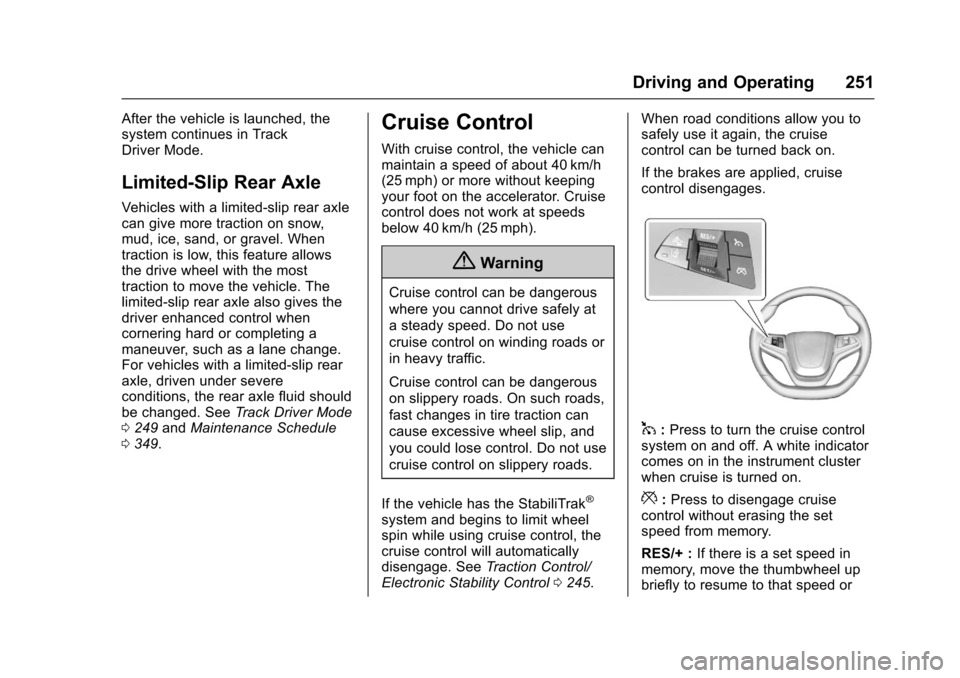
1:Press to turn the cruise controlsystem on and off. A white indicatorcomes on in the instrument clusterwhen cruise is turned on.
*:Press to disengage cruisecontrol without erasing the setspeed from memory.
RES/+ :If there is a set speed inmemory, move the thumbwheel upbriefly to resume to that speed or
Page 253 of 400
Chevrolet SS Sedan Owner Manual (GMNA-Localizing-U.S.-10122752) -2017 - crc - 8/31/16
252 Driving and Operating
hold upwards to accelerate. If cruisecontrol is already active, use toincrease vehicle speed.
SET/✓:Move the thumbwheel downbriefly to set the speed and activatecruise control. If cruise control isalready active, use to decreasespeed.
The speedometer reading can bedisplayed in either English or metricunits. SeeDriver Information Center(DIC)0108.Theincrementvalueused depends on the unitsdisplayed.
Setting Cruise Control
If1is on when not in use, SET/- or
RES/+ could get bumped and gointo cruise when not desired. Keep1off when cruise control is notbeing used.
To s e t a s p e e d :
1. Press1.
2. Get to the speed desired.
3. Move the thumbwheel downtoward SET/✓and release it.
4. Remove foot from theaccelerator.
The cruise control indicator on theinstrument cluster turns green aftercruise control has been set to thedesired speed. SeeInstrumentCluster096.
Resuming a Set Speed
If the cruise control is set at adesired speed and then the brakes
are applied or*is pressed, the
cruise control is disengaged withouterasing the set speed from memory.
Once the vehicle reaches about40 km/h (25 mph) or more, move thethumbwheel up toward RES/+briefly. The vehicle returns to theprevious set speed.
Increasing Speed While UsingCruise Control
If the cruise control system isalready activated:
.Move the thumbwheel up towardRES/+ and hold it until thedesired speed is reached, thenrelease it.
.To i n c r e a s e t h e s p e e d i n s m a l lincrements, move thethumbwheel up toward RES/+briefly. For each press, thevehicle goes about 1.6 km/h(1 mph) faster.
Reducing Speed While UsingCruise Control
If the cruise control system isalready activated:
.Move the thumbwheel towardSET/✓and hold until the desiredlower speed is reached, thenrelease it.
.To d e c r e a s e t h e v e h i c l e s p e e d i nsmall increments, move thethumbwheel toward SET/✓briefly. For each press, thevehicle goes about 1.6 km/h(1 mph) slower.
Passing Another Vehicle WhileUsing Cruise Control
Use the accelerator pedal toincrease the vehicle speed. Whenyou take your foot off the pedal, thevehicle slows down to the previouslyset cruise control speed. Whilepressing the accelerator pedal or
Page 254 of 400
Chevrolet SS Sedan Owner Manual (GMNA-Localizing-U.S.-10122752) -2017 - crc - 8/31/16
Driving and Operating 253
shortly following the release tooverride cruise control, brieflymoving the thumbwheel towardSET/–will result in cruise control setto the current vehicle speed.
Using Cruise Control on Hills
How well the cruise control workson hills depends upon the vehiclespeed, load, and the steepness ofthe hills. When going up steep hills,you might have to step on theaccelerator pedal to maintain thevehicle speed. When goingdownhill, you might have to brake orshift to a lower gear to keep yourspeed down. If the brake pedal isapplied, cruise control willdisengage.
Ending Cruise Control
There are four ways to disengagecruise control:
.Step lightly on the brake pedalor clutch for a manualtransmission.
.Press*.
.Shift the transmission toN(Neutral).
.To t u r n o f f t h e c r u i s e c o n t r o l ,
press1.
Erasing Speed Memory
The cruise control set speed is
erased from memory if1is pressed
or if the vehicle is turned off.
Driver Assistance
Systems
This vehicle may have features thatwork together to help avoid crashesor reduce crash damage whiledriving, backing, and parking. Readthis entire section before usingthese systems.
{Warning
Do not rely on the Driver
Assistance Systems. These
systems do not replace the need
for paying attention and driving
safely. You may not hear or see
alerts or warnings provided by
these systems. Failure to use
proper care when driving may
result in injury, death, or vehicle
damage. SeeDefensive Driving
0217.
(Continued)
Page 261 of 400
Chevrolet SS Sedan Owner Manual (GMNA-Localizing-U.S.-10122752) -2017 - crc - 8/31/16
260 Driving and Operating
Warning (Continued)
or ice, or if the windshield is
damaged. It may also not detect a
vehicle on winding or hilly roads,
or in conditions that can limit
visibility such as fog, rain,
or snow, or if the headlamps or
windshield are not cleaned or in
proper condition. Keep the
windshield, headlamps, and FCA
sensors clean and in good repair.
Collision Alert
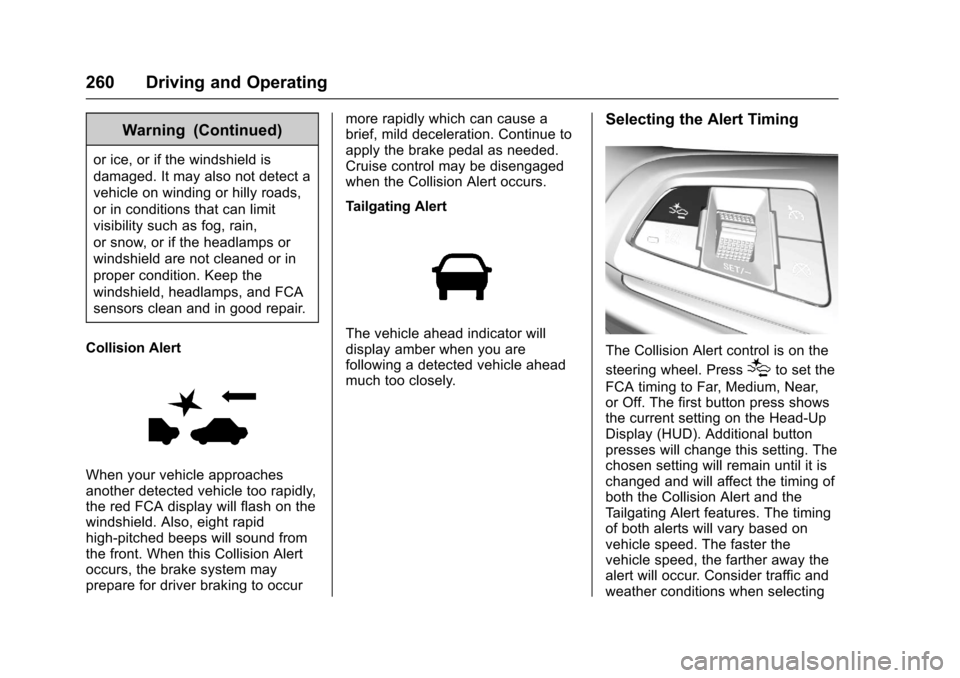
When your vehicle approachesanother detected vehicle too rapidly,the red FCA display will flash on thewindshield. Also, eight rapidhigh-pitched beeps will sound fromthe front. When this Collision Alertoccurs, the brake system mayprepare for driver braking to occur
more rapidly which can cause abrief, mild deceleration. Continue toapply the brake pedal as needed.Cruise control may be disengagedwhen the Collision Alert occurs.
Tailgating Alert
The vehicle ahead indicator willdisplay amber when you arefollowing a detected vehicle aheadmuch too closely.
Selecting the Alert Timing
The Collision Alert control is on the
steering wheel. Press[to set the
FCA timing to Far, Medium, Near,or Off. The first button press showsthe current setting on the Head-UpDisplay (HUD). Additional buttonpresses will change this setting. Thechosen setting will remain until it ischanged and will affect the timing ofboth the Collision Alert and theTa i l g a t i n g A l e r t f e a t u r e s . T h e t i m i n gof both alerts will vary based onvehicle speed. The faster thevehicle speed, the farther away thealert will occur. Consider traffic andweather conditions when selecting
Page 391 of 400

Chevrolet SS Sedan Owner Manual (GMNA-Localizing-U.S.-10122752) -2017 - crc - 9/1/16
390 Index
Compartments
Storage . . . . . . . . . . . . . . . . . . . . . . . . . 87
Compressor Kit, Tire Sealant . . . 323
Configure Menu . . . . . . . . . . . . . . . . 181
Connections
OnStar®...................... 380
Control
Traction and Electronic
Stability . . . . . . . . . . . . . . . . . . . . . 245
Control of a Vehicle . . . . . . . . . . . . . 218
Controls
Steering Wheel . . . . . . . . . . . . . . . 134
Convenience Net . . . . . . . . . . . . . . . . 88
Convex Mirrors . . . . . . . . . . . . . . . . . . 38
Coolant
Engine . . . . . . . . . . . . . . . . . . . . . . . . 281
Engine Temperature Gauge . . . . 98
Cooling . . . . . . . . . . . . . . . . . . . . . . . . . 210
Cooling System . . . . . . . . . . . . . . . . . 280
Engine Messages . . . . . . . . . . . . .114
Courtesy Transportation
Program . . . . . . . . . . . . . . . . . . . . . . . 370
Coverage Explanations . . . . . . . . . 188
Cruise Control . . . . . . . . . . . . . . . . . . 251
Light . . . . . . . . . . . . . . . . . . . . . . . . . . 107
Messages . . . . . . . . . . . . . . . . . . . . .114
Cupholders . . . . . . . . . . . . . . . . . . . . . . 87
Customer Assistance . . . . . . . . . . . 367
Customer Assistance (cont'd)
Offices . . . . . . . . . . . . . . . . . . . . . . . . 366
Te x t Te l e p h o n e ( T T Y )
Users . . . . . . . . . . . . . . . . . . . . . . . 367
Customer Information
Service Publications
Ordering Information . . . . . . . . 373
Customer Satisfaction
Procedure . . . . . . . . . . . . . . . . . . . . . 364
D
Damage Repair, Collision . . . . . . . 371
Danger, Warning, and Caution . . . . 2
Data Collection
Infotainment System . . . . . . . . . . 377
OnStar . . . . . . . . . . . . . . . . . . . . . . . 376
Data Recorders, Event . . . . . . . . . 376
Database Coverage
Explanations . . . . . . . . . . . . . . . . . . 188
Daytime Running
Lamps (DRL) . . . . . . . . . . . . . . . . . . 127
Defensive Driving . . . . . . . . . . . . . . . 217
Delayed Locking . . . . . . . . . . . . . . . . . 33
Destination . . . . . . . . . . . . . . . . . . . . . 171
Destination Download
OnStar®...................... 180
Devices
USB . . . . . . . . . . . . . . . . . . . . . . . . . . 158
Diagnostics
OnStar®...................... 382
Distracted Driving . . . . . . . . . . . . . . . 217
Dome Lamps . . . . . . . . . . . . . . . . . . . 129
Door
Ajar Light . . . . . . . . . . . . . . . . . . . . . 108
Ajar Messages . . . . . . . . . . . . . . . .114
Delayed Locking . . . . . . . . . . . . . . . . 33
Locks . . . . . . . . . . . . . . . . . . . . . . . . . . . 32
Power Locks . . . . . . . . . . . . . . . . . . . . 33
Rear Seat Pass-Through . . . . . . . 51
Drive Belt Routing, Engine . . . . . . 363
Driver Assistance Systems . . . . . 253
Driver Information
Center (DIC) . . . . . . . . . . . . . . . . . . 108
Driver Mode Control . . . . . . . . . . . . 247
Driver Mode Control Light . . . . . . 105
Driving
Assistance Systems . . . . . . . . . . 259
Defensive . . . . . . . . . . . . . . . . . . . . . 217
Drunk . . . . . . . . . . . . . . . . . . . . . . . . . 218
For Better Fuel Economy . . . . . . . 22
Hill and Mountain Roads . . . . . . 223
If the Vehicle is Stuck . . . . . . . . . 225
Loss of Control . . . . . . . . . . . . . . . 219
Off-Road Recovery . . . . . . . . . . . 219
Track Events and
Competitive . . . . . . . . . . . . . . . . . 220
Page 394 of 400

Chevrolet SS Sedan Owner Manual (GMNA-Localizing-U.S.-10122752) -2017 - crc - 9/1/16
Index 393
L
Labeling, Tire Sidewall . . . . . . . . . . 305
Lamps
Daytime Running (DRL) . . . . . . 127
Dome . . . . . . . . . . . . . . . . . . . . . . . . . 129
Exterior Controls . . . . . . . . . . . . . . 126
License Plate . . . . . . . . . . . . . . . . . 293
Malfunction Indicator . . . . . . . . . 100
Messages . . . . . . . . . . . . . . . . . . . . .116
On Reminder . . . . . . . . . . . . . . . . . 107
Reading . . . . . . . . . . . . . . . . . . . . . . 129
Lane Departure
Warning (LDW) . . . . . . . . . . . . . . . . 263
Lane Departure Warning
Light . . . . . . . . . . . . . . . . . . . . . . . . . . 104
Lap-Shoulder Belt . . . . . . . . . . . . . . . 53
LATCH System
Replacing Parts after a
Crash . . . . . . . . . . . . . . . . . . . . . . . . . 81
LATCH, Lower Anchors and
Te t h e r s f o r C h i l d r e n . . . . . . . . . . . . 7 6
Lighting
Entry . . . . . . . . . . . . . . . . . . . . . . . . . 130
Exit . . . . . . . . . . . . . . . . . . . . . . . . . . . 130
Illumination Control . . . . . . . . . . . 128
Lights . . . . . . . . . . . . . . . . . . . . . . . . . . . 104
Airbag Readiness . . . . . . . . . . . . . . . 99
Lights (cont'd)
Antilock Brake System
(ABS) Warning . . . . . . . . . . . . . . 104
Brake System Warning . . . . . . . 102
Charging System . . . . . . . . . . . . . 100
Cruise Control . . . . . . . . . . . . . . . . 107
Door Ajar . . . . . . . . . . . . . . . . . . . . . 108
Driver Mode Control . . . . . . . . . . 105
Electric Parking Brake . . . . . . . . 103
Engine Oil Pressure . . . . . . . . . . 106
Flash-to-Pass . . . . . . . . . . . . . . . . . 126
High-Beam On . . . . . . . . . . . . . . . . 107
High/Low Beam Changer . . . . . 126
Lane Departure Warning . . . . . . 104
Low Fuel Warning . . . . . . . . . . . . 106
Safety Belt Reminders . . . . . . . . . . 98
Security . . . . . . . . . . . . . . . . . . . . . . 107
Service Electric Parking
Brake . . . . . . . . . . . . . . . . . . . . . . . 103
Service Vehicle Soon . . . . . . . . . 102
StabiliTrak®OFF . . . . . . . . . . . . . 105
Tire Pressure . . . . . . . . . . . . . . . . . 106
Traction Control System
(TCS)/StabiliTrak®.......... 105
Traction Off . . . . . . . . . . . . . . . . . . . 104
Limited-Slip Rear Axle . . . . . . . . . . 251
Locks
Automatic Door . . . . . . . . . . . . . . . . . 33
Locks (cont'd)
Delayed Locking . . . . . . . . . . . . . . . . 33
Door . . . . . . . . . . . . . . . . . . . . . . . . . . . . 32
Lockout Protection . . . . . . . . . . . . . . 33
Power Door . . . . . . . . . . . . . . . . . . . . . 33
Safety . . . . . . . . . . . . . . . . . . . . . . . . . . 34
Loss of Control . . . . . . . . . . . . . . . . . 219
Low Fuel Warning Light . . . . . . . . . 106
Low-Profile Tires . . . . . . . . . . . . . . . . 304
Lower Anchors and Tethers
for Children (LATCH
System) . . . . . . . . . . . . . . . . . . . . . . . . 76
Lumbar Adjustment . . . . . . . . . . . . . . 46
Front Seats . . . . . . . . . . . . . . . . . . . . . 46
M
Maintenance
Records . . . . . . . . . . . . . . . . . . . . . . 360
Maintenance and Care
Additional . . . . . . . . . . . . . . . . . . . . . 355
Maintenance Schedule . . . . . . . . . 349
Recommended Fluids and
Lubricants . . . . . . . . . . . . . . . . . . . 358
Malfunction Indicator Lamp . . . . . 100
Manual Mode . . . . . . . . . . . . . . . . . . . 238
Manual Transmission . . . . . . . . . . . 240
Fluid . . . . . . . . . . . . . . . . . . . . . . . . . . 278
Map Data Updates . . . . . . . . . . . . . . 188
Maps . . . . . . . . . . . . . . . . . . . . . . . . . . . 168