door lock CHEVROLET SS 2017 1.G Owner's Manual
[x] Cancel search | Manufacturer: CHEVROLET, Model Year: 2017, Model line: SS, Model: CHEVROLET SS 2017 1.GPages: 400, PDF Size: 7.31 MB
Page 50 of 400
Chevrolet SS Sedan Owner Manual (GMNA-Localizing-U.S.-10122752) -2017 - crc - 8/31/16
Seats and Restraints 49
driver seat rearward to a presetposition when exiting the vehicle.SeeVehicle Personalization0120.
The easy exit driver seatautomatically activates when one ofthe following occurs:
.The vehicle is turned off and thedriver door is opened within ashort time.
.The vehicle is turned off with thedriver door open.
RKE transmitters are not labeledwith a number. If your memory seatposition is stored to 1 or 2 but thisposition is not automaticallyrecalling, then store your positionsto the other button or switch RKEtransmitters with the other driver.
To s t o p r e c a l l m o v e m e n t , p r e s s o n eof the memory, power mirror,or power seat controls; or press thepower tilt and telescoping steeringwheel control, if equipped.
Obstructions
If something has blocked the driverseat while recalling a memoryposition, the recall may stop.Remove the obstruction. Then doone of the following:
.If automatically or manuallyrecalling the stored memoryposition, press and hold theappropriate manual control fortwo seconds. Try recalling againby pressing the appropriatememory button. If automaticallyrecalling the position, tryrecalling again by opening the
driver door and pressingKon
the RKE transmitter.
.If recalling the exit position,press and hold the appropriatemanual control for the exitfeature not recalling fortwo seconds. Then try recallingthe exit position again.
If the memory position is still notrecalling, see your dealer forservice.
Heated and Ventilated
Front Seats
{Warning
If you cannot feel temperature
change or pain to the skin, the
seat heater may cause burns. To
reduce the risk of burns, people
with such a condition should use
care when using the seat heater,
especially for long periods of
time. Do not place anything on
the seat that insulates against
heat, such as a blanket, cushion,
cover, or similar item. This may
cause the seat heater to
overheat. An overheated seat
heater may cause a burn or may
damage the seat.
Page 52 of 400
Chevrolet SS Sedan Owner Manual (GMNA-Localizing-U.S.-10122752) -2017 - crc - 8/31/16
Seats and Restraints 51
Rear Seats
Rear Seat
Pass-Through Door
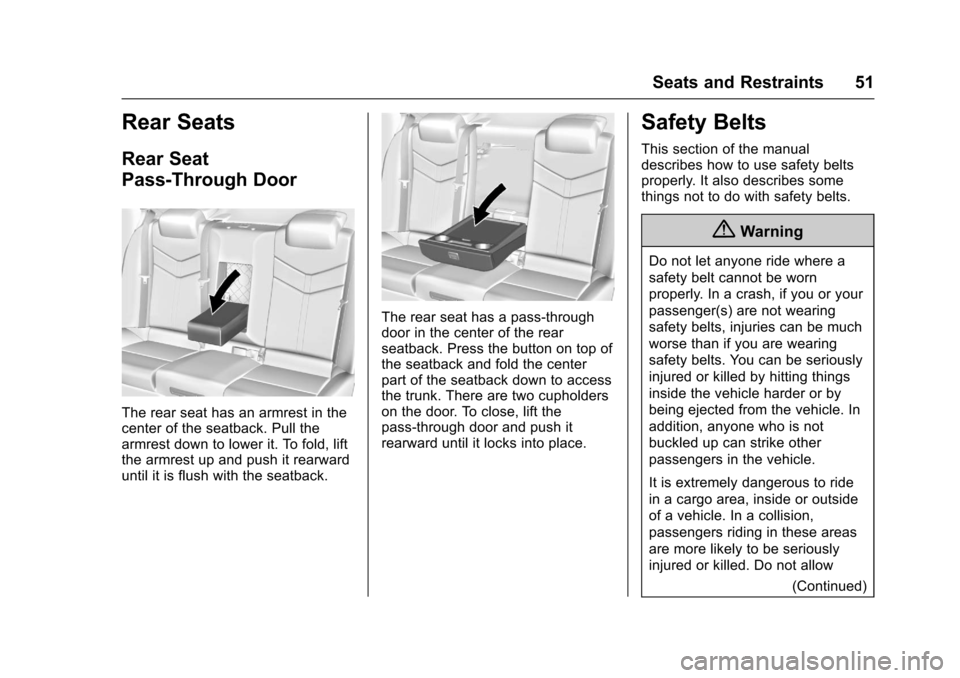
The rear seat has an armrest in thecenter of the seatback. Pull thearmrest down to lower it. To fold, liftthe armrest up and push it rearwarduntil it is flush with the seatback.
The rear seat has a pass-throughdoor in the center of the rearseatback. Press the button on top ofthe seatback and fold the centerpart of the seatback down to accessthe trunk. There are two cupholderson the door. To close, lift thepass-through door and push itrearward until it locks into place.
Safety Belts
This section of the manualdescribes how to use safety beltsproperly. It also describes somethings not to do with safety belts.
{Warning
Do not let anyone ride where a
safety belt cannot be worn
properly. In a crash, if you or your
passenger(s) are not wearing
safety belts, injuries can be much
worse than if you are wearing
safety belts. You can be seriously
injured or killed by hitting things
inside the vehicle harder or by
being ejected from the vehicle. In
addition, anyone who is not
buckled up can strike other
passengers in the vehicle.
It is extremely dangerous to ride
in a cargo area, inside or outside
of a vehicle. In a collision,
passengers riding in these areas
are more likely to be seriously
injured or killed. Do not allow
(Continued)
Page 56 of 400
Chevrolet SS Sedan Owner Manual (GMNA-Localizing-U.S.-10122752) -2017 - crc - 8/31/16
Seats and Restraints 55
To u n l a t c h t h e b e l t , p u s h t h e b u t t o non the buckle. The belt shouldreturn to its stowed position.
Always stow the safety belt slowly.If the safety belt webbing returnsquickly to the stowed position, theretractor may lock and cannot bepulled out. If this happens, pull thesafety belt straight out firmly tounlock the webbing, and thenrelease it. If the webbing is stilllocked in the retractor, see yourdealer.
Before a door is closed, be sure thesafety belt is out of the way. If adoor is slammed against a safetybelt, damage can occur to both thesafety belt and the vehicle.
Safety Belt Pretensioners
This vehicle has safety beltpretensioners for the front outboardoccupants. Although the safety beltpretensioners cannot be seen, theyare part of the safety belt assembly.They can help tighten the safetybelts during the early stages of amoderate to severe frontal, nearfrontal, or rear crash if the thresholdconditions for pretensioner
activation are met. Safety beltpretensioners can also help tightenthe safety belts in a side crash or arollover event.
Pretensioners work only once. If thepretensioners activate in a crash,the pretensioners and probablyother parts of the vehicle's safetybelt system will need to be replaced.SeeReplacing Safety Belt SystemParts after a Crash056.
Do not sit on the outboard safetybelt while entering or exiting thevehicle or at any time while sitting inthe seat. Sitting on the safety beltcan damage the webbing andhardware.
Safety Belt Use During
Pregnancy
Safety belts work for everyone,including pregnant women. Like alloccupants, they are more likely tobe seriously injured if they do notwear safety belts.
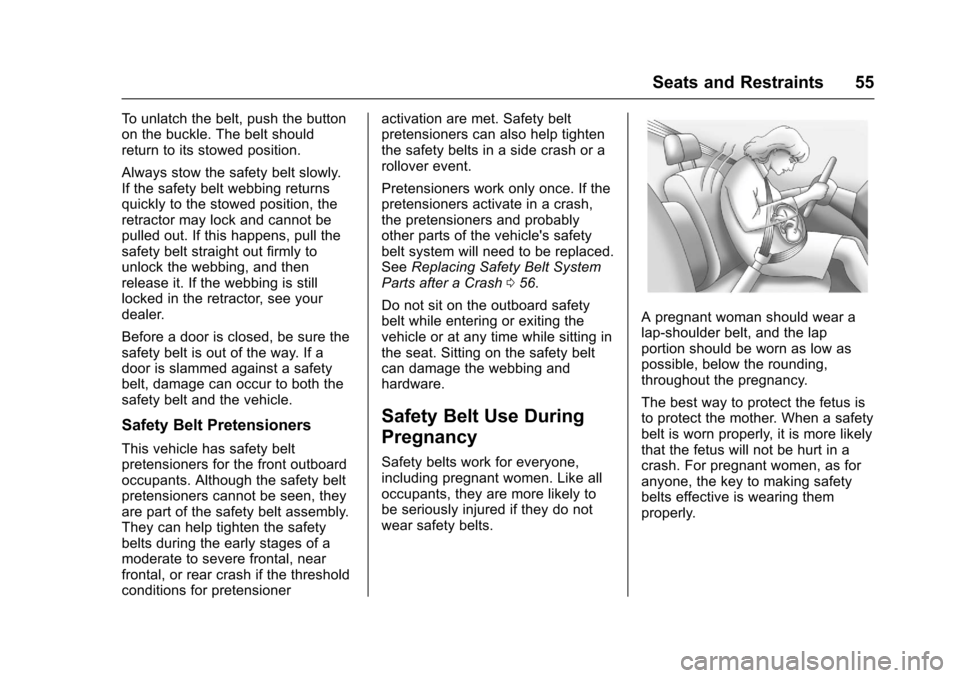
Apregnantwomanshouldwearalap-shoulder belt, and the lapportion should be worn as low aspossible, below the rounding,throughout the pregnancy.
The best way to protect the fetus isto protect the mother. When a safetybelt is worn properly, it is more likelythat the fetus will not be hurt in acrash. For pregnant women, as foranyone, the key to making safetybelts effective is wearing themproperly.
Page 61 of 400
Chevrolet SS Sedan Owner Manual (GMNA-Localizing-U.S.-10122752) -2017 - crc - 8/31/16
60 Seats and Restraints
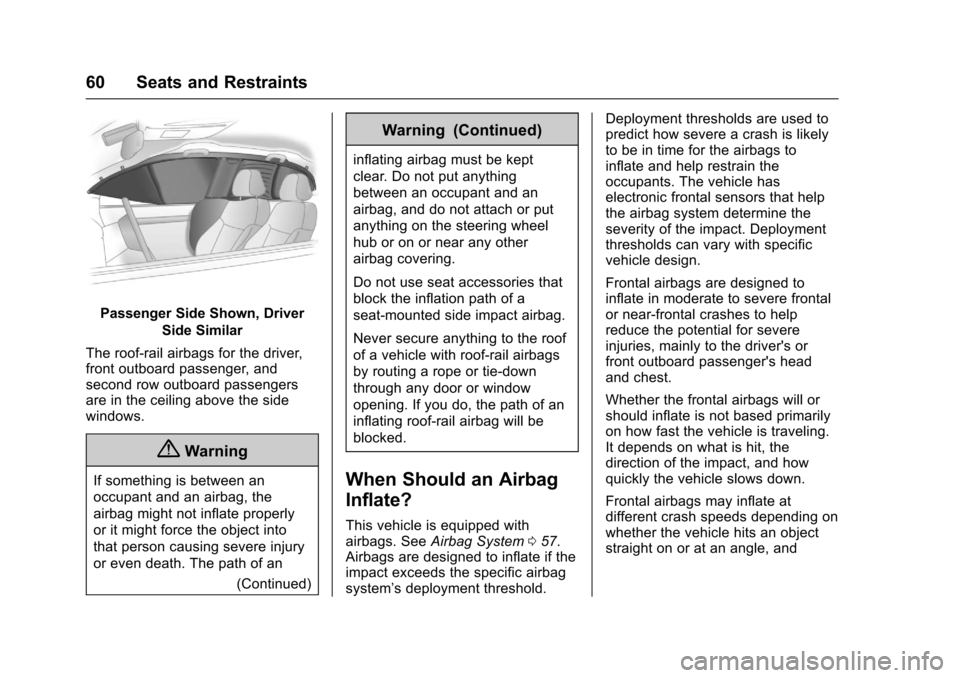
Passenger Side Shown, Driver
Side Similar
The roof-rail airbags for the driver,front outboard passenger, andsecond row outboard passengersare in the ceiling above the sidewindows.
{Warning
If something is between an
occupant and an airbag, the
airbag might not inflate properly
or it might force the object into
that person causing severe injury
or even death. The path of an
(Continued)
Warning (Continued)
inflating airbag must be kept
clear. Do not put anything
between an occupant and an
airbag, and do not attach or put
anything on the steering wheel
hub or on or near any other
airbag covering.
Do not use seat accessories that
block the inflation path of a
seat-mounted side impact airbag.
Never secure anything to the roof
of a vehicle with roof-rail airbags
by routing a rope or tie⇣down
through any door or window
opening. If you do, the path of an
inflating roof-rail airbag will be
blocked.
When Should an Airbag
Inflate?
This vehicle is equipped withairbags. SeeAirbag System057.Airbags are designed to inflate if theimpact exceeds the specific airbagsystem’sdeploymentthreshold.
Deployment thresholds are used topredict how severe a crash is likelyto be in time for the airbags toinflate and help restrain theoccupants. The vehicle haselectronic frontal sensors that helpthe airbag system determine theseverity of the impact. Deploymentthresholds can vary with specificvehicle design.
Frontal airbags are designed toinflate in moderate to severe frontalor near-frontal crashes to helpreduce the potential for severeinjuries, mainly to the driver's orfront outboard passenger's headand chest.
Whether the frontal airbags will orshould inflate is not based primarilyon how fast the vehicle is traveling.It depends on what is hit, thedirection of the impact, and howquickly the vehicle slows down.
Frontal airbags may inflate atdifferent crash speeds depending onwhether the vehicle hits an objectstraight on or at an angle, and
Page 63 of 400
Chevrolet SS Sedan Owner Manual (GMNA-Localizing-U.S.-10122752) -2017 - crc - 8/31/16
62 Seats and Restraints
Rollover capable roof-rail airbagsare designed to help contain thehead and chest of occupants in theoutboard seating positions in thefirst and second rows. The rollovercapable roof-rail airbags aredesigned to help reduce the risk offull or partial ejection in rolloverevents, although no system canprevent all such ejections.
But airbags would not help in manytypes of collisions, primarilybecause the occupant's motion isnot toward those airbags. SeeWhenShould an Airbag Inflate?060.
Airbags should never be regardedas anything more than a supplementto safety belts.
What Will You See after
an Airbag Inflates?
After the frontal, knee, andseat-mounted side impact airbagsinflate, they quickly deflate, soquickly that some people may noteven realize an airbag inflated.Roof-rail airbags may still be at leastpartially inflated for some time afterthey inflate. Some components of
the airbag module may be hot forseveral minutes. For location of theairbags, seeWhere Are theAirbags?059.
The parts of the airbag that comeinto contact with you may be warm,but not too hot to touch. There maybe some smoke and dust comingfrom the vents in the deflatedairbags. Airbag inflation does notprevent the driver from seeing out ofthe windshield or being able to steerthe vehicle, nor does it preventpeople from leaving the vehicle.
{Warning
When an airbag inflates, there
may be dust in the air. This dust
could cause breathing problems
for people with a history of
asthma or other breathing trouble.
To a v o i d t h i s , e v e r y o n e i n t h e
vehicle should get out as soon as
it is safe to do so. If you have
breathing problems but cannot
get out of the vehicle after an
airbag inflates, then get fresh air
(Continued)
Warning (Continued)
by opening a window or a door.
If you experience breathing
problems following an airbag
deployment, you should seek
medical attention.
The vehicle has a feature that mayautomatically unlock the doors, turnon the interior lamps and hazardwarning flashers, and shut off thefuel system after the airbags inflate.The feature may also activate,without airbag inflation, after anevent that exceeds a predeterminedthreshold. You can lock the doors,turn off the interior lamps, and turnoff the hazard warning flashers byusing the controls for thosefeatures.
{Warning
Acrashsevereenoughtoinflate
the airbags may have also
damaged important functions in
(Continued)
Page 91 of 400
Chevrolet SS Sedan Owner Manual (GMNA-Localizing-U.S.-10122752) -2017 - crc - 8/31/16
90 Instruments and Controls
Instruments and
Controls
Controls
Steering Wheel Adjustment . . . . 91Steering Wheel Controls . . . . . . . 91Horn . . . . . . . . . . . . . . . . . . . . . . . . . . . 92Windshield Wiper/Washer . . . . . . 92Clock . . . . . . . . . . . . . . . . . . . . . . . . . . 93Power Outlets . . . . . . . . . . . . . . . . . 94
Warning Lights, Gauges, and
Indicators
Warning Lights, Gauges, andIndicators . . . . . . . . . . . . . . . . . . . . 95Instrument Cluster . . . . . . . . . . . . . 96Speedometer . . . . . . . . . . . . . . . . . . 97Odometer . . . . . . . . . . . . . . . . . . . . . . 97Trip Odometer . . . . . . . . . . . . . . . . . 97Ta c h o m e t e r . . . . . . . . . . . . . . . . . . . . 9 7Fuel Gauge . . . . . . . . . . . . . . . . . . . . 97Engine Coolant TemperatureGauge . . . . . . . . . . . . . . . . . . . . . . . . 98Safety Belt Reminders . . . . . . . . . 98Airbag Readiness Light . . . . . . . . 99Passenger Airbag StatusIndicator . . . . . . . . . . . . . . . . . . . . . . 99Charging System Light . . . . . . . 100
Malfunction Indicator Lamp(Check Engine Light) . . . . . . . . 100Service Vehicle Soon Light . . . 102Brake System WarningLight . . . . . . . . . . . . . . . . . . . . . . . . 102Electric Parking BrakeLight . . . . . . . . . . . . . . . . . . . . . . . . 103Service Electric Parking BrakeLight . . . . . . . . . . . . . . . . . . . . . . . . 103Antilock Brake System (ABS)Warning Light . . . . . . . . . . . . . . . 104Lane Departure Warning(LDW) Light . . . . . . . . . . . . . . . . . 104Traction Off Light . . . . . . . . . . . . . 104StabiliTrak®OFF Light . . . . . . . . 105Traction Control System (TCS)/StabiliTrak®Light . . . . . . . . . . . 105Driver Mode Control Light . . . . 105Tire Pressure Light . . . . . . . . . . . 106Engine Oil Pressure Light . . . . 106Low Fuel Warning Light . . . . . . 106Security Light . . . . . . . . . . . . . . . . . 107High-Beam On Light . . . . . . . . . . 107Lamps On Reminder . . . . . . . . . 107Cruise Control Light . . . . . . . . . . 107Door Ajar Light . . . . . . . . . . . . . . . 108
Information Displays
Driver InformationCenter (DIC) . . . . . . . . . . . . . . . . 108Head-Up Display (HUD) . . . . . . 110
Vehicle Messages
Vehicle Messages . . . . . . . . . . . . 113Battery Voltage and ChargingMessages . . . . . . . . . . . . . . . . . . . 113Brake System Messages . . . . . 113Cruise Control Messages . . . . . 114Door Ajar Messages . . . . . . . . . . 114Engine Cooling SystemMessages . . . . . . . . . . . . . . . . . . . 114Engine Oil Messages . . . . . . . . . 115Engine Power Messages . . . . . 115Fuel System Messages . . . . . . . 115Key and Lock Messages . . . . . . 115Lamp Messages . . . . . . . . . . . . . . 116Object Detection SystemMessages . . . . . . . . . . . . . . . . . . . 116Ride Control SystemMessages . . . . . . . . . . . . . . . . . . . 117Security Messages . . . . . . . . . . . 117Service Vehicle Messages . . . . 118Starting the VehicleMessages . . . . . . . . . . . . . . . . . . . 118Tire Messages . . . . . . . . . . . . . . . . 118Transmission Messages . . . . . . 119Vehicle ReminderMessages . . . . . . . . . . . . . . . . . . . 120Vehicle Speed Messages . . . . . 120Washer Fluid Messages . . . . . . 120Window Messages . . . . . . . . . . . 120
Page 123 of 400
Chevrolet SS Sedan Owner Manual (GMNA-Localizing-U.S.-10122752) -2017 - crc - 8/31/16
122 Instruments and Controls
Phone Settings
See“Phone”inConfigure Menu0181.
Navigation Settings
SeeConfigure Menu0181.
Display Settings
Select and the following maydisplay:
.Home Page Menu
.Rear Camera Options
.Display Off
.Map Settings
Home Page Menu
Select to customize the first page ofthe Home Page.
Rear Camera Options
Select and the following maydisplay:
.Camera
.Symbols
.Guide Lines
Select to turn an option on and off.
SeeAssistance Systems for Parkingor Backing0254.
Display Off
Select to turn off the display. Thedisplay will return when any buttonis pressed or the screen is touched.
Map Settings
Select to enter the submenu tochange Automatic Zoom, enableSpeed Limit to display on the map,and change Map Display settings.
.Map Display:Select to changethe screen background.
To c h a n g e t h e o v e r a l l b r i g h t n e s ssetting for the display, use thevehicle interior lightinginstrument panel illuminationcontrol.
⇣The Automatic setting adjuststhe screen backgroundautomatically depending onthe exterior lighting conditions.
⇣The Day setting brightens themap background.
⇣The Night setting darkens themap background.
.Speed Limits:Select to displaythe posted speed limit on themap, when available.
Vehicle Settings
Select and the following maydisplay:
.Climate and Air Quality
.Comfort and Convenience
.Collision/Detection Systems
.Lighting
.Power Door Locks
.Remote Lock/Unlock/Start
.Return to Factory Settings?
Climate and Air Quality
Select and the following maydisplay:
.Auto Fan Speed
.Remote Start Auto Cool Seat
.Remote Start Auto Heat Seat
Auto Fan Speed
This feature sets the climate controlfan speed to maintain the interiortemperature.
Page 125 of 400

Chevrolet SS Sedan Owner Manual (GMNA-Localizing-U.S.-10122752) -2017 - crc - 8/31/16
124 Instruments and Controls
Vehicle Locator Lights
Select to turn this feature on or off.When on, the turn signals flash andthe headlamps and back-up lamps
will turn on whenKis pressed on
the Remote Keyless Entry (RKE)transmitter when it is dark outside.
Exit Lighting
This allows the selection of howlong the exterior lamps stay onwhen leaving the vehicle when it isdark outside.
Select Off, 30 Seconds, 1 Minute,or 2 Minutes.
Power Door Locks
Select and the following maydisplay:
.Open Door Anti Lock Out
.Auto Door Unlock
.Delayed Door Lock
Open Door Anti Lock Out
When on, this feature will keep thedriver door from locking when thedoor is open. If off, the DelayedDoor Lock menu will be available.
Select On or Off.
Auto Door Unlock
This allows the selection of whichdoors will automatically unlock whenthe vehicle is shifted into P (Park)and for a manual transmission whenthe ignition is turned off.
Select All Doors, Driver Door, or Off.
Delayed Door Lock
When on, this feature will delay thelocking of the doors. To override thedelay, press the power door lockswitch on the door.
Select On or Off.
Remote Lock/Unlock/Start
Select and the following maydisplay:
.Remote Unlock Feedback
.Remote Lock Feedback
.Remote Door Unlock
.Passive Door Unlock
.Passive Door Lock
.Remote Left in Veh. Reminder
Remote Unlock Feedback
If equipped, this allows the selectionof what type of feedback is givenwhen unlocking the vehicle with theRKE transmitter.
Select Flash Lights or Off.
Remote Lock Feedback
This allows the selection of whattype of feedback is given whenlocking the vehicle with the RemoteKeyless Entry (RKE) transmitter.
Select Lights and Horn, Lights Only,Horn Only, or Off.
Remote Door Unlock
This allows the selection of which
doors will unlock when pressingK
on the RKE transmitter.
Select Driver Door or All Doors.When set to Driver Door, the driver
door will unlock the first timeKis
pressed and all doors will unlock
whenKis pressed a second time.
When set to All Doors, all of thedoors will unlock with the first press
ofK.
Page 126 of 400

Chevrolet SS Sedan Owner Manual (GMNA-Localizing-U.S.-10122752) -2017 - crc - 8/31/16
Instruments and Controls 125
Passive Door Unlock
This allows the selection of whatdoors will unlock when using thebutton on the driver door to unlockthe vehicle.
Select All Doors or DriverDoor Only.
Passive Door Lock
This allows passive locking to beturned on or off and selectsfeedback. SeeRemote KeylessEntry (RKE) System Operation025.
Select On with Horn Chirp, On,or Off.
Remote Left in Veh. Reminder
Select to turn this feature on or off.This feature sounds an alert whenthe RKE transmitter is left in thevehicle.
Return to Factory Settings?
Select to return all vehiclepersonalization to the defaultsettings.
Select Yes or No.
Page 130 of 400
Chevrolet SS Sedan Owner Manual (GMNA-Localizing-U.S.-10122752) -2017 - crc - 8/31/16
Lighting 129
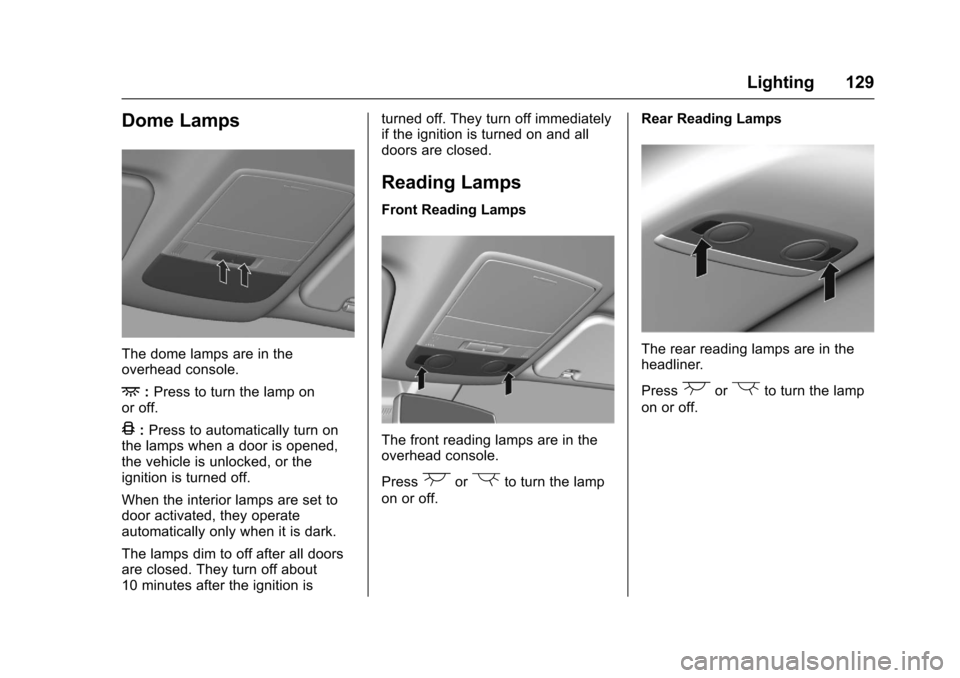
Dome Lamps
The dome lamps are in theoverhead console.
+:Press to turn the lamp onor off.
4:Press to automatically turn onthe lamps when a door is opened,the vehicle is unlocked, or theignition is turned off.
When the interior lamps are set todoor activated, they operateautomatically only when it is dark.
The lamps dim to off after all doorsare closed. They turn off about10 minutes after the ignition is
turned off. They turn off immediatelyif the ignition is turned on and alldoors are closed.
Reading Lamps
Front Reading Lamps
The front reading lamps are in theoverhead console.
Press(or)to turn the lamp
on or off.
Rear Reading Lamps
The rear reading lamps are in theheadliner.
Press(or)to turn the lamp
on or off.