buttons CHEVROLET SSR 2003 1.G User Guide
[x] Cancel search | Manufacturer: CHEVROLET, Model Year: 2003, Model line: SSR, Model: CHEVROLET SSR 2003 1.GPages: 374, PDF Size: 2.55 MB
Page 163 of 374
Setting the Time
The radio may have a button marked with an H or HR to
represent hours and an M or MN to represent minutes.
Press and hold the hour button until the correct hour
appears on the display. AM or PM will appear on
the display for morning or evening hours. Press and
hold the minute button until the correct minute appears
on the display. The time can be set with the ignition
on or off.
To synchronize the time with an FM station broadcasting
Radio Data System (RDS) information, press and
hold the hour and minute buttons at the same time for
two seconds until UPDATED and the clock symbol
appear on the display. If the time is not available from
the station, NO UPDAT will appear on the display.
RDS time is broadcast once a minute. After tuning to an
RDS broadcast station, it may take a few minutes for
the time to update.
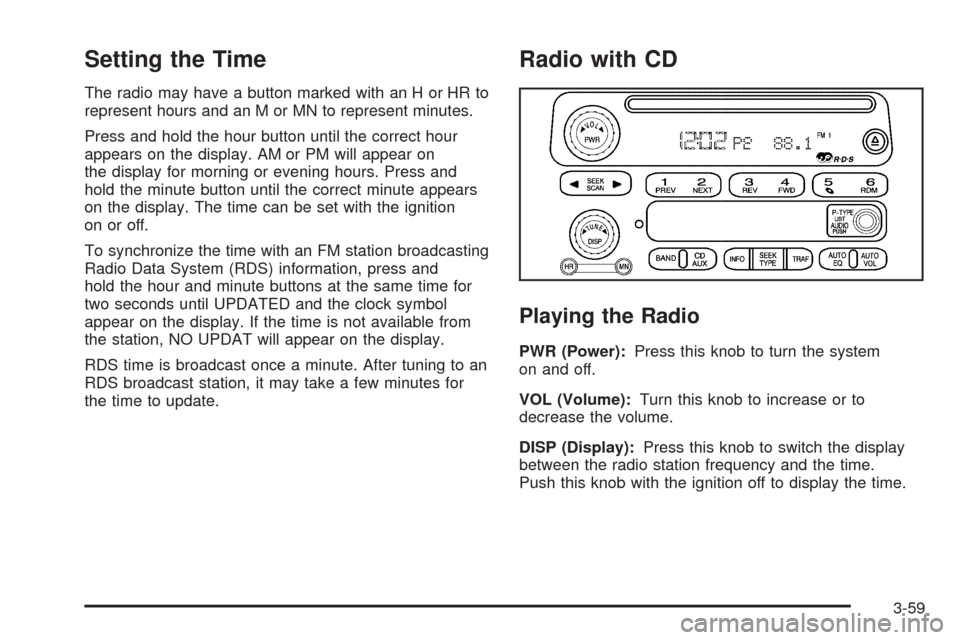
Radio with CD
Playing the Radio
PWR (Power):Press this knob to turn the system
on and off.
VOL (Volume):Turn this knob to increase or to
decrease the volume.
DISP (Display):Press this knob to switch the display
between the radio station frequency and the time.
Push this knob with the ignition off to display the time.
3-59
Page 164 of 374
For RDS, press the DISP knob to change what appears
on the display while using RDS. The display options
are station name, RDS station frequency, PTY, and the
name of the program (if available).
To change the default on the display, press the DISP
knob until you see the display you want, then hold
the knob for two seconds. The radio will produce one
beep and the selected display will now be the default.
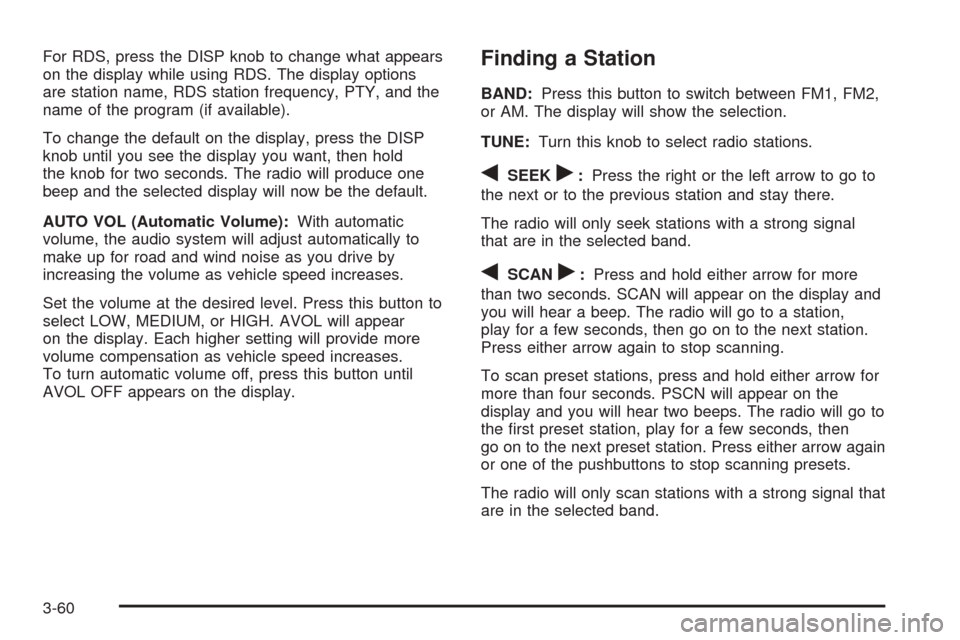
AUTO VOL (Automatic Volume):With automatic
volume, the audio system will adjust automatically to
make up for road and wind noise as you drive by
increasing the volume as vehicle speed increases.
Set the volume at the desired level. Press this button to
select LOW, MEDIUM, or HIGH. AVOL will appear
on the display. Each higher setting will provide more
volume compensation as vehicle speed increases.
To turn automatic volume off, press this button until
AVOL OFF appears on the display.Finding a Station
BAND:Press this button to switch between FM1, FM2,
or AM. The display will show the selection.
TUNE:Turn this knob to select radio stations.
qSEEKr:Press the right or the left arrow to go to
the next or to the previous station and stay there.
The radio will only seek stations with a strong signal
that are in the selected band.
qSCANr:Press and hold either arrow for more
than two seconds. SCAN will appear on the display and
you will hear a beep. The radio will go to a station,
play for a few seconds, then go on to the next station.
Press either arrow again to stop scanning.
To scan preset stations, press and hold either arrow for
more than four seconds. PSCN will appear on the
display and you will hear two beeps. The radio will go to
the rst preset station, play for a few seconds, then
go on to the next preset station. Press either arrow again
or one of the pushbuttons to stop scanning presets.
The radio will only scan stations with a strong signal that
are in the selected band.
3-60
Page 165 of 374
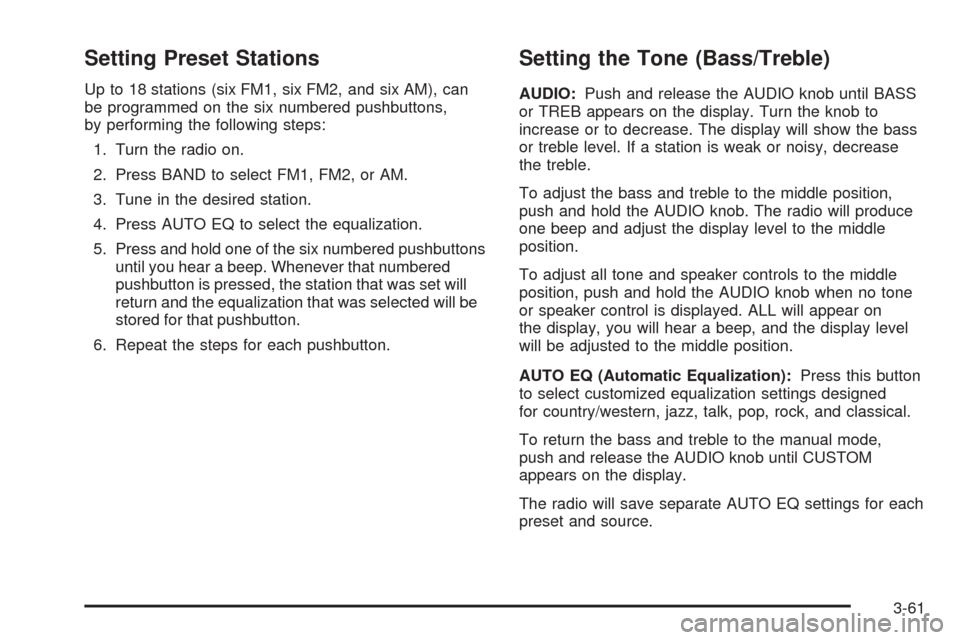
Setting Preset Stations
Up to 18 stations (six FM1, six FM2, and six AM), can
be programmed on the six numbered pushbuttons,
by performing the following steps:
1. Turn the radio on.
2. Press BAND to select FM1, FM2, or AM.
3. Tune in the desired station.
4. Press AUTO EQ to select the equalization.
5. Press and hold one of the six numbered pushbuttons
until you hear a beep. Whenever that numbered
pushbutton is pressed, the station that was set will
return and the equalization that was selected will be
stored for that pushbutton.
6. Repeat the steps for each pushbutton.
Setting the Tone (Bass/Treble)
AUDIO:Push and release the AUDIO knob until BASS
or TREB appears on the display. Turn the knob to
increase or to decrease. The display will show the bass
or treble level. If a station is weak or noisy, decrease
the treble.
To adjust the bass and treble to the middle position,
push and hold the AUDIO knob. The radio will produce
one beep and adjust the display level to the middle
position.
To adjust all tone and speaker controls to the middle
position, push and hold the AUDIO knob when no tone
or speaker control is displayed. ALL will appear on
the display, you will hear a beep, and the display level
will be adjusted to the middle position.
AUTO EQ (Automatic Equalization):Press this button
to select customized equalization settings designed
for country/western, jazz, talk, pop, rock, and classical.
To return the bass and treble to the manual mode,
push and release the AUDIO knob until CUSTOM
appears on the display.
The radio will save separate AUTO EQ settings for each
preset and source.
3-61
Page 168 of 374
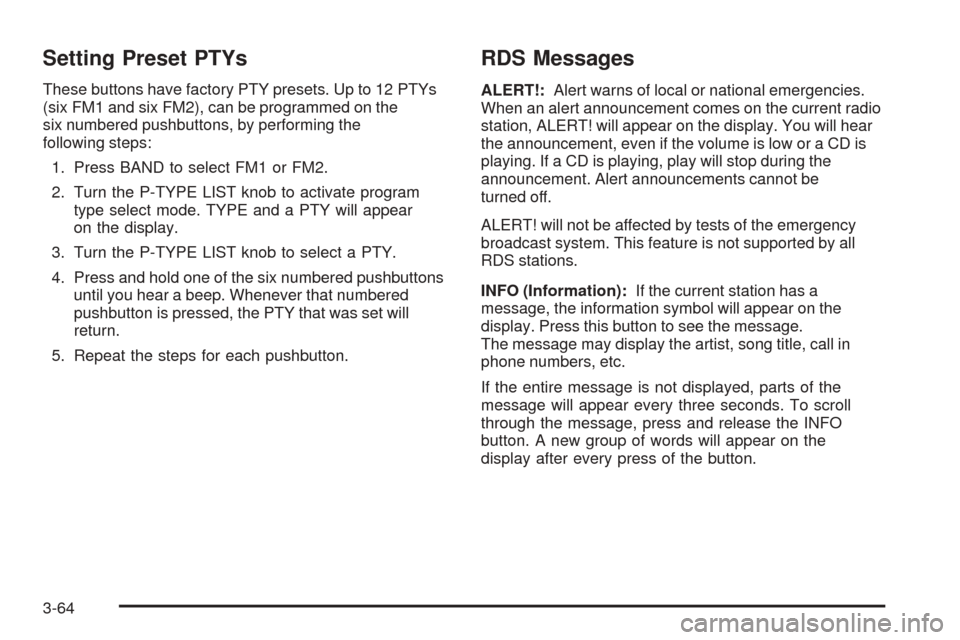
Setting Preset PTYs
These buttons have factory PTY presets. Up to 12 PTYs
(six FM1 and six FM2), can be programmed on the
six numbered pushbuttons, by performing the
following steps:
1. Press BAND to select FM1 or FM2.
2. Turn the P-TYPE LIST knob to activate program
type select mode. TYPE and a PTY will appear
on the display.
3. Turn the P-TYPE LIST knob to select a PTY.
4. Press and hold one of the six numbered pushbuttons
until you hear a beep. Whenever that numbered
pushbutton is pressed, the PTY that was set will
return.
5. Repeat the steps for each pushbutton.
RDS Messages
ALERT!:Alert warns of local or national emergencies.
When an alert announcement comes on the current radio
station, ALERT! will appear on the display. You will hear
the announcement, even if the volume is low or a CD is
playing. If a CD is playing, play will stop during the
announcement. Alert announcements cannot be
turned off.
ALERT! will not be affected by tests of the emergency
broadcast system. This feature is not supported by all
RDS stations.
INFO (Information):If the current station has a
message, the information symbol will appear on the
display. Press this button to see the message.
The message may display the artist, song title, call in
phone numbers, etc.
If the entire message is not displayed, parts of the
message will appear every three seconds. To scroll
through the message, press and release the INFO
button. A new group of words will appear on the
display after every press of the button.
3-64
Page 173 of 374
AUTO VOL (Automatic Volume):The system has a
feature called automatic volume. With this feature,
the audio system adjusts automatically to make up for
road and wind noise as you drive.
Set the volume at the desired level. Press this button to
select LOW, MEDIUM, or HIGH. AVOL will appear on the
display. Each higher setting will provide more volume
compensation as vehicle speed increases. Then, as you
drive, automatic volume increases the volume, as
necessary, to overcome noise at any speed. The volume
level should always sound the same to you as you drive.
To turn automatic volume off, press this button until
AVOL OFF appears on the display.
If your vehicle is equipped with Bose the system will
have AudioPilot
®noise compensation technology.
AudioPilot®monitors the level of noise in the vehicle and
automatically increases or decreases the level of the
audio to keep the audio above the noise.
To use AudioPilot
®set the volume at the desires level.
Press the AUTO VOL button until AVOL appears on the
display. This feature works best at lower volume settings
where background noise may be louder than the audio.
At high volume settings, where the audio is much louder
than the background noise, there will be no change in the
audio level. To turn automatic volume off, press the
AUTO VOL button until AVOL OFF appears on the
display.
Finding a Station
AM FM:Press this button to switch between FM1,
FM2, or AM. The display will show the selection.
TUNE:Turn this knob to select radio stations.
sSEEKt:Press the right or the left arrow to go to
the next or to the previous station and stay there.
The radio will only seek stations with a strong signal
that are in the selected band.
sSCANt:Press and hold either SCAN arrow for
two seconds until SC appears on the display and
you hear a beep. The radio will go to a station,
play for a few seconds, then go on to the next station.
Press either SCAN arrow again to stop scanning.
To scan preset stations, press and hold either SCAN
arrow for more than four seconds. PRESET SCAN will
appear on the display and you will hear a double
beep. The radio will go to a preset station stored on
your pushbuttons, play for a few seconds, then go on to
the next preset station. Press either SCAN arrow
again to stop scanning presets.
The radio will only scan stations with a strong signal
that are in the selected band.
3-69
Page 174 of 374
Setting Preset Stations
Up to 18 stations (six FM1, six FM2, and six AM), can
be programmed on the six numbered pushbuttons,
by performing the following steps:
1. Turn the radio on.
2. Press AM FM to select FM1, FM2, or AM.
3. Tune in the desired station.
4. Press AUTO EQ to select the equalization.
5. Press and hold one of the six numbered pushbuttons
until you hear a beep. Whenever that numbered
pushbutton is pressed, the station that was set will
return and the equalization that was selected will be
stored for that pushbutton.
6. Repeat the steps for each pushbutton.
Setting the Tone (Bass/Treble)
AUDIO:Push and release the AUDIO knob until BASS,
MID, or TREB appears on the display. Turn the knob
to increase or to decrease. If a station is weak or noisy,
decrease the treble.
To adjust bass, midrange, or treble to the middle
position, select BASS, MID, or TREB and push and hold
the AUDIO knob. The radio will produce one beep
and adjust the display level to the middle position.
To adjust all tone and speaker controls to the middle
position, push and hold the AUDIO knob when no tone
or speaker controls are displayed. CENTERED will
appear on the display and you will hear a beep.
AUTO EQ (Automatic Equalization):Press this button
to select customized equalization settings designed
for country, jazz, talk, pop, rock, and classical.
To return to the manual mode, press the AUTO EQ
button until CUSTOM appears on the display. Then
manually adjust the bass, midrange, and treble using the
AUDIO knob.
3-70
Page 177 of 374
To use the PTY interrupt feature, press and hold the
P-TYPE button until you hear a beep on the PTY
you want to interrupt with. When selected, an asterisk
will appear beside that PTY on the display. Select
multiple interrupts if desired. When listening to a CD,
the last selected RDS station will interrupt play if
that selected program type format is broadcast.
SCAN:Scan the stations within a PTY by performing
the following:
1. Press the P-TYPE button to activate program type
select mode. P-TYPE and the last selected PTY will
appear on the display.
2. Turn the P-TYPE knob to select a PTY.
3. Once the desired PTY is displayed, press and hold
either SCAN arrow, and the radio will begin
scanning the stations in the PTY.
4. Press either SCAN arrow to stop at a station.
If both P-TYPE and TRAF are on, the radio will scan
for stations with the selected PTY and traffic
announcements.AM FM (Alternate Frequency):Alternate frequency
allows the radio to switch to a stronger station with the
same program type. To turn alternate frequency on,
press and hold AM FM for two seconds. AF ON
will appear on the display. The radio may switch to
stations with a stronger frequency.
To turn alternate frequency off, press and hold BAND
again for two seconds. AF OFF will appear on the
display. The radio will not switch to other stations.
Setting Preset PTYs
These pushbuttons have factory PTY presets. Up to
12 PTYs (six FM1 and six FM2), can be programmed on
the six numbered pushbuttons, by performing the
following steps:
1. Press AM FM to select FM1 or FM2.
2. Press the P-TYPE button to activate program type
select mode. P-TYPE and the last selected PTY will
appear on the display.
3. Turn the P-TYPE knob to select a PTY.
4. Press and hold one of the six numbered pushbuttons
until you hear a beep. Whenever that numbered
pushbutton is pressed, the PTY that was set will
return.
5. Repeat the steps for each pushbutton.
3-73
Page 363 of 374
Driving On Grades..........................................4-47
Driving on Snow or Ice....................................4-26
Driving Through Deep Standing Water...............4-19
Driving Through Flowing Water.........................4-19
Driving with a Trailer.......................................4-46
E
Electrical System
Add-On Equipment......................................5-81
Fuses and Circuit Breakers...........................5-82
Headlamps.................................................5-81
Power Windows and Other Power Options......5-81
Windshield Wiper Fuses...............................5-81
Emergency Cargo Cover Release Handle...........2-34
Emissions Inspection and Maintenance
Programs...................................................3-33
Engine
Air Cleaner/Filter.........................................5-20
Battery.......................................................5-36
Change Engine Oil Light...............................3-35
Check and Service Engine Soon Light............3-30
Compartment Overview................................5-12
Coolant......................................................5-24
Coolant Temperature Gage...........................3-30
Cooling System Inspection............................6-14
Cover........................................................5-19
Exhaust.....................................................2-22
Oil .............................................................5-14Engine (cont.)
Overheating................................................5-27
Reduced Power Light...................................3-36
Starting......................................................2-16
Engine Compartment Fuse Block......................5-85
Engine Coolant Hot Idle Engine........................3-46
Engine Coolant Level Check.............................. 6-9
Engine Cover Insert........................................5-19
Engine Oil Additives........................................5-17
Engine Oil Level Check..................................... 6-9
Engine Oil Scheduled Maintenance..................... 6-5
Engine Overheated Stop Engine.......................3-47
Erasing HomeLink
®Buttons..............................2-30
Exit Lighting...................................................3-14
Express Down Window....................................2-11
Extender, Safety Belt.......................................1-19
Exterior Lamps...............................................3-11
F
Fan Knob......................................................3-19
Filter
Engine Air Cleaner......................................5-20
Finding a Program Type (PTY) Station.......3-63, 3-72
Finding a Station....................................3-60, 3-69
Finish Care....................................................5-76
Finish Damage...............................................5-78
Flash-to-Pass................................................... 3-6
Flat Tire........................................................5-65
5