buttons CHEVROLET SSR 2003 1.G Owners Manual
[x] Cancel search | Manufacturer: CHEVROLET, Model Year: 2003, Model line: SSR, Model: CHEVROLET SSR 2003 1.GPages: 374, PDF Size: 2.55 MB
Page 84 of 374
Mirrors
Manual Rearview Mirror
The vehicle may have a manual rearview mirror. While
sitting in a comfortable driving position, adjust the mirror
so you can see clearly behind your vehicle. Grip the
mirror in the center to move it up or down and side to
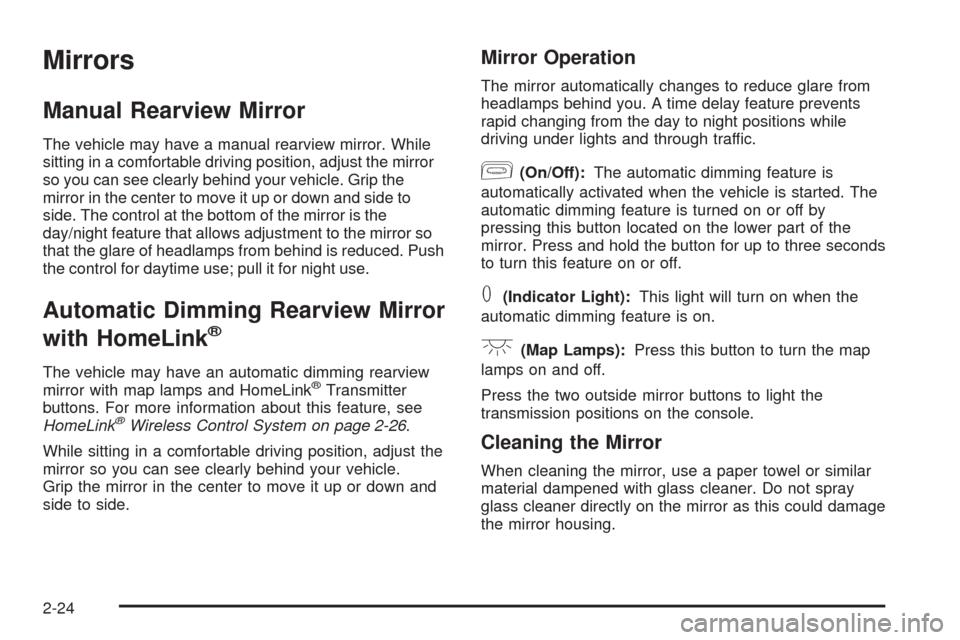
side. The control at the bottom of the mirror is the
day/night feature that allows adjustment to the mirror so
that the glare of headlamps from behind is reduced. Push
the control for daytime use; pull it for night use.
Automatic Dimming Rearview Mirror
with HomeLink
®
The vehicle may have an automatic dimming rearview
mirror with map lamps and HomeLink®Transmitter
buttons. For more information about this feature, see
HomeLink
®Wireless Control System on page 2-26.
While sitting in a comfortable driving position, adjust the
mirror so you can see clearly behind your vehicle.
Grip the mirror in the center to move it up or down and
side to side.
Mirror Operation
The mirror automatically changes to reduce glare from
headlamps behind you. A time delay feature prevents
rapid changing from the day to night positions while
driving under lights and through traffic.
[(On/Off):The automatic dimming feature is
automatically activated when the vehicle is started. The
automatic dimming feature is turned on or off by
pressing this button located on the lower part of the
mirror. Press and hold the button for up to three seconds
to turn this feature on or off.
T(Indicator Light):This light will turn on when the
automatic dimming feature is on.
+(Map Lamps):Press this button to turn the map
lamps on and off.
Press the two outside mirror buttons to light the
transmission positions on the console.
Cleaning the Mirror
When cleaning the mirror, use a paper towel or similar
material dampened with glass cleaner. Do not spray
glass cleaner directly on the mirror as this could damage
the mirror housing.
2-24
Page 86 of 374
Outside Automatic Dimming
Heated Mirror
If the vehicle has this feature, the driver’s side outside
rearview mirror will adjust for the glare of headlamps
from behind by pushing the on and off settings on the
mirror. SeeAutomatic Dimming Rearview Mirror
with HomeLink
®on page 2-24for more information.
Both outside mirrors are also heated when the
rear window defogger is turned on. See “Rear Window
Defogger” underClimate Control System on page 3-18.
The mirrors can be manually folded inward to prevent
damage when going through an automatic car wash.
To fold, push the mirror toward the vehicle. To return the
mirror to its original position, push outward. Be sure
to return the mirrors to their original unfolded position
before driving.
HomeLink®Transmitter
HomeLink®Wireless Control System
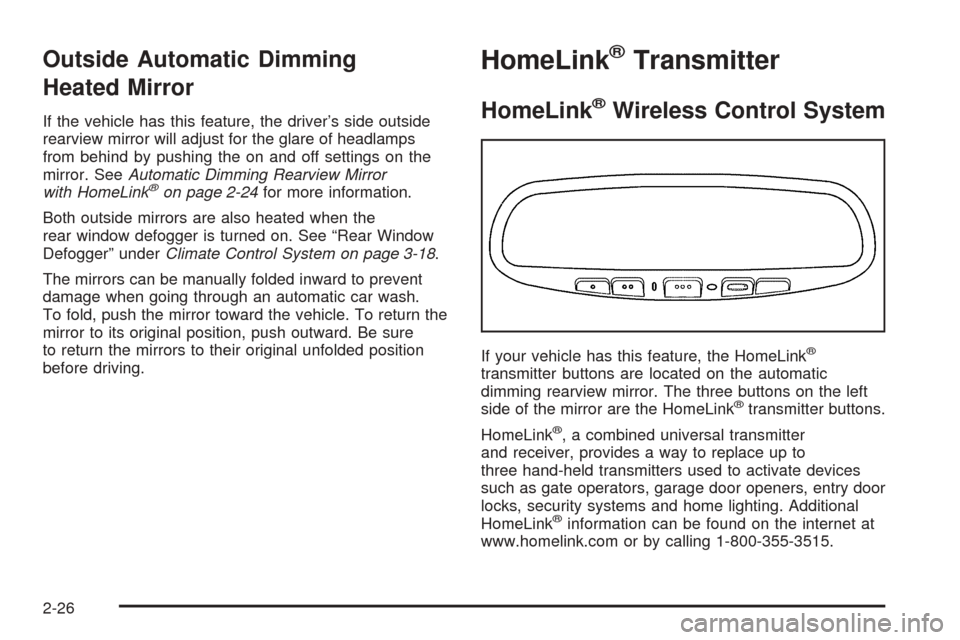
If your vehicle has this feature, the HomeLink®
transmitter buttons are located on the automatic
dimming rearview mirror. The three buttons on the left
side of the mirror are the HomeLink
®transmitter buttons.
HomeLink
®, a combined universal transmitter
and receiver, provides a way to replace up to
three hand-held transmitters used to activate devices
such as gate operators, garage door openers, entry door
locks, security systems and home lighting. Additional
HomeLink
®information can be found on the internet at
www.homelink.com or by calling 1-800-355-3515.
2-26
Page 87 of 374
If your vehicle is equipped with the HomeLink®
Transmitter, it complies with Part 15 of the FCC Rules.
Operation is subject to the following two conditions:
(1) this device may not cause harmful interference, and
(2) this device must accept any interference received,
including interference that may cause undesired
operation.
This device complies with RSS-210 of Industry Canada.
Operation is subject to the following two conditions:
(1) this device may not cause interference, and
(2) this device must accept any interference received,
including interference that may cause undesired
operation of the device.
Changes and modications to this system by other than
an authorized service facility could void authorization
to use this equipment.
HomeLink®Wireless Control
System Operation
Do not use the HomeLink®Transmitter with any garage
door opener that does not have the “stop and reverse”
feature. This includes any garage door opener model
manufactured before April 1, 1982. If you have a newer
garage door opener with rolling codes, please be
sure to follow Steps 6 through 8 to complete the
programming of your HomeLink
®Transmitter.Read the instructions completely before attempting to
program the HomeLink
®Transmitter. Because of
the steps involved, it may be helpful to have another
person available to assist you in programming the
transmitter.
Keep the original transmitter for use in other vehicles as
well as for future HomeLink
®programming. It is also
recommended that upon the sale of the vehicle,
the programmed HomeLink
®buttons should be erased
for security purposes. Refer to “Erasing HomeLink®
Buttons” or, for assistance, contact HomeLink®on the
Internet at: www.homelink.com or by calling
1-800-355-3515.
Be sure that people and objects are clear of the garage
door or gate operator you are programming. When
programming a garage door, it is advised to park outside
of the garage.
It is recommended that a new battery be installed in
your hand-held transmitter for quicker and more
accurate transmission of the radio frequency.
2-27
Page 88 of 374
Programming HomeLink®
Your vehicle’s engine should be turned off while
programming the transmitter. Follow these steps to
program up to three channels:
1. Press and hold down the two outside buttons,
releasing only when the indicator light begins to
ash, after 20 seconds. Do not hold down the
buttons for longer than 30 seconds and do not
repeat this step to program a second and/or third
transmitter to the remaining two HomeLink
®buttons.
2. Position the end of your hand-held transmitter about
1 to 3 inches (3 to 8 cm) away from the HomeLink
®
buttons while keeping the indicator light in view.
3. Simultaneously press and hold both the desired
button on HomeLink
®and the hand-held transmitter
button. Do not release the buttons until Step 4
has been completed.
Some entry gates and garage door openers may
require you to substitute Step 3 with the procedure
noted in “Gate Operator and Canadian
Programming” later in this section.4. The indicator light will ash slowly at rst and then
rapidly after HomeLink
®successfully receives the
frequency signal from the hand-held transmitter.
Release both buttons.
5. Press and hold the newly-trained HomeLink
®button
and observe the indicator light.
If the indicator light stays on constantly,
programming is complete and your device should
activate when the HomeLink
®button is pressed and
released.
To program the remaining two HomeLink
®buttons,
begin with Step 2 under “Programming HomeLink®.”
Do not repeat Step 1 as this will erase all of the
programmed channels.
If the indicator light blinks rapidly for two seconds
and then turns to a constant light, continue with
Steps 6 through 8 following to complete the
programming of a rolling-code equipped device
(most commonly, a garage door opener).
2-28
Page 89 of 374
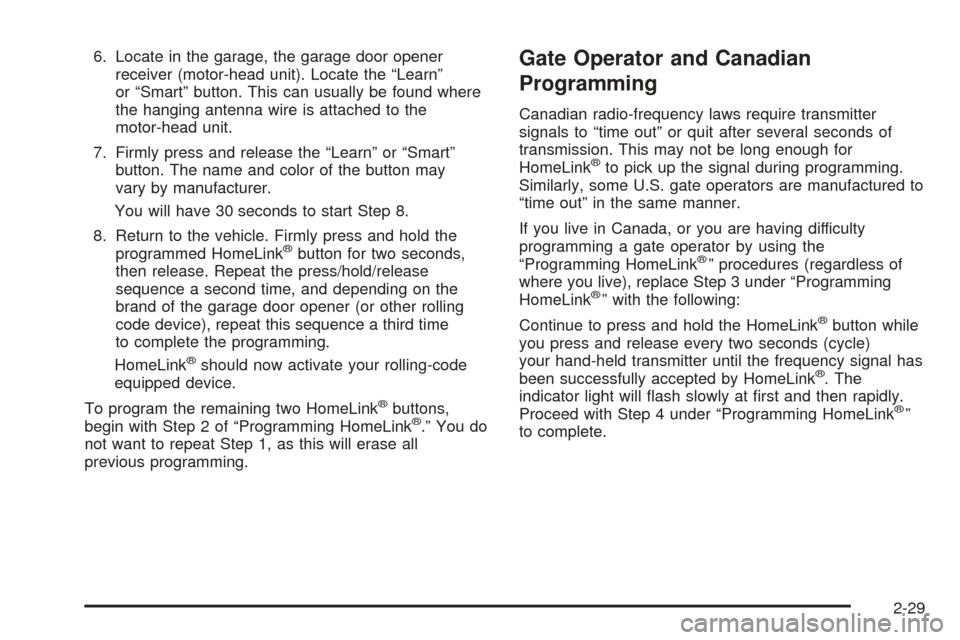
6. Locate in the garage, the garage door opener
receiver (motor-head unit). Locate the “Learn”
or “Smart” button. This can usually be found where
the hanging antenna wire is attached to the
motor-head unit.
7. Firmly press and release the “Learn” or “Smart”
button. The name and color of the button may
vary by manufacturer.
You will have 30 seconds to start Step 8.
8. Return to the vehicle. Firmly press and hold the
programmed HomeLink
®button for two seconds,
then release. Repeat the press/hold/release
sequence a second time, and depending on the
brand of the garage door opener (or other rolling
code device), repeat this sequence a third time
to complete the programming.
HomeLink
®should now activate your rolling-code
equipped device.
To program the remaining two HomeLink
®buttons,
begin with Step 2 of “Programming HomeLink®.” You do
not want to repeat Step 1, as this will erase all
previous programming.
Gate Operator and Canadian
Programming
Canadian radio-frequency laws require transmitter
signals to “time out” or quit after several seconds of
transmission. This may not be long enough for
HomeLink
®to pick up the signal during programming.
Similarly, some U.S. gate operators are manufactured to
“time out” in the same manner.
If you live in Canada, or you are having difficulty
programming a gate operator by using the
“Programming HomeLink
®” procedures (regardless of
where you live), replace Step 3 under “Programming
HomeLink
®” with the following:
Continue to press and hold the HomeLink
®button while
you press and release every two seconds (cycle)
your hand-held transmitter until the frequency signal has
been successfully accepted by HomeLink
®. The
indicator light will ash slowly at rst and then rapidly.
Proceed with Step 4 under “Programming HomeLink
®”
to complete.
2-29
Page 90 of 374
Using HomeLink®
Press and hold the appropriate HomeLink®button for at
least half of a second. The indicator light will come
on while the signal is being transmitted.
Erasing HomeLink®Buttons
To erase programming from the three buttons do the
following:
1. Press and hold down the two outside buttons until
the indicator light begins to ash, after 20 seconds.
Do not hold the two outside buttons for longer
than 30 seconds.
2. Release both buttons.
HomeLink
®is now in the train (learning) mode and can
be programmed at any time beginning with Step 2
under “Programming HomeLink
®” shown earlier in
this section.
Individual buttons cannot be erased, but they can be
reprogrammed. See “Reprogramming a Single
HomeLink
®Button” following this section.
Reprogramming a Single
HomeLink®Button
To program a device to HomeLink®using a HomeLink®
button previously trained, follow these steps:
1. Press and hold the desired HomeLink
®button. Do
not release the button.
2. The indicator light will begin to ash after
20 seconds. While still holding the HomeLink
®
button, proceed with Step 2 under “Programming
HomeLink®” shown earlier in this section.
Resetting Defaults
To reset HomeLink®to default settings do the following:
1. Hold down the two outside buttons for about
20 seconds until the indicator light begins to ash.
2. Continue to hold both buttons until the HomeLink
®
indicator light turns off.
3. Release both buttons.
For questions or comments, contact HomeLink
®at
1-800-355-3515, or on the Internet at
www.homelink.com.
2-30
Page 104 of 374
Vehicle Personalization
Memory Seat
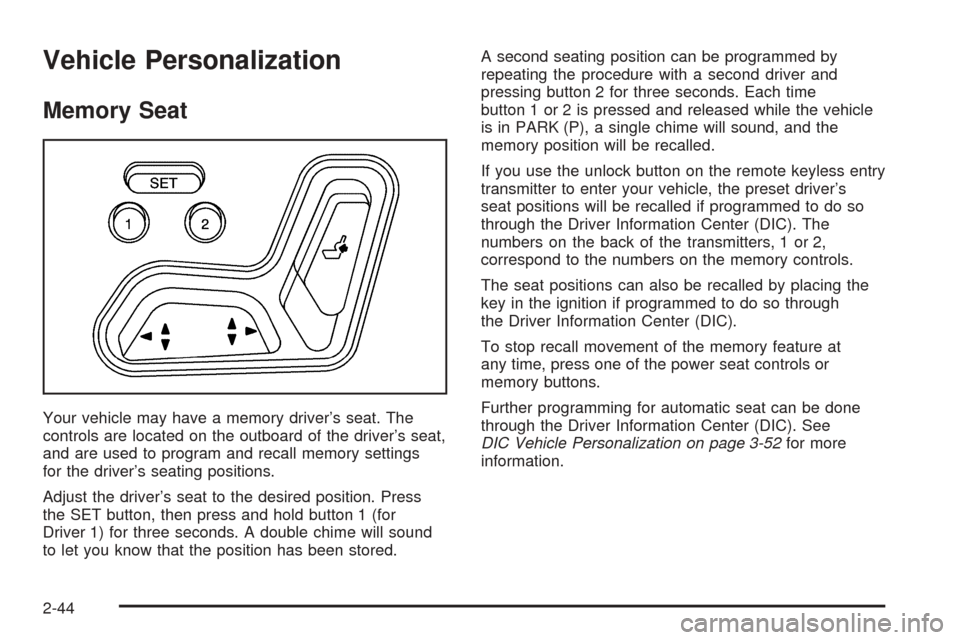
Your vehicle may have a memory driver’s seat. The
controls are located on the outboard of the driver’s seat,
and are used to program and recall memory settings
for the driver’s seating positions.
Adjust the driver’s seat to the desired position. Press
the SET button, then press and hold button 1 (for
Driver 1) for three seconds. A double chime will sound
to let you know that the position has been stored.A second seating position can be programmed by
repeating the procedure with a second driver and
pressing button 2 for three seconds. Each time
button 1 or 2 is pressed and released while the vehicle
is in PARK (P), a single chime will sound, and the
memory position will be recalled.
If you use the unlock button on the remote keyless entry
transmitter to enter your vehicle, the preset driver’s
seat positions will be recalled if programmed to do so
through the Driver Information Center (DIC). The
numbers on the back of the transmitters, 1 or 2,
correspond to the numbers on the memory controls.
The seat positions can also be recalled by placing the
key in the ignition if programmed to do so through
the Driver Information Center (DIC).
To stop recall movement of the memory feature at
any time, press one of the power seat controls or
memory buttons.
Further programming for automatic seat can be done
through the Driver Information Center (DIC). See
DIC Vehicle Personalization on page 3-52for more
information.
2-44
Page 107 of 374
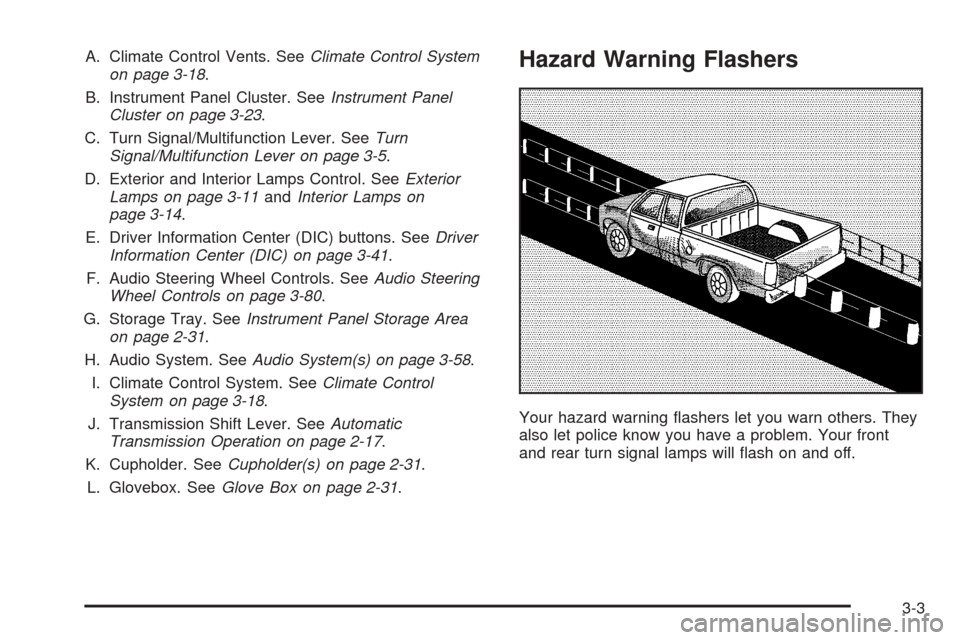
A. Climate Control Vents. SeeClimate Control System
on page 3-18.
B. Instrument Panel Cluster. SeeInstrument Panel
Cluster on page 3-23.
C. Turn Signal/Multifunction Lever. SeeTurn
Signal/Multifunction Lever on page 3-5.
D. Exterior and Interior Lamps Control. SeeExterior
Lamps on page 3-11andInterior Lamps on
page 3-14.
E. Driver Information Center (DIC) buttons. SeeDriver
Information Center (DIC) on page 3-41.
F. Audio Steering Wheel Controls. SeeAudio Steering
Wheel Controls on page 3-80.
G. Storage Tray. SeeInstrument Panel Storage Area
on page 2-31.
H. Audio System. SeeAudio System(s) on page 3-58.
I. Climate Control System. SeeClimate Control
System on page 3-18.
J. Transmission Shift Lever. SeeAutomatic
Transmission Operation on page 2-17.
K. Cupholder. SeeCupholder(s) on page 2-31.
L. Glovebox. SeeGlove Box on page 2-31.Hazard Warning Flashers
Your hazard warning ashers let you warn others. They
also let police know you have a problem. Your front
and rear turn signal lamps will ash on and off.
3-3
Page 145 of 374
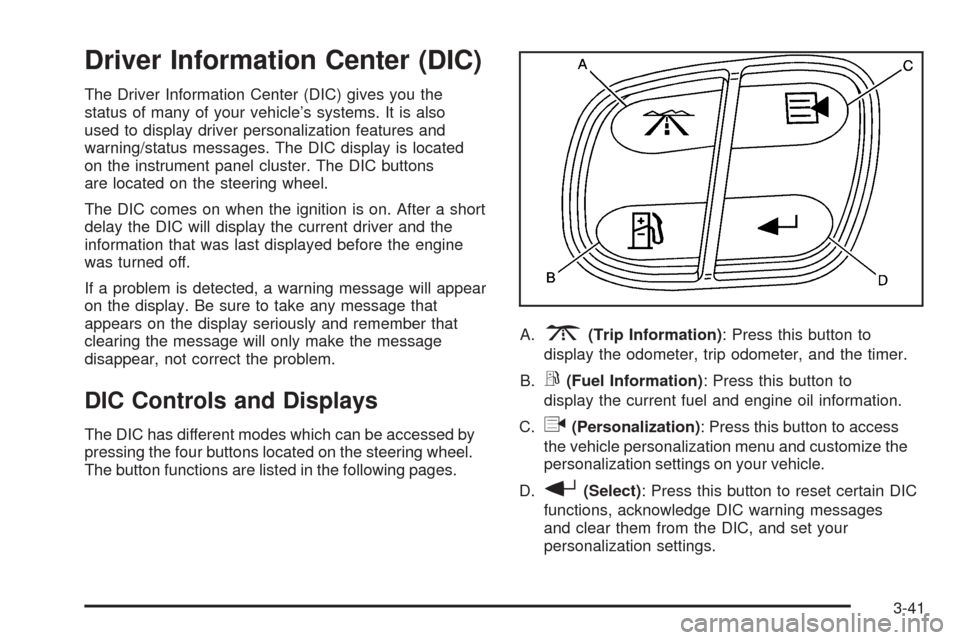
Driver Information Center (DIC)
The Driver Information Center (DIC) gives you the
status of many of your vehicle’s systems. It is also
used to display driver personalization features and
warning/status messages. The DIC display is located
on the instrument panel cluster. The DIC buttons
are located on the steering wheel.
The DIC comes on when the ignition is on. After a short
delay the DIC will display the current driver and the
information that was last displayed before the engine
was turned off.
If a problem is detected, a warning message will appear
on the display. Be sure to take any message that
appears on the display seriously and remember that
clearing the message will only make the message
disappear, not correct the problem.
DIC Controls and Displays
The DIC has different modes which can be accessed by
pressing the four buttons located on the steering wheel.
The button functions are listed in the following pages.A.
3(Trip Information): Press this button to
display the odometer, trip odometer, and the timer.
B.
r(Fuel Information): Press this button to
display the current fuel and engine oil information.
C.
q(Personalization): Press this button to access
the vehicle personalization menu and customize the
personalization settings on your vehicle.
D.
r(Select): Press this button to reset certain DIC
functions, acknowledge DIC warning messages
and clear them from the DIC, and set your
personalization settings.
3-41
Page 161 of 374
Seat Position Recall
This feature allows you to choose how any previously
programmed seat position is recalled. Press the
personalization button until SEAT POSITION RECALL
appears in the display. To access the modes for
SEAT POSITION RECALL, press the select button.
Once SEAT POSITION RECALL is selected, press the
select button to scroll through the following modes:
Mode 1:SEAT POSITION RECALL OFF
Mode 2:SEAT POSITION RECALL AT KEY IN
Mode 3:SEAT POSITION RECALL ON REMOTE
If you choose Mode 1, the memory seat position you
saved will only be recalled when the memory
button 1 or 2 is pressed.
If you choose Mode 2, the memory seat position you
saved will be recalled when you put the key in the
ignition.
If you choose Mode 3, the memory seat position you
saved will be recalled when you unlock the vehicle with
the remote keyless entry transmitter.
Scroll through the list of modes. When the mode you want
is displayed on the DIC, press personalization button to
set your choice, return to the personalization menu, and
advance to the next programmable feature. SeeMemory
Seat on page 2-44for more information.
Display Language
This feature allows you to choose the language in which
the DIC information will be displayed. Press the select
button until DISPLAY LANGUAGE appears on the
DIC. Once DISPLAY LANGUAGE is selected, press the
select button to scroll through the following modes:
Mode 1:ENGLISH
Mode 2:FRANCAIS (French)
Mode 3:ESPANOL (Spanish)
When the language you desire is displayed on the DIC,
press personalization button to set your choice,
return to the personalization menu, and advance to the
next programmable feature.
If you accidentally choose a language that you don’t
want, press and hold the personalization button and the
trip information button at the same time. The DIC will
begin scrolling through the languages in their particular
language. English will be in English, French will be
in French and so on. When you see the language that
you would like, release both buttons. The DIC will
then display the information in the language you chose.
3-57