automatic transmission CHEVROLET SSR 2005 1.G User Guide
[x] Cancel search | Manufacturer: CHEVROLET, Model Year: 2005, Model line: SSR, Model: CHEVROLET SSR 2005 1.GPages: 388, PDF Size: 2.5 MB
Page 119 of 388

Instrument Panel Overview...............................3-4
Hazard Warning Flashers................................3-5
Other Warning Devices...................................3-5
Horn.............................................................3-6
Tilt Wheel.....................................................3-6
Turn Signal/Multifunction Lever.........................3-6
Turn and Lane-Change Signals........................3-7
Headlamp High/Low-Beam Changer..................3-8
Flash-to-Pass.................................................3-8
Windshield Wipers..........................................3-8
Windshield Washer.........................................3-9
Cruise Control................................................3-9
Exterior Lamps.............................................3-12
Headlamps on Reminder................................3-13
Daytime Running Lamps (DRL).......................3-14
Automatic Headlamp System..........................3-14
Fog Lamps..................................................3-15
Interior Lamps..............................................3-16
Instrument Panel Brightness...........................3-16
Theater Dimming..........................................3-17
Exit Lighting.................................................3-17
Perimeter Lighting.........................................3-17
Map Lamps.................................................3-17
Battery Run-Down Protection..........................3-17Center Console Switchbank............................3-18
Accessory Power Outlets...............................3-18
Ashtrays and Cigarette Lighter........................3-19
Climate Controls............................................3-20
Climate Control System.................................3-20
Outlet Adjustment.........................................3-22
Warning Lights, Gages, and Indicators............3-23
Instrument Panel Cluster................................3-24
Speedometer and Odometer...........................3-25
Trip Odometer..............................................3-25
Tachometer.................................................3-26
Engine Speed Limiter....................................3-26
Safety Belt Reminder Light.............................3-26
Airbag Readiness Light..................................3-27
Airbag Off Light............................................3-28
Charging System Light..................................3-29
Brake System Warning Light..........................3-30
Anti-Lock Brake System Warning Light.............3-31
Traction Control System (TCS) Warning
Light (Automatic Transmission)....................3-31
Engine Coolant Temperature Gage...................3-32
Malfunction Indicator Lamp.............................3-32
Oil Pressure Gage........................................3-36
Section 3 Instrument Panel
3-1
Page 122 of 388
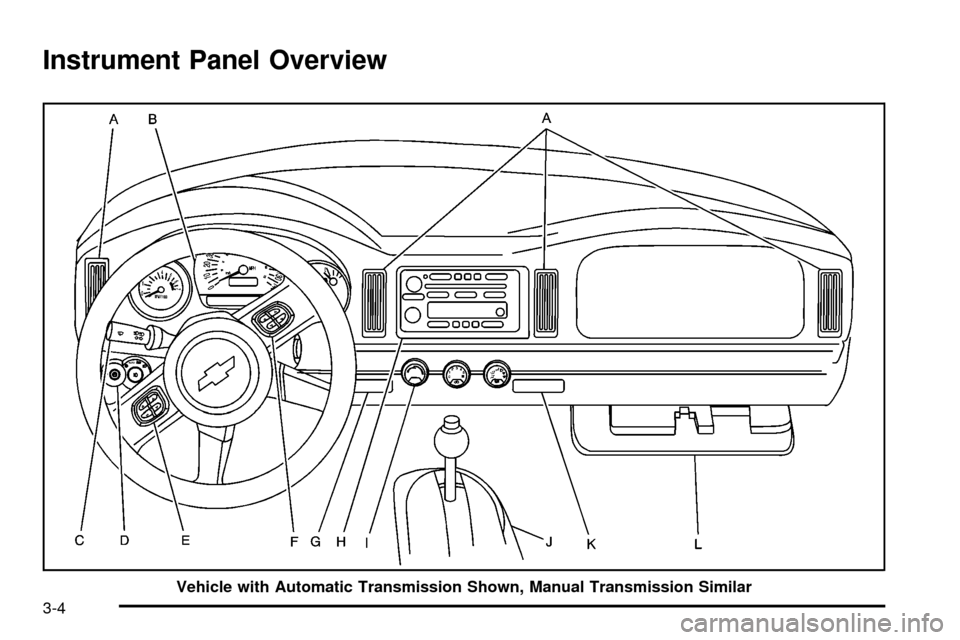
Instrument Panel Overview
Vehicle with Automatic Transmission Shown, Manual Transmission Similar
3-4
Page 123 of 388

A. Climate Control Vents. SeeClimate Control System
on page 3-20.
B. Instrument Panel Cluster. See
Instrument Panel
Cluster on page 3-24.
C. Turn Signal/Multifunction Lever. See
Turn
Signal/Multifunction Lever on page 3-6.
D. Exterior and Interior Lamps Control. See
Exterior
Lamps on page 3-12andInterior Lamps on
page 3-16.
E. Driver Information Center (DIC) buttons. See
Driver
Information Center (DIC) on page 3-42.
F. Audio Steering Wheel Controls. See
Audio Steering
Wheel Controls on page 3-82.
G. Storage Tray. See
Instrument Panel Storage Area
on page 2-35.
H. Audio System. See
Audio System(s) on page 3-58.
I. Climate Control System. See
Climate Control
System on page 3-20.
J. Transmission Shift Lever. See
Automatic
Transmission Operation on page 2-19orManual
Transmission Operation on page 2-21.
K. Cupholder. See
Cupholder(s) on page 2-35.
L. Glovebox. See
Glove Box on page 2-35.
Hazard Warning Flashers
Your hazard warning ¯ashers let you warn others. They
also let police know you have a problem. Your front
and rear turn signal lamps will ¯ash on and off.
The hazard warning
¯asher button is located
on top of the steering
column.
Your hazard warning ¯ashers work no matter what
position your key is in, and even if the key is not in the
ignition.
Press the button to make the front and rear turn signal
lamps ¯ash on and off. Press the button again to
turn the ¯ashers off.
When the hazard warning ¯ashers are on, your turn
signals will not work.
Other Warning Devices
If you carry re¯ective triangles, you can set them up at
the side of the road about 300 feet (100 m) behind
your vehicle.
3-5
Page 132 of 388

Daytime Running Lamps (DRL)
Daytime Running Lamps (DRL) can make it easier for
others to see the front of your vehicle during the
day. DRL can be helpful in many different driving
conditions, but they can be especially helpful in the short
periods after dawn and before sunset. Fully functional
daytime running lamps are required on all vehicles
®rst sold in Canada.
The DRL system will make your headlamps come
on at reduced brightness when the following conditions
are met:
·The ignition is on,
·the exterior lamps knob is in AUTO,
·the light sensor detects daytime light, and
·the automatic transmission is not in PARK (P)
or the parking brake is not set on a manual
transmission.
When the DRL are on, only your headlamps will be on.
The taillamps, sidemarker and other lamps won't be
on. The instrument panel won't be lit up either. When it begins to get dark, the headlamps will
automatically switch from DRL to the regular headlamps.
To idle your vehicle with the DRL off, put your
automatic transmission in PARK (P). The DRL will
stay off until you shift out of PARK (P). If you have a
manual transmission, set the parking brake when
the ignition is off and then start your vehicle. The DRL
will stay off until you release the parking brake.
Automatic Headlamp System
When it is dark enough outside, your automatic
headlamp system will turn on your headlamps at the
normal brightness along with other lamps such as
the taillamps, sidemarker, parking lamps and the
instrument panel lights when the exterior lamps knob is
turned to AUTO. See
Exterior Lamps on page 3-12for more information. The radio lights will also be on.
Your vehicle is equipped with a light sensor on the top
of the instrument panel. Be sure it is not covered or
the system will be on whenever the ignition is on.
The system may also turn on your lights when driving
through a parking garage, heavy overcast weather
or a tunnel. This is normal.
3-14
Page 136 of 388
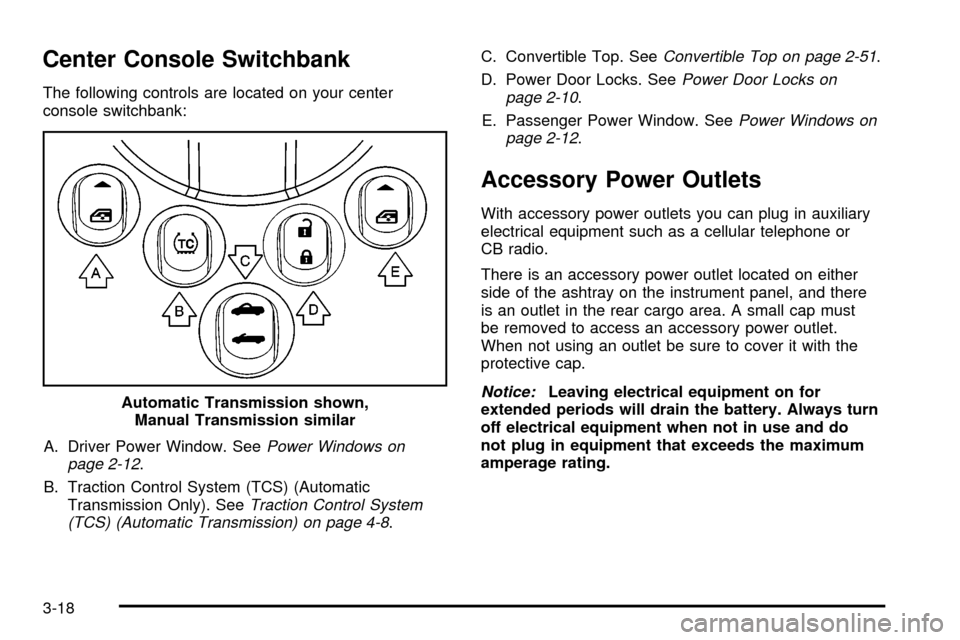
Center Console Switchbank
The following controls are located on your center
console switchbank:A. Driver Power Window. See
Power Windows on
page 2-12.
B. Traction Control System (TCS) (Automatic Transmission Only). See
Traction Control System
(TCS) (Automatic Transmission) on page 4-8. C. Convertible Top. See
Convertible Top on page 2-51.
D. Power Door Locks. See
Power Door Locks on
page 2-10.
E. Passenger Power Window. See
Power Windows on
page 2-12.
Accessory Power Outlets
With accessory power outlets you can plug in auxiliary
electrical equipment such as a cellular telephone or
CB radio.
There is an accessory power outlet located on either
side of the ashtray on the instrument panel, and there
is an outlet in the rear cargo area. A small cap must
be removed to access an accessory power outlet.
When not using an outlet be sure to cover it with the
protective cap.
Notice:Leaving electrical equipment on for
extended periods will drain the battery. Always turn
off electrical equipment when not in use and do
not plug in equipment that exceeds the maximum
amperage rating.
Automatic Transmission shown,
Manual Transmission similar
3-18
Page 142 of 388
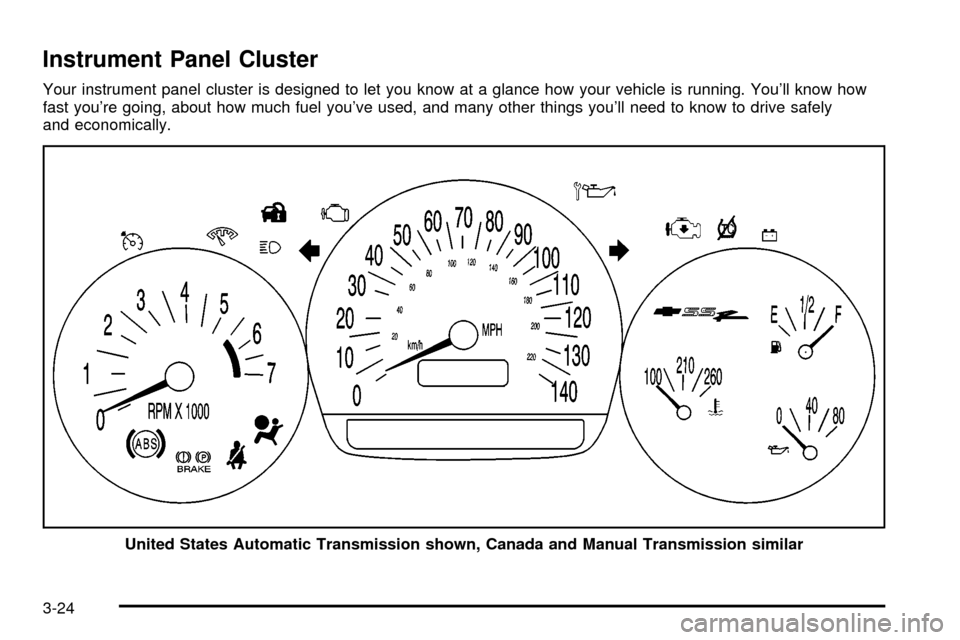
Instrument Panel Cluster
Your instrument panel cluster is designed to let you know at a glance how your vehicle is running. You'll know how
fast you're going, about how much fuel you've used, and many other things you'll need to know to drive safely
and economically.United States Automatic Transmission shown, Canada and Manual Transmission similar
3-24
Page 149 of 388

Anti-Lock Brake System
Warning Light
With the anti-lock brake
system, this light will come
on when you start your
engine and may stay on for
several seconds. That's
normal.
If the light stays on, or comes on when you're driving,
your vehicle needs service. If the regular brake
system warning light isn't on, you still have brakes, but
you don't have anti-lock brakes. If the regular brake
system warning light is also on, you don't have anti-lock
brakes and there's a problem with your regular
brakes. See
Brake System Warning Light on page 3-30.
The anti-lock brake system warning light should come
on brie¯y when you turn the ignition key to RUN.
If the light doesn't come on then, have it ®xed so it
will be ready to warn you if there is a problem.
Traction Control System (TCS)
Warning Light (Automatic
Transmission)
If the TC (traction control)
warning light comes on
and stays on, there may
be a problem with the
traction control system.
The TC (traction control) warning light will come on
brie¯y when you turn the ignition to ON. If it doesn't
come on then, have it ®xed so it will be ready to warn
you if there is a problem.
If the Traction Control System (TCS) is on and you drive
faster than 100 mph (161 km/h), the system will turn
off and the TC warning light will come on. The TCS will
turn back on and the TC warning light will go out
once the vehicle speed falls below 90 mph (145 km/h).
3-31
Page 164 of 388
Battery Voltage Too Low
This message will be displayed when the battery
voltage is lower than normal and you try to raise or
lower the convertible top. The charging system light
may also be displayed on the instrument panel cluster.
See
Charging System Light on page 3-29for more
information. Press the select button to acknowledge the
message and clear it from the DIC display.
Cargo Cover Ajar
This message will be displayed when trying to open
or close the convertible top while the cargo cover
is open. Make sure the cargo cover is fully closed
before trying to open or close the convertible top.
This message will clear itself from the DIC once the
cargo cover is closed.
Change Trans (Transmission) Fluid
(Automatic Transmission Only)
If your transmission ¯uid in your vehicle needs to
be changed, this message will appear on the DIC.
See
Automatic Transmission Fluid on page 5-21andScheduled Maintenance on page 6-4for more
information.
Check Oil Level
If the oil level in the vehicle is low, this message will
appear on the DIC. Check the oil level and add oil
as necessary. See
Engine Oil on page 5-13for more
information. Press the select button to acknowledge this
message and clear it from the DIC display.
Depress Brake
This message will be displayed on the DIC when you
try to raise or lower the convertible top without ®rst
pressing the brake pedal. The brake pedal must
be pressed in order to operate the convertible top.
See
Convertible Top on page 2-51for more information.
Pressing the brake pedal will clear the message, or
you can press the select button to acknowledge
and clear the message from the DIC display.
Driver Door Ajar
This message will be displayed on the DIC and a
chime will sound when the driver's door is not closed
completely. Stop the vehicle, check the door for
obstacles, and close the door again. Fully closing the
driver's door will clear this message from the display,
or you can press the select button to acknowledge
the message and clear it from the DIC display.
3-46
Page 169 of 388
Stop Vehicle
This message will be displayed when attempting to
release the cargo cover while the vehicle is in motion.
The vehicle must be stopped to release the cargo cover.
See
Cargo Cover on page 2-36for more information.
Tlat (Tonneau Latch) Hall Switch Fault
This message will be displayed when trying to raise
or lower the convertible top and there is a problem with
this switch. If the message persists, see your
GM dealer for service.
Tonn (Tonneau) Hall Switch Fault
This message will be displayed when trying to raise or
lower the convertible top and there is a fault with
this switch. If the message persists, see your GM dealer
for service.
Tonn (Tonneau) Latd (Latched)
Switch Fault
This message will be displayed when trying to raise
or lower the convertible top and there is a fault with this
switch. If the message persists, see your GM dealer
for service.
Traction Active
(Automatic Transmission Only)
This message, along with the light on the Traction
Control System (TCS) warning light on the instrument
panel cluster, will be displayed when the TCS system is
active. Press the select button to acknowledge this
message and clear it from the DIC display. See
Traction
Control System (TCS) (Automatic Transmission) on page 4-8
andTraction Control System (TCS) Warning
Light (Automatic Transmission) on page 3-31for
more information.
Trans (Transmission) Hot Idle
(Automatic Transmission Only)
If the transmission ¯uid in the vehicle becomes too hot,
this message will appear on the DIC. Stop the vehicle
and let it idle to allow the transmission ¯uid to cool. This
message will clear when the ¯uid temperature reaches
a safe level. See
Automatic Transmission Fluid on
page 5-21for more information.
3-51
Page 170 of 388
Turn Signal On
If a turn signal is left on for 3/4 mile (1.2 km), this
message will appear on the display and you will hear a
chime. Move the turn signal/multifunction lever to the
off position. Press the select button to acknowledge this
message and clear it from the display. See
Turn
Signal/Multifunction Lever on page 3-6for more
information.
Unknown Speed
This message will be displayed when trying to raise or
lower the convertible top and the roof controller
cannot communicate with the Powertrain Control
Module (PCM). See your GM dealer for service.
DIC Vehicle Personalization
Your vehicle has a personalization feature that allows
you to program certain features to a preferred setting
for up to two drivers. The number of programmable
features varies depending upon which model of
the vehicle you purchased. Once the features are
programmed, the saved settings are recalled by
pressing the unlock button on the remote keyless entry
transmitter, 1 or 2, or by pressing the appropriate
memory button, 1 or 2, located on the outboard side of
the driver's seat. See
Memory Seat on page 2-59for more information. The following is a list of available programmable
options:
·AUTOMATIC LOCKING (Automatic
Transmission only)
·AUTOMATIC UNLOCKING
·REMOTE LOCK FEEDBACK
·REMOTE UNLOCK FEEDBACK
·HEADLAMPS ON AT EXIT
·PERIMETER LIGHTING
·SEAT POSITION RECALL, if equipped
·ALARM WARNING TYPE
·DISPLAY LANGUAGE
·DISPLAY UNITS ± U.S./MET
q(Personalization):
Press this button located on
the steering wheel to access the vehicle personalization
menu and customize the personalization settings on
your vehicle.
3-52