automatic transmission CHEVROLET SSR 2005 1.G Owner's Manual
[x] Cancel search | Manufacturer: CHEVROLET, Model Year: 2005, Model line: SSR, Model: CHEVROLET SSR 2005 1.GPages: 388, PDF Size: 2.5 MB
Page 171 of 388
Automatic Locking
(Automatic Transmission only)
This feature allows you to choose how the vehicle's
doors are locked on your automatic transmission vehicle.
Press the personalization button until AUTOMATIC
LOCKING appears in the display. To access the modes
for AUTOMATIC LOCKING, press the select button.
Once AUTOMATIC LOCKING is selected, press
the select button to scroll through the following modes:
Mode 1:LOCK DOORS OUT OF PARK
Mode 2: LOCK DOORS WITH SPEED
If you choose Mode 1, the doors will lock when
the vehicle is shifted out of PARK (P).
If you choose Mode 2, the doors will lock when
the vehicle speed is above 8 mph (13 km/h) for
three seconds.
Scroll through the list of modes. When the mode you
want is displayed on the DIC, press the personalization
button to set your choice, return to the personalization
menu, and advance to the next programmable feature.
For more information on automatic door locks, see
Programmable Automatic Door Locks on page 2-10.
Automatic Unlocking
This feature allows you to choose how the vehicle's
doors are unlocked. Press the personalization button
until AUTOMATIC UNLOCKING appears in the display.
To access the modes for AUTOMATIC UNLOCKING,
press the select button. Once AUTOMATIC
UNLOCKING is selected, press the select button to
scroll through the following modes:
Mode 1: UNLOCK ALL IN PARK (Automatic
Transmission only)
Mode 2: UNLOCK ALL AT KEY OUT
Mode 3: UNLOCK DRIVER IN PARK
(Automatic Transmission only)
Mode 4: UNLOCK DOORS MANUALLY
If you choose Mode 1, all of the doors will unlock when
the vehicle is shifted into PARK (P).
If you choose Mode 2, all of the doors will unlock when
the key is taken out of the ignition.
If you choose Mode 3, the driver's door will be unlocked
when the vehicle is shifted into PARK (P).
If you choose Mode 4, the doors will not be unlocked
automatically.
3-53
Page 203 of 388

Your Driving, the Road, and Your Vehicle..........4-2
Defensive Driving...........................................4-2
Drunken Driving.............................................4-3
Control of a Vehicle........................................4-5
Braking.........................................................4-6
Anti-Lock Brake System (ABS).........................4-6
Braking in Emergencies...................................4-8
Traction Control System (TCS)
(Automatic Transmission).............................4-8
Steering......................................................4-10
Off-Road Recovery.......................................4-12
Passing.......................................................4-12
Loss of Control.............................................4-13
Driving at Night............................................4-15
Driving in Rain and on Wet Roads..................4-16
City Driving..................................................4-19Freeway Driving...........................................4-20
Before Leaving on a Long Trip.......................4-21
Highway Hypnosis........................................4-21
Hill and Mountain Roads................................4-22
Winter Driving..............................................4-24
If You Are Stuck: In Sand, Mud,
Ice or Snow..............................................4-28
Rocking Your Vehicle to Get It Out.................4-28
Loading Your Vehicle....................................4-29
Towing..........................................................4-34
Towing Your Vehicle.....................................4-34
Recreational Vehicle Towing...........................4-34
Trailer Recommendations...............................4-35
Towing a Trailer...........................................4-35
Section 4 Driving Your Vehicle
4-1
Page 210 of 388

Remember: Anti-lock does not change the time you
need to get your foot up to the brake pedal or always
decrease stopping distance. If you get too close to
the vehicle in front of you, you will not have time to apply
your brakes if that vehicle suddenly slows or stops.
Always leave enough room up ahead to stop, even
though you have anti-lock brakes.
Using Anti-Lock
Do not pump the brakes. Just hold the brake pedal
down rmly and let anti-lock work for you. You may feel
the brakes vibrate, or you may notice some noise,
but this is normal.
Braking in Emergencies
With anti-lock brakes, you can steer and brake at the
same time. In many emergencies, steering can help
you more than even the very best braking.
Traction Control System (TCS)
(Automatic Transmission)
Your vehicle may have a Traction Control System (TCS)
that limits wheel spin. This is especially useful in slippery
road conditions. The system operates only if it senses
that one or both of the rear wheels are spinning or
beginning to lose traction. When this happens, the
system reduces engine power and may also up-shift the
transmission to limit wheel spin.
You may feel or hear the system working, but this is
normal.
If your vehicle is in cruise control when the traction
control system begins to limit wheel spin, the cruise
control will automatically disengage. When road
conditions allow you to safely use it again, you may
re-engage the cruise control. SeeCruise Control on
page 3-9.
The Traction Control System operates in all transmission
shift lever positions except for rst gear. This is normal.
The system is deactivated when the transmission is
shifted into rst gear. In this situation, the traction control
system warning light on the instrument panel cluster will
come on. This is normal. The system can upshift the
transmission only as high as the shift lever position
you’ve chosen, so you should use the lower gears only
when necessary. SeeAutomatic Transmission Operation
on page 2-19.
4-8
Page 211 of 388
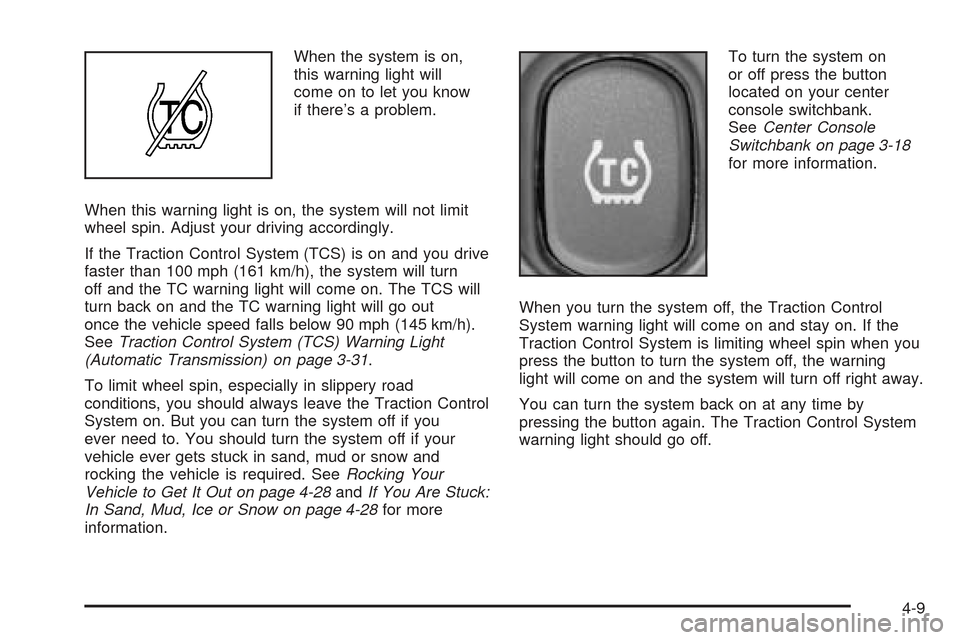
When the system is on,
this warning light will
come on to let you know
if there’s a problem.
When this warning light is on, the system will not limit
wheel spin. Adjust your driving accordingly.
If the Traction Control System (TCS) is on and you drive
faster than 100 mph (161 km/h), the system will turn
off and the TC warning light will come on. The TCS will
turn back on and the TC warning light will go out
once the vehicle speed falls below 90 mph (145 km/h).
SeeTraction Control System (TCS) Warning Light
(Automatic Transmission) on page 3-31.
To limit wheel spin, especially in slippery road
conditions, you should always leave the Traction Control
System on. But you can turn the system off if you
ever need to. You should turn the system off if your
vehicle ever gets stuck in sand, mud or snow and
rocking the vehicle is required. SeeRocking Your
Vehicle to Get It Out on page 4-28andIf You Are Stuck:
In Sand, Mud, Ice or Snow on page 4-28for more
information.To turn the system on
or off press the button
located on your center
console switchbank.
SeeCenter Console
Switchbank on page 3-18
for more information.
When you turn the system off, the Traction Control
System warning light will come on and stay on. If the
Traction Control System is limiting wheel spin when you
press the button to turn the system off, the warning
light will come on and the system will turn off right away.
You can turn the system back on at any time by
pressing the button again. The Traction Control System
warning light should go off.
4-9
Page 230 of 388

If You Are Stuck: In Sand, Mud,
Ice or Snow
In order to free your vehicle when it is stuck, you will
need to spin the wheels, but you do not want to
spin your wheels too fast. The method known as rocking
can help you get out when you are stuck, but you
must use caution.
{CAUTION:
If you let your tires spin at high speed, they
can explode, and you or others could be
injured. And, the transmission or other parts of
the vehicle can overheat. That could cause an
engine compartment re or other damage.
When you are stuck, spin the wheels as little
as possible. Do not spin the wheels above
35 mph (55 km/h) as shown on the
speedometer.Notice:Spinning your wheels can destroy parts of
your vehicle as well as the tires. If you spin the
wheels too fast while shifting your transmission
back and forth, you can destroy your transmission.
For more information about using tire chains on your
vehicle, seeTire Chains on page 5-66.
Rocking Your Vehicle to Get It Out
First, turn your steering wheel left and right. That
will clear the area around your front wheels. If you
have traction control, you should turn the system off.
SeeTraction Control System (TCS) (Automatic
Transmission) on page 4-8. Then shift back and forth
between REVERSE (R) and a forward gear, or with
a manual transmission, between FIRST (1) or
SECOND (2) and REVERSE (R), spinning the wheels
as little as possible. Release the accelerator pedal while
you shift, and press lightly on the accelerator pedal
when the transmission is in gear. By slowly spinning
your wheels in the forward and reverse directions,
you will cause a rocking motion that may free your
vehicle. If that does not get you out after a few tries,
you may need to be towed out. If you do need to
be towed out, seeTowing Your Vehicle on page 4-34.
4-28
Page 238 of 388

If yours was built with trailering options, as many are,
it’s ready for heavier trailers. But trailering is different
than just driving your vehicle by itself. Trailering means
changes in handling, acceleration, braking, durability
and fuel economy. Successful, safe trailering takes
correct equipment, and it has to be used properly.
That’s the reason for this part. In it are many time-tested,
important trailering tips and safety rules. Many of
these are important for your safety and that of your
passengers. So please read this section carefully before
you pull a trailer.
If You Decide To Pull A Trailer
If you do, here are some important points:
There are many different laws, including speed limit
restrictions, having to do with trailering. Make sure
your rig will be legal, not only where you live
but also where you’ll be driving. A good source for
this information can be state or provincial police.
Don’t tow a trailer at all during the rst 500 miles
(800 km) your new vehicle is driven. Your engine,
axle or other parts could be damaged.
Then, during the rst 500 miles (800 km) that you
tow a trailer, don’t drive over 50 mph (80 km/h)
and don’t make starts at full throttle. This helps your
engine and other parts of your vehicle wear in at
the heavier loads.
If you have an automatic transmission, you can tow
in DRIVE (D). You may want to shift the transmission
to THIRD (3) or, if necessary, a lower gear if the
transmission shifts too often under heavy loads
and/or hilly conditions. If you have a manual
transmission and you are towing a trailer, it is better
not to use the highest gear.
Three important considerations have to do with weight:
Weight of the trailer
Weight of the trailer tongue
Weight on your vehicle’s tires
4-36
Page 247 of 388

Turn Signals When Towing a Trailer
When you tow a trailer, your vehicle has to have extra
wiring and a heavy-duty turn signal asher (included
in the optional trailering package).
The arrows on your instrument panel will ash whenever
you signal a turn or lane change. Properly hooked up,
the trailer lamps will also ash, telling other drivers
you’re about to turn, change lanes or stop.
When towing a trailer, the arrows on your instrument
panel will ash for turns even if the bulbs on the trailer
are burned out. Thus, you may think drivers behind
you are seeing your signal when they are not. It’s
important to check occasionally to be sure the trailer
bulbs are still working.
Driving On Grades
Reduce speed and shift to a lower gear before you
start down a long or steep downgrade. If you don’t shift
down, you might have to use your brakes so much
that they would get hot and no longer work well.If you have an automatic transmission, you can tow in
DRIVE (D). You may want to shift the transmission
to THIRD (3) or, if necessary, a lower gear if the
transmission shifts too often under heavy loads or hilly
conditions. If you have a manual transmission and
you are towing a trailer, it is better not to use SIXTH (6)
gear. Just drive in FIFTH (5) gear (or, as you need
to, a lower gear).
When towing at high altitude on steep uphill grades,
consider the following: Engine coolant will boil at a lower
temperature than at normal altitudes. If you turn your
engine off immediately after towing at high altitude
on steep uphill grades, your vehicle may show signs
similar to engine overheating. To avoid this, let the
engine run while parked, preferably on level ground, with
the automatic transmission in PARK (P) for a few
minutes before turning the engine off. For manual
transmissions, let the engine run while parked,
preferably on level ground, with the transmission out of
gear and the parking brake applied, for a few minutes
before turning the engine off. If you do get the overheat
warning, seeEngine Overheating on page 5-28.
4-45
Page 248 of 388

Parking on Hills
{CAUTION:
You really should not park your vehicle, with
a trailer attached, on a hill. If something goes
wrong, your rig could start to move. People
can be injured, and both your vehicle and the
trailer can be damaged.
But if you ever have to park your rig on a hill, here’s
how to do it:
1. Apply your regular brakes, but don’t shift into
PARK (P) yet for an automatic transmission, or
into gear for a manual transmission. Turn your
wheels into the curb if facing downhill or into traffic
if facing uphill.
2. Have someone place chocks under the trailer
wheels.
3. When the wheel chocks are in place, release the
regular brakes until the chocks absorb the load.
4. Release the regular brakes.
When You Are Ready to Leave
After Parking on a Hill
1. Apply your regular brakes and hold the pedal down
while you:
Start your engine.
Shift into a gear.
Release the parking brake.
2. Let up on the brake pedal.
3. Drive slowly until the trailer is clear of the chocks.
4. Stop and have someone pick up and store the
chocks.
4-46
Page 249 of 388
Maintenance When Trailer Towing
Your vehicle will need service more often when you’re
pulling a trailer. SeeScheduled Maintenance on
page 6-4for more information. Things that are especially
important in trailer operation are automatic transmission
uid (don’t overll), engine oil, axle lubricant, belt,
cooling system and brake system. Each of these is
covered in this manual. If you’re trailering, it’s a
good idea to review these sections before you start
your trip.
Check periodically to see that all hitch nuts and bolts
are tight.
Trailer Wiring Harness
The trailer wiring is a four-wire harness assembly.
The wires are blunted and taped to the wiring harness.
The harness and wiring are stored under the vehicle
on the driver’s side. The harness has no connector and
should be wired by a qualied electrical technician.
The technician can use the following color code chart
when connecting the wiring harness to your trailer.
Black: Ground wire.
Yellow: Left turn lamps.
Dark Green: Right turn lamps.
Brown: Parking lamps.
Securely attach the harness to the trailer, then tape
or strap it to your vehicle’s frame rail. Be sure you leave
it loose enough so the wiring doesn’t bend or break,
but not so loose that it drags on the ground.
Store the harness in its original place. Wrap the harness
together and tie it neatly so it won’t be damaged.
4-47
Page 251 of 388
Service............................................................5-3
Doing Your Own Service Work.........................5-4
Adding Equipment to the Outside
of Your Vehicle...........................................5-5
Fuel................................................................5-5
Gasoline Octane............................................5-5
Gasoline Specications....................................5-5
California Fuel...............................................5-6
Additives.......................................................5-6
Fuels in Foreign Countries...............................5-7
Filling Your Tank............................................5-8
Filling a Portable Fuel Container.....................5-10
Checking Things Under the Hood....................5-10
Hood Release..............................................5-11
Engine Compartment Overview.......................5-12
Engine Oil...................................................5-13
Engine Oil Life System..................................5-16
Engine Cover...............................................5-18
Engine Air Cleaner/Filter................................5-19
Automatic Transmission Fluid.........................5-21
Manual Transmission Fluid.............................5-24
Hydraulic Clutch...........................................5-25
Engine Coolant.............................................5-26
Coolant Surge Tank Pressure Cap..................5-28Engine Overheating.......................................5-28
Cooling System............................................5-30
Power Steering Fluid.....................................5-33
Windshield Washer Fluid................................5-34
Brakes........................................................5-35
Battery........................................................5-38
Jump Starting...............................................5-38
Rear Axle.......................................................5-43
Headlamp Aiming...........................................5-44
Bulb Replacement..........................................5-44
Halogen Bulbs..............................................5-44
Headlamps..................................................5-44
Front Turn Signal, Sidemarker and
Parking Lamps..........................................5-46
Taillamps.....................................................5-48
Back-Up Lamps............................................5-49
Replacement Bulbs.......................................5-49
Windshield Wiper Blade Replacement..............5-50
Tires..............................................................5-52
Tire Sidewall Labelling...................................5-53
Tire Terminology and Denitions.....................5-55
Ination - Tire Pressure.................................5-58
Tire Inspection and Rotation...........................5-60
Section 5 Service and Appearance Care
5-1