cruise control CHEVROLET SSR 2005 1.G Owners Manual
[x] Cancel search | Manufacturer: CHEVROLET, Model Year: 2005, Model line: SSR, Model: CHEVROLET SSR 2005 1.GPages: 388, PDF Size: 2.5 MB
Page 119 of 388

Instrument Panel Overview...............................3-4
Hazard Warning Flashers................................3-5
Other Warning Devices...................................3-5
Horn.............................................................3-6
Tilt Wheel.....................................................3-6
Turn Signal/Multifunction Lever.........................3-6
Turn and Lane-Change Signals........................3-7
Headlamp High/Low-Beam Changer..................3-8
Flash-to-Pass.................................................3-8
Windshield Wipers..........................................3-8
Windshield Washer.........................................3-9
Cruise Control................................................3-9
Exterior Lamps.............................................3-12
Headlamps on Reminder................................3-13
Daytime Running Lamps (DRL).......................3-14
Automatic Headlamp System..........................3-14
Fog Lamps..................................................3-15
Interior Lamps..............................................3-16
Instrument Panel Brightness...........................3-16
Theater Dimming..........................................3-17
Exit Lighting.................................................3-17
Perimeter Lighting.........................................3-17
Map Lamps.................................................3-17
Battery Run-Down Protection..........................3-17Center Console Switchbank............................3-18
Accessory Power Outlets...............................3-18
Ashtrays and Cigarette Lighter........................3-19
Climate Controls............................................3-20
Climate Control System.................................3-20
Outlet Adjustment.........................................3-22
Warning Lights, Gages, and Indicators............3-23
Instrument Panel Cluster................................3-24
Speedometer and Odometer...........................3-25
Trip Odometer..............................................3-25
Tachometer.................................................3-26
Engine Speed Limiter....................................3-26
Safety Belt Reminder Light.............................3-26
Airbag Readiness Light..................................3-27
Airbag Off Light............................................3-28
Charging System Light..................................3-29
Brake System Warning Light..........................3-30
Anti-Lock Brake System Warning Light.............3-31
Traction Control System (TCS) Warning
Light (Automatic Transmission)....................3-31
Engine Coolant Temperature Gage...................3-32
Malfunction Indicator Lamp.............................3-32
Oil Pressure Gage........................................3-36
Section 3 Instrument Panel
3-1
Page 120 of 388

Change Engine Oil Light................................3-37
Security Light...............................................3-37
Cruise Control Light......................................3-37
Reduced Engine Power Light.........................3-38
Highbeam On Light.......................................3-38
Check Gages Warning Light...........................3-38
Fuel Gage...................................................3-39
Auxiliary Gage Package.................................3-40
Driver Information Center (DIC).......................3-42
DIC Controls and Displays.............................3-42
DIC Warnings and Messages.........................3-45
DIC Vehicle Personalization............................3-52Audio System(s).............................................3-58
Setting the Time...........................................3-59
Radio with CD..............................................3-59
Radio with Six-Disc CD.................................3-71
Theft-Deterrent Feature..................................3-82
Audio Steering Wheel Controls.......................3-82
Radio Reception...........................................3-83
Care of Your CDs.........................................3-83
Care of Your CD Player................................3-83
Integrated Windshield Antenna........................3-83
Section 3 Instrument Panel
3-2
Page 125 of 388

·LWindshield Washer. SeeWindshield Washer
on page 3-9
.
·ICruise Control.Cruise Control on page 3-9.
For information on the exterior lamps, see
Exterior
Lamps on page 3-12later in this section.
Turn and Lane-Change Signals
The turn signal has two upward (for right) and
two downward (for left) positions. These positions
allow you to signal a turn or a lane change.
To signal a turn, move the lever all the way up or
down. When the turn is ®nished, the lever will return
automatically.
An arrow on the
instrument panel
cluster will ¯ash
in the direction
of the turn or
lane change. To signal a lane change, just raise or lower the lever
until the arrow starts to ¯ash. Hold it there until you
complete your lane change. The lever will return by itself
when you release it.
As you signal a turn or a lane change, if the arrows
¯ash more quickly than normal, a signal bulb may
be burned out and other drivers won't see your turn
signal.
If a bulb is burned out, replace it to help avoid an
accident. If the arrows do not go on at all when you
signal a turn, check the fuse and for burned out bulbs.
See
Fuses and Circuit Breakers on page 5-84.
Turn Signal On Chime
If your turn signal is left on for more than 3/4 of a mile
(1.2 km), a chime will sound at each ¯ash of the
turn signal and a message will display on the DIC.
See
DIC Warnings and Messages on page 3-45for additional information. To turn off the chime, move
the turn signal lever to the off position.
3-7
Page 127 of 388
Windshield Washer
{CAUTION:
In freezing weather, do not use your washer
until the windshield is warmed. Otherwise the
washer ¯uid can form ice on the windshield,
blocking your vision.
LQ(Windshield Washer): To spray washer ¯uid on
the windshield, press the paddle. The wipers will clear
the window and then either stop or return to your preset
speed.
Cruise Control
With cruise control, you can maintain a speed of about
25 mph (40 km/h) or more without keeping your foot
on the accelerator. This can really help on long
trips. Cruise control does not work at speeds below
about 25 mph (40 km/h).
If you apply your brakes, the cruise control will shut off.
{CAUTION:
Cruise control can be dangerous where you
cannot drive safely at a steady speed. So, do
not use your cruise control on winding roads
or in heavy traffic.
Cruise control can be dangerous on slippery
roads. On such roads, fast changes in tire
traction can cause needless wheel spinning,
and you could lose control. Do not use cruise
control on slippery roads.
{CAUTION:
If you leave your cruise control on when you
are not using cruise, you might hit a button
and go into cruise when you do not want to.
You could be startled and even lose control.
Keep the cruise control switch off until you
want to use cruise control.
3-9
Page 128 of 388
Setting Cruise Control
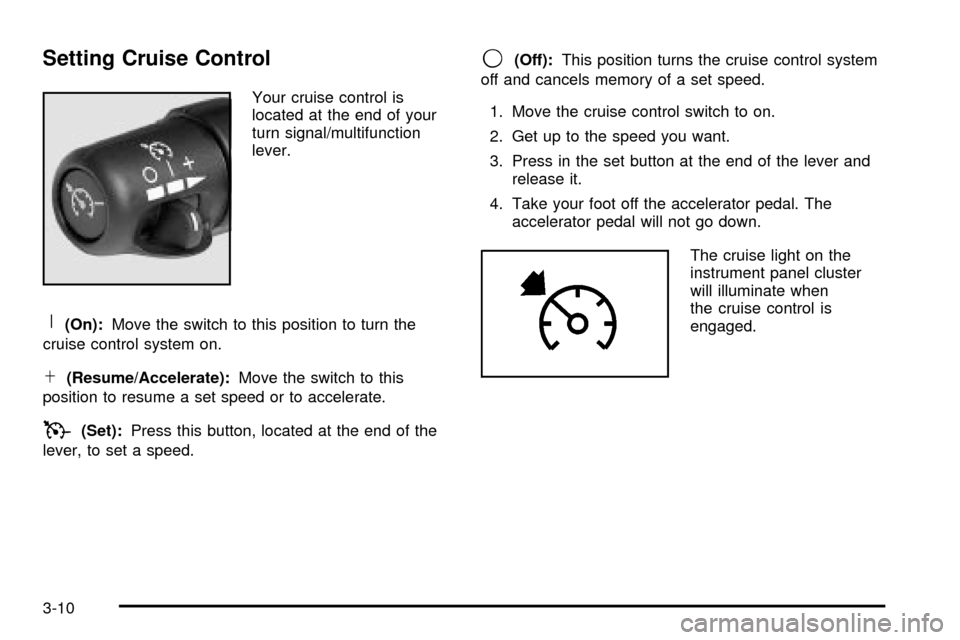
Your cruise control is
located at the end of your
turn signal/multifunction
lever.
R(On):Move the switch to this position to turn the
cruise control system on.
S(Resume/Accelerate): Move the switch to this
position to resume a set speed or to accelerate.
T(Set): Press this button, located at the end of the
lever, to set a speed.
9(Off): This position turns the cruise control system
off and cancels memory of a set speed.
1. Move the cruise control switch to on.
2. Get up to the speed you want.
3. Press in the set button at the end of the lever and release it.
4. Take your foot off the accelerator pedal. The accelerator pedal will not go down.
The cruise light on the
instrument panel cluster
will illuminate when
the cruise control is
engaged.
3-10
Page 129 of 388
Resuming a Set Speed
Suppose you set your cruise control at a desired speed
and then apply your brakes or the clutch, if equipped.
This, of course, shuts off the cruise control. But you do
not need to reset it.
Once you are going about 25 mph (40 km/h) or more,
you can move the cruise control switch brie¯y from on to
resume/accelerate.
You will go right back up to your chosen speed and stay
there.
If you hold the switch at resume/accelerate, the vehicle
will keep going faster until you release the switch or
apply the brake. So unless you want to go faster, do not
hold the switch at resume/accelerate.
Increasing Speed While Using Cruise
Control
There are two ways to go to a higher speed:
·Use the accelerator pedal to get to the higher
speed. Press the button at the end of the lever,
then release the button and the accelerator pedal.
You will now cruise at the higher speed.
·Move the cruise switch from on to resume/
accelerate. Hold it there until you get up to the
speed you want, and then release the switch.
To increase your speed in very small amounts,
move the switch brie¯y to resume/accelerate.
Each time you do this, your vehicle will go about
1 mph (1.6 km/h) faster.
Reducing Speed While Using Cruise
Control
There are two ways to reduce your speed:
·Press and hold the button at the end of the lever
until you reach the lower speed you want, then
release it.
·To slow down in very small amounts, brie¯y press
and release the set button. Each time you do this,
you will go about 1 mph (1.6 km/h) slower.
Passing Another Vehicle While Using
Cruise Control
Use the accelerator pedal to increase your speed.
When you take your foot off the pedal, your vehicle will
slow down to the cruise control speed you set earlier.
3-11
Page 130 of 388
Using Cruise Control on Hills
How well your cruise control will work on hills depends
upon your speed, load and the steepness of the hills.
When going up steep hills, you may want to step on the
accelerator pedal to maintain your speed. When going
downhill, you may have to brake or shift to a lower gear to
keep your speed down. Of course, applying your brakes
or the clutch, if equipped, takes you out of cruise control.
Many drivers ®nd this to be too much trouble and do not
use cruise control on steep hills.
Ending Cruise Control
There are three ways to turn off the cruise control:
·Step lightly on the brake pedal or clutch,
if equipped.
·Move the cruise switch to off, or
·Shift the transmission to NEUTRAL (N).
Erasing Speed Memory
When you turn off the cruise control or the ignition,
your cruise control set speed memory is erased.
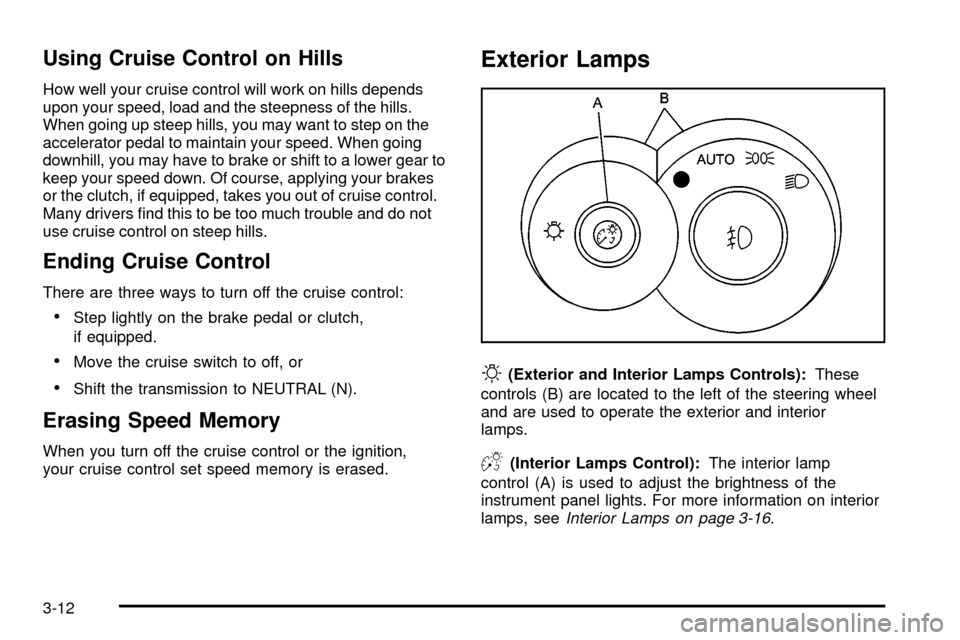
Exterior Lamps
O(Exterior and Interior Lamps Controls):These
controls (B) are located to the left of the steering wheel
and are used to operate the exterior and interior
lamps.
D(Interior Lamps Control): The interior lamp
control (A) is used to adjust the brightness of the
instrument panel lights. For more information on interior
lamps, see
Interior Lamps on page 3-16.
3-12
Page 155 of 388
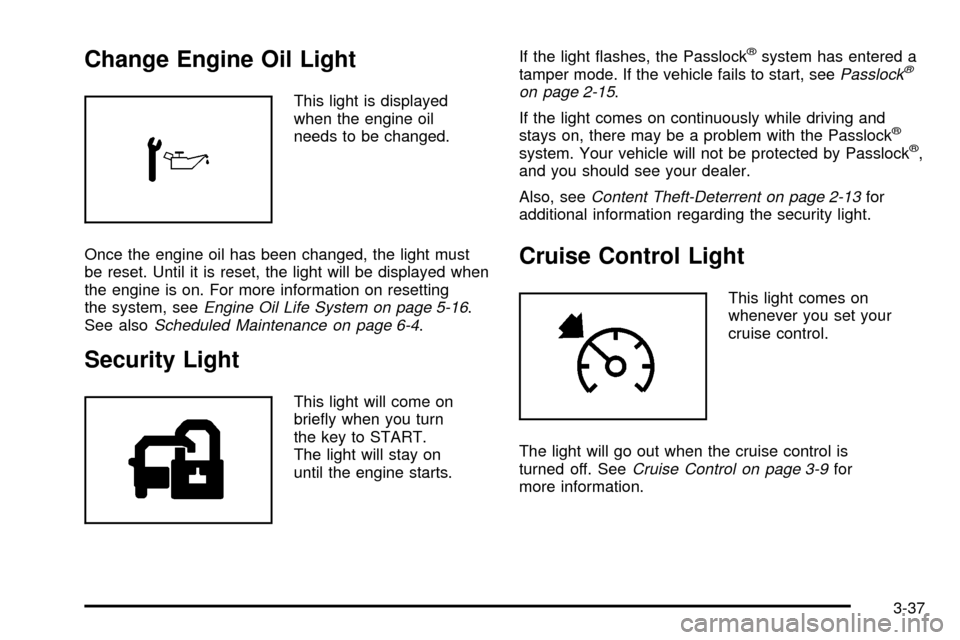
Change Engine Oil Light
This light is displayed
when the engine oil
needs to be changed.
Once the engine oil has been changed, the light must
be reset. Until it is reset, the light will be displayed when
the engine is on. For more information on resetting
the system, see
Engine Oil Life System on page 5-16.
See alsoScheduled Maintenance on page 6-4.
Security Light
This light will come on
brie¯y when you turn
the key to START.
The light will stay on
until the engine starts. If the light ¯ashes, the Passlock
žsystem has entered a
tamper mode. If the vehicle fails to start, seePasslockž
on page 2-15.
If the light comes on continuously while driving and
stays on, there may be a problem with the Passlock
ž
system. Your vehicle will not be protected by Passlockž,
and you should see your dealer.
Also, see
Content Theft-Deterrent on page 2-13for
additional information regarding the security light.
Cruise Control Light
This light comes on
whenever you set your
cruise control.
The light will go out when the cruise control is
turned off. See
Cruise Control on page 3-9for
more information.
3-37
Page 210 of 388

Remember: Anti-lock does not change the time you
need to get your foot up to the brake pedal or always
decrease stopping distance. If you get too close to
the vehicle in front of you, you will not have time to apply
your brakes if that vehicle suddenly slows or stops.
Always leave enough room up ahead to stop, even
though you have anti-lock brakes.
Using Anti-Lock
Do not pump the brakes. Just hold the brake pedal
down rmly and let anti-lock work for you. You may feel
the brakes vibrate, or you may notice some noise,
but this is normal.
Braking in Emergencies
With anti-lock brakes, you can steer and brake at the
same time. In many emergencies, steering can help
you more than even the very best braking.
Traction Control System (TCS)
(Automatic Transmission)
Your vehicle may have a Traction Control System (TCS)
that limits wheel spin. This is especially useful in slippery
road conditions. The system operates only if it senses
that one or both of the rear wheels are spinning or
beginning to lose traction. When this happens, the
system reduces engine power and may also up-shift the
transmission to limit wheel spin.
You may feel or hear the system working, but this is
normal.
If your vehicle is in cruise control when the traction
control system begins to limit wheel spin, the cruise
control will automatically disengage. When road
conditions allow you to safely use it again, you may
re-engage the cruise control. SeeCruise Control on
page 3-9.
The Traction Control System operates in all transmission
shift lever positions except for rst gear. This is normal.
The system is deactivated when the transmission is
shifted into rst gear. In this situation, the traction control
system warning light on the instrument panel cluster will
come on. This is normal. The system can upshift the
transmission only as high as the shift lever position
you’ve chosen, so you should use the lower gears only
when necessary. SeeAutomatic Transmission Operation
on page 2-19.
4-8
Page 379 of 388
Child Restraints (cont.)
Older Children.............................................1-19
Securing a Child Restraint Designed for
the LATCH System...................................1-32
Securing a Child Restraint in the Passenger
Seat Position...........................................1-34
Top Strap...................................................1-28
Top Strap Anchor Location............................1-29
Cigarette Lighter.............................................3-19
Cleaning
Aluminum or Chrome-Plated Wheels..............5-79
Exterior Lamps/Lenses.................................5-78
Fabric/Carpet..............................................5-74
Finish Care.................................................5-78
Glass Surfaces............................................5-76
Instrument Panel.........................................5-76
Interior Plastic Components...........................5-76
Leather......................................................5-76
Tires..........................................................5-80
Underbody Maintenance...............................5-81
Vinyl..........................................................5-76
Washing Your Vehicle...................................5-77
Weatherstrips..............................................5-77
Windshield and Wiper Blades........................5-79
Climate Control System...................................3-20
Outlet Adjustment........................................3-22
Clutch, Hydraulic.............................................5-25Content Theft-Deterrent....................................2-13
Control of a Vehicle.......................................... 4-5
Convertible Top..............................................2-51
Lowering the Convertible Top........................2-53
Raising the Convertible Top..........................2-54
Coolant
Engine Temperature Gage............................3-32
Surge Tank Pressure Cap.............................5-28
Cooling System..............................................5-30
Cruise Control Lever......................................... 3-9
Cruise Control Light........................................3-37
Cupholder(s)..................................................2-35
Customer Assistance Information
Courtesy Transportation.................................. 7-8
Customer Assistance for Text
Telephone (TTY) Users............................... 7-4
Customer Assistance Offices........................... 7-4
Customer Satisfaction Procedure..................... 7-2
GM Mobility Reimbursement Program............... 7-6
Reporting Safety Defects to
General Motors........................................7-11
Reporting Safety Defects to the
Canadian Government..............................7-11
Reporting Safety Defects to the
United States Government.........................7-11
Roadside Assistance Program......................... 7-6
Service Publications Ordering Information........7-12
3