horn CHEVROLET SSR 2005 1.G Owners Manual
[x] Cancel search | Manufacturer: CHEVROLET, Model Year: 2005, Model line: SSR, Model: CHEVROLET SSR 2005 1.GPages: 388, PDF Size: 2.5 MB
Page 64 of 388
At times you may notice a decrease in range. This is
normal for any remote keyless entry system. If the
transmitter does not work or if you have to stand closer
to your vehicle for the transmitter to work, try this:
Check the distance. You may be too far from your
vehicle. You may need to stand closer during
rainy or snowy weather.
Check the location. Other vehicles or objects
may be blocking the signal. Take a few steps to
the left or right, hold the transmitter higher, and
try again.
Check to determine if battery replacement is
necessary. See “Battery Replacement” under
Remote Keyless Entry System Operation on
page 2-6.
If you are still having trouble, see your dealer or
a qualied technician for service.
Remote Keyless Entry System
Operation
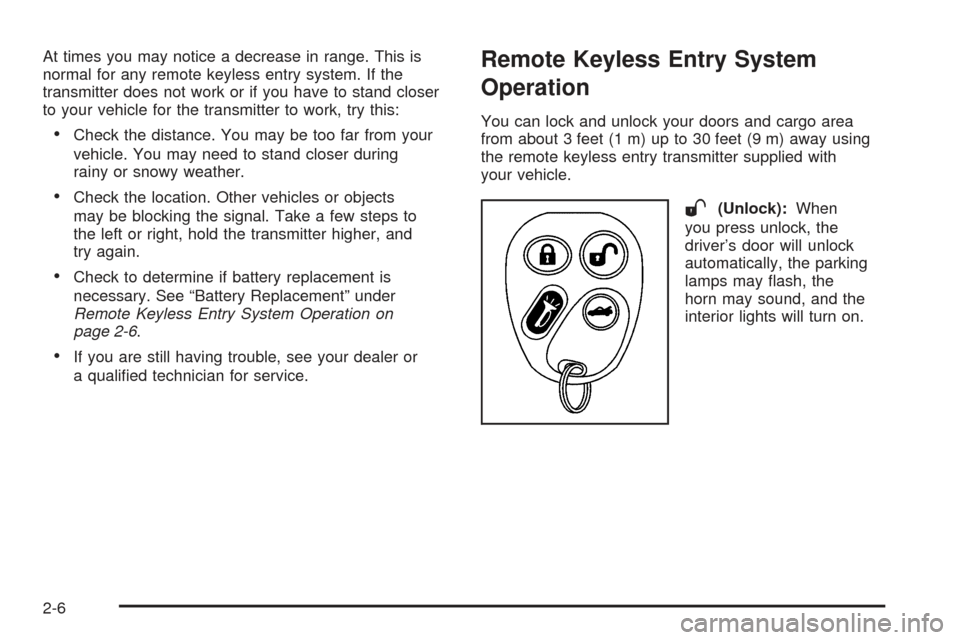
You can lock and unlock your doors and cargo area
from about 3 feet (1 m) up to 30 feet (9 m) away using
the remote keyless entry transmitter supplied with
your vehicle.
W(Unlock):When
you press unlock, the
driver’s door will unlock
automatically, the parking
lamps may ash, the
horn may sound, and the
interior lights will turn on.
2-6
Page 65 of 388

If your vehicle has the memory seat feature and you
have previously programmed a seat position, the driver’s
seat will move to that position when you press the
unlock button. SeeMemory Seat on page 2-59for more
information.
Q(Lock):Press lock to lock all the doors. Press lock
again within three seconds and the horn will chirp.
F(Cargo Cover Release):To release the cargo
cover, press the button with this symbol on it. The
convertible top must be all the way up or down for this
feature to work properly. See “Roof Tonneau” under
Lowering the Convertible Top on page 2-53for
more information. The cargo cover can also be released
using the cargo cover release button located in the
glove box. SeeCargo Cover on page 2-36for more
information.
L(Remote Alarm):Press the button with the
horn symbol on it, to sound the horn and make the
headlamps and taillamps ash for up to 30 seconds.
This can be turned off by pressing the horn button again,
or by waiting for 30 seconds, or by starting the vehicle.You can program different feedback settings for up to
two drivers using the Driver Information Center (DIC).
For more information seeDriver Information Center
(DIC) on page 3-42.
Matching Transmitter(s) to Your Vehicle
Each remote keyless entry transmitter is coded to
prevent another transmitter from unlocking your vehicle.
If a transmitter is lost or stolen, a replacement can
be purchased through your dealer. Remember to bring
any remaining transmitters with you when you go to
your dealer. When the dealer matches the replacement
transmitter to your vehicle, any remaining transmitters
must also be matched. Once your dealer has coded
the new transmitter, the lost transmitter will not unlock
your vehicle. Each vehicle can have a maximum of
four transmitters matched to it.
2-7
Page 72 of 388
If a locked door is opened with the key, without the
key, or without the remote keyless entry transmitter,
the alarm will go off. The headlamps and parking lamps
will ash for two minutes, and the horn will sound for
30 seconds, then will turn off to save the battery power.
You can disable the alarm using the remote keyless
entry transmitter or by putting the key in the ignition and
starting the vehicle.
Remember, the theft-deterrent system won’t activate
if you lock the doors with a key or use the manual door
lock. It activates only if you use a power door lock
switch with the door open, or with the remote keyless
entry transmitter. You should also remember that
you can start your vehicle with the correct ignition key
if the alarm has been set off.
Here’s how to avoid setting off the alarm by accident:
If you don’t want to activate the theft-deterrent
system, the vehicle should be locked with the
door keyafterthe doors are closed.
Always unlock a door with a key, or use the remote
keyless entry transmitter. Unlocking a door any
other way will set off the alarm.
If you set off the alarm by accident, unlock any door
with the key. You can also turn off the alarm by pressing
unlock on the remote keyless entry transmitter. The alarm
won’t stop if you try to unlock a door any other way.
Testing the Alarm
The alarm can be tested by following these steps:
1. From inside the vehicle, lower the driver’s window
and open the driver’s door.
2. Activate the system by locking the doors with the
power door lock switch while the door is open, or
with the remote keyless entry transmitter.
3. Get out of the vehicle, close the door and wait for
the security light to go out.
4. Then reach in through the window, unlock the door
with the manual door lock and open the door. This
should set off the alarm.
When the alarm is set the power door unlock switch is
not operational.
If the alarm does not sound when it should but the
headlamps ash, check to see if the horn works. The
horn fuse may be blown. To replace the fuse, see
Fuses and Circuit Breakers on page 5-84.
If the alarm does not sound or the headlamps do not
ash, the vehicle should be serviced by your dealer.
2-14
Page 119 of 388

Instrument Panel Overview...............................3-4
Hazard Warning Flashers................................3-5
Other Warning Devices...................................3-5
Horn.............................................................3-6
Tilt Wheel.....................................................3-6
Turn Signal/Multifunction Lever.........................3-6
Turn and Lane-Change Signals........................3-7
Headlamp High/Low-Beam Changer..................3-8
Flash-to-Pass.................................................3-8
Windshield Wipers..........................................3-8
Windshield Washer.........................................3-9
Cruise Control................................................3-9
Exterior Lamps.............................................3-12
Headlamps on Reminder................................3-13
Daytime Running Lamps (DRL).......................3-14
Automatic Headlamp System..........................3-14
Fog Lamps..................................................3-15
Interior Lamps..............................................3-16
Instrument Panel Brightness...........................3-16
Theater Dimming..........................................3-17
Exit Lighting.................................................3-17
Perimeter Lighting.........................................3-17
Map Lamps.................................................3-17
Battery Run-Down Protection..........................3-17Center Console Switchbank............................3-18
Accessory Power Outlets...............................3-18
Ashtrays and Cigarette Lighter........................3-19
Climate Controls............................................3-20
Climate Control System.................................3-20
Outlet Adjustment.........................................3-22
Warning Lights, Gages, and Indicators............3-23
Instrument Panel Cluster................................3-24
Speedometer and Odometer...........................3-25
Trip Odometer..............................................3-25
Tachometer.................................................3-26
Engine Speed Limiter....................................3-26
Safety Belt Reminder Light.............................3-26
Airbag Readiness Light..................................3-27
Airbag Off Light............................................3-28
Charging System Light..................................3-29
Brake System Warning Light..........................3-30
Anti-Lock Brake System Warning Light.............3-31
Traction Control System (TCS) Warning
Light (Automatic Transmission)....................3-31
Engine Coolant Temperature Gage...................3-32
Malfunction Indicator Lamp.............................3-32
Oil Pressure Gage........................................3-36
Section 3 Instrument Panel
3-1
Page 124 of 388

Horn
To sound the horn, press the horn symbol on the
steering wheel pad.
Tilt Wheel
A tilt wheel allows you to adjust the steering wheel before
you drive. You can raise it to the highest level to allow
more room for the driver to enter and exit the vehicle.The tilt lever is located on
the driver's side of the
steering column, under the
turn signal lever.
To tilt, hold the steering wheel and pull the tilt lever
toward you. Move the wheel to a comfortable level, then
release the tilt lever to lock the wheel in place.
Turn Signal/Multifunction Lever
The lever on the left side of the steering column
includes the following:
·GTurn and Lane Change Signals.Turn and
Lane-Change Signals on page 3-7
.
·3Headlamp High/Low-Beam Changer.Headlamp
High/Low-Beam Changer on page 3-8
.
·Flash-to-Pass Feature. SeeFlash-to-Pass on
page 3-8
.
·NWindshield Wipers. SeeWindshield Wipers on
page 3-8
.
3-6
Page 172 of 388
Scroll through the list of modes. When the mode you
want is displayed on the DIC, press the personalization
button to set your choice, return to the personalization
menu, and advance to the next programmable feature.
For more information on automatic door locks, see
Programmable Automatic Door Locks on page 2-10.
Remote Lock Feedback
This feature allows you to choose whether or not the
horn chirps and the parking lamps ¯ash when you lock
the vehicle with the remote keyless entry transmitter.
Press the personalization button until REMOTE
LOCK FEEDBACK appears in the display. To access
the modes for REMOTE LOCK FEEDBACK, press
the select button. Once REMOTE LOCK FEEDBACK is
selected, press the select button to scroll through the
following modes:
Mode 1:LOCK FEEDBACK: BOTH
Mode 2: LOCK FEEDBACK: OFF
Mode 3: LOCK FEEDBACK: HORN
Mode 4: LOCK FEEDBACK: LAMPS If you choose Mode 1, the parking lamps will ¯ash each
time you press the lock button on the remote keyless
entry transmitter and the horn will chirp the second time
you press the lock button.
If you choose Mode 2, there will be no feedback when
locking the vehicle.
If you choose Mode 3, the horn will chirp the second
time you press the button with the lock symbol on
the remote keyless entry transmitter.
If you choose Mode 4, the parking lamps will ¯ash each
time you press the button with the lock symbol on
the remote keyless entry transmitter.
Scroll through the list of modes. When the mode you
want is displayed on the DIC, press the personalization
button to set your choice, return to the personalization
menu, and advance to the next programmable feature.
Remote Unlock Feedback
This feature allows you to choose whether or not the
parking lamps ¯ash and the horn chirps when you
unlock the vehicle with the remote keyless entry
transmitter. Press the personalization button until
REMOTE UNLOCK FEEDBACK appears in the display.
3-54
Page 173 of 388
To access the modes for REMOTE UNLOCK
FEEDBACK, press the select button. Once REMOTE
UNLOCK FEEDBACK is selected, press the select
button to scroll through the following modes:
Mode 1:UNLOCK FEEDBACK: BOTH
Mode 2: UNLOCK FEEDBACK: OFF
Mode 3: UNLOCK FEEDBACK: HORN
Mode 4: UNLOCK FEEDBACK: LAMPS
If you choose Mode 1, the parking lamps will ¯ash each
time you press the button with the unlock symbol on
the remote keyless entry transmitter. The horn will chirp
the second time you press the unlock button.
If you choose Mode 2, there will be no feedback when
unlocking the vehicle.
If you choose Mode 3, the horn will chirp the second
time you press the button with the unlock symbol on the
remote keyless entry transmitter.
If you choose Mode 4, the parking lamps will ¯ash each
time you press the button with the unlock symbol on
the remote keyless entry transmitter.
Scroll through the list of modes. When the mode you
want is displayed on the DIC, press the personalization
button to set your choice, return to the personalization
menu, and advance to the next programmable feature.Headlamps on at Exit
This feature allows you to set the amount of time you
want the headlamps to remain on after you exit the
vehicle. Press the personalization button until
HEADLAMPS ON AT EXIT appears in the display.
To access the modes for HEADLAMPS ON AT EXIT,
press the select button. Once HEADLAMPS ON
AT EXIT is selected, press the select button to scroll
through the following modes:
Mode 1: HEADLAMP DELAY 10 SEC
Mode 2: HEADLAMP DELAY 20 SEC
Mode 3: HEADLAMP DELAY 40 SEC
Mode 4: HEADLAMP DELAY 60 SEC
Mode 5: HEADLAMP DELAY 120 SEC
Mode 6: HEADLAMP DELAY 180 SEC
Mode 7: HEADLAMP DELAY OFF
If you choose Mode 7, the headlamps will turn off as
soon as you turn off the vehicle.
Scroll through the list of modes. When the mode you
want is displayed on the DIC, press the personalization
button to set your choice, return to the personalization
menu, and advance to the next programmable feature.
3-55
Page 175 of 388
Alarm Warning Type
This feature allows you to choose the type of alarm
warning feedback that will occur. Press the select button
until ALARM WARNING TYPE appears on the DIC.
Once ALARM WARNING TYPE is selected, press the
select button to scroll through the following modes:
Mode 1:ALARM WARNING: BOTH
Mode 2: ALARM WARNING: OFF
Mode 3: ALARM WARNING: HORN
Mode 4: ALARM WARNING: LAMPS
If you choose Mode 1, the horn will chirp and the
exterior lamps will ¯ash when the alarm is active.
If you choose Mode 2, there will be no alarm warning
on activation.
If you choose Mode 3, the horn will chirp when the
alarm is active.
If you choose Mode 4, the exterior lamps will ¯ash when
the alarm is active.
Scroll through the list of modes. When the mode you
want is displayed on the DIC, press the personalization
button to set your choice, return to the personalization
menu, and advance to the next programmable feature.
See
Content Theft-Deterrent on page 2-13for more
information.
Display Language
This feature allows you to choose the language in which
the DIC information will be displayed. Press the select
button until DISPLAY LANGUAGE appears on the
DIC. Once DISPLAY LANGUAGE is selected, press the
select button to scroll through the following modes:
Mode 1: LANGUAGE: ENGLISH
Mode 2: LANGUAGE: FRANCAIS (French)
Mode 3: LANGUAGE: ESPANOL (Spanish)
When the language you desire is displayed on the DIC,
press the personalization button to set your choice,
return to the personalization menu, and advance to the
next programmable feature.
If you accidentally choose a language that you do not
want, press and hold the personalization button and the
trip information button at the same time. The DIC will
begin scrolling through the languages in their particular
language. English will be in English, French will be
in French and so on. When you see the language that
you would like, release both buttons. The DIC will
then display the information in the language you chose.
3-57
Page 339 of 388

Fuses Usage
1 Auxiliary Power 2
2Passenger’s Side High Beam
Headlamp
3Passenger’s Side Low Beam
Headlamp
4 Driver’s Side High Beam Headlamp
5 Driver’s Side Low Beam Headlamp
6 Cargo Cover Release
7Transmission Control
Module/Canister
Fuses Usage
8 Truck Body Controller
9 Windshield Washer
10 Driver’s Side Stoplamp/Turn Signals
11 Fuel Pump
12 Fog Lamps
13 Stoplamps
14 Headlamp Driver Module (HDM)
15Passenger’s Side Stoplamp/Turn
Signals
16 Cigarette Lighter
17 Hazard Warning Flashers
18 Coils
19 Truck Body Control, Ignition 1
20 Starter
21 Airbag System
22 Horn
23 Ignition E
24Instrument Panel Cluster,
Driver Information Center (DIC)
5-89
Page 340 of 388

Fuses Usage
25Automatic Transmission Shift
Interlock Control System
26 Back-up lamps, Lock Out
27 Engine Control Module
28 Oxygen Sensor B
29 Injector B
30 Air Conditioning
31Engine Control Module (ECM),
Transmission Control Module (TCM)
32 Transmission
33 Engine 1
34Engine Control Module,
Electronic Brake Controller
35 Oxygen Sensor A
36 Injector A
37 Engine Cooling Fan
38 Anti-lock Brake System (ABS)
39 Ignition A
40 Climate Control Fan
41 Ignition BRelays Usage
42 Powertrain
43 Starter
44 Fuel Pump
45 Cargo Cover Release
46 Windshield Washer
47 Headlamp Driver Module (HDM)
48 Fog Lamps
49 High Beam Headlamps
50 Horn
51 Air Conditioning
Miscellaneous Usage
52 Instrument Panel Battery
5-90