air condition CHEVROLET SUBURBAN 1995 User Guide
[x] Cancel search | Manufacturer: CHEVROLET, Model Year: 1995, Model line: SUBURBAN, Model: CHEVROLET SUBURBAN 1995Pages: 486, PDF Size: 26.58 MB
Page 161 of 486
To increase and decrease the flow of heated air to the rear floor vents, move
the switch marked REAR HEAT to the blower speed you want.
The knob has three speed positions.
To increase the flow of heated air, move
the switch toward HIGH.
To decrease the flow of heated air, move it toward
LOW. To turn the fan off, move the switch to OFF.
Rear Air Conditioning and Rear Heater
If your vehicle has a rear air conditioning and rear heater system
combination, controls are provided
to regulate the temperature, location and
speed of the air flow.
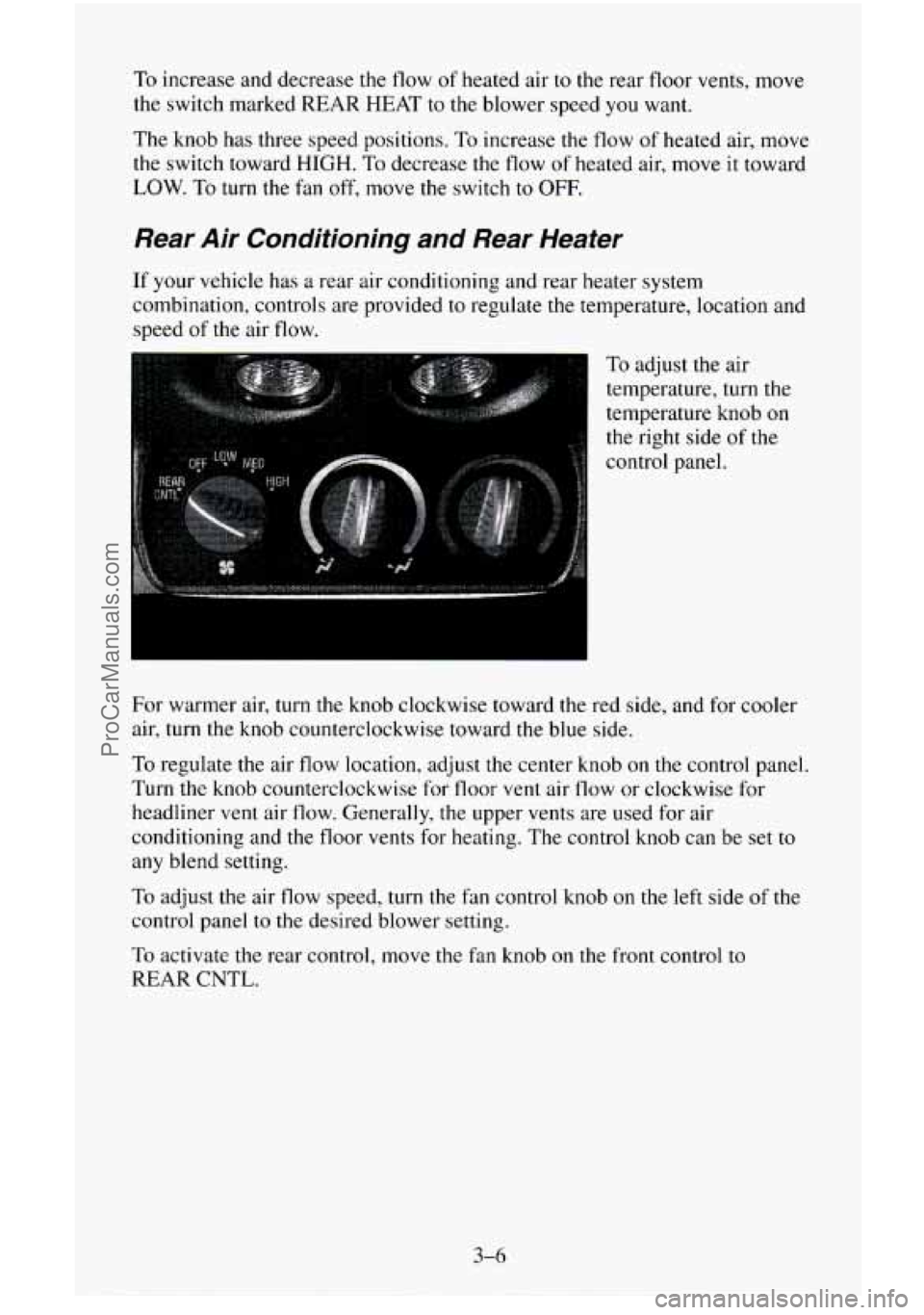
To adjust the air
temperature, turn the
temperature knob
on
the right side of the
control panel.
For warmer air, turn the knob clockwise toward the red side, and for cooler
air, turn the knob counterclockwise toward the blue side.
To regulate the air flow location, adjust the center knob on the control panel
Turn the knob counterclockwise for floor vent air flow or clockwise for
headliner vent air flow. Generally, the upper vents are used for air
conditioning and the floor vents for heating. The control knob can be set
to
any blend setting.
To adjust the air flow speed, turn the fan control knob on the left side of the
control panel
to the desired blower setting.
To activate
the rear control, move the fan knob on the front control to
REAR
CNTL.
3-6
ProCarManuals.com
Page 163 of 486
You can turn the defogger off at any time by pressing the button again. The
defogger will shut itself off after several minutes,
so that the glass does not
get too hot. If the defogger shuts off, and the window still isn’t clear, turn on
the defogger again.
Ventilation System
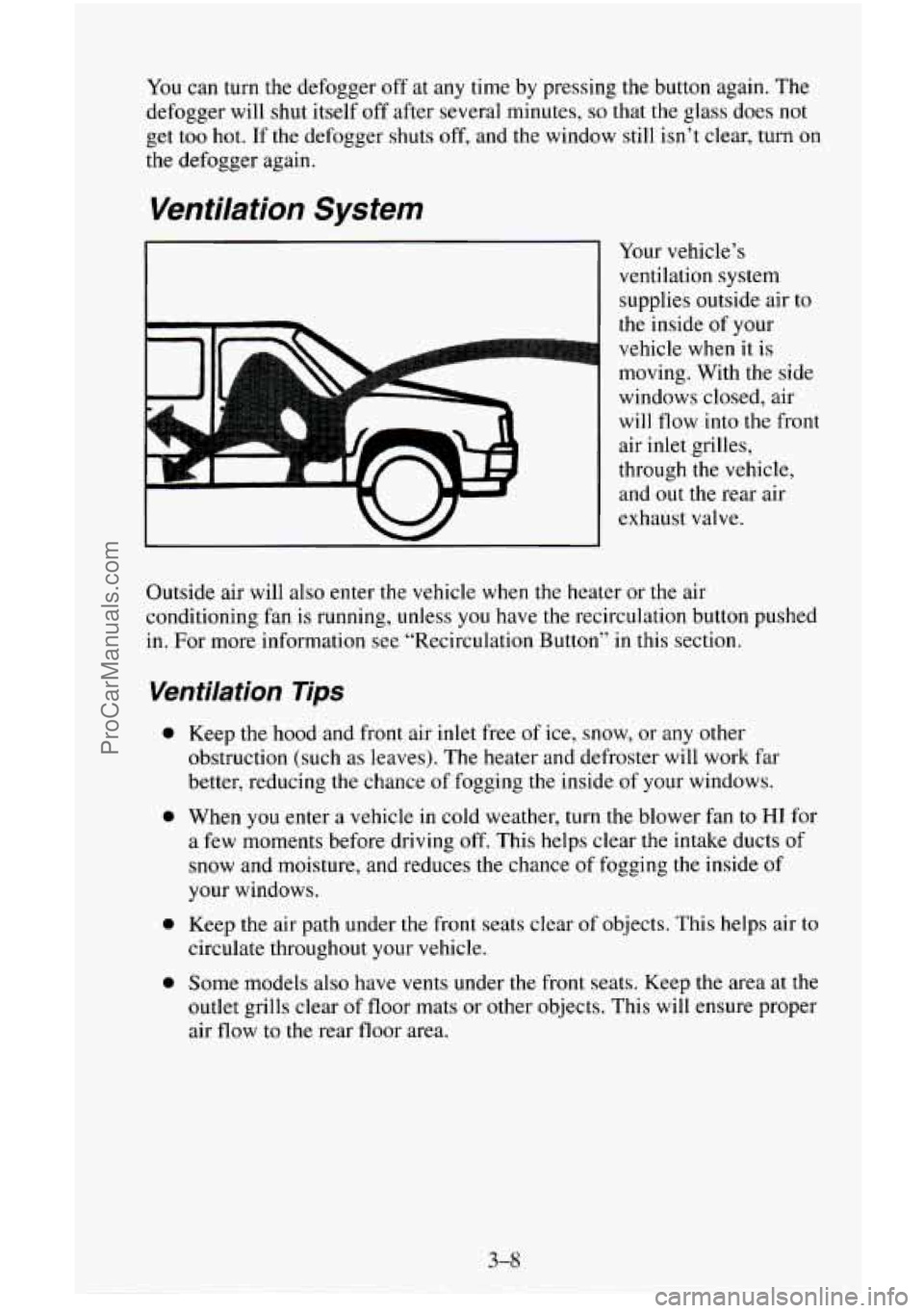
Your vehicle’s
ventilation system
supplies outside air
to
the inside of your
vehicle when it is
moving. With the side
windows closed, air
will flow into the front
air inlet grilles,
through the vehicle,
and
out the rear air
exhaust valve.
Outside air will also enter the vehicle when the heater or the air
conditioning fan is running, unless
you have the recirculation button pushed
in. For more information see “Recirculation Button” in this section.
Ventilation Tips
0
0
0
0
Keep the hood and front air inlet free of ice, snow, or any other
obstruction (such as leaves). The heater and defroster will work far
better, reducing the chance
of fogging the inside of your windows.
When you enter a vehicle in cold weather, turn the blower fan to
HI for
a few moments before driving off. This helps clear the intake ducts of
snow and moisture, and reduces the chance of fogging the inside
of
your windows.
Keep the air path under the front seats clear
of objects. This helps air to
circulate throughout your vehicle.
Some models also have vents under the front seats. Keep the area at the
outlet grills clear
of floor mats or other objects. This will ensure proper
air
flow to the rear floor area.
3-8
ProCarManuals.com
Page 243 of 486
NOTICE:
If your engine catches fire because you keep driving with no
coolant, your vehicle can be badly damaged. The costly repairs
would not be covered by your warranty.
If No Steam Is Coming From Your Engine
If you get the overheat warning but see or hear no steam, the problem may
not be too serious. Sometimes the engine can get a little too hot when you:
Climb a long hill on a hot day.
Stop after high speed driving.
0 Idle for long periods in traffic.
Tow a trailer. See “Driving on Grades” in the Index.
If you get the overheat warning with
no sign of steam, try this for a minute
or
so:
I. If you have an air conditioner, turn it off.
2. Turn on your heater to full hot at the highest fan speed and open the
window as necessary.
3. If you’re in a traffic jam, shift to NEUTRAL (N); otherwise, shift to the
highest gear while driving
- AUTOMATIC OVERDRIVE (a) or
DRIVE (3) for automatic transmissions.
If you no longer have the overheat warning, you can drive. Just to be safe,
drive slower for about ten minutes. If the warning doesn’t come back on,
you can drive normally.
5-10
ProCarManuals.com
Page 257 of 486
h
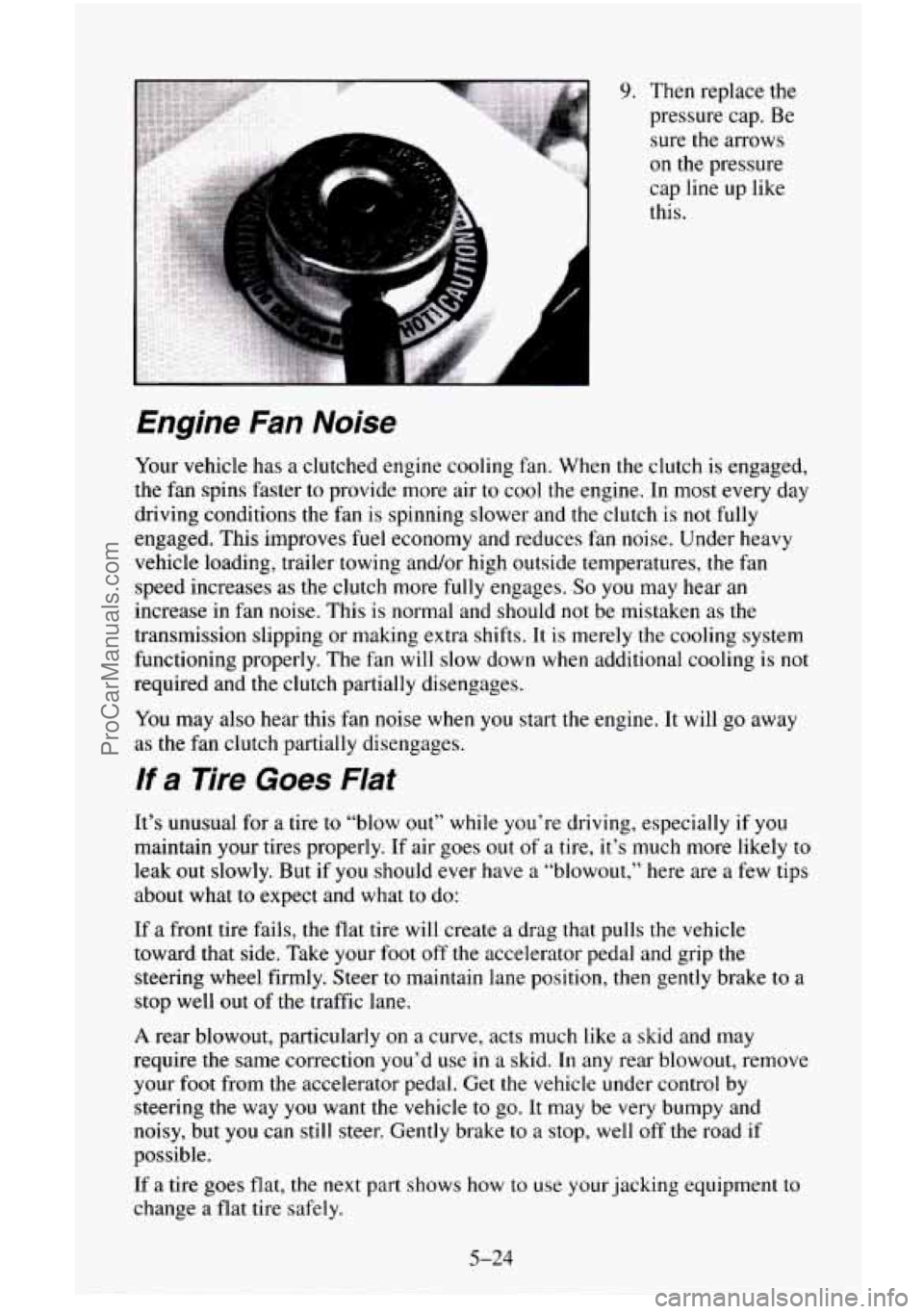
9. Then replace the
pressure cap. Be
sure the arrows
on the pressure
cap line up like
this.
Engine Fan Noise
Your vehicle has a clutched engine cooling fan. When the clutch is engaged,
the fan spins faster to provide more air to cool the engine. In most every day
driving conditions the fan
is spinning slower and the clutch is not fully
engaged. This improves fuel economy and reduces fan noise. Under heavy
vehicle loading, trailer towing and/or high outside temperatures,
the fan
speed increases as the clutch more
fully engages. So you may hear an
increase in fan noise. This is normal and should not be mistaken as the
transmission slipping
or making extra shifts. It is merely the cooling system
functioning properly. The fan will slow down when additional cooling is not
required and the clutch partially disengages.
You may also hear this fan noise when you start the engine. It will go away
as the fan clutch partially disengages.
If a Tire Goes Flat
It’s unusual for a tire to “blow out” while you’re driving, especially if you
maintain your tires properly. If air goes out of a tire, it’s much more likely to
leak out slowly. But if you should ever have a “blowout,” here are a few tips
about what
to expect and what to do:
If a front tire fails, the flat tire will create a drag that pulls the vehicle
toward that side. Take your foot off the accelerator pedal and grip the
steering wheel firmly. Steer
to maintain lane position, then gently brake to a
stop well out of the traffic lane.
A rear blowout, particularly on a curve, acts much like a skid and may
require the same correction you’d
use in a skid. In any rear blowout, remove
your foot from
the accelerator pedal. Get the vehicle under control by
steering the way
you want the vehicle to go. It may be very bumpy and
noisy, but you can still steer. Gently brake to a stop, well
off the road if
possible.
If a tire goes flat, the next part shows how to use your jacking equipment to
change a flat tire safely.
5-24
ProCarManuals.com
Page 290 of 486
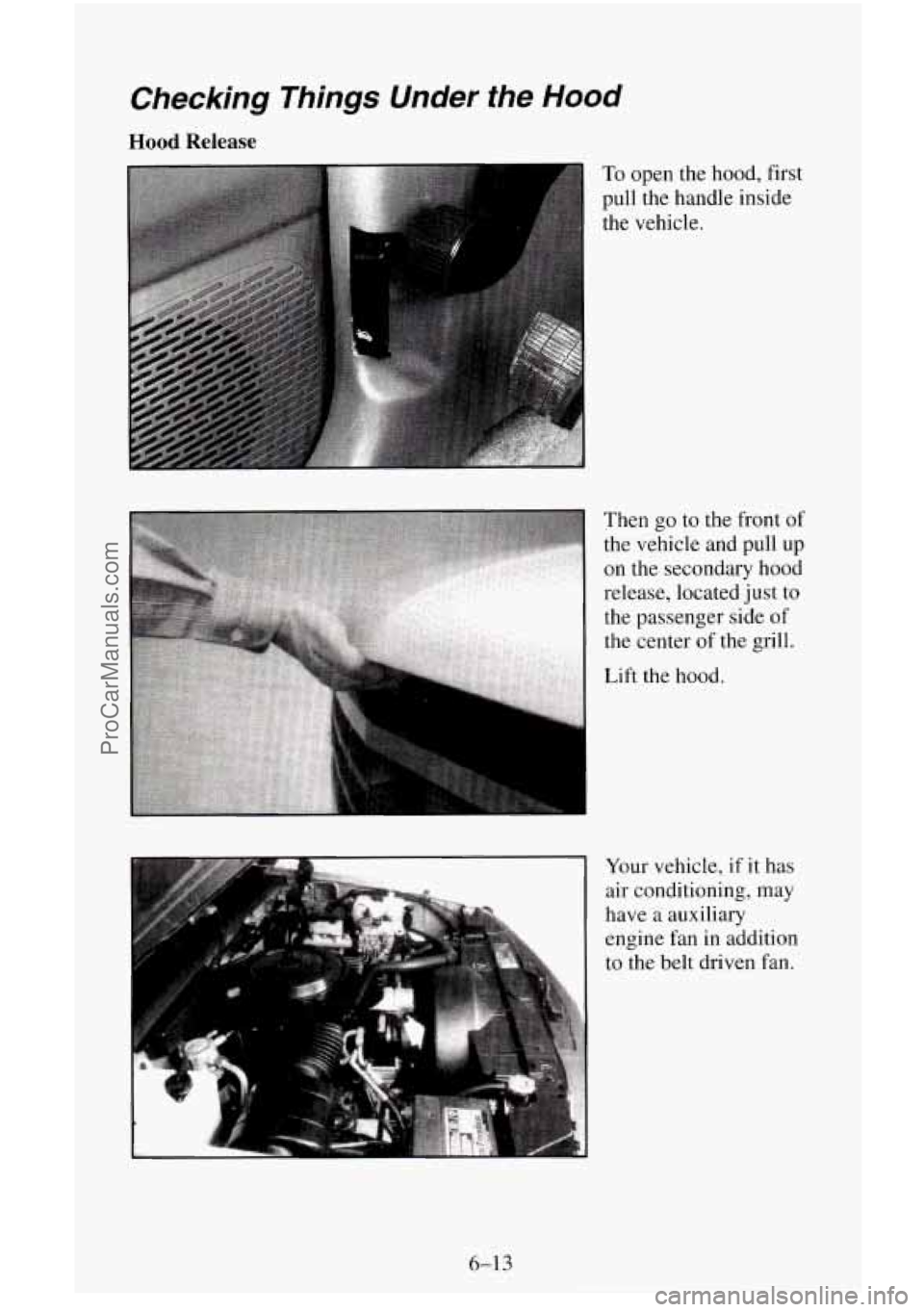
Checking Things Under the Hood
Hood Release
To open the hood, first
pull the handle inside
the vehicle.
Then go to the front
of
the vehicle and pull up
on the secondary hood
release, located just
to
the passenger side of
the center
of the grill.
Lift the hood.
Your vehicle, if it has
air conditioning, may
have
a auxiliary
engine fan in addition
to the belt driven fan.
6-13
ProCarManuals.com
Page 311 of 486
Specification 6038-M.” Use GM Coolant Supplement (Sealer) with a
complete coolant flush and refill. If
you use this mixture, you don’t need to
add anything else.
NOTICE:
If you use an improper coolant mix, your engine could overheat
and be badly damaged. The repair cost wouldn’t be covered by
your warranty.
Too much water in the mix can freeze and crack
the engine, radiator, heater core and other parts.
Some conditions, such
as air trapped in the cooling system, can affect the
coolant level
in the radiator. Check the coolant level when the engine is cold
and follow the steps under “Adding Coolant”
for the proper way to add
coolant.
If you have to add coolant more than four times
a year, have your dealer
check
your cooling system.
I NOTICE:
If you use the proper coolant, you don’t have to add extra
inhibitors or additives which claim to improve the system. These
can be harmful.
6-34
ProCarManuals.com
Page 320 of 486
Brake Wear
Your vehicle has front disc brakes and rear drum brakes.
Disc brake pads
have built-in wear indicators that make a high-pitched
warning sound when the brake pads are worn and new pads are needed. The
sound may come and
go or be heard all the time your vehicle is moving
(except when you are pushing on the brake pedal firmly).
I NOTICE:
Continuing to drive with worn-out brake pads could result in
costly brake repair.
Some driving conditions or climates may cause a brake squeal when the
brakes are first applied or lightly applied. This does not mean something is
wrong with your brakes.
Your rear drum brakes don’t have wear indicators, but
if you ever hear a
rear brake rubbing noise, have the rear brake linings inspected. Also, the
rear brake drums should be removed and inspected each time the tires are
removed for rotation or changing. When
you have the front brakes replaced,
have
the rear brakes inspected, too.
Brake linings should always be replaced as complete axle sets.
Brake Pedal Travel
See your dealer if the brake pedal does not return to normal height, or if
there
is a rapid increase in pedal travel. This could be a sign of brake
trouble.
Brake Adjustment
Every time you make a brake stop, your disc brakes adjust for wear.
If your brake pedal goes down farther than normal, your rear drum brakes
may need adjustment. Adjust them by backing up and firmly applying the
brakes a few times.
6-43
ProCarManuals.com
Page 322 of 486
Air Conditioning
Every now and then have your dealership check your air conditioning
system to be sure
it has not lost any cooling ability. If you think the system
is not working properly, have your dealership check it out as soon as
possible.
The air conditioning will not work when the temperature is below
40°F
(4°C).
Fluid Leak Check
After the vehicle has been parked for a while, inspect the surface under the
vehicle for water, oil, fuel or other fluids. Water dripping from the air
conditioning system after
it has been used is normal. If you notice fuel leaks
or fumes, the causes should be found and corrected at once.
Lock Cylinders
To be sure your locks operate properly, they must be lubricated. Your
vehicle’s maintenance schedule will tell
you how often to lubricate them.
See “Recommended Fluids and Lubricants”
in the Index for the proper
lubricant to use.
You should not use penetrating oils because they could wash out the factory
installed lubricant and cause the lock
to bind. De-icers which contain
alcohol could also wash away
the lubricant, so be sure to lubricate the lock
after using
a de-icer of this type.
Battery
Every new GM vehicle has a Delco Freedom’ battery. You never have to
add water
to one of these. When it’s time for a new battery, we recommend
a Delco Freedom@ battery. Get one that has the replacement number shown
on the original battery’s label.
Vehicle Storage
If you’re not going to drive your vehicle for 25 days or more, take off the
black, negative
(-) cable from the battery. This will help keep your battery
from running down.
6-45
ProCarManuals.com
Page 337 of 486
Warning: The temperature grade for this tire is established for a tire that is
properly inflated and
not overloaded. Excessive speed, underinflation, or
excessive loading, either separately or
in combination, can cause heat
buildup and possible tire failure.
These grades are molded on the sidewalls of passenger car tires.
While
the tires available as standard or optional equipment on General
Motors vehicles may vary with respect to these grades, all such tires meet
General Motors performance standards and have been approved for
use on
General Motors vehicles.
All passenger type (P Metric) tires must conform
to Federal safety requirements in addition to these grades.
Wheel Alignment and Tire Balance
The wheels on your vehicle were aligned and balanced carefully at the
factory
to give you the longest tire life and best overall performance.
In most cases, you will not need
to have your wheels aligned again.
However,
if you notice unusual tire wear or your vehicle pulling one way or
the other, the alignment may need
to be reset. If you notice your vehicle
vibrating when driving
on a smooth road, your wheels may need to be
rebalanced.
Wheel Replacement
Replace any wheel that is bent, cracked, or badly rusted or corroded. If
wheel nuts keep coming loose, the wheel, wheel bolts, and wheel nuts
should be replaced. If the wheel leaks air, replace it (except some aluminum
wheels, which can sometimes be repaired). See your GM dealer if any of
these conditions exist.
Your dealer will know the kind
of wheel you need.
Each new wheel should have the same load carrying capacity, diameter,
width, offset, and be mounted the same way as
the one it replaces.
If you need to replace any of your wheels, wheel bolts, or wheel nuts,
replace them only with new GM original equipment parts. This way, you
will be
sure to have the right wheel, wheel bolts, and wheel nuts for your
vehicle.
ProCarManuals.com
Page 347 of 486
Finish Damage
Any stone chips, fractures or deep scratches in the finish should be repaired
right away. Bare metal will corrode quickly and may develop
into a major
repair expense.
Minor chips and scratches can be repaired
with touch-up materials available
from your dealer
or other service outlets. Larger areas of finish damage can
be corrected
in your dealer’s body and paint shop.
Underbody Maintenance
Chemicals used for ice and snow removal and dust control can collect on
the underbody. If these are not removed, accelerated corrosion (rust) can
occur
on the underbody parts such as fuel lines, frame, floor pan, and
exhaust system even though
they have corrosion protection.
At least every spring, flush these materials from the underbody with plain
water. Clean any areas where mud and other debris can collect. Dirt packed
in closed areas of the frame should be loosened before being flushed. Your
dealer or an underbody vehicle washing system can do this for
you.
Chemical Paint Spotting
Some weather and atmospheric conditions can create a chemical Fallout.
Airborne pollutants can fall upon and attack painted surfaces on your
vehicle. This damage can take two forms: blotchy, ringlet-shaped
discolorations, and small irregular dark spots etched
into the paint surface.
Although no defect
in the paint job causes this, GM will repair, at no charge
to the owner, the surfaces of new vehicles damaged by this fallout condition
within
12 months or 12,000 miles (20 000 km) of purchase, whichever
comes first.
6-70
ProCarManuals.com