display CHEVROLET SUBURBAN 1995 Owner's Manual
[x] Cancel search | Manufacturer: CHEVROLET, Model Year: 1995, Model line: SUBURBAN, Model: CHEVROLET SUBURBAN 1995Pages: 486, PDF Size: 26.58 MB
Page 178 of 486
When a disc is playing, the letters CD and the CD symbol will appear in the
display.
EJECT
- Press EJECT to eject the disc from the player and play the radio.
When the same or a new disc is inserted,
the disc will start playing on track
1.
00 Dolby’ Noise Reduction is manufactured under a license from Dolby
Laboratories Licensing Corporation. Dolby@ and the
00 symbol are
trademarks of Dolby Laboratories Licensing Corporation.
THEFTLOCK Theft Deterent Feature
THEFTLOCK is an anti-theft feature for the compact disc player. It can be
used
or ignored. If ignored, the system plays normally. If it is used, your
player won’t be usable if it is ever stolen, because it will
go to LOC mode
any time the battery power is removed. After a loss of battery power, the
player cannot be turned on unless an unlock code is entered.
The following instructions tell you how to enter a secret code into
the
system. If your vehicle loses battery power for any reason, you must unlock
the system with the secret code before the radio will turn on.
To Lock The System:
1.
2.
3.
4.
5.
6.
7.
8.
9. Write
down any number from
000 to 999 and keep it in a safe place.
Turn the ignition to ACC or RUN.
Turn the radio
off.
Press the 1 and 4 buttons together. Hold them down until “- - -” shows
on the display.
You are now ready to enter your secret code. Don’t wait more than 15
seconds between any of the following steps. If you do, the radio
automatically returns to time display and you must start the procedure
over
at step 4.
Press MIN and “000” will appear on the display.
Press the MIN
button again to make the last two digits agree with your
code.
Press
HR to make the first one or two digits agree with your code.
Press
AM/FM after you have confirmed that the code matches the one
you wrote down.
rEP appears in the display, indicating that you need to
repeat steps
5 through 7.
Press AM/FM and this time the display will show SEC.
With the ignition off, the THEFTLOCK indicator
will flash.
3-23
ProCarManuals.com
Page 179 of 486
To Unlock THEFTLOCK After a Power Loss
When battery power is reapplied to a secured radio, the radio won’t turn on
and “LOC” will appear on the display.
Enter your secret code as follows. Pause
no more than 15 seconds between
steps.
1. Turn the ignition on.
2. Turn the radio off.
3. Press MIN and “000” will appear on the display.
4. Press the MIN button again to make the last two digits agree with your
code.
5. Press HR to make the first one or two digits agree with your code.
6. Press AM/FM after you have confirmed that the code matches the one
you wrote down. SEC appears in the display indicating that the radio is
now operable.
To Disable THEFTLOCK
1. Turn the ignition on.
2. Turn the radio off.
3. With the time showing in the display, press the 1 and 4 buttons
together. Hold them down until
“SEC” shows on the display.
You are now ready to enter your secret code. Don’t wait more than
15
seconds between any of the following steps.
4. Press MIN and “000” will appear on the display.
5. Press the MIN button again to make the last two digits agree with your
code.
6. Press HR to make the first one or two digits agree with your code.
7. Press AMEM after you have confirmed that the code matches the one
you wrote down. “- ” will appear in the display, indicating that the
system is unsecured (disabled).
If the code is incorrect, “SEC” will appear
in the display and the system will
still be secured. The radio will still operate if it is secured or unsecured. If
“SEC” appears and you still want to disable the system, follow the disable
procedure again and enter the correct code.
3-24
ProCarManuals.com
Page 180 of 486
Remote Cassette Player - €?W AM-FM Stereo Audio
Compact Disc ATC System
..
EJECT
i
1
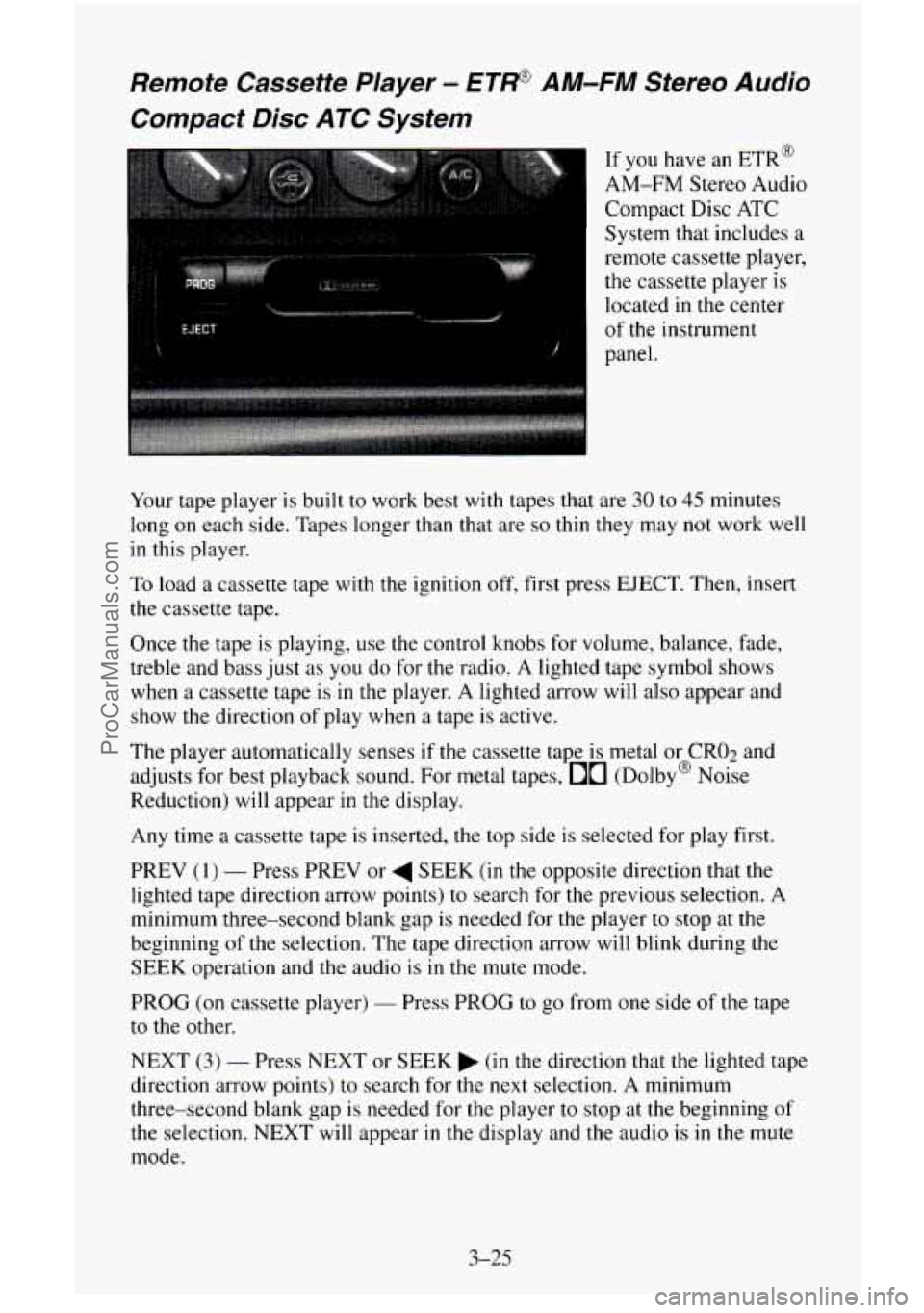
If you have an ETR@
AM-FM Stereo Audio
Compact Disc ATC
System that includes a
remote cassette player,
the cassette player is
located in the center
panel.
, of the instrument
Your tape player is built
to work best with tapes that are 30 to 45 minutes
long
on each side. Tapes longer than that are so thin they may not work well
in this player.
To load a cassette tape with the ignition off, first press EJECT. Then, insert
the cassette tape.
Once
the tape is playing, use the control knobs for volume, balance, fade,
treble and bass just as you do for the radio. A lighted tape symbol shows
when a cassette tape is in the player. A lighted arrow will also appear and
show
the direction of play when a tape is active.
The player automatically senses
if the cassette tape is metal or CRO2 and
adjusts for best playback sound. For metal tapes,
00 (Dolby@ Noise
Reduction) will appear in the display.
Any time a cassette tape is inserted, the top side is selected for play first.
PREV
(1) - Press PREV or 4 SEEK (in the opposite direction that the
lighted tape direction arrow points) to search for the previous selection.
A
minimum three-second blank gap is needed for the player to stop at the
beginning
of the selection. The tape direction arrow will blink during the
SEEK operation and
the audio is in the mute mode.
PROG
(on cassette player) - Press PROG to go from one side of the tape
to the other.
NEXT
(3) - Press NEXT or SEEK (in the direction that the lighted tape
direction arrow points) to search for the next selection. A minimum
three-second blank gap is needed for the player
to stop at the beginning of
the selection. NEXT will appear in the display and the audio is in the mute
mode.
3-25
- ProCarManuals.com
Page 181 of 486
REV (4) - To rapidly reverse the tape, press REV and the tape will rapidly
reverse
to the beginning of the cassette reel or until you press REV again.
The radio plays the last selected station during REV.
00 (5) - 00 is active at all times with a tape inserted in the remote
cassette.
00 will appear in the display.
FWD (6) - To rapidly advance the tape, press FWD and the tape will
rapidly advance to the end of the cassette reel or until you press FWD again.
The radio plays the last selected station during FWD.
TAPE
- To switch between the player and the radio when a tape is playing,
press the AMEM button. To return to the tape player, press CD AUX. The
lighted arrow
will appear next to the tape symbol and show the direction of
play when a tape is active.
EJECT (on cassette player)
- To remove the tape press the EJECT button.
EJECT
can be used with either the ignition or radio off. Also, you must
press EJECT before loading
a cassette with the radio off to allow loading.
If
a tape is inserted with side “1” (or “A”) up, then the right arrow means
that that side is being played. Likewise, a left arrow would indicate that side
“2” (or “B”) had been selected.
00 Dolby@ Noise Reduction is manufactured under a license from Dolby
Laboratories Licensing Corporation. Dolby@ and the
00 symbol are
trademarks
of Dolby Laboratories Licensing Corporation.
Understanding Radio Reception
FM stereo will give you the best sound. But FM signals will reach only
about
10 to 40 miles (16 to 65 km). And, tall buildings or hills can interfere
with
FM signals, causing the sound to come and go.
The range for most
AM stations is greater than for FM, especially at night.
The longer range, however, can cause stations to interfere with each other.
AM can pick up
noise from things like storms and power lines. Try reducing
the treble to reduce this noise
if you ever get it.
AM Stereo means the DelcoB system can receive C-QUAM@stereo
broadcasts. Many
AM stations around the countr use C-QUAM@ to
produce stereo, though some do not. (C-QUAM
is a registered trademark
of Motorola, Inc.) If your Delco@ system can get C-QUAM@, your
“STEREO” light will come
on when you’re receiving it.
Be aware that hearing damage from loud noise is almost undetectable until
it is too late. Your hearing can adapt to higher volumes of sound. Sound that
seems normal can be loud and harmful to your hearing. Take precautions by
adjusting the volume control on your radio to a safe sound level before your
hearing adapts to it.
2
3-26
ProCarManuals.com
Page 182 of 486
To help avoid hearing loss or damage:
1. Adjust the volume control to the lowest setting.
2. Increase volume slowly until you hear comfortably and clearly.
NOTICE:
Before you add any sound equipment to your vehicle - like a
tape player, CB radio, mobile telephone or two-way radio - be
sure you can add what you want.
If you can, it’s very important
to do it properly. Added sound equipment may interfere with the
operation of your vehicle’s engine, Delco@ radio or other
systems, and even damage them. And, your vehicle’s systems
may interfere with the operation of sound equipment that has
been added improperly.
So, before adding sound equipment, check with your dealer and
be sure to check Federal rules covering mobile radio and
telephone units.
Care of Your Cassette Player and Tapes
A tape player that is not cleaned regularly is subject to reduced sound
quality, ruining the cassette, or damaging the mechanism. Tape cassettes that
are not properly stored
in their plastic cases away from contaminants, direct
sunlight, and extreme heat may not operate properly and could cause
premature failure
of the tape player.
Your tape player should be cleaned with every
50 hours of use to provide
optimum performance. Your radio may display “Cln” (Clean)
to indicate
that you have used your tape player for 50 hours without re-setting the tape
clean timer. If you notice a reduction
in sound quality, regardless of when
the tape player was last cleaned, try playing a different cassette to see if the
tape or tape player is at fault.
If the second cassette results in no
improvement
in sound quality, try cleaning the tape player.
Proper tape player cleaning should be done with
a scrubbing action,
non-abrasive cleaning cassette. This is a wet-type cleaning system that uses
a cleaning cassette with pads which scrub
the tape head as the hubs of the
cleaner cassette turn. To properly clean your tape player, follow instructions
with the cleaning cassette. If
you use this type of cleaner, the radio may
display an error and eject the cartridge. This
is normal and is the result of an
added feature
in the tape player that detects broken tapes. If an error occurs,
you will need to insert the cleaning cassette at least 3 times to thoroughly
clean the tape player.
3-27
ProCarManuals.com
Page 183 of 486
You may prefer to use a non-scrubbing action, wet-type cleaner. This type
of cleaner
uses a fabric belt to clean the tape head. This type of cleaner
cassette will not cause
an error, but it may not clean the tape player as
thoroughly as the scrubbing type cleaner.
A scrubbing action cleaner cassette is available through your retailer
(SPO
#12344600).
Cassettes are subject to wear and the sound quality may degrade over time.
Always verify that the cassette tape is in good condition and the tape player
is clean before obtaining service
on your tape player.
NOTICE:
Cassette tape adapter kits for portable CD players will not work
in your cassette player. These adapters will cause the radio to
display an error and the adapter cassette
will be ejected.
Care of Compact Discs
Handle discs carefully. Store them in their original cases or other protective
cases and away from direct sunlight and dust. If the surface
of a disc is
soiled, dampen a clean, soft cloth
in a mild, neutral detergent solution and
clean it, wiping from
the center to the edge.
Be sure never to touch the signal surface when handling discs. Pick up discs
by grasping the outer edges or the edge
of the hole and the outer edge.
Fixed Mast Antenna
The fixed mast antenna can withstand most car washes without being
damaged. If the mast should ever become slightly bent, you can straighten
it
out by hand. If the mast is badly bent, as it might be by vandals, you should
replace it.
Check every once in a while to be sure
the mast is still tightened to the
fender.
3-28
ProCarManuals.com
Page 301 of 486
This doughnut-shaped logo (symbol) is used on most oil containers to help
you select the correct oil.
You should
look for this on the oil container, and use only those oils that
display the logo.
GM Goodwrench@
oil (in Canada, GM Engine Oil) meets all the
requirements for your vehicle.
Engine Oil Additives
Don’t add anything to your oil. Your GM dealer is ready to advise if you
think something should be added.
When to Change Engine Oil
See if any one of these is true for you:
Most trips are less than 5 to I0 miles (8 to 16 km). This is particularly
important when outside temperatures are below freezing.
0 Most trips include extensive idling (such as frequent driving in stop and
go traffic).
You operate your vehicle in dusty areas or off-road frequently.
0 You frequently tow a trailer or use a carrier on top of your vehicle.
If any of
these is true for your vehicle, then you need to change your oil and
filter every
2,500 miles (4 000 km) or 3 months - whichever comes first.
If
none of them is true, change the oil and filter every 5,000 miles (8 000
km) or I2 months - whichever comes first.
What to Do with Used Oil
Did you know that used engine oil contains certain elements that may be
unhealthy for your skin and could even cause cancer? Don’t let used oil stay
on your skin for very long. Clean your skin and nails with soap and water,
or a good hand cleaner. Wdsh or properly throw away clothing or rags
containing used engine
oil. (See the manufacturer’s warnings about the use
and disposal
of oil products.)
Used oil can be
a real threat to the environment. If you change your own oil,
be sure to drain all free-flowing oil from the filter before disposal. Don’t
ever dispose
of oil by putting it in the trash, pouring it on the ground, into
sewers, or
into streams or bodies of water. Instead, recycle it by taking it to
a place that collects used
oil. If you have a problem properly disposing of
your used oil, ask your dealer, a service station or a local recycling center
for help.
ProCarManuals.com