light CHEVROLET SUBURBAN 1996 Service Manual
[x] Cancel search | Manufacturer: CHEVROLET, Model Year: 1996, Model line: SUBURBAN, Model: CHEVROLET SUBURBAN 1996Pages: 486, PDF Size: 26.58 MB
Page 171 of 486
FADE - Press lightly on the FADE knob to release it from its stored
position and
pull it out to the fully extended position. Rotate the knob
clockwise to adjust sound
to the front speakers and counterclockwise to
adjust sound to the rear speakers. Push the knob back
in to the stored
position when done.
BAL
- Press lightly on the BAL knob to release it from its stored position
and pull it
out to the fully extended position. Rotate the knob clockwise to
adjust sound to the right speakers and counterclockwise to adjust sound
to
the left speakers. Push the knob back in to the stored position when done.
BASS
- Press lightly on the BASS knob to release it from its stored
position and pull
it out to the fully extended position. Rotate the knob
clockwise
to increase the bass response and counterclockwise to decrease
bass response. Any time the BASS control is rotated,
tone is automatically
set back to
MAN (manual). Push the knob back in to the stored position
when done.
TREBLE
- Press lightly on the TREB knob to release it from its stored
position and pull
it out to the fully extended position. Rotate the knob
clockwise to increase the treble response and counterclockwise
to decrease
treble response. Any time the TREB control is rotated,
tone is automatically
set back
to MAN (manual). Push the knob back in to the stored position
when done.
To Play a Cassette
Your tape player is built to work best with tapes that are 30 to 45 minutes
long
on each side. Tapes longer than that are so thin they may not work well
in this player.
To load a cassette tape with the ignition off, first press EJECT or RCL.
Then, insert the cassette tape.
Once the tape is playing, use the control knobs for volume, balance, fade,
treble and bass just
as you do for the radio. A lighted tape symbol shows
when a cassette tape is in the player. A lighted arrow
will also appear and
show the direction of play when a tape
is active.
The player automatically senses if the cassette tape
is metal or CR02 and
adjusts for best playback sound. For metal tapes,
00 (Dolby' Noise
Reduction) will appear
in the display.
Any time
a cassette tape is inserted, the top side is selected for play first.
PREV (1)
- Press PREV or 4 SEEK (in the direction that the lighted tape
direction
arrow points) to search for the previous selection. A minimum
three-second blank gap is needed for the player to stop at the beginning
of
the selection. The tape direction arrow will blink during the SEEK
operation.
3-16
..
ProCarManuals.com
Page 172 of 486
PROG (2) - Press PROG to go from one side of the tape to the other.
NEXT
(3) - Press NEXT or SEEK (in the direction that the lighted tape
direction. arrow points) to search for the next selection.
A minimum
three-second blank gap is needed for the player to stop at the beginning of
the selection.
NEXT will appear in the display.
REV
(4)- To rapidly reverse the tape, press REV and the tape will rapidly
reverse to the beginning of the cassette reel or
until you press REV again.
The radio plays the last selected station during REV.
00 (5)- Press 00 to reduce cassette tape noise. The 00 symbol will
appear
in the display while the player is in this mode.
FWD (6)- To rapidly advance the tape, press FWD and the tape will
rapidly advance to the end of the cassette reel or until you press FWD again.
The radio plays the last selected station during FWD.
TAPE AUX- To switch between the player and the radio
when a tape is
playing, press the AM/FM button. To return to the tape player, press
TAPE
AUX. The lighted arrow will appear and show the direction of play when a
tape is active.
EJECT
- To remove the tape press the EJECT button. EJECT can be used
with either the ignition
or radio off. Also, you must press EJECT before
loading a cassette with the radio off to
allow loading.
If a tape is inserted with side “1” (or “A”) up, then the right arrow means
that that side is being played. Likewise, a left arrow would indicate that side
“2” (or “B”) had been selected.
00 Dolby@ Noise Reduction is manufactured under a license from Dolby
Laboratories Licensing Corporation. Dolby@ and
the 00 symbol are
trademarks
of Dolby Laboratories Licensing Corporation.
THEFTLOCK” Theft Deferent Feature
THEFTLOCK” is an anti-theft feature for the cassette player. It can be
used or ignored.
If ignored, the system plays normally. If it is used, your
player won’t be usable if it is ever stolen, because
it will go to LOC mode
any time the battery power is removed. After
a loss of battery power, the
player cannot be turned on unless
an unlock code is entered. When
activated, an indicator will flash
while the ignition is off.
The following instructions tell you how to enter a secret code to activate the
THEFTLOCK system. If your vehicle loses battery power for any reason,
you must unlock the svstem with the secret code before
the radio will turn
on.
3-17
ProCarManuals.com
Page 175 of 486
Upper Knob (PWR-VOL) - The upper knob has these two functions:
Push it to switch the system on and off.
Turn it to control the volume.
SCV (Speed Compensated Volume) - Move the control ring behind the
upper knob clockwise
to adjust the Speed Compensated Volume feature. As
you drive, this feature increases the volume to overcome noise at any
particular speed. Each clockwise position
on the control ring allows more
compensation and at
a faster rate.
AM/FM - Press this button to switch between AM, FMl and FM2. The
display will
show what mode the receiver is in.
RCL (Recall) - Press this button to change between the clock and the radio
station frequency displayed when the radio is
on. Also, press this button to
display the time when the ignition is off.
TUNE
- Press lightly on the TUNE button to release it from its stored
position. Rotate the knob clockwise
to increase frequency and
counterclockwise
to decrease radio frequency. When done, press the knob
again to return it to its stored position.
Pushbuttons
- The six pushbuttons let you return to favorite stations. To
set the pushbuttons for up
to 18 favorite stations (6 AM, 6 FM1 and 6 FM2):
1. Tune in the desired station.
2. Press AUTO TONE to select the best setting for the type of station
chosen.
3. Press and hold one of the pushbuttons until sound returns
(approximately two seconds). Whenever
you press that button, the
preset station will return.
Repeat these steps for each pushbutton.
SEEK - Press SEEK to cause the receiver to seek the next higher
station.
Press
4 SEEK to cause the receiver to seek the next lower station.
SCAN - Press and hold the center of the SEEK button to momentarily hear
each available station. Release the button when SCAN appears in the
display. The receiver will
continue to scan and momentarily stop at each
station until you press the center of the
SEEK button again.
P. SCAN (Preset Scan) - Press this button to scan each preset pushbutton
station. The receiver will continue to scan and momentarily stop at each
station until you press either P.
SCAN again or one of the six pushbuttons.
The AUTO
SCAN setting for that preset button will also return. The
pushbutton number (Pl-P6) will appear momentarily just before frequency
is displayed.
3-20
ProCarManuals.com
Page 176 of 486
AUTO TONE -Press this button to select between five preset equalization
settings and tailor the sound to the music or voice being heard. Each time
you press the button, the selection will switch to one of the preset settings of
CLASSIC, NEWS, ROCK, POP, or JAZZ. The display will show which
mode the receiver is in.
To return to the manual mode, press and release
AUTO TONE until
MAN (manual) appears in the display. This will return
the tone adjustment to the
TREB and BASS controls. Also, any time a
TREB or BASS control is rotated, tone
is automatically set back to MAN
(manual).
FADE
- Press lightly on the FADE knob to release it from its stored
position and pull it out
to the fully extended position. Rotate the knob
clockwise to adjust sound to the front speakers and counterclockwise to
adjust sound to the rear speakers. Push the knob back
in to the stored
position when done.
BAL
- Press lightly on the BAL knob to release it from its stored position
and pull
it out to the fully extended position. Rotate the knob clockwise to
adjust sound to the right speakers and counterclockwise to adjust sound to
the left speakers. Push the knob back in
to the stored position when done.
BASS
- Press lightly on the BASS knob to release it from its stored
position and pull it out to the
fully extended position. Rotate the knob
clockwise to increase the bass response and counterclockwise to decrease
bass response. Any time the BASS control is rotated, tone is automatically
set back to MAN (manual). Push the knob back
in to the stored position
when done.
TREBLE
- Press lightly on the TREB knob to release it from its stored
position and pull it out to the fully extended position. Rotate the knob
clockwise to increase the treble response and counterclockwise to decrease
treble response. Any time the TREB control is rotated, tone is automatically
set back to MAN (manual). Push the knob back
in to the stored position
when
done.
To Play A Compact Disc
NOTICE:
DO NOT use mini-discs that are called singles. They won’t eject.
USE FULL-SIZE COMPACT DISCS.
Press the PWR knob to turn the player on. Inserting a disc partway with the
power
off and ignition on will also turn the player on. Insert a disc into the
slot, label side up. The player will pull
it in. Wait a few seconds and the disc
should play. When a disc is
in the player, a CD symbol will appear in the
display. When a disc is playing, the letters CD will appear next to the CD
symbol.
3-21
ProCarManuals.com
Page 180 of 486
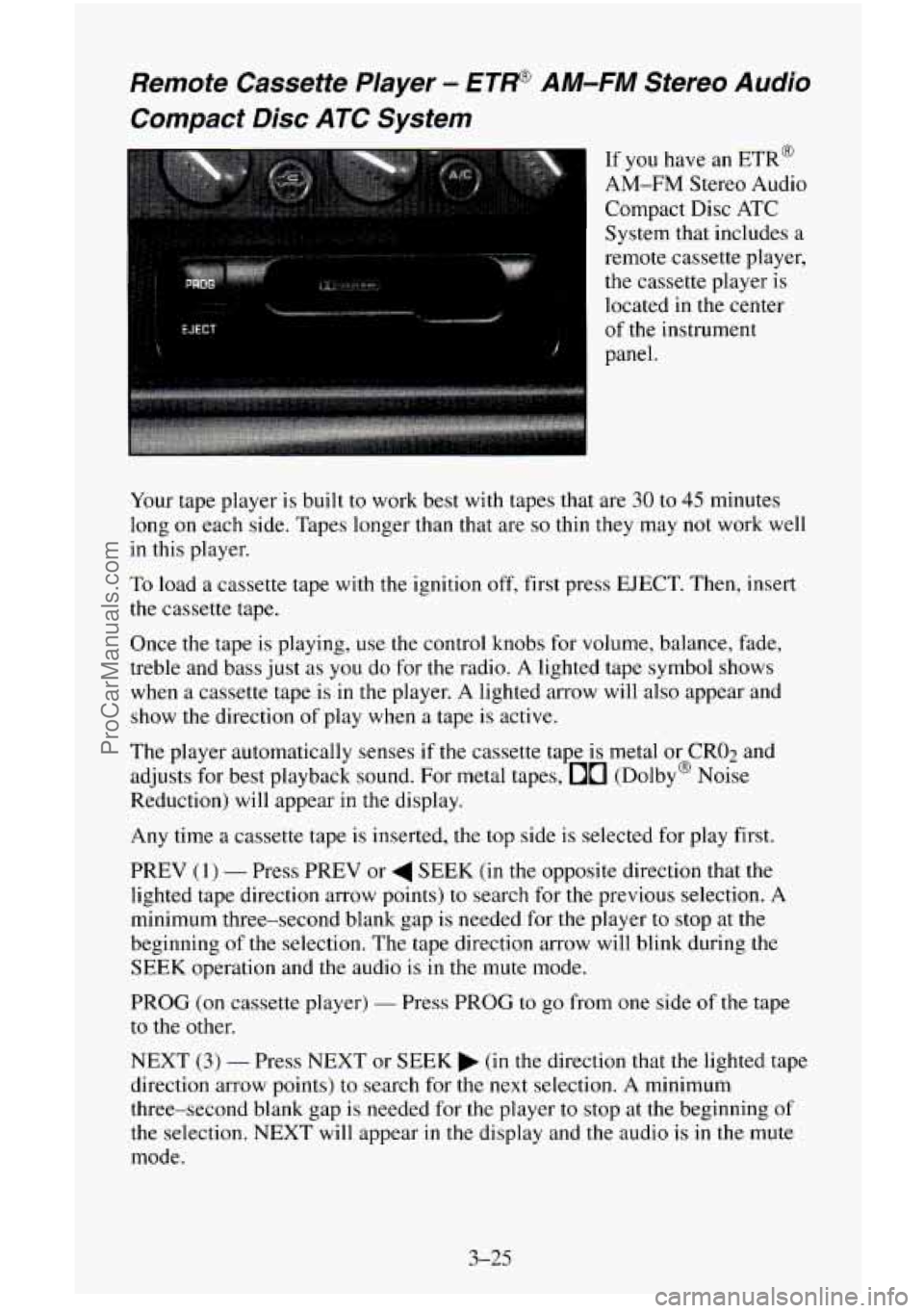
Remote Cassette Player - €?W AM-FM Stereo Audio
Compact Disc ATC System
..
EJECT
i
1
If you have an ETR@
AM-FM Stereo Audio
Compact Disc ATC
System that includes a
remote cassette player,
the cassette player is
located in the center
panel.
, of the instrument
Your tape player is built
to work best with tapes that are 30 to 45 minutes
long
on each side. Tapes longer than that are so thin they may not work well
in this player.
To load a cassette tape with the ignition off, first press EJECT. Then, insert
the cassette tape.
Once
the tape is playing, use the control knobs for volume, balance, fade,
treble and bass just as you do for the radio. A lighted tape symbol shows
when a cassette tape is in the player. A lighted arrow will also appear and
show
the direction of play when a tape is active.
The player automatically senses
if the cassette tape is metal or CRO2 and
adjusts for best playback sound. For metal tapes,
00 (Dolby@ Noise
Reduction) will appear in the display.
Any time a cassette tape is inserted, the top side is selected for play first.
PREV
(1) - Press PREV or 4 SEEK (in the opposite direction that the
lighted tape direction arrow points) to search for the previous selection.
A
minimum three-second blank gap is needed for the player to stop at the
beginning
of the selection. The tape direction arrow will blink during the
SEEK operation and
the audio is in the mute mode.
PROG
(on cassette player) - Press PROG to go from one side of the tape
to the other.
NEXT
(3) - Press NEXT or SEEK (in the direction that the lighted tape
direction arrow points) to search for the next selection. A minimum
three-second blank gap is needed for the player
to stop at the beginning of
the selection. NEXT will appear in the display and the audio is in the mute
mode.
3-25
- ProCarManuals.com
Page 181 of 486
REV (4) - To rapidly reverse the tape, press REV and the tape will rapidly
reverse
to the beginning of the cassette reel or until you press REV again.
The radio plays the last selected station during REV.
00 (5) - 00 is active at all times with a tape inserted in the remote
cassette.
00 will appear in the display.
FWD (6) - To rapidly advance the tape, press FWD and the tape will
rapidly advance to the end of the cassette reel or until you press FWD again.
The radio plays the last selected station during FWD.
TAPE
- To switch between the player and the radio when a tape is playing,
press the AMEM button. To return to the tape player, press CD AUX. The
lighted arrow
will appear next to the tape symbol and show the direction of
play when a tape is active.
EJECT (on cassette player)
- To remove the tape press the EJECT button.
EJECT
can be used with either the ignition or radio off. Also, you must
press EJECT before loading
a cassette with the radio off to allow loading.
If
a tape is inserted with side “1” (or “A”) up, then the right arrow means
that that side is being played. Likewise, a left arrow would indicate that side
“2” (or “B”) had been selected.
00 Dolby@ Noise Reduction is manufactured under a license from Dolby
Laboratories Licensing Corporation. Dolby@ and the
00 symbol are
trademarks
of Dolby Laboratories Licensing Corporation.
Understanding Radio Reception
FM stereo will give you the best sound. But FM signals will reach only
about
10 to 40 miles (16 to 65 km). And, tall buildings or hills can interfere
with
FM signals, causing the sound to come and go.
The range for most
AM stations is greater than for FM, especially at night.
The longer range, however, can cause stations to interfere with each other.
AM can pick up
noise from things like storms and power lines. Try reducing
the treble to reduce this noise
if you ever get it.
AM Stereo means the DelcoB system can receive C-QUAM@stereo
broadcasts. Many
AM stations around the countr use C-QUAM@ to
produce stereo, though some do not. (C-QUAM
is a registered trademark
of Motorola, Inc.) If your Delco@ system can get C-QUAM@, your
“STEREO” light will come
on when you’re receiving it.
Be aware that hearing damage from loud noise is almost undetectable until
it is too late. Your hearing can adapt to higher volumes of sound. Sound that
seems normal can be loud and harmful to your hearing. Take precautions by
adjusting the volume control on your radio to a safe sound level before your
hearing adapts to it.
2
3-26
ProCarManuals.com
Page 182 of 486
To help avoid hearing loss or damage:
1. Adjust the volume control to the lowest setting.
2. Increase volume slowly until you hear comfortably and clearly.
NOTICE:
Before you add any sound equipment to your vehicle - like a
tape player, CB radio, mobile telephone or two-way radio - be
sure you can add what you want.
If you can, it’s very important
to do it properly. Added sound equipment may interfere with the
operation of your vehicle’s engine, Delco@ radio or other
systems, and even damage them. And, your vehicle’s systems
may interfere with the operation of sound equipment that has
been added improperly.
So, before adding sound equipment, check with your dealer and
be sure to check Federal rules covering mobile radio and
telephone units.
Care of Your Cassette Player and Tapes
A tape player that is not cleaned regularly is subject to reduced sound
quality, ruining the cassette, or damaging the mechanism. Tape cassettes that
are not properly stored
in their plastic cases away from contaminants, direct
sunlight, and extreme heat may not operate properly and could cause
premature failure
of the tape player.
Your tape player should be cleaned with every
50 hours of use to provide
optimum performance. Your radio may display “Cln” (Clean)
to indicate
that you have used your tape player for 50 hours without re-setting the tape
clean timer. If you notice a reduction
in sound quality, regardless of when
the tape player was last cleaned, try playing a different cassette to see if the
tape or tape player is at fault.
If the second cassette results in no
improvement
in sound quality, try cleaning the tape player.
Proper tape player cleaning should be done with
a scrubbing action,
non-abrasive cleaning cassette. This is a wet-type cleaning system that uses
a cleaning cassette with pads which scrub
the tape head as the hubs of the
cleaner cassette turn. To properly clean your tape player, follow instructions
with the cleaning cassette. If
you use this type of cleaner, the radio may
display an error and eject the cartridge. This
is normal and is the result of an
added feature
in the tape player that detects broken tapes. If an error occurs,
you will need to insert the cleaning cassette at least 3 times to thoroughly
clean the tape player.
3-27
ProCarManuals.com
Page 183 of 486
You may prefer to use a non-scrubbing action, wet-type cleaner. This type
of cleaner
uses a fabric belt to clean the tape head. This type of cleaner
cassette will not cause
an error, but it may not clean the tape player as
thoroughly as the scrubbing type cleaner.
A scrubbing action cleaner cassette is available through your retailer
(SPO
#12344600).
Cassettes are subject to wear and the sound quality may degrade over time.
Always verify that the cassette tape is in good condition and the tape player
is clean before obtaining service
on your tape player.
NOTICE:
Cassette tape adapter kits for portable CD players will not work
in your cassette player. These adapters will cause the radio to
display an error and the adapter cassette
will be ejected.
Care of Compact Discs
Handle discs carefully. Store them in their original cases or other protective
cases and away from direct sunlight and dust. If the surface
of a disc is
soiled, dampen a clean, soft cloth
in a mild, neutral detergent solution and
clean it, wiping from
the center to the edge.
Be sure never to touch the signal surface when handling discs. Pick up discs
by grasping the outer edges or the edge
of the hole and the outer edge.
Fixed Mast Antenna
The fixed mast antenna can withstand most car washes without being
damaged. If the mast should ever become slightly bent, you can straighten
it
out by hand. If the mast is badly bent, as it might be by vandals, you should
replace it.
Check every once in a while to be sure
the mast is still tightened to the
fender.
3-28
ProCarManuals.com
Page 192 of 486
Off-Road Recovery
You may find sometime that your right wheels have dropped off the edge of
a road onto the shoulder while you’re driving.
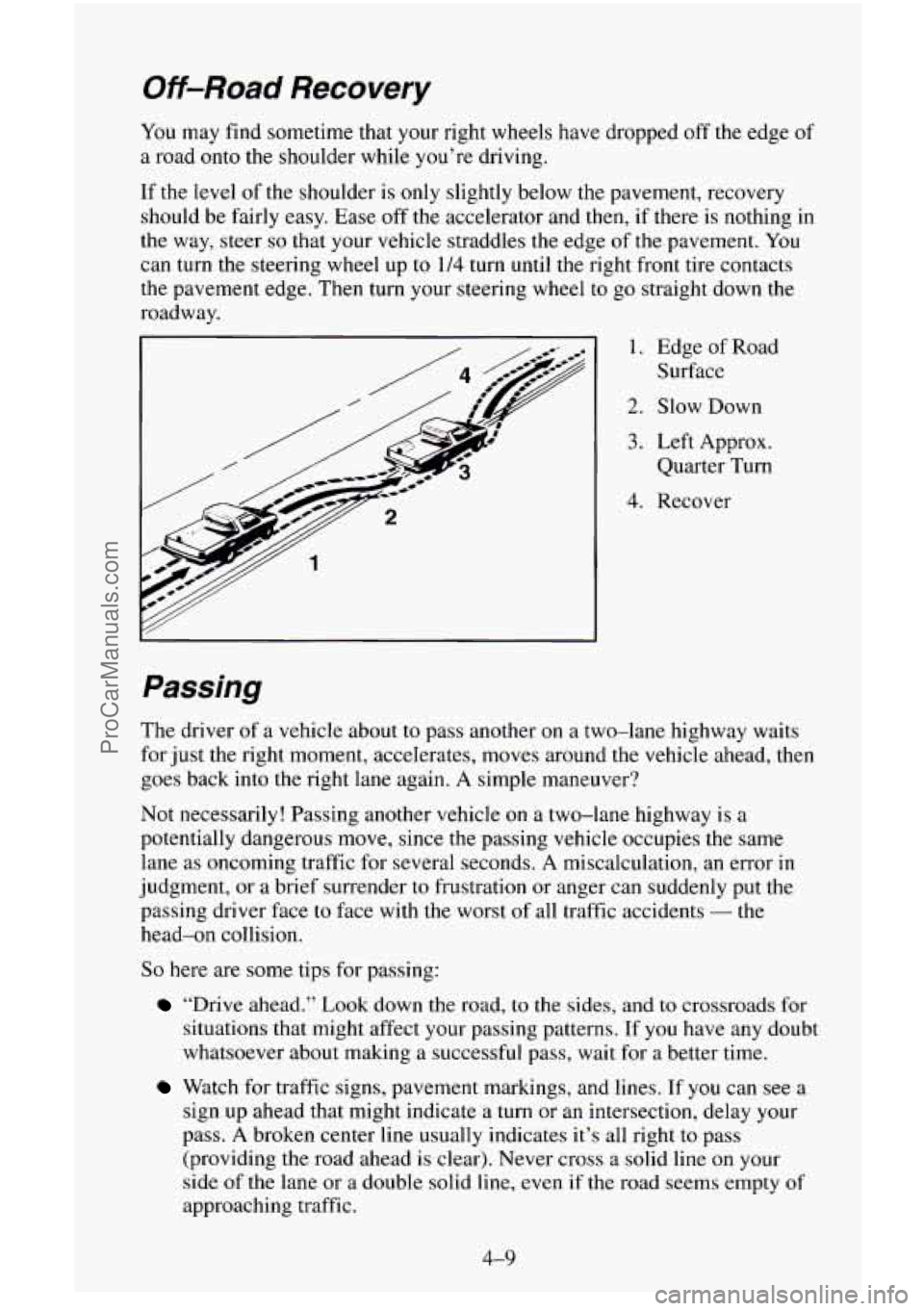
If the level of the shoulder is only slightly below the pavement, recovery
should be fairly easy. Ease off the accelerator and then, if there is nothing in
the way, steer
so that your vehicle straddles the edge of the pavement. You
can turn the steering wheel up to 1/4 turn until the right front tire contacts
the pavement edge.
Then turn your steering wheel to go straight down the
roadway.
I I. Edge of Road
Surface
2. Slow Down
3. Left Approx.
Quarter Turn
4. Recover
Passing
The driver of a vehicle about to pass another on a two-lane highway waits
for just the right moment, accelerates, moves around the vehicle ahead, then
goes back into the right lane again. A simple maneuver?
Not necessarily! Passing another vehicle
on a two-lane highway is a
potentially dangerous move, since the passing vehicle occupies the same
lane as oncoming traffic for several seconds.
A miscalculation, an error in
judgment, or
a brief surrender to frustration or anger can suddenly put the
passing driver face to face with the worst of all traffic accidents
- the
head-on collision.
So here are some tips for passing:
“Drive ahead.” Look down the road, to the sides, and to crossroads for
situations that might affect your passing patterns. If
you have any doubt
whatsoever about making a successful pass, wait for a better time.
Watch for traffic signs, pavement markings, and lines. If you can see a
sign up ahead that might indicate a turn or an intersection, delay your
pass.
A broken center line usually indicates it’s all right to pass
(providing the road ahead is clear). Never cross a solid line
on your
side of the lane or a double solid line, even if the road seems empty
of
approaching traffic.
ProCarManuals.com
Page 193 of 486
0
0
0
0
0
0
0
Do not get too close to the vehicle you want to pass while you’re
awaiting an opportunity. For
one thing, following too closely reduces
your area of
vision, especially if you’re following a larger vehicle.
Also,
you won’t have adequate space if the vehicle ahead suddenly
slows or stops. Keep back a reasonable distance.
When it looks like
a chance to pass is coming up, start to accelerate but
stay in the right lane and don’t get too close. Time your move
so you
will be increasing speed as the time comes to move into the other lane.
If the way
is clear to pass, you will have a “running start” that more
than makes up for the distance
you would lose by dropping back. And
if something happens to cause you to cancel your pass, you need only
slow down and drop back again and wait for another opportunity.
If other cars are lined up
to pass a slow vehicle, wait your turn. But
take care that someone isn’t trying to pass
you as you pull out to pass
the slow vehicle. Remember
to glance over your shoulder and check
the blind spot.
Check your mirrors, glance over your shoulder, and start your left lane
change signal before moving
out of the right lane to pass. When you
are far enough ahead
of the passed vehicle to see its front in your inside
mirror, activate your right lane change signal and move back
into the
right lane. (Remember that if your right outside mirror is convex, the
vehicle
you just passed may seem to be farther away from you than it
really is.)
Try not to pass more
than one vehicle at a time on two-lane roads.
Reconsider before passing
the next vehicle.
Don’t overtake a slowly moving vehicle
too rapidly. Even though the
brake lights are not flashing, it may be slowing down or starting to turn.
If you’re being passed, make it easy for the following driver to get
ahead of
you. Perhaps you can ease a little to the right.
Loss of Control
Let’s review what driving experts say about what happens when the three
control systems (brakes, steering and acceleration) don’t have enough
friction where
the tires meet the road to do what the driver has asked.
In any emergency, don’t give up. Keep trying
to steer and constantly seek an
escape route or area of less danger.
Skidding
In a skid, a driver can lose control of the vehicle. Defensive drivers avoid
most skids by taking reasonable care suited
to existing conditions, and by
not “overdriving” those conditions. But skids are always possible.
4-10
ProCarManuals.com