clock CHEVROLET SUBURBAN 1997 User Guide
[x] Cancel search | Manufacturer: CHEVROLET, Model Year: 1997, Model line: SUBURBAN, Model: CHEVROLET SUBURBAN 1997Pages: 433, PDF Size: 21.49 MB
Page 162 of 433
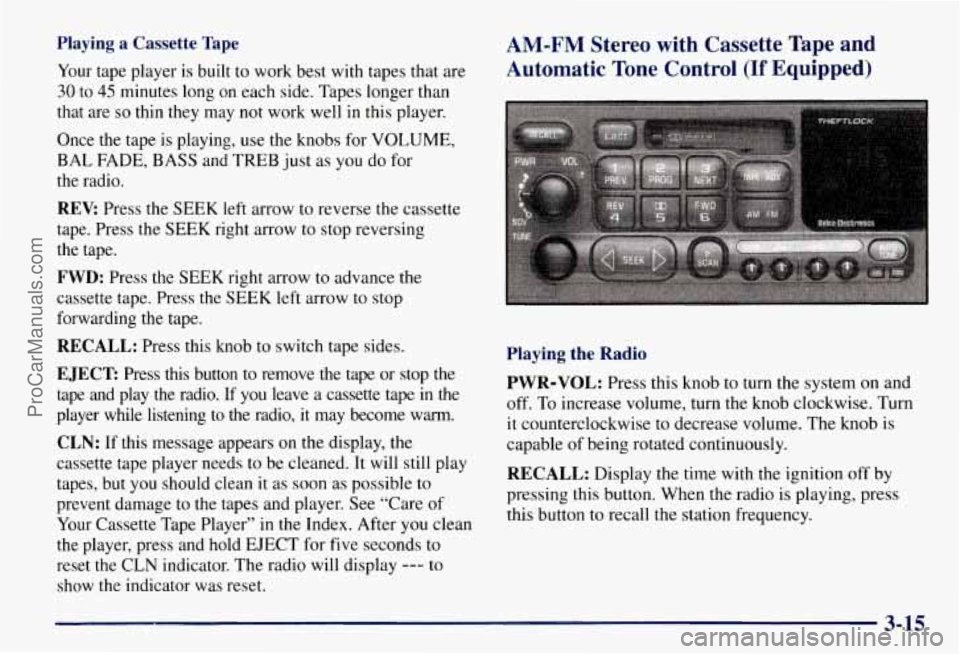
Playing a Cassette Tape
Your tape player is built to work best with tapes that are
30 to 45 minutes long on each side. Tapes longer than
that are
so thin they may not work well in this player.
Once the tape is playing, use the knobs for VOLUME,
BAL FADE, BASS and TREB just as you do for
the radio.
REV: Press the SEEK left arrow to reverse the cassette
tape. Press the SEEK right arrow to stop reversing
the tape.
FWD: Press the SEEK right arrow to advance the
cassette tape. Press the SEEK left arrow to stop
forwarding the tape.
RECALL: Press this knob to switch tape sides.
EJECT Press this button to remove the tape or stop the
tape and play the radio.
If you leave a cassette tape in the
player while listening to the radio, it may become warm.
CLN: If this message appears on the display, the
cassette tape player needs to be cleaned. It will still play
tapes, but you should clean
it as soon as possible to
prevent damage to the tapes and player. See “Care of
Your Cassette Tape Player’’ in the Index. After you clean
the player, press and hold EJECT for five seconds to
reset the CLN indicator. The radio will display
--- to
show the indicator was reset.
AM-FM Stereo with Cassette Tape and
Automatic Tone Control
(If Equipped)
Playing the Radio
PWR-VOL: Press this knob to turn the system on and
off. To increase volume, turn the knob clockwise. Turn
it counterclockwise to decrease volume. The knob is
capable of being rotated continuously.
RECALL: Display the time with the ignition off by
pressing this button. When the radio is playing, press
this button to recall the station frequency.
3-15
ProCarManuals.com
Page 163 of 433
SCV: Your system has a feature called
Speed-Compensated-Volume (SCV). With SCV, your
audio system adjusts automatically to make up for road
and wind noise as you drive. Set the volume at the
desired level. Move the control ring behind the upper
knob clockwise to adjust the SCV. Then, as you drive,
SCV automatically increases the volume, as necessary,
to overcome noise at any particular speed. The volume
level should always sound the same to you as you drive.
If you don’t want to
use SCV, turn the control all the
way down. Each detent on the control ring allows for
more volume compensation at a faster rate
of speed.
Finding a Station
AM-FM:
Press this button to switch between AM, FMI
and FM2. The display will show your selection.
TUNE: Press this knob lightly so it extends. Turn it to
choose radio stations. Push the knob back into its stored
position when you’re not using it.
SEEK: Press the right arrow to tune to the next higher
station and the left arrow to tune to
the next lower station
and stay there. The sound will mute while seeking.
SCAN: Press and hold SEEK for two seconds until
SCAN appears on the display. SCAN allows you to
listen to stations for a few seconds. The receiver will
continue
to scan and momentarily stop at each station
until you press the button again. The sound will mute
while scanning.
PUSHBUTTONS: The six numbered pushbuttons
let you return to your favorite stations. You can set up to
18 stations (six AM, six FM1 and six FM2). Just:
1. Turn the radio on.
2. Press AM-FM to select the band.
3. Tune in the desired station.
4. Press AUTO TONE to select the setting you prefer.
5. Press and hold one of the six pushbuttons. The sound
will mute. When it returns, release the button.
Whenever you press that numbered button, the
station
you set will return and the tone you selected
will be automatically selected for that button.
6. Repeat the steps for each pushbutton.
3-16
ProCarManuals.com
Page 164 of 433
P.SCAN: The preset scan button lets you scan through
your favorite stations stored on your pushbuttons. Select
either the
AM, FMl or FM2 mode and then press
PSCAN. It will scan through each station stored on your
pushbuttons and stop for a few seconds before continuing
to scan through all of the pushbuttons. Press RSCAN again or one of the pushbuttons to stop scanning to listen
to a specific preset station. P.SCAN will light up
on the
display while in this mode.
If one of the stations stored on
a pushbutton is too weak for the location you are in, the
radio display will show the channel number (Pl-P6) for
several seconds before advancing to the next preset station.
Setting the Tone
BASS:
Press lightly on this knob to release it from its
stored position. Turn the knob clockwise to increase bass
and counterclockwise to decrease
bass. When the BASS
control is rotated, the AUTO TONE display will go blank.
TREB: Press lightly on this knob to release it from its
stored position. Turn the knob clockwise to increase
treble and counterclockwise to decrease treble. When
the TREB control is rotated, the AUTO TONE display
will go blank. If a station is weak or noisy, you may
want to decrease the treble.
Push these knobs back into their stored positions when
you’re not using them.
AUTO TONE: Press this button to select among the
six preset equalization settings and tailor the sound to
the music or voice being heard. Each time you press
the button, the selection will switch to one of the
preset settings of CLASSIC, NEWS, ROCK, POP,
COUNTRYNESTERN or JAZZ. To return to the
manual mode, press and release this button until the
AUTO TONE display goes blank. This will return the
tone adjustment to the BASS and TREB controls.
If a
BASS or TREB control is rotated, the AUTO TONE
display will go blank.
Adjusting the Speakers
BAL:
Press lightly on this knob to release it from its
stored position. Turn the control clockwise to adjust
sound to the right speakers and counterclockwise to
adjust sound to the left speakers. The middle position
balances the sound between the speakers.
FADE: Press lightly on this knob to release it from its
stored position. Turn the control clockwise to adjust the
sound to the front speakers and counterclockwise for
rear speakers. The middle position balances the sound
between the speakers.
Push these knobs back into their stored positions when
you’re
not using them.
3-17
ProCarManuals.com
Page 167 of 433
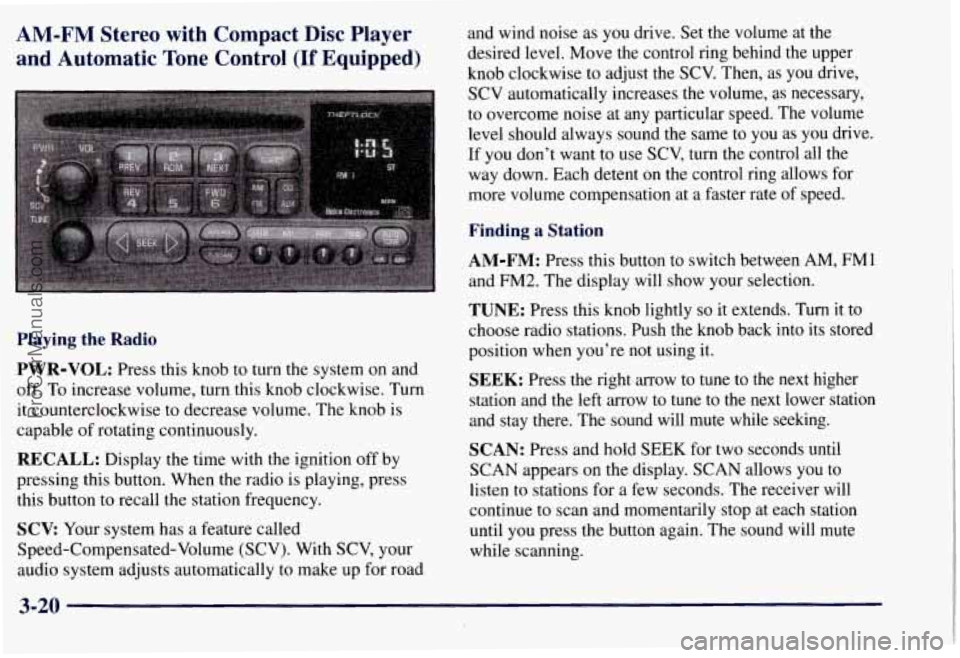
AM-FM Stereo with Compact Disc Player
and Automatic Tone Control
(If Equipped)
Playing the Radio
PWR-VOL:
Press this knob to turn the system on and
off. To increase volume, turn this knob clockwise. Turn
it counterclockwise to decrease volume. The knob is
capable of rotating continuously.
RECALL: Display the time with the ignition off by
pressing this button. When the radio is playing, press
this button to recall the station frequency.
SCV Your system has a feature called
Speed-Compensated-Volume (SCV). With SCV, your
audio system adjusts automatically to make up
for road and wind noise
as
you drive. Set the volume at the
desired level. Move the control ring behind the upper
knob clockwise to adjust the SCV. Then, as you drive,
SCV automatically increases the volume, as necessary,
to overcome noise at any particular speed. The volume
level should always sound the same to
you as you drive.
If you don't want
to use SCV, turn the control all the
way down. Each detent on the control ring allows for
more volume compensation at a faster rate of speed.
Finding a Station
AM-FM: Press this button to switch between AM, FMl
and FM2. The display will show your selection.
TUNE: Press this knob lightly so it extends. Turn it to
choose radio stations. Push the knob back into its stored
position when you're not using it.
SEEK: Press the right arrow to tune to the next higher
station and the left arrow to tune
to the next lower station
and stay there. The sound will mute while seeking.
SCAN: Press and hold SEEK for two seconds until
SCAN appears on the display. SCAN allows you to
listen to stations for a few seconds. The receiver
will
continue to scan and momentarily stop at each station
until
you press the button again. The sound will mute
while scanning.
3-20
ProCarManuals.com
Page 168 of 433
PUSHBUTTONS: The six numbered pushbuttons
let you return to your favorite stations. You can set up to
18 stations (six AM, six FM 1 and six FM2). Just:
1. Turn the radio on.
2. Press AM-FM to select the band.
3. Tune in the desired station.
4. Press AUTO TONE to select the setting you prefer.
5. Press and hold one of the six pushbuttons. The sound
will mute. When it returns, release the button.
Whenever you press that numbered button, the
station
you set will return and the tone you selected
will be automatically selected for that button.
6. Repeat the steps for each pushbutton.
PSCAN: The preset scan button lets you scan through
your favorite stations stored
on your pushbuttons. Select
either the
AM, FM1 or FM2 mode and then press
P.SCAN. It will scan through each station stored on your
pushbuttons and stop for a few seconds before continuing
to scan through all of the pushbuttons. Press P.SCAN
again or one of the pushbuttons to stop scanning to listen
to a specific stored station. P.SCAN will light up on the
display while in this mode.
If one of the stations stored on
a pushbutton is too weak for the location you
are in, the
radio display will show the channel number (PI-P6) for
several seconds before advancing to the next preset station.
Setting the Tone
BASS: Press lightly on this knob to release it from its
stored position. Turn the knob clockwise to increase
bass and counterclockwise to decrease bass. When the
BASS control is rotated, the AUTO TONE display will
go blank.
TREB: Press lightly on this knob to release it from its
stored position. Turn the knob clockwise to increase
treble and counterclockwise to decrease treble. When
the TREB control is rotated, the AUTO TONE display
will go blank. If a station
is weak or noisy, you may
want to decrease the treble.
Push these knobs back into their stored positions when
you’re not using them.
AUTO TONE: Press this button to select among the
six preset equalization settings and tailor the sound to
the music or voice being heard. Each time you press the
button, the selection will switch to one of the preset
settings of CLASSIC, NEWS, ROCK, POP,
COUNTRYNESTERN
or JAZZ. To return to the
manual mode, press and release this button until the
AUTO TONE display goes blank. This will return the
tone adjustment to the
BASS and TREB controls. If a
BASS or TREB control is rotated, the AUTO TONE
display will
go blank.
3-21
ProCarManuals.com
Page 169 of 433
Adjusting the Speakers
BAL: Press lightly on this knob to release it from its
stored position. Turn the control clockwise to adjust
sound to the right speakers and counterclockwise to
adjust sound to the left speakers. The middle position
balances the sound between the speakers.
FADE: Press lightly on this knob to release it from its
stored position. Turn the control clockwise to adjust the
sound to the front speakers and counterclockwise for
rear speakers. The middle position balances the sound
between the speakers.
Push these knobs back into their stored positions when
you're not using them.
Playing a Compact Disc
PWR: Press this knob to turn the system on. (Please note
that you can
also turn the system on when you insert a
compact disc into the player with the
ignition on.)
Insert a disc partway into the slot, label side up. The
player will pull it in. Wait a few seconds and the disc
should play. CD and a CD symbol will also appear on
the display. Anytime you
are playing a CD, the letters
CD will be next to the CD symbol.
If the disc comes back out and ERR appears on the
display,
it could be that:
0 You are driving on a very rough road. (The disc
should play when the road gets smoother.)
0 The disc is upside down.
It is dirty, scratched or wet.
It is very humid. (If so, wait about an hour and
try again.)
0 The disc player is very hot.
Press RECALL to make ERR go off the display.
PREV (1): Press PREV or the SEEK left arrow to
search for the previous selection. If you hold this button
or press it more than once, the disc will advance further.
Sound
is muted in this mode.
RDM (2): Press this button to play the tracks on the disc
in random order. While in the RDM mode,
RANDOM
appears on the display. Press RDM again to return to
normal 'play.
NEXT (3): Press NEXT or the SEEK right arrow to
search for the next selection. If you hold this button or
press it more than once,
the disc will advance further.
The next track number will appear on the display. Sound
is muted in this mode.
3-22
ProCarManuals.com
Page 190 of 433
An emergency like this requires close attention and a
quick decision.
If you are holding the steering wheel at
the recommended
9 and 3 o’clock positions, you can
turn it a full
180 degrees very quickly without removing
either hand. But you have to act fast, steer quickly, and
just as quickly straighten the wheel once you have
avoided the object.
The fact that such emergency situations are always
possible is a good reason to practice defensive driving at
all times and wear safety belts properly.
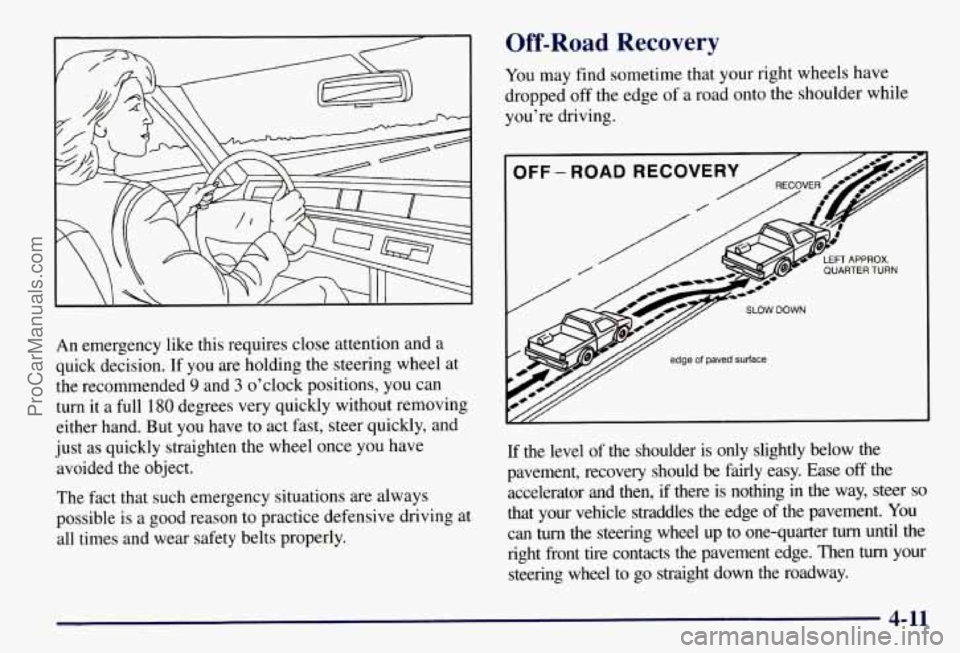
Off-Road Recovery
You may find sometime that your right wheels have
dropped
off the edge of a road onto the shoulder while
you’re driving.
If the level of the shoulder is only slightly below the
pavement, recovery should be fairly easy. Ease
off the
accelerator and then,
if there is nothing in the way, steer so
that your vehicle straddles the edge of the pavement. You
can
turn the steering wheel up to one-quarter turn until the
right front tire contacts the pavement edge. Then
turn your
steering wheel to go straight down the roadway.
4-11
ProCarManuals.com
Page 200 of 433
Qt What should I do if my vehicle stalls, or is about
to stall, and
I can’t make it up the hill?
A: If this happens, there are some things you should
0
0
0
do, and there are some things you must not do.
First, here’s what you
should do:
Push the brake pedal
to stop the vehicle and keep it
from rolling backwards. Also, apply the parking brake.
If your engine is still running, shift the transmission
to REVERSE (R), release the parking brake, and slowly back down
the hill in REVERSE (R).
If your engine has stopped running, you’ll need to
restart it. With the brake pedal depressed and the
parking brake still applied, shift the transmission to
PARK (P) and restart the engine. Then, shift to
REVERSE
(R), release the parking brake, and
slowly back down the hill as straight as possible in
REVERSE (R).
As you are backing down the hill, put your left hand
on the steering wheel at the
12 o’clock position. This
way, you’ll be able to tell
if your wheels are straight
and maneuver as
you back down. It’s best that you
back down the hill with your wheels straight rather
than in the left or right direction. Turning the wheel
too far to the left or right will increase the possibility
of a rollover.
Here are some things you
must not do if you stall, or are
about to stall, when going up a hill.
Never attempt to prevent a stall by shifting into
NEUTRAL (N) to “rev-up” the engine and regain
forward momentum. This won’t work. Your vehicle
will roll backwards very quickly and you could go
out of control.
Instead, apply the regular brake to stop the
vehicle. Then apply the parking brake. Shift to
REVERSE
(R), release the parking brake, and
slowly back straight down.
0 Never attempt to turn around if you are about to stall
when going up a hill. If the hill is steep enough to
stall your vehicle, it’s steep enough to cause you to
roll over if you turn around. If you can’t make it up
the hill, you must back straight down the hill.
4-21
ProCarManuals.com
Page 255 of 433
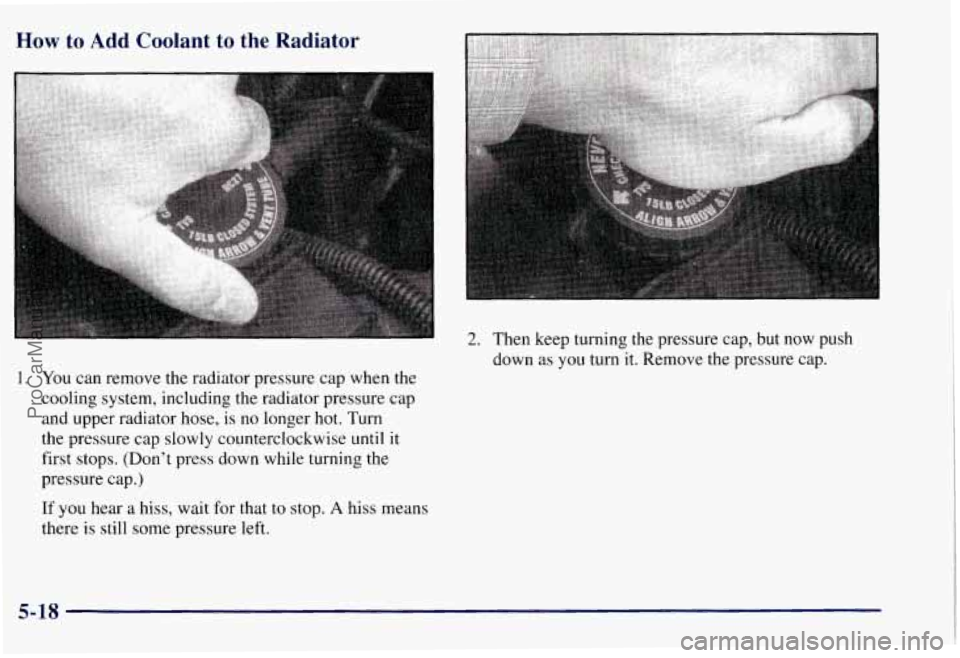
How to Add Coolant to the Radiator
1. You can remove the radiator pressure cap when the
cooling system, including the radiator pressure cap
and upper radiator hose, is no longer
hot. Turn
the pressure cap slowly counterclockwise until it
first stops. (Don’t press down while turning the
pressure cap.)
If you hear
a hiss, wait for that to stop. A hiss means
there
is still some pressure left.
2. Then keep turning the pressure cap, but now push
down as you turn
it. Remove the pressure cap.
5-18
ProCarManuals.com
Page 260 of 433
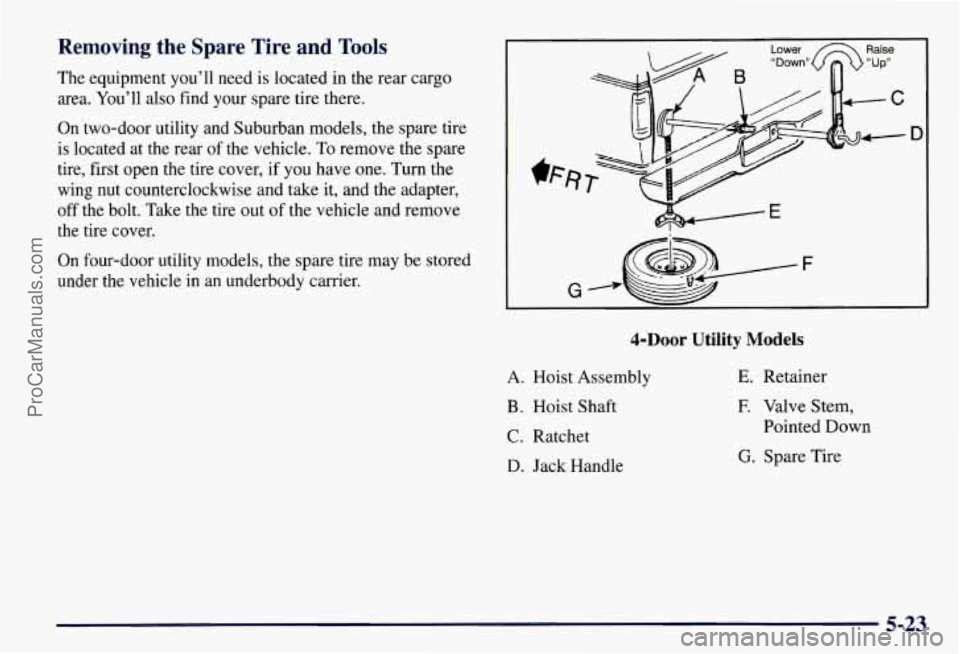
Removing the Spare Tire and Tools
The equipment you’ll need is located in the rear cargo
area. You’ll also find your spare tire there.
On two-door utility and Suburban models, the spare tire
is located at the rear of the vehicle.
To remove the spare
tire, first open the tire cover,
if you have one. Turn the
wing nut counterclockwise and take it, and the adapter,
off the bolt. Take the tire out of the vehicle and remove
the tire cover.
On four-door utility models, the spare tire may be stored
under the vehicle in
an underbody carrier.
Lower Raise
D
&Door Utility Models
A. Hoist Assembly
B. Hoist Shaft
C. Ratchet
D. Jack Handle
E. Retainer
E Valve Stem,
Pointed Down
G. Spare Tire
5-23
ProCarManuals.com